 This article has a talk page!
Unused Graphics#
General#

|
To do:
|
Placeholder Castle Bridge#
Your favorite graphics from Super Mario Maker are back. Once again, there are castle bridge graphics that resemble the Super Mario Bros. ones, and once again they're unused. The snow theme (both day and night) and sky theme even have unique bridge sprites!
Mysteriously, almost every finished castle bridge design has brown bits at the bottom that are seemingly from the placeholder tiles. Probably just a minor mistake done when Nintendo added the finished sprites.
Most Themes |
Underground Theme |
Snow Theme |
Snow Theme |
Sky Theme |
Most Themes |
Airship |
Desert, Ground, and Underwater |
|---|---|---|---|---|---|---|---|
 |
 |
 |
 |
 |
 |
 |
 |
Hammer#
v1.00 |
Later Versions |
|---|---|
 |
 |
An unused tile of what appears to be the head of a hammer that could be found in the NSMBU day Ghost House tileset to the right of the metal block tile in version 1.00. Later versions of the game removed the graphics for this tile, leaving only the shape of it. The exact purpose of this tile is unknown.
|
|
To do: |

Another version of this sprite can be found in the SMB night Ground and day Underground tilesets, which had alpha data for it added some version after v1.00. Unlike the NSMBU version, this seemingly never had graphics data.
Castle Theme |
Snow Theme |
Underwater Theme |
|---|---|---|
 |
 |
 |
In the SMB3 night Castle and day Snow tilesets and the SMW day Underwater tileset, this tile was instead a square with an opacity of 39 in version 1.00 before being removed in a later version. The color of the square comes from the hidden checkerboard background from the tileset.
Super Mario Bros.#
Dark P-Block#

In the Underwater (Night) tileset, there are two tiles for darkened P-Blocks that have an unknown purpose. The empty one has a different shape than the one used in-game. These sprites can be seen by performing a glitch that allows objects that aren't normally accessible in the Super Mario 3D World style to be used in said style and vice versa. These sprites are the same color as the background seen when removing the alpha channel of this tileset, meaning these sprites are just leftovers in the alpha channel.
Character-Specific Flags#

Four character-specific flag designs that likely would have been used after grabbing the flagpole, much like in the New Super Mario Bros. U style.
Super Mario World#
Square#
Day |
Night |
|---|---|
 |
 |
A square found 16 times in each Plains tileset in older versions of the game. They have the same shape as the end of a track and are located directly under the tiles for the ON/OFF tracks, so they may be related to those.
Clear Pipe#
Day |
Night |
|---|---|
 |
 |
Crudely-drawn placeholder graphics for the Clear Pipe exist in both versions of the Forest tileset. In the final game, the Clear Pipe is exclusive to the Super Mario 3D World game style, though these graphics are used if the Clear Pipe is forcibly added into the Super Mario World Forest theme via glitches.
These pipes seemingly disappear when disabling the Forest tileset alpha channel due to them using the same colors as the background, suggesting that the original sprites were deleted and the sprites visible are leftovers from the alpha channel.
Triangles#
Day |
Night |
|---|---|
 |
 |
In version 1.00, the day and night versions of the SMW Sky theme had 5 triangle shaped tiled located underneath the blue ON/OFF Conveyor Belts. The purpose of these tiles is unknown.
Buzzy and Spiny Helmet Variants#
|
|
To do: |

Sprites were added in v3.0.0 for the Buzzy Beetle and Spiny helmets that were intended to be used in conjunction with the P-Balloon powerup, and have a series of texture animations (float_cancel_ftp, float_end_ftp, float_ftp, float_jet_ftp, float_move_ftp, and float_start_ftp) which make use of them. However, pairing both powerups simultaneously in-game results in the helmet being discarded, rendering these unseen.
They can be triggered through co-op editing: First, Player 1 has to hover the cursor on the character. Then Player 2 has to grab the P-Balloon. When Player 1 opens the power-up menu, Player 2 has to put the P-Balloon on the character, and then Player 1 has to select either Buzzy Helmet or Spiny Helmet. These sprites also keep even after switching from edit mode to play mode. You can view this glitch by clicking this link.
Unused Flag texture#
Apparently, there was supposed to be a flag just like all the other game styles (excluding SMB3) in SMW. There is a texture of a flag (no goalpole), going by the name of "flag.0.png"
New Super Mario Bros. U#
Early Conveyor and Sloped Conveyor#
The day Ghost House tileset for NSMBU contains leftover sprites for the NSMBU conveyor belt seen in the first game, where its outer edge was originally red instead of grey. There also exists a version of the sloped conveyor belt in this early style. Interestingly all tiles that are normally used for the ON/OFF conveyors instead just use this early design in the Ghost House tileset.


Darkened ON/OFF Switch#
Both the day and night versions of the Ghost House tileset contain unused sprites of a darkened ON/OFF Switch. Most blocks have unique appearances for dark course themes, however the ON/OFF Switch doesn't.

Unused Mii Outfit Textures#
Chompless Chomp-Dog Shirt#
|
|
To do: |
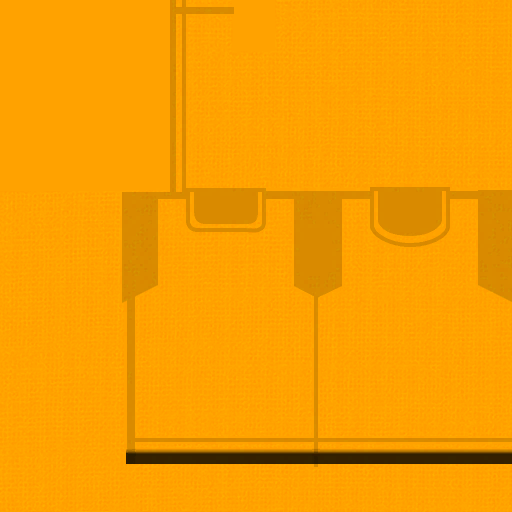
The texture for the arms and neck of the Chomp-Dog Shirt Mii outfit has an unused area for the main shirt without the Chain Chomp.
Slobbery Shirt#
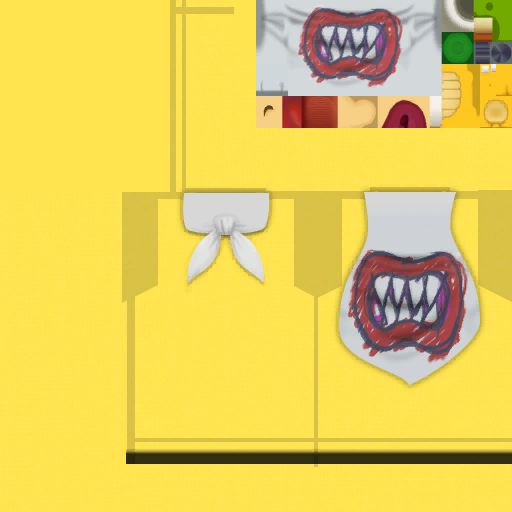
The texture for the Slobbery Shirt has Bowser Jr.'s texture, which goes unused in this shirt.
Extra Parent-and-Child Skirt Frame#
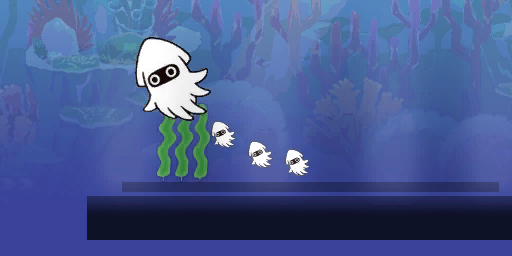
There is an unused 17th frame for the Parent-and-Child Skirt, which has a darker shadow and only one Blooper Nanny.
Early Pipe Skirt Texture#
|
Early |
Final |
|---|---|

|

|
The file for the Skull Skirt contains an early version of the Pipe Skirt texture. This texture is 128×128 pixels, while the final texture is 512×512 pixels.
Early Shy Cap Texture#
|
Early |
Final |
|---|---|
|

|
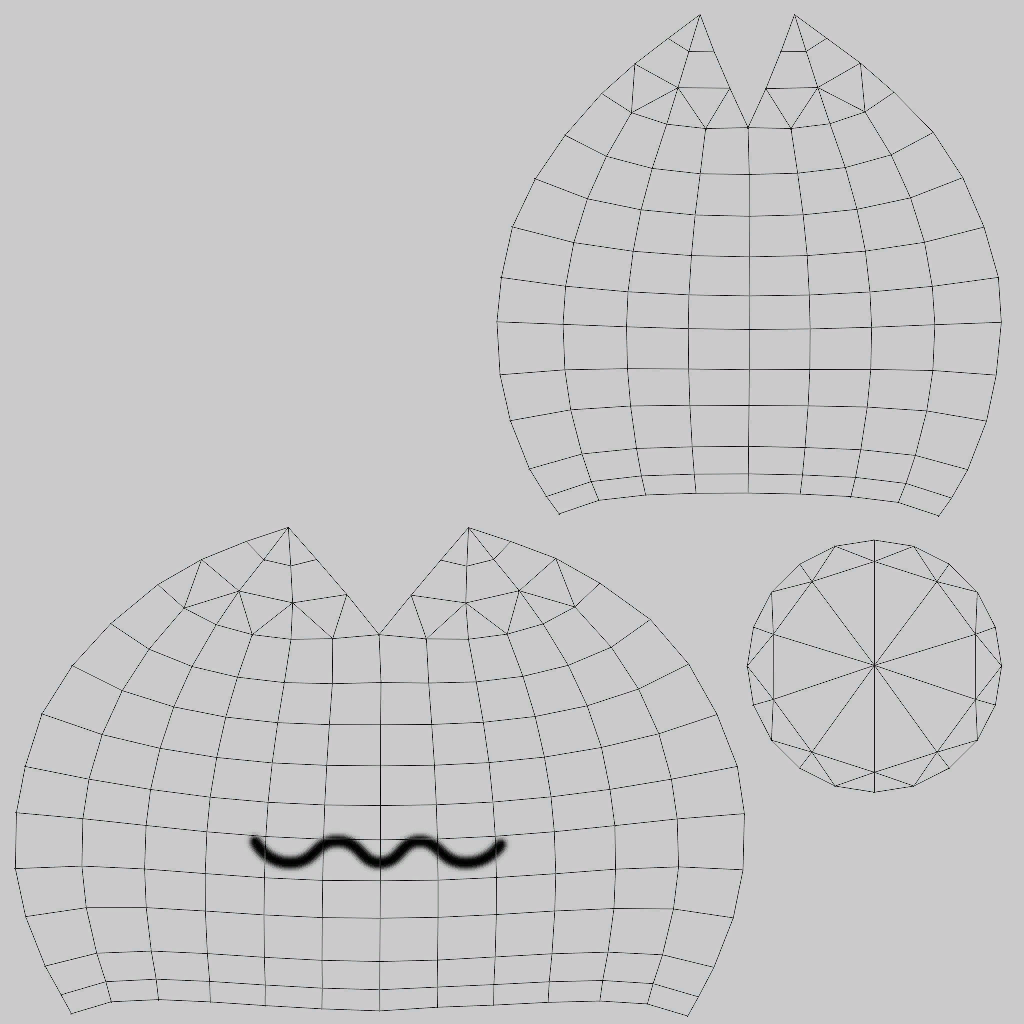
An early texture for the Shy Cap with a wireframe template, a bigger mouth, and no face, arms, or tail.
Unused Yoshi Hat Texture#

An unused texture for the Yoshi Hat that only consists of a nostril texture. These nostrils are different from the ones that are used.
Unused Models#
Super Mario 3D World#
Unused Ferris Wheel#
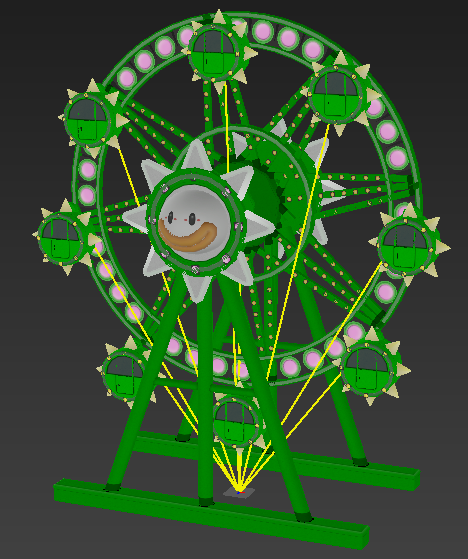
An unused model of a Ferris wheel named 3W_DVObj_airship_FerrisWheel. Based on the file name, this likely would've appeared in the background of the Airship theme.
Unused Donut Block Model#
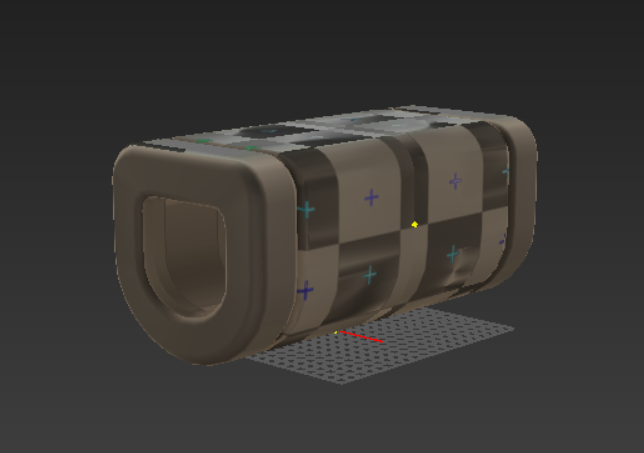
An unused model for the Donut Block named editwait_block_chikuwa_model. This model is untextured and is shaped like the Donut Block from other game styles. The model has data for 3 textures named ChikuwaBlock2x4_Alb, ChikuwaBlock2x4_Nrm, and ChikuwaBlock2x4_Spm. This is the same model used in Super Mario 3D World.
(Source: Original TCRF research)
Unused Cloud Block Model#

An unused model for the Cloud Block named editwait_block_kumo_model. This model, like the Donut Block, is untextured. From the front, it's wider than the final model and from other views there is an indent in the middle, making it look like there are two clouds.
(Source: Original TCRF research)
Unused Snake Block Model#

An unused model for the Snake Block named editwait_block_snake_model. This model has a brown texture, similar to a hit ? Block. This model has a duplicate in the Fast Snake Block files named editwait_block_snake2_model.
(Source: Original TCRF research)
New Super Mario Bros. U#
Unused BGCastle Night#
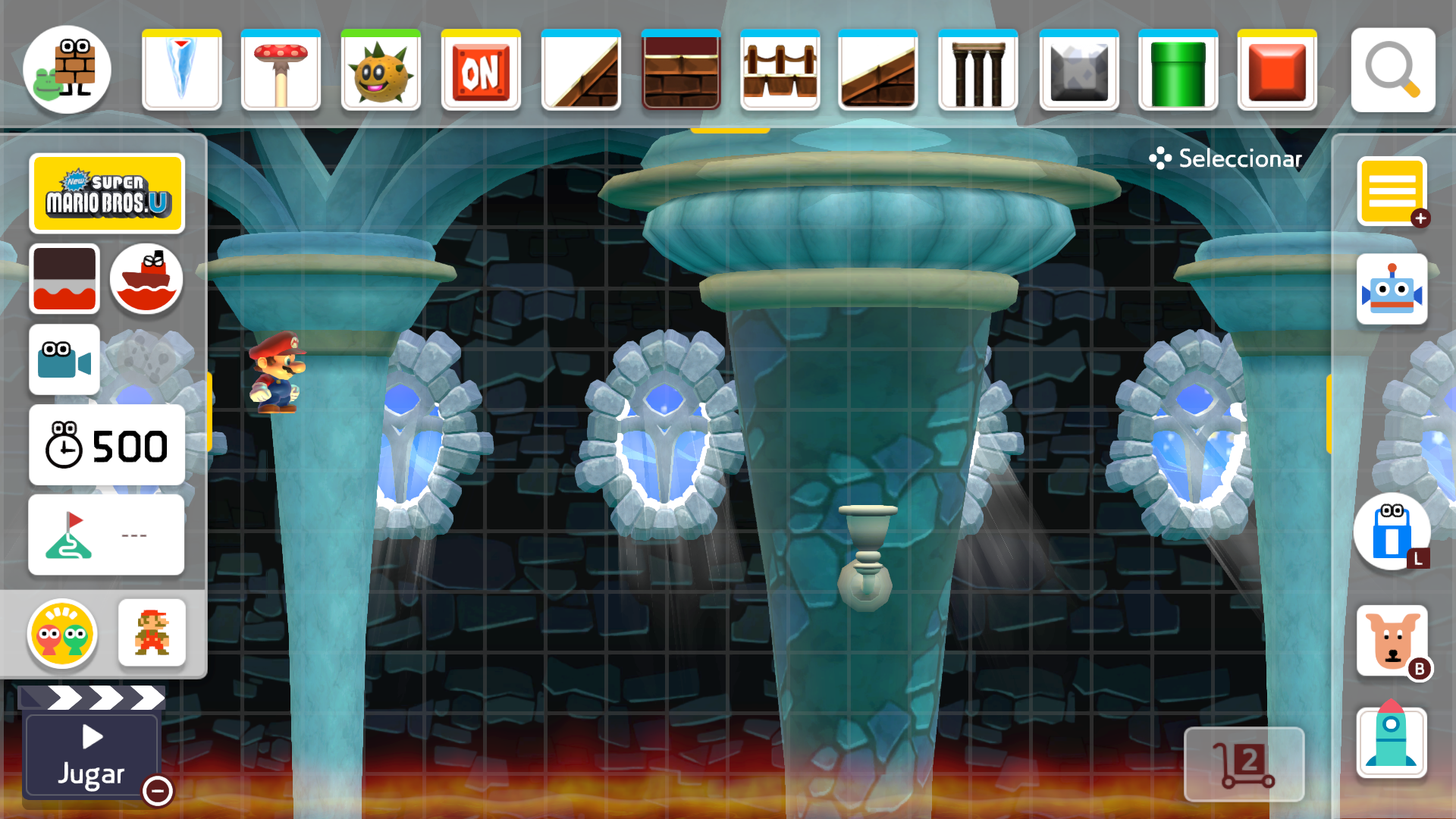
In version 3.0.3, an unused night version of New Super Mario Bros. U's Castle background was added. It appears to be unfinished due to its seemingly incorrect lighting and position, though it is similar to Frosted Glacier's Castle's background. It has a vertical version, but it's identical to the horizontal one.
(Source: Original TCRF research)
Unused Sounds#
|
|
Some sounds are leftovers from the first game.
General#
voice_wings The sound that played in the first game when placing wings. In the sequel, Wings aren't an object that can be placed directly and are instead an option that appears when holding down on an object. Located in Pack\StaticHighFreqSound.pack\Edit_Wing.bars.
(Source: Original TCRF research)
se_ui_singingparts_fastconveyorbelt A voice sound for placing a fast conveyor belt that is for some reason unused.
Super Mario Bros.#
CharaMario_Common_appeal_5turn A leftover from the first game that acted as the generic Costume Mario appeal sound.
M1_HEN_JUMP
M1_HEN_JUMP_FUWA
M1_HEN_LARGE
Leftover Weird Mario jump, flutter, and Power Up sounds.
NewMario2_GoldEffect The ambient shining sound of Gold Mario from New Super Mario Bros. 2, used for the gold and silver costumes in the first game.
(Source: ecumber 1)
voice_mysterymushroom The sound that played in the first game when placing a Mystery Mushroom. Located in Pack\StaticHighFreqSound.pack\M1_EditKinokoFunny.bars.
(Source: Original TCRF research)
30th This is when you scan the Mario's 30th anniversary amiibo in SMM1. There might have been plans to add this sound to the Big Mushroom on launch day, and scrap the current one.
CharaMario_Airwing_Move The sound is unknown where it is from. It might have been something like a new amiibo costume that was planned to be coming to SMM2.
Super Mario World#
MW_BatFly Apparently, there was supposed to be Bats from SMW in SMM2. For whatever reason, they were located in Model/M1_player.bars/MW_BatFly.bwav.
Super Mario 3D World#
Two audio files relating to the Flip Boards from Super Mario 3D World (seen in courses like Cakewalk Flip) exist in the files, but are never used.
3W_SeOjJumpFlipBoardFlipEd
3W_SeOjJumpFlipBoardFlipSt
Unused Text#
Removed Course Parts#
|
|
To do:
|
The files which contain the names of the course parts as used on the parts menu ( MessageData\ReferenceMsg_, \PartsIconName.msbt, \OtherPartsName.msbt, and PartsIconName_plural.msbt) contain names for course parts that don't exist in the game. Alternative pluralizations of these do not exist, whereas they do for some used objects.
Label |
US/EU English |
US French |
|---|---|---|
NokonokoShell |
Koopa Shell |
Carapace de Koopa |
The shell of a Koopa Troopa. These only are spawned when a Koopa Troopa is stomped.
Label |
US/EU English |
US French |
|---|---|---|
Stone |
Stone |
Pierre |
The stone object used for the Story Mode-exclusive "Reach the goal while holding a stone" Clear Condition.
Label |
US/EU English |
US French |
|---|---|---|
BuilderBox |
Builder Box |
Caisse de constructeur |
Builder Mario's boxes can't be placed in Course Maker.
Label |
US/EU English |
US French |
|---|---|---|
Fireball |
Fireball |
Boule de feu |
No type of Fireball can be placed in Course Maker.
Label |
US/EU English |
US French |
|---|---|---|
QueenShoes |
Stiletto |
Talon aiguille |
Stilettos cannot be placed without a Goomba in them.
Label |
US/EU English |
US French |
|---|---|---|
Shell |
Shells |
Carapaces |
Oddly vague. Could refer to any shelled enemy, such as the Koopa Troopa, Buzzy Beetle, or Spiny's shells.
Label |
US/EU English |
US French |
|---|---|---|
Shoes |
Shoe |
Chaussure |
Like Stilettos, Shoes cannot be placed directly.
Label |
US/EU English |
US French |
|---|---|---|
Yoshi |
Yoshi |
Yoshi |
Yoshi_Red |
Red Yoshi |
Yoshi rouge |
Yoshis cannot be placed directly, they can only hatch from their respective eggs.
(Source: Original TCRF research)
Removed Text Files#
The msbp file contains references to some (uncompiled) text files that don't have equivalents in the game:
DebugMsg/Debug_SDImportExport.mstxt
StampMsg/Stamp.mstxt
(Source: Original TCRF research)
Course Modification Dates#
|
|
To do: |
All the courses found within the game's data (Story Mode, Yamamura's Dojo, and title screen courses) have modification dates visible in Coursebot.
Story Mode Courses#
Course |
Modification Date |
|---|---|
A Downhill Battle |
March 18, 2019 at 5:43 PM |
Underground Coin Collecting |
March 6, 2019 at 4:48 PM |
ON/OFF Switch Research Expedition |
April 2, 2019 at 1:06 AM |
Under the Angry Sun |
April 5, 2019 at 9:40 AM |
Upside-Down Stretches |
March 29, 2019 at 3:58 PM |
Rotten Produce |
February 27, 2019 at 1:52 PM |
Good Lakitu, Bad Lakitu |
March 20, 2019 at 6:21 PM |
Big Showdown on a Little Star |
March 27, 2019 at 11:29 AM |
Boo's Towering House of Terror |
March 18, 2019 at 5:49 PM |
Blinking Block Blitz |
January 23, 2019 at 3:24 PM |
Banzai Bill Chase Scene |
April 11, 2019 at 9:27 PM |
That's One Hot Car! |
April 4, 2019 at 1:38 PM |
Swing, Claw! Swing! |
February 14, 2019 at 2:56 PM |
The Keymaster |
March 18, 2019 at 8:41 PM |
Ant Trooper March |
April 2, 2019 at 6:17 AM |
Shoe-Stepper |
March 19, 2019 at 9:53 AM |
Yamamura's Dojo Courses#
Lesson Name |
Modification Date |
|---|---|
Controlling Raccoon Mario |
November 20, 2018 at 1:29 AM |
Controlling Cape Mario |
November 15, 2018 at 5:11 AM |
Controlling Propeller Mario |
November 20, 2018 at 1:32 AM |
Controlling Cat Mario |
January 3, 2019 at 3:04 PM |
Intro to Making |
February 28, 2019 at 12:06 PM |
Unused Story Mode Level Features#
Unused Subworld Themes#
Some levels that don't use the subworld have their subworlds set to a specific theme that isn't Ground.
Course |
Theme |
|---|---|
Swinging Claw Ropes Course |
Castle |
Impassable Castle |
Forest |
Lava Bubble Limbo |
Castle |
Koopa Troopa Car, Go! |
Castle |
Save Me, Snake Block! |
Underwater |
The Darkness Lifts |
Airship |
Banzai Bill Ambush |
Airship |
With a Lantern |
Airship |
Koopa Clown Car Coin Collecting |
Airship |
The World's Greatest Cannon Ride |
Airship |
Above the Clouds |
Ghost House |
Blooper Barrage |
Castle |
Boo-ring Course |
Underground |
Ancient Seesaw Fortress#
The subworld for Ancient Seesaw Fortress contains a small unused area at the very top of it that contains walls of red and blue ON/OFF Blocks, a Seesaw, two blue pipes, and a bunch of hard blocks.

Unused Behaviors#
|
|
To do: |
Dying in the Hub#
If the player hacks the game to remove the invisible edge barriers in Story Mode and falls down the front, the screen will fade out and the game will bring Mario back to the middle of the hub world. This was likely intended as a failsafe if the player managed to glitch past the invisible walls.
(Source: Skelux)
Story Mode-Exclusive Parts#
Stone#
The Stone object can be hacked into the Course Editor, and has a number of functionalities normally not seen in Story Mode:
- Stones disappear completely if the player switches into the Super Mario Bros. style, since items cannot be held in that style.
- Stones can be given Super Mushrooms, unlike other objects which can be picked up, Big Stones take up a 2x2 tile space, cannot be picked up or tongued by Yoshi, and do not crush the player despite their size.
- Stones can be given Wings or a Parachute. Winged Stones can be stood on, and hitting a Winged Stone from below will not destroy the wings.
- Stones can be placed inside Koopa Clown Cars.
- When thrown, Stones are able to kill most enemies in one hit, including the Angry Sun. Throwing a Stone four times at Bowser will defeat him.
- When placed into a Pipe or a Blaster, only one Stone will be produced at a time. If the original Stone disappears, another Stone will be produced.
- Stones react to low gravity in the Night Sky and Night Airship themes.
Toad#
The Toad course part can also be hacked in, though their functionality is much more limited and broken. When in the editor:
- Toads in other styles than New Super Mario Bros. U use the in-game Toad sprite, however they are a bit smaller than the player Toad.
- Toad sprites are only visible when idle. They are invisible in the editor and when they are following the player.
- The most Toads the player can collect is 16, however the game stops the visual and sound effects for collecting more than 10 of them.
- Idle Toads cannot be enlarged, given Wings or a Parachute, tongued by Yoshi, or placed in Clown Cars or Lakitu's Cloud.
- Toads can be placed into Pipes, Blasters, ? Blocks, and Lakitus.
- Toads are immune to Grinders, Twisters, and Icicles.
- Toads do not interact with Trampolines.
- Toads which touch the Moon itself are damaged.
(Source: Skelux)
10/30/50 Coins in Blocks#
When 10/30/50 Coins are forced inside of objects that can contain other objects, they are affected by gravity and soon vanish, the same way they do when a POW Block is activated near them.
Unused Part Weights#
The Super Mario 3D World-exclusive parts all have unused weights when placed on a Seesaw. These can be seen by glitching the Seesaw into that style.
Part |
Weight |
|---|---|
Crate |
1 Unit |
Boomerang Flower |
1 Unit |
Super Bell |
1 Unit |
Super Hammer |
1 Unit |
Ant Trooper and Horned Ant Trooper |
1 Unit |
Big Ant Trooper and big Horned Ant Trooper |
2 Units |
Skipsqueak and Spiny Skipsqueak |
1 Unit |
Big Skipsqueak and big Spiny Skipsqueak |
2 Units |
Hop-Chops |
1 Unit |
Big Hop-Chops |
2 Units |
Meowser |
1 Unit |
Big Meowser |
2 Units |
Pom Pom |
1 Unit |
Big Pom Pom |
2 Units |
Koopa Troopa Car |
1 Unit |
Bully |
2 Units |
Big Bully |
4 Units |
(Source: Spencer (Crate and Bully), Xanderrock98 (others))
Exclusive Course Parts between Normal Game Styles and Super Mario 3D World#
|
|
To do: |
Through a variety of glitches, several course parts exclusive to the normal game styles can be forced into the Super Mario 3D World game style and vice versa. While these course parts lack sprites (and or appears invisible), they are semi-functional to various extents. Unfortunately, most of these course parts will crash the game when imported.
Normal Game Style Objects#
Course Part(s) |
Functions in Super Mario 3D World Style? |
Notes |
|---|---|---|
Bowser Jr. |
No |
|
Bumper |
Yes |
|
Burner |
No |
Crashes the game. |
Buzzy Beetle |
Yes |
Appears invisible and cannot be defeated by jumping on it (and once doing so, the game gives out points). The empty helmet variation functions the same. |
Cannon |
No |
|
Chain Chomp |
No |
|
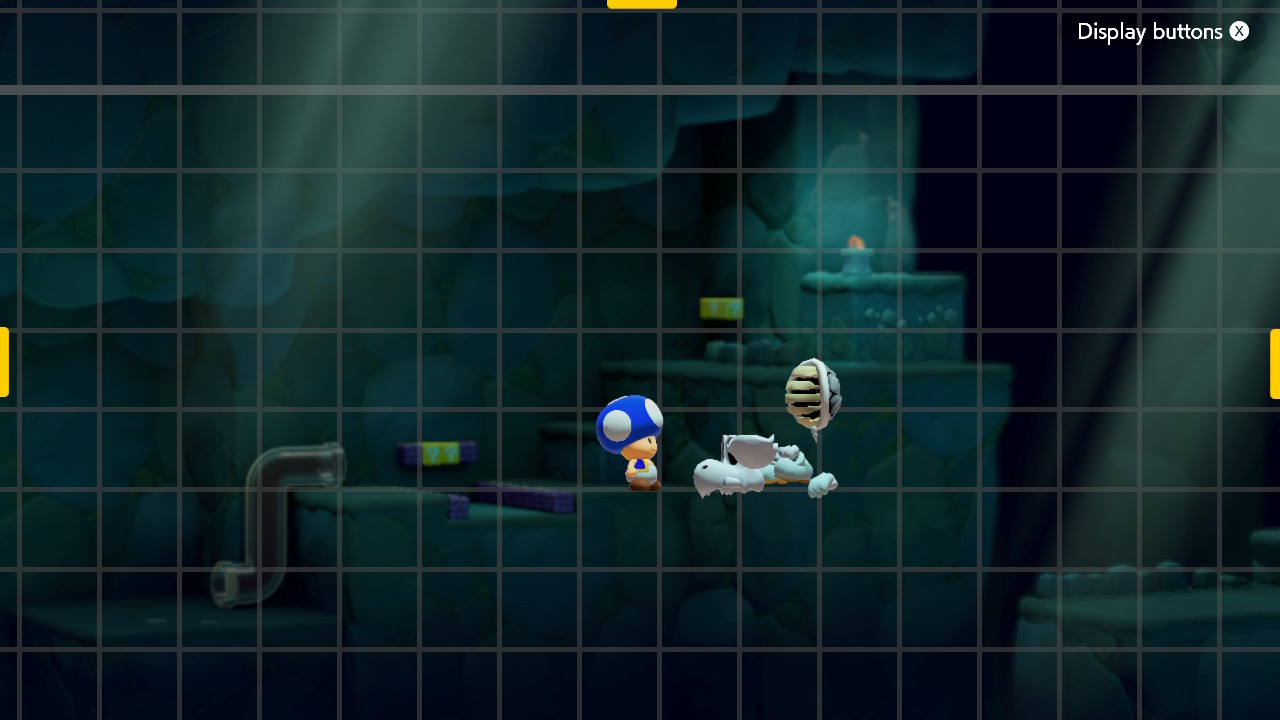
Dry Bones Shell |
Yes |
When you view this object in Edit mode, it appears jumbled up. However, it appears as a Dry Bones (in a T-pose) in Play mode. If you attempt to "play dead", you will get stuck in place. |
Fire Bar |
No |
|
Frozen Coin |
Yes |
If this part is hit with Builder Mario's hammer, it turns into a hit ? Block. |
Grinder |
Yes |
|
Koopa Clown Car |
Yes |
|
Lakitu |
No |
Lakitu doesn't appear in Play mode, and does nothing. |
Monty Mole |
Yes |
|
Mushroom Platform |
Yes |
|
Note Block |
Yes |
|
Music Block |
Yes |
Only makes sound when the player lands on it. |
2D Semisolid Platform |
Yes |
Cat Mario can't climb them. |
Spike Trap |
Yes |
|
Spike Top |
Yes |
In the object properties menu, the red Spike Top uses the NSMBU Green Pipe icon and the blue Spike Top uses the NSMBU Red Pipe icon. |
Swinging Claw |
No |
|
Shoe Goomba |
Yes |
If you try to make this object bigger or change it into the Stiletto, the game crashes. |
Spiny Shell |
Yes |
This object mostly functions as its regular counterpart (from the Normal Game Styles), but you are unable to wear it. For some reason, the game won't delete the level if this object is in it when it is saved. |
Sun/Moon |
Yes |
Allows for Night themes in the Super Mario 3D World theme, which are inaccessible in normal gameplay. |
Koopalings |
No |
|
Vine |
Yes |
The object itself will appear messed up, and the game will crash if you attempt to climb it. If it's placed into a ? Block however, it works. |
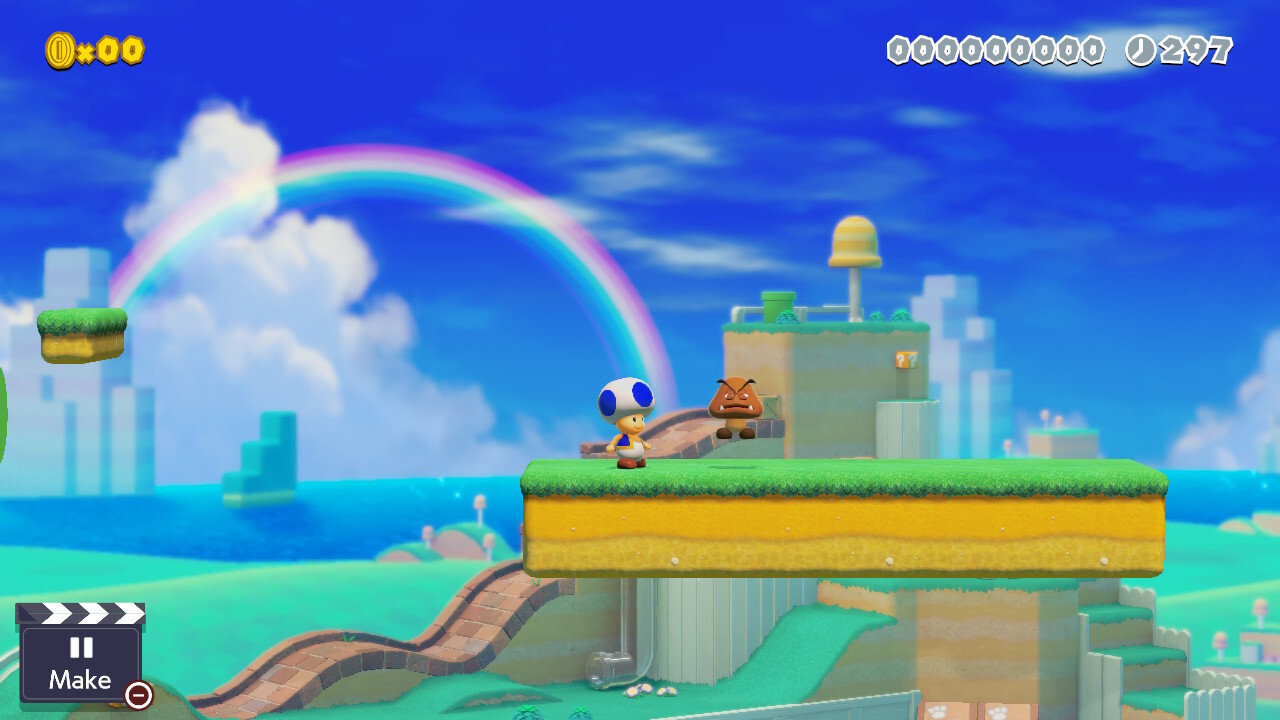
3D World Objects#
Course Part(s) |
Functions in the Normal Game Styles? |
Notes |
||
|---|---|---|---|---|
Blinking Block |
Yes |
|||
Clear Pipe |
Yes |
Has sprites for horizontal segments in the Super Mario World Forest theme. |
||
Crate |
No |
|||
Dash Block |
Yes |
A small glitch can occur if the player has the Master Sword powerup: using the dash attack into the Dash Block will cause the game to repeat the Shield sound repeatedly until the player is off the Dash Block. |
||
3D World Koopa Troopa |
Yes |
Acts like a normal Koopa Troopa but is two tiles tall in the editor. |
||
Meowser |
Yes |
Acts like a normal Bowser but with a 3x4 grid size in the editor. |
||
Mushroom Trampoline |
Yes |
|||
ON/OFF Trampoline |
Yes |
|||
Red POW Block |
No |
Turns into a regular POW Block when the level is played. |
||
3D World Semisolid Platform |
Yes |
Appears invisible and blocks can't be placed over the solid part of the platform just like in the 3D World style. |
||
Spike Block |
Yes |
|||
Super Hammer |
Yes |
Only works when dragged on the player in the editor, which will make them appear as their super form but with the ability to use the hammer but only in the NSMBU style. In the other styles, the player becomes two tiles tall but can't use the hammer ability and uses the sprites of their small form. |
||
Track Block |
Yes |
In the object properties menu, the red Track Block uses the 3D World Green Pipe icon and the blue Track Block uses the 3D World Red Pipe icon. |
||
Tree |
Yes |
Functions like the Vine object. |
||
Warp Box |
No (singleplayer), Yes (online multiplayer) |
The game will softlock if you enter the warp box in the 2D game styles. For some reason the game continues normally in online multiplayer. |
||
! Block |
No |
|||
Cannon Box, Propeller Box, Goomba Mask, Bullet Bill Mask, & Red POW Box |
No |
|||
Ant Trooper/Horned Ant Trooper |
No |
Crashes the game. |
||
Bully |
No |
Crashes the game. |
||
Charvaargh |
No |
Crashes the game. |
||
Fire Bro |
No |
Crashes the game. |
||
Hop-Chops |
No |
Crashes the game. |
||
Koopa Troopa Car |
No |
Crashes the game. |
||
Piranha Creeper |
No |
Crashes the game. |
||
Porcupuffer |
No |
Crashes the game. |
||
Skipsqueak |
No |
Crashes the game. |
||
Stingby |
No |
Crashes the game. |
Oddities#
Off-Model Super Mario World Fire Mario#
Fire Mario in the Super Mario World style has some animations that are inconsistent with his other forms.
|
Normal Mario |
Fire Mario |
|---|---|

|

|
The carrying player animation uses a different pose.

The outlines for Fire Mario's cap and shirt when riding in a Dry Bones Shell are miscolored red like the normal form, aside from his victory pose and the arm of fire shooting.

Some animations use Mario's untanned skin tone, like his normal form.
New Super Mario Bros. U Pipes#
|
Super Mario Maker |
Super Mario Maker 2 |
|---|---|

|

|
Unlike in Super Mario Maker, pipes in the New Super Mario Bros. U style are shinier than they are in the source game. They somewhat resemble an early design of the pipes seen in early footage of said game.
(Source: Nick930 (image))
Magikoopa-spawned Goombas in the Super Mario 3D World Style#
In the Super Mario 3D World style, when a block is turned into a Goomba by a Magikoopa, the game spawns the Goomba from the Super Mario Bros./New Super Mario Bros. U styles instead of the Super Mario 3D World one. This object displays different behavior, such as walking faster and not charging at the player when approached.
(Source: Spencer)
Broken Super Mario Bros. Key Door sound timings (post-3.0.0)#
In versions prior to 3.0.0, unlocking a Key Door in the Super Mario Bros. style first lets the unlock sound play before the door opening sound does. However, starting in 3.0.0, this timing is broken, as the unlock sound and door opening sounds play at the same time instead, while the proper sound timings are still intact in other styles. Despite revisions past 3.0.0, this bug still has not been fixed.
Removed Text#
|
|
To do: |
The file that contains the descriptions of the Clear Conditions, Message\ReferenceMsg_*\GoalCondition.msbt, contains two used pieces of text for the Toad rescue Clear Conditions, labeled 01 and 03, but none labeled 02. 01:
Reach the goal with all [number] Toads in tow.03:
Reach the goal with [number] Toads in towJudging from the numbering of similar sets of strings, 02 would have likely said "Reach the goal with at least [number] Toads in tow."
(Source: Original TCRF research)
Internal Project Name#
The game's codename is "Slope", according to strings in the executable. The first Super Mario Maker had a codename of "Block".
(Source: ecumber05)
Regional Differences#
Kamek and Spike Pillar#
Similarly to the first game, the European English text refers to Magikoopas as "Kameks" and Skewers as "Spike Pillars". This also applies to the Magikoopa Mii outfit.
However, unlike the first game, the sounds when placing them are unchanged.
Revisional Differences#
|
|
To do: |

|
This needs some investigation. |
2019 Server Update#
Released on July 24, 2019.
- Upped the course upload limit from 32 to 64.
Version 1.1.0#
Released on October 2, 2019, mainly focusing on online play.
- A "Play with Friends" button has been added to courses in Course World, making it possible to play with friends without downloading the course first.
- Players can now play online with friends in either Multiplayer Versus or Co-op mode.
- The Nintendo Switch Online mobile app is now supported.
- Players can automatically match online with people that were matched with via the app, and voice chat with them.
- Some new features were added to Nearby Play:
- Players can now choose between Multiplayer Co-op or Multiplayer Versus modes.
- Players can now select courses uploaded to Course World as well as courses saved to Coursebot.
- When playing a course saved to Coursebot, the host no longer needs to be connected to the internet.
- LAN Play mode has been added. In this mode, players connected to the same Local Area Network can now play together wirelessly.
- LAN Play mode can be accessed by clicking in the L Stick and pressing the L or R buttons in the Network Play menu.
- If the connection is unstable before a multiplayer match starts, the match will be cancelled.
- In Multiplayer Co-op, if everyone chooses to start over, the timer will now reset.
- The text for S+ rank is now yellow.
- If a player places Builder Boxes after a Warp Pipe, Clear Pipe, Door, or Warp Block, they break when other players exit said warp.
- This does not happen with your own boxes or regular boxes.
- All characters now take the same amount of time to move through a Warp Pipe, regardless of their state.
- Players cannot match with other players using v1.0.1 or lower in Network Play.
- Simplified the display of comments containing stamps.
- Added a refresh/update button to Courses uploaded.
- Added a list showing a user's 100 most recent First Clears.
- Now displays a user's total number of First Clears.
- Now displays a user's total number of world-record times.
- Added a list of Official Makers in Leaderboards. These makers existed beforehand, but would have to be found via Course IDs/Maker IDs shared variously by Nintendo on social media and the game's official website.
- Players can now switch between Touch with buttons or Touch only in the Settings menu in handheld mode.
- Players can now play with horizontal Joy-Cons in all Game Modes.
- Players can change their controller grip from Settings in the main menu.
- Most known glitches were fixed.
- L + R can now be used to start the game, in addition to ZL + ZR, with - the button prompt changed to mention the former as well.
- When using a controller, the player character now stays under the finger cursor while Y is being held, instead of just being moved to its position.
- The scroll speed while holding Y was also drastically increased.
- Icicles, One-Way Doors, Firebars, Burners, and the top 16 rows of vertical sub-areas are no longer considered global ground.
- Piranha Creeper's hitbox has been slightly altered.
- Luigi, Toad, and Toadette now act just like Mario, meaning they now throw fireballs at the same height and have the same hitboxes.
- Magikoopas in the 3D World style can no longer turn Spike Blocks into enemies.
- The Luigi's Assist Parts message has been replaced by a small icon above the clapboard.
- A new opening animation was added, which will automatically be played the first time this version is opened.
- Players can no longer jump when they're stuck inside blocks, including ON/OFF Blocks.
- Players can now place more objects in doors, similarly to Super Mario Maker.
Version 2.0.0#
Released on December 5, 2019, focusing around new course elements.
- Pokeys from Super Mario Bros. 2 were added, though they function the way they did in New Super Mario Bros. Wii, and like the 3D World Snow Pokeys in the Snow theme.
- Spikes from Super Mario Bros. 3 were added.
- The Master Sword from The Legend of Zelda was added as a power-up in the Super Mario Bros. style. Collecting one changes the player to Link and drastically alters the moveset.
- The Frozen Coin is added, a coin encased in an ice block that can either be used as a platform or melted using various fiery objects (except lava).
- P-Blocks, blocks that toggle from solid to non-solid or vice versa by a P-Switch, were added.
- Dash Blocks were added to the Super Mario 3D World style. When stepped on, the player receives a massive speed boost for a short time, but are restricted to jumping.
- Ninji Speedrun was added. This mode pits players from around the world to compete for a best time in courses made by Nintendo.
- The number of Likes a Maker has received are now displayed in the overview tab.
- The layout of the overview tab was changed to allow space for this.
- A new opening animation was added, which will automatically be played the first time this version is opened.
2020 Server Update#
Released on January 7, 2020, in celebration of 10 million courses being uploaded.
- The course upload limit was increased from 64 to 100, as in the original Super Mario Maker.
Version 3.0.0#
Released on April 22, 2020. This was touted as the final major update, and with the massive amount of additions and changes, it certainly shows.
- The SMB2 Mushroom was added in the SMB style. Collecting one changes the player to SMB2-style sprites and allows them to stand on enemies, pick them up, and throw them. Players can also pull up snowballs from the ground in the Snow theme.
- The Frog Suit was added in the SMB3 style, working as it did in that game aside from allowing players to run across the top of water while holding an object or another player.
- The P-Balloon was added in the SMW style, inflating the player and allowing them to fly around with the directional buttons, at the cost of not being able to stomp.
- The Super Acorn was added in the NSMBU style, working as it did in that game.
- The Boomerang Flower was added in the SM3DW style, working as it did in that game.
- The Cannon Box, Propeller Box, Goomba Mask, Bullet Bill Mask, and Red POW Box were added in the SM3DW style.
- All seven Koopalings were added in every style except SM3DW, with their SMW styles being completely redone.
- In the North American 3.0.0 trailer, the Koopalings were shown in the SMW style using their sprites from SMB3. The final version of the update uses original sprites for them instead.
- Three different variations of the Mechakoopa were added in every style except SM3DW.
- The Cursed Key, based on the SMB2 keys, was added in the SMB style. Collecting one summons a Phanto to chase you, as it did in that game.
- The ON/OFF Trampoline was added in the SM3DW style, and its bouncy properties can be toggled by the ON/OFF Switch.
- Dotted Line Blocks were added in the SM3DW style.
- A World Maker was added, allowing Makers to create a Mario game with up to 8 worlds (each with as many as five courses for a total of 40), in the form of Super Worlds.
- Worldbot was added, functioning similarly to Coursebot regarding Super Worlds, with the total number of Super Worlds you can save being 6.
- You can play Super Worlds uploaded from Makers in Course World.
- If a Maker uploads a Super World, it will be displayed in the Overview section of their Maker Profile.
- Added “Share to Friend List” to Options that will share your information to your friends in Leaderboards and Ninji Speedruns if allowed.
- Added a list of Super Worlds a Maker has played to their Maker Profile if the "Share to Friend List" option is allowed.
- Added a friend list to Leaderboards.
- In Leaderboards, the order of the list of Makers you're following has been changed to display whoever uploaded a course most recently first.
- More course tags were added: Art, Technical, Shooter, Boss Battle, Single Player, and Link.
- Any course tagged with Single Player will not appear in Network Play.
- You can now download courses that you posted to "My Courses" in Coursebot.
- Added a list of friends' times to Everyone's Times in Ninji Speedruns if the "Share to Friend List" option is allowed.
- A new opening animation was added showing off Mario, Peach, Yoshi, and the Koopalings. Much like v2.0.0's new opening animation, this will play upon first booting up the game after updating.
- The behavior of Hammer Bros. was altered in this update: instead of pacing back and forth in one spot, as in previous games, they will continuously walk to the left or right, and will only turn around after touching the edge of the platform they are on or (sometimes) jumping. It's currently unknown whether this is a bug or intentional behavior.
- Various issues, exploits, and bugs were possibly fixed.
Version 3.0.1#
Released on July 14, 2020.
- In the Course World, when the player opens the pause menu while playing Ninji Speedruns, they will not be able to perform any actions for a certain period after closing the pause menu.
- Various issues, exploits, and bugs were possibly fixed.
Version 3.0.2#
Released on November 14, 2022, 2 years after the previous update.
- Fixes a severe vulnerability in the game's network code that would allow remote code execution. This vulnerability is now known as ENLBufferPwn. Similar security fixes were implemented for Animal Crossing: New Horizons, ARMS, and Splatoon 2 the same day.
- Various issues, exploits, and bugs were possibly fixed.
Version 3.0.3#
Released on February 6, 2024, two years after 3.0.2.
- ”Made more adjustments to make for a more pleasant, gaming experience.”, as said from the Nintendo patch notes of SMM2. There is not any other information on the internet that really shows changes.
- Bugs and issues might have been fixed.
- A new unused Background of the Night Castle in NSMBU was also found in the game files, as said from above.