This game/console's online features are no longer supported. While this game/console's online features were once accessible, they are (as of February 28, 2001) no longer officially supported and online-exclusive features may be documented as now-unseen content.
Mario Artist: Communication Kit is the third title in the Mario Artist series for the ill-fated 64DD, used to transfer content from the other entries (Paint Studio, Talent Studio, and Polygon Studio) to an online service.
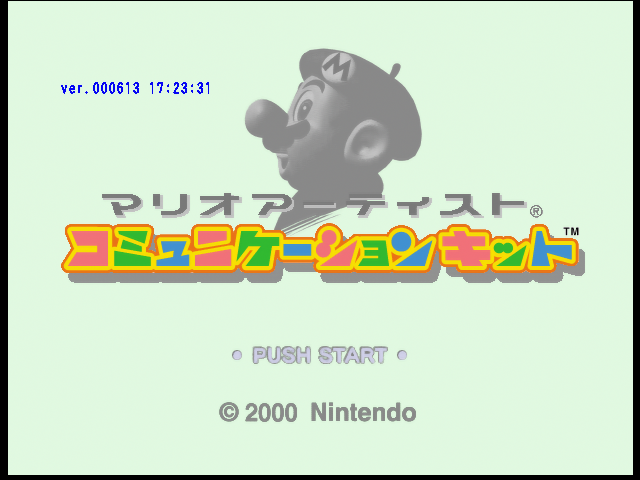
Debug Mode can be enabled by performing the following button sequence on the title screen: D-Pad Up, D-Pad Up, D-Pad Up, D-Pad Down, D-Pad Down, D-Pad Down, D-Pad Left, D-Pad Right, D-Pad Left, D-Pad Right, L Button, R Button.
You can also use the following GameShark code: 8005FC70 0001
You will then see the version number and the background color will change slightly.
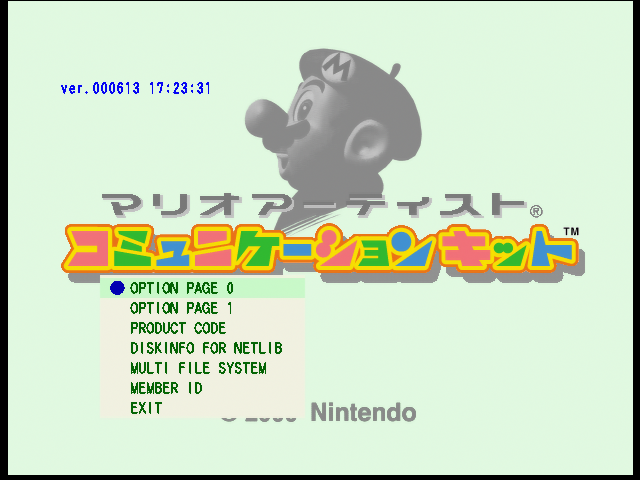
USING THIS MENU WILL ERASE DATA FROM THE DISK. USE IT AT YOUR OWN RISK. This menu can be accessed on the title screen by pressing D-Pad Left and all C Buttons at once.
OPTION PAGE 0 and OPTION PAGE 1 will delete configuration settings.
PRODUCT CODE is unknown.
DISKINFO FOR NETLIB is unknown.
MULTI FILE SYSTEM will format the save file system and erase every downloaded and imported content.
MEMBER ID will erase linked Randnet membership info. Afterwards, you would have to log in again.
As with Paint Studio, Communication Kit supports the Game Boy Printer through unreleased peripherals.
It supports the unreleased 64GB Cable shown at Spaceworld 1999. If detected from one of the controller ports, the game will display the Game Boy Printer (Pocket Printer) icon in the main menu, near the Bonus Contents icon (which may also be hidden).
This cable plugs into a Game Boy Printer cartridge, which then the Game Boy Printer plugs into the Game Boy's link port. This cartridge only acts as a middleman as Paint Studio sends and receives RAW Game Boy link data. Oddly enough, alongside support for the original Game Boy Printer, it has support for an unannounced "Game Boy Printer Color" (referred to as Color Printer in the text) hardware which prints color images.
You can print in several directions, as well as splitting the image in 2 or 4. For the original Game Boy Printer menu, you can change the paper color, as well as brightness and contrast. The Game Boy Printer Color menu allows to change the brightness, contrast and hue.
Pocket Printer IconRegular Pocket Printer MenuPocket Printer Color Menu
Watch on YouTube This movie called ムービー (under the filename ムービー.TSBGA) uses shuffled scenes with an unknown talent called きほんタレント1, with streamed audio ripped from "Yellow Magic Orchestra - Snakeman Show 1".
It should be known that Sound Movies cannot be made in Mario Artist: Talent Studio, it is a format that only Nintendo themselves could make. The only other known Sound Movie is the Hidden Movie from Talent Studio with Hiroshi Yamauchi.
This file can be found at offset 0x19C6200 of the NDD file, at a size of 0x124158 bytes.
Watch on YouTubePress B at the title screen, then C-Up after the credits begin. This will show your cursor on the credits and when you press A or Z, you can shoot roles and names to change them to Katakana or Hiragana. This cannot be done in the other Mario Artist games.
Watch on YouTubeThe following can be enabled by using one of the following:
Action Replay / GameShark Code: 80139B1C 0001
NDD Disk File Hacking: Replace A0209B1C to A0249B1C at offset 0x1F0050
Cartridge Port Hacking: Replace A0209B1C to A0249B1C at offset 0x17D878
This has some intended glitch effects on the names, and by pressing C-Up you can also click the names, different sound effects will occur and a score will be shown at the end.
Watch on YouTubeThe following can be enabled by using the following GameShark code: 801E4694 0001
Action Replay / GameShark Code: 801E4694 0001
NDD Disk File Hacking: Replace 80121CE0 to 80121CF0 at offset 0x205728
Cartridge Port Hacking: Replace 80121CE0 to 80121CF0 at offset 0x192F50
This is a full fledged minigame where you have to hit as many names as possible while juggling with the S T A F F letters to not fall into the bottom of the screen for score penalities.
 This article has a talk page!




 This movie called ムービー (under the filename ムービー.TSBGA) uses shuffled scenes with an unknown talent called きほんタレント1, with streamed audio ripped from "Yellow Magic Orchestra - Snakeman Show 1".
