 This article has a talk page!
Mario Kart 64 basically takes all the wishes and feature requests from Super Mario Kart and makes them come true. Four players! Tunnels! No Koopa Troopa! All good stuff. Except that last one, clearly.
Sub-Pages#


Version Differences#

Debug Menu#
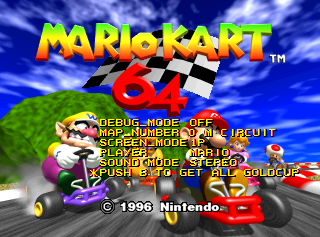
Use one of the below GameShark codes and press L + Z at the title screen.
Version |
Gameshark code |
Version |
Gameshark code |
Version |
Gameshark code |
|---|---|---|---|---|---|
USA |
D10F6914 2020 |
Japan v1.0 |
D10F73C4 2020 |
Japan v1.1 |
D10F61B4 2020 |
Europe v1.0 |
D10F6A54 2020 |
Europe v1.1 |
D10F6974 2020 |
iQue |
D10F3C24 2020 |
In the debug build of the game that was leaked as part of the July 2020 gigaleak, the debug menu is enabled by default and can be activated by pressing R on the title screen.
On the iQue Player version, text in the options appears corrupt, though the option names are unaffected. Numbers display correctly, so it's still possible to navigate and use the menu.
- DEBUG_MODE activates key combinations during play:
- L+R+A+B: Reset game.
- R+B: Toggle CPU meter.
- D-Pad Right: Advance player 1 and everyone behind them to final lap.
- D-Pad Down: Advance everyone to final lap.
- D-Pad Up: Advance player 1 and one other to final lap.
- Z or C-Down can be pressed during the race start sequence to start early. This will glitch the game if done too soon.
- MAP_NUMBER selects the track. Available are the 16 single-player tracks plus the four tracks from battle mode.
Level Select |
Course |
|---|---|
0 M CIRCUIT |
Mario Raceway |
1 MOUNTAIN |
Choco Mountain |
2 CASTLE |
Bowser's Castle |
3 GHOST |
Banshee Boardwalk |
4 MAZE |
Yoshi Valley |
5 SNOW |
Frappe Snowland |
6 BEACH |
Koopa Troopa Beach |
7 P CIRCUIT |
Royal Raceway |
8 L CIRCUIT |
Luigi Raceway |
9 FARM |
Moo Moo Farm |
10 HIGHWAY |
Toad's Turnpike |
11 DESERT |
Kalimari Desert |
12 SHERBET |
Sherbet Land |
13 RAINBOW |
Rainbow Road |
14 STADIUM |
Wario Stadium |
15 BLOCK |
Block Fort |
16 SKYSCRAPER |
Skyscraper |
17 DECK |
Double Deck |
18 JUNGLE |
D.K.'s Jungle Parkway |
19 DOUGHNUT |
Big Donut |
- SCREEN_MODE selects the screen mode, and thus the players that participate. Available values are 1 player, 2 player up/down, 2 player left/right, 3 players and 4 players. The two player left-right view is never used in the final game, and is somewhat glitchy.
- PLAYER selects the first player. If you have more than one player, the game assumes Luigi for player 2, Yoshi for player 3 and Toad for player 4.
- SOUND MODE simply selects the sound mode (mono, headphones, stereo).
- PUSH B TO GET ALL GOLDCUP is fairly self-descriptive. This option only appears when the cursor is moved all the way to the bottom.
Note that if you try to start a one-player game on a battle map, the game will automatically add a second player.
XXX Sound Mode#
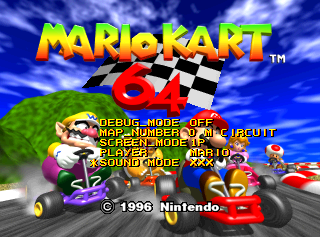
This GameShark code switches the sound mode to "XXX" on the debug menu and blank in the Options menu.
Version |
Gameshark code |
Version |
Gameshark code |
Version |
Gameshark code |
|---|---|---|---|---|---|
USA |
8018EDF2 0002 |
Japan V1.0 |
8018C812 0002 |
Japan V1.1 |
8018B5C2 0002 |
Europe V1.0 |
8018EF33 0002 |
Europe V1.1 |
8018EE52 0002 |
|
Debug Menu |
Options Menu |
|---|---|
|

|
To elucidate the reason for a fourth option existing, in the leaked source files, audio/kart_sou_inc.h describes four sound options rather than the final three (stereo, mono, headphone): option 0 is "Wide", which may refer to surround sound.
/* Output Mode Define */
#define WIDE_MODE       0
#define HEADPHONE_MODE          1
#define STEREO_MODE     2
#define MONO_MODE       3
CPU and Graphic Display#

When Debug Mode is enabled, the following GameShark codes can be used:
- Debug Mode Enabled.
Version |
Gameshark code |
Version |
Gameshark code |
Version |
Gameshark code |
|---|---|---|---|---|---|
USA |
800DC521 0001 |
Japan V1.0 |
800DCDF1 0001 |
Japan V1.1 |
800DBD31 0001 |
Europe V1.0 |
800DC5B1 0001 |
Europe V1.1 |
800DC541 0001 |
- Shows which master display list is currently in use.
Version |
Gameshark code |
Version |
Gameshark code |
Version |
Gameshark code |
|---|---|---|---|---|---|
USA |
800DC515 0001 |
Japan V1.0 |
800DCDE5 0001 |
Japan V1.1 |
800DBD25 0001 |
Europe V1.0 |
800DC5A5 0001 |
Europe V1.1 |
800DC535 0001 |
- Shows bars at the bottom measuring CPU usage of the video (red), audio (yellow), and game logic (orange) threads.
Version |
Gameshark code |
Version |
Gameshark code |
Version |
Gameshark code |
|---|---|---|---|---|---|
USA |
800DC663 0001 |
Japan V1.0 |
800DCF31 0001 |
Japan V1.1 |
800DBE71 0001 |
Europe V1.0 |
800DC6F1 0001 |
Europe V1.1 |
800DC683 0001 |
While the CPU meter is enabled, pressing L+R toggles a flag at 800DC664, but this flag doesn't seem to be accessed anywhere else. (This is done at 80004098.)
Frame-by-Frame advance#
The following code activates a frame-by-frame advance mode if Debug Mode is enabled:
Version |
Gameshark code |
|---|---|
USA |
81001760 3C03 |
When the game is paused, player 1 can hold A and B and press L to advance a frame. This unfortunately conflicts with using A to unpause the game; you must hold A before pausing. Alternatively, adding the code 81001784 2400 makes it require only holding B and pressing L while paused.
Crash Debug Screen#

If the game crashes, it will draw a small white square with red border near the upper-left corner of the screen. At that point, pressing L, Up, Left, Down, Right, R, L, B, A will display some information about the cause of the crash.
The first line displays three numbers - first is the thread ID (usually 5), second is the address of the faulty instruction, third is the exception code (as defined in the R4300i manual). The second line displays the $RA register. The third line is the opcode of the faulty instruction.
The GameShark code 810DC6FE FFFF will shorten this code to simply "press L".
This display cannot be seen on most emulators, as most plugins don't seem to continue redrawing the screen after the game crashes.
Unused Code#

|
To do: |
Track Scaling Function#
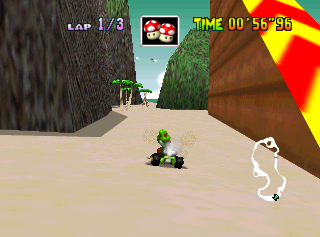
Next to the mirror mode flag in memory (address 800DC608 in USA version) is a floating-point value that appears to always be set to 1.0. When a track is loaded, its height is scaled by this amount. (All polygon vertices are multiplied by this value.) Use one of the below GameShark codes to activate this feature (default value 3F80):
Version |
Gameshark code |
Version |
Gameshark code |
Version |
Gameshark code |
|---|---|---|---|---|---|
USA |
810DC608 ???? |
Japan V1.0 |
810DCED8 ???? |
Japan V1.1 |
810DBE18 ???? |
Europe V1.0 |
810DC698 ???? |
Europe V1.1 |
810DC628 ???? |
This value only affects track polygons, and hit detection is not altered to compensate for the steeper hills and/or shorter vertical walls, so changing it often produces unplayable tracks and strange effects such as floating trees, low areas being considered underwater/out of bounds, and walls that are no longer solid.
No similar scaling functions exist for the X and Z axes. This may have been intended as a debugging function to test slopes, or a bonus mode that would scale tracks to various sizes.
Vertical Splitscreen#

This unused vertical splitscreen display for 2-player mode is only accessible via the Debug Menu or by using the following GameShark code below that forces the horizontal splitscreen mode to the vertical splitscreen mode when selecting a 2-player game:
Version |
Gameshark code |
Version |
Gameshark code |
Version |
Gameshark code |
|---|---|---|---|---|---|
USA |
D00DC533 0001 |
Japan 1.0 |
D00DCE03 0001 |
Japan 1.1 |
D00DBD43 0001 |
Europe 1.0 |
D00DC5C3 0001 |
Europe 1.1 |
D00DC553 0001 |
iQue |
D00D8ED3 0001 |
It's pretty clear why this isn't accessible normally: it's unfinished. The lap counter still displays in Battle Mode, the map goes over the second player's lap counter, and the Vs and Es only appear when you're close to the camera.
This feature can be seen in some very early footage of the game, from when it was known as "Super Mario Kart R".
Lightning in Battle Mode#
When used in Battle Mode, the Lightning Bolt makes all other players lose one balloon; however, it isn't normally possible to obtain this item, likely because it would have made battles horribly unbalanced. Code that specifically handles the Lightning Bolt's effects in Battle Mode can be found around 8008E0FC in RAM.
Bomb Warning#

An unused multiplayer feature that warns players when they approach the moving bombs on the track. This can be seen in an early screenshot but was disabled in the final game. It can be re-enabled by using the GameShark codes:
Version |
Gameshark code |
|---|---|
USA |
D10F6914 0002 |
Start up a 3 or 4 player versus race then once in game, press C-Left once and drive near a bomb and then press C-Right until you see the bomb icon.
(Source: superluigikart)
Feather Jump State#
The player-state code contains a flag indicating a feather jump state is active. By setting the state at 0x0F699E (NA) to 0x10 it triggers an immediate feather jump on the player. The feather item from Super Mario Kart wasn't included in the final game, though it can be seen in certain prerelease material and in the award ceremony (which is visually similar, but uses a different state flag).
(Source: tasvideos.org)
Code from the 2020 Nintendo leaks labels this flag as USE_WING, which shows that this state would have been activated via use of an item, in this case the scrapped feather.
To see this in-game, use one of the below codes and press Z.
Version |
Gameshark code |
Version |
Gameshark code |
Version |
Gameshark code |
|---|---|---|---|---|---|
USA |
D10F6914 0400 |
Japan V1.0 |
Japan V1.1 |
||
Europe V1.0 |
Europe V1.1 |
Storm Hit State#
Another player-state code has a flag used to trigger a large spinning jump, which can be activated by setting the state at 0x0F699D (USA) to 0x02. When active, the character gets flung into the air in a similar fashion to the feather jump, but with much more height and less forward momentum. The character plays a negative voice line (the same as for a banana spin out) and upon landing on ground, it removes all momentum. By observation and labelling, this was meant to be a negative player-state.
Code from the 2020 Nintendo leaks labels this flag as HIT_STORM, which suggests that this state would have been used for colliding with the scrapped tornado and typhoon hazards presumably found in Kalimari Desert and other courses respectively, for which commented out code has been found.
To see this in-game, use one of the below codes and press C-Down.
Version |
Gameshark code |
Version |
Gameshark code |
Version |
Gameshark code |
|---|---|---|---|---|---|
USA |
D10F6914 2000 |
Japan V1.0 |
Japan V1.1 |
||
Europe V1.0 |
Europe V1.1 |
Height Jump State#
The game contains three unused functions, intended for a higher jump or bounce (unrelated to the bounce that happens after landing from the big dash jump on Royal Raceway).
Those functions are for starting, executing and resetting said high jump. They are not called anywhere in the code, but the act of replacing other function calls with them, shows that they are fully functional.
Code from the 2020 Nintendo leaks labels the activator flag which would have called those functions as HIT_HEIGHTJUMP and snippets of code from an early build suggests that this state would have been set when colliding from above with the steam boat on D.K.'s Jungle Parkway. The video shows a recreation and the actual behavior of the height jump.
A short excerpt from Nintendo Magazine System #51, seemingly based on pre-release press information provides proof that the jump was intentional during development, but didn't make it into the release versions:
DONKEY KONG JUNGLE
Return to planet of the apes in this frantic race through a steaming jungle.
However, to cross a river the racers must jump from the bank and land perfectly on a boat which is moored in the centre!
(Source: archive.org)
CPU Shell Code#
The game contains six tables that determine the item probabilities when hitting an item box. The first two tables are both for GP mode and determine item probabilities for a human player and a CPU player, respectively. According to the latter, CPU players have a certain chance to get Green Shells, both the single and the triple variety, but the CPU never uses shells at all, so this isn't actually ever seen in gameplay.
Unused Graphics#
Menu Graphics#
Among the menu graphics are two unused options, untranslated from Japanese:
Graphic |
Translation |
|---|---|
 |
Without Item |
 |
With Item |
Bomb Warning Icon#

The bomb warning icon that shows when you're close to the moving bombs.
Early Traffic Light#

An early version of the traffic light.
Early Item Boxes#


The textures for the early item boxes. It's a leftover from Super Mario Kart R.
(Source: deadhamster)
Player HUD#


4 Player HUDs for the multiplayer modes.
(Source: Origami64)
Monty Mole#

While these two sprites are technically used while Monty is preparing to spring out of its hole, the player never sees the lower body while Monty is standing still.
(Source: Ragey)
Position Numbers#


Even though the game has 8 racers, there are unused 0th and 9th position icons for the lap progression HUD.
"GO" Sign#
Texture |
In-game |
|---|---|
 |
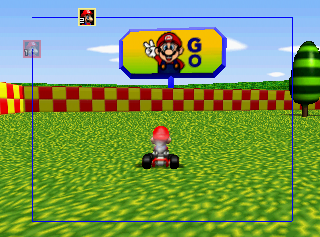 |
The bottom part of this texture cannot be seen, as the sign is too small to have the full texture. The full sign can be seen in some prerelease material. The artwork of Mario making the "V" sign comes from Super Mario World.
Stylized Leaf#

Although present in the game files, this leaf texture isn't used. It was probably meant to fall out of the striped trees, based on its appearance.
The code below replaces the realistic leaves with this unused one, when hitting a tree.
Version |
Gameshark code |
|---|---|
USA |
|
Shy Boo Animation#

Together with the 360 degree render sprites comes this animation of a Boo, hiding its face.
Boos can be seen floating around in the course "Banshee Boardwalk", yet this specific animation is never used.
Spiral Pattern Tree#

Within the texture files is this render of a tree, which is shown to have a unique spiral pattern.
Code from the 2020 Nintendo leaks proves that those trees would have been used in the course "Moo Moo Farm".
Unused Shadow#
bitmap_kage is an unused development graphic found in the game's source files.
The texture depicts a pixelated green-and-blue silhouette of a kart viewed from above. Its name includes the Japanese word kage (影), meaning "shadow", suggesting that it may have been used as a placeholder or early prototype for kart shadow rendering during development.

Misplaced Item Boxes#

Hidden underneath the Big Donut arena are two misplaced item boxes. These item boxes can be seen by getting the camera behind the green bars and waiting, eventually the two item boxes will float up into view. The stored Z-value of these two boxes is about 100 units less than all the other 22 boxes, causing them to appear below the course.
Since the red, blue and yellow sections of the map each contain six Item Boxes whereas the green section contains four, it's clear that these two Item Boxes were intended to appear in the map.
A Gameshark code to restore the two boxes to the course surface:
Version |
Gameshark code |
|---|---|
USA |
|
(Source: HootHoot and Triclon1)
DK's Jungle Parkway Performance#
The external treelines of DK Parkway are made up of 8 different unique textures that are alternated between. Due to the large number of textures and the short length of these strips, the display lists for the treelines will usually load 2-4 textures while only drawing 10-12 triangles total. As texture loading is a huge cost to performance on the N64, this is one of the major causes to the lower framerate in the level. To remedy this, the development team opted to skip render frames on this level to avoid slowing down the gameplay.
Since DK's Jungle Parkway was one of the last courses added, this performance issue is most likely due to a lack of time for the scheduled release.
Unused Early Banshee Boardwalk Ceiling#
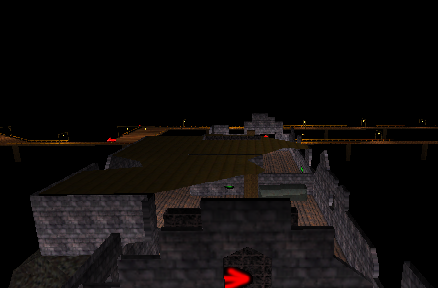
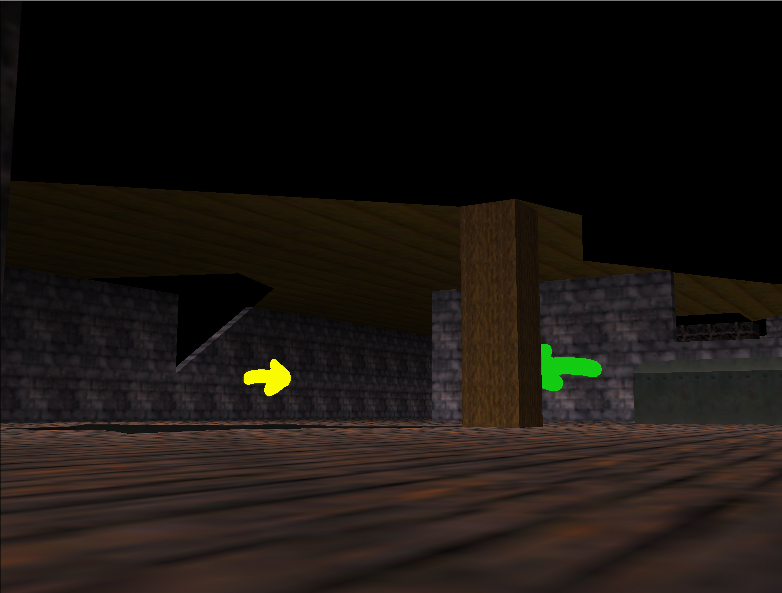
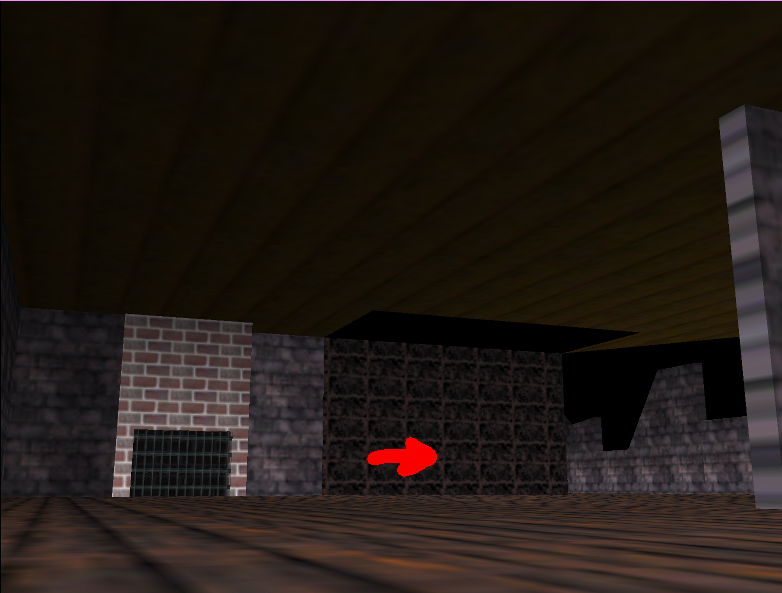
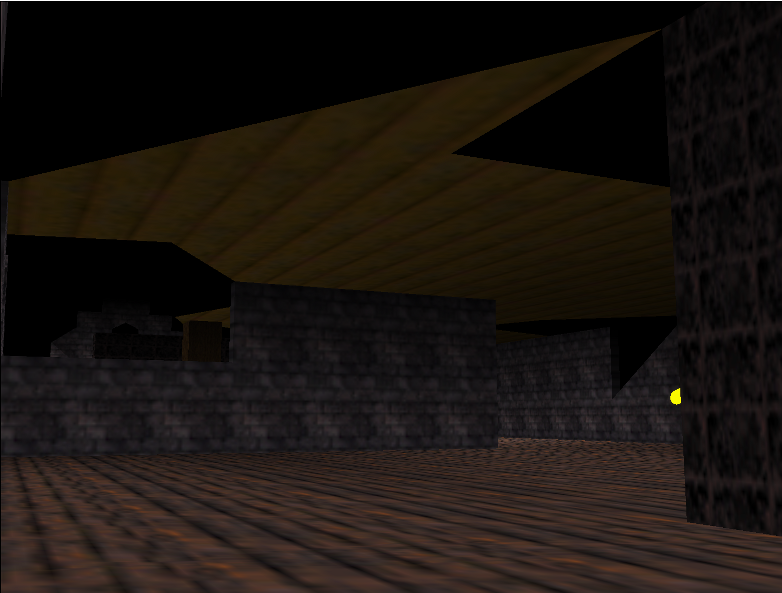
The course "Banshee Boardwalk" contains an unused piece of geometry, which only can be seen in the credits scene by manipulating the ingame camera.
It can not be seen in a regular race, since the game never loads it in via the culling system, however the credits sequence is set up to render every part of the level regardless of its culling state.
The layout and an unsealed part of the ceiling suggests that is has been used in an earlier rendition of this course.
Unused Music#
Hidden Result Loop The Results (1st − 4th Place) track was likely intended to alternate between two ~100 second sections of music, each composed of a 50-second segment repeated twice. Due to a binary counter bug, the first segment repeats, incidentally, 64 times (for 54 minutes and 39 seconds!) before the second segment ever has a chance to play—at which point it repeats twice and correctly returns to the first segment.
In the version of the song included on both the official soundtrack CD and on the Nintendo Music app, the second segment plays after the first segment has looped twice, at about 1:40. This may be how the track was intended to sound originally.
Bad Trophy Ending Loop The minor-key version of the trophy ceremony music is obscure enough on its own, playing only if a player finishes a cup in fourth place or below. However, the full and unaltered loop can't be heard in-game. The build-up music of the song plays for the first few seconds of the cutscene, then switching to either the winning or losing version. This version is usually altered and slowed down by game code, then coming to a complete halt. Afterwards the music switches to a different jingle.
Mario Kart 64 Theme Ending While most of the song is well-known, the last 10-15 seconds of the theme, consisting of a slap bass solo, is never played as the demo video usually quits with the song fading out before it finishes.
Debugging Text#
Most of this text probably would have been spat out to a debug console on development systems, but goes unused in the final game.
Terminate-Canceled
Channel %d,Phase %d
Copy %d
%d->%d
pitch %x: delaybytes %d : olddelay %d
cont %x: delaybytes %d : olddelay %d
Warning:Kill Note  %x
Kill Voice %d (ID %d) %d
Warning: Running Sequence's data disappear!
Audio:Memory:Heap OverFlow : Not Allocate %d!
Audio:Memory:DataHeap Not Allocate
StayHeap Not Allocate %d
AutoHeap Not Allocate %d
Status ID0 : %d  ID1 : %d
id 0 is Stopping
id 0 is Stop
id 1 is Stopping
id 1 is Stop
WARNING: NO FREE AUTOSEQ AREA.
WARNING: NO STOP AUTO AREA.
AND TRY FORCE TO STOP SIDE
Check ID0 (seq ID %d) Useing ...
Check ID1 (seq ID %d) Useing ...
No Free Seq area.
CH %d: ID %d
TWO SIDES ARE LOADING... ALLOC CANCELED.
WARNING: Before Area Overlaid After.
WARNING: After Area Overlaid Before.
MEMORY:SzHeapAlloc ERROR: sza->side %d
Audio:MEMORY:SzHeap Overflow error. (%d bytes)
Auto Heap Unhit for ID %d
Heap Reconstruct Start %x
AHPBASE %x
AHPCUR  %x
HeapTop %x
SynoutRate %d / %d
FXSIZE %d
FXCOMP %d
FXDOWN %d
WaveCacheLen: %d
SpecChange Finished
Fbank Seq %x
Already Load Type %d,ID %d
Warning:Emem Over,not alloc %d
Write %d
Romcopy %x -> %x ,size %x
Romcopyend
CAUTION:WAVE CACHE FULL %d
LOAD Rom :%x -> Ram :%x  Len:%x
BASE %x %x
LOAD %x %x %x
INSTTOP    %x
INSTMAP[0] %x
already flags %d
ERR:SLOW BANK DMA BUSY
ERR:SLOW DMA BUSY
Check %d  bank %d
Cache Check
NO BANK ERROR
BANK %d LOADING START
BANK %d LOAD MISS (NO MEMORY)!
BANK %d ALREADY CACHED
BANK LOAD MISS! FOR %d
Seq %d Loading Start
Heap Overflow Error
SEQ  %d ALREADY CACHED
Ok,one bank slow load Start
Sorry,too many %d bank is none.fast load Start
Seq %d:Default Load Id is %d
Seq Loading Start
Error:Before Sequence-SlowDma remain.
Cancel Seq Start.
SEQ  %d ALREADY CACHED
Clear Workarea %x -%x size %x
AudioHeap is %x
Heap reset.Synth Change %x
Heap %x %x %x
Main Heap Initialize.
----
Init Completed. ------------
Syndrv    :[%6d]
Seqdrv    :[%6d]
audiodata :[%6d]
----
Audio: setvol: volume minus %f
Audio: setvol: volume overflow %f
Audio: setpitch: pitch minus %f
Audio: voiceman: No bank error %d
Audio: voiceman: progNo. overflow %d,%d
Audio: voiceman: progNo. undefined %d,%d
Audio: voiceman: No bank error %d
Audio: voiceman: Percussion Overflow %d,%d
Audio: voiceman: Percussion table pointer (bank %d) is irregular.
Audio: voiceman: Percpointer NULL %d,%d
--4 %x
Stoped Voice
CAUTION:SUB IS SEPARATED FROM GROUP
Error:Wait Track disappear
Slow Release Batting
Audio:Wavemem: Bad voiceno (%d)
Audio: C-Alloc : Dealloc voice is NULL
Alloc
Error:Dim voice-Alloc %d
Error:Same List Add
Already Cut
Audio: C-Alloc : lowerPrio is NULL
Sub Limited Warning:
Drop Voice Warning: Drop Voice
Env-Clear 0
Audio:Envp: overflow  %f
Audio:Track:Warning: No Free Notetrack
SUBTRACK DIM
Audio:Track: Warning :SUBTRACK had been stolen by other Group.
SEQID %d,BANKID %d
ERR:SUBTRACK %d NOT ALLOCATED
Error:Same List Add
Macro Level Over Error!
WARNING: NPRG: cannot change %d
Audio:Track:NOTE:UNDEFINED NOTE COM. %x
Audio: Note:Velocity Error %d
Error: Subtrack no prg.
ERR %x
 Error: Your assignchannel is stolen.
Audio:Track :Call Macro Level Over Error!
Audio:Track :Loops Macro Level Over Error!
SUB:ERR:BANK %d NOT CACHED.
Audio:Track: CTBLCALL Macro Level Over Error!
[%2x]
Err :Sub %x ,address %x:Undefined SubTrack Function %x
Disappear Sequence or Bank %d
Group:Undefine upper C0h command (%x)
Group:Undefined Command
Error : Queue is not empty ( %x )
specchg error
***** CAM MAX %d *****
entryout !!! %d
AFTER GOAL VOICE FLAME %d
*** Pause On ***
*** Pause Off ***
CALLED!! Na_ChangeSoundMode player %d
CALLED!! Na_ChangeSoundMode spec   %d
Interfaced Spec Change player %d
Interfaced Spec Change spec   %d
FX MIX %d
************** Seq Fadeout ***************
SEQ FADE OUT TIME %d
DAC:Lost 1 Frame.
DMA: Request queue over.( %d )
DMA [ %d lines] TIMEOUT
Warning: WaveDmaQ contains %d msgs.
Audio:now-max tasklen is %d / %d
Audio:Warning:ABI Tasklist length over (%d)
AudioSend: %d -> %d (%d)
Undefined Port Command %d
(num %d) (rank %d) (e_rank %d)
(num %d  org_bipas %d  bipas %d)
(%d) rap %3d
rate_count_F %10.2f
rap_count_F %10.2f
area %5d
enemy %d (%d --> %d)
enemy voice set (%d  slip_flag %x  weapon %x)
(%d , name %d)
===== ENEMY DRIVE SUB (%d) =====
ENEMY END
(1)enemy stick angle over!! (%d)
(2)enemy stick angle over!! (%d)
ENEMY END
AREA ERR!!!
%d AREA ERR!!!
SOUTH
EAST
NORTH
WEST
get_oga_area_sub_BP() ...
(b_num = %d)
(%d, %d, %d)
<%d> (%d, %d, %d) [%d] lng %f
(area %d, y %7.2f)
(num %d: area %d ) (%d,%d,%d)
(num %d: area %d ==>%d) (group %d) (%d,%d,%d)
BOM(%d) (%7.2f, %7.2f, %7.2f)
BOM HIT CHECK
BOM HIT !!!!! (%d)
RESULT BOM area(%d)
BOM
SET
(TABLE IS FULL)
(category %d)
MAP NUMBER %d
center_EX ptr             = %x %x (%x)
center_BP[%d] ptr         = %x %x (%x)
side_point_L_BP[%d] ptr   = %x %x (%x)
side_point_R_BP[%d] ptr   = %x %x (%x)
curve_BP[%d] ptr          = %x %x (%x)
angle_BP[%d] ptr          = %x %x (%x)
short_cut_data_BP[%d] ptr = %x %x (%x)
CENTER LINE
(map:%d)
ROM center (BP%d) line adr. = %x (%x)
center (BP%d) line adr. = %x (%x)
BP center_point_number : %d
(%d -> %d)
extern POINT rom_center_KT
area read from ROM (%d)
(num %d, act %d)
(num %d,  act %d,  old_act_num %d)
SL: center_point_number : %d
SL: CENTER LINE
SHIP: center_point_number : %d
SHIP: CENTER LINE
(num %d, permit %d, %d)
OGA CAMERA INIT (%d)
OGA CAMERA INIT END
ERR !!! (ncx = %f)
ERR !!! (ncz = %f)
ERR !!! (ecx = %f)
ERR !!! (ecz = %f)
OGA DRIVERS POINT CAMERA MODE
OGA WINNER CAMERA MODE
OGA TIMEATTACK QUICK CAMERA INIT
OGA BATTLE CAMERA INIT win(%d)
GOAL! <<rank 1>> camera %d  rank %d
GOAL! <<rank 2,3,4>> camera %d  rank %d
GOAL! <<rank 5,6,7,8>> camera %d  rank %d
<<< ITEM OBJ NUMBER ERR !! >>> item %d  obj_num %d
<<< BANANA SET >>> obj_num %d   zure %f
BANANA
EXISTOBJ
category
sparam
num
BANANA HOLD (num %d  time %d   hold_time %d)
<<< BANANA NAGE SET >>> obj_num %d
BANANA NAGE MOVE
BANANA NAGE END
G_SHELL HOLD (num %d  time %d   hold_time %d)
<<< G_SHELL SET >>> obj_num %d
<<< G_SHELL SET >>> object_count %d
G_SHELL
R_SHELL HOLD (num %d  time %d   hold_time %d  obj_num %d)
<<< R_SHELL SET >>> obj_num %d
<<< R_SHELL SET >>> object_count %d
R_SHELL
R_SHELL SHOOT (num %d  time %d   hold_time %d  obj_num %d)
S_BANANA HOLD (num %d  time %d   hold_time %d)
<<< SUPER_BANANA SET >>> obj_num %d
<<< SUPER_BANANA SET >>> object_count %d
S_BANANA
S_BANANA RELEASE (num %d  time %d )
<<< FAKE IBOX SET >>> obj_num %d
IBOX
FBOX HOLD (num %d  time %d   hold_time %d)
START (%d)
END (%d)
map_number = %d - > 20
OGA Move
OGAWA DEBUG DRAW
S_MARIO
S_LUIZI
S_YOSSY
S_KINOP
S_DONKY
S_WARIO
S_PEACH
S_KUPPA
J_MARIO
J_LUIZI
J_YOSSY
J_KINOP
J_DONKY
J_WARIO
J_PEACH
J_KUPPA
debug_mode
on
off
map_number
screen_mode
player
sound mode
push b to get all goldcup
effectcount < 0 !!!!!!(kawano)
MAX effectcount(760) over!!!!(kawano)References#
- MobyGames↩︎
- 1997 현대 컴보이 64 올 소프트 리스트! Korean Nintendo 64 - All Soft List!↩︎
- Game Champ 게임챔프 1997-08, pg. 74 - 현대 컴보이 64 발매일↩︎
- Game Champ 게임챔프 1997-09, pg. 56 - 현대 컴보이 64, 성공적 판매 전↩︎
- iQue Ltd.↩︎
- Super Smash Bros. Brawl chronicle↩︎
- マリオカート64 - nintendo.co.jp↩︎
- Mario Kart 64 | Nintendo 64 | Games | Nintendo UK↩︎
- Nintendo Magazine System (UK) #59, pg. 5 and 27↩︎
- Nintendo Magazine System (AU) #50, pg. 4 - "Mario Kart 64 will be available in Australia in June."↩︎