 This article has a talk page!
 Notes
Notes
 Bugs
Bugs
 Unused AudioProps to the Arcade Version for giving us most of these unused tracks (as well as the entire uncompressed soundtrack for this game)!
 English Translation Differences"Footbrawl" versus "American Footbrawl". Guess which is the European name.
Unused Layouts#

|
To do: |
Found in RomFS\art\fe folder are two unused debugging screen layouts. To see these in-game, simply replace one of the used layout .data and .dict files.
Mission Select#
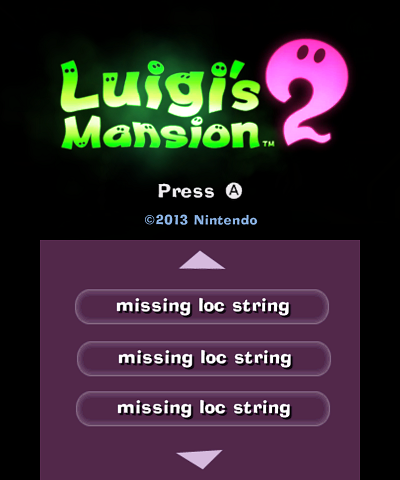
debugselectmissions.data seems to be a layout for a simple menu, containing a list of missions. The mission names don't seem to load.
(Source: Skawo)
Progress Debug#

progressiondebug.data appears to be a menu allowing you to set some completion parameters.
(Source: Skawo)
Unused Cutscenes#
To see these in-game, simply replace one of the used cutscene .data and .dict files.
RiseSandBoxCamera#
Found in RomFS\art\levels\sandbox\nistest\nis\ridesandboxcamera is an unused script for a cutscene, which consists of some camera movements.
The level that would host this cutscene is gone from the game, so the overworld map was loaded to showcase it. Watch on YouTube
(Source: Skawo)
Mission00Zone, Poltergust Upgrade#
RomFS\art\levels\bunker\mission00zone is an unused E.Gadd cutscene testing script. The cutscene first loads a sub-script found in RomFS\art\levels\bunker\art\nis\poltergust_upgrade, which shows E.Gadd don a welding mask and tinker with the Poltergust on Luigi's back. The cutscene then proceeds to go through every single Luigi and E.Gadd animation that can be used for the bunker scenes, whilst popping up undefined textboxes.
Mission307Zone#
RomFS\art\levels\bunker\mission307zone is an unused end-of-level cutscene. After Luigi leaves the Pixelshifter, E.Gadd proceeds to say a few sentences and brings up the Parascope map, which indicates that Haunted Towers have been unlocked.
Mission208Zone#
RomFS\art\levels\bunker\mission208zone is yet another unused end-of-level cutscene. The spoils from the mission are sent to the vault, after which E.Gadd says a few undefined sentences.
(Source: Skawo)
Unused Rooms#
Gloomy Manor#
room_treasureroom#
A complex 3D Maze found in RomFS\art\levels\mansiona\room_treasureroom. Present is a chest, which awards you a modest amount of money, and a spring pad that launches you back to the beginning.
Haunted Towers#
room_secretroom1#
A barely-started bonus challenge found in RomFS\art\levels\mansionb\room_secretroom1. Aside from a textureless platform, it contains one of the Secret Mine teleporters, which crashes if interacted with.
room_secretroomtemplate#
An even more barebones bonus challenge, with only the platform's outer walls modelled. Found in RomFS\art\levels\mansionb\room_secretroomtemplate.
(Source: Skawo)
Unused Missions#
Gloomy Manor and the Secret Mine both have a mission00 folder. Secret Mine's is entirely empty, while Gloomy Manor's appears to contain a Greenie model and references Stage 4's ending cutscene - but neither of those appear in the stage when it's loaded in.
(Source: Skawo)
Unused Actions#
First Person Mode#
There exists an unused first person mode toggle, which can be mapped to a button. This likely went unused because the game doesn't render a lot outside the screen. This can be reenabled by the following cheat code in the EUR and US versions:
2090A27B 00000007
2090A27E 0000000B
(Source: Marioiscool246)
Held Dark Light#
There exists a mode which makes the Dark Light act more like the regular flashlight. It stays on when walking around, and by holding the Dark Light button it can be charged and strobed. The strobing doesn't seem to have any effect on actually revealing objects, however.
20908265 00000000(Source: Marioiscool246)
Health Regeneration#
The game can be set to restore Luigi's HP to full shortly after he gets hurt. Once the HP reaches 100, the game plays an otherwise-unused sound effect. This was used in the E3 2011 demo.
2090A534 00000001(Source: Marioiscool246)
Unused Textures#
Convergence Plane Texture#

Found in RomFS\art\global.data is this texture reading "Convergence Plane" several times over.
(Source: CometMedal)
Configuration Files#
Located in \ini are four files which seem to contain settings for the game, as well as general ROM information.
buildinfo.ini#
Has what would likely be the last build time and date.
JPN:
Current Changelist = CL 0
Build Date = Feb 07 2013 - 23:41
EUR:
Current Changelist = CL 319043
Build Date = Feb 14 2013 - 13:05
USA:
Current Changelist = CL 319042
Build Date = Feb 14 2013 - 13:06
KOR:
Current Changelist = CL 0
Build Date = Apr 05 2013 - 14:31releasetweakfilter.txt#
Possibly the most recently used development and debugging software.
Most Recently Used
Animation
Audio
Camera
Effects
Engine
FE
Gameplay
GameplayConfig
Memory
MP
Network
NCL_Tweakers
Presentation
Profiling
Rendering
SDCard
Zonesrominfo.ini#
Contains the game's "product code" serial (as seen in various places) and the unique ID part of the title ID.
CTR ProductCode = CTR-P-AGGE
CTR UniqueID = 0x0055Fuser.ini#
Appears to contain flags used during development of the game for debugging purposes. Unfortunately, it does not work if the flags are set to true, or the comment sign is removed.
Show Smiler = false
Warn When Too Fast = false
Colour Effects On Out Of Memory = false
#Always Unlock All Missions = true
#Skip SaveLoad = false
Show Low Memory Warning = false
Debug Features#
Gyro Info#
Information detailing the gyroscope position can be drawn on the screen by using the following cheat code (EUR version) and pressing the R button:
009583E0 00000001Ghost Catch Info#
Information about the current ghost capture can be drawn on the screen by using the following cheat code (EUR version) and attempting to catch a ghost:
0095AE54 00000001Smiler#
Making its way over from Super Mario Strikers is the Smiler. A small rectangle is drawn in the corner of the screen and gets angry whenever the game starts losing frames. This can be seen in the video below starting at 2:17.
00917128 00000001
2095DBB0 00000001Debug Switches#
By adding a dist.ini file with certain flags to the RomFS\ini directory, some debugging features can be enabled. The format of the file follows the convention of user.ini, i.e
Flag Name = valueUseTestLevels#
If set to true, the game sometimes loads into a glitched titlescreen. "Current: F1" is shown on the bottom screen, while a level seems to be loaded in the background. The game usually crashes not too long after. In the sequel, this is used to load into a Level Select. As such, this likely means it has been dummied out from this game, but not completely. 
Skip Frontend#
If set to true, the game immediately loads into a level.
Skip Frontend Level#
If set to a level name (e.g. MansionA, MansionA_SpiderBoss, Bunker, etc...), it loads that level when Skip Frontend is enabled.
Skip Frontend Mission#
If set to a number, it loads that mission of the selected level when Skip Frontend is enabled.
King Boo Hack#
If frontend is being skipped, and loaded level is MansionE_KingBoo, if set to true it will load the final boss fight with King Boo, but if set to false, it will load the Giant Knight fight.
Always Unlock All Missions#
If set to true, all missions get unlocked.
Smoke Test, Smoke Test Duration#
Seems to be some sort of stability test. If set to true, it crashes the game, unless Smoke Test Duration is set to a non-zero value (e.g 190.0) and Skip Frontend is enabled. After loading into Gloomy Manor, a debug string is displayed on the bottom screen for the duration of the test. The game proceeds to warp Luigi around the manor.
Custom Level#
Can be set to MansionA, MansionB, MansionC, MansionD or MansionE. If Smoke Test is enabled, the bottom screen map of that mansion will load, the debug string on the bottom screen will print the selected level, but the player will still end up in Gloomy Manor.
BootLanguage#
Can be set to, for example, German. Allows one to override the game's language.
No function/unknown#
The following flags are also referenced in the code, but seem to do nothing, or their function is unknown: Net Test Host, Net Test Players, TestStart, Intentionally Fail Assert, Intentionally Crash Game, Smoke Output By Platform, Changelist, AppNumber, BootRegion
(Source: Skawo)
Text Speed Tag#
The text in the game can contain a {tp} tag, which can be used to control the text print speed. In every single instance of this tag being used in the final game value of 0.01 is used, however others work as well. Watch on YouTube
(Source: RoadrunnerWMC)
Unused Text#
The following text in art/fe/english.data is related to debugging. Some of these strings are used in the unused layouts.
Wrong Version
Unlock Missions
100% Completion
FE Only Mode
Equipment Override
Debug Settings
POCS
Debug MenuInterestingly, "Debug Settings" is replaced with "Debug Settings 13/12.2" in ukenglish.data (which contains all of the European English game text).
Oddities#
"Pixelporter"#
The device called the "Pixelator" in the North American version and the "Pixelshifter" in the European version is referred to internally by the game as the "Pixelporter".
The original name actually snuck into the final game text in a single line of dialogue (string ID 9065DC2E), but only in the North American version:
North American Quote |
European Quote |
|---|---|
We need to track h__ down. |
We need to track h__ down. |
This line can be seen in the game at the end of mission C-2 ("Underground Expedition" in the North American version, "Underground Trek" in the European version).
Font Colors#
|
|
To do: |
A few space characters in the game's text have markup explicitly coloring them #FFFCFC (a slight off-white), a color not used for any visible game text (except in the Japanese translation, but hold that thought). Of course, this cannot be seen during gameplay. The colored spaces are marked below (as they appear in the North American version):
Those big-brained ghosts█sure |
Remarkable! |
I've triangulated the powerful |
Luigi, my boy! You really used your noggin to teach |
The European English version also has colored spaces in the same places. Other translations do not.
The Japanese translation, however, is the only one that uses that font color (#FFFCFC) for any visible text. This only happens in one line (the color is represented below with an underline):
North American Text |
Japanese Text |
|---|---|
(Player name)'s ScareScraper |
(Player name)のグループ |
Unrelatedly, some other text in the game includes seemingly redundant font color markup:
North American Text |
European Text |
|---|---|
Why don't you check the |
Why don't you check the |
Rewriting font color markup as parentheses, the North American text is equivalent to "Why don't you check the (W)((ater Supply) )on the roof?". Since the European text works correctly without the complicated markup, it's a mystery why it is present in the North American version.
StreetPass#
The folder containing the ScareScraper-exclusive ghosts is named "streetpass" (\art\streetpass). The game doesn't support StreetPass at all...
Terror Tower#
The folder containing assets for the ScareScraper rooms is named “terrortower” (\art\levels\terrortower). This may have been an early name for the ScareScraper. Note that Disney owns a theme park attraction called the “Tower of Terror”. Whether or not this was the reason for the name change is unknown.
(Source: luigim1)
Internal Project Name#
The game is called LM3DS internally, according to the strings in the executables.
(Source: luigim1)