 This article has a talk page!
Sonic the Hedgehog was more or less the killer app for the Genesis in the early 1990s and introduced the world to Sega's blue-tinted erinaceid.
Sub-Pages#
 Development Info
 Prototype Info
 Prerelease Info
 Bugs
Bugs
 Revisional DifferencesSonic the Hedgehog 1... point 3.
Header Space#
When playing Sonic the Hedgehog on an emulator, you might have noticed the header has a very large space formatted as:
SONIC THE HEDGEHOGThis is actually a crude attempt at a line break, which can be seen by setting your hex editor's bytes per row to 16 and looking at 0x00120 inside the ROM.
Level Select#

One of the most well-known codes in gaming history: press Up, Down, Left, Right on the title screen (note: if you're playing revision 1 on a Japanese Mega Drive, you have to input the Down button three times instead of just once), then hold A and press Start. In the original release, the level order is different from the order in normal gameplay: Labyrinth and Star Light are earlier than they should be, and Marble and Spring Yard are later. In the Sonic Jam Official Guide, programmer Yuji Naka explained that this is because Labyrinth was supposed to be the second level, but was considered too much of a difficulty spike. This original level order actually showcases the levels getting more and more mechanical in theme, as Sonic gets closer and closer to Scrap Brain.
(Source: Sonic Retro)
Original |
Revision 1 |
|---|---|
Green Hill Zone |
Green Hill Zone |
Labyrinth Zone |
Marble Zone |
Marble Zone |
Spring Yard Zone |
Star Light Zone |
Labyrinth Zone |
Spring Yard Zone |
Star Light Zone |
Scrap Brain Zone |
Scrap Brain Zone |
Final Zone |
Final Zone |
Debug Mode#
Again, codes for the debug mode vary based on console or game region.
Revision 0 and Revision 1 on International Hardware#
Another well-known code. While Up, C, Down, C, Left, C, Right, C is the most common version, a shorter version is C, C, Up, Down, Left, Right. The main requirement for the code is pressing C twice before the final input of Right. After entering the code, press Start while holding A and continue holding A until Sonic appears in the level. The "Pause Options" (see below) are enabled even if A hasn't been held.
To activate Level Select and Debug Mode, simply enter the Level Select code, push any direction on the D-Pad after the ring sound, then enter the Debug Mode code.
From here, you have access to a variety of things:
- Invincibility
- Infinite Time
- Debug Coordinates (in place of score)
- Sprite Counter (in place of time)
- Placement Mode: Press B during gameplay. From there,
- Press A to move forward one object.
- Hold A and press C to move backward one object.
- Press C to place the object.
- Pause Options: press A to go back to the title screen, hold B to enable slow motion, or press C to enable frame advance.
Revision 1 on a Japanese system#
Here, there are separate codes for the pause options and the rest of the debug features. As usual, they are entered on the title screen and can be combined by interpolating a D-Pad direction between them.
Pause Options:
- C, C, Up, Down, Down, Down, Left, Right
Debug Mode:
- C, C, C, C, Up, Down, Down, Down, Left, Right, hold A and press Start
Once enabled, they behave in the same manner as they do when running on non-Japanese systems.
Invisible Credits#

Credits that are hidden on the Sonic Team Presents screen, and completely unseen in every region outside of Japan. The credits were added by Yuji Naka in defiance of Sega, which at the time prohibited developers from crediting themselves by their real names (the game's normal staff roll uses aliases instead, as with many Japanese games from the era). If you play the Japanese version and have a Japanese Mega Drive, or switch the region to Japanese, you can use the code C, C, C, C, C, C, Up, Down, Down, Down, Left, Right, which should make a ring noise, then when the demo starts, hold Down + A + B + C to turn the screen's background to white, making the text visible after the Sega splash screen. This code does not work in the Sonic Classics version.
You can also activate this code for the International version if running on Japanese hardware. The code becomes C, C, C, C, C, C, Up, Down, Left, Right.
If you can't do the above codes, use the Pro Action Replay codes FFFFE3:0001 and FFF604:0072.
The credits translate to:
Position |
Person |
|---|---|
Program |
Naka Yuuji |
Plan |
Yasuhara Hirokazu |
Design |
Ooshima Naoto |
Sound Produce |
Nakamura Masato |
Sound Program |
Kubota Hiroshi |
Unused Sprites#
Sonic#
Artwork |
Description |
|---|---|
 |
Sonic gulping for air while standing. Likely used for the air bubbles found in Labyrinth Zone, as well as Scrap Brain Zone Act 3. |
 |
Seen in earlier development pictures. It would be seen as Sonic's jumping sprite after passing a goal. Used in the prototype build. Modified versions of these sprites would end up being used in Sonic Mania, Sonic the Hedgehog Golf, and albeit still unused, Sonic the Hedgehog (Didj). |
 |
A sliding sprite, similar to those used in Sonic CD. Possibly used for sliding a slope or if he was originally skidding. Modified versions of these sprites would later appear in the official "Hedgehog Day Dance Party" video, but not in Sonic Mania itself. |
 |
Spin Dash-like sprites. There's a routine which would change Sonic's sprite to one of these, but it's unused. However, a similar animation was made for Mighty's "Hammer Drop" ability in Sonic Mania Plus. Judging by the unused code associated with these sprites, it's possible that they were used to create a "squash and stretch" effect when Sonic hit a wall. A special interaction for Sonic hitting walls was present in some early prototypes of Sonic the Hedgehog 2, but was removed in the final game. |
 |
Shrinking, maybe falling, sprites for Sonic. Purpose unknown. Perhaps early death animation. |
 |
A black-and-white death sprite, whose purpose is unknown. Possibly would have been used when falling into lava, like in Marble Zone. This is also present, still unused, in Sonic the Hedgehog 2 and Sonic CD. Similar unused sprites exist in Sonic the Hedgehog 3 & Knuckles. Even Sonic Origins Plus contains a similar unused sprite for Amy Rose. |
 |
Sonic holding his breath, alongside 3 unshaded bubbles. Leftover code in the object that handles the drowning countdown and bubbles (object 0A) loads this art and its associated mapping data when the parent drowning countdown object is loaded, but that specific object is normally invisible, so it's never seen. Because the parent drowning countdown object is loaded when Sonic enters water, the most likely intention is that Sonic was intended to appear to hold his breath whenever entering water. The mapping data only covers the art for the head and not for the unshaded bubbles. This data can be found at ROM offset 14150 in REV00, and 148B8 in REV01. Unlike the rest of Sonic's sprites here, this one is stored in its own art set, compressed in the Nemesis format. This compressed art can be found at ROM offset 2C03A in REV00; it was removed in REV01. For some reason, this art also exists in the prototype at ROM offset 26AEC, though there is no associated mapping data for it there. The face of this sprite would later be used in Sonic Mania, as Sonic is inhaling an air bubble. |
 |
An alternate sprite of Sonic spinning in Labyrinth Zone's tunnels. This sprite would later appear in modified form in Sonic the Hedgehog 2 when Sonic is lifted by the Grabber badnik, with new variants added for Tails and later Amy Rose in Sonic Origins Plus. |
(Source: Sonic 1 Disassembly)
Zone-Specific#
Green Hill Zone#
Artwork |
Description |
|---|---|
 |
A checkered boulder, seen in early screenshots, and part of the Green Hill Zone boss in the final. As seen in the prototype, it would have originally been its own object that could be pushed around and break through walls that Sonic couldn't and roll through tubes that Sonic could. In certain places it would serve as an obstacle that would chase the player. The checker boulder can still be viewed via debug mode, but cannot be placed. This was used in the prototype build. It was restored in the 2013 remake, and is also featured in Sonic Mania's debug mode, though only in Green Hill's acts. |
 |
Two faces, possibly from an earlier point in development. The sad totem specifically can be seen in a pre-release screenshot. Their graphics are mapped to Sonic's palette in the final, though it could be possible their true palette was removed. They are simply earlier versions of the Green Hill Zone decorations. They can be also seen in the Nick Arcade prototype of Sonic 2 in Green Hill Zone, on the glitched Crabmeats and the Act 3 boss. They are loaded naturally into the RAM addresses FFBAC8 and FFBAD0 and appear a layer in front of the sprites, can be added on Green Hill Zone with these codes, FF5970:0159 happy face, FF5972:015A sad face. |
 |
A set of unused border-like tiles. Interestingly, These tiles are very similar to the border tiles seen in the 8-bit version's act 2 underground segment. Although still unused in the prototype, these tiles are included in one of its level chunks, which got eventually replaced in the final. These tiles would later appear in Sonic Mania. |
 |
A set of border-like tiles that correspond to a door in the prototype. |
 |
A 2x2 block that can be found in tile graphics 2F66E-2F6B6, compressed in the Nemesis format. |
 |
A version of the rotating spikes in Green Hill Act 3, with the log intact. |
Marble Zone#
Artwork |
Description |
|---|---|
 |
A horizontally-oriented spiked chandelier thingy. A fully functional but completely unused object exists for these. Can be added using patch code FFD004:4500 with debug mode active in Marble Zone. Used in the prototype build. |
 |
Splats the Bunny, a badnik that seems to have been cut relatively late in development, as both a trading card and a figurine for it were released. No code for Splats exists in the final game, but it does exist in the prototype, where it can be placed in Marble Zone using debug mode, albeit with Marble Zone's palette, which is wrong. It was once meant to appear in Scrap Brain Zone, according to concept art and source code remnants showing its VRAM position. Its original ID was $4F, and similar code would be used for the "Ball" badnik, in the Sonic 2 "August 21st" build. A functional Splats can be placed via debug mode in the game's 2013 remake, but it wouldn't be until 26 years later in 2017's Sonic Mania when Splats finally got its chance to be fully utilized, sporting a slightly tweaked design as one of the enemies in Press Garden Zone. It can also be seen broken in the scrap piles in Flying Battery Zone. A slightly different variation is also in the debug mode's object list for Green Hill Zone, much like the 2013 remake. It also appeared in Sonic Superstars. |
 |
A chunk of grass which has no known purpose. Early concept art shows a mechanic where grass would be differently colored to show the location of hidden spike traps. It doesn't seem to match with any palette, and no code for it exists in the final game and in the available prototype. |
 |
Marble Zone's background bricks, separated from the level tiles. |
Spring Yard Zone#
Artwork |
Description |
|---|---|
 |
Leftover from the prototype is an unused sign present in Spring Yard's tileset. As the sign is also unused in the prototype, it was seen only in Concept art; the palette here is from the prototype which made it cycle. Interestingly, it is arranged in a way to work as a sprite. |
Labyrinth Zone#
Artwork |
Description |
||||
|---|---|---|---|---|---|
|
An unused sprite of a Burrobot facing downwards. Purpose unknown. Possibly moving on the tile wall. The head is misaligned by 2 pixels in the sprite mapping data. It looks correct in the digitizer files. |


Star Light Zone#
Artwork |
Description |
In-Game |
|---|---|---|
|
Unused lights from Star Light Zone. These lights were used in the prototype. |
 |


Unused Egg Capsule Machinery#


Unused pieces of the post-boss Egg Capsule.
The code that sets up the main capsule has two unused parts - One sets routine 4 and loads sprite frame 0x03, the other sets routine 5 and loads frame 0x05. Frame 0x03 points to a mapping frame for the button, but frame 0x05 is the unused smaller piece of the capsule, implying this wasn't intentional. Unfortunately, both the routines they call point to the explosion handler for this object, implying the routines for it were removed. Leftover source labels in the Sonic 2 Nick Arcade prototype refer to them as masincenter and masincenter2.
Had it remained implemented, it likely would have been attached from the back of the capsule, as detailed in a piece of concept art for Dr. Robotnik.

The bottom half of the larger unused bit would go on to be used in Final Zone, albeit as a different art file entirely.
Final Zone#
At the end of Final Zone after Sonic destroys the Egg Crusher, Robotnik quickly attempts to fly away with his Egg Mobile. Before he takes off, the Egg Mobile has a pair of bird legs that retract. The legs are actually taller in their raw graphics (revealing a mechanical knee), as the legs are cut off in-game.
|
Raw Graphics |
In-Game |
|---|---|

|

|
Special Stage#
These can be seen in normal gameplay by falling out of a Special Stage using debug mode.
Artwork |
Description |
|---|---|
 |
Labelled as Zones 1-6, possibly used to mark which Special Stage you were in. |
 |
A 1-up icon. This is mentioned and shown in the game's manual but doesn't appear in-game outside of the aforementioned out-of-bounds area. It is actually fully coded and functional, and collecting it will grant you an extra life. The icon disappears like a ring when touched. |
 |
A W block. It's unknown what specifically it would have done, but source symbols left over in the Sonic 2 Nick Arcade prototype suggest it had to do with warping, as it is referred to as "warp." |
Misc.#
Artwork |
Description |
|---|---|
 |
This text was meant to appear on the title screen, but was disabled due to a programming error involving the Sonic Team Presents screen. Interestingly, it will appear on Japanese systems after viewing the invisible credits (since performing that disables the Sonic Team presents screen), and is restored in the Brazilian Mega Games 10 version. It can be reactivated by using the code FFD11A:0100. This functions as intended in the prototype. The basic function of this text is fully restored in the 2013 remake, though it's modified to say "TOUCH TO START". It also says "PRESS BUTTON" when a controller is plugged in, and in Sonic Origins. This graphic was recycled for both versions of Sonic Chaos, though with reduced colors. |

|
Characters found within the 8x8 font that aren't included in any of the strings. This interestingly features three special characters. "W" is used in the prototype. |
 |
A sprite for obtaining 100,000 points. The code to increase points when hitting objects in succession caps at 10,000, rendering this unused. |
 |
Unused sprites for goggles, which would have been placed over Sonic. It's most likely obtained from the equally unused Goggles Monitor. These were later used in Sonic Mania for when Sonic is piloting the Tornado when playing as Tails, Mighty, or Ray. |
 |
These sprites could have been used in the ending, since they show Robotnik struggling to stay in the air (and then exploding), presumably only if you attacked Robotnik's craft when he tries to escape in Final Zone. |
|
An unused frame of the switch sprite. When bit 5 of a switch's subtype is set, it makes the object flash, using this sprite. In Labyrinth Zone, this sprite's data is partially overwritten by the cork sprite in VRAM. Marble Zone's switch has no equivalent sprite. This switch was used to close a door, it is present in the prototype in a set of objects without reference from Sparkling Zone 1. |
 |
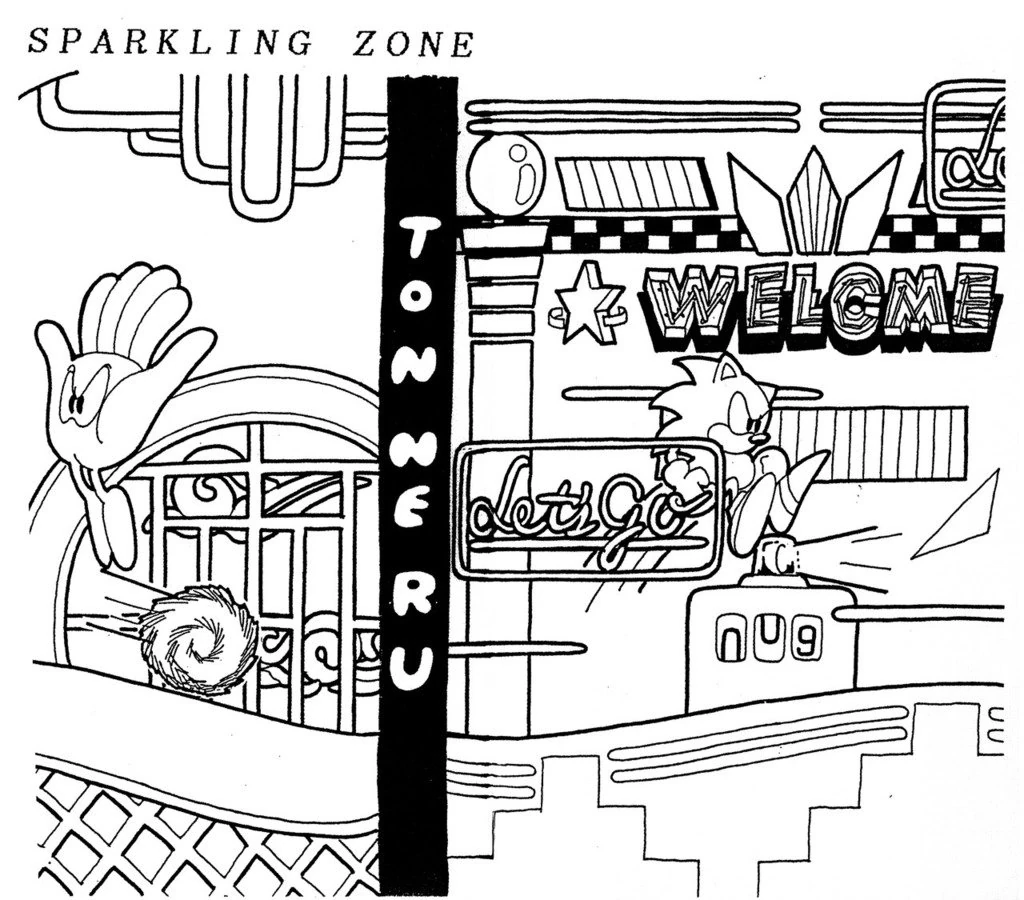
The only letter meant for the title cards that went unused after the prototype, since nothing calls for any use of it. It would've been used for Sparkling and Clock Work, but they were respectively renamed to Spring Yard and Scrap Brain. |
 |
A period, also intended for the title cards. |
 |
A small fireball, similar to the ones shot out by the gargoyle statues in Labyrinth Zone. |
 |
Some sort of smoke or dust. This is loaded in VRAM within the prototype, where the final game's checkpoint graphics would've been found. |
 |
Sparkles, in a similar style to the invincibility stars. |
 (How it looks assembled.)

Unused Objects#

|
To do: |
Object ID |
Graphic |
Name |
Description |
|---|---|---|---|
1D |
 |
Unused Switch |
An object with broken graphics that functions as a switch. While Sonic is touching this object, it will move down very slightly and set switch 0 in the switch flags array as pressed. |
24 |
 |
Unused Explosion |
An explosion object with very similar code to the used explosion objects; just like the used explosion objects, it has no collision, and simply plays an explosion animation. The graphics it uses are unique and are also not used anywhere else in the game. |

(Source: Sonic 1 Disassembly)
Unused Subtypes#
Several objects have unused subtypes, a "subtype" being a variable on the object that can modify its behavior and/or appearance.
Graphic |
Name |
Description |
|---|---|---|
N/A |
Labyrinth Zone Breakable Pole |
One of the "wind tunnel" sections in Labyrinth Zone Act 3 features poles that Sonic can grab onto. The time until a pole breaks after Sonic grabs it varies depending on the object's subtype. All 5 of the poles in this section share the same subtype of 04, so they all break after 4 seconds. The poles do not appear in any other section in Labyrinth Zone or Scrap Brain Zone Act 3. In addition, while they can be placed using edit mode, any poles placed this way have a subtype of 00, making them unable to break on their own. |
N/A |
Labyrinth Zone Flapping Door |
The time that a "flapping door" (the door placed in front of tunnels in Labyrinth Zone and Scrap Brain Zone Act 3) waits before opening or closing varies depending on the object's subtype. However, all flapping doors encountered in the final game or placed through edit mode have a subtype of 02, so they all wait 2 seconds before opening and 2 seconds before closing. |
 |
Green Hill Zone Log Bridge |
The number of logs that appear in the well-known log bridge vary depending on the object's subtype. However, in the final game all bridges in all 3 Acts of Green Hill Zone share a subtype of 0C, so they all have 12 logs. |
N/A |
Fireball |
Fireballs with a subtype of 03 fly up and fall down at a speed of 7 pixels/frame, faster than any of the other fireball subtypes with the "fly up and fall down behavior". Fireballs with a subtype of 04 fly upwards until they hit a ceiling, as opposed to falling downwards after some time. Neither of these fireball subtypes can be encountered in-game normally. |
 |
Swinging Platform |
The swinging platforms of Green Hill Zone instead carry a wrecking ball when bit 4 of their subtype value is set. The wrecking ball can hurt Sonic; however, unlike the swinging spike balls that are also represented by this swinging platform object, or the Green Hill Zone boss wrecking ball, the swinging wrecking ball still runs platform collision code. This allows Sonic to stand on the wrecking ball if he is invulnerable. Technically, the swinging platforms of Marble Zone, Star Light Zone, and the swinging spike ball of Scrap Brain Zone are capable of doing this, too, but the wrecking ball graphics are not loaded, suggesting this feature was only intended for Green Hill Zone. The PAR codes FFFE06:6B00 + FFD004:1500 will allow you to place an instance of the wrecking ball with a chain length of 10 in debug mode. |
N/A |
Green Hill Zone Spikes on Log |
The subtype of this object determines how many spikes the individual object has (the spiked log sections in-game are constructed of multiple of these objects). In-game, all of these objects have a subtype of 10 (16 spikes), so variants of different numbers of spikes are never seen. |
N/A |
Collapsing Floor |
The collapsing floors that appear in Marble Zone, Star Light Zone, and Scrap Brain Zone fall apart into fragments in an unordered manner. If bit 0 of the object's subtype is clear, the collapsing floor will instead fall apart in a more fluid motion from left to right, or right to left depending on the object's orientation. However, this can only be seen on collapsing floor objects placed using edit mode as they have a subtype of 00 (the collapsing floors placed in levels have subtypes of 01 and 81, so they wouldn't show this behavior). |
N/A |
Marble Zone Grass Platform |
If the lower digit of the Marble Zone grass platform's subtype is set to 4 or C (such as 24), the platform will move up and down with a larger range than any of the other subtypes. Specifically, the 3 least significant bits of the subtype must be equal to 4. There are 4 different "up and down movement" behaviors that only differ in movement range for the platform subtypes with lower digits between 1-4, and 9-C; the other behaviors / ranges are used, but this specific one was never used for any platform placed in Marble Zone. |
(Source: Sonic 1 Disassembly)
Unused Monitor Subtypes#
The Monitor object has several unused subtypes, though all of these unused subtypes do nothing when the monitor is broken.
Three of these subtypes use otherwise unused power-up art. The unused art is also visible if you fly over the goalpost in debug mode or by using the level wrapping glitch, as this causes the end-of-level art loading routine to not execute; the goalpost art is normally written over the top of the art for the monitors. These monitor subtypes are all also unused in the prototype, and do nothing when broken there either.
Artwork |
Description |
|---|---|
 |
A monitor that shows nothing but static. Represented by subtype 00, and also displayed as a default for invalid monitor subtypes. Scrap Brain Zone Act 2 contains a number of these invalid monitor subtypes (apparently a victim of changing object allocations - the subtypes work out perfectly if the monitors are changed to solidity objects), which emit various glitched tiles when broken. The 00 subtype can be placed in Debug Mode. |
 |
A Robotnik monitor, represented by subtype 01. Footage from the Computer Chronicles 1991 WCES Event shows this Robotnik art on monitors that cycle between various other powerups. Later used in the 2013 remake, Sonic 2, Sonic 3 & Knuckles, and Sonic Mania, where it has been given the ability to hurt Sonic. |
 |
A monitor with an "S" on it, represented by subtype 07. This monitor appears in Prototype 510 of Sonic CD, essentially giving the player a speed boost and invincibility. In other games it appears in, including this game's 2013 remake, it grants Super/Hyper forms. |
 |
A monitor displaying Sonic's unused goggles, represented by subtype 08. An unused variable exists and cleared alongside all other power-up variables at 0xFFFE2F, believed to be for the goggles. These become placeable objects in the 2013 remake's debug mode. |
Null Objects#
Objects with an ID of 02, 03, 04, 05, 06, and 07 all point to a Null object subroutine (which has no code, meaning it falls through to the subroutine for applying gravity to objects instead). Originally, these were all objects that were used to test stuff in early development. All of these objects would remain unused in the prototype.
Empty Objects#
Objects with an ID of 10, 19, and 4F all only contain an rts instruction. In the prototype, these objects were a Sonic Animation Test object, the Green Hill Zone rolling ball that still remains in Debug Mode, and the Splats badnik that was meant to be used in Scrap Brain Zone before being cut. (These are all referred to as play02, ball, and usa in the source code.)
Obscured Sprites#
Artwork |
Description |
|---|---|
 |
The lower half of Sonic's title screen animation are hidden behind the SONIC THE HEDGEHOG ribbon, making these go obscured. These are actually leftovers from the genga (key animation) sketches, seen here. They can, however, be seen in numerous early emulations of the game (Including the official Sega Smash Pack Volume 1 for the Dreamcast), which incorrectly render Sonic in front of the logo. A slightly edited version of the full sprite can also be seen on the options screen in the canceled game Sonic's Edusoft. |
 |
Due to a level art list error, one of the Roller sprites are overwritten with Caterkiller art. |
 |
The "END" graphics where Robotnik jumps on the logo has its shadow graphics below separated from the rest of the text. |
 |
Sonic's hand on the continue screen is separated from the main sprite. Oddly, it's misplaced one pixel to the right in the assembled sprite. |
 |
Robotnik's legs in his crouch and jump frames are obscured by his main body sprite. |

Act 4 Leftovers#
Every single Zone actually has an Act 4 entry, but only Labyrinth Zone uses it for Scrap Brain Zone Act 3.
No unique starting positions for any Act 4 (Besides Labyrinth Zone) have been added.
Therefore loading into one of these Acts spawn the player at the positions: $0080 for X, and $00A8 for Y.
Most of these Acts crash the game due to invalid pointers, however the level boundaries show some unique values for Act 4.
Zone |
Act |
Left Boundary |
Right Boundary |
Top Boundary |
Bottom Boundary |
|---|---|---|---|---|---|
Green Hill Zone |
1 |
$0000 |
$24BF |
$0000 |
$0300 |
Green Hill Zone |
2 |
$0000 |
$1EBF |
$0000 |
$0300 |
Green Hill Zone |
3 |
$0000 |
$2960 |
$0000 |
$0300 |
Green Hill Zone |
4 (Unused) |
$0000 |
$2ABF |
$0000 |
$0300 |
Labyrinth Zone |
1 |
$0000 |
$19BF |
$0000 |
$0530 |
Labyrinth Zone |
2 |
$0000 |
$10AF |
$0000 |
$0720 |
Labyrinth Zone |
3 |
$0000 |
$202F |
$FF00 |
$0800 |
Labyrinth Zone |
4 (Scrap Brain Zone Act 3) |
$0000 |
$20BF |
$0000 |
$0720 |
Marble Zone |
1 |
$0000 |
$17BF |
$0000 |
$01D0 |
Marble Zone |
2 |
$0000 |
$17BF |
$0000 |
$05D0 |
Marble Zone |
3 |
$0000 |
$1800 |
$0000 |
$0720 |
Marble Zone |
4 (Unused) |
$0000 |
$16BF |
$0000 |
$0720 |
Star Light Zone |
1 |
$0000 |
$1FBF |
$0000 |
$0640 |
Star Light Zone |
2 |
$0000 |
$1FBF |
$0000 |
$0640 |
Star Light Zone |
3 |
$0000 |
$2000 |
$0000 |
$0720 |
Star Light Zone |
4 (Unused) |
$0000 |
$3EC0 |
$0000 |
$0720 |
Spring Yard Zone |
1 |
$0000 |
$22C0 |
$0000 |
$0420 |
Spring Yard Zone |
2 |
$0000 |
$28C0 |
$0000 |
$0520 |
Spring Yard Zone |
3 |
$0000 |
$2C00 |
$0000 |
$0620 |
Spring Yard Zone |
4 (Unused) |
$0000 |
$2EC0 |
$0000 |
$0620 |
Scrap Brain Zone |
1 |
$0000 |
$21C0 |
$0000 |
$0720 |
Scrap Brain Zone |
2 |
$0000 |
$1E40 |
$FF00 |
$0800 |
Scrap Brain Zone |
3 (Final Zone) |
$2080 |
$2460 |
$0510 |
$0510 |
Scrap Brain Zone |
4 (Unused) |
$0000 |
$3EC0 |
$0000 |
$0720 |
Ending Sequence |
1 (Good Ending) |
$0000 |
$0500 |
$0110 |
$0110 |
Ending Sequence |
2 (Bad Ending) |
$0000 |
$0DC0 |
$0110 |
$0110 |
Ending Sequence |
3 (Unused) |
$0000 |
$2FFF |
$0000 |
$0320 |
Ending Sequence |
4 (Unused) |
$0000 |
$2FFF |
$0000 |
$0320 |
Green Hill Zone Act 4's camera stops exactly after the fight against Eggman.
Perhaps this is an old leftover from when the boss didn't exist yet in earlier prototypes.
Labyrinth Zone Act 4 is used up for Scrap Brain Zone Act 3.
Marble Zone Act 4's camera stops exactly before the fight against Eggman.
This lines up with the prototype where Eggman was only able to be fought in Green Hill.
Star Light Zone Act 4's camera value is possibly a placeholder given that this was one of the last zones to be implemented in the game.
It's possible this Zone didn't exist in very early prototypes.
Spring Yard Zone Act 4's camera value is actually the same value used for Sparkling Zone Act 3 in the prototype.
The value for this level in the prototype was $29C0.
Scrap Brain Zone Act 3 is used up for Final Zone.
Scrap Brain Zone Act 4's camera uses the same placeholder value of Star Light Zone Act 4, this level didn't exist in the prototype.
Ending Sequences Act 3 and 4 are both unused and use another possibly placeholder value for their camera.
In the prototype, all Acts of this Sequence use the same value.
Zone Leftovers#
Watch on YouTubeZone ID 06, Act ID 00 (Act 1) and Act ID 01 (Act 2) are used for the ending sequence (good ending and bad ending respectively) in the final game, however, Zone 06 exhibits some odd behavior when played as a regular level. It plays the Final Zone music, and doesn't have an act number on the title card (which just says "Zone"). This isn't due to reading garbage data either, this level is specifically assigned these music and properties. The collision has some problems, and the graphics are messed up too.
Act ID 00 (Act 1) spawns Sonic where he normally is during the good ending, while Act ID 01 (Act 2) spawns Sonic where he normally is during the bad ending. Act ID 02 (Act 3) is unused and completely empty, resulting in Sonic falling to his death.
Unused Warping Effect#
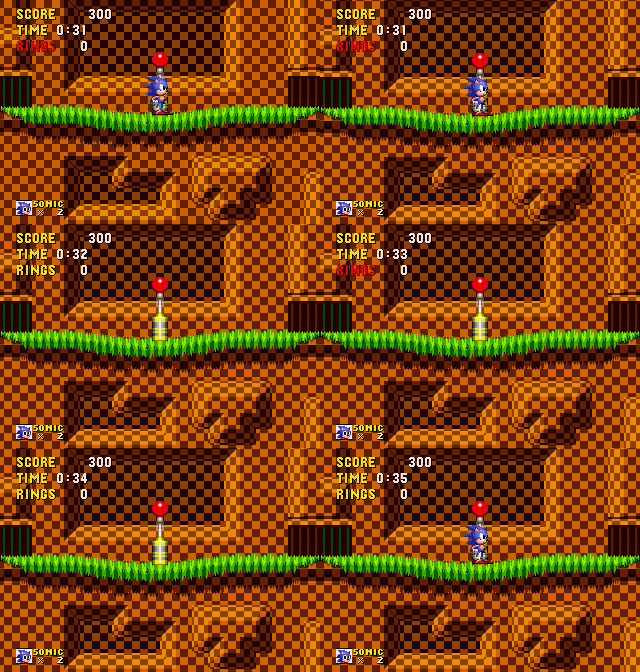

This was used in the prototype when running into a giant ring; Sonic disappears as he runs into it, and a warping noise plays. Sonic then reappears a few seconds later, likely as a method of testing the object.
(Source: Sonic Database)
(Sprite Ripping: Cioss)
Unused Demo#
Watch on YouTubeDirectly after the demo pointers, there is completely unreferenced demo data, located at 0x40C0 in REV00, and 0x40C2 in REV01. The demo shows Sonic slowly walking right, jumping once, then running for a few seconds. This data is also present in the prototype, Sonic 2, and the Sonic 3 prototype.
(Source: Sonic Retro)
Misplaced Objects#

In Green Hill Zone Act 1, a Motobug is suspended above an abyss near the first group of spikes. It is quickly erased from memory because there is no collision area for it to spawn on. A stage planning sheet reveals that a Motobug was once placed at the top of the hill immediately past the misplaced Motobug, in front of the spring, so perhaps this is a remnant of that early design.

Green Hill Zone Act 2 has a misplaced Crabmeat at the coordinates 10D0,0370, under the section with the moving pillars and spikes just before the checkpoint. It cannot be seen in gameplay, as it's placed such that it instantly falls into the abyss and unloads. The Crabmeat is particularly amusing compared to the other misplaced objects in this Zone in that it's already below the level of the screen.

A purple rock can be found below the boundaries of the map in Green Hill Zone Act 3 at coordinates 18D4,0771. It is impossible to reach without the use of debug mode. Changing the Y position of this rock to 0271 makes it fit perfectly with the level layout. There is also a Buzz Bomber that is impossible to reach normally at coordinates 21B0,0000.
In Spring Yard Zone Act 2, there is an upwards yellow spring below the level layout at coordinates 0B10,0ABA. This object does not exist in the prototype of Sparkling Zone Act 2, making it's existence rather strange. In Labyrinth Zone Act 1, there is a group of spikes buried in 12D3,0675. It is impossible to see them because they are out of bounds and the foreground tiles are in a layer above the sprites. For some reason, the spikes are located at the same coordinate in act 3.
|
Act 1 |
Act 3 |
|---|---|

|

|
Unused Level Chunks#
|
|
To do:
|
Labyrinth Zone:


Marble Zone:
These have been unused since the prototype, that or they were made but never used.


Star Light Zone:


All of these chunks are used in the prototype. The final rendition of Star Light Zone does not require as many unique chunks as the layout in the prototype does, leaving many leftover chunks that retain the prototype Star Light Zone art style. In addition, while the prototype does use the background chunks that are seen here, the final game has copies of these chunks in earlier chunk slots and uses those slots rather than the ones here.
Scrap Brain Zone:


Chunk 33 is used once in the prototype, near the end of Act 1. Chunk 23 was also used in the prototype's Act 2, but it had a completely different design there.
Unused 2x2 Tiles#
|
|
To do: |
All tiles loaded into VRAM are organized by spreadsheet at the RAM address FFB000, where IDs are created for each line representing 2x2 chunks of VRAM graphics. Address FF0000 is in charge of adding mirroring and collision to these tiles, creating 16x16 chunks.
In all, there are 255 chunks created from FF0000. To add these chunks, add the IDs below in the format (0x xx) after FF0000 and search for the chunk ID 01 in the level data. Through this method, it's possible to see some of the unused graphics referenced above.
Zone |
Image |
IDs |
|---|---|---|
Green Hill Zone |
|
006, 187, 199, 19A, 00C, 00E, 017, 018, 022, 028, 02B, 02C, 044, 048, 049, 055 |
Marble Zone |
 |
058, 059, 05A, 05B, 065, 069, 06A, 06B, 06C, 08A, 08C, 094 |
Spring Yard Zone |
 |
01C, 01D, 02B, 06A, 06B, 072, 08B, 08D, 0AC, 0BA, 0BB, 0D2, 0DD, 0F6, 0FB, 104 |
Labyrinth Zone |
 |
03C, 03D, 04F |
Star Light Zone |
|
018, 019, 01A, 01B, 01C, 01D, 01E, 01F, 021, 022, 023, 024, 025, 026, 027, 028 |
Scrap Brain Zone |
|
01A, 01B, 01C, 01D, 029, 02A, 034, 03E, 047, 048, 06A, 074, 07B, 085, 086, 0C0 |


Exception Handler#

The game contains a very basic error handler. In the event a 68000 exception occurs (e.g. a bug causes the game to crash), the game will stop and print some basic information to the screen. This can be triggered in the first two acts of Labyrinth Zone. If the camera is panned down at the moment the results screen is about to appear at the end of the first two Acts, the game may crash with an illegal instruction exception.
These are best performed on an actual console, as the error handler does not work properly in some emulators.
While the error handler has text for most of the defined 68000 exceptions, very few of them are likely to show up during normal gameplay, as many of them are assigned as placeholders.
Rarely, pressing C when an error message shows up will make the game continue, but sometimes it won't work properly and will either show another error message, or lead to the game freezing entirely.
A complete list of the game's error messages (which are shown below) can be found at hex value 000004E0.
ERROR EXCEPTION
BUS ERROR
ADDRESS ERROR
ILLEGAL INSTRUCTION
ZERO DIVIDE
CHK INSTRUCTION
TRAPV INSTRUCTION
PRIVILEGE VIOLATION
TRACE
LINE 1010 EMULATOR
LINE 1111 EMULATOR
Unused Sounds#
Sound ID |
Sound |
Description |
|---|---|---|
$A5 |
This sound effect was used for when the earlier Ballhog bombs exploded while hitting the ground, and when the Buzzbomber missile made contact with Sonic. In the released prototype, the sound can only be heard when the ballhog bombs hit the ground. |
|
$A2 |
These sounds are similar to the spike sounds in the final game. |
|
$AB |
||
$B8 |
Unused Music Sequences#
In the game, there exists some unused sequences for music, most of which are either a little or very different than the final version.
Duplicate Credits Voices#
Voice $1C is a direct copy of Voice $0A, called once in the intro of the FM1 channel. Voice $1D is a direct copy of Voice $10, called once in the intro of the FM2 channel.
Unused Credits Voices#
Voice $13 is an unused, alternate version of Voice $07. Voice $1E is an unused, alternate version of Voices $0A and $1C.
Unused Credits Sequence#
Unused |
Masa's Demo |
|---|---|
This unused sequence sounds almost exactly like the track from Masato's demos titled Theme of SONIC THE HEDGEHOG Demo which has many major differences from the final version, one of which there being that an extra note is being played.
Unused Spring Yard Zone Percussion#
Unused |
Sega Music Collection |
Final |
|---|---|---|
Spring Yard Zone features extra percussion that was dummied out with note rests. This can be heard in the Sega Music Collection version of the song. Strangely, this is not heard in the demo version of the song.
Unused Green Hill Voice#
Unused |
Used |
|---|---|
While called within the intro of the song, no note plays while it is active, thus is never heard in the song itself.
Unused Boss Voices#
Voice $03 is unused and may have been used to test the bass. |
Unused (Voice $03) |
Unused (Voice $04) |
Masa's Demo |
Final (Voice $00) |
Unused Act Clear Trumpet#
Unused |
Masa's Demo |
Final |
|---|---|---|
The unused instrument makes this sound near identical to the Masa Demo version as well.
Unused Code#
Sonic 1 has quite a bit of unused code, most of which were meant for a much older version of the game: Watch on YouTube
- An unused routine to squish Sonic, which played the unused "warping" animations shown above. When this routine is enabled, it activates when Sonic is near a wall, causing him to stick in place, as if he was hanging onto the wall. It is unknown what this was meant for. In the PC version of Sonic CD, this routine is labelled as hedcolchk.
- Sonic in the Special Stages has some leftover code that would've limited his jump height, just like the Sonic in normal stages. This does not exist in the prototype.
- There's a third music queue that's never called for. This is simply a function of the sound driver which the game doesn't use.
- Code to record the demo inputs.
- A routine that converts the collision from a 'bitmap'-like format to the one used in-game. Interestingly, this was altered in the Sonic 2 Nick Arcade Prototype so it would convert Green Hill's collision to work with the new collision table, though it doesn't work since both variations would require a special development cartridge that could overwrite itself.
- Interestingly, a remnant of the data it was meant to convert can be found in the J2ME port under blkcol.bct.
- A routine to calculate a square root; this particular code was removed in the Japanese version.
- Alternate code for the invincibility stars trailing behind, making them trail behind a bit less.
Unused Palettes#
Palette |
Description |
|---|---|
 |
A palette cycle for Marble Zone's lava and torches in the background. It doesn't work very well when applied though - it may have been intended for an older iteration of the Zone's artwork, as prerelease screenshots show that the look of the lava changed significantly during development. |
 |
Alternate background palettes for the special stages. |
References#
- https://www.mobygames.com/game/6579/sonic-the-hedgehog/releases/↩︎
- https://www.sega.jp/fb/segahard/md/soft.html↩︎
- Select - Lançamentos Nacionais: Sonic the Hedgehog - Ação Games, Issue 4, August 1991↩︎
- https://groups.google.com/g/rec.games.video/c/paAgJy9q1dA/m/geqhMS8zzNIJ↩︎
- "We had 12 copies of ''Sonic in on a Friday (the 21st) and we'd sold out in 45 minutes. It was crazy. When it came down to the last copy a couple of guys got into a scuffle. It almost came to blow. We had to split them up."↩︎