 This article has a talk page!

|
To do:
|

|
This page covers the 1996 Windows 95 port of the game, not the 2011 multiplatform remake. |
Sonic CD is a Windows 95 port of the Sega CD original, and one of the earliest instances of a mainline Sonic game appearing on non-Sega hardware. It's a rather straightforward port, with little in the way of differences aside from higher resolution graphics, better FMV quality, and this loading graphic showing up between every single screen change. This port of the game would serve as the basis for the version included in Sonic Gems Collection.
This version of the game, eventually superseded by the 2011 version, has compatibility issues with modern versions of Windows and will not run properly on systems using Windows XP onward. Playing on a modern PC requires fanmade patches to get it running.
Unused Graphics#
Sprite |
Name |
Description |
|---|---|---|
 |
Sonic rolling at an angle |
Two different angles of Sonic rolling, intended for the 3D loop in Palmtree Panic 1. These are not present in the Sega CD version, except for some leftover mappings data in Tidal Tempest, but are present in its v0.02 prototype. |
 |
Sonic falling |
An animation of Sonic falling into the distance. Purpose unknown. These are not in the Sega CD version, not even in any known prototypes, except for some leftover mappings data in Tidal Tempest. |
 |
Black & white death sprite |
A black-and-white death sprite, whose purpose is unknown. This is also present (and unused) in the original Sonic the Hedgehog, in the v0.02 prototype of the Sega CD version, and in Tidal Tempest in the final Sega CD version. |
Revisional Differences#
Sonic CD was exclusively distributed by Intel - mainly in the United States - through Packard Bell, Hewlett-Packard and other computer bundles starting in October 1995 (with a 1.01 version later shipping in 1996). This initial version made use of the Dino APIs, as it had predated DirectX's deployment for developers. That following year, Sega would port this version to DirectX 3 and release it via retail around the world, while neglecting to change this version's American soundtrack for international exports.
- Like previously mentioned, the Dino release received an updated 1.01 revision that modified some files.
- Every instance of 1.0 (
SETUP.LGO,README.TXTand the About box) has been replaced to 1.01 accordingly. AUTOPLAY.EXE,AUTORUN.INF,DINOCDA.VXD,SONICDLG.DLL,DINOCDA.DLLandSONICCD.EXEhave different compile dates but don't seem to have any differences.
- Every instance of 1.0 (
- The 1995 release refers to the game as "Sonic Game" while the 1996 release just calls it Sonic CD.
- The 1995 release uses the Sonic sprite found in the About box as part of the executable while the 1996 release uses the sprite from the titlebar.
|
October 1995 (Dino) |
August 1996 (DirectX) |
|---|---|

|

|
- Both versions have completely different AutoPlayers and installers, with the 1995 release using a re-drawn title screen with a SEGA jingle when booting up.
October 1995 (Dino) |
August 1996 (DirectX) |
|---|---|
 |
 |
 |
 |
- The 1995 release installs the game to
C:\WINDOWS\SONICCDwhile the 1996 release installs it inC:\SEGA\SONICCD\. - The 1996 release installs DirectX 3 (obviously).
- The title screen's text was updated.
|
October 1995 (Dino) |
August 1996 (DirectX) |
|---|---|

|

|
Save for a 1993 VHS promo, the Windows port represents the earliest instance of Sega sourcing the cutscenes from the original tape master instead of redrawing everything.4 For whatever reason, the 1996 release changed the OPN.AVI file's codec to Cinepak to Indeo, which causes compatibility issues when playing on modern versions of Windows. The intro also now has a baked-in black bar (although there does exist a version of this intro without this black bar). Weirdly, all of the other FMV's codecs remain the same between releases.
|
October 1995 (Dino) |
August 1996 (DirectX) |
|---|---|
- The 1995 release has a dedicated application for calibrating joysticks.
- The 1995 release normally only supports 30 FPS, while the 1996 release can achieve 60 if Smooth Sonic is enabled.
- There's a Better Sound Quality option only found in the 1995 release. When selected, the music will restart and the sound effects will use their 22khz variants found in
PCM.CMP.- Weirdly, these 22khz sound effects would be later used in the Sonic Gems Collection version, although that version mostly uses the 1996 release as a basis.
- The 1995 release uses 16-bit executables for the setup and main game executable (which makes it impossible to install or play the game in 64-bit versions of Windows) while the 1996 release uses 32-bit executables.
- The Intel Corporation section in the About box credits is completely absent.
Different Title Screen Sprites#
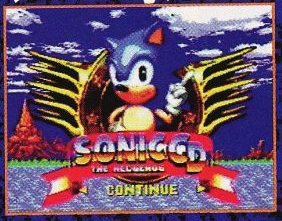
The Sega CD version of the game uses anamorphic resolution for the title screen, rendering the title screen at a 8:7 aspect ratio, which is stretched into 4:3 on analog tube televisions. As this trick would be impractical on PC (for example, if the user runs the game in a window, the game would need to stretch the image in software resulting in noticeable artifacts) the title screen is rendered at 4:3 instead and the art was adjusted accordingly. Curiously, the title screen art used for Sonic strongly resembles that seen in the EGM #50 build of the Sega CD version.
EGM #50 |
Ver0.51 to Final |
Windows 95 (DirectX) |
|---|---|---|
 |
 |
|
|
Final |
Windows 95 |
|---|---|
|
|
|


Username Secrets#
|
|
To do: |
Open the SONICCD.INI file, add [Secret] and the following lines to it for the according effect:
User=Debugger |
Activates the Secret Menu. |
User=Satoh |
Also Activates the Secret Menu. |
User=Fujiwara |
When Sonic gets hit, he will only lose half of his rings instead of all of them. |
Secret Menu#
This menu contains two additional menus: Stage and FUNC.
Stage#
This menu contains the following options:
R1
R3
R4
R5
R6
R7
R8
Special
RX refers to a set zone, though like the other versions of Sonic CD, R2 is skipped. After picking a Stage, another menu appears prompting you to pick the Past, Present, Good Future, or Bad Future version of the stage.
SPECIAL leads to a equally sized sub menu containing:
R1
R2
R3
R4
R5
R6
R7
R8(EGGMAN)
Unsurprisingly, selecting one takes you to the designated Special Stage. Clearing it returns you to the title screen.
FUNC#
Here's where the debugging stuff is. The menu contains the following options:
SpriteCmp
mapinit()
DEBUGFLAG
SPECIALDEBUG
TIMEWARP
GO_SPECIAL
GOODEND
Flags
FRAME
Timer (STAT)
TimerInit (STAT)
AVE_300Frame (STAT)
MMTimer
SndMemFree
RecStart (Demo)
RecEnd
RecPlay
RecRead
RecWrite
Demo
WAVEOPEN
WAVE CLOSE
CD Reset
- SpriteCmp - After disabling this no new sprites will load (causing to fatal errors).
- mapinit() - Sends you right to the beginning of the stage you are in.
- DEBUGFLAG - Enables item placement mode.
- SPECIALDEBUG - Stops the Special Stage timer.
- TIMEWARP - Disables the time travel when toggled off. If the player toggles this off while attempting to time travel, they'll have sparks around them forever.
- GO_SPECIAL - Takes you to your next Special Stage.
- GOODEND - Displays a dialog containing your obtained Time Stones, the zones where you have gotten a Good Future, and what your next Special Stage is.
- Flags - Displays a dialog containing:
generate_flag=00
time_flag==X
X will differ depending on the time frame you are in.
- FRAME - Displays a sub menu containing two options: 60 and 30, which changes the game's frame rate. While this option doesn't seem to do anything in the 1996 release, it does work in the 1995 release and it's the only way that version achieves 60 FPS.
- TIMER (STAT) - Appears to do nothing.
- TimerInit (STAT) - Appears to do nothing.
- AVE_300Frame (STAT) - Appears to do nothing.
- MMTimer - Disabling this speeds up the special stages.
- SndMemFree - Appears to mute every sound effect until the game is restarted. WAVEOPEN cannot restore these.
- RecStart (Demo) - Starts a demo recording for the current Zone & Time Zone, temporarily saving the player's inputs.
- RecEnd - Ends the demo recording. If there's no demo recording playing, it'll play the recording instead.
- RecPlay - Plays the current temporary recording.
- RecRead - Loads the local recording of the current Zone & Time Zone.
- RecWrite - Saves the temporary recording locally to the current Zone & Time Zone.
Demo - Leads to a sub menu containing:
AVI
11A
SPE1
43C
SPE5
82A
When clicked on, the next title screen demo will be forced to the one that was chosen.
- WAVEOPEN - Appears to only very briefly pause the game before resuming and enabling all sound effects.
- WAVECLOSE - Disables all sound effects. WAVEOPEN can restore this.
- CDReset - Appears to only mute the game music until the game is restarted.
Sega CD Cheats#
The debug menu from the Sega CD version, among all the other similar codes, is still present, but with A/B/C replaced with Space.
(Source: Sonic Retro)
OMAKE#
Found in the OMAKE folder on the 1996's version disc are BMP images of various icons, higher-res versions of some game sprites, and the title screen. OMAKE in Japanese means “extra” or “bonus,” so it’s likely that this was probably just a folder for curious players.
However, the images with “ICON/SNC_ICO” in the title are actually images for the program on the desktop. These are likely here for anybody who wants to customize their game to how they desire.


References#
- https://info.sonicretro.org/Interview:_Jim_Tretheway_(2000-09-23)_by_RyogaMasaki↩︎
- "Buy 2 Sega Proven Family Fun Games and Get a 3rd One Free!" - Just so you're totally informed: Bug! and Baku Baku will ship from Sega's warehouse to stores nationwide on September 5th, and Sonic CD on September 20th.↩︎
- ソニック・ザ・ヘッジホッグCD - 1996年 8月 9日]↩︎
- https://forums.sonicretro.org/posts/1070146↩︎