Differences from Previous Versions#
|
GameCube
|
2012
|
|
|
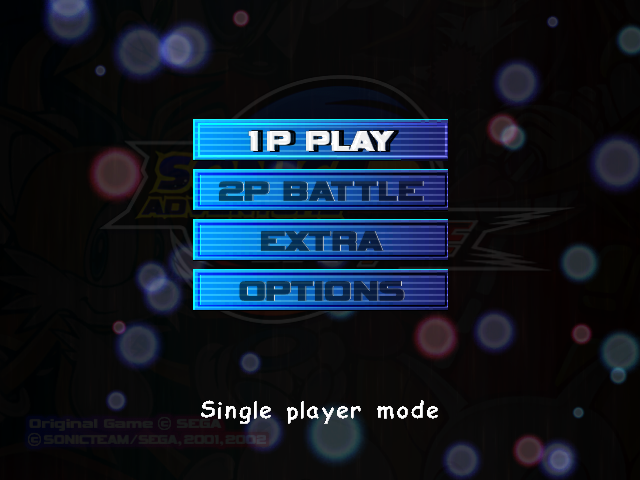
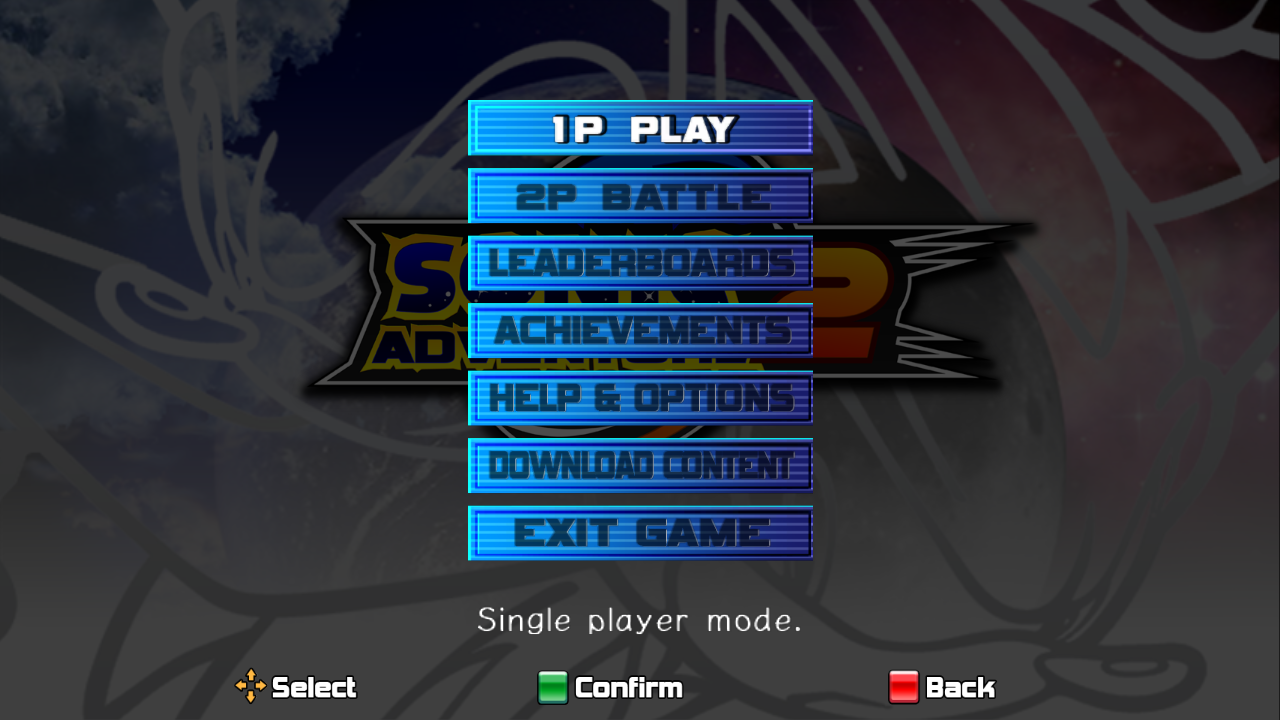
The menu was completely overhauled in this version:
- The "Options" button was renamed to "Help & Options".
- Button prompts have been added to the bottom of the menus.
- The Omochao tutorial was replaced with a tutorial resembling a manual.
- The text language option is now a part of the launcher. Though the voice language option is still a part of the options menu.
- Somehow, the music has somehow gotten even louder.
|
Dreamcast/GameCube
|
2012
|
|
NOW SAVING
|
Saving...
|
- When the game is saving data, the message that appears on the top right is slightly different.
Graphical Differences#
- Some HUD graphics were remade in HD, which is done by storing them in
.PAK files and patching them on the fly.
- 16:9 aspect ratio support was added, though some cutscenes still display in 4:3 due to using video effects.
- All references to SOAP shoes were removed for copyright reasons due to SOAP's licensing agreement with Sega being expired.
- Omochao's hints from Sonic Generations were added between loading screens.
- The recap backgrounds seen when resuming an unfinished story were redone in the 2012 version. Although it's barely visible, Sonic's artwork in the background was updated to the SOAP shoes' version, whereas the Dreamcast and GameCube versions are instead based on an alternate version of his portrait that isn't wearing the SOAP shoes.
|
Dreamcast/GameCube
|
2012
|

|

|
- The health icon was changed from a cross to an 'H', likely due to the ICRC being notoriously strict about how their emblem is used in entertainment since the original's release.
- All artwork previously portraying Sonic wearing his classic shoes were replaced with the SOAP shoe versions.
Stage Differences#
- All of Big's cameos in levels that were removed in the GameCube version are restored, except for ones in Wild Canyon and the multiplayer mode.
Route 101#
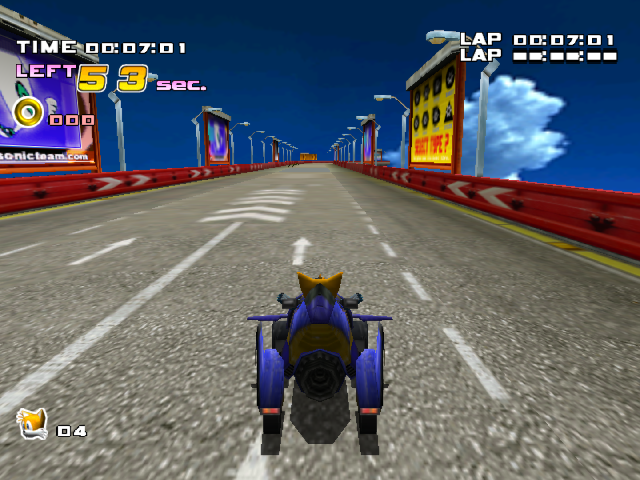
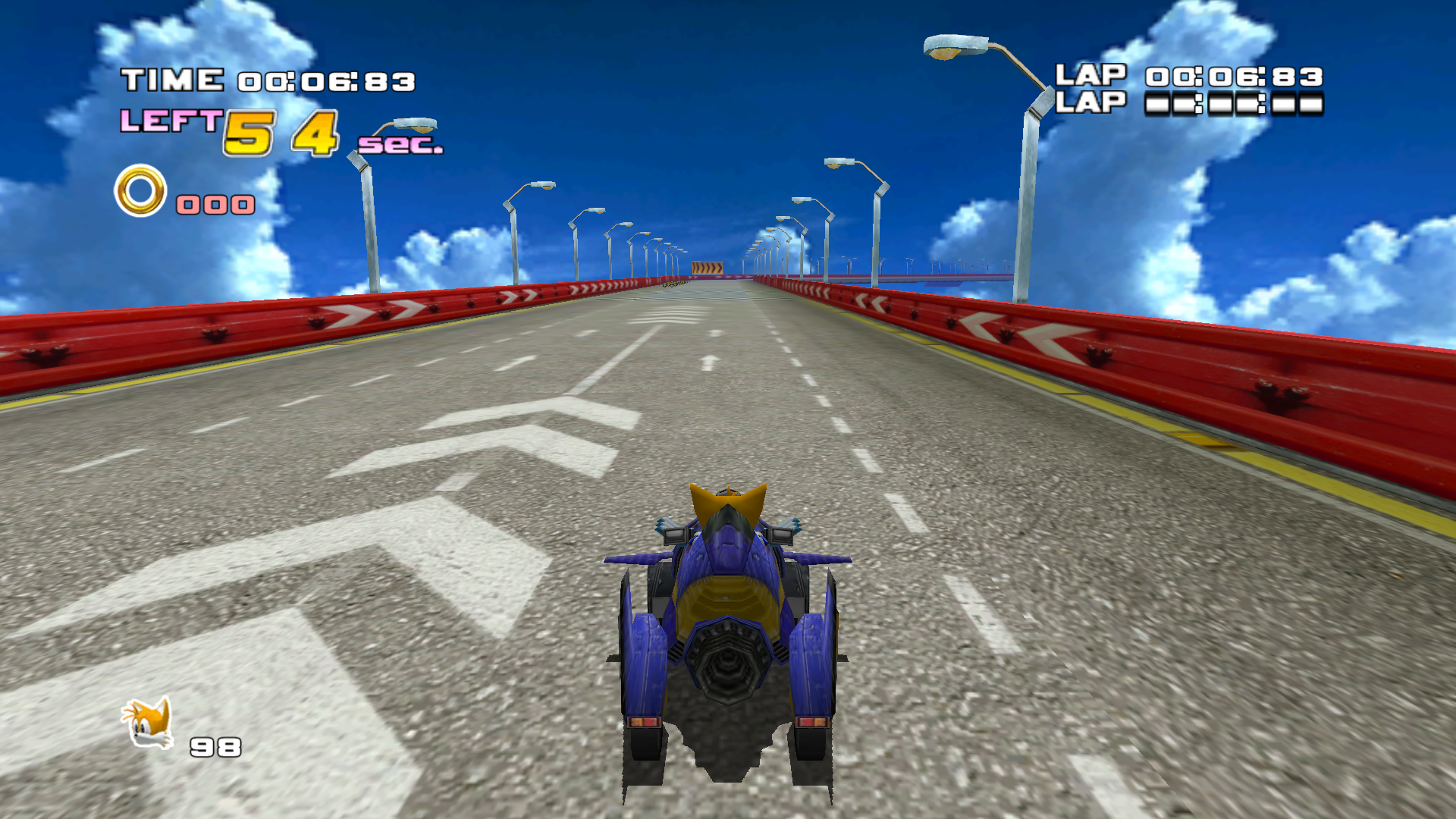
- The billboards that were present in the Dreamcast and GameCube versions are strangely absent in the 2012 version.
|
Dreamcast/GameCube
|
2012
|
|
|
Unused Graphics#
Unused Font#
Used for debugging purposes.
Title Screen Demo Texts#

The background for the title screen includes text for trial versions. While they are used in the console versions, the PC version doesn't have a trial version.
Scene Select Icon#

The icon for the Hero Story's Sonic vs. Shadow 2 scene from the Dreamcast version was given a new icon in this version despite it still going unused.
GameCube Version Leftovers#
As mentioned above, the .PAK files are patched in on the fly to display the HD HUD and remove SOAP shoes references; deleting these files will make the game use the original PRS files, which were left unmodified from the GameCube release.
Iron Gate Lighting#
|
Xbox 360/PS3 (Shown: GameCube)
|
PC
|
|
|
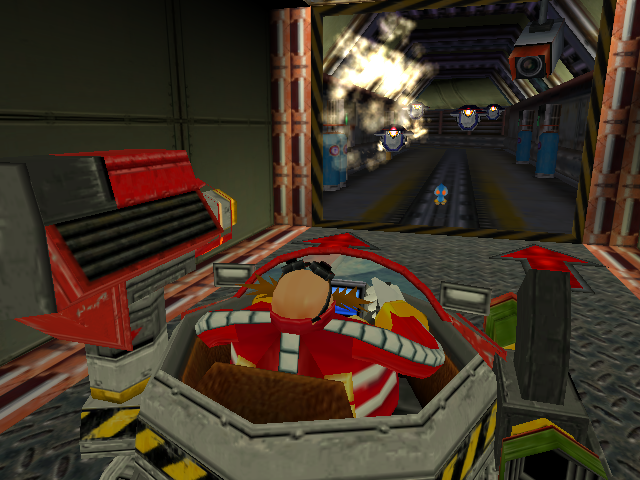
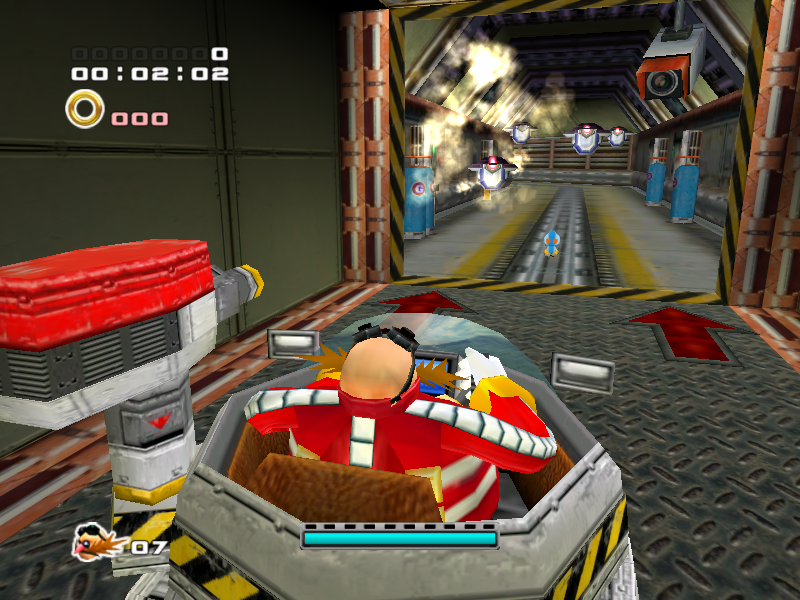
A bug in the PC version causes Eggman's flashlight to illuminate the entire stage in Iron Gate and Lost Colony. The stages themselves are identical to the GameCube version, which can be seen on the Xbox 360/PS3, where the bug isn't present.
Stage Select Background#
|
Xbox 360/PS3
|
PC
|
|
|
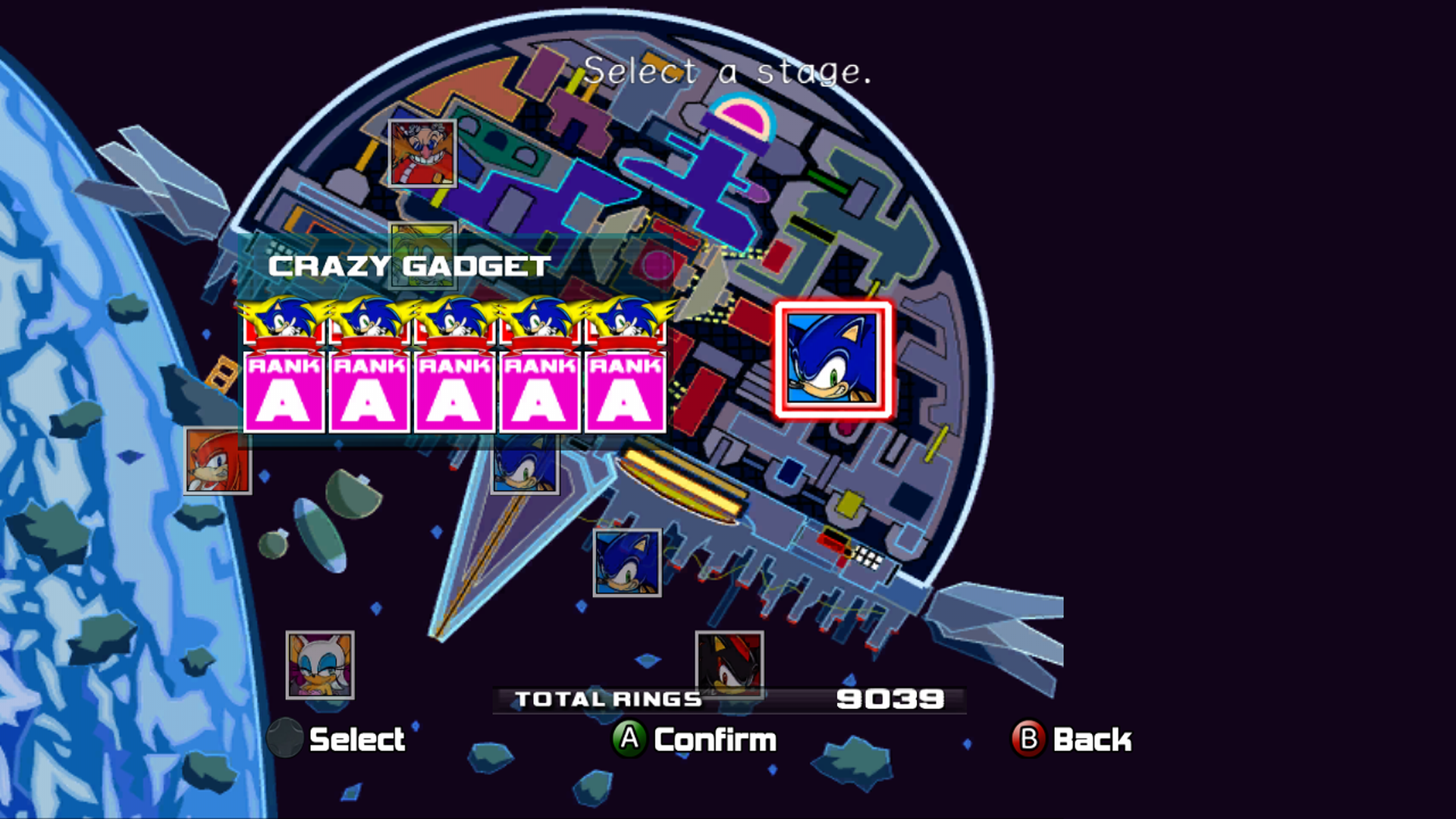
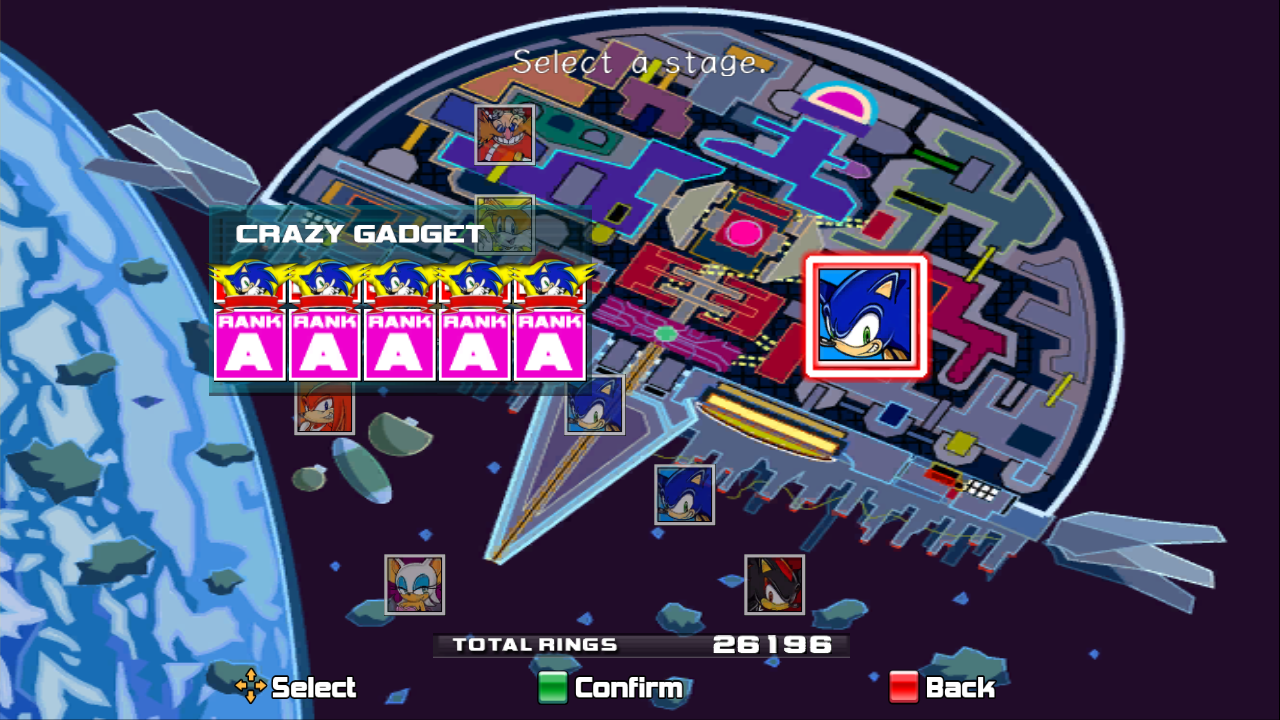
The ARK section of the stage select map has difficulties displaying in 16:9 due to its narrow size. The PC version stretches the image to the size of the screen, but it doesn't apply to the transition between the two sections of the map, resulting in a notable snap before and after.
Background Text#
|
Dreamcast
|
Xbox 360/PS3
|

|
|
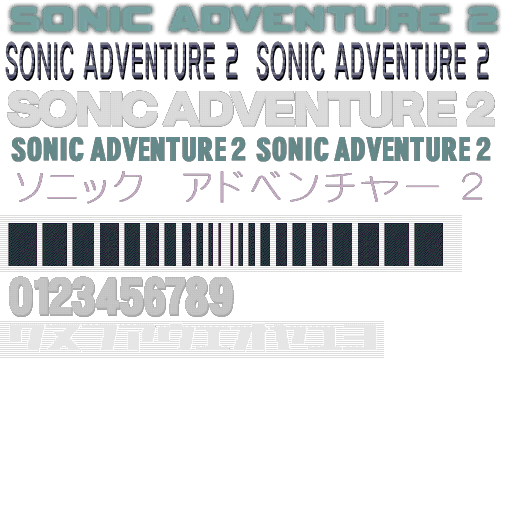
The Dreamcast version's scrolling text for the main menu background was remade, but it only shows up in the console versions. It isn't used in the PC version, but the code for displaying it is still there and it still appears in the in-game manual's screenshots.
Options#
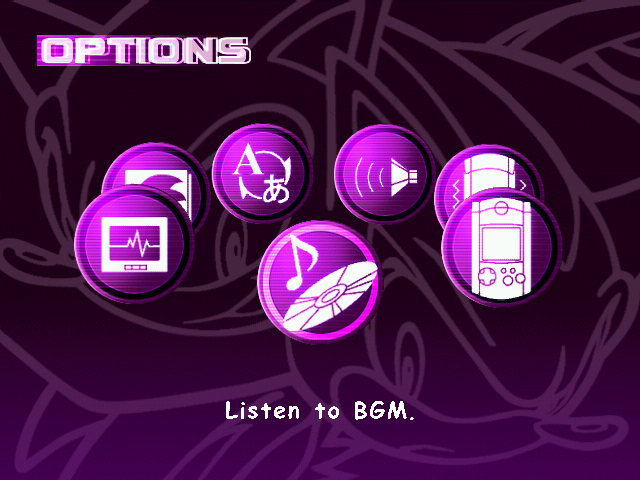
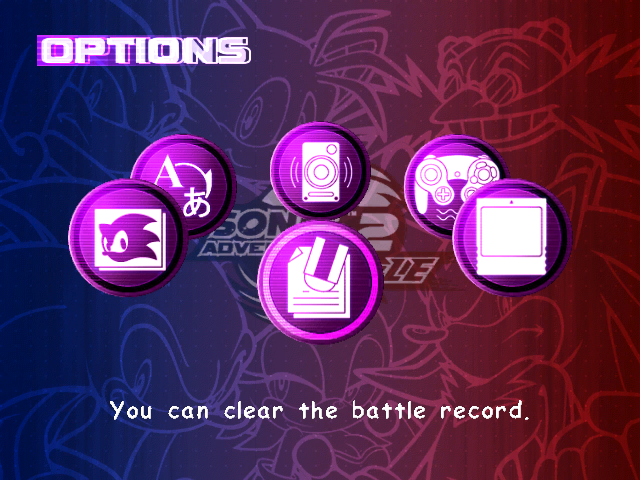
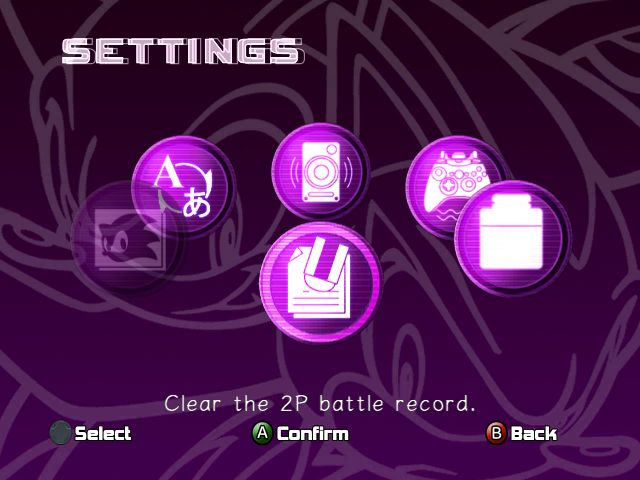
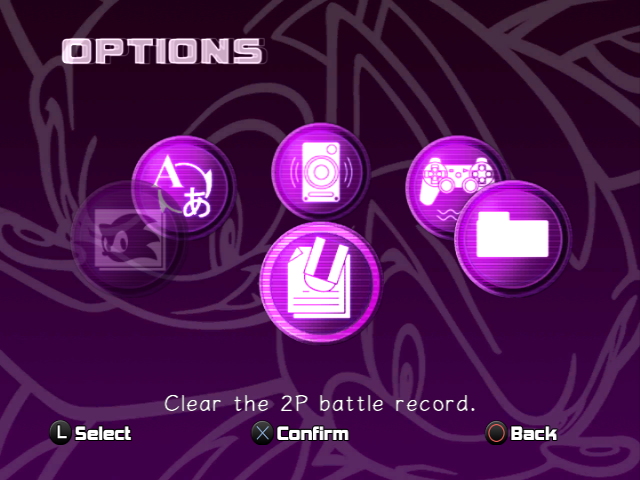
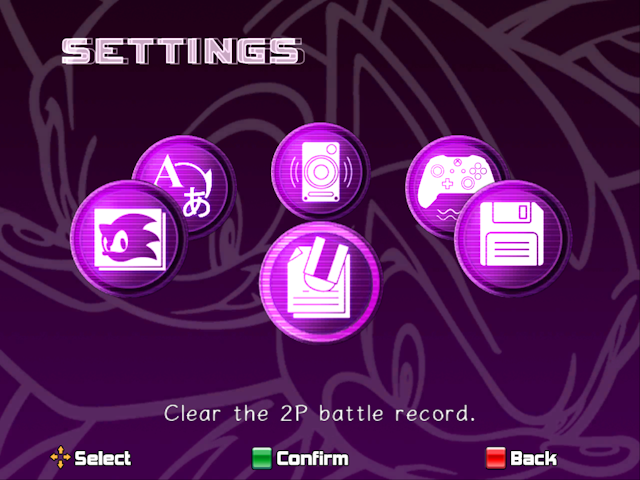
The buttons in the options menu is different for each version. Interestingly, the Dreamcast, GameCube, and PS3 versions read "OPTIONS" on the top left. On Xbox 360 and PC, it reads "SETTINGS".
Memory Card Select#
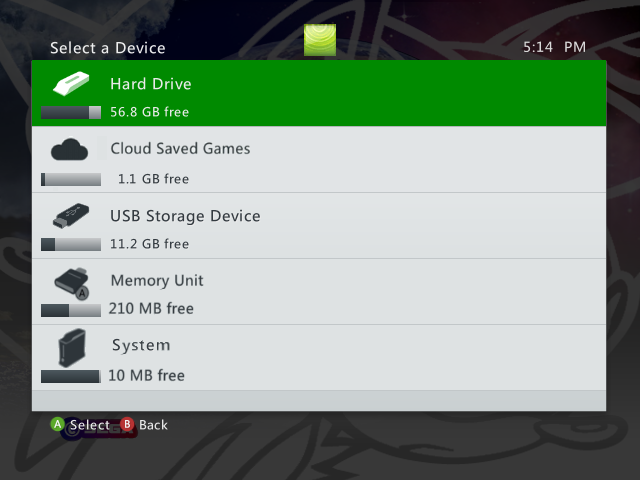
The Memory Card select screen on all versions differ. The Dreamcast version allows you to choose 8 VMUs, allowing up to 88 main save files per console, assuming nothing else is stored on the VMUs. The GameCube version allows you to choose 2 Memory Cards, which allows a different amount of save files depending on the type. The Xbox 360 version allows you to choose between multiple storage devices. The PS3 version will, by default, save to the HDD. The PC version will save the game data to the game installation.
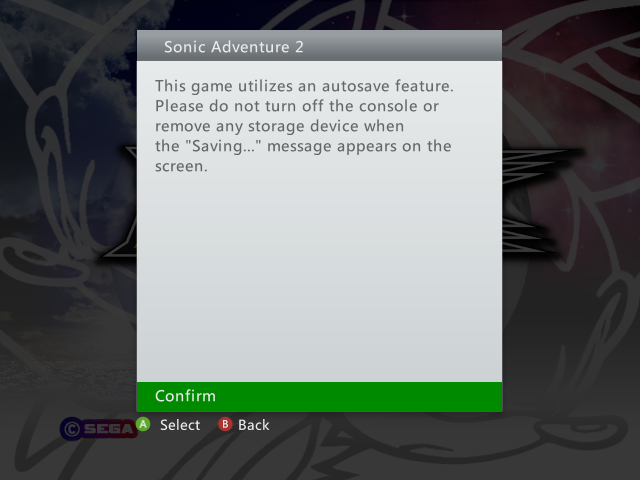
The Xbox 360 and PS3 version have a warning about auto-saving. The Xbox 360 displays the message after selecting a storage device. The PS3 displays the message when the game is starting up. All other releases do not have this.
Leftovers from Previous Versions#
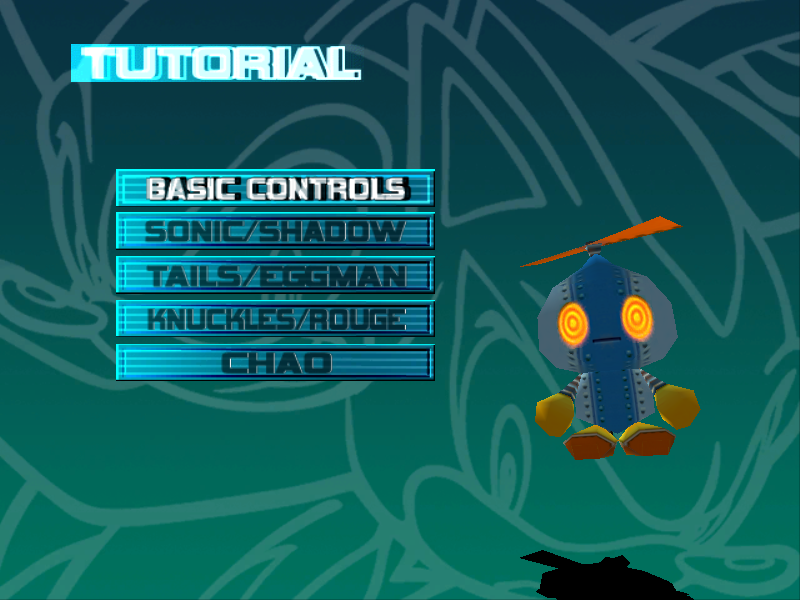
Previous versions of the game had a Tutorial option in the Extras menu where Omochao would provide the player with a guide on how to play the game. This tutorial was replaced in this version, but the original Omochao version (as well as the option for it) are still in the game. This tutorial menu is identical to the one used in the GameCube version.
In the Steam port, all FMVs are stored in the MPEG Sofdec (SFD) format, but the original MPEG (M1V) files are still present. Format aside, the videos are identical.
GameCube Memory Card#

|
To do:
Find out if the GameCube model still exists.
|
In the Steam version, Data_DLL.dll's cardObj export contains a list of four models of GameCube memory cards in a box with a slot indicator above them, one each for Slot A and Slot B in English and Japanese. Additionally, fileSelect.prs, fileSelect_e.prs, fileSelect.pak, and fileSelect_e.pak contain textures for the GameCube model that appears in the back of the GameCube version's save file select screen.
For some bizarre reason, the Debug Menu for the Dreamcast and GameCube versions is still present. The code to display the text was removed, but the options still function.
References#
|
|
|
Genesis
|
Sonic the Hedgehog (Prototype) • Sonic the Hedgehog 2 (Prototypes) • Sonic the Hedgehog 3 (Prototype) • Sonic & Knuckles (Prototypes) • Sonic 3 & Knuckles • Sonic 3D Blast (Prototypes) • Sonic the Hedgehog 3 (film)
|
|
Sega Master System
|
Sonic the Hedgehog (Prototype) • Sonic the Hedgehog 2 (Prototype) • Sonic Chaos (Prototypes) • Sonic Blast
|
|
Game Gear
|
Sonic the Hedgehog (Prototype) • Sonic the Hedgehog 2 (Prototype) • Sonic Chaos (Prototypes) • Sonic Triple Trouble (Prototypes) • Sonic Labyrinth • Sonic Blast (Prototypes)
|
|
Arcade
|
SegaSonic the Hedgehog (Prototype)
|
|
Sega CD
|
Sonic the Hedgehog CD (Prototypes)
|
|
32X
|
Knuckles' Chaotix (Prototypes)
|
|
Windows
|
Sonic the Hedgehog CD (1996) • Sonic 3D Blast • Sonic Heroes (Prototypes) • Sonic Adventure DX: Director's Cut (2004) (Demo) • Sonic the Hedgehog 4: Episode I (Prototypes) • Sonic the Hedgehog CD (2011) (Demo) • Sonic Adventure DX: Director's Cut (2011) • Sonic Generations (Demos) • Sonic the Hedgehog 4: Episode II (Prototype) • Sonic Adventure 2 (Prototype) • Sonic Lost World • Sonic Mania • Sonic Forces • Sonic Colors: Ultimate • Sonic Frontiers • Sonic Superstars • Sonic X Shadow Generations
|
|
Sega Saturn
|
Sonic X-treme • Sonic 3D Blast (Prototype)
|
|
Dreamcast
|
Sonic Adventure (Prototypes) • Sonic Adventure 2 (Prototypes)
|
|
Neo Geo Pocket Color
|
Sonic the Hedgehog Pocket Adventure (Prototypes)
|
|
GameCube
|
Sonic Adventure 2: Battle (Demo) • Sonic Adventure DX: Director's Cut (Prototypes) • Sonic Heroes (Prototypes) • Shadow the Hedgehog (Prototypes)
|
|
Game Boy Advance
|
Sonic Advance (Prototype) • Sonic Advance 2 (Prototype) • Sonic Advance 3 (Prototype) • Sonic the Hedgehog Genesis
|
|
PlayStation 2
|
Sonic Heroes (Prototypes) • Shadow the Hedgehog (Prototype) • Sonic Unleashed
|
|
Xbox
|
Sonic Heroes (Prototypes) • Shadow the Hedgehog (Prototype)
|
|
DoJa, BREW
|
Sonic the Hedgehog • Sonic the Hedgehog 2
|
|
J2ME
|
Sonic the Hedgehog • Sonic the Hedgehog 2 • Sonic Unleashed • Sonic Advance
|
|
N-Gage
|
Sonic N
|
|
Nintendo DS
|
Sonic Rush (Demo) • Sonic Rush Adventure • Sonic Colors (Demo)
|
|
Xbox 360
|
Sonic the Hedgehog (Prototypes) • Sonic Unleashed (Prototypes) • Sonic Adventure DX: Director's Cut (Prototypes) • Sonic the Hedgehog 4: Episode I (Prototypes) • Sonic Generations (Demos) • Sonic the Hedgehog CD (2011) (Demos) • Sonic the Hedgehog 4: Episode II (Prototype) • Sonic Adventure 2 (Prototype)
|
|
Wii
|
Sonic and the Secret Rings • Sonic Unleashed • Sonic and the Black Knight • Sonic the Hedgehog 4: Episode I (Prototypes) • Sonic Colors
|
|
PlayStation 3
|
Sonic the Hedgehog (Prototypes) • Sonic Unleashed (Prototypes) • Sonic the Hedgehog 4: Episode I (Prototypes) • Sonic Generations (Demos) • Sonic the Hedgehog CD (2011) (Demo) • Sonic the Hedgehog 4: Episode II (Prototype) • Sonic Adventure 2 (Prototype)
|
|
Nintendo 3DS
|
Sonic Generations • Sonic Lost World
|
|
Wii U
|
Sonic Lost World
|
|
PlayStation 4, Xbox One, Nintendo Switch
|
Sonic Mania • Sonic Forces (Demo) • Sonic Colors: Ultimate • Sonic Frontiers • Sonic Superstars • Sonic X Shadow Generations
|
|
Amazon Luna
|
Sonic Mania • Sonic Colors: Ultimate • Sonic Frontiers • Sonic Superstars
|
|
PlayStation 5, Xbox Series X
|
Sonic Frontiers • Sonic Superstars • Sonic X Shadow Generations
|
|
Nintendo Switch 2
|
Sonic X Shadow Generations • Sonic Frontiers Definitive Edition
|
|
iOS, Android, tvOS
|
Sonic Advance (2011) • Sonic the Hedgehog 4: Episode I (Prototypes) • Sonic the Hedgehog 4: Episode II (Prototype) • Sonic the Hedgehog • Sonic the Hedgehog 2 • Sonic the Hedgehog CD (Demo) • Sonic Advance (2014)
|
|
Ouya, NVIDIA Shield
|
Sonic the Hedgehog 4: Episode I (Prototypes) • Sonic the Hedgehog 4: Episode II (Prototype) • Sonic the Hedgehog CD (Demo)
|
|
|
|
Racing Games
|
|
Game Gear
|
Sonic Drift (Demo) • Sonic Drift 2
|
|
Windows
|
Sonic R • Sonic Riders (Prototype) • Sonic & SEGA All-Stars Racing • Sonic & All-Stars Racing Transformed • Team Sonic Racing • Sonic Racing: CrossWorlds (Prototypes)
|
|
Sega Saturn
|
Sonic R (Preview)
|
|
PlayStation 2
|
Sonic Riders (Prototypes) • Sonic Riders: Zero Gravity (Prototypes)
|
|
GameCube, Xbox
|
Sonic Riders (Prototypes)
|
|
Nintendo DS
|
Sonic & SEGA All-Stars Racing
|
|
PlayStation Portable
|
Sonic Rivals • Sonic Rivals 2
|
|
PlayStation 3
|
Sonic & SEGA All-Stars Racing • Sonic & All-Stars Racing Transformed
|
|
Xbox 360
|
Sonic & SEGA All-Stars Racing • Sonic & All-Stars Racing Transformed • Sonic Free Riders
|
|
Wii
|
Sonic & SEGA All-Stars Racing • Sonic Riders: Zero Gravity
|
|
Wii U
|
Sonic & All-Stars Racing Transformed
|
|
Nintendo 3DS
|
Sonic & All-Stars Racing Transformed
|
|
PlayStation 4, Xbox One, Nintendo Switch
|
Team Sonic Racing • Sonic Racing: CrossWorlds (Prototypes)
|
|
PlayStation 5, Xbox Series, Nintendo Switch 2
|
Sonic Racing: CrossWorlds (Prototypes)
|
|
Amazon Luna
|
Team Sonic Racing
|
|
Adobe Flash
|
Sonic Rivals Dash
|
|
|
|
Sports/Fighting Games
|
|
Genesis
|
Sonic the Hedgehog Spinball (Prototypes)
|
|
Sega Master System, Game Gear
|
Sonic Spinball (Prototypes)
|
|
Arcade
|
Sonic Championship • Mario & Sonic at the Rio 2016 Olympic Games
|
|
Game Boy Advance
|
Sonic Pinball Party • Sonic Battle
|
|
Nintendo DS
|
Mario & Sonic at the Olympic Games • Mario & Sonic at the Olympic Winter Games
|
|
Xbox 360
|
Sonic the Fighters
|
|
Wii
|
Mario & Sonic at the Olympic Games • Mario & Sonic at the Olympic Winter Games (Prototypes) • Mario & Sonic at the London 2012 Olympic Games
|
|
Nintendo 3DS
|
Mario & Sonic at the London 2012 Olympic Games
|
|
Wii U
|
Mario & Sonic at the Sochi 2014 Olympic Winter Games • Mario & Sonic at the Rio 2016 Olympic Games
|
|
Nintendo Switch
|
Mario & Sonic at the Olympic Games: Tokyo 2020
|
|
J2ME
|
Sonic the Hedgehog Golf • Sonic at the Olympic Games • Sonic Spinball
|
|
BREW
|
Sonic at the Olympic Games • Sonic Spinball
|
|
|
|
Puzzle Games
|
|
Genesis
|
Sonic Eraser • Dr. Robotnik's Mean Bean Machine (Prototypes)
|
|
Sega Master System, Game Gear
|
Dr. Robotnik's Mean Bean Machine
|
|
Arcade
|
SegaSonic Bros.
|
|
Adobe Flash
|
Sonic Jigsaw 2
|
|
|
|
Educational
|
|
Sega Master System
|
Sonic's Edusoft
|
|
Genesis
|
Wacky Worlds
|
|
Windows
|
Sonic's Schoolhouse (Prototype)
|
|
Sega Pico
|
Sonic the Hedgehog's Gameworld (Prototypes) • Tails and the Music Maker (Prototypes)
|
|
Leapster
|
Sonic X
|
|
LeapFrog Didj
|
Sonic the Hedgehog
|
|
|
|
Sonic Boom
|
|
Wii U
|
Rise of Lyric (Prototype)
|
|
Nintendo 3DS
|
Shattered Crystal • Fire & Ice
|
|
Adobe Flash
|
Link 'n Smash
|
|
|
|
Compilations
|
|
Genesis
|
Sonic Classics
|
|
Sega Saturn
|
Sonic Jam (Demo)
|
|
Windows
|
Sonic & Knuckles Collection • Sonic Mega Collection Plus • Sonic Origins
|
|
GameCube
|
Sonic Mega Collection (Prototype) • Sonic Gems Collection
|
|
PlayStation 2
|
Sonic Mega Collection Plus • Sonic Gems Collection
|
|
Xbox
|
Sonic Mega Collection Plus
|
|
Game Boy Advance
|
Combo Pack
|
|
Nintendo DS
|
Sonic Classic Collection
|
|
Xbox One, Xbox Series X, PlayStation 4, PlayStation 5, Nintendo Switch
|
Sonic Origins
|
|
Game.com
|
Sonic Jam
|
|
Plug & Play
|
Super Sonic Gold
|
|
|
|
Other
|
|
Game Gear
|
Tails' Skypatrol • Tails Adventures
|
|
Arcade
|
SegaSonic Popcorn Shop • SegaSonic Cosmo Fighter
|
|
Sega Saturn
|
Sonic the Hedgehog into Dreams...
|
|
Dreamcast
|
Sonic Shuffle (Prototype)
|
|
Game Boy Advance
|
Tiny Chao Garden
|
|
Nintendo DS
|
Sonic Chronicles: The Dark Brotherhood
|
|
Windows, Mac OS X
|
The Murder of Sonic the Hedgehog
|
|
J2ME
|
Sonic Jump (2005) • Sonic Jump (2007)
|
|
Adobe Flash
|
Sonic the Broad Jump • Sonic and the Black Knight: Knight in Training
|
|
iOS, Android
|
Sonic Jump • Sonic Dash • Sonic Runners • Sonic Runners Adventure (Prototype) • Sonic Rumble • Sonic Blitz
|
|
|
|
See Also
|
|
Flicky • Ristar
|
 This article has a talk page!