 Featured article
ソニック・ザ・ヘッジホッグ2 は前作の続編である。本作では、(8ビット版ソニック2とは異なり)プレイアブルキャラクターとしてマイルス・"テイルス"・パウアーが初登場したほか、シリーズの象徴となる「スピンダッシュ」、ソニックのロボット版という概念、そして6個7個のカオスエメラルドをすべて集めたことに対する実質的な報酬である、黄金の針を持つ「スーパーソニック」が導入された。最終バージョンからは数多くの興味深い要素がカットされており、謎につつまれた非常に有名な没ステージ「ヒドゥンパレスゾーン」などがその代表例である。
サブページ#


Debug Functions#
Level Select#

Like the first game, Sonic 2 has a well-known level select:
- Go into the Options menu.
- In the sound test, play sounds 19, 65, 09, 17 (September 17, 1965 being Yuji Naka's birthday). This enables the Level Select.
- Press Start to return to the title screen. When the menu appears, hold A and press Start to bring up the Level Select screen.
Debug Mode#

Enabling the game's debug mode requires the level select to be enabled.
- In the level select's sound test, play sounds 01, 09, 09, 02, 01, 01, 02, 04 (November 24, 1992 being the date of the game's US release).
- Choose any level, then hold A and press Start. Keep A held down until after the title card pops up.
Alternatively, it can be accessed with Pro Action Replay code FFFFFA:0001.
From here, you have access to a variety of things:
- Unlimited time
- Debug coordinates (in place of score)
- Sprite counter (in place of time)
- Placement mode: Press B to enter placement mode. From there:
- Press A to move forward one object.
- Hold A and press C to move backward one object.
- Press C to place the object.
- While the game is paused, some debugging options are available:
- Press A to go back to the title screen.
- Press and hold B to slow down the game by 50%.
- Press C to advance the game by one frame.
In addition, if Sonic dies, he can be revived by entering placement mode, moving to a safe spot, and exiting. Trying to place an object in this death state will freeze the game, however. You must also be playing as Sonic, as Tails cannot enter object placement mode.
"Night Vision" Mode#

Go to the Level Select screen, enable Debug Mode, then hold C and press Start when selecting a level. This will cause the console's VDP to activate a debug function: background graphics drawn behind the sprite layer will be covered with a translucent black overlay.
Moving Background Debug#
Use PAR code 00EBEC:4E71 (Rev. 00), 00EBC0:4E71 (Rev. 01), or 00EBC2:4E71 (Rev. 02) to enable a special debugging feature: Hold 2P Up or 2P Down to move the rising floor / lava in Hill Top and the moving clouds in the background of Wing Fortress.
(Source: Sonic 2 Disassembly)
Cheats#
- All 7 Emeralds: To get all 7 Chaos Emeralds, unlock the Level Select screen and play sounds 04, 01, 02, 06 or enter the Pro Action Replay code FFFFB1:0007.
- Extra Continues: For 14 extra continues, play sounds 01, 01, 02, 04 on the Options screen. This cheat makes Oil Ocean Zone music play all the time due to an incorrect sound command.
Unused Graphics#
Palettes#
Graphic |
Description |
|---|---|
 |
Palette ID $03 is the palette that was used for the level select until Beta 6; it remains in the final game, and even persists, unused, in Sonic the Hedgehog 3. Due to the palette restructure that happened during the title screen's overhaul, Sonic appears completely black while the background uses palette line 3, which is meant for Sonic. The palette cycle from Sonic 1's title, as well as the Sonic 1 Sega screen can be found at 0x1E5A, 0x26D6 and 0x26E2; the code for the Sega screen palette can also be found just above, entirely unreferenced. |
Sonic#
Graphic |
Frame ID |
Description |
|---|---|---|
 |
52-53 |
An animation very similar to one used in Wing Fortress Zone when Sonic grabs the panels on the side of the ship. However, this is vertical. Sprites showing Knuckles in an identical pose also go unused in Sonic & Knuckles. |
 |
5E |
An alternate death frame, defined in animation 16. This returns from (and is also unused in) Sonic 1. |
 |
CF |
This sprite, though used, is incredibly obscure. It appears for only a single frame when turning from the "panic" balance animation, making it almost impossible to see under normal circumstances. It can be seen if you do a frame-perfect pause during the transition. It notably goes completely ignored in the mobile remake and Sonic Origins. |
Dr. Eggman#
Graphic |
Name |
Description |
|---|---|---|
 |
Unused CPZ Animation |
There's an unused animation for Eggman's Egg Poison mech accidentally dropping the Mega Mack on his head. This animation has been around since the Nick Arcade prototype, but it was never implemented. The boss is programmed to play this animation whenever byte 0x2D (Obj5D_status) of its object RAM has its second lowest bit set, although it appears misaligned in the actual game. There's a fix to implement the lost animation here. |
 |
Eggman laugh |
In Death Egg Zone, Eggman is programmed to laugh when Sonic takes damage during the Mecha Sonic battle. However, as there are no Rings in this Zone, and animation freezes after Sonic dies, this can never normally be seen without debug mode. In the 2013 mobile remake, animation is not frozen when the player dies. You can also view the animation in the Sonic Jam port by playing in Easy mode, as well as the 3DS and Sega Ages versions by playing in Ring Keeper mode. |
Other#
Graphic |
Name |
Description |
|---|---|---|

|
Debug Font |
The data for the previous game's level select font still remains in the game. Only the numbers and letters A - F are used within debug mode. A majority of this is used in the prototypes for its own level select and error handler. |
 |
HPZ Icon |
A Level Select icon for Hidden Palace Zone. It is not normally used in any version of the game, but Pro Action Replay code 0096D8:0303 will cause it to replace the Emerald Hill icon in the Stage Select. It also appears in Sonic the Hedgehog 3's stage select, which recycles icons from the Sonic 2 Zones. The final game's stage select wasn't implemented until Beta 7, while Hidden Palace itself was removed around the time of the Pre-Beta. It's likely the art was already drawn, and thus implemented, even if still ultimately unused. |
 |
CPZ Decorative object |
Unused decorative objects for Chemical Plant Zone, stored at 0x0383-0x0393 in VRAM. These can be placed in the iOS/Android 2013 version's debug mode. |
 |
OOZ spring holder |
A holder for the Oil Ocean Zone ball launcher (see below). This appeared in the Simon Wai prototype, and is still loaded into VRAM in the final game. |
|
Unused Aquis graphics |
An unused animation for Aquis spitting up oil, along with an oil spray. |
 |
Unused Balkiry frame |
An unused frame of the Balkiry badnik from Sky Chase Zone with its landing gear deployed. It's possible that they were originally intended to take off from the Wing Fortress as it passed by. If a Balkiry is selected in debug mode, this sprite will be seen instead of its flying one. |
 |
Walking Tocky |
A walking animation for the Tockys in Sky Chase Zone. The only ways to see this sprite is by using debug mode to create and destroy a Badnik while the Wing Fortress passes by, or by waiting to destroy a Badnik until it passes by. This would later on make an appearance in Sonic Mania, shortly before the Metal Sonic boss battle at Stardust Speedway Zone. |
 |
Picky |
Picky, a returning animal from Sonic 1, is present in Death Egg Zone. However, there are no Badniks or animal capsules, so he's never seen. |


(Source: Sonic Retro)
Unused Objects#
Object ID |
Graphic |
Name |
Description |
|---|---|---|---|
0C |
 |
CPZ Hovering Platform |
This object has been around since the Nick Arcade prototype. Every 1024 frames, it will slowly rise up for 128 frames, float in the air, then come back down 128 frames later. The amount of time it floats in the air is 128*(lower four bits of subtype) frames. The upper four bits can be used to offset when it starts to rise in the air. |
12 |

|
HPZ Blocker |
In the earliest prototypes, this crystal was used to block off a tube in Hidden Palace Zone. The graphics are long gone, but the long-unchanged code remains. It's a simple, solid, indestructible object. In the 2013 remaster, it appears in the revised Hidden Palace as a breakable object, and often conceals springs, whereas the one that appears in the Proto Palace Zone warps the player back to the stage select. |
13 |
 |
HPZ Waterfall |
Another Hidden Palace Zone leftover. Again, the graphics were removed from the ROM. Its height is equal to 16*(lower five bits of subtype)+16 pixels. Placing one with a subtype greater than 17 will spawn garbage objects to its right. |
17 |
N/A |
Green Hill Zone Spinning Spikes |
A leftover from Sonic 1. Unfortunately, the graphics have been deleted, but the coding is intact. |
46 |
|
OOZ Ball Launcher |
A ball and spring object, which can be placed in Oil Ocean Zone via debug mode. If a switch is placed near it and pressed, the ball will pop out and start rolling in whichever direction Sonic was facing when the object was placed. It seems this object would have been used to cross something, as it can be stood upon, much like the boulder object that appeared in early versions of Sonic the Hedgehog. It does not collide with breakable floors or elevators, and it will go up slopes and even vertical walls without slowing or stopping. It can be seen in the Simon Wai prototype. |
73 |
 |
MCZ Ring Platform |
An odd platform made of rings, which can be placed in Mystic Cave Zone via debug mode. It can be stood on, and moves in a similar motion to the spinning spiked balls in the level. |
B7 |
 |
WFZ Turbine Fire |
If the sub-ID of the rotating platforms in Wing Fortress Zone has bit 02 of their subtype set, but not 04, some kind of laser will appear, lacking sound effects, when the platform spins. This object can be placed with debug mode, where it appears before the used platform in the object list. 
As can be seen in this mockup screenshot, the colour, shape, and shading of the "laser" matches the thrusters on the underside of the Zone, meaning that this may have been its intended use. There isn't really any opportunity for this setup to be used anywhere in WFZ, as the thrusters are only found on the bottom of the ship, meaning there are no walls below them, and the spinning platforms are only ever found attached to walls. |
BF |
 |
WFZ Destructible Pole |
An odd, spinning pole, which can be placed in Wing Fortress Zone via debug mode. It acts like a Badnik: you can destroy it, and it can damage you, but it doesn't move. However, its sprites aren't grouped with the other WFZ Badnik graphics. Instead, they're placed alongside the other Wing Fortress level objects - specifically, right before the sprites for the spinning propeller blades. 
Based on this, it's possible the pole was meant for a destructible spinning propellers obstacle, as seen above. There are even slots on the sprite where the blades' ends could fit. |


Unused Subtypes#
Graphic |
Name |
Description |
|---|---|---|
 |
Monitors |
If the subtype of a monitor is set to 00, the monitor will spawn with a static icon. Breaking the monitor will harm the player. |
N/A |
CPZ Tipping Platform |
The amount of time that the platforms in Chemical Plant Zone remain flipped can vary -- it's equal to 10+(upper four bits of the subtype) frames -- but in the final game, the upper four bits are always set to 70. |
 |
ARZ Door |
An unused, closing door from Aquatic Ruin Zone. This door was implemented between the Simon Wai and August 21st prototypes, but doesn't seem to fit anywhere. These can be placed in debug mode. |
 |
CPZ Bubble Snakes |
The blue bubble snakes in Chemical Plant Zone have many subtypes that define their movement pattern, (00-0F for jumping back and forth, 10-1F for jumping between the floor and ceiling), and their length, which can be any number of segments between 1 and 16. However, only those that are 6 segments long are used (subtypes 05 and 15), leaving all other subtypes unused. In addition, above the code to initialize the object is a table for varying vertical speeds, however it goes unused with the game instead using -$480; the unused values are -$500, -$600, and -$700. Attempting to use them in-game causes it to go beyond its limit, likely explaining why it went unused. |
 |
OOZ Pressure Stopper |
The used pressure stopper in Oil Ocean Zone launches the player upwards. If the object subtype is set to 00, like it is in debug mode, it will launch the player to the right. This would have been used in the Simon Wai layout of the stage, but has no purpose in the final layout. |
Unreferenced Objects#
The code for Giant Rings from Sonic 1, and their accompanying code and flash, are still present in the ROM.
Similarly, the code that allowed the player to interact with sloped platforms in Marble Zone still exists, and was even rewritten so its compatible with two players. However, there's an error that makes it non-functional. It seems to have been abandoned before the Nick Arcade prototype.
Unused Score Tally#

This configuration for the score tally, replacing "ACT #" with "ZONE", is meant to be used in levels with only one act, such as Sky Chase Zone, Wing Fortress Zone, and Death Egg Zone. However, none of those levels have a score tally, so this text never appears unless a capsule is placed via debug mode and destroyed. This was later used in Hidden Palace Zone in the 2013 remake.
Unused Audio#
Music#
The song at entry #10 in the Sound Test is unused in normal gameplay; however, it will play if the corrupted remains of Hidden Palace are accessed in the final build. It does not exist in the Simon Wai prototype; instead that version of Hidden Palace uses the music that was later used for the 2-player version of Mystic Cave.
(Source: Sonic Retro)
Disc 2, Track 37 of the Sonic the Hedgehog 1&2 Soundtrack contains Masato Nakamura's original demo, but unlike other tracks, the music speeds up and reaches a finale, without looping. This suggests the music was intended for an event, like a cutscene, perhaps one in Hidden Palace. It's only named "STH2 Unused Song ~ Masa's Demo version ~", obscuring its use, though the track titles only indicate where or how each song is used in the final game.
Popular speculation says this song was set to be Hidden Palace's music, but the 2013 remaster of Sonic the Hedgehog 2 uses the Mystic Cave 2 Player song, like prototypes past. The developers felt it better suited the level. However, Song #10 is used in Proto Palace Zone.
Sounds#
A few unused leftovers from Sonic the Hedgehog, and other unused sounds, can be heard in the Sound Test.
Sound ID |
Sound |
Description |
|---|---|---|
Sonic the Hedgehog Leftovers |
||
$29 |
The sound used when hitting the R, UP, and DOWN blocks in the Special Stage. |
|
$31 |
Electricity humming from Scrap Brain Zone. |
|
$38 |
Sounds similar to the spikes popping up sound effect. This is also unused in Sonic 1. |
|
$3A |
The sound made while hitting the colored diamonds in the Special Stage. |
|
$43 |
The warp noise made when entering a Giant Ring at the end of an Act. This sound was later reused in Sonic the Hedgehog 3. |
|
$47 |
Chain pulling sound from Marble Zone. |
|
$49 |
Bonus point tag appearing at the end of an act. |
|
Other Unused Sounds |
||
$51 |
Unknown. Sounds like something popping or skidding on the ground. |
|
$52 |
A low siren, similar to $53 which is used in the 2-Player mode. |
|
$68 |
Sounds like a shorter version of Mystic Cave Zone's bridges stopping in place ($69). |
|
Scrapped Zone Remains#
Zone ID 01#

What contained the remains of Labyrinth Zone in the Nick Arcade prototype, and is now an empty level slot. It's accessed via the Pro Action Replay code FFFE10:0100 or Game Genie code ACLA-ACD8, if locked onto a Sonic & Knuckles cartridge (AB6X-ACBR and either selecting Sound Test with Sonic 2 only, or Special Stage if the cartridge is locked on.)
Here, it's an objectless copy of Emerald Hill Zone Act 1, but one which uses Tails' icon, like several other earlier, scrapped stages. Adding and breaking an Animal Capsule will produce animals from Emerald Hill, and finishing Act 1 will send you to Emerald Hill Zone Act 1. Early concept art, that lines up with the internal order, shows what the original level order could have looked like. Judging by this art, this slot was intended for Ocean Wind Zone.
Wood Zone (ID 02)#

This level slot, that once contained Wood Zone, has a few remnants in the final build: Palette, palette cycling data, its start position, rasterized layer deformation data, background scrolling data, object data, and its music ID.
In the Nick Arcade prototype, this slot originally belonged to Chemical Plant (Marble) before it was rearranged in the Simon Wai prototype.
It can be accessed via the Pro Action Replay code FFFE10:0200 or Game Genie code ACLA-AECY, if locked onto a Sonic & Knuckles cartridge (AB6X-AEBR and either starting the game with the codes active, or selecting Emerald Hill Act 1 in the level select. If locked on, instead choose Special Stage.)
Again, the stage references where it's data once was, but in the final, this means glitched graphics, no objects, and Metropolis Zone's music. It's also able to load some of Metropolis Zone's objects. But because of the age of the stage, like other early Zones, it also uses Tails' life counter and glitchy collision, as its expecting Sonic 2's smaller collision tiles. Revision 02, and all versions based on Revision 02, will also have a scrolling glitch due to those versions removing its scrolling code.
If you add an Animal Capsule, which uses Emerald Hill Zone's animals, the stage will take you to Metropolis Zone.
Zone ID 03#

Another empty stage. It can be accessed with Pro Action Replay code FFFE10:0300 or Game Genie code ACLA-AGD8, or (AB6X-AGBR if locked onto Sonic & Knuckles, then selecting Sound Test in the level select, or Special Stage when locked on.
It's almost identical to ID 01, Ocean Wind Zone, save some intact background data, and that it references Oil Ocean's music. Badnik sprites from both Metropolis and Emerald Hill Zone are loaded.
In the Nick Arcade prototype, this level slot belonged to Emerald Hill Zone, before being cleared out by the time of the Simon Wai prototype. Finishing Act 1 will send you to Emerald Hill Zone Act 1, and uses that stage's animals.
Again, going by the early concept art's level order, this was going to be Sand Shower Zone.
Hidden Palace Zone (ID 08)#
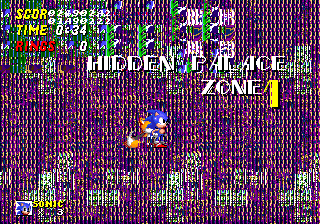
The level slot containing Hidden Palace Zone in older builds. It retains a fair amount of the level's data, including its object layout, palettes and palette cycling, and ring layout, but nearly everything else points to Oil Ocean's data, including its art, 16x16 level mapping, and collision. The exception is the music, with points to Sound Test Track 10. The code for Badniks was also excised.
It can be accessed with Pro Action Replay code FFFE10:0800, or (30702E:0800 when locked onto Sonic 2. It can also be accessed, in Revision 00, with the Game Genie code ACLA-ATD4 (ACLA-ATDR, and AB6X-ATBR when locked on. Either choose Death Egg, or Special Stage for when its locked onto Sonic & Knuckles.
The game will reboot when placing an Animal Capsule and finishing the stage, though uses its own set of Tiny Animals, Micky and Rocky.
This Zone has been updated since the Wai and August 21st prototypes, adding an object that rolls Sonic up into a ball to the long tube near the start of the level, and new background scrolling data. Otherwise, it seems untouched, right down to the Tails Life Icon in the HUD. The 1-Up Monitor no longer gives an extra life, but will if its locked onto Sonic & Knuckles.
Zone ID 09#

Guess what? An empty level slot. It can be access using Pro Action Replay code FFFE10:0900 or Game Genie code ACLA-AWD8, (AB6X-AWBR when locked onto Sonic & Knuckles. Choose Sound Test in the Level Select, or Special Stage if you're locked on.
It uses garbled Emerald Hill Zone tiles, and Badnik sprites from Oil Ocean. Same as the Wai prototype, it references Sky Chase's music. It also has little Collision data, references a water height that's likely leftovers from Hidden Palace Zone, and no objects are available in the debug menu.
If you finish it by adding in an Animal Capsule, you'll go straight to Emerald Hill Act 1, and shares Hidden Palace's animals. Judging by the early level order, this was intended to be Rock World Zone.
Zone ID 11#
In Sonic 2's code, the pointers that controls the animal's PLCs, list another entry after zone 0x10. This extra stage would've brought the total stage count up to the originally planned 18 Zones. Attempting to load this stage will cause the game to crash on the title card as no other code references it, meaning necessary stuff like level art won't load and instead read garbage data. It reuses Sky Chase Zone's animals, Tocky and Cucky.
Unused Demo#
Watch on YouTubeThe game contains data for an unused demo identical to the one found in Sonic 1. Although the demo handling code still includes leftover calls intended for Sonic 1's ending demos, the associated pointers were removed, instead reading this data as pointers. It is located at 0x4980 in REV00 and 0x498C in REV01. It is also present in all prototypes.
(Source: Sonic Retro)
Unused Oil Ocean Zone Background Section#

Oil Ocean Zone's background layout is 768 pixels wide internally, but the game only uses the first 512 pixels. Sonic 2 has 64×32 tiles (512×256 pixels) loaded at a time, and loads new tiles on the edges as you move around the level. Oil Ocean's scrolling code doesn't reload any tiles as you move horizontally, leaving you with the same horizontal area of the background that you started with. This is because the standard tile-reloading mechanism would eventually overwrite the tiles used for the sun, which never moves. However, Chemical Plant Zone and Sonic 1's Scrap Brain Zone employ a more advanced method of reloading tiles that avoids this issue and would have been ideal for Oil Ocean, and yet Oil Ocean does not use it.
Unused Level Chunks#
Emerald Hill Zone only:


Emerald Hill Zone or Hill Top Zone:


Hill Top Zone only:

Chemical Plant Zone:


Casino Night Zone:


Mystic Cave Zone:


Oil Ocean Zone:


Note that none of the unused chunks are in the table that's checked to determine whether or not Sonic & Tails should slide.
Metropolis Zone:


Wing Fortress Zone:


Unused 2x2 Tiles#
Tiles loaded in the VRAM are organized by tileset at RAM address FF9000. IDs are created at this point for each line, representing 2x2 chunks of VRAM graphics. Address FF0000 is in charge of adding mirroring and collision to the 2x2 tiles, creating 8x8 chunks. In all, there are 256 chunks created from FF00000. To add these chunks, add the IDs below in the format 0xxx at FF0000, and search for chunk ID 00 in the stage data. Some unused graphics can be found in this way:
Zone |
Plane A Low |
Plane B High |
IDs |
|---|---|---|---|
Oil Ocean Zone |
 |
 |
017, 01B, 081, 08D, 093, 0B2, 0B3, 0C8 |
Metropolis Zone |
 |
 |
023, 024, 025, 026, 028, 029, 048, 049 |
Sky Chase / Wing Fortress Zone |
 |
 |
147, 14D, 151, 157, 162, 16C, 1BB, 1F8 |
Unused Scrolling Code#
Aquatic Ruin Zone#
The routine that controls Aquatic Ruin Zone's scrolling sets up three layers of parallax for the rows of leaves found floating high above the level. The code sets up these layers to scroll at different speeds, but the speeds of the top and bottom layers are immediately overwritten with the speed of the middle layer afterward, effectively disabling the parallax. This behavior goes all the way back to the Simon Wai prototype version of the level. If re-enabled, the parallax effect will split some of the leaves in half due to how the layers are separated, suggesting that the effect was designed for an earlier version of the level art, or that it was simply cut for looking rough.
(Source: Clownacy)
Hill Top Zone#
Basic scrolling code exists for a two-player version of Hill Top Zone. This code appears to be unfinished, as it lacks the parallax movement of the cloud layer present in the one-player version of the level. This alone should not be taken as evidence of a two-player version of the level being planned, however, as Hill Top's moving objects lack the flag that stops them from despawning whenever the player moves out of their range. This flag is used by moving objects found in all other two-player levels and is required for compatibility with the two-player mode's special object management system. In addition, the level's earthquake gimmick and the faraway scrolling mountains in the background, as well as various enemy graphics, are completely unoptimized for two-player mode.
(Source: Clownacy)