


Systems#
 Story Recognition ModeIt's not a game, it's an AI! And it reads your mind!
Resources#
 Unused TexturesAll sorts of textures in large numbers! Even Custom Content, too!
 Unused Graphics
 Unused Text"Hello, I am MR. MONSTER, your kiddo's Princi-Pal."
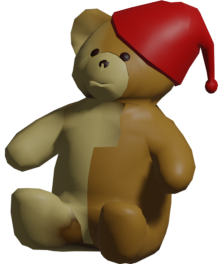 Unused ModelsMemories, cut furniture, and other stuff.
 Unused SoundsSul sul.
 Unused ActionsWho knew Sims could do a lot more?
 Development OversightsMistakes that were made beneath all that crunch.
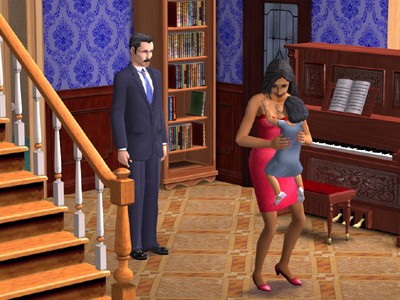 OdditiesThis memory is a lot more different than I imagined...
Data#
 Hidden Sim DataLost knowledge from beyond the lot...and grave.
 Hidden Create-A-Sim ContentHairstyles and fashion from another time.
 Unused Data
Version Differences#
 Regional DifferencesA lot less graphical differences...but now with mimes.
Revisional DifferencesPatches that either fixed the game or broke features.
Regional DifferencesA lot less graphical differences...but now with mimes.
Revisional DifferencesPatches that either fixed the game or broke features.Debugging Features#

|
To do: |
By pressing Ctrl+⇧ Shift+C to bring up the command console and typing "boolProp testingcheatsenabled true" and pressing ↵ Return will enable several debugging features;
- By clicking a Sim while holding down ⇧ Shift, a menu pops up with debugging options. These include making Sims grow up instantly (or killing them if they're old), changing their aspiration, and making many Sims either selectable or unselectable. Most objects also have a debugging options, in which they can be reset to their original form or even deleted.
- Holding ⇧ Shift+N in Create A Family mode will allow the player to access clothing and hairstyles that are normally used, but not for normal sims.
Debug Mode Hotkeys#
How to enter Debug mode in The Sims 2:
- Navigate to C:\Program Files\EA GAMES\(LATEST EP)\TSData\Res\Config, or the directory where you installed your game.
- Open the GlobalProps.xml file in NotePad, EditPad Lite, or your favorite raw text editor. Back up the file first by making a copy of it on your Desktop!
- Insert "
true " between the lines with "allowCustomContent" and "animationLOD". - Save the file.
- You're done! Please note that testing cheats will be enabled by default every time you start up the game. You can disable it in-game by typing "boolProp testingchestsenabled false" into the cheat console.
- The cheat is "off" by default. To turn it on, press Ctrl+⇧ Shift+C, and then type in "allMenus on". To turn it off, type "allMenus off".
List of debug mode hotkeys:
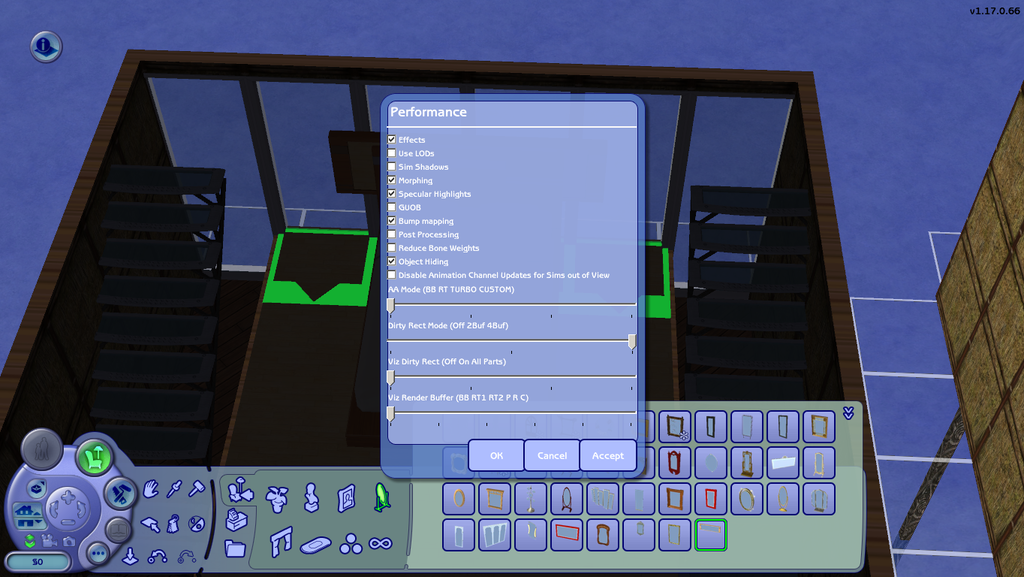
- Ctrl+O: Brings up "Performance" window used during development that contains toggles for certain performance/graphics options. To apply the settings in the "Performance" window, click "OK" on the left. Window:
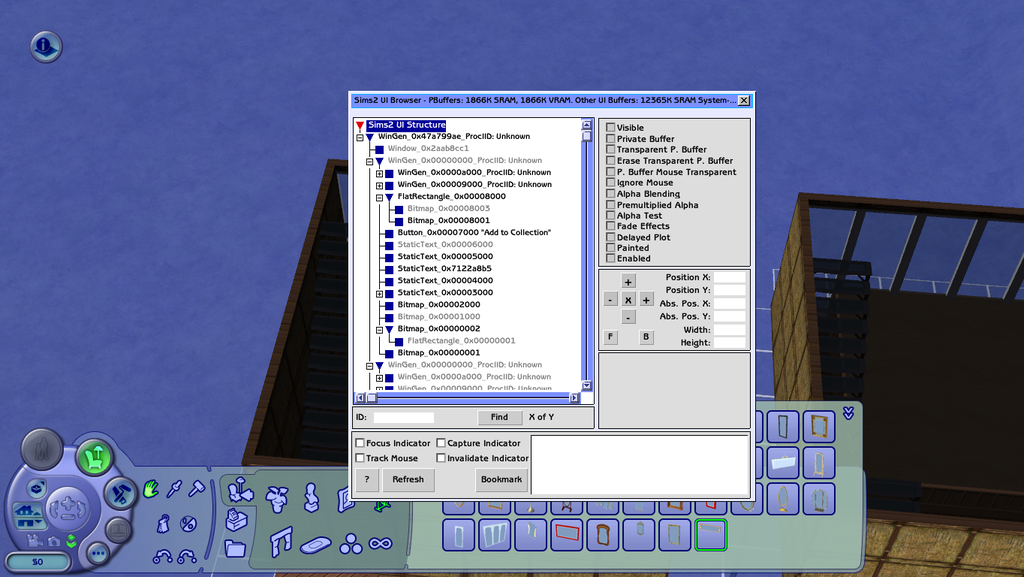
- Ctrl+U: Brings up a window used during development that allows you to manipulate UI elements by moving them around and toggling their visibility. After being moved, UI elements do not remain in place after the game is closed. Window:
- Ctrl+⇧ Shift+C: Open cheat system input box.
- Ctrl+⇧ Shift+F: Force crash.
- Ctrl+⇧ Shift+L: Force reload current lot.
- Ctrl+⇧ Shift+U: Force reload UI (typically just induces a lag moment).
- Ctrl+⇧ Shift+S: Shows FPS and (resource) performance counter.
- Ctrl+⇧ Shift+W: Toggle wireframe objects (but not lot geometry).
(Source: Game guide:Allmenus cheat - The Sims Fandom Wiki, What did you discover today while playing the sims? v2, post №9064 - Mod The Sims, What did you discover today while playing the sims? v2, post №8042 - Mod The Sims, История разработки Симс 2, post №1250 - The Sims Creative Club, simnostalgia.tumblr.com)
Incomplete/Missing Language Localizations#
The Sims, while having a large worldwide audience as a whole, is known to be localization-friendly as only text scripts need to be translated into other languages. However, there are various languages that are mentioned in SimPE according to text strings, but did not receive a localization. Among them are:
- Hindi
- Arabic
- Bulgarian
- Cyrillic
- Ukrainian
- Icelandic
- Romanian
- Latin
- Slovak
- Albanian
- Turkish
- Tagalog
- Vietnamese
This means that the developers considered the possibility of translating the game into these languages, but didn't make any progress due to strings not being translated into those languages. Interestingly, the strings themselves are earlier versions of them in English, suggesting that translation plans were cut midway through the game's development. This means that analyzing the lists of strings and text resources clearly allow us to identify and determine early versions of the game's text assets that were considered during its development.
One example of such an incomplete localization is the Cyrillic language section. This section was created not to add Cyrillic, but to test Cyrillic letters during the game's development and localization, such as Russian, where it has an official localization for that language.
However, the Cyrillic game font doesn't have Ukrainian alphabet characters, so special fonts and modifications are required for proper text rendering. Some of these characters include:
- Ґ ґ
- Є є
- І і
- Ї ї
The list of incomplete/missing language localizations was obtained by comparing the list of languages into which the game has been officially translated (the list is pulled from Wikimedia) and the list of language sections in SIMPE program, Package Editor in The Sims 2.1


Unused Objects#
|
|
To do:
|
Some of the objects are found in objects.package. They are sorted by OBJD in SimPE.
NOTE: This section lists unused and hidden objects that are programmed in the game, and will NOT cover meshes (covered in another page), nor mod recreations.
Buy Mode#
Base Game Cars#
|
|
To do:
|
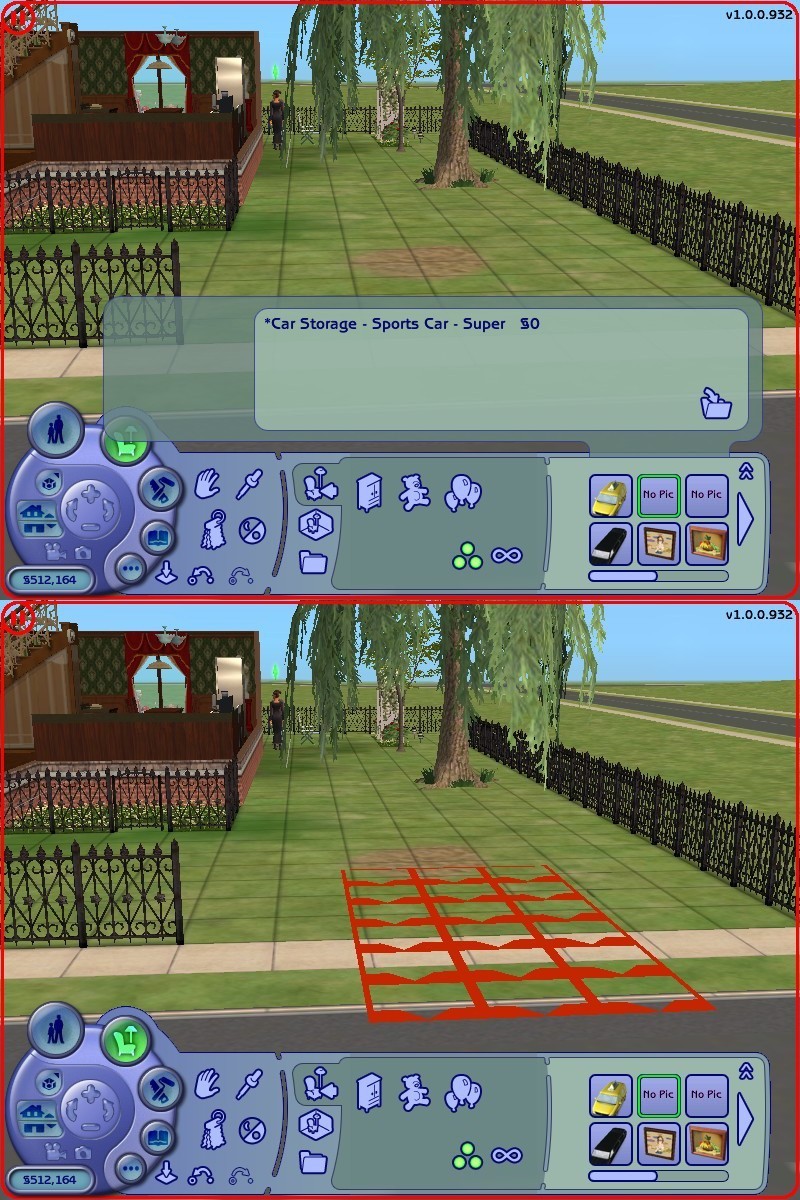
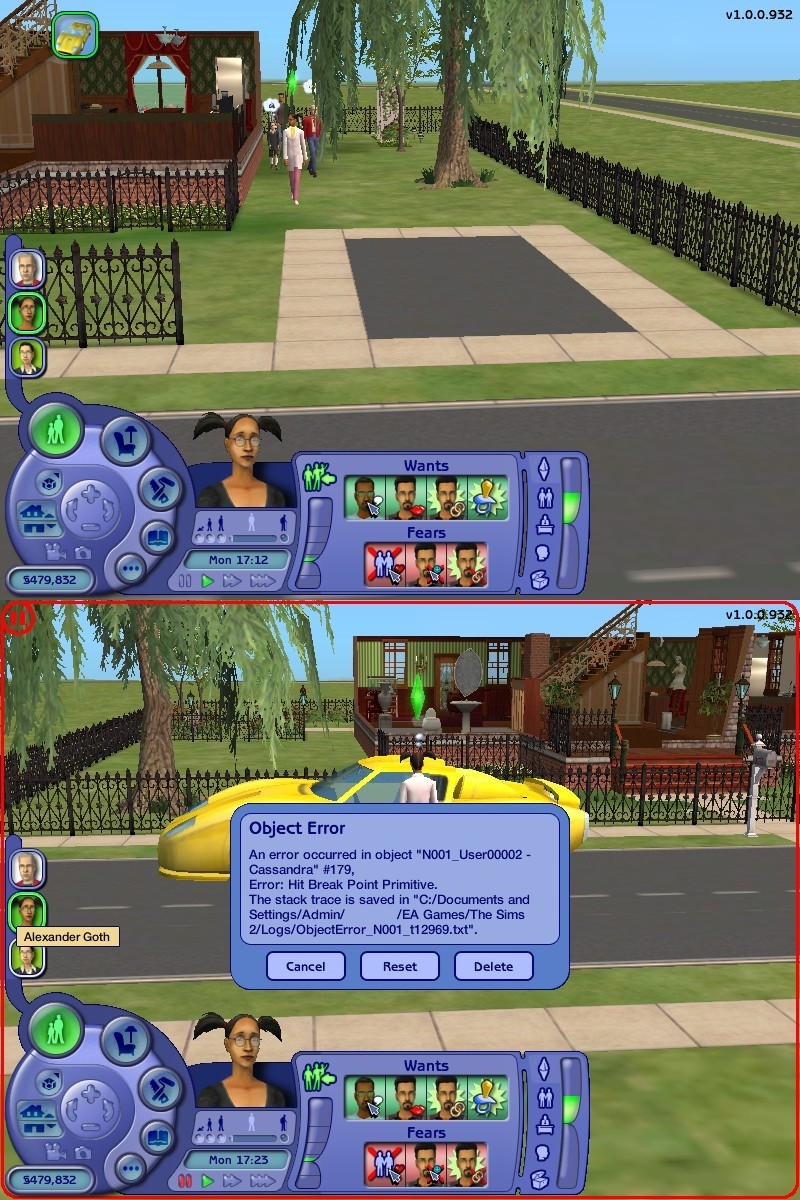
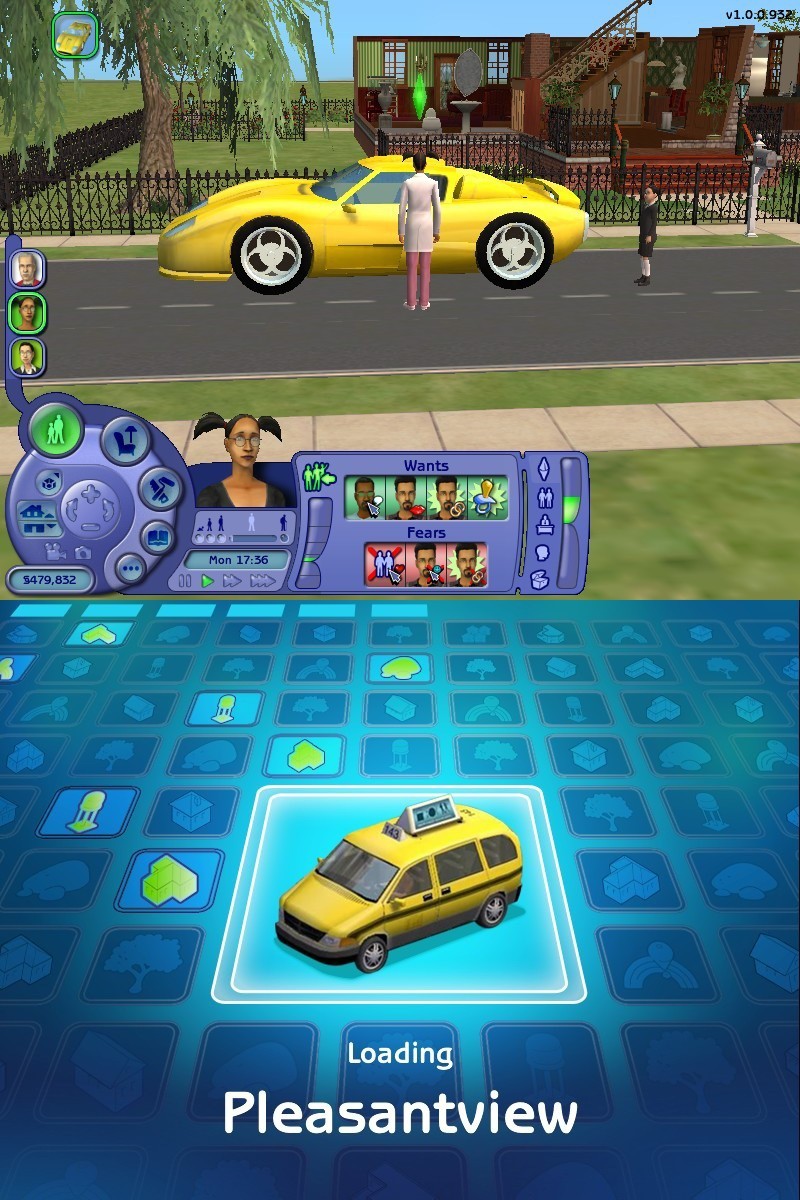
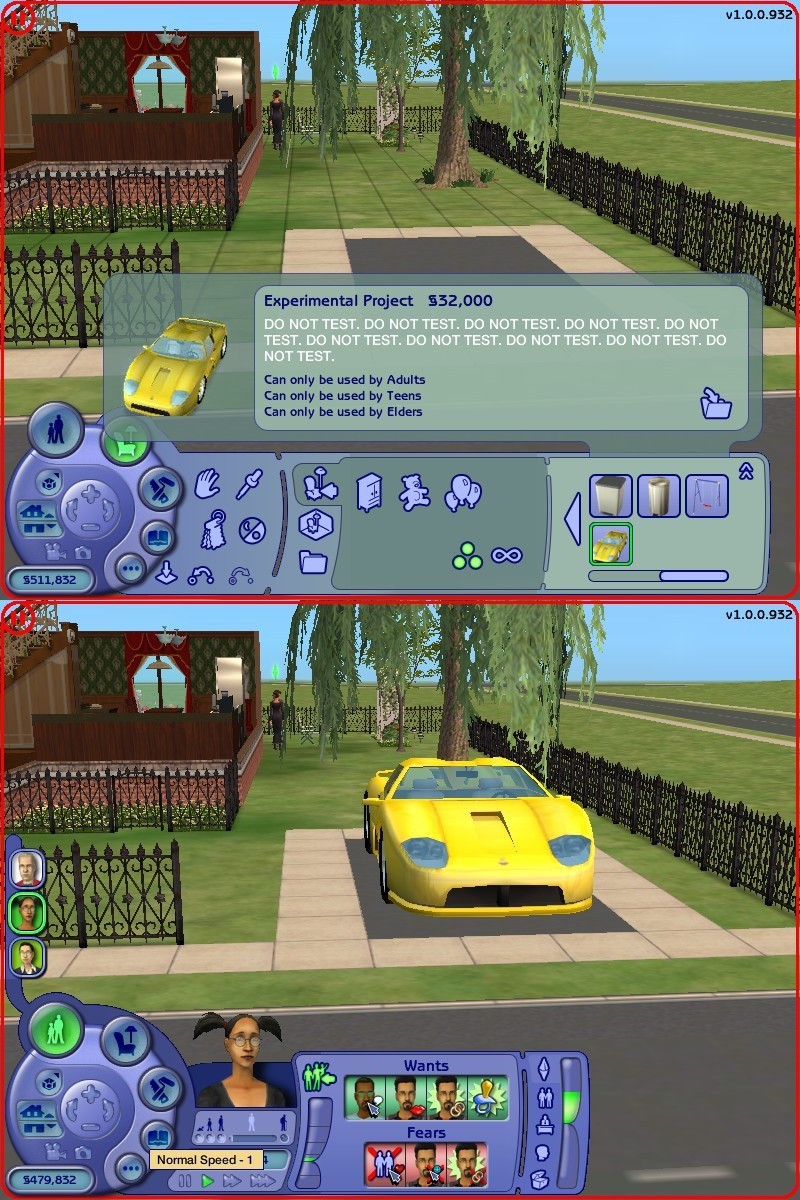
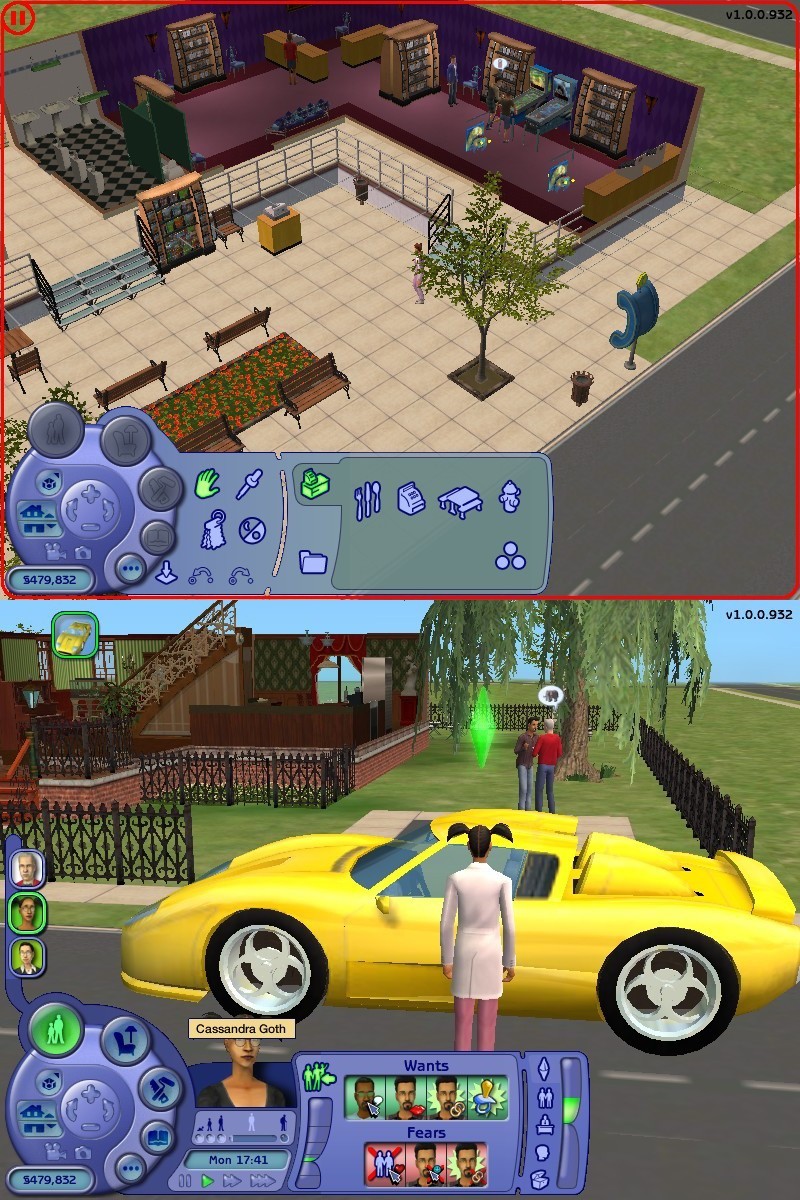
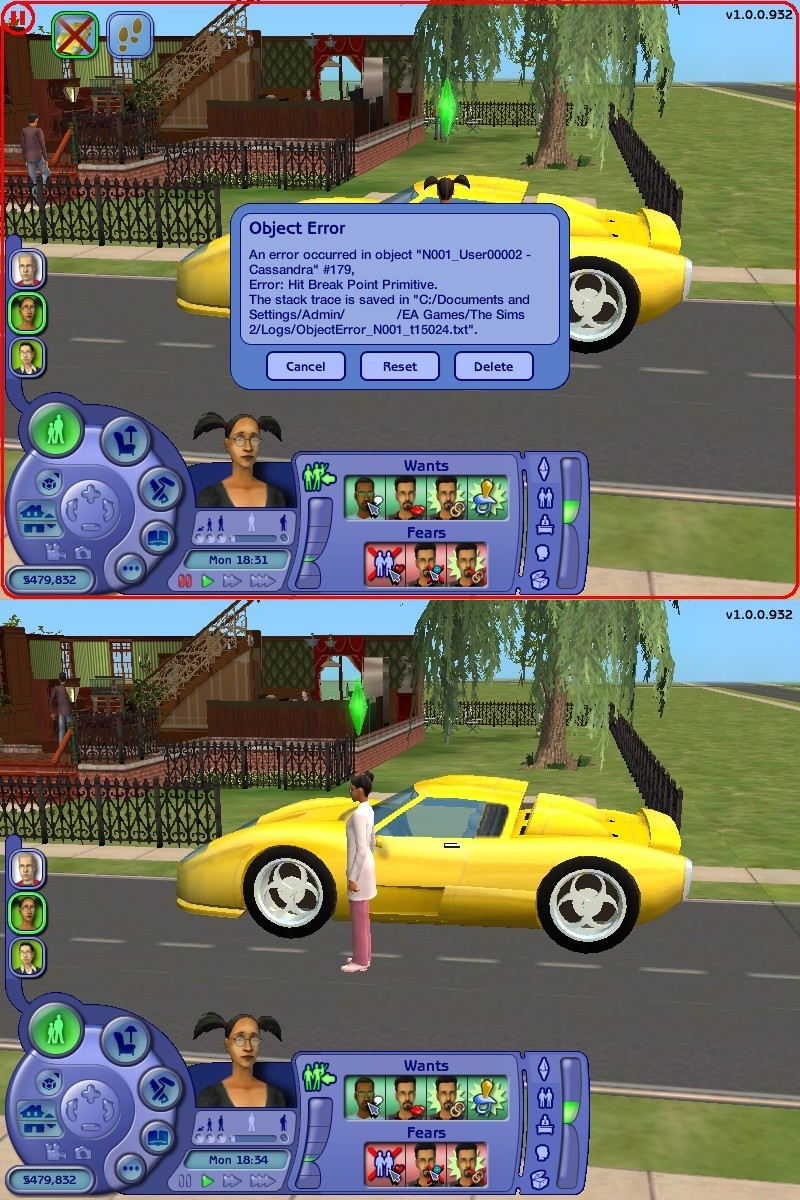
According to some early 2004 prerelease material, vehicles were originally intended for the base game before it would eventually reappear in the Nightlife and FreeTime expansions. They were originally intended as an Aspiration unlock according to SimPE.
Traces of this can be found in the final product, though the function is in an incomplete and buggy state; causing an error message, and among the available menu items there is a Go Downtown2 item. Performing it would show the loading screen image of the Taxi and takes the player into Buy/Build mode of the Community Lot they visit and can only exit without saving3
So, as soon as the player selects the “Go Downtown” option, the car is transferred to the portal, where either the school bus is parked, or where the sim “picked up” a taxi if the option “Go to a Community Lot” was selected in the menu. Sim correctly gets into the car. Parking is no longer needed4.
It remains to figure out why the sim who arrived at the community lot is not displayed, but the Buy Mode is activated.
Car Types
The list of car types that are available in the base game can be found in the objects.package file in this resource:
Name |
Type |
Group |
Instance |
|---|---|---|---|
Car Types |
BCON |
0x7F8F4EB6 |
0x00002000 (8192) |
Group 0x7F8F4EB6 is JobDataGlobals group.
Here are the contents of this resource:
Line |
Value |
Label |
|---|---|---|
0x0 (0) |
0x0000 |
Hatchback |
0x1 (1) |
0x0001 |
Minivan |
0x2 (2) |
0x0002 |
Sedan |
0x3 (3) |
0x0003 |
HMV |
0x4 (4) |
0x0004 |
Sports Car Low |
0x5 (5) |
0x0005 |
Sports Car Mid |
0x6 (6) |
0x0006 |
Sports Car Super |
0x7 (7) |
0x0007 |
Helicopter - Military |
0x8 (8) |
0x0008 |
Helicopter - Business |
0x9 (9) |
0x0009 |
Bus - School |
0xA (10) |
0x000A |
Bus - Team |
0xB (11) |
0x000B |
Town Car |
0xC (12) |
0x000C |
Limo |
0xD (13) |
0x000D |
***Custom Car*** |
0xE (14) |
0x000E |
Police Car |
0xF (15) |
0x000F |
Van - Swat |
0x10 (16) |
0x0010 |
Van - Delivery |
0x11 (17) |
0x0011 |
Ambulance |
In this list is a mention of custom car (***Custom Car***). Also, there's a mention of SWAT vehicle (Van - Swat). Both names are unused in the base game. For the downloadable custom cars to work properly, you need the Nightlife expansion pack. SWAT vehicle (Van - Swat) is unavailable in game. Law enforcement career uses a police car for all levels of career before Captain Hero level. At this career level, the sim doesn't use a work car to get to work, but takes off like Superman. This is a last level of this career.
(Source: Types of cars which should have been in the base game - The Sims 2 Beta Library Tumblr Blog)
Windmill#
Instance |
Group |
File Name |
Object Name |
Price |
Image |
Description |
Notes |
|---|---|---|---|---|---|---|---|
0x000041A7 |
0x7F8FB402 |
Scenario Reward - Windmill |
Dielectric Electrobreeze Windmill |
§1,500 |
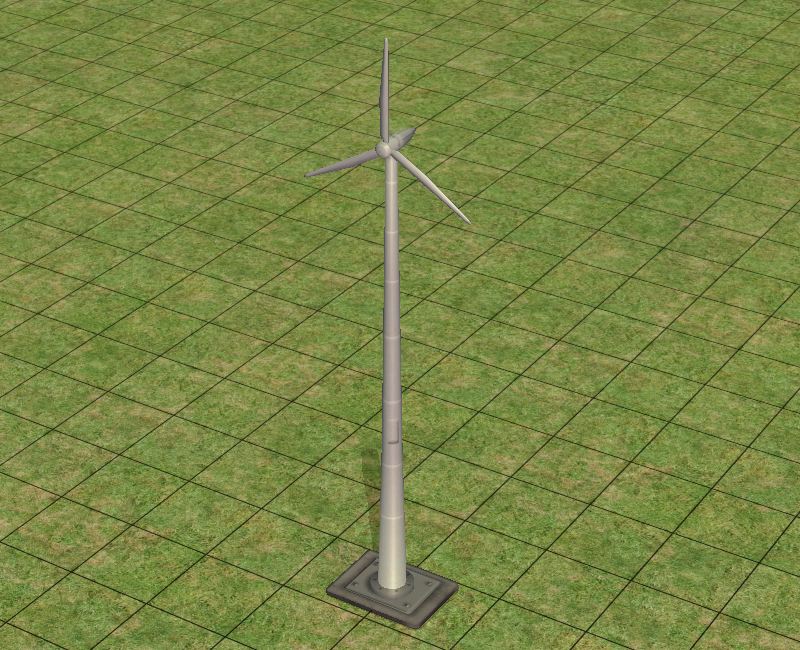 |
Save the environment by illuminating your home, and maybe even your mind, with the Electrobreeze Windmill and the harnessed power of the wind. When deployed, it reduces your power bill, enabling you to spend money on rich essentials such as garden gnomes and flamingo decorations. QuixoteGuard protects the unit from rampaging toddlers and confused grandparents. |
A reward intended to be given out after completing the cut Power Outage scenario in the base game, where it even has a unique animation for spinning. Notoriously, it would not return all the way until the very last release Mansion & Garden Stuff, with a rewritten description and a price of §1,650. |
Neighborhood View#
Instance |
File Name |
Object Name |
Image |
Notes |
|---|---|---|---|---|
0xF09B86D1 |
Carousel |
Carousel |
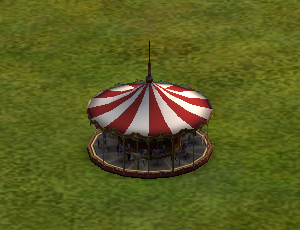 |
A scrapped, fully-animated neighborhood decoration intended to appear in either Open For Business, Family Fun Stuff, or Pets. |
Debug Mode#
Placeholder Object#
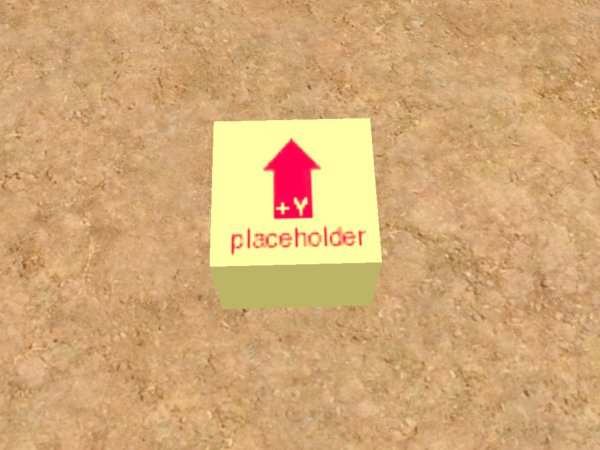
This placeholder object exists in the form taken by several debugging objects when they are spawned in-game. Oddly enough, whilst this placeholder object is not obtainable by normal means, it can be seen on the KidzTube station on a Sim's TV.
Build Mode#
Disabled Items#
There's dozens of items that don't show up in Build Mode, where most of them are disabled in their respective .txt files, found in TSData/Res/Catalog/Scripts. Depending on the version of the game, they are found in different areas;
- In the base game, they are simply found in the game's install location.
- In the Double Deluxe, Ultimate Collection, and Legacy Collection releases of the game, they are found in the
Basefolder within the game's install location.
All of the items can be restored by adding a hash to notInCatalog and/or deprecated. Some of them are assigned to appear in specific parts of the Catalog, but if they don't have one, they appear in All instead. None of the items have names, descriptions nor prices assigned to them, and some of the objects are duplicates of content that already exists in-game.
Some of the content originally appeared in prerelease screenshots of the game. Though they would appear in later expansions, stuff packs and even the Stories spin-off games.
Most of the inaccessible content are from the base game unless stated otherwise.
Wall Coverings#
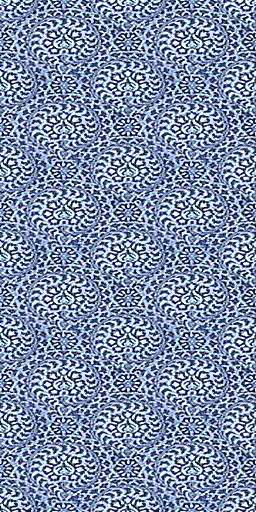
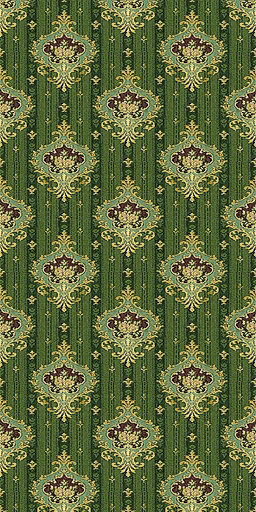
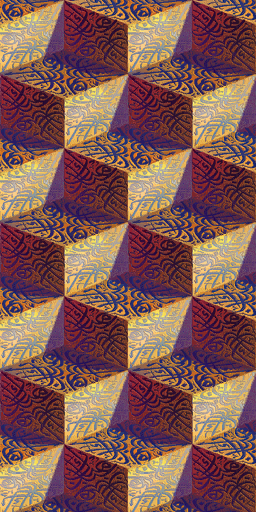
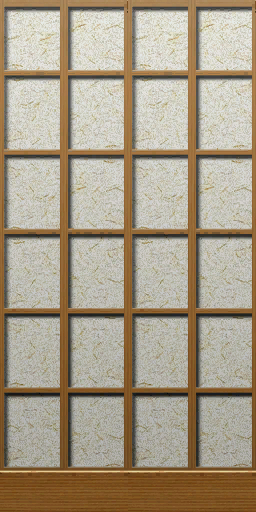
The following Wall Coverings are found in wallPatterns.txt. Interestingly, other variants for some of the Wallpapers exist, but cannot be fully re-enabled without modding.
Arranged from top to bottom in the file for easier organization.
wallpattern |
material |
Commented out With... |
Type |
Image |
Notes |
|---|---|---|---|---|---|
|
|
|
N/A |
 |
The "wallpaper" used when creating new walls. |
|
|
|
Wallpaper |
 |
xxx |
|
|
|
Wallpaper |
 |
xxx |
|
|
|
Wallpaper |
 |
xxx |
|
|
|
Painted |
 |
xxx |
|
|
|
Painted |
 |
xxx |
|
|
|
Wallpaper |
 |
xxx |
|
|
|
Painted |
 |
xxx |
|
|
|
Wallpaper |
 |
xxx |
|
|
|
Wallpaper |
 |
xxx |
|
|
|
Wallpaper |
 |
xxx |
|
|
|
Wallpaper |
 |
Similar to a wallpaper in the final, except slightly less saturated. |
|
|
|
Painted |
 |
xxx |
|
|
|
Wallpaper |
(image) |
xxx |
|
|
|
Wallpaper |
 |
xxx |
|
|
|
Painted |
(image) |
xxx |
|
|
|
Painted |
 |
xxx |
|
|
|
Sliding |
(image) |
xxx |
|
|
|
Painted |
(image) |
xxx |
|
|
|
Poured |
(image) |
xxx |
|
|
|
Painted |
(image) |
xxx |
|
|
|
Painted |
(image) |
xxx |
|
|
|
Painted |
(image) |
xxx |
|
|
|
Painted |
(image) |
xxx |
|
|
|
Painted |
(image) |
xxx |
|
|
|
Painted |
(image) |
xxx |
|
|
|
Painted |
(image) |
xxx |
|
|
|
Painted |
(image) |
xxx |
|
|
|
Painted |
(image) |
xxx |
|
|
|
Painted |
(image) |
xxx |
|
|
|
Painted |
(image) |
xxx |
|
|
|
Painted |
(image) |
xxx |
|
|
|
Painted |
(image) |
xxx |
|
|
|
Painted |
(image) |
xxx |
|
|
|
Painted |
(image) |
xxx |
|
|
|
Painted |
(image) |
xxx |
|
|
|
Brick |
 |
xxx |
|
|
|
Painted |
(image) |
xxx |
|
|
|
Painted |
(image) |
xxx |
|
|
|
Painted |
(image) |
xxx |
|
|
|
Painted |
(image) |
xxx |
|
|
|
Painted |
(image) |
xxx |
|
|
|
Painted |
(image) |
xxx |
xxx |
xxx |
|
Painted |
(image) |
xxx |
xxx |
xxx |
|
Painted |
(image) |
xxx |
xxx |
xxx |
|
Painted |
(image) |
xxx |
xxx |
xxx |
|
Painted |
(image) |
xxx |
xxx |
xxx |
|
Painted |
(image) |
xxx |
xxx |
xxx |
|
Painted |
(image) |
xxx |
xxx |
xxx |
|
Painted |
(image) |
xxx |
xxx |
xxx |
|
Painted |
(image) |
xxx |
xxx |
xxx |
|
Painted |
(image) |
xxx |
xxx |
xxx |
|
Painted |
(image) |
xxx |
xxx |
xxx |
|
Painted |
(image) |
xxx |
xxx |
xxx |
|
Painted |
(image) |
xxx |
xxx |
xxx |
xxx |
xxx |
(image) |
xxx |
xxx |
xxx |
xxx |
xxx |
(image) |
xxx |
xxx |
xxx |
xxx |
xxx |
(image) |
xxx |
xxx |
xxx |
xxx |
xxx |
(image) |
xxx |
xxx |
xxx |
xxx |
xxx |
(image) |
xxx |
|
|
|
Panelling |
 |
xxx |
xxx |
xxx |
xxx |
xxx |
(image) |
xxx |
xxx |
xxx |
xxx |
xxx |
(image) |
xxx |
xxx |
xxx |
xxx |
xxx |
(image) |
xxx |
xxx |
xxx |
xxx |
xxx |
(image) |
xxx |
|
|
|
xxx |
(image) |
xxx |
|
|
|
xxx |
(image) |
xxx |
|
|
|
xxx |
(image) |
xxx |
|
|
|
xxx |
 |
xxx |
xxx |
xxx |
xxx |
xxx |
(image) |
xxx |
Unused Television Cinematics#
|
|
To do: |
Inside the Movies/Games folder contains five unused videos intended to show before Sims would play video games on a television or computer. They consist of the 2003 EA Games Logo albeit with "Challenge Everything" being blurred (to accommodate with other languages, despite it still being said), and the ESRB rating screens of Rating Pending, Everyone and Teen. There were no video games that carry the Rating Pending rating at the time of the Sims 2's release.
Additionally, blank.movie is a one-second video of a black screen so it won't be covered.
eagames.movie |
esrb_rp.movie |
esrb_e.movie |
esrb_t.movie |
|---|---|---|---|
Neighborhood Cinematics#
Loading any of the pre-made neighborhoods plays a unique cinematic flythrough of the neighborhood, which is not something that can easily be created for custom neighborhoods, but is possible by creating definitions in a file named main.fx and placing it in TSBin\Plugins. Each flythrough is associated with the name of the neighborhood, so changing the name of a neighborhood to one of the valid names will cause it to play the associated flythrough when loaded. However, as each cinematic is tailored for the design of its intended neighborhood, the camera may clip through the terrain when the cinematic is played in other neighborhoods.
The main menu shows animated thumbnails of these cinematics for each of the pre-made neighborhoods (though the intro of the flythrough has typically been truncated). The clips used for Pleasantview, Strangetown, and Veronaville appear to have been recorded using very early versions of the flythroughs, so some differences can be observed from the final game:
Neighborhood |
Early |
Final |
Notes |
|---|---|---|---|
Pleasantview |
|
||
Strangetown |
|
||
Veronaville |
|
||
Riverblossom Hills |
|
||
Desiderata Valley |
|
||
Belladonna Cove |
|
There are also three unused cinematics that are associated with early names for the neighborhoods (note that the below videos show these scenes playing in the final neighborhoods, which differ in design to the early incarnations these cinematics were made for):
Neighborhood |
Video |
Notes |
|---|---|---|
Lakeview |
Lakeview is likely an early version of Pleasantview, or an early reworking of the ultimately scrapped Riverside neighborhood. Pleasantview actually derives its terrain from the latter, with
|
|
This is the same cinematic, but with the first scene playing out correctly. It can only be seen when manually invoking the effect |
||
This version can only be seen when manually invoking the effect |
||
Sedona |
Sedona is an early desert neighborhood that existed before the creation of Strangetown. The terrain is present in the released game as
|
|
Europa |
Europa is an early incarnation of Veronaville.
|
Unused Jealousy Cinematic#

There exists an unused Jealousy cinematic in the base game, that was intended to play when a Sim is caught cheating on their spouse. In Objects.package and Sims01.package, a cinematic resource named caughtCheating exists in the CINE resource, but it is never triggered during normal gameplay.
In the Objects.package of the base game, within the Text Lists resource that defines cinematics for beds, the name caughtCheating appears in English.
The relevant resource details are:
Name |
Group |
Instance |
|---|---|---|
Cinematics |
0x7F4437F2 |
0x00000097 (151) |
In the Sims01.package, a related CINE resource exists named caughtCheating_cine.
The resource details are:
Name |
Group |
Instance |
|---|---|---|
caughtCheating_cine |
0x1C0532FA |
0xFFED5299 |
However, it can be re-enabled through ⇧ Shift by clicking on a bed in a very specific situation (such as a Sim cheating on their spouse by woohoing in bed, and the cheated Sim being in another room).
Several attempts have been made to recreate the missing cinematic.5 Both attempts reveal that the cinematic starts to play but ends abruptly. The camera pans dramatically, but key sequences, such as the final shot of the betrayed Sim, are missing. Only parts of the intended scene exist, with missing camera angles and incomplete animation sequencing.
 |
Unused Animations#
|
|
To do: |
Jealousy Cinematic#

Two animations were associated with the jealousy cinematic:
- Cheatee (the Sim being cheated on)
- Cuddler (the Sim doing the cheating)
Both animations can be previewed separately.6
Cheatee |
Cuddler |
|---|---|
The Cheatee's animation appears relatively complete, but the Cuddler’s animation and the overall scene flow are unfinished.
Strangely, A small fragment of the unused Cheatee animation also appears briefly in the official trailer for the Apartment Life expansion pack at 0:50.7
Unused Memory#
In Freetime, there is an unused Memory that would have been for the dummied-out Give Me Youth wish interaction from the Genie, even coming with an unused description and icon.
Icon |
Memory Name |
Description |
|---|---|---|
 |
Became Young Again Through Genie Lamp |
I thought youth was fleeting before. That magical genie made me young again, though! I'll cherish this extra time I've gained! |
Scrapped/Early Scripted Sequences#
Lothario Family#
In the objects.package of the base game in the Behaviour function resource (BHAV), there is a BHAV Script - Pleasantville - Lothario.
The path to this BHAV:
Found In |
Name |
Type |
Group |
Instance |
|---|---|---|---|---|
Objects/objects.package |
Script - Pleasantville - Lothario |
BHAV |
0x7F6B4AOE |
0x00001005 (4001) |
This BHAV contains these instructions:
     0000 : 0118 : 01 : 0027 : FFFC : 14000000000000000000000000000000

[global 0x0118] Idle (1 arg: ticks=0x0014)


     0001 : 0002 : 00 : 0009 : FFFC : 0000000000050A070000000000000000

[prim 0x0002] Expression (Stack Object ID 0x0000 := Literal 0x0000)


     0002 : 0024 : 01 : 0028 : FFFC : 00000000000800020000140001050000

[prim 0x0024] Dialog (Text Notification, Strings: Private, Message: "This place is a mess!  Use the phone to hire a maid.", TNS Style: System, Priority: 0x01, timeout: 0x14, TNS ID: Temp 0x0000, icon: none, wait for user: True, block simulation: True.  (Text notification on side of screen - returns unique ID in specified temp. For birthdays, days-Till-Birthday is expected in temp1))


     0003 : 0118 : 01 : 0004 : FFFC : 1E000000000000000000000000000000

[global 0x0118] Idle (1 arg: ticks=0x001E)


     0004 : 0002 : 00 : 0005 : FFFC : 0000000000050A070000000000000000

[prim 0x0002] Expression (Stack Object ID 0x0000 := Literal 0x0000)


     0005 : 001F : 00 : 0006 : 0036 : 00000000810A00000000000000000000

[prim 0x001F] Set to Next (Stack Object ID 0x0000, person)


     0006 : 0002 : 00 : 0007 : 0005 : 3D00005D0002131A0000000000000000

[prim 0x0002] Expression (Stack Object's person data 0x003D (family number) == Const 0x013A:0x00 ("Service NPCs" Value: 0x7FFF))


     0007 : 0002 : 00 : 0008 : 0005 : 9B0017590002131A0000000000000000

[prim 0x0002] Expression (Stack Object's person data 0x009B (NPC Type) == Const 0x0132:0x17 ("Maid" Value: 0x0013))


     0008 : 0002 : 00 : 000B : FFFC : 000000000005190A0000000000000000

[prim 0x0002] Expression (Local 0x0000 (Maid ID) := Stack Object ID 0x0000)


     0009 : 001F : 00 : 000A : FFFD : 287FAE0D840A00000000000000000000

[prim 0x001F] Set to Next (Stack Object ID 0x0000, object of type: GUID 0x0DAE7F28)


     000A : 0002 : 00 : 0033 : FFFC : 010000000005190A0000000000000000

[prim 0x0002] Expression (Local 0x0001 (Don ID) := Stack Object ID 0x0000)


     000B : 202E : 01 : 000F : 000C : 1900001901000A00000A000001000000

[semi 0x202E] Event Detect - Personality/Interest Talk (2 args: Person A=Local 0x0000 (Maid ID), Local 0x0001 (Don ID))


     000C : 0118 : 01 : 000B : FFFC : 1E000000000000000000000000000000

[global 0x0118] Idle (1 arg: ticks=0x001E)


     000D : 0024 : 01 : 002D : FFFC : 00000000000800000000140000060000

[prim 0x0024] Dialog (Text Notification, Strings: Private, Message: "Having a hard time making small talk with that special someone?  Pick up the phone and visit a Community Lot, where you can buy magazines that open your mind to all new topics of conversation!", TNS Style: Sim, Priority: 0x01, timeout: 0x14, TNS ID: Temp 0x0000, icon: automatic, wait for user: True, block simulation: True.  (Text notification on side of screen - returns unique ID in specified temp. For birthdays, days-Till-Birthday is expected in temp1))


     000E : 0002 : 00 : 000D : FFFC : 0000010000050A190000000000000000

[prim 0x0002] Expression (Stack Object ID 0x0000 := Local 0x0001 (Don ID))


     000F : 0002 : 00 : 0010 : FFFC : 0000000000050A070000000000000000

[prim 0x0002] Expression (Stack Object ID 0x0000 := Literal 0x0000)


     0010 : 001F : 00 : 0011 : 000E : 76A86CAC840A00000000000000000000

[prim 0x001F] Set to Next (Stack Object ID 0x0000, object of type: GUID 0xAC6CA876)


     0011 : 0002 : 00 : 0012 : 0010 : 00000100000201190000000000000000

[prim 0x0002] Expression (Stack Object's attribute 0x0000 ("In Action") == Local 0x0001 (Don ID))


     0012 : 0118 : 01 : 000F : FFFC : 1E000000000000000000000000000000

[global 0x0118] Idle (1 arg: ticks=0x001E)


     0013 : 0002 : 00 : 0014 : FFFC : 0000000000050A070000000000000000

[prim 0x0002] Expression (Stack Object ID 0x0000 := Literal 0x0000)


     0014 : 001F : 00 : 0015 : FFFD : F12B104E840A00000000000000000000

[prim 0x001F] Set to Next (Stack Object ID 0x0000, object of type: GUID 0x4E102BF1)


     0015 : 0002 : 00 : 0016 : FFFC : 020000000005190A0000000000000000

[prim 0x0002] Expression (Local 0x0002 (TelescopeID) := Stack Object ID 0x0000)


     0016 : 0002 : 00 : 0017 : FFFC : 02001900000501070000000000000000

[prim 0x0002] Expression (Stack Object's attribute 0x0002 ("Force Job Chance Card") := Literal 0x0019)


     0017 : 0024 : 01 : 001C : FFFC : 000000000008000200001400010B0000

[prim 0x0024] Dialog (Text Notification, Strings: Private, Message: "Don dresses to impress!  Call a taxi to visit a community lot and shop for food, clothes, and entertainment.", TNS Style: System, Priority: 0x01, timeout: 0x14, TNS ID: Temp 0x0000, icon: none, wait for user: True, block simulation: True.  (Text notification on side of screen - returns unique ID in specified temp. For birthdays, days-Till-Birthday is expected in temp1))


     0018 : 0002 : 00 : 0019 : FFFC : 03000000000519100000000000000000

[prim 0x0002] Expression (Local 0x0003 (HandSlot) := Stack Object's slot 0x0000)


     0019 : 0178 : 01 : 001D : 001A : 1903000A00000A00000A000001000000

[global 0x0178] Verify - Object ID (1 arg: Object ID=Local 0x0003 (HandSlot))


     001A : 0002 : 00 : 001B : FFFC : 03000100000519100000000000000000

[prim 0x0002] Expression (Local 0x0003 (HandSlot) := Stack Object's slot 0x0001)


     001B : 0178 : 01 : 001F : 0036 : 1903000A00000A00000A000001000000

[global 0x0178] Verify - Object ID (1 arg: Object ID=Local 0x0003 (HandSlot))


     001C : 0002 : 00 : 0021 : FFFC : 0000010000050A190000000000000000

[prim 0x0002] Expression (Stack Object ID 0x0000 := Local 0x0001 (Don ID))


     001D : 0020 : 00 : 0002 : 001E : 60685CD8030019000000000000000000

[prim 0x0020] Test Object Type (Local 0x0003 (HandSlot), is instance of: GUID 0xD85C6860, checking original (not current) GUID: False, incoming ID is a neighbor ID: False, return GUID selected in Temp 0,1: False)


     001E : 0020 : 00 : 0002 : 001A : FF9F19AC030019000000000000000000

[prim 0x0020] Test Object Type (Local 0x0003 (HandSlot), is instance of: GUID 0xAC199FFF, checking original (not current) GUID: False, incoming ID is a neighbor ID: False, return GUID selected in Temp 0,1: False)


     001F : 0020 : 00 : 0002 : 0020 : 60685CD8030019000000000000000000

[prim 0x0020] Test Object Type (Local 0x0003 (HandSlot), is instance of: GUID 0xD85C6860, checking original (not current) GUID: False, incoming ID is a neighbor ID: False, return GUID selected in Temp 0,1: False)


     0020 : 0020 : 00 : 0002 : 0036 : FF9F19AC030019000000000000000000

[prim 0x0020] Test Object Type (Local 0x0003 (HandSlot), is instance of: GUID 0xAC199FFF, checking original (not current) GUID: False, incoming ID is a neighbor ID: False, return GUID selected in Temp 0,1: False)


     0021 : 027D : 01 : 0028 : 0022 : 1A17590701000A00000A000001000000

[global 0x027D] NPC - Instance of on Lot? (2 args: NPC ID (use #G - NPC Identifiers)=Const 0x0132:0x17 ("Maid" Value: 0x0013), Including Visitors?=Literal 0x0001)


     0022 : 02EC : 01 : 0028 : 0018 : 1A17590A00000A00000A000001000000

[global 0x02EC] Schedule - NPC - Check (1 arg: NPC Type=Const 0x0132:0x17 ("Maid" Value: 0x0013))


     0023 : 0002 : 00 : 0001 : FFFC : 04000000000519070000000000000000

[prim 0x0002] Expression (Local 0x0004 (NinaArrived?) := Literal 0x0000)


     0024 : 2031 : 01 : 0013 : 0013 : 1901000A00000A00000A000001000000

[semi 0x2031] Simulation - Select/Activate Sim (1 arg: SimID=Local 0x0001 (Don ID))


     0025 : 0002 : 00 : 0026 : FFFC : 0000000000050A070000000000000000

[prim 0x0002] Expression (Stack Object ID 0x0000 := Literal 0x0000)


     0026 : 001F : 00 : 002E : 0032 : 5B88AE2D840A00000000000000000000

[prim 0x001F] Set to Next (Stack Object ID 0x0000, object of type: GUID 0x2DAE885B)


     0027 : 0002 : 00 : 0023 : FFFC : 00000000000519070000000000000000

[prim 0x0002] Expression (Local 0x0000 (Maid ID) := Literal 0x0000)


     0028 : 0002 : 00 : 0036 : FFFC : 00000100000519070000000000000000

[prim 0x0002] Expression (Local 0x0000 (Maid ID) := Literal 0x0001)


     0029 : 0002 : 00 : 002A : FFFC : 0600500000050F070000000000000000

[prim 0x0002] Expression (Stack Object's motive 0x0006 (Comfort) := Literal 0x0050)


     002A : 0002 : 00 : 002B : FFFC : 0800500000050F070000000000000000

[prim 0x0002] Expression (Stack Object's motive 0x0008 (Water / Hygiene) := Literal 0x0050)


     002B : 0002 : 00 : 002C : FFFC : 0F00500000050F070000000000000000

[prim 0x0002] Expression (Stack Object's motive 0x000F (Fun) := Literal 0x0050)


     002C : 0002 : 00 : 0037 : FFFC : 0900500000050F070000000000000000

[prim 0x0002] Expression (Stack Object's motive 0x0009 (Bladder) := Literal 0x0050)


     002D : 0002 : 00 : 0036 : FFFC : 0000E703000519070000000000000000

[prim 0x0002] Expression (Local 0x0000 (Maid ID) := Literal 0x03E7)


     002E : 0002 : 00 : 0029 : 002F : 04000100000219070000000000000000

[prim 0x0002] Expression (Local 0x0004 (NinaArrived?) == Literal 0x0001)


     002F : 0024 : 01 : 0030 : FFFC : 00000000000800000000140001060000

[prim 0x0024] Dialog (Text Notification, Strings: Private, Message: "Having a hard time making small talk with that special someone?  Pick up the phone and visit a Community Lot, where you can buy magazines that open your mind to all new topics of conversation!", TNS Style: System, Priority: 0x01, timeout: 0x14, TNS ID: Temp 0x0000, icon: automatic, wait for user: True, block simulation: True.  (Text notification on side of screen - returns unique ID in specified temp. For birthdays, days-Till-Birthday is expected in temp1))


     0030 : 0002 : 00 : 0029 : FFFC : 04000100000519070000000000000000

[prim 0x0002] Expression (Local 0x0004 (NinaArrived?) := Literal 0x0001)


     0031 : 0002 : 00 : 0036 : 001C : 00000000000019070000000000000000

[prim 0x0002] Expression (Local 0x0000 (Maid ID) > Literal 0x0000)


     0032 : 0002 : 00 : 0035 : 0038 : 04000100000219070000000000000000

[prim 0x0002] Expression (Local 0x0004 (NinaArrived?) == Literal 0x0001)


     0033 : 0301 : 01 : FFFD : 0024 : 19000000000000000000000000000000

[global 0x0301] Death - Is Sim Dead? (NID) (1 arg: Neighbor ID=0x0019)


     0034 : 0002 : 00 : FFFD : 0025 : 00001600000006070000000000000000

[prim 0x0002] Expression (Global 0x0000 (Hour) > Literal 0x0016)


     0035 : 0002 : 00 : FFFD : 0031 : 00000000000019070000000000000000

[prim 0x0002] Expression (Local 0x0000 (Maid ID) > Literal 0x0000)


     0036 : 0118 : 01 : 0034 : FFFC : 1E000000000000000000000000000000

[global 0x0118] Idle (1 arg: ticks=0x001E)


     0037 : 0002 : 00 : 0036 : 0031 : 00000000000019070000000000000000

[prim 0x0002] Expression (Local 0x0000 (Maid ID) > Literal 0x0000)


     0038 : 0002 : 00 : 0036 : 0031 : 00000000000019070000000000000000

[prim 0x0002] Expression (Local 0x0000 (Maid ID) > Literal 0x0000)
The script begins by checking whether Nina Caliente has arrived. This check is contained in instruction number 0x23 (35):
     0023 : 0002 : 00 : 0001 : FFFC : 04000000000519070000000000000000

[prim 0x0002] Expression (Local 0x0004 (NinaArrived?) := Literal 0x0000)
A message appears saying that Don Lothario needs to go to the community lot and buy food, clothes, and entertainment. This message is contained in instruction at number 0x17 (23):
[prim 0x0024] Dialog (Text Notification,
  Strings: Private,
  Message: "Don dresses to impress!  Call a taxi to visit a community lot and shop for food,
  clothes,
  and entertainment.",
  TNS Style: System,
  Priority: 0x01,
  timeout: 0x14,
  TNS ID: Temp 0x0000,
  icon: none,
  wait for user: True,
  block simulation: True.  (Text notification on side of screen - returns unique ID in specified temp. For birthdays,
  days-Till-Birthday is expected in temp1))
Message field: "Don dresses to impress! Call a taxi to visit a community lot and shop for food, clothes, and entertainment.".
After this message appears, the presence of the maid at the lot is checked:
     0021 : 027D : 01 : 0028 : 0022 : 1A17590701000A00000A000001000000

[global 0x027D] NPC - Instance of on Lot? (2 args: NPC ID (use #G - NPC Identifiers)=Const 0x0132:0x17 ("Maid" Value: 0x0013), Including Visitors?=Literal 0x0001)
If the maid is not in the lot, the game, after a few more checks, calls the player to call the maid because the house is messy. This message is contained in instruction at number 0x2 (2):
     0002 : 0024 : 01 : 0028 : FFFC : 00000000000800020000140001050000

[prim 0x0024] Dialog (Text Notification, Strings: Private, Message: "This place is a mess!  Use the phone to hire a maid.", TNS Style: System, Priority: 0x01, timeout: 0x14, TNS ID: Temp 0x0000, icon: none, wait for user: True, block simulation: True.  (Text notification on side of screen - returns unique ID in specified temp. For birthdays, days-Till-Birthday is expected in temp1))
Message field: "This place is a mess! Use the phone to hire a maid.".
Then the script, regardless of the results of the numerous checks and expressions in it loops.
If the Personality/Interest Talk with the maid fails, a message appears saying that Don can call a taxi and go to the community lot to buy magazines, which will open up new topics of conversation for him. This message is contained in instruction at number 0xD (13):
[prim 0x0024] Dialog (Text Notification,
  Strings: Private,
  Message: "Having a hard time making small talk with that special someone?  Pick up the phone and visit a Community Lot,
  where you can buy magazines that open your mind to all new topics of conversation!",
  TNS Style: Sim,
  Priority: 0x01,
  timeout: 0x14,
  TNS ID: Temp 0x0000,
  icon: automatic,
  wait for user: True,
  block simulation: True.  (Text notification on side of screen - returns unique ID in specified temp. For birthdays,
  days-Till-Birthday is expected in temp1))
Message field: "Having a hard time making small talk with that special someone? Pick up the phone and visit a Community Lot, where you can buy magazines that open your mind to all new topics of conversation!".
This message is also duplicated in instruction 0x2F (47). Only TNS Style differs: in instruction 0xD (13) its value is "Sim", in instruction 0x2F (47) its value is "System".
Pleasant Family#
In the objects.package of the base game in the Behaviour function resource (BHAV), there is a BHAV Script - Pleasantville - Pleasant.
The path to this BHAV:
Found In |
Name |
Type |
Group |
Instance |
|---|---|---|---|---|
Objects/objects.package |
Script - Pleasantville - Pleasant |
BHAV |
0x7F6B4AOE |
0x00001002 (4098) |
This BHAV contains these instructions:
     0000 : 0118 : 01 : 0031 : FFFC : 14000000000000000000000000000000

[global 0x0118] Idle (1 arg: ticks=0x0014)


     0001 : 0002 : 00 : 0014 : FFFC : 0000000000050A070000000000000000

[prim 0x0002] Expression (Stack Object ID 0x0000 := Literal 0x0000)


     0002 : 0118 : 01 : 0012 : FFFC : 01000000000000000000000000000000

[global 0x0118] Idle (1 arg: ticks=0x0001)


     0003 : 0024 : 01 : 0012 : FFFC : 00000000000000020000140000010000

[prim 0x0024] Dialog (message, Strings: Private, Title: [none], Message: "Script Broke for some reason.", Button 1: [none], icon: none, wait for user: True, block simulation: True.  (Display a dialog with a message and yes button.))


     0004 : 001F : 00 : 0006 : FFFD : DE70AEAD840A00000000000000000000

[prim 0x001F] Set to Next (Stack Object ID 0x0000, object of type: GUID 0xADAE70DE)


     0005 : 0002 : 00 : 0004 : FFFC : 0000000000050A070000000000000000

[prim 0x0002] Expression (Stack Object ID 0x0000 := Literal 0x0000)


     0006 : 0002 : 00 : 0007 : FFFC : 38000900000513070000000000000000

[prim 0x0002] Expression (Stack Object's person data 0x0038 (School Grade) := Literal 0x0009)


     0007 : 0002 : 00 : 0008 : FFFC : 0000000000050A070000000000000000

[prim 0x0002] Expression (Stack Object ID 0x0000 := Literal 0x0000)


     0008 : 001F : 00 : 0009 : FFFD : 00000000810A00000000000000000000

[prim 0x001F] Set to Next (Stack Object ID 0x0000, person)


     0009 : 0020 : 00 : 000A : 0008 : 6E71AEED00000A000000000000000000

[prim 0x0020] Test Object Type (Stack Object ID 0x0000, is instance of: GUID 0xEDAE716E, checking original (not current) GUID: False, incoming ID is a neighbor ID: False, return GUID selected in Temp 0,1: False)


     000A : 0002 : 00 : 000D : FFFC : 38000200000513070000000000000000

[prim 0x0002] Expression (Stack Object's person data 0x0038 (School Grade) := Literal 0x0002)


     000B : 0002 : 00 : 0026 : FFFC : 020000000005190A0000000000000000

[prim 0x0002] Expression (Local 0x0002 (MaryID) := Stack Object ID 0x0000)


     000C : 0024 : 01 : 0018 : FFFC : 00000000000800000000140001020000

[prim 0x0024] Dialog (Text Notification, Strings: Private, Message: "$Object's Aspiration is Romance, and he doesn't seem to be getting it.  $Object should try to find some intimacy in their life.", TNS Style: System, Priority: 0x01, timeout: 0x14, TNS ID: Temp 0x0000, icon: automatic, wait for user: True, block simulation: True.  (Text notification on side of screen - returns unique ID in specified temp. For birthdays, days-Till-Birthday is expected in temp1))


     000D : 0002 : 00 : 000E : FFFC : 0000000000050A070000000000000000

[prim 0x0002] Expression (Stack Object ID 0x0000 := Literal 0x0000)


     000E : 001F : 00 : 000F : 0002 : 00000000810A00000000000000000000

[prim 0x001F] Set to Next (Stack Object ID 0x0000, person)


     000F : 0020 : 00 : 0010 : 000E : 9D6FAEAD00000A000000000000000000

[prim 0x0020] Test Object Type (Stack Object ID 0x0000, is instance of: GUID 0xADAE6F9D, checking original (not current) GUID: False, incoming ID is a neighbor ID: False, return GUID selected in Temp 0,1: False)


     0010 : 0002 : 00 : 0030 : FFFC : 030000000005190A0000000000000000

[prim 0x0002] Expression (Local 0x0003 (DanielID) := Stack Object ID 0x0000)


     0011 : 0002 : 00 : 0005 : FFFC : 00000100000500070000000000000000

[prim 0x0002] Expression (My attribute 0x0000 ("In Action") := Literal 0x0001)


     0012 : 0002 : 00 : FFFD : FFFC : 00000000000500070000000000000000

[prim 0x0002] Expression (My attribute 0x0000 ("In Action") := Literal 0x0000)


     0013 : 0002 : 00 : FFFD : FFFC : 00000000000500070000000000000000

[prim 0x0002] Expression (My attribute 0x0000 ("In Action") := Literal 0x0000)


     0014 : 0002 : 00 : 0015 : FFFC : 0000000000050A070000000000000000

[prim 0x0002] Expression (Stack Object ID 0x0000 := Literal 0x0000)


     0015 : 001F : 00 : 000B : FFFD : 4F70AE2D840A00000000000000000000

[prim 0x001F] Set to Next (Stack Object ID 0x0000, object of type: GUID 0x2DAE704F)


     0016 : 0070 : 00 : 000C : FFFC : 000A0000E00000DF0600210007080001

[prim 0x0070] Effect Stop/Start (Soft start effect, Target: Stack Object ID 0x0000, default 3/4 height, "uiHeadlineGroup_ScreamRuntime" [Effect:0xE0 (Global)], icon: Literal 0x0008 (Conversation), sheet: "uieffects-headlines-motives-scream-02" [IconTexture:0x01 (Global)], Priority: False, model: default)


     0017 : 0178 : 01 : 001A : 002A : 1902000A00000A00000A000001000000

[global 0x0178] Verify - Object ID (1 arg: Object ID=Local 0x0002 (MaryID))


     0018 : 0002 : 00 : 0017 : FFFC : 0000020000050A190000000000000000

[prim 0x0002] Expression (Stack Object ID 0x0000 := Local 0x0002 (MaryID))


     0019 : 0118 : 01 : 0018 : FFFC : 3C000000000000000000000000000000

[global 0x0118] Idle (1 arg: ticks=0x003C)


     001A : 0002 : 00 : 0019 : 002A : 1D00FFFF000004070000000000000000

[prim 0x0002] Expression (Stack Object's 0x001D (room) > Literal 0xFFFF)


     001B : 0033 : 00 : 001F : 0034 : 1B131F0003D182CA0C00080000000000

[prim 0x0033] Manage Inventory (Set To Next Token Of GUID, token: GUID 0x0CCA82D1, Category: visible memory, reversed: False, Inventory (singular): Neighbor: Stack Object's person data 0x001F (neighbor id), index: Temp 0x0000)


     001C : 0118 : 01 : 0032 : FFFC : 3C000000000000000000000000000000

[global 0x0118] Idle (1 arg: ticks=0x003C)


     001D : 0002 : 00 : 001E : FFFC : 0000000000050A070000000000000000

[prim 0x0002] Expression (Stack Object ID 0x0000 := Literal 0x0000)


     001E : 001F : 00 : 002F : 0020 : 7269AE0D840A00000000000000000000

[prim 0x001F] Set to Next (Stack Object ID 0x0000, object of type: GUID 0x0DAE6972)


     001F : 0118 : 01 : 001D : FFFC : FA000000000000000000000000000000

[global 0x0118] Idle (1 arg: ticks=0x00FA)


     0020 : 002A : 00 : 0021 : 0013 : 7269AE0D060000000000000000000000

[prim 0x002A] Create New Object Instance (GUID 0x0DAE6972, place: out of world (put new object id in Stack Object), Create object normally, fail if tile is non-empty: False, pass Temp 0 to main: False, move in a new Sim: False, copying design mode materials from object in Temp 5: False)


     0021 : 0002 : 00 : 0022 : FFFC : 040000000005190A0000000000000000

[prim 0x0002] Expression (Local 0x0004 (CassID) := Stack Object ID 0x0000)


     0022 : 0002 : 00 : 0023 : FFFC : 0000000000050A070000000000000000

[prim 0x0002] Expression (Stack Object ID 0x0000 := Literal 0x0000)


     0023 : 001F : 00 : 0024 : 0013 : F9BEE681840A00000000000000000000

[prim 0x001F] Set to Next (Stack Object ID 0x0000, object of type: GUID 0x81E6BEF9)


     0024 : 0002 : 00 : 0025 : FFFC : 000000000005190A0000000000000000

[prim 0x0002] Expression (Local 0x0000 (PortalID) := Stack Object ID 0x0000)


     0025 : 0010 : 00 : 002F : 0013 : 000008001904001900000000DE080000

[prim 0x0010] Find Location For (Local 0x0004 (CassID), relative to Local 0x0000 (PortalID), facing, normal, prefer empty: True, user editable: False, on level ground: False, with empty border: False, begin in front of refobj: False, with line of sight to center: False)


     0026 : 0002 : 00 : 0027 : FFFC : 0000000000050A070000000000000000

[prim 0x0002] Expression (Stack Object ID 0x0000 := Literal 0x0000)


     0027 : 001F : 00 : 0029 : 0011 : E9A23837840A00000000000000000000

[prim 0x001F] Set to Next (Stack Object ID 0x0000, object of type: GUID 0x3738A2E9)


     0028 : 0002 : 00 : 001B : FFFC : 00000000000508070000000000000000

[prim 0x0002] Expression (Temp 0x0000 := Literal 0x0000)


     0029 : 0002 : 00 : 0011 : FFFC : 07000400000505070000000000000000

[prim 0x0002] Expression (Stack Object's [semi] attribute 0x0007 := Literal 0x0004)


     002A : 0002 : 00 : 002B : FFFC : 0000000000050A070000000000000000

[prim 0x0002] Expression (Stack Object ID 0x0000 := Literal 0x0000)


     002B : 001F : 00 : 002C : 0013 : B58867D0840A00000000000000000000

[prim 0x001F] Set to Next (Stack Object ID 0x0000, object of type: GUID 0xD06788B5)


     002C : 0002 : 00 : 002D : FFFC : 05001600000505070000000000000000

[prim 0x0002] Expression (Stack Object's [semi] attribute 0x0005 := Literal 0x0016)


     002D : 0002 : 00 : 002E : FFFC : 04001300000505070000000000000000

[prim 0x0002] Expression (Stack Object's [semi] attribute 0x0004 := Literal 0x0013)


     002E : 0002 : 00 : 0033 : FFFC : 0000020000050A190000000000000000

[prim 0x0002] Expression (Stack Object ID 0x0000 := Local 0x0002 (MaryID))


     002F : 0002 : 00 : 0013 : FFFC : 0000000000050A070000000000000000

[prim 0x0002] Expression (Stack Object ID 0x0000 := Literal 0x0000)


     0030 : 2031 : 01 : 0016 : 0016 : 0A00000A00000A00000A000001000000

[semi 0x2031] Simulation - Select/Activate Sim (1 arg: SimID=Stack Object ID 0x0000)


     0031 : 0002 : 00 : 0001 : FFFC : 02000200000500070000000000000000

[prim 0x0002] Expression (My attribute 0x0002 ("Force Job Chance Card") := Literal 0x0002)


     0032 : 014B : 01 : 0028 : 0013 : 1902000A00000A00000A000001000000

[global 0x014B] Verify - Person ID (1 arg: Person ID=Local 0x0002 (MaryID))


     0033 : 0002 : 00 : 0032 : FFFC : 06000000000519070000000000000000

[prim 0x0002] Expression (Local 0x0006 (LoopID) := Literal 0x0000)


     0034 : 0002 : 00 : 001C : 0013 : 0600F401000B19070000000000000000

[prim 0x0002] Expression (Local 0x0006 (LoopID) ++ and < Literal 0x01F4)
The scripts start by displaying this message. This message is contained in instruction at number 0xC (12):
     000C : 0024 : 01 : 0018 : FFFC : 00000000000800000000140001020000

[prim 0x0024] Dialog (Text Notification, Strings: Private, Message: "$Object's Aspiration is Romance, and he doesn't seem to be getting it.  $Object should try to find some intimacy in their life.", TNS Style: System, Priority: 0x01, timeout: 0x14, TNS ID: Temp 0x0000, icon: automatic, wait for user: True, block simulation: True.  (Text notification on side of screen - returns unique ID in specified temp. For birthdays, days-Till-Birthday is expected in temp1))
Message field: "$Object's Aspiration is Romance, and he doesn't seem to be getting it. $Object should try to find some intimacy in their life.".
$Object refers to Daniel Pleasant.
This BHAV also contains a message saying that the script is broken for some reason. This message is contained in instruction at number 0x3 (3):
     0003 : 0024 : 01 : 0012 : FFFC : 00000000000000020000140000010000

[prim 0x0024] Dialog (message, Strings: Private, Title: [none], Message: "Script Broke for some reason.", Button 1: [none], icon: none, wait for user: True, block simulation: True.  (Display a dialog with a message and yes button.))
Message field: "Script Broke for some reason.".
Veronaville - General Script#
Evidently a script that Veronaville would have followed during gameplay. Unfortunately the BHAV that governs its functions is completely empty, leaving it a mystery as to what exactly it would have done.
The path to this BHAV:
Found In |
Name |
Type |
Group |
Instance |
|---|---|---|---|---|
Objects/objects.package |
Script - Veronaville - General Script |
BHAV |
0x7F6B4A0E |
0x0000100E (4110) |
The contents of this BHAV are empty.
Only for Veronaville exist a BHAV with "General Script" in its name.
Unused Music#
The sfx1.package from base game, which is located at the path "TSData\Res\Sound" contain five full unused music tracks. This tracks can be found by extracting the contents of the base game's sfx1.package using SimPE into a folder. The extracted package will consist of 4 folders and one file. The unused music tracks are located in "2026960B - mp3 or xa Sound File" folder. The files in the "2026960B - mp3 or xa Sound File" folder need to be sorted by file size from largest to smallest. The five larger files are these tracks. You can listen to these music tracks below:
"Eeyooma Mana Muki Vop" from The Sims Bustin' Out
This music track is from The Sims Bustin' Out. Its original name is "Eeyooma Mana Muki Vop". The name of the extracted file is "94E6DF8B-0B8AB3CD-FF5B9FA4.mp3". It would appear in Pet Stories, another game using the same engine.
"Nahtreel Jazz" from The Sims Bustin' Out
This music track is from The Sims Bustin' Out. Its original name is "Nahtreel Jazz". The name of the extracted file is "CE84B784-0B8AB3CD-FFA134CC.mp3".
"sbo_bb4" from The Sims Bustin' Out
This music track is from The Sims Bustin' Out. Its original name is "sbo_bb4". The name of the extracted file is "011AB223-0B8AB3CD-FFDC58F1.mp3".
"Sim the Blues" from The Sims: Unleashed
This music track is a shorter edit from The Sims: Unleashed. Its original name is "Sim the Blues". The name of the extracted file is "09731966-0B8AB3CD-FF4E0CB4.mp3".
"SUL_Band2_M" from The Sims: Unleashed
This music track is a shorter edit from The Sims: Unleashed. Its original name is "SUL_Band2_M". The name of the extracted file is "647ABE94-0B8AB3CD-FF1C5809.mp3".
(Source: Found five full songs in base game's sfx1.package. Where do they play on? - Mod The Sims & That One Guy YouTube channel)
Hidden Details#
Content from another expansion pack / stuff pack#
Anti-Piracy#
If the game detects that it is pirated (such as some no-CD cracks that didn't fully remove the anti-piracy protection), some build mode tools such as building walls will not work.
(Source: No CD Build Mode Issue - Mod The Sims)
References#
- https://commons.wikimedia.org/wiki/Category:The_Sims_2↩︎
- https://www.tumblr.com/l-1-z-a/613859088326098944/option-go-downtown-in-hidden-buyable-cars-from↩︎
- https://www.tumblr.com/l-1-z-a/613501606461341696/the-first-results-of-unlocking-cars-from-the-base?_branch_match_id=link-1156705444303996665↩︎
- https://thesimscc.ru/threads/istorija-razrabotki-sims-2.31582/post-5663422↩︎
- Unlock attempts of unused jealousy cinematic (Tumblr)↩︎
- Cheatee and Cuddler animations (Tumblr)↩︎
- Fragment of Cheatee animation in Apartment Life trailer (Tumblr)↩︎