 This article has a talk page!
SimCity 4 is the fourth installment of the ever-so-popular series, adding so much content that trying to understand everything is on par with learning Ancient Greek from scratch.
Sub-Pages#

Debug Mode#
A DLL file has been leaked which can be added to the Plugins folder to add some debug options. It can be downloaded here:
 |
File: Extra cheats plugin.7z (114 KB) (info) |

Once the plugin is installed, when you use Ctrl+X to open the cheat window, you can right-click to get a list of all available commands. Also, when you hold Ctrl+Alt+Shift and use the Query tool to hover your mouse over any building, you will get detailed statistics about the building including wealth, desirability, pollution and more.
The commands added by the plugin are as follows:
- Barstuck stops the news bar at the bottom.

- BuildingPlop allows you to "plop" all RCI buildings in the game wherever you want. Once you enter the command, a window will open with the internal names of all the in-game buildings. Select a building and press the X button to close the window and another window will pop up where you can choose from all available footprints. Select one and press the X button again and you will now be able to build the building (for free).
Be aware, though, that there are some issues with plopping buildings. Commercial buildings will generally work perfectly fine, except for minor display issues (they're displayed as city-owned area). Industrial buildings work too but never produce freight. Residential buildings, however, do not work at all. They'll abandon immediately. - CreateException crashes the game. Yeah. It was used to test the exception report.
- DrawPaths draws traffic paths on the roads, allowing you to see what constitutes a valid pathway for commuting purposes and how they are linked together. This was used by the developers to diagnose traffic problems with certain roads and junctions.
- FPS allows you to adjust the game's frame rate.
- GOL begins the Game of Life. Observe how green life beings traverse through your city.
- HidePaths will hide the traffic paths enabled by the DrawPaths command.
- LotPlop does the same as BuildingPlop above, but for lots (like schools etc.)
- Moolah, followed by a number, sets your amount of money to the specified value. This was probably used by the developers as an easy money cheat, and also to test various situations a player may face such as bankruptcy.
- PlopAllBuildings plops all RCI buildings in the game on the current map. This is very resource intensive, and will crash the game if the map is too small to hold all in-game RCI buildings. This was probably used to quickly test appearance, i.e. checking for missing model files.
- RiskyMoney gives you $10,000, but there's a catch. There's a random chance your city will be subject to a disastrous earthquake when you use this command.
- ShowTime adds a clock showing the system time to the game.
- SimDate allows you to set the in-game date. However, it will always set the date to one day after what you type in. Therefore, SimDate 12 31 1999 sets the date to 1/1/00, the first day in the game.
- Snow adds snow to the terrain based on the terrain height and the in-game date (more snow in December, less in July). This is an in-game easter egg which is normally triggered if the real-life date is set to Christmas, but this code triggers it too. Note that the snow is a purely visual effect, it does not affect traffic in any way.
- Stopwatch stops the in-game time.
- udriveit allows you to control any vehicle in the game by clicking on it. This also includes vehicles which cannot normally be controlled in U-Drive-It mode. These usually work fine, more or less, but have various problems. The vehicles you can control this way are listed here:
- Large cargo ship (seaport): Works perfectly fine, and you can crush all other boats.
- Cruise ship: Works perfectly fine too, but detonates by itself after some time, for whatever reason.
- Sailboat: It is very slow (as is typical of sailboats), but strangely you can reverse at full speed, like a car.
- Green rail vehicle: It works, and you can drive at full speed without it derailing (like it is supposed to).
- Articulated truck: Rather buggy. If you select the head, you can drive around normally but the trailer looks totally wrong (it is detached and does not follow the head around). If you select the trailer, the head automatically detaches and you can't move. After a while, it disappears on its own.
- Concrete mixer: Works perfectly fine.
- Pedestrians: You can't move at all. It's surprising this is a valid vehicle to begin with.
Some commands are not listed, but still work:
- SetSeaLevel, followed by a number, allows you to set the water level. You can either make the entire map dry, or flood it. The water level will reset itself when you reload the city.
Upgradable Buildings#
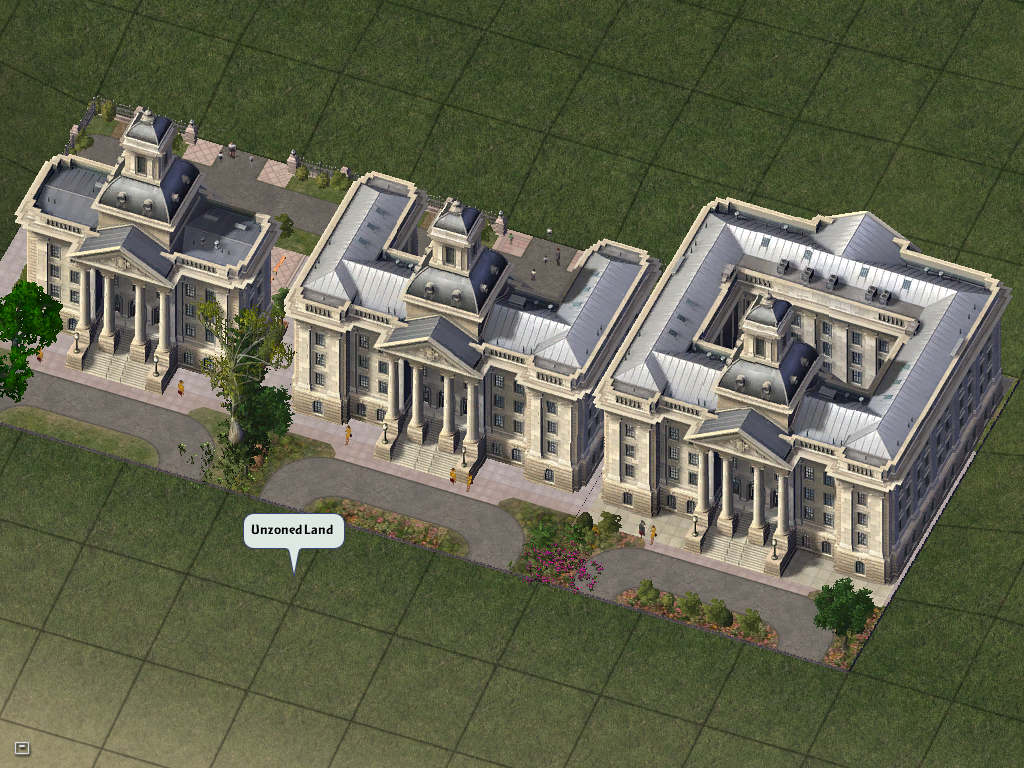
In the final game, the three airports can upgrade when their capacity is reached. The seaport and the city hall was meant to be upgradable like that as well. The coding for the upgradable seaport still remains, and you can easily make seaports upgradable. The city hall, however, cannot upgrade in the game no matter what, but the model files are in the game nevertheless.
Dirt Road#
Dirt roads were planned for the game but not implemented for reasons unknown. Perhaps the developers thought that it would have such a low capacity it would be rendered entirely useless.
The following unused text in the game directly references this unused feature:
To me, pavement is a wonderful thing - the hard smooth surface, the extreme heat on a summers day.
But it can be costly to create and maintain. If you are looking to save a few simoleons you might
consider <a href="#link_id#game.tool_plop_network(network_tool_types.DIRT_ROAD)">dirt roads</a> as
an alternative. There's something special about the bumpy ride and billows of dust that only an
unpaved path can provide. And what a boon to our local car wash owners!
Unused Cap#
There's an unused cap that prevents RCI buildings from progressing unless it is within range of a fire station.
Ordinances#
IDs exist for all the ordinances from SimCity 3000, as well as three brand new ordinances (Bridge Tolls, Police Outreach and Water Tower Ads) all of which go completely unused. Some of these unused ordinances have bits of unused text associated with them, with the petitioner messages for the Public Smoking Ban ordinance being particularly interesting since it's formatted differently from the other text in SimCity 4.
No kidding, Mayor! These smokers, dousing us all with poison whether we
like it or not! I'm sick and tired of breathing in someone else's carcinogens!
Sick and tired! We need a smoking ban in #city# now, Mayor. Support your
Sims for the long run, and say no to nicotine!<br>
<br>
Pass the Smoking Ban Ordinance now?<br>
<a href="xxx">Yes</a> <a href="xxx">No</a><br>What's next, Mayor? You gonna outlaw donuts cause they're bad for us? Don't
encourage these health nuts, or pretty soon we'll all be eating tofu for
Thanksgiving cause it'll be LAW! I'm a citizen too! My choices are my business!
If the nicotine naysayers don't like it, tell 'em to stay home where the
air is oh-so-clean! Mayor, repeal the Smoking Ban now!<br>
<br>
Repeal the Smoking Ban Ordinance now?<br>
<a href="xxx">Yes</a> <a href="xxx">No</a><br>Additionally, two properties are present in ordinance definitions but never actually used.
- Year available would presumably make the ordinance available only after a certain year. In the final game the only ordinance to have a value set for this property is the Power Conservation Act, but the value of 1970 is somewhat impractical given that cities in SimCity 4 start in the year 0. (SimCity 3000 allowed the player to choose a start date of 1900, 1950 or 2000.)
- Monthly chance is set to 0.5 for all ordinances in the final game. What exactly it would have done is unclear.
Advisors#
The advisors in SimCity 4 appear in animated Sim form, appearing just like characters in The Sims. Looking at their meshes and textures reveal some interesting oddities.
All of the advisors only have a partial model, with the entire back side and the lower half of their bodies being non-existent. In-game only a small portion of their upper bodies can be seen from a fixed front-facing perspective, so presumably the developers saw no need to model any part of them that couldn't be seen.
The textures for the advisors' bodies encompass the entire body however, leaving a fair amount of detail going unseen. All the textures appear to use the same format used in The Sims, with some of them having been directly modified from skin textures in that game. Unlike in The Sims, the advisors all have a strange grey shadowing applied to one half of their textures, presumably to emulate the effect of directional lighting. For some reason the textures of Monique, Jonas, and Sam are smaller than those of the other characters.
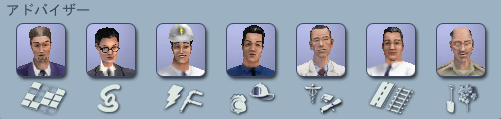
Advisors in at least some Asian versions of the game (namely Chinese, Japanese and Thai) use their own unique textures, giving them a more distinctly Asian appearance.
Character |
Head Texture |
Body Texture |
Meshes |
Notes |
|---|---|---|---|---|
Neil Fairbanks |
 |
 |
0a54cefb_b_ctpM00 |
Neil's body texture is |
Monique Diamond |
 |
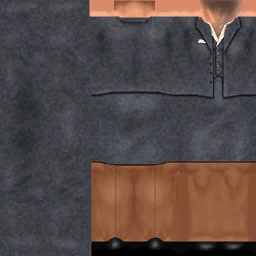 |
0a54cef6_b_finF00 |
Monique's head texture is |
Jonas Sparks |
 |
 |
4a397515_utlM_b_Med00 |
Jonas's body texture is |
Sam Armstrong |
 |
 |
2a283d69_b_safetyMLgt |
Sam's head texture appears to be based on |
Bettina Dean |
 |
 |
0a54cef8_c_hneF00 |
Bettina's head texture is |
Jamil Herd |
 |
 |
0a54cef4_c_trnM00 |
Jamil has a unique skintone that doesn't match any of the ones in The Sims, and therefore has separate meshes for his mouth and teeth. Jamil's head texture is |
Camille Meadows |
 |
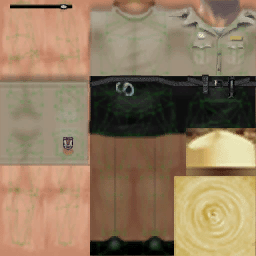 |
0a4810d6_envF_b00 |
Camille's body texture appears to be modification of |
Dr. Vu's Breasts#
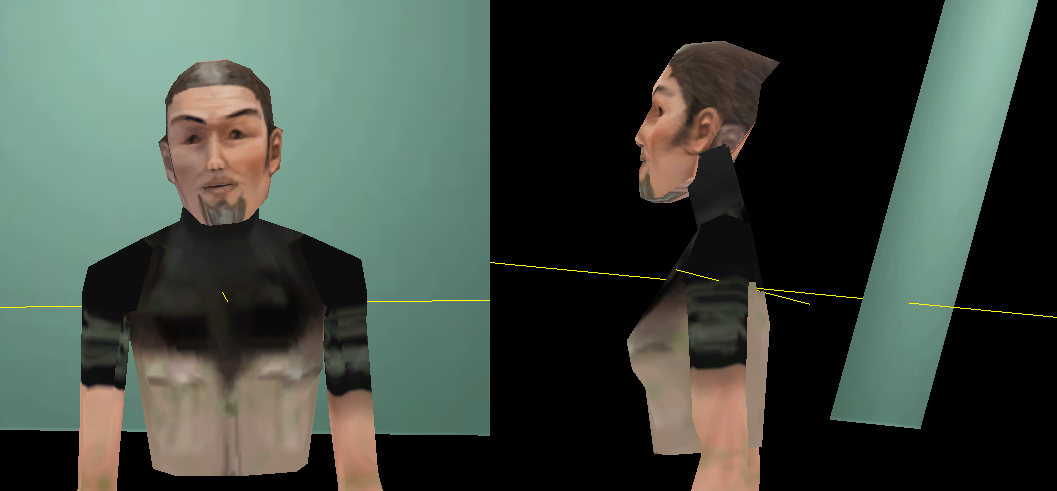
Dr. Vu is an antagonist added with the Rush Hour expansion that appears in Sim form similarly to the advisors. As with all Sims in the game, only a small portion of his body can be seen. Looking at his mesh and texture files reveal that his body is actually just a crudely retextured version of Camille Meadows, complete with breasts!

For an unknown reason, Dr. Vu doesn't use the head texture that was specifically created for him, but rather one intended for the Town Planner advisor in Asian versions of the game (it's used on both characters in those versions). This texture doesn't quite fit his head mesh properly (having been designed for Neil Fairbanks's model) resulting in a slightly odd appearance in-game. The unused texture fits the mesh perfectly and gives Vu a more distinctly villainous appearance.
Character |
Head Texture |
Body Texture |
Meshes |
Notes |
|---|---|---|---|---|
Dr. Vu |
 |
 |
Head texture is completely unused |
Regional Differences#

|
To do: |
SimCity 4 contains a number of differences in versions released in specific regions of the world.
Certain Asian versions (at least Chinese, Japanese and Thai) contain visually different advisors, with a more distinctly Asian appearance. Their textures can be found in every version of the game.
Unlike the original advisors, all of the Asian release advisors are male. The language files remain the same, however, so playing in other languages can result in the finance and environment advisors having names not normally associated with their sex. The City Planner's head texture is also used for Dr. Vu.
In Taiwan, an exclusive version of the game was released as SimCity: Formosa. It contains an additional region (FORMOSA) based on Taiwan's topography, and includes some local landmarks that were eventually released for other regions through the official website. It also features advisors with a unique appearance, different to those used in the Japanese version.