 This article has a talk page!


Hidden Credit#

|
This needs some investigation. |
Present at 0x120C of the ROM file, or 0x12C of RESET inside the ROM filesystem:
PS compatible mode by M.T.In TOOL firmwares, this message appears as:
GmainX(MINIRA) by M.T.GmainX refers to the PS2 development hardware.
It's worth noting that this string is the second human-readable string in the ROM (right after "Sony Computer Entertainment Inc"), meaning that M.T. got some pretty high billing!
Startup Screen Easter Egg#
The Sony Computer Entertainment boot screen can show "towers" (blocks appearing in different numbers and different heights) in the background, as long as a PS2 Memory Card is inserted. While undocumented in the manual, these blocks represent the different titles launched on the system, and the respective number of launches with that Memory Card inserted.
This data is stored in the B?DATA-SYSTEM folder of the Memory Card, displayed in the Browser (using a ROM-builtin icon not actually stored on the card) as the misleadingly named "Your System Configuration"; the actual system settings are stored in built-in EEPROM (and HDD system partitions for HDDOSD/PSBBN-exclusive settings such as keyboard repeat rate).
Only a limited number of titles can be recorded: if exceeded, the least-recently-played one will be dropped. When using HDDOSD, both disc and HDD titles will be recorded (however most unofficial uses of the HDD do not conform to the appropriate partition naming scheme required for this functionality). Modern versions of Open PS2 Loader will update this play history as well.
System Version Tag#

|
To do: |
The compatibility ROM within the PS2 BIOS contains a unique string:
System ROM Version 5.0 10/27/00 J
Copyright 1993-1999 (C) Sony Computer Entertainment Inc.
Test Mode#
|
|
To do: |
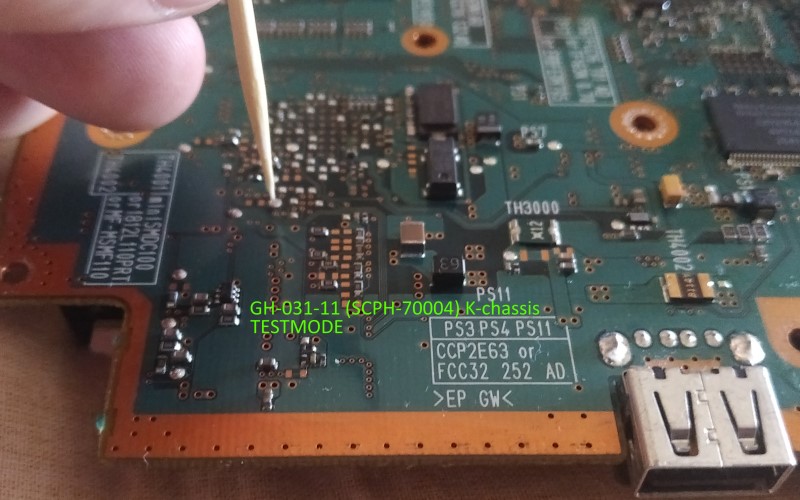
The BIOS allows booting either OSDSYS (the menu interface you'd usually see), as well as TESTMODE. It can be accessed in multiple ways: by shorting a certain mechacon pin to ground on the board, using a custom-built ELF to load it, or just simply editing EELOAD in the BIOS itself and preventing rom0:OSDSYS from being loaded by replacing it with rom0:TESTMODE, which is what the following video and screenshots use to achieve it.
When booted, it sits on a blank screen playing a 1kHz sine wave tone until any button is pressed on the controller. Afterwards, it lets you cycle between 6 different test cards. Some of these cards also let you change its properties.
The controls are as follows:
Select |
Next test card |
|---|---|
X |
Change color (2nd, 4th, 5th test card) * |
O |
Dithered gradient/solid steps (6th test card) |
R1 |
Increase resolution |
R2 |
Decrease resolution |
Up |
Increase brightness (2nd test card) |
Down |
Decrease brightness (2nd test card) |
Left |
Increase density (2nd test card) |
Right |
Decrease density (2nd test card) |
* X also changes the resolution on the 1st test card, as well as toggles the sine wave tone!
Test Mode demonstration |
|---|
VOLUME WARNING: There is a loud 1kHz sine wave tone at the beginning! |


A list of available resolutions can be found in the TESTMODE executable file in the BIOS:
VESA4B 1280x1024 N-InterVESA4A 1280x1024 N-InterVESA3E 1024x768 N-InterVESA3D 1024x768 N-InterVESA3C 1024x768 N-InterVESA3B 1024x768 N-InterVESA2E 800x600 N-InterVESA2D 800x600 N-InterVESA2C 800x600 N-InterVESA2B 800x600 N-InterVESA2A 800x600 N-InterVESA1D 640x480 N-InterVESA1C 640x480 N-InterVESA1B 640x480 N-InterVESA1A 640x480 N-InterDTV1080I 1440x1080 InterDTV720P 960x720 N-InterDVD480P 720x480 N-InterDTV480P 720x480 N-InterDVDPAL 702x576 InterPAL 640x512 InterDVDNTSC 711x480 InterNTSC 640x448 Inter
Oddities#
Invalid System Configuration#
The OSDSYS executable has three icon.sys presets loaded at all times: "Your System Configuration", "あなたのシステム設定ファイル", and a third nameless preset, all three pointing to the _SCE8 (\ICOIMAGE\ICOBYSYS) BIOS icon. The first two named ones have an unused red background and the 3rd unnamed preset has the regular dark blue background usually seen with the System Configuration file (as well as with Corrupted Data, Network Settings, and other system files) which is used to override the red background. It is possible to make an "invalid" system configuration file which would skip the nameless blue preset from being loaded, letting it display the unused red background that presumably would've been seen if something had gone horribly wrong with the file.
(Source: Edness)
Normal Configuration |
Invalid Configuration |
|---|---|
 |
 |
 |
 |