 This article has a talk page!
The PlayStation is Sony's first game console, and the result of a bad falling out with Nintendo who partnered up with Philips instead to release some (rather poor) Nintendo games on their CD-i system. Despite that, its $299 launch price and extensive game library led it to become the most popular game console of its generation; in addition, it introduced the Dual Analog controller to audiences as one of the first controllers with two analog sticks, which was eventually replaced by the more popular and ubiquitous DualShock.
Further proving the success of the console, the PS one, a smaller revision, was released in 2000 and sold more units than the PlayStation 2 during the rest of the year.

|
To do:
|
Hidden Text#
The BIOS contains a heaping of what appears to be debug console output, either used during the console's development, or used for game development on the console. It appears to have been compiled to MIPS using the C language. Character sequences beginning with a "%" are format specifiers.
Unless noted otherwise, all addresses noted below are for the SCPH-1001 revision.
Developer Credits#
Hidden in the BIOS at 0x129 is a small string:
Version(s) |
String |
|---|---|
SCPH-1000 |
|
SCPH-3500 |
|
All other revisions |
|
Backwards compatibility |
|
Realtime Kernel/Bootstrap Loader#
Normally unseen when using a real PlayStation, the following text is generated for console output when using the PCSX emulator, and possibly a devkit as well. It contains information related to the PlayStation kernel and boot process as the console loads.
PS-X Realtime Kernel Ver.2.5
Copyright 1993,1994 (C) Sony Computer Entertainment Inc.

PS-X ROM monitor Ver.2.3
Copyright 1993,1994 (C) Sony Computer Entertainment Inc.

setup file    : %s
KERNEL SETUP!

boot file     : %s
boot address  : %08x %08x
Execute !

BOOTSTRAP LOADER Type C Ver 2.1   03-JUL-1994
Copyright 1993,1994 (C) Sony Computer Entertainment Inc.

SYSTEM.CNF;1
PSX.EXE;1

Change effective memory : %d MBytes
Effective memory must be 2/8 MBytes

cdrom:
cdrom:
EXEC:PC0(%08x)  T_ADDR(%08x)  T_SIZE(%08x)
                S_ADDR(%08x)  S_SIZE(%08)
End of Main

EXEC:PC0(%08x)  T_ADDR(%08x)  T_SIZE(%08x)
                S_ADDR(%08x)  S_SIZE(%08)
End of Main
PIO Loader#
The PIO (Parallel Input/Output) feature was intended to be used for debugging but was exploited to boot unsigned code on such devices such as the Action Replay. At offset 0xE288 is a string which all PIO equipment must return to the console in order to have code execution passed to the device. Following that appears to be a primitive shell of some sort. It is unclear whether any development kits made use of the PIO Loader or whether this was an early development leftover.
Licensed by Sony Computer Entertainment Inc.

PIO SHELL for PlayStation(tm)
tty
CONSOLE

DIP SWITCH : %02X
fd=%d
write=%x
read=%x
error(%d,%d)
test 6 button PAD (QUICK TYPE)
test 6 button PAD (NEW)
ret:%08x     stock:%08x
tty(s2681) bad function
%s baud rate set to %d
s2681(1)
s2681(0)
Control Pad Driver#
At offset 0x16D34 appears to be debug output for the control pad driver. Interestingly, it refers to a "dual cross key" gamepad, which may be an as-yet-unseen prototype controller containing two D-Pads.
PS-X Control PAD Driver  Ver 3.0
TYPE : Dual cross key  ->  not supported!
TYPE : 6 free button or flying-V form
TYPE : Unknown (%d)  ->  not supported!
Bad Hankaku/SJIS Code#
Location 0x601E4 contains an error message about a "bad hankaku code". Hankaku means "half-width" in the Japanese katakana system of writing.
bad hankaku code 0x%xOffset 0x602FC contains an additional error about a "bad sjis code". SJIS is Shift-JIS, a Japanese character encoding.
bad sjis code 0x%xStandard Libraries#
Offset 0x61160 begins a long strand of textual error messages, debug messages, and file versions. These are strings from some kind of standard library to be used for any PlayStation application.
Error: Can't push matrix,stack(max 20) is full!
Error: Can't pop matrix,stack is empty!
This function is not implemented

sys.c,v 1.5 1995/06/02 01:51:14 shima Exp
SetGraphDebug:level:%d,type:%d reverse:%d
DrawPrim
GPU timeout:QUE=(%2d,%2d),CODE=(%d,%d,%08X)

ext.c,v 1.1 1995/02/15 04:59:46 shima Exp

prim.c,v 1.1 1995/02/15 05:00:08 shima Exp
tpage: (%d,%d,%d,%d)
tpage: (%d,%d,%d,%d)
clut: (%d,%d)
clip (%3d,%3d)-(%d,%d)
ofs  (%3d,%3d)
tw   (%d,%d)-(%d,%d)
dtd   %d
dfe   %d
env->tpage: (%d,%d,%d,%d)
env->tpage: (%d,%d,%d,%d)
disp   (%3d,%3d)-(%d,%d)
screen (%3d,%3d)-(%d,%d)
isinter %d
isrgb24 %d

otag.c,v 1.1 1995/02/15 05:00:07 shima Exp
OTag :prim
%5d:
bad prim:addr=%08X,type=%s,len=%d
SPU : Timeout [%s]
wait (reset)
wait (dmaf clear/W [start])
wait (tsa/W-I/O)
wait (wrdy H -> L)
wait (dmaf clear/W)
wait (ioctl/tsa-1)
wait (ioctl/tsa-2)
libspu: not supported ioctl (%d)

vsync.c,v 1.1 1995/02/15 04:57:50 shima Exp
VSync: timeout (%d:%d)

pad.c,v 1.1 1995/02/15 04:57:45 shima Exp

intr.c,v 1.1 1995/02/15 04:57:35 shima Exp

Too many interrupts
ResetCallback: _96_remove
DMA Bus Error: code=%08x
DMA bus error: code=%08x
At offset 0x65E48 appears to be more libraries and debug messages, this time with differing versions. These are possibly earlier versions of the libraries used in most games.
CdGetStatus() : Command is Delivered.
CdGetToc() : Command is Delivered.
GetStatus() : cmd=%02x, pre_cmd=%02x, status=%02x
GetTN() : Done.
GetTD() : cmd=%02x, pre_cmd=%02x, result=%02x
$Id: pad.c,v 1.10 1994/07/29 10:34:09 suzu Exp $
$Id: intr.c,v 1.21 1994/07/29 10:34:06 suzu Exp $ :     Copyright (C) by 1994 Sony Computer Entertainment Inc.
System Version Tag#
Just a simple version tag near the end of the file in most revisions at offset 0x7FF32. However, the string for SCPH-1002 is at 0x423C0 instead. Likewise, the string for SCPH-1001 is at 0x42E74. The backwards compatibility BIOS build date is updated for each new compiled release; therefore, this only shows the earliest known date.
Version |
String |
|---|---|
SCPH-1001 |
|
SCPH-3500 |
|
SCPH-1001 |
|
SCPH-5501 |
|
SCPH-5501 |
|
SCPH-5502 |
|
SCPH-7502 |
|
SCPH-100 |
|
SCPH-101 |
|
SCPH-102A |
|
SCPH-102B |
|
Backwards |
|
Revisional Differences#
|
|
To do:
|
Logo Screen Differences#
SCPH-100x to SCPH-550x (3.0 and Earlier) |
SCPH-700x to SCPH-900x (4.0 and 4.1) |
SCPH-10x (PSone) (4.3 to 4.5) |
|---|---|---|
 |
 |
 |
 |
 |
 |
There are noticeable differences in the Sony Computer Entertainment logo screen across various revisions. In BIOS versions 4.0 and earlier, the words pop into view as soon as the logo is formed (except on the SCPH-1000 and -3000 models), whereas they fade in on later versions. Starting from BIOS version 4.0, the words are also scaled down in relation to the logo. Also noticeable is how unevenly scaled the word textures are, and that the TM symbol is above the words 'Computer Entertainment' as opposed to being on the right of the two words in the later versions. Lastly, after the model SCPH-9001, the TM symbol was replaced by a ® symbol. Differences also exist in the PlayStation logo screen between the aforementioned BIOS versions. In BIOS versions 3.0 and earlier, the textures used for rendering the 'licensed by' text are unevenly scaled as previously mentioned. On BIOS versions 4.0 and later, this issue is corrected.
As previously mentioned as well, after the model SCPH-9001, the TM symbol was replaced by a ® symbol (except in Japan where it was always there from the start). This is the same case for the backwards compatibility BIOS (version 5.0), where the 4 letter region abbreviation was also removed. Otherwise, there are no obvious differences regarding how the PlayStation logo itself is drawn between all PlayStation consoles worldwide.
System Menu Differences and Similarities#
|
SCPH-1002, DTL-H3002, and SCPH-5502'' |
SCPH-10x |
|---|---|

|

|
The menu on the SCPH-10x model series uses simple icons with text above them. On the other hand, the menu on the SCPH-1002, DTL-H3002 and SCPH-5502 models has a similar background, but with different, more primitive icons and no text.
|
SCPH-1001 |
SCPH-7001 |
|---|---|
|
|
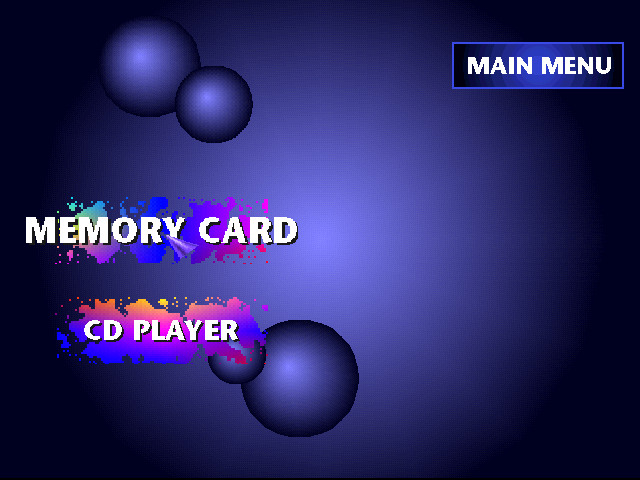
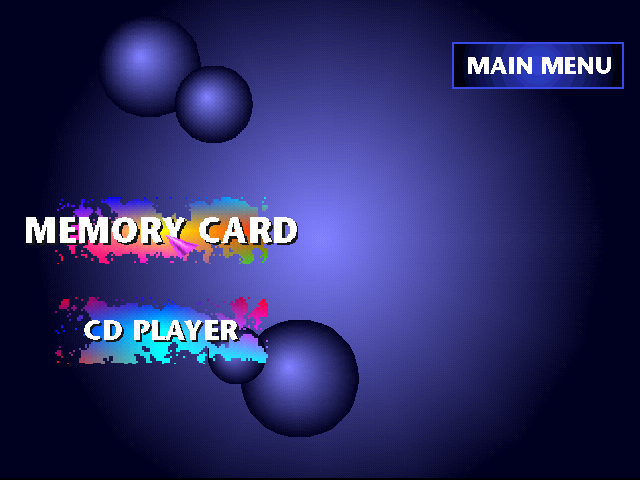
The menus have briefly changed their gradient colors for button plates (such as the SCPH-5501 and SCPH-7001 firmwares). Some of the cursors have changed their colors as well.
|
SCPH-7001 |
SCPH-7502 |
|---|---|
|
|
|
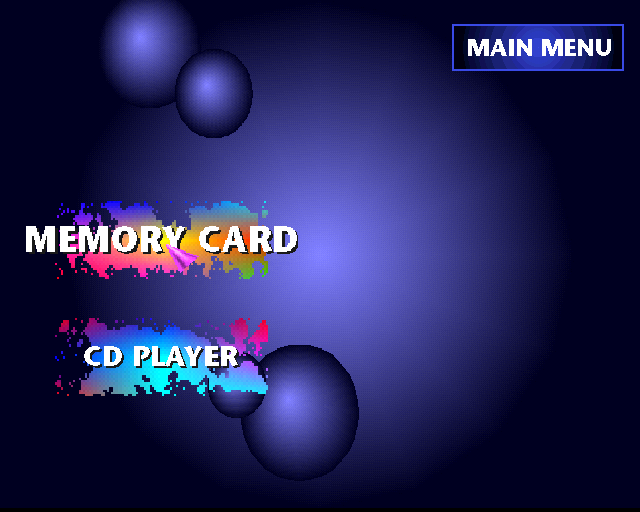
Ditto. The screen was scaled vertically in the SCPH-7502 firmware to take advantage of the higher resolution.
CD Player and Memory Card Screens#
SCPH-1002 to SCPH-5552 (Europe) |
SCPH-900x and earlier (North America, Japan) |
SCPH-10x (PSone) |
|---|---|---|
 |
|
 |
 |
 |
 |
Note the changed order and flipped arrow |
For simplicity's sake, only SCPH-7001 is shown. |
The old CD player menu returns almost unchanged |
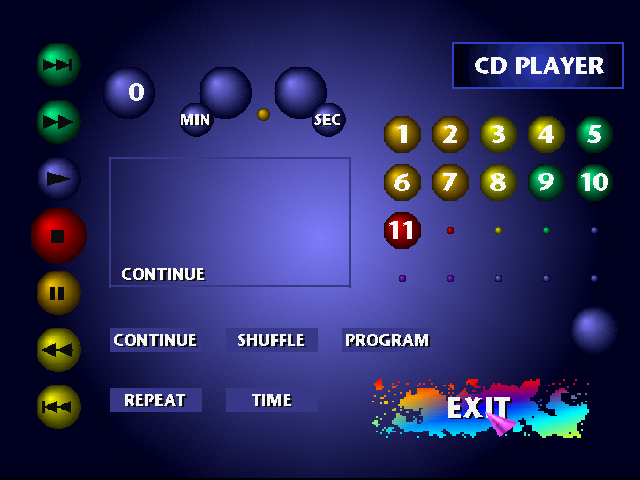
The CD Player on the PSone models has a function whereby one can select from a list of presets that add reverb to the music being played, in addition to the default "direct" preset, where no reverb is applied at all. This functionality was actually introduced as far back as the SCPH-1002 model, where it remained a feature exclusive to European consoles, until it was removed in that region with the SCPH-7002 revision. This functionality would later return for all regions of consoles with the introduction of the PSone (SCPH-10x). Compared with its first iteration, the newer version of the tiled CD menu receives a yellow background for the transport controls, a teal background behind the program buttons, and loses the brown-to-yellow rectangles in the reverb buttons. The icon for the page swap button changes from blank to three dots, and where blank squares were grey in both menus of the earlier firmware, they become black for the PSone.
The Memory Card menu also brings interesting changes between the different styles of the system menu. As with the main menu, SCPH-1002, SCPH-5502, and SCPH-5552 mostly use unique iconography to label their functions, rather than using text. The transfer and delete buttons adapt to contain the icon of the save you have selected and even mirror their layout when the selected save is on the second card. The blue menus add a header "Memory Card" atop the menu, and a label above each Memory Card which says "Card". The later tiled menu tends to be more specific by changing this to "Memory Card Slot". The "Memory Card" header no longer appears on the late tiled menu. Since its first outing, the new tiled menu has had a yellow background added behind its now textual save operation buttons. The confirmation buttons have also changed to text-based icons, which now are always shown, instead of only appearing after a save operation has been selected.
Another detail is the animation of exiting the CD Player or Memory Card menu. On the blue menus, the "Exit" text fades to black when either of the four face buttons is pressed with it highlighted, while the tiled menus do something more interesting; the blue tile behind the "Exit" text acts like it is a door opening to the root menu.
SoundScope#
Later PlayStation consoles (SCPH-700x and above) included SoundScope in the CD player, which can be accessed by pressing Select or Mouse Button 2 with a recognized audio CD inserted in the console. PSone Console firmwares (SCPH-10x) are the only ones that had both reverb presets and SoundScope functionality present in the CD player.
Controls#
- Left/Right = Change visual effect
- Up/Down/Mouse up/Mouse down = Increase/Decrease speed
- Triangle = Blur the screen
- Circle/Mouse Button 1 = Cycle to a random visual effect
- X + Up/Down = Change size of visual effects (Blue lines will appear)
- Square = Change color
- Mouse left/Mouse right = Change color forwards/backwards
Recording#
If you hold down the X button and push R1, you will enter recording mode. A red dot will appear on the bottom right side of the screen, and from here you can record your controller inputs. When you're finished recording, hold down X and push R1 again to stop recording. You can playback what you just recorded by holding down X and pushing L1. A green dot will appear on the bottom left side of the screen indicating that it's in playback mode. It'll constantly playback what you just recorded until one of the buttons are pressed.
Loading/Saving Recordings#
You can save your recorded controller inputs of the SoundScope onto the Memory Card by holding down X and pushing R2. Doing so will make a yellow dot appear on the top right side of the screen and save your recording. You can load your saved controller inputs by holding down X and pushing L2. A yellow dot will appear on the top left indicating that it is loading. You can only save a single recording of controller inputs. Saving a new recording will overwrite the current existing one.
Regional Differences#
Main Menu#
|
Japan (SCPH-5500) |
US (SCPH-1001) |
|---|---|
|
|
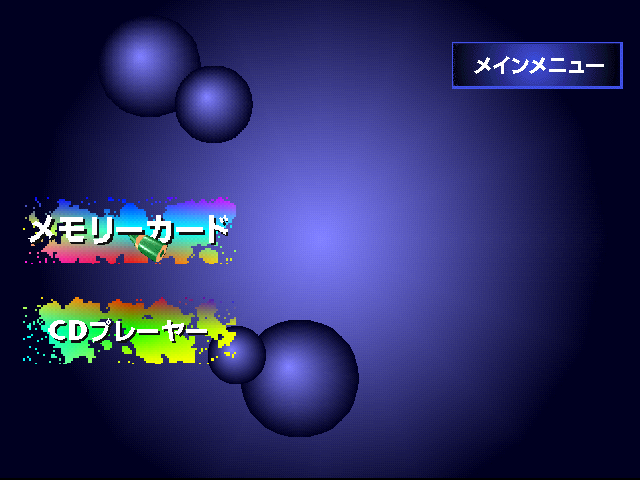
The SCPH-1000 and SCPH-5500 firmwares use a green-colored pencil as the navigation cursor, while SCPH-7000 uses a purple cursor (as well as SCPH-7001 and SCPH-7502). Their button plates have been colored differently. The "MAIN MENU" header also saw changes to its gradient and offset.
Error Message Screens#
SCPH-1000 to SCPH-5000 (Japan) |
SCPH-1001 to SCPH-7001 (North America) |
SCPH-1002 to SCPH-5552 (Europe) |
SCPH-10x (PSone) |
|---|---|---|---|
 |
 |
 |
 |
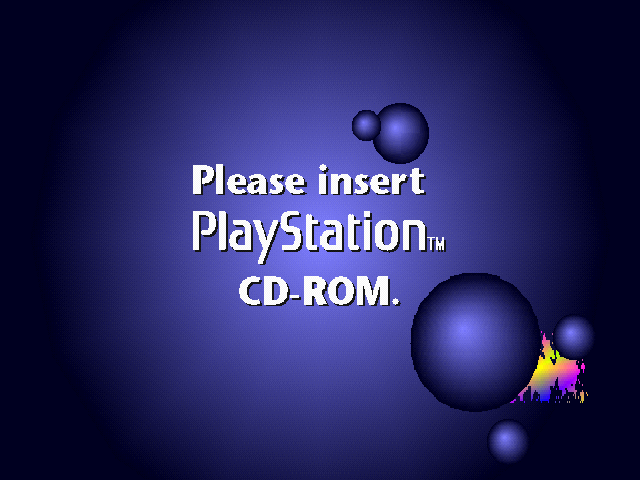
Japanese and North American consoles (from SCPH-100x to SCPH-700x) make use of a message informing the user to use a PlayStation disc, whereas European consoles have a different appearance by using a diagram instead. SCPH-10x consoles retain the "Please insert PlayStation® format disc" message.
It should be noted the gradient "splash" on the bottom-right (shown on the Japanese and US consoles) changes in color depending on the model, and the trademark symbol used for the PlayStation logo is different.
CD-ROM Backdoor#
The CD-ROM control chip in some PlayStation models supports a debug command to disable most of the disc authentication. However, this command would have to be sent from software running on the PlayStation itself. Because no game (other than Alien Resurrection) provides such behavior, this generally requires either a parallel port cartridge, or an exploit such as tonyhax (involving specifically crafted Tony Hawk's Pro Skater 2 and Tony Hawk's Pro Skater 3 save data, among others) to be used as a solderless backup loading option. Additionally, these commands don't disable all authentication, so a game would still be able to detect the use of a copy.
The protection can be disabled by sending the correct command sequence to the disc drive:
Command |
Parameter String |
|---|---|
0x50 |
none |
0x51 |
Licensed by |
0x52 |
Sony |
0x53 |
Computer |
0x54 |
Entertainment |
0x55 |
see below |
0x56 |
none |
Parameter for command 0x55 depends on the console's region:
Region |
Parameter |
|---|---|
North America |
of America/America |
Europe |
(Europe)/Europe |
Net Yarōze systems |
World wide |
Japan/Asia |
Inc. |
However, the command does nothing on Japanese firmware.
(Source: Nocash)
Anti-Piracy and Regional Lockout#

The first PlayStation, correctly predicting wide availability and affordability of CD-Rs in its expected commercial viability, is the first major CD-based console implementing anti-piracy design.
It uses a NES-style combined region and originality check, popularly known as the "wobble": the spiral track of the CD is deliberately distorted near its beginning, generating a tracking error that, after signal processing, encodes a four letter code such as SCEI, SCEA or SCEE corresponding to the "NTSC-J", "NTSC-U/C" and "PAL" user-marketed regions. This code is processed directly in the mechacon, impeding (but not completely preventing) access to the disc's sectors. There is however functionality to make the actual region code or the presence of one available to software, which is used in the second logo screen and, combined with the fact the wobble is only found near the start of the disc, for chip detection in some American and Japanese titles.
As noted in the previous section, some versions of the retail PlayStation boot ROM are a bit stricter than those from other regions. Notably, all Japanese boot ROMs, as well as European PSones, will verify the licensing data in the ISO9660 System Area (i.e. the PS logo and long-form "Licensed by Sony ..." text) and not boot a game from a different region, even if the main wobble-based security is defeated by a modchip. On a Japanese console, this will only result in the ability to play bootlegs and copies of Japanese games, but not authentic discs sold outside Japan, or even bootlegs with a modified and/or overseas logo or text. (A simple, if tedious and expensive, workaround is to create a disc image from an overseas game on a computer, patch the region to Japan using a third-party utility, and burn the modified disc image onto a CD-R. A less tedious workaround is booting from a parallel port accessory or boot disc such as the Karat-published Pro Action Replay CDX, a rebadged GameShark CDX designed for Japanese consoles.)
There is one notable exception: the original v1.0 boot ROM from 1994 contains a bug which effectively disables its region blocking. When this ROM detects a disc from outside Japan, instead of blocking the boot process, it will simply block the PlayStation logo from appearing. After the SCE logo appears, the screen will cut to black, and the game will start. This boot ROM only shipped inside the very earliest SCPH-1000 consoles starting in December 1994, and by early 1995 it had already been replaced with boot ROM v1.1, which patches the loophole.
Some non-retail models of the PS1 are region free, such as the "PlayStation World Wide" (DTL-H300x) part of the Net Yaroze kit which supports four regions (SCEA, SCEI, SCEE, and SCEW used exclusively for the Yaroze boot disc) and the Japanese 10 million units celebrative model (SCPH-7000W), both being fully equipped for both PAL and NTSC video modes, and the latter using a modified American ROM without supplementary region protection and an Asian multi-voltage power supply. Perhaps surprisingly, not all developers' test kit models (having a custom mechacon accepting non-original discs) are region free, due to the presence in the lineup of models with Japanese ROMs.
Contrary to long-debunked rumors, the console's use of black (necessarily IR-transparent) discs is not an optical performance nor security feature (apart from providing a way of readily identifying bootlegs to the casual buyer), although their coolness factor only encouraged CD-R manufacturers to offer them.
Contrasted to cheat and/or swap-facilitating discs, the vast majority of industrially manufactured pirate discs ("Hong Kong silvers") are in fact ordinary looking silver CD-ROMs without a wobble, aimed at minimum cost instead of convincing counterfeiting and expecting the buyer to already have a chipped console. (It should be mentioned though, that there are official PS1 CDs that were manufactured up until 2019 that are silver, but they are real complete with wobble.)