 This article has a talk page!
The self-explanatory title that defined punching and kicking (and fireball throwing) in video games.
NOTE: This page covers all the CPS-1 variations of the game (The World Warrior, Champion Edition, Hyper Fighting). For the CPS-2 variations, check out the Super Street Fighter II and Super Street Fighter II Turbo as well as Hyper Street Fighter II pages.
Debug Functions#
There are a few leftover developer tools that can be accessed by setting DIP switch C8 on. The activation is confirmed by a column of "A" characters on the right edge of the screen right after the startup test.
- The World Warrior: Additionally, P2 LP+HP must be held down during the startup test. Alternatively, developer tools can be enabled by setting the byte at RAM address FF82D7 to a non-zero value.
- Champion Edition: Developer tools can be enabled by setting the byte at RAM address FF82D3 to a non-zero value
Object Test#
To enter this test, hold P1 MP during the Warning screen.

Allows you to view all character animations, along with associated data.
- Hyper Fighting: Note that the DIP switch settings cause a speed-up effect that makes navigation difficult; to access the menu without this side effect, disable the DIP switch or access this test directly by freezing RAM address FF08CE to B3 then pressing the Service Mode button.
Controls - Modes#
There are 5 modes in the Object Test, NORMAL, EDIT, CATCH, and two unlabeled modes we'll refer to as "CATCH2", and "ROLL+ZOOM".
- NORMAL: Offers the basic animation viewer as well as tile data for each animation frame.
- EDIT: Displays hitboxes and their associated data.
- CATCH: Displays 2 characters standing on the same spot.
- CATCH2: Displays an opponent character with a specific sprite and position offset as determined by the value of the primary character's CATCH parameter. This allows reviewing how an opponent who is grabbed with a throwing technique will be displayed.
- ROLL+ZOOM: Enables controllable tile rotation and zoom effect to the the currently displayed object.
Controls - Buttons#
Control |
Description |
|
|---|---|---|
P1 Start |
Increment Stage. Seems to be involved with palettes; you have to change this value to display proper palettes for the boss characters. |
|
Service + P1 Start |
Increment stage + display associated character background. P1 Start reverts to default background, while incrementing stage. |
|
P1 Left/Right |
Toggle "P1" direction (NORMAL and CATCH modes only). |
|
P1 LP |
Decreases "P1" Chr Ctr value by 1 every frame while held down, thus playing back the current animation in real-time. |
|
P1 MP |
Reset "P1" current animation sequence to its start. |
|
P1 HP |
Toggle priority of "P1" and "P2" sprites (CATCH mode only). |
|
P1 HP + Up/Down |
Increment "P1" character. |
|
P1 HP + Left/Right |
Enables or disables the MOVE flag (Normal Mode). When active, directional inputs issue incremental X/Y translation commands. Holding P1 LP in combination with a direction increases the translation step size. P1 MP resets X/Y values to 0. |
|
P1 LK |
Toggle tile display (NORMAL mode only). |
|
P1 MK |
Disables character axis display while held. |
|
P1 HK |
Increments "P1" animation frame (EDIT and CATCH modes only). |
|
P2 Start |
Increment mode. |
|
P2 Up/Down |
Increment "P2" animation (CATCH mode only) / Increment DX value of currently displayed hitbox (EDIT mode only). |
|
P2 Left/Right |
Toggle "P2" direction (CATCH mode only) / Increment DY value of currently displayed hitbox (EDIT mode only). |
|
P2 LP |
Decreases "P2" Chr Ctr value by 1 every frame while held down, thus playing back the current animation in real-time (CATCH mode only). |
|
P2 LP + Up/Down |
Increment SX value of currently displayed hitbox (EDIT mode only). |
|
P2 LP + Left/Right |
Increment SY value of currently displayed hitbox (EDIT mode only). |
|
P2 MP |
Resets "P2" current animation to its start (CATCH mode only). |
|
P2 HP |
Unknown. |
|
P2 HP + Up/Down |
Increment "P2" character. |
|
P2 LK |
Increment hitbox type selection (EDIT mode only). |
|
P2 MK |
Unknown. |
|
P2 HK |
Increments "P2" animation frame (CATCH mode only) / Displays/resets currently selected hitbox type of current animation frame (EDIT mode only). The display does not update until P2 HK is pressed again, even if you move to another animation frame or hitbox type. |
Parameters#
These are the currently understood parameter displays:
Parameter |
Description |
|
|---|---|---|
CHR CTR |
Number of frames of game time that the animation frame is to be displayed before advancing to the next frame. |
|
CHR TYPE |
For some characters, a specific value determines whether or not a light normal can be chain cancelled. |
|
CHR DIR |
Current character direction, 00 = facing left, 01 = facing right. |
|
(Unlabeled, under CHR DIR) |
Current animation sequence ID. |
|
HEAD |
Head vulnerability box ID for current animation frame. |
|
BODY |
Body vulnerability box ID for current animation frame. |
|
FOOT |
Foot vulnerability box ID for current animation frame. |
|
WEAK |
Weak point box ID for current animation frame. |
|
ATCK |
Attack box ID for current animation frame. |
|
BODY1 |
Pushbox ID for current animation frame. |
|
KAGE |
Ground shadow sprite ID for current animation frame. |
|
PRIO |
Sprite priority for current animation frame. |
|
CATCH |
Catch ID for current animation frame. Determines opponent sprite and position offset for when they are grabbed by a throw. |
|
BLOCK |
Blocking flag for current animation frame. 00 = no block, 01 = standing block, 02 = crouching block. |
|
Weak No |
Extra effect to apply if weak point box is hit during current animation frame. 00 = nothing, 02 = double damage. |
|
SIT |
Crouching flag for current animation frame 00 = standing, 01 = crouching. |
|
OBJ SUU |
Number of tiles in the current animation frame. |
|
DX |
X offset of currently displayed hitbox. |
|
DY |
Y offset of currently displayed hitbox. |
|
SX |
X radius of currently displayed hitbox. |
|
SY |
Y radius of currently displayed hitbox. |
|
YOKE |
How the AI responds to the current animation frame. |
|
YOKE2 |
If set to 01, the AI knows that the opponent's attack is recovering. |
|
ATCK DNo. |
Damage table for attack box of current animation frame. |
|
SD CODE |
Sound to play upon successful hit for attack box of current animation frame. |
|
ATCK EX. |
Attack type for attack box of current animation frame. 00 = standard ground-based normal, 01 = sweep, 02 = jumping normal, 03 = special move, 04 = normal with special property. |
|
ADJUST1. |
Additional random damage table for attack box when health is 3C or higher. |
|
ADJUST2. |
Additional random damage table for attack box when health is 3B or lower. |
|
EX Code |
Effect on hit for attack box if ATCK EX = 03 or 04. |
Scroll Test#
To enter this test, hold P1 LP during the Warning screen.
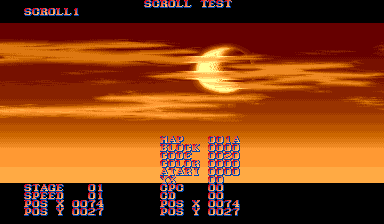
Allows you to view backdrop elements.
- Hyper Fighting: Note that the DIP switch settings cause a speed-up effect that makes navigation difficult; to access the menu without this side effect, disable the DIP switch or access this test directly by freezing RAM address FF08CE to A4 then pressing the Service Mode button.
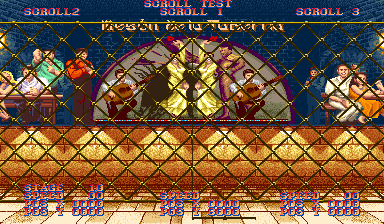
Stages 01-0C correspond to the stages of all 12 characters, 0D-0F correspond to the three bonus stages, 11 is for the title screen and the high score list, 12 is for character select and VS screens, and 13 and 14 are for the characters' endings. Stage 10, however, is unused: it is a smaller version of Vega's (Claw) stage, having the same size as the bonus stages, and is located after the "flaming barrel" bonus stage. It's possible that a fourth bonus stage was planned at one point.
Controls#
Initial Screen:
- P1 Up/Down: Select scroll type.
- P1 LP: Confirm scroll type / Increment stage (after scroll type has been confirmed).
- P1 MP: Confirm stage (after scroll type has been confirmed).
Upon Scroll Type / Stage Confirmation:
- P1 Up/Down/Left/Right: Scroll, speed varies according to "SPEED" parameter.
- P1 LP: Increment "SPEED" parameter.
- P1 LP+MP: Return to initial scroll test menu.
- P2 Up/Down/Left/Right: Move cursor. Information in the right-hand column reflects to cursor position.
Following keys work only in SCROLL123 mode:
- P1 Start: Switches the P2 arrow keys between scrolling layers 2 and 3.
- P2 Start: Changes the order of layers.
- P2 LP: Increment the P2 "SPEED" parameter.
- P2 Up/Down/Left/Right: Scroll the selected P2 layer, speed varies according to "SPEED" parameter.
Enemy Test#
To enter this test, hold P1 HP during the Warning screen.

The functionality of this test is currently unknown. There are "Single" and "All" modes, both of which trigger some text and numbers that advance extremely quickly.
- The World Warrior: Gets stuck in a black screen.
- Hyper Fighting: Note that the DIP switch settings cause a speed-up effect that makes navigation difficult; to access the menu without this side effect, disable the DIP switch or access this test directly by freezing RAM address FF08CE to C4 then pressing the Service Mode button.
Controls#
- P1 Up/Down: Select mode.
- P1 LP: Initiate test.
Stage Select#
Configuring DIP B4-B8 and Booting the game in Debug mode (DIP A8+C8 ON while holding P2 LP+HP through the ram check screen) allows the player to start on any stage.
- Hyper Fighting only needs DIP A8+C8 ON for this function to work. After selecting a character Turn DIP C8 OFF to play at normal speed.
Stage |
DIP B4 |
DIP B5 |
DIP B6 |
DIP B7 |
DIP B8 |
FBNEO HEX |
|
|---|---|---|---|---|---|---|---|
RYU |
ON |
OFF |
OFF |
OFF |
OFF |
0X08 |
|
E. HONDA |
ON |
ON |
OFF |
OFF |
OFF |
0X18 |
|
BLANKA |
ON |
OFF |
ON |
OFF |
OFF |
0X28 |
|
GUILE |
ON |
ON |
ON |
OFF |
OFF |
0X38 |
|
KEN |
ON |
OFF |
OFF |
ON |
OFF |
0X48 |
|
CHUN-LI |
ON |
ON |
OFF |
ON |
OFF |
0X58 |
|
ZANGIEF |
ON |
OFF |
ON |
ON |
OFF |
0X68 |
|
DHALSIM |
ON |
ON |
ON |
ON |
OFF |
0X78 |
|
DICTATOR |
ON |
OFF |
OFF |
OFF |
ON |
0X88 |
|
SAGAT |
ON |
ON |
OFF |
OFF |
ON |
0X98 |
|
CLAW |
ON |
ON |
ON |
OFF |
ON |
0XA8 |
|
BOXER |
ON |
OFF |
ON |
OFF |
ON |
0XB8 |
|
CAR |
ON |
OFF |
OFF |
ON |
ON |
0XC8 |
|
BARREL |
ON |
ON |
OFF |
ON |
ON |
0XD8 |
|
DRUM CAN |
ON |
OFF |
ON |
ON |
ON |
0XE8 |
|
DRUM CAN 2 |
ON |
ON |
ON |
ON |
ON |
0XF8 |
- To add hex values in fbneo press F5 to open the Map Game Inputs dialogue box and scroll down to find the DIP tables. Debug can be configured by inserting a hex value of 0x80 in DIPA+C. Additionally, clicking Input -> Edit Dipswitch Settings and changing the game mode setting from Test to Game will toggle the debugger on or off without changing the map game inputs settings (reboot required to get back into the debugger when returning to test mode).
Location Test Ending#
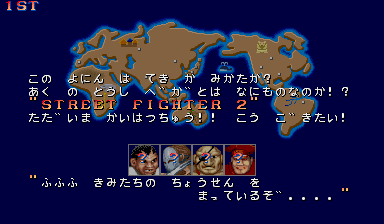
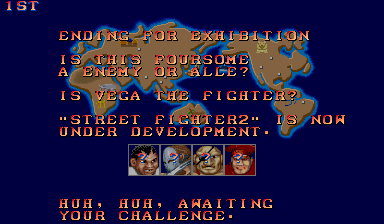
Leftover in the ROM is an unused ending from location test builds, featuring the icons of the four boss characters and a few (Engrish-laden) paragraphs. This "preview" mode can be enabled by setting the RAM byte at 0xFF8307 to a non-zero value before selecting your character.
(Source: Hpman)
Comparison: Japan vs International#
- Notably, Dictator's Japanese name hasn't changed in the international version.
|
Japan |
International |
|---|---|
|
|
Text Translation#
Japanese |
Translated |
|---|---|
こうごきたい! "ふふふ きみたちの ちょうせん を まっているぞ. . . ." |
Unused Moves#
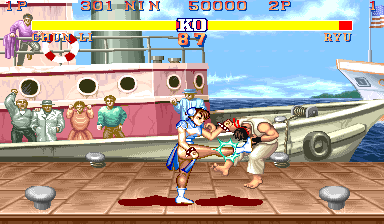
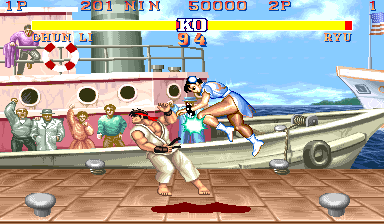
Despite having only officially been usable since Champion Edition, Chun-Li's back-flipping and forward-flipping command normals exist dummied out in The World Warrior. According to developer interviews, they were present at the location test but were removed from the finished product due to balance concerns.

Hyper Fighting adds an unused attack animation for Ryu that combines his far standing hard kick roundhouse and his close standing hard kick ax kick into something vaguely resembling the special kicks Ken would eventually gain in Super Turbo. The resulting attack can hit twice, just like the standard close standing hard kick, but seems to have no other special properties.
Unused Graphics#
|
In-Game (Unused) |
Fixed |
|---|---|

|

|
The defeated portrait of Dictator goes unseen only in The World Warrior due to the four bosses not being playable until Champion Edition, which features some redrawn and tweaked character select artwork (note the glitchy hat). This artwork can only be seen in-game by using cheats to play as him.

This is actually what The World Warrior subtitle looks like inside the ROM, with a typo on "Warrior". Game planner Akira "Nin" Nishitani said in a 1991 interview that this mistake was noticed at the end of development.
The graphic trick used in-game is different than what was mentioned in the interview: the right half of the "Wo" tile in "World" was used to replace the "ie" in "Warrier". This made it appear to say "The World Warrlor" (with an L). Then individual dark blue pixel sprites were placed near the top of the 'l' to change it into an 'i'. The single-pixel sprites came from Guile's graphics.
Oddly enough, the graphics were corrected in Champion Edition, even though the subtitle went unused from that point on.
(Source: Fabien Sanglard)


The startup animations of Ryu's and Ken's Hurricane Kicks have 4 frames, but the spinning animation starts before the last one is displayed. Ken's would eventually be seen in Super Street Fighter II (albeit for only 1/60th of a second), but Ryu's never saw any use.

The effect sprite for projectile impacts has 4 frames of animation, but it disappears after the third frame, leaving this last one unused. The animation was later updated in Super Street Fighter II but this frame still remained unused.
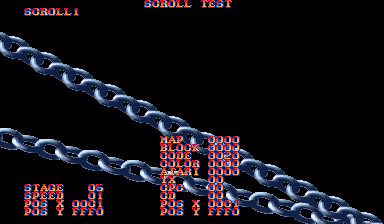

Some large foreground chains for Ken's stage. Interestingly, the original sketch for Ken's stage seen in a Street Fighter II artbook included them. They're actually present in-game, albeit layered behind all the other backdrops.


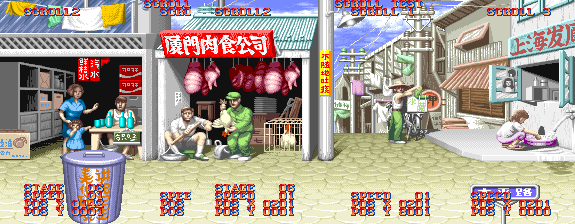
A trash can for Chun-Li's stage that reads 讲究卫生 美化环境 (Pay attention to sanitation, Beautify the environment) and an unused sign that reads 太平路 (Taiping Road). As with the chains in Ken's stage, these are present in the game, only layered behind the other backdrops.
Above is a screenshot showing how these two items would probably look if they were layered properly and not hidden.
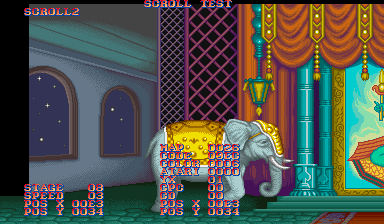
These windows in Dhalsim's stage are obscured by elephants in normal gameplay.
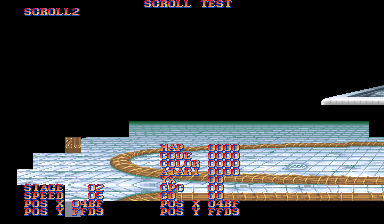
A hidden glitch tile on E. Honda's stage graphics layer, it's the "US" tile from the "WINNERS DON'T USE DRUGS" banner, mirrored.
(Source: T Akiba, felineki)

This padding tile is repeated several times in the 16x16 graphic banks that contain data for some of the endings and the Continue screen animations. The black color is transparent in the original data.
Unused Sounds#
Sound code 12 is named "Game Over" in the ROM data and is stored right before the used Game Over track (13), which is named "Game Over II".
Two grunt voice clips go unused, a generic male one (40) and a female one for Chun-Li (42).
What is presumably a KO sound intended for Vega/Balrog (Claw) exists in the PCM data, but cannot be accessed from the sound test. The characters later had varied KO sounds in Super Street Fighter II.
Regional Differences#

|
To do: |
|
Japan |
International |
|---|---|

|

|
- On the Continue screen, below the timer and character portraits, the Japanese sets provide several advice and tips to improve your skills at the game; the international versions remove this completely and leave just a black space where the text would be.
Japanese Description |
Translated |
|---|---|
|
"Quickly move the lever → ↓ ↘, and press the Punch button. It's difficult, but its destructive power is exceptional - Shoryuken. |
- In the Japanese version, each character has several different win quotes. The international versions gave each character just one win quote.
- In Japan, Champion Edition is known as Street Fighter II Dash: Champion Edition. However, the title screen was not changed to reflect this difference. This is because the word "Dash" isn't spelled on the game's title but is represented by an apostrophe-like symbol known as a prime next to the "II", which is alternatively known as a "dash". The prime mark is also present on the international title screen but was treated as an unspoken symbol in the game's overseas promotion. This subtle difference was later reflected in Hyper Street Fighter II, in which the Champion Edition-based playstyle is called "Dash" in the Japanese version and "Champ" in the international versions.
Character Names#
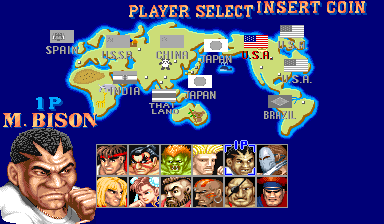
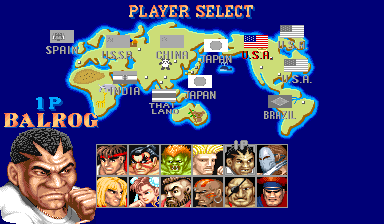
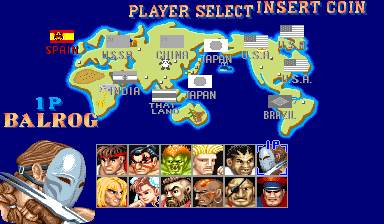
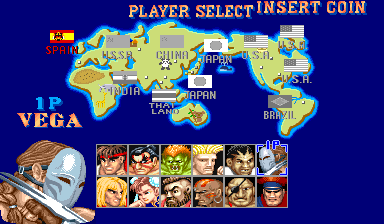
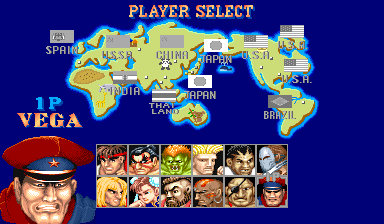
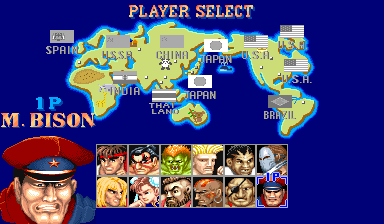
Perhaps one of the most notable regional differences in video gaming is this game's name change of boss characters. Since the characters' character select and VS screen nametags are hand drawn rather than written with a font, Capcom USA opted to swap around some of their names rather than give them brand new ones, leading to a LOT of confusion later down the line. Sagat, who already debuted in the previous game, is the only boss character not to have been renamed.
Note: Pictures are from Champion Edition, where the bosses can be selected by the players for the first time.
|
Japan |
International |
|---|---|
|
|
The disgraced African-American boxer is known as M. Bison (M for Mike) in Japan and Balrog elsewhere. This was changed due to concerns about a lawsuit from real-life boxer Mike Tyson, upon whom the character is based.
|
Japan |
International |
|---|---|
|
|
The Spanish claw-wielding, mask-wearing bullfighter is known as Balrog in Japan and Vega (which is actually a Spanish surname) elsewhere.
|
Japan |
International |
|---|---|
|
|
Finally, the leader of Shadaloo and soon-to-be-world-dictator is known as Vega in Japan and M. Bison elsewhere, this was because Capcom USA thought Vega was a weak name for this character. What the "M" actually stands for has remained inconsistent across the series - the animated Street Fighter II film, the 1995 cartoon series, and Alpha 3 use it to refer to "Master" (Vega-sama, in Japan), whereas Street Fighter IV and Street Fighter X Tekken use "Mighty".
Champion Edition Japanese Changes#
- Boxer's Dash Straight can now hit against crouching opponents.
- Boxer's transition from crouching to standing was speed up and smoother.
- Boxer's Turn Around Punch now has 10 levels, rather than 2.
- Claw's Rolling Crystal Flash now has 3 variants. Instead of always doing just one roll, he can either do one roll for light punch, two rolls for medium punch or three rolls for heavy punch.
- Claw's Rolling Crystal Flash... if fully connected is stronger. Instead of all versions dishing out the same damage, light is a true 3 hit combo, medium has a delayed 3rd hit and heavy is 4 hits. Also against some characters, this move can be blocked after the 1st hit. The light punch version is still a true combo but it's only got two hits and not three if blocked.
- All versions of Sagat's Tiger Uppercut can now knock grounded opponents down, instead of just the light punch one.
- Dictator's Psycho Crusher now does less frequent block hits and less chip damage.
- The rear side of Ken's Tatsumaki Senpukyaku now pushes opponents away, instead of pulling them in, for a great combo.
- Zangief's Spinning Piledriver now does 50 damage to a opponent, instead of 44 damage, making it stronger.
Hyper Fighting Title Screen#
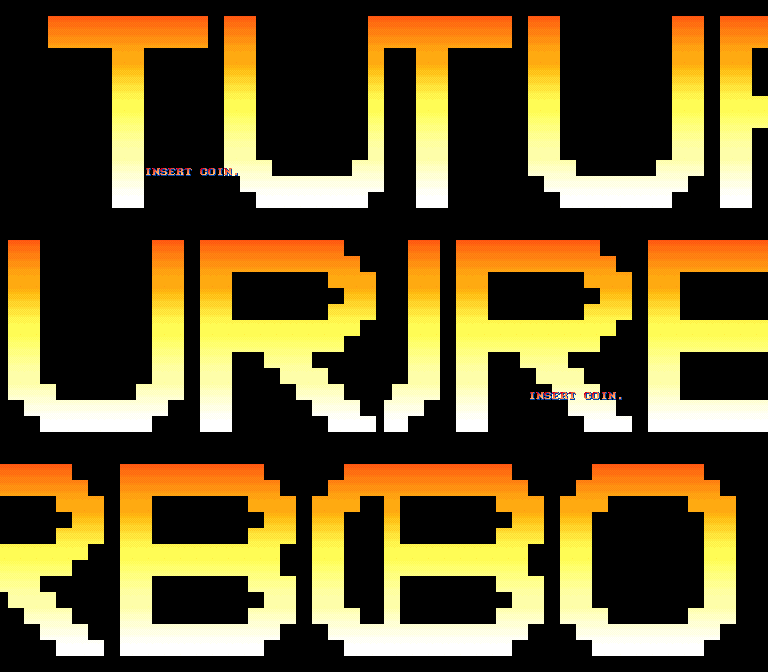
In the Japanese version, midway through the intro sequence as the camera pans up the skyscraper, the screen briefly cuts to black, displaying the word "TURBO" scrolling from right to left to reflect the game's new title. The intro then resumes with the camera continuing its upward pan before the game's logo appears.
This brief segment was removed from the international versions, which instead reuse the standard intro from The World Warrior and Champion Edition, where the camera continuously pans up the skyscraper without any cuts before the logo is shown.
|
Japan |
International |
|---|---|

|

|
Whilst the international title screen for Hyper Fighting went for a blue background similar to Champion Edition with a recolored Street Fighter II′ logo and the game's subtitle spelled in flashing letters, the Japanese title screen features a slightly more elaborate design consisting of a black background and a large blue stripe behind the logo, with the word "Turbo" added to the main title and no flashing subtitle. Like Champion Edition before it, the full Japanese title is Street Fighter II Dash Turbo: Hyper Fighting, with "Dash" being represented with a prime symbol. The word "Turbo" actually appears on the game's U.S. marquee despite its absence on the international title screen, which is simply the Street Fighter II Champion Edition marquee logo surrounded by the words "Turbo" and "Hyper Fighting".
The rest of the game is inconsistent as to which title it uses in all regions. The revision screen during boot-up displays the title as Street Fighter 2′T, while the staff roll uses Street Fighter 2′ with Hyper Fighting written underneath.
The "Turbo" suffix would later be used for the Super NES equivalent in all regions (without the prime mark).
Revisional Differences#
|
|
To do: |
Street Fighter II went through several revisions through Champion Edition and Hyper Fighting.
Portraits#
|
|
To do: |
|
The World Warrior |
Champion Edition/Hyper Fighting |
|---|---|
|
|
|


The portraits for all 12 fighters were revised in Champion Edition, with Ken's being the only one that was almost unchanged from The World Warrior. Most of the retouches mainly revolve around the characters' actual faces, but some of the palettes (most notably Chun-Li's and Dictator's) were fixed too.
Victory Poses#
|
|
To do:
|
|
World Warrior |
Champion Edition, Hyper Fighting |
|---|---|
|
|
|


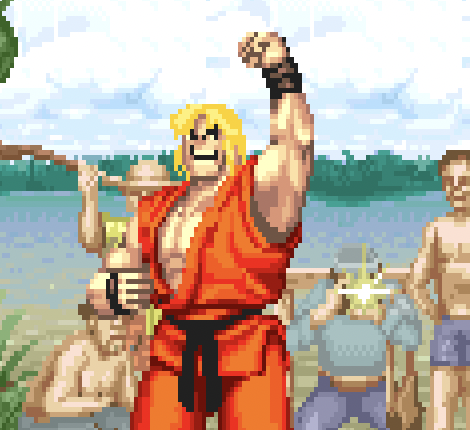

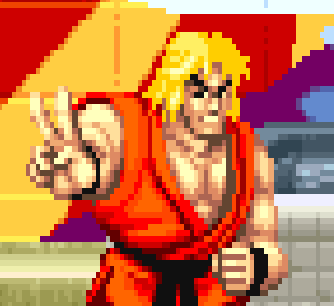

Several victory poses were redrawn to be more on-model.
Endings#
|
|
To do: |
The visuals for some of the endings were changed too.
Ryu#
|
The World Warrior |
Champion Edition/Hyper Fighting |
|---|---|

|

|
Ryu was given a more in-character facelift for the later revisions.
Note that if you win the game with Normal Ryu in Hyper Street Fighter II, it still uses the revised facelift.
Ken#
The World Warrior |
Champion Edition/Hyper Fighting |
|---|---|
 |
 |
 |
 |
 |
 |
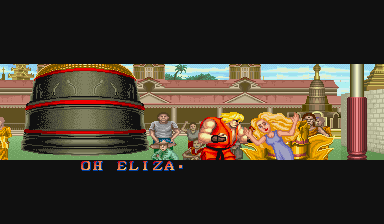
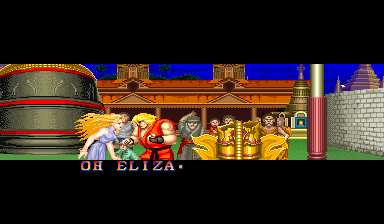
Ken and Eliza's heads were redrawn to be less terrifying. Ken was also given broader shoulders and Eliza was given a less detailed dress.
Guile#
The World Warrior |
Champion Edition/Hyper Fighting |
|---|---|
 |
 |
 |
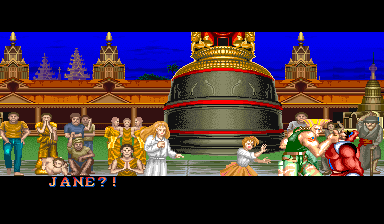 |
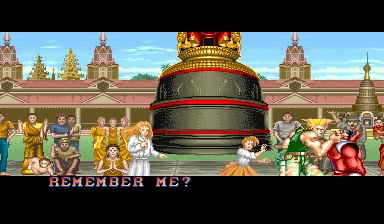
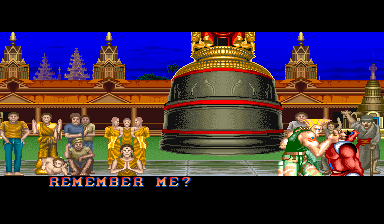
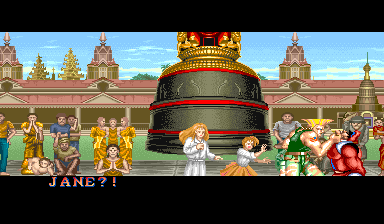
Jane (Julia in the Japanese version) and Amy (Chris(tina) in the Japanese version) no longer appear at the beginning of Guile's ending. They appear after Jane shouts "HONEY STOP!" instead.
This change effectively makes the ending much better and more climactic, as they appear at the right moment instead of standing behind Guile for so long while he is talking to Bison.
Dictator's Engrish Fix#
In The World Warrior, Dictator's only win quote in the international versions has him saying "GET LOSE, YOU CAN’T COMPARE WITH MY POWERS.", which is grammatically incorrect. In Champion Edition and Hyper Fighting, the "E" in "LOSE" was replaced by a "T", where it now says "GET LOST, YOU CAN’T COMPARE WITH MY POWERS.", which is grammatically correct.