 This article has a talk page!
The PlayStation version of LEGO Island 2: The Brickster's Revenge is very watered-down compared to the Windows iteration, with many aspects heavily reworked due to system limitations, and even more parts scrapped completely due to time constraints during development, such as whole levels and several characters.
 Prototype Info
 Source CodeAutomatically-generated source files found throughout the disc.
 Unused Dialogue & StringsA huge number of unused lines. Some did not survive the move from PC to PlayStation, while others are unused in both.
Level Select#
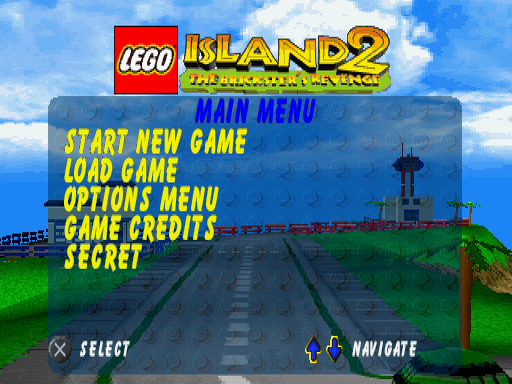
There is a byte in memory that defines how many options are visible on the main menu. Increasing it by 1 reveals a hidden option titled "Secret", which takes you to another menu where you are able to select any level.
It is possible there is a cheat code to enable it, but as it currently stands, it has yet to be found, if it exists at all.
Using the following GameShark code while on the main menu will reveal the extra option.
North America |
Europe |
|---|---|
|
|
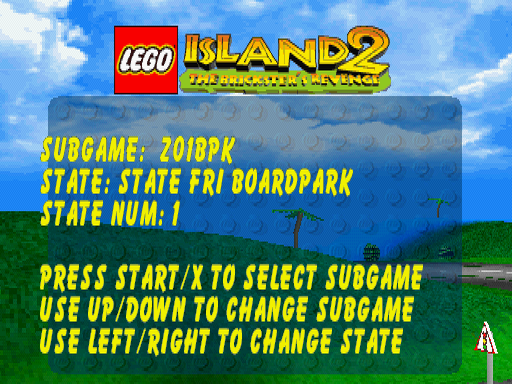
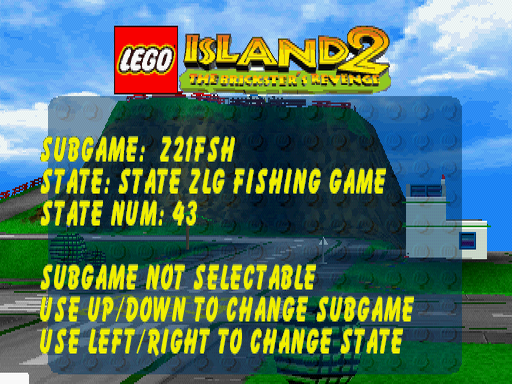
Interestingly, this menu lists the three minigames cut from this port, which are Fishing, Parachute Training, and Parachute Onto OGEL. The list also reveals two extra locations that are not present in the PC version as well. These are travelling from the overworld desert section to the Oasis, and from the Oasis to the Desert.
Navigating to any of these five states will display a "SUBGAME NOT SELECTABLE" message. Indeed, all of the appropriate files are missing from the disc entirely.
(Discovery by: Scraliontis)
|
Selectable Level |
Non-Selectable Level |
|---|---|
|
|
While there are instructions that appear with the menu, they do not seem to work correctly. Pressing D-pad Left or Right moves through the levels as intended, but pressing D-pad Up or Down will sometimes show incorrect Subgame directories compared to what the State below it is. This makes some of them unselectable, as the directory is incorrectly set to one of the cut minigames. Pressing right and then left will show the same State name, but it will now have the correct Subgame directory.
The unselectable level and state names are below. They are internally written with underscores, but displayed on-screen with spaces.
SubGame |
State |
State Num |
Notes |
|---|---|---|---|
|
STATE_ZLG_OD_TO_FISH |
42 |
This was also cut from the PC version. There is an unused hologram Infomaniac call about talking to the Old Fisherman in the open, which is also present in the PlayStation version. |
|
STATE_ZLG_FISHING_GAME |
43 |
Almost all of the voice lines related to this minigame are present in the files. Oddly enough, the lines about the Old Fisherman lending Pepper his pole to catch Bertha are missing. |
|
STATE_ZLG_OASIS_TO_DESERT |
44 |
Another fully cut section that would have taken place after leaving the Oasis. In the final game, you immediately move to the next area where you go to start Bi-Plane. |
|
STATE_FRI_PARACHUTE_TRIANING |
60 |
The misspelling of training is in the original text. The voice lines for this are also present. |
|
STATE_ZLG_OGEL_BY_PARACHUTE |
63 |
All of the voice lines related to this minigame are present in the files. |
|
STATE_FRI_CI_HORSE_TO_BRIDGE_WITH_J* |
22 |
These two directories seem to be from cut sections, likely where you had to instead pick up the pages, rather than be given them. These directories are not present in the PC version either. They seem to be using the names and state numbers of the closest states to them. |
|
STATE_FRI_JOUST_GAME |
23 |
|
|
STATE_FRI_CI_TO_DIVE_GAME |
17 |
These three have the correct state name and number, but incorrectly set the directories to one of the three Fishing subgames, the Parachute Training subgame, and the Parachute Onto OGEL subgame, which is why they cannot be selected. |
|
STATE_FRI_CI_HORSE_TO_BULLS |
25 |
|
|
STATE_FRG_LI_BOAT_FROM_CI |
30 |
|
Strings with asterisks (*) are too long to be fully displayed on-screen, with the cut-off text shown here in bold.
Higher Quality Outro FMV#
PADDING.BIN in the North American version contains the outro FMV with a higher bit rate and frame rate than the version shown in-game. The European release also has this file, but the versions that play in-game retain the original 25 frames per second the FMVs were made at, albeit with a lower bit rate.
Bugs#
- In only the European version, throwing a pizza while standing still will cause the throwing sound to play a second time after the first one ends.
- The European version correctly shows all 256 lines of the game in video memory, but when displayed on-screen, the last two lines are missing, showing only 254.
- Some minigames do not play the voice lines that are meant to be heard during gameplay, despite them being in the files.
Unused Music#
The PC version dynamically switches the track playing depending on where you are on the island, changing when you move closer to, or away from, certain buildings. This dynamic feature was also used to iterate through variations on a track, where extra instruments would come in.
This feature was likely intended to be in the PlayStation version too, as almost all of the music was converted for it, but many tracks ended up going unused, and some were not fully finished. There are also some tracks present here that are unused in both versions of the game.
Filename |
Audio |
Notes |
|---|---|---|
|
Information Center dynamic track. |
|
|
Radio Station dynamic track. |
|
|
Rob & Steve's house dynamic track. |
|
|
Police Station dynamic track. |
|
|
Pizzeria dynamic track. |
|
|
Brickster-Bots Theme. Oddly enough, this track more closely resembles the music that plays during the OGEL Maze minigame in the Game Boy Advance version, rather than the PC version. |
|
|
A slightly different arrangement of the Brickster-Bots Theme. This is the converted version of the track titled "BBotsVartn" in the PC version, but it still shares the slow tempo of the one above. |
|
|
These tracks were possibly used for testing the dynamic playback feature before it was scrapped, or served as placeholders. They do not match any of the PC music tracks either. |
|
|
||
|
||
|
||
|
||
|
||
|
||
|
Infomaniac character theme. The following character themes are unused, as characters do not have dynamic themes in either the PC or PlayStation versions. |
|
|
Nick Brick character theme. |
|
|
Mama Brickolini character theme. |
|
|
Papa Brickolini character theme. |
|
|
Whack-A-Bot only plays the first track on a loop and does not transition into these two variants. |
|
|
||
|
Brick Dive does not transition to this variant. |
|
|
Whack-A-Snake does not transition to this variant. |
|
|
The converted version of the track titled "Pre-Matching" in the PC version. This track very briefly plays before the main music begins in the PC version of the minigame. |
|
|
The converted version of the track titled "Fishing" in the PC version, which plays when you reel in a fish. Yet another leftover from when the fishing minigame was still planned for this version. |
|
|
The game only uses the first track, rendering these two variants unused. |
|
|
||
|
An unused and seemingly unfinished track that would later become the LEGO Racers 2 bonus game theme. It is used in the prototype as the audio for the credits and is baked into the video file. |
|
Unused Models#
LEGO Island#
Bill Ding#

Bill Ding is always loaded on LEGO Island, but is set not to be visible. He is found on a curb behind the Pizzeria. Making him visible at the start of the game will allow you to talk to him, but he will load either random voice lines, which are sometimes his own, or none at all. He also dodges thrown pizzas. The name for him in memory is BILL.
When talking to him, he will still look towards the direction of your closest objective upon talking to him a second time, but he will then stay looking in that direction until he can look at a closer objective, due to his incomplete behaviour code. If he is set to be visible during the section where you have to take down the Brickster-Bots, he will no longer have any collision, cannot be talked to, and he will have also moved slightly to be on the grass.
His appearance in this version does not match how he looks in the PC version, indicating this could have been an earlier design for him. Here, his arms and legs are blue instead of white and black respectively, and his construction hat is red instead of white. His appearance was likely changed, as he looked very similar to Nubby Stevens like this.
One of his hands is missing, which is due to the right hands being the ones that hold tools or objects. In this version, Technician Bob holds a spanner in his right hand, rather than the hammer he uses in the PC version, so the spanner model required for Bill Ding does exist as part of the minifigure meshes, but is not assigned to him.
In the PC version, Bill Ding appears during the cutscenes of Pepper's house construction, and when a building is reconstructed after retrieving a Constructopedia page. In the PlayStation version, the buildings quickly appear while a particle effect of bricks rains down on them, instead of them being rebuilt brick by brick. Since this plays so fast, the longer cutscenes with Bill Ding speaking were no longer needed, although his voice lines for when Pepper's house is being built are still present in the files.
Using the following GameShark code will make him visible, but you will no longer be able to talk to him if it is activated later in the game.
North America |
Europe |
|---|---|
|
|
Board Park#
Among the models listed in memory for the Board Park are four LEGO Island characters. The model names are DJAB, BONE, VALS, and PAPA. Three of these are the names for DJ (whose full name is DJ Ablebody in this game, hence the AB), Valerie Stubbins, and Papa Brickolini. As for BONE, this would have been Bony Hawks, a character who appears only here in the PC version, and who would later be known as Gnarly Bones in the sequel. He can still be seen in the centre of the quarter pipes in the image for the board park on Pepper's computer, albeit without his beanie, and not on the skateboard. You are not able to get off of the skateboard in the minigame.
These four models are placed two on either side of the top of each quarter pipe, but their models do not draw anything. If the ID of a visible object is set to their IDs, such as the blue fence, it will then show where they are placed. If Pepper's model is set to their IDs, they will still not draw anything, and the game will begin to glitch.
Castle Island#
Cavalry Knight#
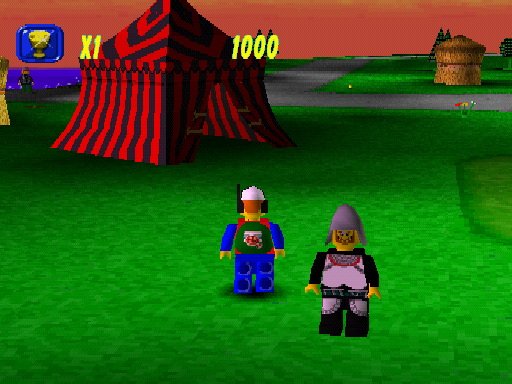
Close to the jousting area, there is an unused character that is set to not be visible. This is the Lions' Cavalry Knight, who even has unused voice lines that are still in the files. He is in the design documents and scripts of the game, as well as his lines, so he was planned from early on, but was cut near release. The name for him in memory is CAVL.
Using the following GameShark code will make him visible. His hat can be changed, but he cannot be spoken to.
North America |
Europe |
|---|---|
|
|
Trees#
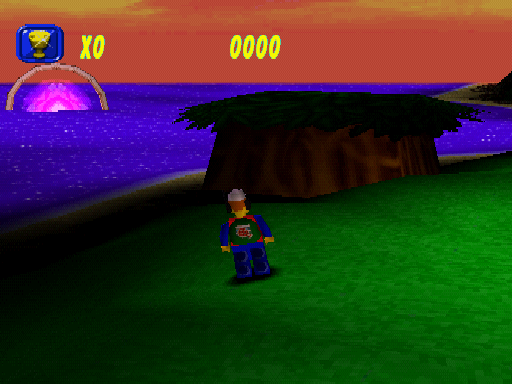
Also close to the jousting area, there is this object textured to look like a group of trees that is set to not be visible. Oddly enough, this is a model from Mr. Hates Camp, and does not appear during any of the minigames. It is most likely a placeholder for something that was not finished. The name for this object in memory is LAND.
Using the following GameShark code will make it visible, but it will have no collision.
North America |
Europe |
|---|---|
|
|
Dolphin#

There is an unfinished model of a dolphin that is set to not be visible. During Brick Dive, the sound made by the dolphin can be heard when bringing the fourth brick to the surface, but the dolphin itself is not seen. The model does not have correct texture mapping, and while it does have an animation file, it does not animate when made visible. The name for it in memory is DLPH.
Using the following GameShark code will make it visible. The screenshot was captured with the use of freecam to get a better look at it.
North America |
Europe |
|---|---|
|
|
Trumpeter#
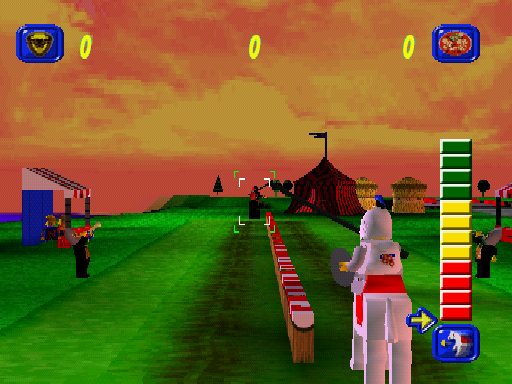
During Jousted, there is a trumpeter on the right side that is set to not be visible. He uses the exact same model and animation as the one on the left, which is a reused model of one of the Bull's Swordsmen. He was likely hidden as he is mostly blocked by the power bar at the start anyway. There are two trumpeters here in the PC version, who instead use unique models, but they both appear on the left side. The name for him in memory is BSD2.
Using the following GameShark code will make him visible.
North America |
Europe |
|---|---|
|
|
Adventurers Island#
Old Fisherman#
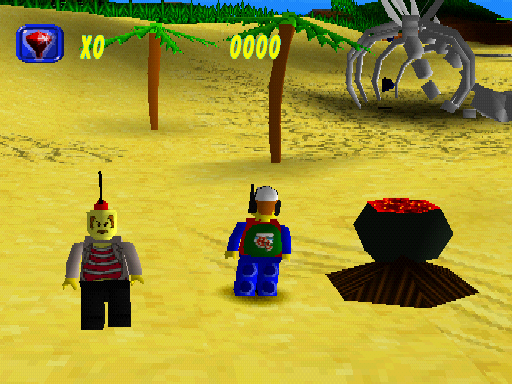
The Old Fisherman, who appears in the PC version, is loaded in with Adventurers Island, but is set to not be visible. He is found close to the Island Racer after Desert Speedster, which, based on an unused call with the Infomaniac via the hologram, was where you would first meet him before Fishing. The name for him in memory is FSHM.
Here, he has an earlier design, appearing as another unaltered Adventurers character from the Dino Island theme, named Mr. Cunningham. Ironically, if they had left him with his original face, his title of "Old" would have been more fitting, given he does actually look older here. The PC version of this character gives him the same type of cartoony face as many of the other characters have, along with him wearing sunglasses. He also retains the brown legs of his basis in the PC version, while his legs here are black due to his leg texture being a duplicate of Johnny Thunder's.
A render of his PC model with this face was featured in a magazine article on the Game Boy Advance version of the game, showing that he was to appear this way in the PC version at one point as well.
The cauldron is the same as the one that is found with the tribe, but its name in memory is FISH, so it seems to be a placeholder for Bertha, or a fish cooking on a fire. The latter would make sense, as the original idea was for you to first meet him in the desert, but this was later changed to skip straight from Desert Speedster to Fishing.
When the he is made visible, he cannot be spoken to and will have a lever on his head, rather than being bald, but his hat can be changed. If his model is assigned to one of the other characters you can speak to, or to Pepper himself, it shows that he does have the two mouth shapes all of the characters have when speaking to you.
Using the following GameShark codes will make him and the cauldron visible when you first arrive on the island, and after Desert Speedster.
North America |
Europe |
|---|---|
|
|
Floor Trap#

During Matching Mummies, there is a trap hidden underneath the floor that went unused. This was likely something the player was going to need to jump over, or a plank may have been over it, like there is a plank across a gap in the PC version of this minigame. The name for the object in memory that covers the trap is CFL3.
Using the following GameShark code will hide the cover and reveal the trap, but the normal floor collision still there.
North America |
Europe |
|---|---|
|
|
Cauldron#
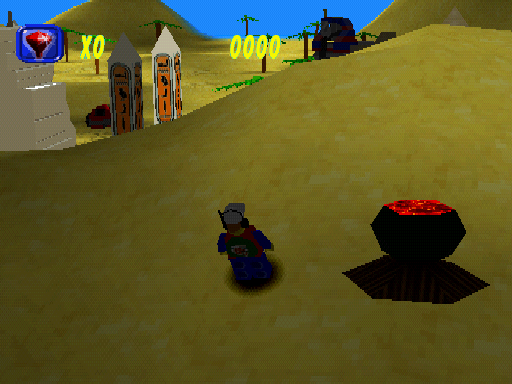
Behind the Mummies Tomb, there is a duplicate of the cauldron from the tribe that is set to not be visible. Much like how it appears next to the Old Fisherman, this is likely a placeholder model for something that was never finished. The name for this object in memory is LAND.
Using the following GameShark code will make the cauldron visible, but it will have no collision.
North America |
Europe |
|---|---|
|
|
OGEL Island#
Slimy Slug#
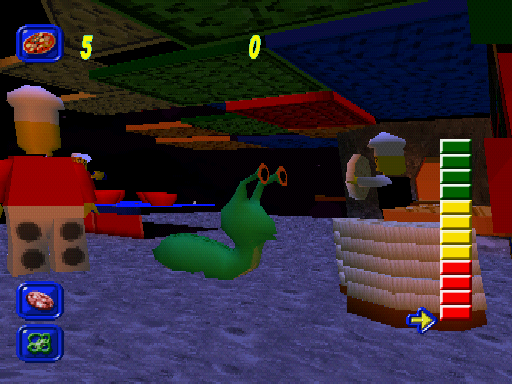
During Make-A-D-Pizza, there is a Slimy Slug that is set to not be visible that can be found with the stack of pizza bases next to Papa. A Slimy Slug does appear near Papa in this minigame in the PC version, but it is much smaller and is animated, while this one is quite big and has no animation. Unsurprisingly, it is named SLUG in memory.
Using the following GameShark codes will make the Slimy Slug visible and will move it slightly so that it is no longer inside the pizza bases. The screenshot was captured with the use of freecam to get a better look at it.
North America |
Europe |
|---|---|
|
|
Brickster-Bot Head#

During the final battle with the Brickster, there are large Brickster-Bot heads that are set to not be visible. They can be found at the top of the tower on the front left and right corners. These are the heads that rained down on you in the prototype, but this was disabled for the final version. There is a third head hidden out of bounds near the bottom.
These heads are set to be visible at the start of the minigame when you are at the bottom of the tower, but they can only be seen by using freecam to move the camera to them. The name for these three objects in memory is BBOT.
Using the following GameShark codes will make the two heads at the top visible during the final battle.
North America |
Europe |
|---|---|
|
|
Unused Textures#
Frontend and Pause Menu#
A number of menu graphics, many of which seem closer to the PC version of the game, go unused. Many, if not all, of these files are seemingly loaded while on the title screen, but are never used in a final menu.
There are smaller versions of these icons too, as well as identical duplicates for the same sizes in the same folders. Welcome to the file structure that is LEGO Island 2.


Apparently an early logo for the title screen. It is unknown why only half of the image survived and why the palette seems incorrect, but it displays the same way when hacked back into the final game's title screen. 
Miscellaneous HUD#
Adventure Island and Castle Island#
Unused HUD icons for Adventure Island. The blue bar is not used anywhere in the game, even when there actually is a progress bar on the side of the HUD.
Duplicates of these files are also found in the Castle Island HUD archive, also unused.


Jousted#


Information Center#
Animated i#
This seems to be an earlier version of the animation that plays when accessing the database, as the container is called INFOANIM.TBK.
This is very similar to the used version, the only difference being it has an orange i and a green circle, along with green shadows. The used one is stored in WALLS.TBK, where most of the Information Center's rack-mounted consoles live. There is an additional fully-black frame, but since it is just nothing, it has not been uploaded.


Map Arrow#
An extra frame for the minimap arrow. The used one has a red outline, so it was probably intended to flash back and forth with this one.

Brick Dive#
Red Brick#
The final game uses a yellow brick from a different archive for the HUD icon.

Centrifuge#
Blue Timing Lamp#
A blue texture for the centrifuge timing lamps. The blue lamp models are actually loaded at runtime, but there does not seem to be any functionality in the minigame to cause it to appear. As a side note, there seems to be separate models loaded in memory for every lamp state. Per side. That means four each side for a total of eight models. The blue lamp models are, therefore, unused too.


Stud Timing Lamp#
It gets better, as there are also eight more models for 1×1 green studs, similar to the ones on the centrifuge base model, which may have been earlier indicator lamps. The first four are regular green, and the other four are a very marginal slightly brighter green.


Asteroid Belt#
Particle Sprites#
A 2D asteroid and a warning bubble that went unused in Asteroid Belt. The final game uses only 3D models for asteroids, and there is no warning when you collide with an asteroid. They are stored alongside the graphic used for the 2D stars that fly by, so the 2D asteroid might have presumably flown past as well.


HUD#
This seems to be an earlier version of the icon when you had struck an asteroid. In the final game, the texture used when you have not yet hit one is simply darkened.

Desert Speedster#
Arrows#
There are unused arrows that are stored with the rest of the minigame's particle effects. With how basic these are, they are likely leftover placeholders.


Mr Hates Camp#
Devil Woman#
This image of a devil woman is stored with the other Hates Camp textures, very likely as a joke texture, considering the volcanic landscape. It is possible this texture is hidden somewhere in the level itself, but it has not been found yet if it is.

Skybox#
The camera angle makes it impossible to see the sky in Mr. Hates Camp, but it does have textures. Considering there are other leftover textures from LEGO Island in the "HAT" folder, and that the minigame seems to have some of the other island's wrapping behavior, the map for Mr. Hates Camp may have started out as a copy of LEGO Island.


Characters#
Multi-coloured Brickster-Bot#
There is a torso texture for a Brickster-Bot that has all four of the individual colours the other Brickster-Bots appear in. It is unknown what this was going to be used for, as there is no mention of a multi-coloured Brickster-Bot in any of the design documents, only the four colours on their own. 
Unused Files#
Files found within, or around, the PSXFILE.
\DATA\FRONTEND\LANG#
TEST.TXT#
TEST1: Bollocks!
TEST2: 2   Bollocks!
TEST3: 3455 Bollcoks!
TEST4: 3456Bollocks!!\DATA\PAUSE#
STATUS.ME#
@MULTI-EDIT VERSION 7.0    C:\LEGO2PSX\COMMON\MAIN\DATA\PAUSE\
/MISC=1/I=1/V=2/SC=0/EV=0/CC=1
/W=1/WNM=A/A=1/WA=0/FN=C:\LEGO2PSX\COMMON\MAIN\DATA\PAUSE\ENGLISH.TXT/C=1/L=24/R=24/IL=1/WS=1/IS=0/D=0/LS=0/BI=7/BTML=1/RM=79/LT=\C\L/FLL=0/SN=1
/G_INT=DEFAULT_INSERT_MODE
1
/G_STR=DEF_SWITCHES
I
/G_STR=DEF_REPL_SWITCHES
PI
/G_STR=DEF_FS_SWITCHES
I
/G_STR=DEF_FSR_SWITCHES
I
/G_INT=DIR_IMMEDIATE
1
/G_INT=AUTO_ARRANGE_ICONS
1
/G_INT=DEF_SCRN_STYLE
1
/G_INT=CUR_SCRN
1
/G_STR=DIR_SORT_STR
n
/G_STR=CALC_PARAMS
/X=18/Y=8/BASE=10
/G_STR=FSWITCHES
I
/G_STR=FRSWITCHES
I
/G_STR=FC_CONFIG_STR
/SH=0/CC=79/IC=48/RW=30208/NKEY=30208/PKEY=33792/RKEY=5118/KEYSTR=NextDif<CtrlPGDN> PrevDif<CtrlPGUP> Report<AltShftR>
/G_INT=EXEC_ENV_MODE
1
/G_STR=FORMAT_CODE_DELIMIT
.
/G_STR=EXTENSIONS
.
/G_STR=FILE_HISTORY
/#=1
/G_STR=FILE_HISTORY1
C:\\LEGO2PSX\\COMMON\\MAIN\\DATA\\PAUSE\\ENGLISH.TXT
/G_INT=NO_CONFIRM_OVERWRITE
1
/G_STR=PRINTER_DEVICE
LPT1
/G_STR=PRINTER_TYPE
HP LASERII
/G_INT=KEYDELAY
1
/G_INT=LOAD_COUNT
1
/G_INT=RESTORE
1
/G_INT=SEARCH_INTR_STYLE
1
/G_STR=SWITCHES
I
/G_STR=REPL_SWITCHES
PI
/G_INT=SPLIT_EDGE_MODE
1
Debugging Strings#
Many debugging strings are loaded while on the title screen and while in other levels, some generic, and some containing jokes towards developers.
The list below is scrollable.
Remember to give Paul some toast!
data/savegame/american.dat
DATA/messages/FE/ENGLISH/STD.str
Sub Game skipped: %d
Could not claim memory in sound ram for commentary
error in sep file sequence file count
data/music/%s.vh
data/music/%s.vb
tune VAB header open failed
tune VAB body open failed
data/sfx/%s.vh
data/sfx/%s.vb
sfx VAB header open failed
sfx VAB body open failed
data/music/%s.sep
failed to count sequences in %s
music sep %s failed to open
data/sfx/%s.sep
sfx sep %s failed to open
No TOC found: please use CD-DA disc
Too many tracks
tracknum too big
CdControlB mode set error
CdControlB play error
Could not find COMFile %s
commentry file %s initialised ok
Data/%s.dat
commentry header file %s initialised ok, %d phrases available
AAAA-XXXXX
sdtest
%sB%c%s%s
data/frontend/load.tbk
Could not find overlay %s
Failed to read overlay %s
loaded overlay %s
Could not open model block %s
Could not claim memory for model block %s
0123456789ABCDEF
0123456789abcdef
Failed to claim memory!
Warning - identifier '%s' does not end; ignored
No room to create look up table
Failed to load data
Failed to open file
No room to load messages
Message file not exist or of zero length
Warning passed font cel pointer is zero
CdRead: sector error
CdRead: Shell open
CdRead: retry
%s: path level (%d) error
%s: dir was not found
CdSearchFile: disc error
CdSearchFile: searching %s
%s:  found
%s: not found
CD_newmedia: Read error in cd_read(PVD)
CD001
CD_newmedia: Disc format error in cd_read(PVD)
CD_newmedia: Read error (PT:%08x)
CD_newmedia: sarching dir
%08x,%04x,%04x,%s
CD_newmedia: %d dir entries found
CD_cachefile: dir not found
CD_cachefile: searching
(%02x:%02x:%02x) %8d %s
CD_cachefile: %d files found
Can't Open Sequence data any more
track=%d,%d
CdGetToc2: %02x:%02x:00
CdGetToc2: error
VSync: timeout
card read error
$Id: intr
c,v 1
76 1997/02/12 12:45:05 makoto Exp $
unexpected interrupt(%04x)
intr timeout(%04x:%04x)
$Id: sys
c,v 1
129 1996/12/25 03:36:20 noda Exp $
ResetGraph:jtb=%08x,env=%08x
ResetGraph(%d)
SetGraphReverse(%d)
SetGraphDebug:level:%d,type:%d reverse:%d
SetGrapQue(%d)
DrawSyncCallback(%08x)
SetDispMask(%d)
DrawSync(%d)
%s:bad RECT
(%d,%d)-(%d,%d)
%s:
ClearImage
LoadImage
StoreImage
MoveImage
ClearOTag(%08x,%d)
ClearOTagR(%08x,%d)
DrawOTag(%08x)
PutDrawEnv(%08x)
DrawOTagEnv(%08x,&08x)
PutDispEnv(%08x)
GPU timeout:que=%d,stat=%08x,chcr=%08x,madr=%08x,
func=(%08x)(%08x,%08x)
unable to open 16 bit background
unable to claim main RAM for background!
0123456789ABCDEF
tpage: (%d,%d,%d,%d)
clut: (%d,%d)
clip (%3d,%3d)-(%d,%d)
ofs  (%3d,%3d)
tw   (%d,%d)-(%d,%d)
dtd   %d
dfe   %d
disp   (%3d,%3d)-(%d,%d)
screen (%3d,%3d)-(%d,%d)
isinter %d
isrgb24 %d
CdInit: Init failed
Fail:pDict->iNumEntries + 1 < pDict->iMaxEntries
Andys an pillock
Fonts/%s
No VRAM available for Kanji font workspace
CSM Started without paths being defined
data/cutscene/%s/%s.cut
data/messages/%s/%s/%s.str
ENGLISH
SPU:T/O [%s]
wait (reset)
wait (wrdy H -> L)
wait (dmaf clear/W)
CdlReadS
CdlSeekP
CdlSeekL
CdlGetTD
CdlGetTN
CdlGetlocP
CdlGetlocL
?
CdlSetmode
CdlSetfilter
CdlDemute
CdlMute
CdlReset
CdlPause
CdlStop
CdlStandby
CdlReadN
CdlBackward
CdlForward
CdlPlay
CdlSetloc
CdlNop
CdlSync
DiskError
DataEnd
Acknowledge
Complete
DataReady
NoIntr
CD timeout:
%s:(%s) Sync=%s, Ready=%s
DiskError:
com=%s,code=(%02x:%02x)
CDROM: unknown intr
(%d)
CD_sync
CD_ready
%s
%s: no param
CD_cw
$Id: bios
c,v 1
86 1997/03/28 07:42:42 makoto Exp $
CD_init:
addr=%08x
CD_datasync
SPU:T/O [%s]
wait (IRQ/ON)
wait (IRQ/OFF)
This is not SEP Data
DMA bus error: code=%08x
MADR[%d]=%08x
bad hankaku code 0x%x
A new cutscene cannot be selected until this one has finished
Fail:CSMManager
pCurrent
Fail:iIndex < CSMManager
iMaxScript
CSM serious error
Asked to Start/Queue cutscene %i, but queue full
[Continue] will ignore this request
Oi!  The script you are intending to start is NOT LOADED!
Call Paul, give him some toast
CSMManager
Actor to be added, but no room remains
Call Paul or press [Continue] to carry on
PEPP
Fail:CSMManager
Actor[i]
pGOB
ERROR: skeleton plotter
Data/Objects/%s/%s.pmc
Camera action not recognised - call Paul
SERIOUS CSM ERROR!
The camera POSITION has been SET but is already moving
This is not allowed!
[Continue] will proceed with script, but camera faults are a result of this error
Fail:pAction->SetPos
Target
pTargetActor
Invalid MOVETYPE for camera positioning
Call Paul
SERIOUS CSM ERROR!
The camera TARGET has been SET but is already moving
This is not allowed!
[Continue] will proceed with script, but camera faults are a result of this error
SERIOUS CSM ERROR!
The camera POSITION has been MOVED but is already moving
This is not allowed!
[Continue] will proceed with script, but camera faults are a result of this error
SERIOUS CSM ERROR!
The camera TARGET has been MOVED but is already moving
This is not allowed!
[Continue] will proceed with script, but camera faults are a result of this error
Unknown waypoint in camera MOVETARGET
Call Paul
Camera MOVETARGET to actor NULL!
Call Paul
Unknown camera MOVETARGET action
Call Paul
faces.tbk
heads.tbk
bodys.tbk
lhands.tbk
rhands.tbk
heads.blk
bodys.blk
lhands.blk
rhands.blk
Data/Objects/%s/%s.pmh
Data/Objects/%s/%s.tbk
Data/grid.TBK
Serious CSM error.Cutscene number %i is already loaded.Check loading of %s %s.[Continue] will skip this extra load
.cut
Fail:sizeof(TBinHeader) == iSizeOfHeader
SWCH
PLAY
Failed to find waypoint %s in CSM/PATH waypoint maps
Failed to find PATH waypoint %s.[Continue] will carry on parsing script.Failed to find CSM waypoint %s.[Continue] will carry on parsing script
Cut-scene error.Failed to find actor %c%c%c%c in FOLLOW
Failed to find switch %s - call Paul
.CSMLoader_LoadBinary received an invalid filename (%s)
CSMLoader_LoadBinary could not find filename (%s)
CSMLoader_LoadBinary fell over handling %s - call Paul
GOB action not recognised - call Paul
Serious CSM error.GOB %c%c%c%c has no route handle.Cannot proceed with move.Unknown MOVETYPE in CSM script - Call Paul
Serious cut-scene error!.Actor %c%c%c%c has no hRoute
Serious CSM error.String %s overran the 4 lines of the HUD.Call Paul
Unable to open track file %s
Data/grid.TBK
throwpizza
GenParts
pizzasplat
pizzasplat.par
throwpizza.par
BOATWAKE
GenParts
data/fonts/main/main
data/fonts/csm/csm
GenParts
%s/%s/%s.???
Data/Tracks/%s/%s.???
Data/Tracks/%s/sky.???
Data/Games/%s/objects/%s.???
Data/Games/%s/oblist.txt
Data/Games/%s/%s.zon
Zero length zone GOB list file (%s)
time out in decoding !
CONTINUE
SAVEGAME
QUITCONF
Data/Messages/fe/ENGLISH/pause.str
Data/Pause/Pause1.tbk
MCREADING
MCNOTIN1
MCNOTIN2
MCNOTFOR1
MCNOTFOR2
MCNOTFOR3
MCFORMAT
MCFORREMOVE
MCFORFAIL
MCFORGOOD
%s %s %03d%%
GAME%01d
MCCARDFULL4.MCCARDFULL3.MCCHOOSESAVE
MCNEWSAVE
MCOVERWRITE.MCNEWSAVE2
MCSAVEREMOVE
MCDOOVER
MCDOSAVE
MCSAVEGOOD
MCSAVEBAD
BUTTON_UP
BUTTON_DOWN.BUTTON_LEFT.BUTTON_RIGHT
BUTTON_2
BUTTON_1
BUTTON_4
BUTTON_3
CONTROL%i
SWIMWAKE
GenParts
DMA STATUS ERROR %x
MDEC_rest:bad option(%d)
MDEC_in_sync
MDEC_out_sync
DMA=(%d,%d), ADDR=(0x%08x->0x%08x)
FIFO=(%d,%d),BUSY=%d,DREQ=(%d,%d),RGB24=%d,STP=%d
%s timeout:.
"loaded overlay %s", "commentry file %s initialised ok", and "commentry header file %s initialised ok, %d phrases available" have been observed as functional and are output to the TTY console, but are otherwise not visible during normal play. The first one outputs the filename of the binary overlay for that given level. The second outputs the name of the audio archive chosen, which contains each character's voice lines. The third and final one outputs the filename for the associated header file, then the total available individual voice lines listed within it.
A working example when loading into LEGO Island from a new game would be:
loaded overlay \BINS\Z90PSX.BIN;1
commentry file \LGI.VAG;1 initialised ok.
commentry header file Data/lgi.dat initialised ok, 802 phrases available|
The LEGO series | |
|---|---|
|
Windows |
LEGO Chess • LEGO Rock Raiders • LEGOLAND • LEGO Football • LEGO Creator • LEGO Digital Designer • Galidor • LEGO Builder Bots • LEGO Bricktopia • Brickcraft • LEGO Worlds |
|
Game Boy Advance |
|
|
Wii |
|
|
PlayStation 4, Xbox One |
|
|
Nintendo Switch |
|
|
Android, iOS |
|
|
PlayStation |
|
|
PlayStation 2 |
|
|
Adobe Flash |
Aqua Raiders: Treasure Trench • Castle • Mars Mission: CrystAlien Conflict |
|
Adobe Shockwave |
Junkbot • World Builder • World Builder 2 • Stack-It • Spybot: The Nightfall Incident • Studios Backlot |
|
The LEGO Movie | |
|
Windows, Mac OS X, PlayStation 4, Xbox One |
|
|
PlayStation 3, Xbox 360, Wii U |
|
|
Nintendo 3DS |
|
|
Batman | |
|
Windows |
The Videogame • 2: DC Super Heroes • 3: Beyond Gotham • DC Super-Villains • Legacy of The Dark Knight |
|
Wii |
|
|
Nintendo DS |
|
|
PlayStation 2, PlayStation Portable |
|
|
PlayStation 3, Xbox 360 |
|
|
Wii U |
|
|
Xbox One, PlayStation 4 |
|
|
Nintendo Switch |
|
|
Nintendo Switch 2, PlayStation 5, Xbox Series X |
|
|
Mac OS X |
|
|
Bionicle | |
|
Game Boy Advance |
|
|
Windows, Mac OS X |
|
|
PlayStation 2 |
|
|
GameCube, Wii |
|
|
Adobe Flash |
Mata Nui Online Game • Mata Nui Online Game II: The Final Chronicle • Voya Nui Online Game • Mistika |
|
Unity Web Player |
|
|
City | |
|
Windows, PlayStation 4, Xbox One, Nintendo Switch |
|
|
Wii U |
|
|
Nintendo 3DS |
|
|
Adobe Flash |
Train Game • Police Chase • Build It • Time to Build • On Patrol |
|
Disney | |
|
Windows |
|
|
Nintendo DS |
|
|
Friends | |
|
Nintendo DS |
|
|
Nintendo 3DS |
|
|
Harry Potter | |
|
Windows |
|
|
PlayStation 3, Xbox 360, Wii |
|
|
Nintendo DS |
|
|
PlayStation Portable |
|
|
Nintendo 3DS |
|
|
PlayStation Vita |
|
|
Indiana Jones | |
|
Windows |
|
|
Wii |
|
|
Nintendo DS |
|
|
PlayStation Portable |
|
|
Island | |
|
Windows |
LEGO Island (Prototype) • LEGO Island 2: The Brickster's Revenge • Island Xtreme Stunts |
|
PlayStation |
|
|
Game Boy Color |
|
|
Game Boy Advance |
LEGO Island 2: The Brickster's Revenge • Island Xtreme Stunts |
|
Adobe Shockwave |
|
|
Jurassic Park | |
|
Windows |
|
|
Marvel | |
|
Windows, PlayStation 4, Xbox One, Mac OS X |
Marvel Super Heroes • Marvel's Avengers • Marvel Super Heroes 2 |
|
Wii U, PlayStation 3, Xbox 360 |
|
|
Nintendo Switch |
|
|
Middle Earth | |
|
Windows |
|
|
Wii, Xbox 360, PlayStation 3, Mac OS X |
|
|
Wii U, PlayStation 4, Xbox One |
|
|
Ninjago | |
|
Windows, PlayStation 4, Xbox One, Nintendo Switch, Mac OS X |
|
|
Adobe Flash |
Spinjitzu Smash (DX) • Smash Creations • Smash Party • The Four Paths • Viper Smash • Spinjitzu Spinball |
|
Racers | |
|
Windows |
Racers (Prototypes) • Racers 2 |
|
Nintendo 64, PlayStation |
|
|
GameCube |
|
|
PlayStation 2 |
|
|
Game Boy Color |
|
|
Game Boy Advance |
|
|
Adobe Flash |
|
|
Star Wars | |
|
Game Boy Advance |
|
|
Windows |
The Video Game • II: The Original Trilogy • The Complete Saga • III: The Clone Wars • The Force Awakens • The Skywalker Saga |
|
Mac OS X |
|
|
GameCube |
|
|
Xbox |
|
|
PlayStation 2 |
The Video Game (Prototype) • II: The Original Trilogy (Prototype) |
|
Wii |
|
|
Nintendo DS |
II: The Original Trilogy • The Complete Saga • III: The Clone Wars |
|
PlayStation Portable |
|
|
Xbox 360 |
II: The Original Trilogy • III: The Clone Wars • The Force Awakens |
|
Xbox One |
|
|
PlayStation 3 |
|
|
PlayStation 4 |
|
|
Wii U |
|
|
Nintendo Switch, PlayStation 5, Xbox Series X |
|
|
See Also | |