 This article has a talk page!
The Sims 2: Castaway is an odd spin-off where your Sim crashes onto a remote island and must survive by making a base, cooking food, crafting items, and making friends with monkeys.
This was the sixth and final Sims entry on the PS2, and the second of three Sims games for the Wii.


Unused Areas#
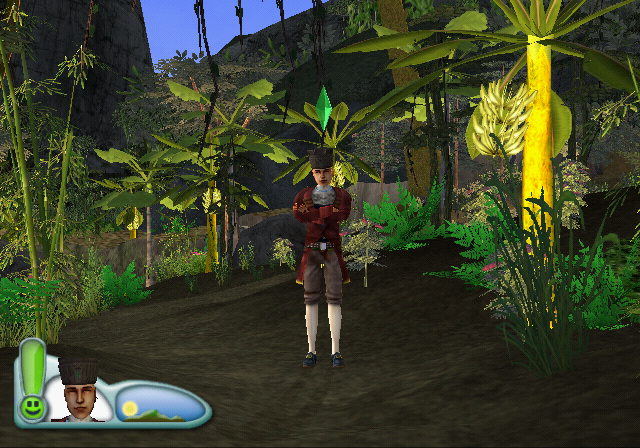
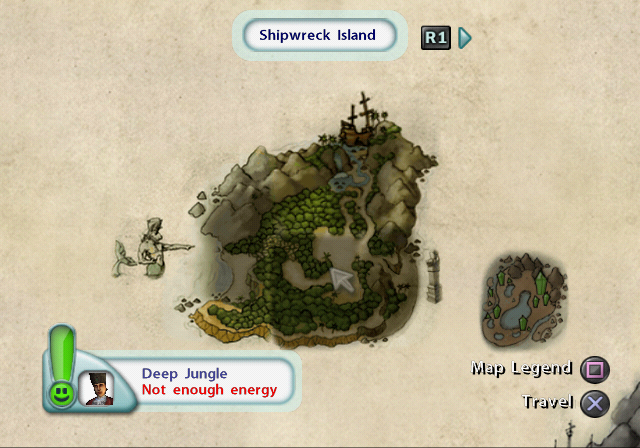
The game normally goes from First Beach to Deep Jungle, with no First Jungle area in-between. But the lot itself still exists and can be loaded. Its exits are First Beach through a regular sandy path, and Deep Jungle that is covered with brambles. Viewing the Island Map while in this lot just says "Not enough energy" when attempting to fast travel anywhere.
It can be accessed with these codes by holding X on PS2 or Z on Wii through the loading screen when walking into a different lot from the current one.
EUR |
USA |
|
PS2 |
D18E5302 0000BFFF |
D18E3782 0000BFFF |
Wii |
285221CE 00002000 |
2851E54E 00002000 |
(Codes: Edness)
While the First Jungle lot is visible on the Shipwreck Island map, hovering over it will highlight Shipwreck Lagoon.


String Label |
String |
|---|---|
urbzui\HouseData\house 02 [0] |
First Jungle |
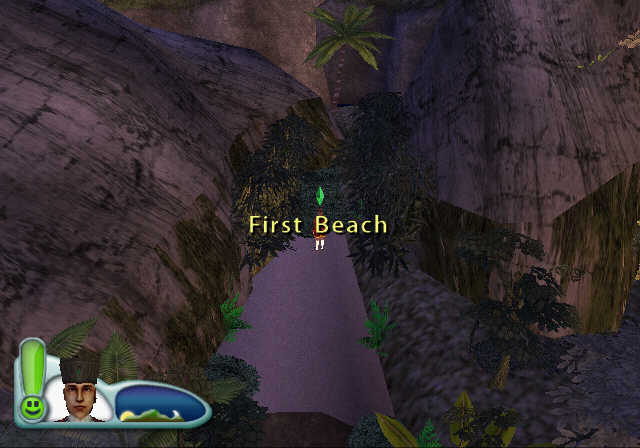
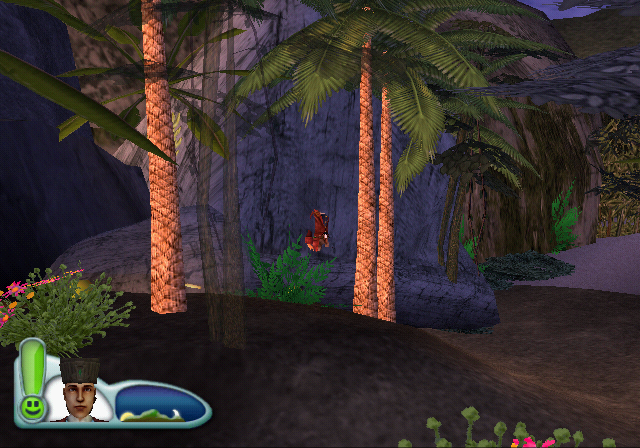
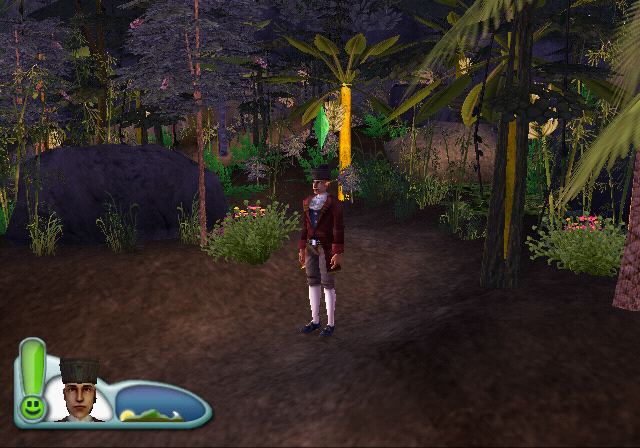
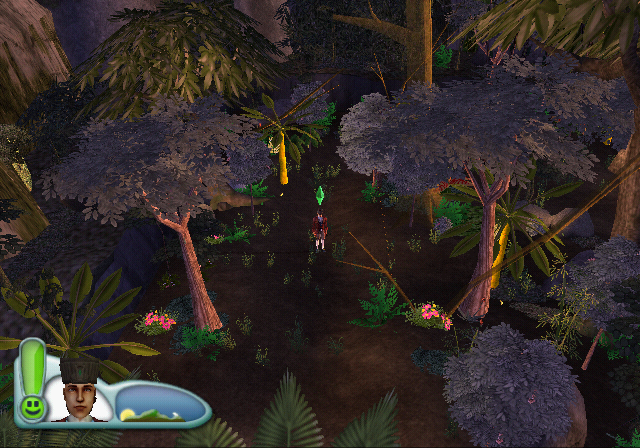
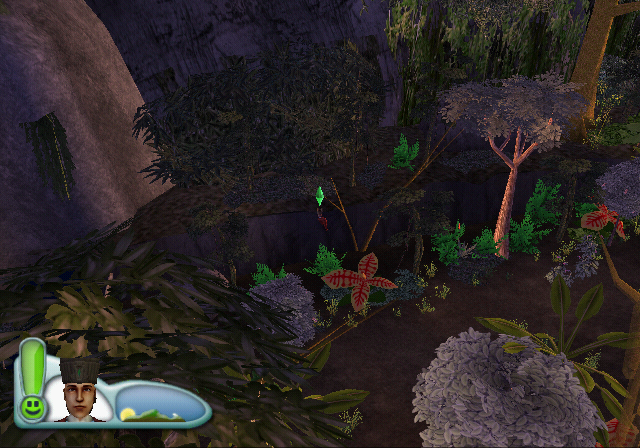
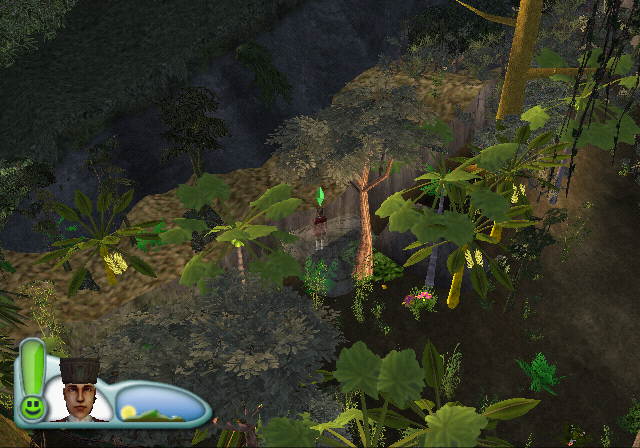
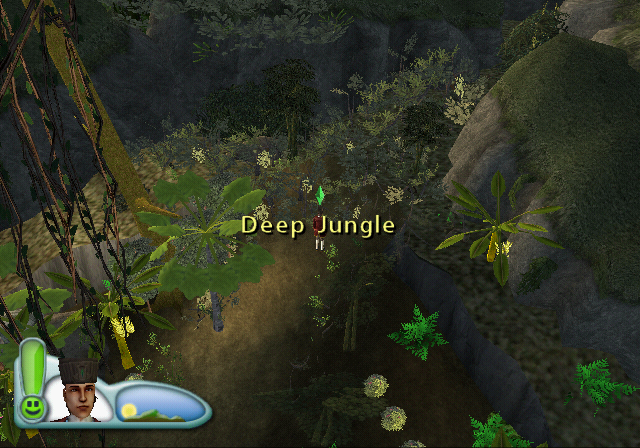
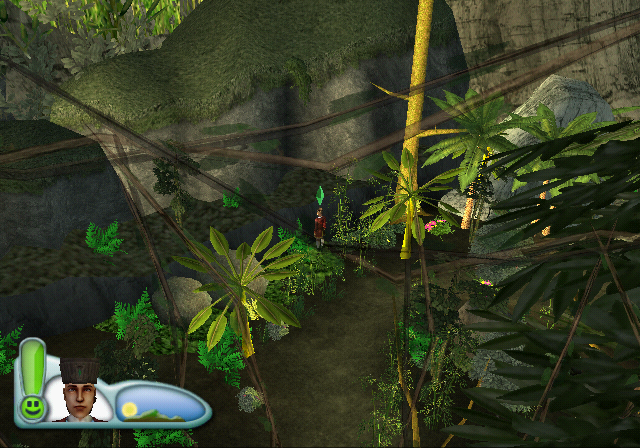
Unused Graphics#
As Castaway was built off of the engine of The Sims 2: Pets, most of the graphics (including unused!) from the game appear in the files.
All of the graphics for the Wants and Fears (including the new and placeholder ones from Pets) are present. Wants and Fears do not appear in Castaway at all and as no new ones were created, it was safe to say it was scrapped very early in development. It could be a bit redundant to upload them to this page, but it is still worth noting.
Category Icons#
Two menu category icons designed for this game that go unused.


Objects#
There are drawn variants of a few items that are normally used in the crafting menu, but are either already given to you at the start of the game, or can only be found during regular gameplay. Items in your inventory just use their action queue icons.
Used |
Unused |
|---|---|
Pocket Knife |
|
|
|
Sleeping Mat |
|
|
|
Toilet Paper |
|
|
|
Conch Shell |
|
|
|
Beard Beard's Sword |
|
|
|


Placeholders#
Various temporary object and tool icons, which also have "TEMP" written in the background.


Xbox Controller Buttons#


The Xbox controller graphics are STILL present, all the way from The Sims 2. Considering that the last console was nearing the end of its life by this game's release, it is likely that the Xbox controller graphics are just leftovers.
GameCube Controller Buttons#


The GameCube controller button graphics are present. It's possible that Castaway originally started development on the GameCube before being moved to the Wii (As they both share similar hardware) and those graphics were just leftovers. But since the GameCube was discontinued at the beginning of 2007 (with the final game being released that Summer), it's more likely that Gamecube controller support was planned for the Wii version.
Unused Goals#
The last page of the 5th book "The Biscuit Isles by Lord R. Stickywyck" has a deleted goal.
String Label |
String |
|---|---|
urbzui\NewUIStrings\goal_tab_4_page_2_goal_1 |
Get Married at the Palace |
There's also a cut 7th goal book that only has an icon and title left over.
Icon |
String Label |
String |
|---|---|---|
|
urbzui\NewUIStrings\goal_tab_6 |
TEMP Surviving, Vol.3: Enough, I Want to Go Home |


Unused Objects#
Two tables that aren't craftable but still have leftover icons, names, and descriptions.
Icon |
String Entry & Texture Name |
Name & Description |
|---|---|---|
 |
SimsObjects\TokenCatalogData [499] |
Standard Cabin Table |
This stocky, but durable table should provide adequate support under the most difficult of circumstances. |
||
 |
SimsObjects\TokenCatalogData [497] |
Standard Bungalow Table |
This is an amazing table; the result of some serious crafting skill and a delicate touch. |
An unused duplicate fish entry. The used variant using the index 276 is named "Speckled Grouper" and also uses this same texture.
Icon |
String Entry & Texture Name |
Name & Description |
|---|---|---|
 |
SimsObjects\TokenCatalogData [262] |
Grouper (speckled) |
TEMP - describe this fish |
Two unused clothing items which have no texture associated with them.
String Entry |
Name & Description |
|---|---|
SimsObjects\TokenCatalogData [283] |
TEMP - baseball cap |
TEMP - maroo |
|
SimsObjects\TokenCatalogData [293] |
TEMP maori bucket cap |
TEMP - maroo |
Unused Music#
The Create-a-Sim, Build/Buy Mode, and other menu tracks from The Sims 2 and The Sims 2: Pets are present, leftover in the files. The leftover songs are as follows:
music_24_bbcas1
music_24_bbcas2
music_24_bbcas3
music_48_title_track
music_load_initial_loop
music_shopping1''
music_shopping3''
Unused Text#
Create-A-Sim#
String Label |
String |
|---|---|
urbzui\NewUIStrings\cas_arch_accept_prompt |
TEMP Do you want to change this crew member's occupation and clothing? |
Ending#
The game normally has two endings, but there's a 3rd ending string where the section describing how you chose to escape is missing.
String Label |
String |
|---|---|
urbzui\NewUIStrings\the_end_return |
Congratulations, .... |
Menu Options#
Various menu options and headers that don't appear in the game. Many of these seem to have been merged together into a different group.
String Label |
String |
|---|---|
urbzui\NewUIStrings\header_decorations |
OBSOLETE |
urbzui\NewUIStrings\header_entertainment |
OBSOLETE |
urbzui\NewUIStrings\header_fast_food |
Fast Food |
urbzui\NewUIStrings\header_fast_food_plan |
Fast Food Plans |
urbzui\NewUIStrings\header_fast_tool_plan |
Fast Tool Plans |
urbzui\NewUIStrings\header_fast_tools |
Fast Tools |
urbzui\NewUIStrings\header_food_plan |
Food Plans |
urbzui\NewUIStrings\header_hand_object_plan |
Hand Object Plans |
urbzui\NewUIStrings\header_hand_objects |
Hand Objects |
urbzui\NewUIStrings\header_object_plans |
Object Plans |
urbzui\NewUIStrings\header_resource_plan |
Resource Plans |
urbzui\NewUIStrings\header_seed_plan |
Seed Plans |
urbzui\NewUIStrings\header_seeds |
Seeds |
Loading Screen Tips#
Text intended to show during the loading screens, where they are all marked as temporary despite having finalized features. No such tips appear in the final game.
Some of them also describe features that don't exist, such as having a weight limited inventory.
String Label |
String |
|---|---|
urbzui\NewUIStrings\loading_hint_00 |
TEMP Boxes sometimes wash up on the beach. You can find many useful items in them. |
urbzui\NewUIStrings\loading_hint_01 |
TEMP Heiroglyphics tell a story of times long ago. You will discover a secret if you find all the pieces. |
urbzui\NewUIStrings\loading_hint_02 |
TEMP Collect all the pieces of the treasure map and it will lead your Sim to discover a reward. |
urbzui\NewUIStrings\loading_hint_03 |
TEMP Artifacts can be found all over the islands, and in hard to reach places. Assemble them and discover their ancient function. |
urbzui\NewUIStrings\loading_hint_04 |
TEMP Deserted islands are a great place to collect shells. Have you collected them all yet? |
urbzui\NewUIStrings\loading_hint_05 |
TEMP You can carry things that you make or find in your inventory, but if it gets too heavy you won't be able to add any more. |
urbzui\NewUIStrings\loading_hint_06 |
TEMP If you get hungry, search around the island for food. But be careful, not everything is good for you. |
urbzui\NewUIStrings\loading_hint_07 |
TEMP Tired of searching for every scrap of food, try growing some of your own. A garden can provide you with a little extra time. |
urbzui\NewUIStrings\loading_hint_08 |
TEMP Fishing is a great way to satisfy your hunger, but making a better fishing pole will get you a bigger catch. |
urbzui\NewUIStrings\loading_hint_09 |
TEMP Chasing animals can be exhausting. You might have better success if your raise your own. |
urbzui\NewUIStrings\loading_hint_10 |
TEMP Shelters are important to your survival. It's no fun sitting through a storm without a sturdy hut to protect you. |
urbzui\NewUIStrings\loading_hint_11 |
TEMP As you discover resources, you will get ideas for making new items. Refer to your plans for making useful things to survive and thrive. |
urbzui\NewUIStrings\loading_hint_12 |
TEMP Tools are important for making new items and collecting resources. Upgrade your tools whenever you can for a better advantage. |
urbzui\NewUIStrings\loading_hint_13 |
TEMP Your clothes will only last so long. Learn to make new clothing items to replace your tattered clothes. |
urbzui\NewUIStrings\loading_hint_14 |
TEMP A firepit is important for warmth and for cooking. It also lifts your spirits to sit beside the fire and relax. |
urbzui\NewUIStrings\loading_hint_15 |
TEMP Learn to cook exotic items and get a power boost from your fabulous food creations. |
urbzui\NewUIStrings\loading_hint_16 |
TEMP Music is good for your Sim. Learn how to make a musical instrument. |
urbzui\NewUIStrings\loading_hint_17 |
TEMP Explore your island and discover the many resources are available for constructing new huts, making tools and or course, eating. |
urbzui\NewUIStrings\loading_hint_18 |
TEMP When the world gets too crazy, freeze it all by holding |
urbzui\NewUIStrings\loading_hint_19 |
TEMP Thunderstorms are commonplace in the tropics. Hunker down and ride out the bad weather. |
urbzui\NewUIStrings\loading_hint_20 |
TEMP Your shipmates may be scattered amoung the islands. Explore each island to find your lost Sim friends. |
urbzui\NewUIStrings\loading_hint_21 |
TEMP Chimps are good resource collectors. Learn how to get them to help you to accelerate your pursuits. |
urbzui\NewUIStrings\loading_hint_22 |
TEMP Question: Why did the chicken cross the island. |
urbzui\NewUIStrings\loading_hint_23 |
TEMP Just how many fish can a Sim eat? If you see a chicken or pig, chase down a rib sticking meal. |
urbzui\NewUIStrings\loading_hint_24 |
TEMP When your Sim goes swimming, watch for opportunities to dive for clams. Nothing satisfies your hunger like fresh shellfish. |
urbzui\NewUIStrings\loading_hint_25 |
TEMP The Death Daisy sounds like a scary plant, but it will revive a fallen Sim. |
urbzui\NewUIStrings\loading_hint_26 |
TEMP If your Sim samples the wrong food, they might loose their lunch, and they will be exhausted for a while. |
urbzui\NewUIStrings\loading_hint_27 |
TEMP Deserted islands have few conveniences. Make sure your Sim has a place to relieve their bladder. |
urbzui\NewUIStrings\loading_hint_28 |
TEMP Swimming in the ocean is fun, but remember you are not the biggest thing in the sea. |
urbzui\NewUIStrings\loading_hint_29 |
TEMP You can coordinate the activities of your tribe by assigning each of your Sims a task to perform. |
urbzui\NewUIStrings\loading_hint_30 |
TEMP After a hurricane, your hut might need some repairs. |
urbzui\NewUIStrings\loading_hint_31 |
TEMP Most of the building tools support Blueprint Mode, which allows you to view the house top-down and navigate with |
urbzui\NewUIStrings\loading_hint_32 |
TEMP You can prevent those pesky chimps from messing up your hut if you construct shutters for your windows. |
urbzui\NewUIStrings\loading_hint_33 |
TEMP Have you had a long conversation with your sand buddy recently? |
urbzui\NewUIStrings\loading_hint_34 |
TEMP Use outdoor gates and fences to create backyard pens for your pets. |
urbzui\NewUIStrings\loading_hint_35 |
TEMP Growing your own food can be more or less productive. Select the right food for the land you are growing on. |
urbzui\NewUIStrings\loading_hint_36 |
TEMP Be careful, the animals on the island are not always happy to share their food. |
urbzui\NewUIStrings\loading_hint_37 |
TEMP A crafting bench will be one of your most important items. Your ability to make items and tools will improve the quality of your island life. |
urbzui\NewUIStrings\loading_hint_38 |
TEMP Your Tiki head will let you know what kind of mood your Sim is in. A mad face is never a good thing to see. |
urbzui\NewUIStrings\loading_hint_39 |
TEMP Your wits and skills will get your Sim through. Learn the arts of survival, and your Sims island life will be charmed. |
urbzui\NewUIStrings\loading_hint_40 |
TEMP After living on the island for a while, you will know why they call the Coconut the fruit of life. |
urbzui\NewUIStrings\loading_hint_41 |
TEMP Unhappy Sims tend to shy away from learning new things. Cover your basic needs. |
urbzui\NewUIStrings\loading_hint_42 |
TEMP Watch your motives, your Sim will do thier best if you manage their needs. |
urbzui\NewUIStrings\loading_hint_43 |
TEMP Sloppyness has its rewards, but don't try to improve your relationships when you smell bad. |
urbzui\NewUIStrings\loading_hint_44 |
TEMP The better your Sims skills are, the easier it is to gather food and make tools. |
urbzui\NewUIStrings\loading_hint_45 |
TEMP Island life can be very relaxing if you first tend to your basic needs. |
urbzui\NewUIStrings\loading_hint_46 |
TEMP Dispose of your trash in the fire pit, or it will collect and foul up your environment. |
urbzui\NewUIStrings\loading_hint_47 |
TEMP When your Sim makes new tools, new opportunities will become available to you. |
urbzui\NewUIStrings\loading_hint_48 |
TEMP Fruits and berries will add somthing special to any meal. |
urbzui\NewUIStrings\loading_hint_49 |
TEMP Sleeping on the beach might sound like fun, but your Sim could be in for a surprise in the middle of the night. |
Unused Files#
For whatever reason creating copies of save files on the PS2 version are prohibited. But despite that, there's an icon for copying the save file which under normal circumstances would never be seen.
copyicon.ico |
|---|
 |
Looks very similar to the default save icon, except it has an extra sprout on the ground next to the buried plumbob.
And there's also a placeholder icon.sys and some unknown/unused slime1 - 3.ico save icons, which are also present in The Sims 2 and The Sims 2: Pets and can be read about here.
Development-Related Text#
Compile Log#
A log file with over 5MB of compile info is found in the root. It has quite a lot of information, nothing too juicy though.
 |
Download The Sims 2: Castaway (Wii) Compile File File: TS2CA_-_eorwb.rar (Compressed: 349KB; Uncompressed: 5MB) (info) |
Logger#
Found in log, this appears to be the remnants from a debugger/logger. How it was used is unknown.
|
Download The Sims 2: Castaway (Wii) Log Folder File: TS2CA_-_log_.rar (Compressed: 8KB; Uncompressed: 26.5KB) (info) |
content_version#
Basically contains the version of the game.
668453
1.Content.DL.1706 build_tools_version#
Appears to be the build date of the SDK tools used to compile the game.
666849
1.devline.0.1401
Lot Errors#
Most of the compile file lists some error and debug messages, never seen in the game. Most of it is made up of various errors with lots.
* Level lot_14 has routing islands for sims!
* Level lot_14 has routing islands for boars and chimps!
* Level lot_26 has routing islands for sims!
lBuild Confirmations#
The log also has lines stating build dates, file conversions, and multiple error messages.
[8/23/2007 19:49:42] Building Datasets...
[8/23/2007 19:49:42] Making Datasets...
Making Datasets
Converting Maya files
Processing Maya files list from node Datasets
Maya file conversion time: 0:0.12
Converting Max files
Max file conversion time: 0:-0.24
Datasets folder took: 0:1.01
Processing Time: 0:1.02
done.
Developer Notes#
QA Read Me#
A "readme" is located in scripts/qa/. It's pretty self-explanatory.
This folder contains Lua test scripts that were created by the QA/Autotest team.
There shoudl be no dependency on these files from the game side, but it's okay for these files to use files from teh game side.

-Eivind (ehagen@maxis.com)viewer_settings.js#
Contains multiple notes from a developer on how not to compile code and layouts for the game.
// Must have a delay before doing the initial ReadCookie. Who woulda figured that Javascript would
// have thread timing issues. Sheesh.
A note explaining how to deal with a certain script error.
// Important Note: DO NOT modify this file in engine/logger/scripts unless you
// wish to change the default settings for everyone. You should only modify the copy of this file in
// your output/disks/[platform]/logs directory. When the game is compiled, a check will be done to
// see if the version of this file in the engine/logger/scripts directory or the version in the
// output/disks/[platform]/logs directory is newer. If the version in your logs directory is newer,
// the global version of this file (in the enginer/logger/scripts directory) will not be copied and
// your version will be kept. Thus, changes made to your local copy will remain unless
// 1) the version in engine/logger/scripts is newer
// or 2) you erase your copy in your logs directory.
Another note warning the user not to delete the .js file.
Debugging Material#
Throughout the logs are many sources and mentions of a debug mode being used throughout development, however it is currently unknown at this time if you are able to access these features.
[debugger]
log_level = info
formatter=simple
formatter_settings=
; filter this channel from the debugger
MEMORY_CHECKPOINT = none
(Above) Presumably settings for adjusting the debug channel.
log_level = all
formatter = simple
formatter_settings = none
GENERAL = none
MEMORY = none
RESOURCE = none
MULTISTREAM = none
GRAPHICS = none
SOUND = none
STATE_MACHINE = none
SIMULATOR = none
EDITH = none
CAS = none
UI = none
UI_CORE = none
APT = none
PLATFORM = none
MEMORY_CHECKPOINT = none
SAVEGAME = none
TIMING = none
ASSET = none
ANIMATION = none
WANTS_AND_FEARS = none
WEATHER = none
(Above) A complete list of toggled debug settings.
#nomenu = 0 # skip the menu?
#mute = 0 # mute the sound?
#nocountdown = 0 # skip the countdown?
#fps = 0 # display fps counter?
#enableprintf = 0 # display debug text to console?
(Above) Even more settings.
Version Differences#
Language Select#
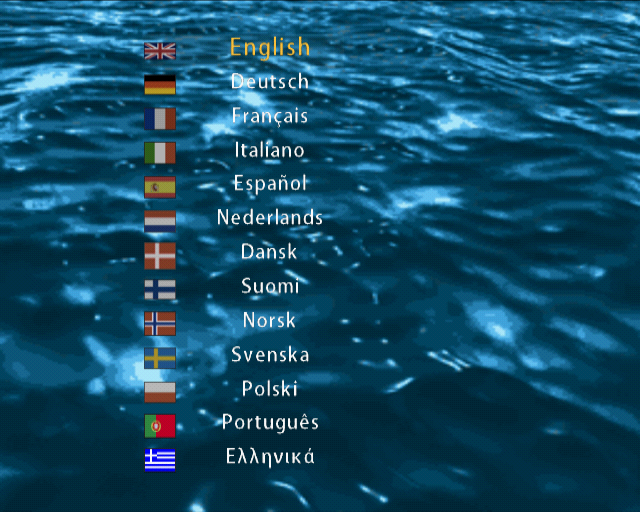
The Wii version has a significantly fewer amount of available languages in the European release. It's missing Danish, Finnish, Norwegian, Swedish, Polish, and Greek.
PlayStation 2 |
Wii |
|---|---|
 |
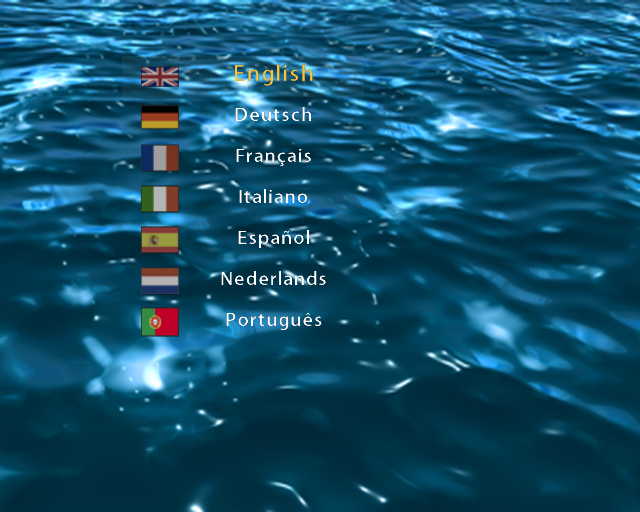 |
The font texture font_frankfur_s24_p0 in the Wii release is identical to the one found in the PS2 release, meaning it still contains all the necessary letters for the languages that weren't included.
 |