This is a sub-page of The Sims (Windows).
28 cheats-based commands can be natively accessed in The Sims, though the number might slightly differ, depending on the expansion packs installed. A fair extra amount can also be detected within the binary data, unveiling an interesting set of developer tools, majoritarily for debugging purposes1, and as to compensate for developing stages when their commands yet did not have UI equivalents.
Among the commands listed below, the ones that the final releases of The Sims have them working, yet capped, are highlighted in Red. The codes in Green, however, should work in all versions (except if otherwise noted).
(Source: Autinerd, LUCPIX)
Commands List#
To all Simmers: Within the game, type Ctrl-⇧ Shift-C. A little text widget will appear, into which you may type a cheat2... but you already knew that... right?
Cheat name [parameters] |
Note (as read in the binary) |
|---|---|
#export |
write out behavior tuning constants to Tuning.txt |
#import |
read in behavior tuning constants from Tuning.txt |
aa [on/off] |
enables/disables sprite antialiasing |
all_menus |
turns on/off the showing of unavailable interactions in person control menus |
allow_inuse |
sets whether menu items appear for in use objects |
alt_add [amt] |
add constant value to entire altitude layer |
assert |
force an assert (for testing) |
auto_level [on/off] |
architecture tools automatically set the level when necessary |
auto_reset |
turns on or off the automatic object reset feature (resetting of object simulations when main or init tree changes) |
autonomy [level] |
set the autonomy level for all people in the house |
browser_failsafe [on/off] |
can prevent a crash when launching the web browser |
bubble_tweak [z offset] |
sets the z value used to offset the sims' thought bubbles |
cam_mode |
turns camera mode on or off |
cht [file] |
executes file.cht as a list of cheats |
core_dump |
enables or disables automatic creation of web pages |
crash |
crashes game :) |
debug_social |
turns on the debug flag to show outcome choice dialogs for social interactions |
draw_all_frames |
draw all animation frames, without skipping to keep up |
draw_floorable |
turn the floorable grid on and off |
draw_origins |
draw colored dots at each person's origin |
draw_routes |
draw colored dots on selected person's path |
dump_happy |
dumps to a file the selected person's most recent list of scored interactions |
dump_mc |
dumps to a file the selected person's motive contribution curve |
edit_char |
open Create-A-Character screen, and edit the select person |
edit_grass [increment] |
turn on mode for editing grass tiles. increment sets number value by which to change the grass |
edit_size [size] |
sets flag layer to allow editing only with a central square, size x size |
fam_test [opcount] |
runs series of random operations on unhouses families |
flush |
Flushes app completely in to VM file. NT only. Useful to see how much memory is required at a given time to run the game (by tracking the app's WorkingSetSize) |
genable [default/status] / ([terrain / floors / walls / clear / objects / people / full_draw / static_rows / static / old_clear / all ] [on/off]) |
- |
grid [on/off] |
enables/disables terrain grid drawing |
grow_grass [amount] |
increase the grass level up to the maximum for each tile |
help [command] |
shows all commands, complete, or partial match |
hist_add |
adds a new family history stat to the current family |
history |
writes out the family history of the current family. if file is not specified, the default is used |
house [house #] |
loads a house, no questions asked |
html |
html [on/off] - enables or disables automatic creation of websites |
import [FAM file] |
Import and load the given FAM file. Does so without asking. |
interests |
dialog showing selected char's interests |
klapaucius |
- |
lamps [on/off] |
enables/disables lamp effects on walls & floors |
load [house num] |
Usage: load [house num], between 0 and 18 |
log_animations |
log animations in the event log window |
log_mask [mask] |
sets the event logging mask |
ot_border [tl] [tr] [bl] [br] |
sets up the borders of the lot with non-editable flag. requires rotation 0 |
lot_size [size] |
change the lot size |
map_edit |
turn on or off the mode to edit locked tiles |
memview |
shows the memory view window (debug builds only) |
money [amt] |
sets current funds to amt |
motives |
turn on/off the motive engine for all people in the house |
move_objects |
turn on or off allowing the user to move any object |
music |
turns music on or off |
ngh [path] |
sets the neighborhood directory to the path |
obj_comp |
turns object compression in save file on or off |
obj_dlg [index] |
- |
offset_world [x_amt] [y_amt] |
moves everything in world by specified x & y tile offsets |
people_quality [low/medium/high] |
- |
plugh |
say "plugh" |
porntipsguzzardo |
type "porntipsguzzardo" |
prepare_lot |
checks for required objects on the current lot and deletes come and see me objects |
preview_anims |
turns on/off animation preview mode |
quats |
enables or disables quaternion transformations. |
quit |
Quit the sims. |
rebuild_cp |
rebuilds entire control panel/ucp from scratch |
refresh_faces |
refresh the BMP_ resources for all people whose IFF files are writable |
refresh_textures |
rematches dependent textures and regenerates bitmaps for all user characters |
reload_people |
total reload of people skeletons, animations, suits and skins |
report_assets |
enables or disables assets report. |
restore_tut |
restores tutorial |
rotation [0/1/2/3] |
set absolute world rotation |
route_balloons |
turn on or off the display of routing debug balloons |
save |
Saves the currently loaded house. |
save_careers |
save out careers data as binary |
save_tuning |
save out data from tuning.txt to object files |
set_hour [hour] |
sets the hour of the day |
sev |
short for "soundevent" |
shadows [on/off] |
enables/disables shadows under objects |
shrink_text [font_size] [text] |
Products shrunk_text_#.bmp files, shrinking the text using the bmp shrinker |
sim_limit [mils] |
sets maximum number of milliseconds to allow simulator |
sim_log [begin/end] |
start and stop the sim logging |
sim_peek |
enables or disables calls to PeekMessage within sim loop |
sim_speed [speed] |
sets the sim speed to given number. 0-1000. |
sound |
turns sounds on or off |
sound_bad |
sound_bad - trigger sound event |
sound_good |
sound_good - short for soundevent |
sound_log [on/off] |
shows or hides the sound log window |
soundevent |
trigger sound event |
stream_fps |
Usage: stream_fps [max frames-per-sec of stream anim] |
swap_houses [house#] [house#] |
swaps the 2 house files and updates families |
sweep on/off/all/none/'subsys_name' [show/hide] |
dialog showing selected char's interests |
tile_info |
show or hide the tile info window |
tips |
Usage: tips |
tutorial |
tutorial off keeps the tutorial object from being generated when a tutorial house is loaded |
visitor_control |
enable or disable allowing visitors to be controlled using the keyboard |
w [text] |
sets caption to appear at lower-left of webcam image |
water_tool |
enables the water tool |
write_destlist |
appends the route destination list to AllRoutes.txt every time a route is found |
write_routes |
write out an RTE file every time a route is found |
xyzzy |
say "xyzzy" |
help#

Triggers a pop-up window in which players can choose from all the existing cheat codes in the build they are playing. Most of the cheat codes have accompanying developer commentary that explains their function; some explanations are more vague and cryptic than others.
tile_info#

tile_info, the "secret" window with in-depth information about the tile the mouse pointer hovers is also called if Ctrl, ⇧ Shift and Alt are pressed when in lots. Tells you the tile's coordinates, which footstep sounds will be played when Sims walk onto it, the internal name of home items, and many other details.
memview#

memview and sweep might've helped the team to ensure that the game's memory consumption remained solid and smooth after a newly-implemented feature. The lowest portion of the real-time generated graph onward is the direct effect of flush, though it doesn't seem to improve the game's performance on newer systems.
sweep#
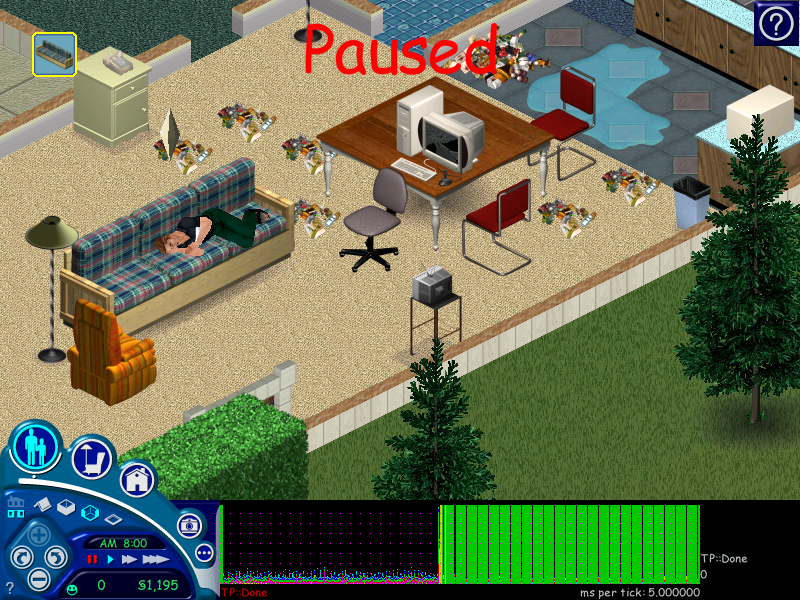
sweep: The second half of the real-time graph displays the performance of the game as it is played in the background, commonly in lesser priority, therefore slower.
log_animations#
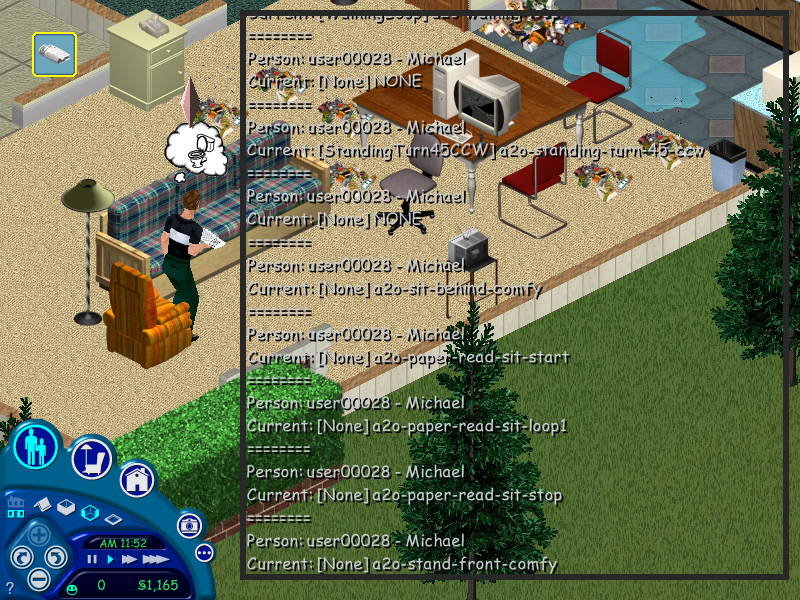
The Sims is a silent animation orchestra — a single interaction tends to use multiple. log_animations registers which .cmx files the Sims play (as well as the short moments when they play none), and in time.
sound_log#
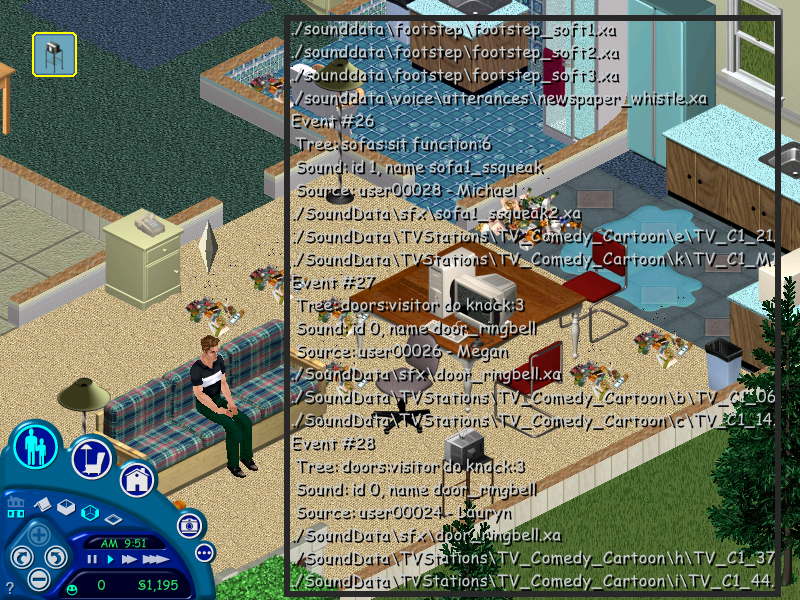
sound_log plays a similar role as the previous cheat, except it focus on the SFX events, from the Simlish to the tiniest white noise the world runs.
water_tool#
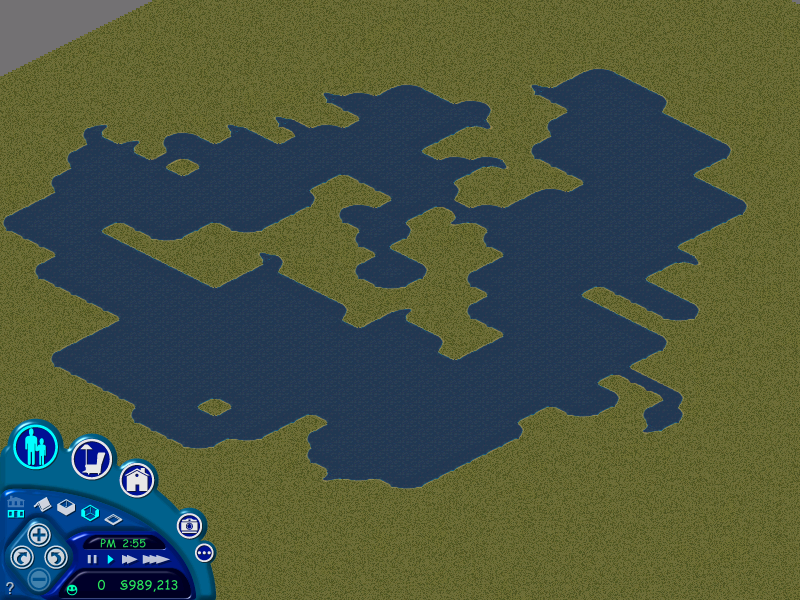
Early in basegame, water tiles (free of any interaction potential) were only seen in the corner of lots that, in the context of the Neighborhood Menu, were set close to its running river. water_tool allows the player to draw customized ponds anywhere, with no financial hits, as intuitively as placing floor tiles. Ultimately became an official feature in later expansion pack-based builds.
lot_size#

lot_size sets the (x)² amount of tiles in the world. x > 3 < 65. Yet, 2 rows typically stay out of bounds, with the assumption that Pedestrial Portals (NPC spawners) will be put there.
offset_world#
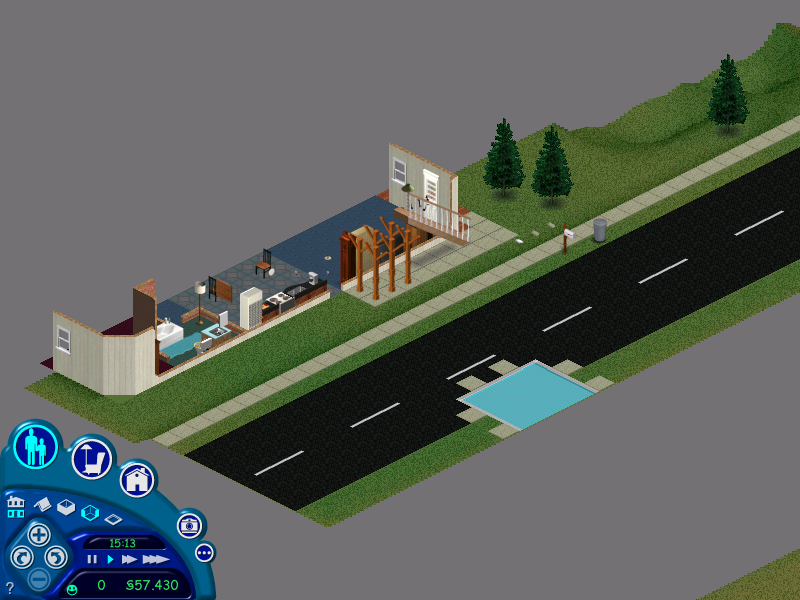
offset_world "moves everything in world by specified x & y tile offsets". Once out of bounds, the progress done to that specific portion of the lot will be lost, if an attempt do undo the cheat is made.
draw_routes#

draw_routes draws colored dots that describe the active character's trajectory, once it starts. It is of note that the game's pathfinding algorithms cause Sims to prioritize floor paths over terrain when walking.
map_edit#
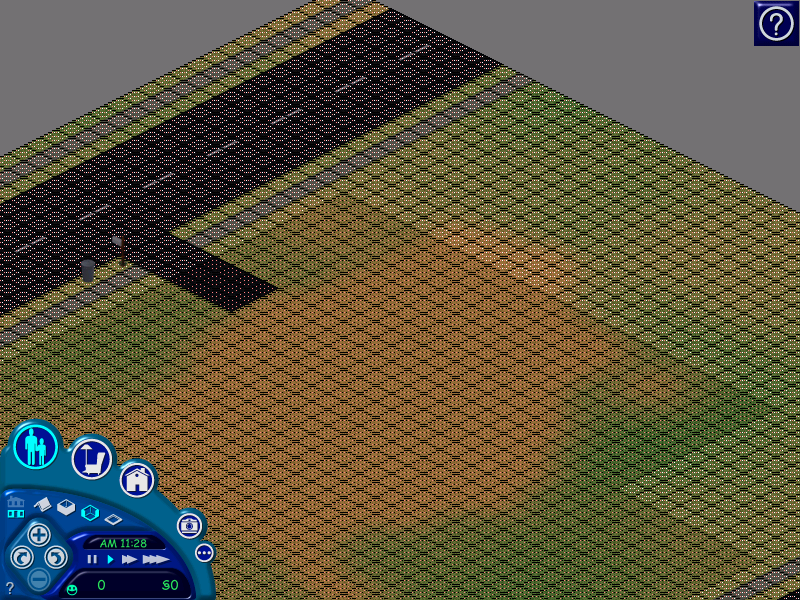
Remember that RollerCoaster Tycoon land-rights-buying mode, which indicates you the where on the world you may build things? map_edit plays in a very similar vein. Highlighted tiles not only signal the lot's editing boundaries, but what parts of the lot will not be shown the next time the lot's thumbnails are generated. While the assortment of editable tiles is manual, edit_size automatically draws a pattern of custom size.
genable#
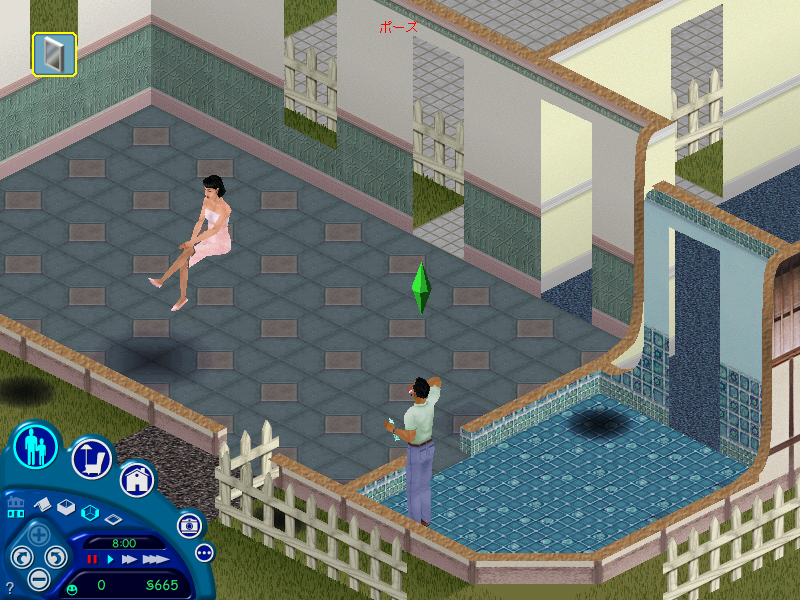
Since we're bringing up RCT analogies, remember, also, that you could natively disable the world's graphics (including the customers) ad hoc? genable is the same kind of deal, albeit entirely through codes. Stops/resumes the rendering of 3D people, terrain, object and home structures and lets you choose whether or not frames should be cleared once processed, specially when there is nothing to overwrite them.
all_menus#
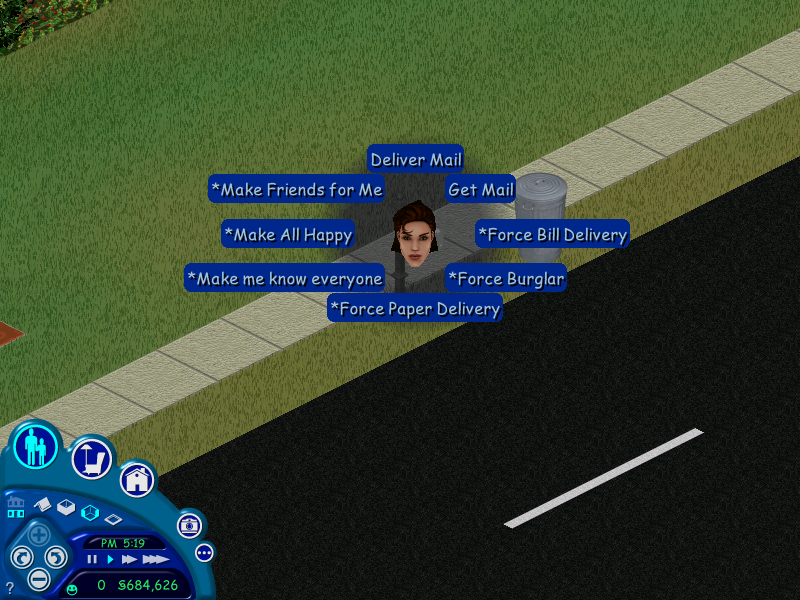
all_menus unlocks all the possible pie-menu commands for given interactions — among these, the ones with SimAntics tree tables assigned as Debug Only. A similar cheat code exists in The Sims 2; in a way, it serves as a testament to the belief that the sequel used the first game as basis.
*Mood window#

all_menus provides an alternate method of analysing someone else's motive data, including that of *Mood — in early pre-release builds, had a control panel display of its own, alongside its fellow Needs...
*Baby Stats#

...also, *Baby Stats! When will my baby become a child? How long will it take until it yells out of hunger? The strings above got the answers.
porntipsguzzardo,xyzzy and plugh#


Indirect references to other games: xyzzy and plugh tribute Colossal Cave Adventure (1976), known as the first text-based RPG. In the game, these two samples of nonsensical words are magic teleport commands — Nothing happens here. as one of the possible negative outcome strings, also justifying why the Sims player gets these exact words in response to inputting these cheats.
Xyzzy and plugh ultimately were inspirations for multiple contexts throughout the early computing history, used as secret commands for software of different kinds; among notable examples, Minesweeper: Typing in xyzzy unlocks the game's debug commands. The term also does a timid "cameo" within scripts of the Unreal Engine.
On the other hand, porntipsguzzardo is also the all-time-favorite SimCity 2000 money-getting cheat code; except that, on The Sims, the players get a playful line in return, reminding that they would not get the same benefits from the command as that of SimCity 2000. Unfortunately, the latter cheat is present, however capped by default, on release builds;
crash#

The Sims contains an instance that simulates a system crashing scenario. Positively responding its subsequent pop-up window causes the game to stop working. Then... you can agree that it works.
#export, #import#

While the routine of exporting Tuning.txt files (based on huge lists of what effects every object, event, and social interaction can have on Sims and the surrounding environment) has its native boundaries, #importing existing ones is entirely struggle-free. Sadly, the game has none. It has been observed, however, that console versions sport a similar file, compatible to the original Sims.
prepare_lot#

prepare_lot "checks for required objects on the current lot.". That being said, if the mailbox, carpool spawner etc. are somehow missing, it will let you know through pop-up dialogs. If everything seems O.K., the cheat instead reboots the Sims' actions and overall state of the lot, as though a game has been just started from the scratch.
debug_social#

With debug_social, users are given the ability to pre-set the possible outcomes of certain Sim-to-Sim interactions. This picture lists the 2 possible consequences of the Give Gift social interaction..
Noteworthy Cases#
"We had developed the scrap book as a debugging tool. We wanted a way in the game to take pictures and show those to each other. Almost immediately we realized that this was a fun toy and it ended up being one of the features in "The Sims" that helped our player community band together" |
- Charles London, The Sims Lead Artist3
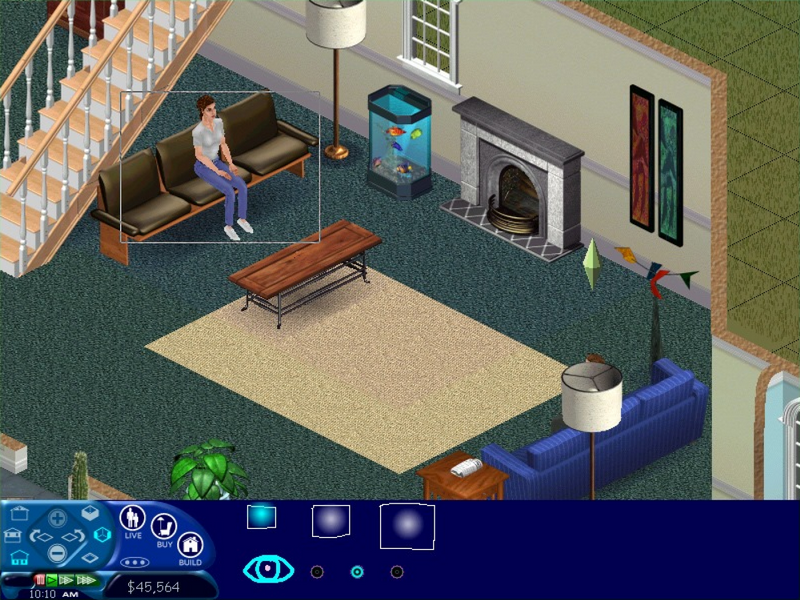
.]] Good things come to those who wait, so they say. Aside from predictable UI commands as save, quit, rotation etc., the cheats below, initially as debugging commands, sooner or later became official features in the game.
- Once noted that disabling certain accessory graphics could be beneficial to performance in low-end PCs,
aa(anti-alias),shadows,lamps(lighting) andpeople_quality(character detail) turned user-friendly Control Panel buttons... until later expansion pack-based patches summarily made the former two controls inaccessible again, anyway. cam_mode(Camera Mode) came to The Sims before its corresponding pre-Alpha build had a Control Panel area to accommodate it. Most notably, one of its snapshotting devices worked as a medium to livestream the game through screenshots at the old SimCity website (more info. here). It did not take too long before its tremendous storytelling potential became apparent.water_tooldraws unique water tiles that can be made into artificial ponds of many sizes, whileedit_grassis a mighty grass paintbrush. Both cheats don't heavily impact gameplay, but somehow enhance the lot's look. Probably noticing that fans found them very amusing to experiment with, the developers eventually added the tools as Build Mode items in future expansion packs... also meaning that the players would need to waste Simoleons to use them.- Allowing the players to check their Sims'
interestsbecame a much greater deal than the usual from the Hot Date expansion pack onward, when the social interaction systems were entirely rebuilt, and Sims could be interested in (and learn) a new set of talk topics. That being said, it deserved an extra room in the Control Panel.
All good things come to an end, they also say. The codes listed below, albeit as working cheats in the first original build, had a shorter useful life than their fellow magic words.
set_hourwas a time machine in itself, allowing players to jump straight to the X hour of the current day's past or future — pretty convenient to avoid the endeavor of waiting for the next carpool to arrive, for example. However it was entirely disabled from the base game's 1.1 patch onward.klapauciuswas the original command to add §1,000 to the current household's funds, and perhaps the lesser known one. The 1.1 update onward turned it off in the name ofrosebud, whose effect is pretty much the same.- The
preview_animscheat series lists the whole set of animation strings pertinent to their respective objects (once clicked on in Live Mode), and allows the currently-active Sim to run the animations in time, no matter how far from the object the Sim is. The addition of later expansion packs refrains the cheat from normal, unhacked use. wallows users to change the subtitle string that goes printed at SimWebCam snapshots: a developer tool that is removed entirely from the Hot Date expansion pack onward. Furthermore, so is the cheat code.
References#
- The cheat codes manager, as it is known today, was first implemented on a build from ca. December 1998 by the game's Graphics Engineer Eric Bowman (Technical Email, page 57), at a particular development phase in which the game engine found itself in an already pretty solid condition, as much of the progress made from then on were more based on overall polish. The earliest documented cheat codes —
aa(anti-alias),shadowandlamps— are graphical settings that would later receive a Control Panel area of their own.↩︎ - https://donhopkins.com/home/TheSimsDesignDocuments/TechnicalEmail.pdf The Sims Technical Email, page 57↩︎
- "Will-Wright Fansite: '99-2000: Launching The Sims (2005)↩︎