This is a sub-page of The Sims (Windows).
Certain modi operandi in The Sims went unused. There have been efforts to reverse-engineer and re-implement them in the game to see how they would have functioned, with their possible context being drawn from reminiscent graphics, animations, and text strings.
Note: These functions have been tested with the original base build (1.0). A small number of the following features were repurposed for different objects and contexts in later expansion packs, not necessarily in the same way as originally intended. These repurposed features will be mentioned in the associated notes.
Sub-Pages#
 Sim DataDo genes influence skills?
Miscellaneous#
 Sim FeaturesStress is counterproductive.
 Object FeaturesTry not to urinate at the trees!
Properties#
In the visual programming language that handles the behavior of objects in the game, "Expression" is a handy primitive used for logical and mathematical operations. Some of its functions include assigning numeric values to an object's local attributes and establishing conditional branches based on those attribute values. In doing so, it can also provide instructions that set how objects manifest themselves within the game world, both in its logic and appearance. This includes checking their default heights, the types of surfaces they can be placed on (such as counters, floors, and end tables), and other physical properties.
Naturally, not all of these properties are utilized.
Object Placement#
Object Heights#
# |
RTS |
Comment |
Snapshot |
Context1 |
|---|---|---|---|---|
#std heights |
||||
|
|
|||
|
|
style="background:#FFFFBF;color:#4D4D4D| Sets the height of objects so they can be placed on surfaces that are lower than dining tables, yet higher than the floor. No surfaces in the base game match this description, causing a good share of "low table reaching" animations to go unused. Interestingly, the bill object is the only one that references this placement setting in its "init" function, suggesting that the original purpose of "low tables" was to be somewhere Sims would drop hand items (like bills) on. The flag would be repurposed for Hot Date and subsequent expansion packs, where coffee tables were first implemented as a restoration of coffee tables seen in pre-release screenshots that were nonexistent in the final product. |
style="background:#000052| |
|

 picturing coffee tables, which were first featured in later expansion packs.]]

Wall Placement#
# |
RTS |
Comment |
Snapshot |
Context |
|---|---|---|---|---|
STR# 229 - wall placement flags |
||||
|
|
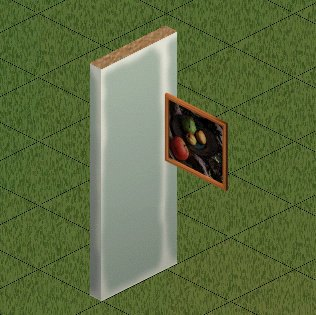
rowspan="2" style="background:#FFFFBF;color:#4D4D4D| Base game wall objects (paintings, toilets...) always face the opposite direction of any walls they're placed on, so these went unused. A similar placement setting would be used for some wall objects in later expansion packs. |
rowspan="2" style="background:#000052| |
, remnant of an old attempt in implementing diagonal objects.]] |
|
|
|||
|
|
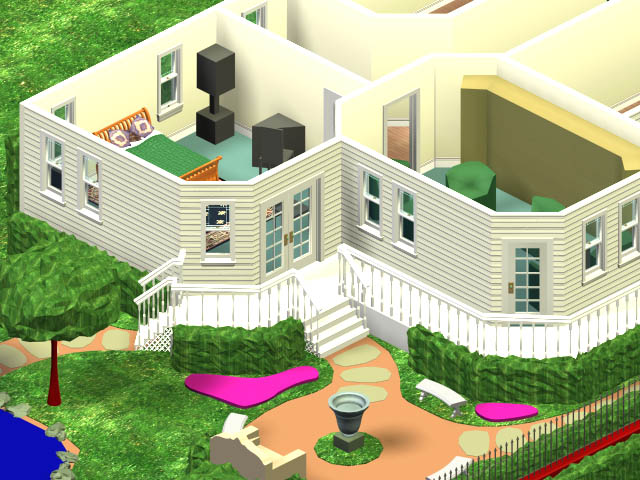
rowspan="2" style="background:#FFFFBF;color:#4D4D4D| These flags suggest that, at some point in development, certain objects could be snapped out of the tile grid's center in order to be placed on the corner of tiles on the floor, terrain, walls, and fences. This placement feature was removed in favor of always having items snap to the center of tiles. |
rowspan="3" style="background:#000052| |
|
|
|
|||
|
|
style="background:#FFFFBF;color:#4D4D4D| This flag suggests a scrapped concept where certain objects were meant to be placed diagonally only. No objects in the game utilize this rule as object sprites were only created for placement in four inter-cardinal directions.
|
||


 by
by Other#
# |
RTS |
Value |
Comment |
Snapshot |
Context |
|---|---|---|---|---|---|
STR#141 - Data labels |
|||||
|
|
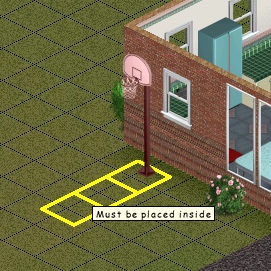
style="background:#FFFFBF;color:#4D4D4D| Forbids users from placing objects outside the house. No object in the base game uses this. Repurposed in Hot Date and subsequent expansion packs where ceiling lamps were introduced to the game. |
style="background:#000052| |

room placement flag. |
|
rowspan="3" colspan="2" style="text-align: center; background-color: #dedede;| |
|

style="background:#FFFFBF;color:#4D4D4D| Allows objects to be rotated in eight different 45-degree directions, effectively enabling diagonal placement. This feature is technically underutilized rather than unused: it is the default rotation value assigned to Sims. Players can observe this when using the "move_objects" cheat code: Sims can be rotated in eight directions, while 2D objects are always limited to four inter-cardinal directions. The existence of this rotation value suggests a potential intention during development to enable diagonal placement for certain objects. This idea is further reinforced by the presence of unused placement flags specifically coded for diagonal placement. Users can hack objects to achieve 45-degree rotations by altering their local "rotation notches" value to |
style="background:#000052| |

rotation notches |
|
|
style="background:#FFFFBF;color:#4D4D4D| Sets the rotation of the 2D objects to 180º, consequently always reversing its facing direction. |
style="background:#000052| |
|||
|
colspan="2" style="background:#FFFFBF;color:#4D4D4D| Sets the rotation of 2D objects to 360 degrees which, in practice, rotates the object straight to its original direction, as if rotation was disabled. |
||||
STR#202 - Placement Flags |
|||||
|
style="text-align: center; background-color: #dedede;| |
colspan=;color:#17191c;--link:#12467a;--newlink:#9c2b26;--dim:#4a4d52"3" rowspan="2" style="background:#FFFFBF;color:#4D4D4D| Unused (and seemingly broken) flags meant to allow objects to intersect tiles occupied by door and window objects. |

placement flags |
||
|
style="text-align: center; background-color: #dedede;| |
||||
|
style="text-align: center; background-color: #dedede;| |
||||

Other Properties#
Object Function#
Function |
Comment |
Snapshot |
Context |
|---|---|---|---|
style="text-align: center; background-color: #dedede;| |
style=;color:#17191c;--link:#12467a;--newlink:#9c2b26;--dim:#4a4d52"background:#FFFFBF;color:#4D4D4D| |
.]] |

level info request function and its developer description. |
rowspan="2" style="text-align: center; background-color: #dedede;| |
style=;color:#17191c;--link:#12467a;--newlink:#9c2b26;--dim:#4a4d52"background:#FFFFBF;color:#4D4D4D| |

ui event function and its developer description. |
|

Wall Adjacency Flags#
# |
RTS |
Comment |
Snapshot |
Context |
|---|---|---|---|---|
STR# 208 - wall adjacency flags |
||||
|
style="text-align: center; background-color: #dedede;| |
rowspan=;color:#17191c;--link:#12467a;--newlink:#9c2b26;--dim:#4a4d52"2" style="background:#FFFFBF;color:#4D4D4D| These flags' original purpose is the modification of an object's properties in case there's a wall in front or behind it. The staircase objects use similar flags for the means of removing their rails on adjacent walls on their left or right side. Later expansion packs repurposed the unused IDs for objects such as awnings. |
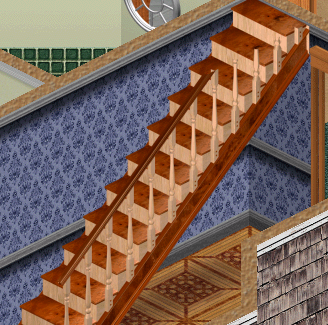
wall adjacency flags only see use in the stair objects: if they're placed next to a wall, their adjacent rail is then removed. |

wall adjacency flags |
|
style="text-align: center; background-color: #dedede;| |
|||
Movement
# |
RTS |
Comment |
Context |
|---|---|---|---|
STR# 203 - Movement Flags |
|||
|
style="text-align: center; background-color: #dedede;| |
style=;color:#17191c;--link:#12467a;--newlink:#9c2b26;--dim:#4a4d52"background:#FFFFBF;color:#4D4D4D| At some point, Sims might have been able to somehow rearrange the objects in the house at their will, under unknown circumstances. In normal gameplay, objects can only be moved with the "Hand Tool". For some reason, this flag was loosely referenced in the payphone object's "init" function in The Sims Online — in theory, this could refrain Sims from moving it, if the engine ever allowed them to do such a thing in the first place. |

movement flags |
|
style="text-align: center; background-color: #dedede;| |
||
Statuses#
# |
RTS |
Comment |
Context |
|---|---|---|---|
STR# 142 - flags for flag field |
|||
|
style="text-align: center; background-color: #dedede;| |

flags |
|
|
style="text-align: center; background-color: #dedede;| |
||
STR# 214 - Flags for Flag Field 2 |
|||
|
style="text-align: center; background-color: #dedede;| |
rowspan=;color:#17191c;--link:#12467a;--newlink:#9c2b26;--dim:#4a4d52"5" style="background:#FFFFBF;color:#4D4D4D| Suggest older flags that designate different deterioration states for an object — electronics, house plants, the aquarium etc. Final objects handle their dirty/broken statuses under more complex Private trees. |
|
|
style="text-align: center; background-color: #dedede;| |
||
|
style="text-align: center; background-color: #dedede;| |
||
|
style="text-align: center; background-color: #dedede;| |
||
|
style="text-align: center; background-color: #dedede;| |
||
|
style="text-align: center; background-color: #dedede;| |
||
|
style="text-align: center; background-color: #dedede;| |
style=;color:#17191c;--link:#12467a;--newlink:#9c2b26;--dim:#4a4d52"background:#FFFFBF;color:#4D4D4D| Suggests an intention in development to implement a number of items that could drift indefinitely or be placed over water, either on a swimming pool or artificial pond tiles. |
|
|
style="text-align: center; background-color: #dedede;| |
style=;color:#17191c;--link:#12467a;--newlink:#9c2b26;--dim:#4a4d52"background:#FFFFBF;color:#4D4D4D| May refer to a cut temperature mechanic for house objects. No objects in the final game use this flag. Objects that, by definition, should have had it (fireplaces, stoves, etc.) instead have private trees which simply set how they increase the lot's "Room" motive score, without any explicit consideration for how "warm" the room gets. Earlier in development, the unused object constant "temperature", which would presumably benefit from items that "generate heat", may have been intended to play a role in the game before being made irrelevant in the final, as no object is coded to check or assign a "temperature" value. |
|
|
style="text-align: center; background-color: #dedede;| |
style=;color:#17191c;--link:#12467a;--newlink:#9c2b26;--dim:#4a4d52"background:#FFFFBF;color:#4D4D4D| "GeneratesLight" is used, instead. |
|


Miscellaneous#
# |
RTS |
Comment |
Context |
|---|---|---|---|
#visitor schedule |
|||
|
style="text-align: center; background-color: #dedede;| |
style=;color:#17191c;--link:#12467a;--newlink:#9c2b26;--dim:#4a4d52"background:#FFFFBF;color:#4D4D4D| Exact purpose unknown; it might refer to an old flag for handling arriving neighbors. |

#visitor schedule |
#Children Grades |
|||
|
style="text-align: center; background-color: #dedede;| |
rowspan=;color:#17191c;--link:#12467a;--newlink:#9c2b26;--dim:#4a4d52"11" style="background:#FFFFBF;color:#4D4D4D| While certain object events call flags that check or change the school grades for child Sims, the specific flags listed here are never used. |

#Children Grades |
|
style="text-align: center; background-color: #dedede;| |
||
|
style="text-align: center; background-color: #dedede;| |
||
|
style="text-align: center; background-color: #dedede;| |
||
|
style="text-align: center; background-color: #dedede;| |
||
|
style="text-align: center; background-color: #dedede;| |
||
|
style="text-align: center; background-color: #dedede;| |
||
|
style="text-align: center; background-color: #dedede;| |
||
|
style="text-align: center; background-color: #dedede;| |
||
|
style="text-align: center; background-color: #dedede;| |
||
|
style="text-align: center; background-color: #dedede;| |
||
#Global Tuning |
|||
|
style="text-align: center; background-color: #dedede;| |
rowspan=;color:#17191c;--link:#12467a;--newlink:#9c2b26;--dim:#4a4d52"2" style="background:#FFFFBF;color:#4D4D4D| Adjusts a Sims' relationship status to "Hate". In the final game, friendship and love are unique events that receive a distinct treatment by the game, signified by help system messages and the sprites ( |

#Global Tuning |
|
style="text-align: center; background-color: #dedede;| |
||
|
style="text-align: center; background-color: #dedede;| |
style=;color:#17191c;--link:#12467a;--newlink:#9c2b26;--dim:#4a4d52"background:#FFFFBF;color:#4D4D4D| Might refer to an early mechanic that handled the distance allowed for two Sims to be in the same bathroom without one asking the other to go away in case their privacy is disturbed. |
|
#category |
|||
|
style="text-align: center; background-color: #dedede;| |
rowspan=;color:#17191c;--link:#12467a;--newlink:#9c2b26;--dim:#4a4d52"5" style="background:#FFFFBF;color:#4D4D4D| Unused flags belonging to an old object categorizing convention that objects such as beds and showers still have in their "init" functions as early remnants. At one point, it might have been used to trigger certain events in case one object of their respective kind was found in the house. |

#category |
|
style="text-align: center; background-color: #dedede;| |
||
|
style="text-align: center; background-color: #dedede;| |
||
|
style="text-align: center; background-color: #dedede;| |
||
|
style="text-align: center; background-color: #dedede;| |
||
 and
and  ), while extremely low relationship scores among Sims don't heavily impact gameplay in the same way, save for a number of hostile interactions that the player has access to in that context. The final game has an unused
  .
.(Source: LUCPIX)
Primitives#
# |
RTS |
Comment |
Context |
|---|---|---|---|
STR# 139 - Primitives |
|||
|
style="text-align: center; background-color: #dedede;| |
style=;color:#17191c;--link:#12467a;--newlink:#9c2b26;--dim:#4a4d52"background:#FFFFBF;color:#4D4D4D| An early "dialog" equivalent. It does not seem to work in the final product. It's meant to somehow print "STR#" resources on the screen as pop-up windows or tooltips. Contrary to "dialog", this primitive does not have any options to add indexed "_BMP" images close to the printed text, or any other special features. Only old, unused trees indexed in the stove and fridge objects reference this primitive. |

show string |
|
rowspan="3"; style="text-align: center; background-color: #dedede;| |
style=;color:#17191c;--link:#12467a;--newlink:#9c2b26;--dim:#4a4d52"background:#FFFFBF;color:#4D4D4D| "Headline" is the designation of old and unused sprites that were called over the Sims' heads as a way of expressing their feelings. Taking this into account, this primitive might be an early equivalent of "set balloon". |

~unused as its label. |
|
rowspan="2"; style="text-align:center;background-color:#EAECF0;color:#17191c;--link:#12467a;--newlink:#9c2b26;--dim:#4a4d52" | |

~unused as its label. |
|
|

~unused as its label. |
||
(Source: LUCPIX)
Primitive Features#
user event#

 The "user event" primitive adds some elements — as the animated Picture-in-Picture overlay — that highlight important events in the game. Even though the engine can handle "Small", "Medium" and "Large" windows fine, only "Medium" and "Large" are ever used in the final game.
(Source: LUCPIX)
Unused OBJD and OBJf Entries#
Many OBJD entries are unused in favor of OBJf entries (internal notes discourage using OBJD in favor of OBJf) as OBJf is basically an extension of OBJD. If no OBJf entry is associated with an object, the game will use the OBJD values instead. Some of the earliest objects made were never updated with an OBJf entry. For this reason, the technically-unused-but-exists-as-a-functional-fallback OBJD entries won't be included. Most aren't even interesting.
- version_2 - Never set to anything other than 0. version_1 is always set to 138.
- sale price - This is never used. The game calculates the sale price from the buy price and the initial and daily depreciation values.
- shadow brightness - Does not seem to work.
- level info request - This button does not exist in the final game. If it did, objects could react to it.
(Original research: Leo Gruen)
Footnotes#
- Instance at Edith tool (or design document) where said resource is referenced.↩︎