the cutting room mirror

Unused Graphics

This is a sub-page of Mario Superstar Baseball.

To do:
A set of graphics for a supposed scrapped minigame password menu.

Stadiums#

Mario Stadium#

MSSBMarioStadiumNumbersTexture.png

Within the files for both the day and night versions of Mario Stadium is a texture with the numbers 120 and 97.5, possibly as some kind of scrapped ball speed indicator on the scoreboard for pitching or hitting the ball.

Playable Characters#

Yoshi#

This needs some investigation.
Discuss ideas and findings on the talk page.
Specifically: Apparently this early bat design is present in a pre-release screenshot from E3 2005.

Early

Final

MSSBEarlyYoshiBatTexture.png MSSBFinalYoshiBatTexture.png

Yoshi's Challenge Mode map model contains an early graphic for his bat, which would've been a brown bat with a Yoshi Egg printed on it.

Toad#

Found within the Toad's low-poly files are early textures of their bats. The early textures consists of the spots seen on Toad's head, rather than a depiction of Toad's head. Blue Toad is the only one to keep the Toad emblem for the low-poly bat texture, but with a blue colored bat instead of a white one.

Toadette#

A low-poly eye texture for Toadette, found within her low-poly files. The final game has Toadette's low-poly model share the same eye texture used for the high-poly model.

Shy Guy#

Early

Final

MSSBEarlyYellowShyGuyTexture.png
MSSBEarlyYellowShyGuyIngame.png
MSSBFinalYellowShyGuyTexture.png
MSSBFinalYellowShyGuyIngame.png
MSSBEarlyGreenShyGuyTexture.png
MSSBEarlyGreenShyGuyIngame.png.png
MSSBFinalGreenShyGuyTexture.png
MSSBFinalGreenShyGuyIngame.png
MSSBEarlyBlackShyGuyTexture.png
MSSBEarlyBlackShyGuyIngame.png.png
MSSBFinalBlackShyGuyTexture.png
MSSBFinalBlackShyGuyIngame.png

Early textures for Yellow, Green, and Black Shy Guy found in an early archive of their character models. The early textures all have different colored shoes for each color (light-blue for Yellow Shy Guy and brown for Green and Black Shy Guy), though Black Shy Guy's early texture originally had a light-gray robe instead of a dark-gray one.

Possibly due to Black Shy Guy's name being changed to Gray Shy Guy in Mario Super Sluggers, the lighter robe design for Black Shy Guy ended up being used in the game's sequel.

Dry Bones#

Early

Final

MSSBEarlyRedDryBonesShellTexture.png MSSBFinalRedDryBonesShellTexture.png
MSSBEarlyRedDryBonesIngame.png
MSSBFinalRedDryBonesIngame.png

Before using a unique design, it seems that Red Dry Bones was originally going to be literally a Red Dry Bones. An unused texture archive for the glove and ball texture contains early textures for Red Dry Bones, matching the rest of the other alternate colors but with a red colored shell rather than the unique "dark" design present in the game.

Title Screen Sketch#

Found within the graphics for the Nintendo and Namco logo boot screens is a sketch of the games title screen featuring crudely-drawn versions of Mario and Luigi behind what appears to be a baseball stadium, presumably Mario Stadium. The text "PRESS START" can be seen on the bottom, and the games title above amusingly reads "Luigi's Older Brother Baseball".

(Source: Roeming, LittleCoaks)

French Health & Saftey Boot Screen#

MSSBPALFrenchBootScreen1.png MSSBPALFrenchBootScreen2.png

Present in the European version's boot screen graphics are a set of graphics for a French health & safety screen. If the system's language is set to French on a PAL GameCube then the game will still be in English, so this was likely a remnant from plans to localize the game in French.

Coming Soon Screen#

This needs some investigation.
Discuss ideas and findings on the talk page.
Specifically: The debug menu's .rel file mentioned a "comingsoon" screen, see if it's possible to load this screen in the game.

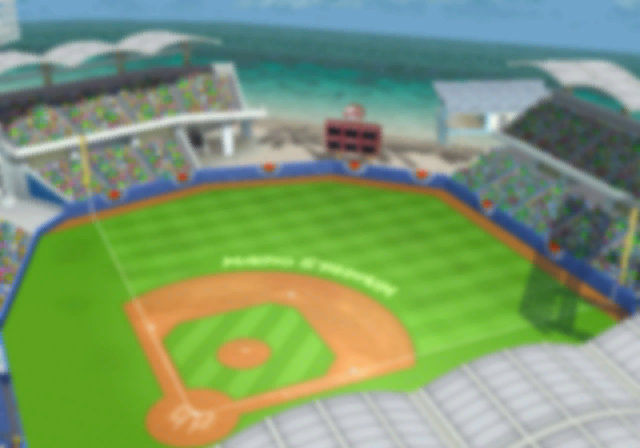
A set of graphics for a "Coming Soon" screen featuring Mario and co. in front of a blurry background of Mario Stadium with text reading "Coming Soon", likely leftover from a demo version of the game.

(Source: Geno Penguin)

Early Build Screenshots#

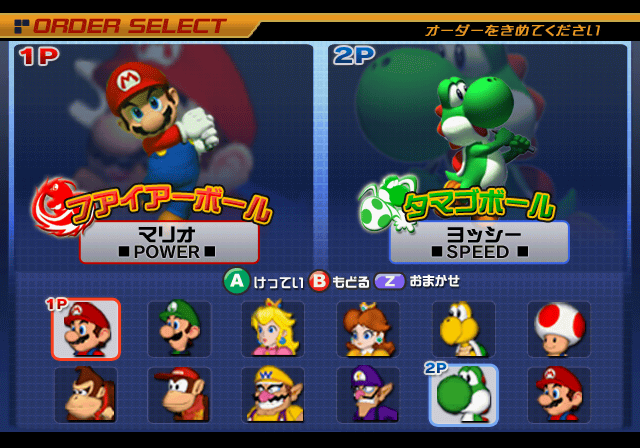
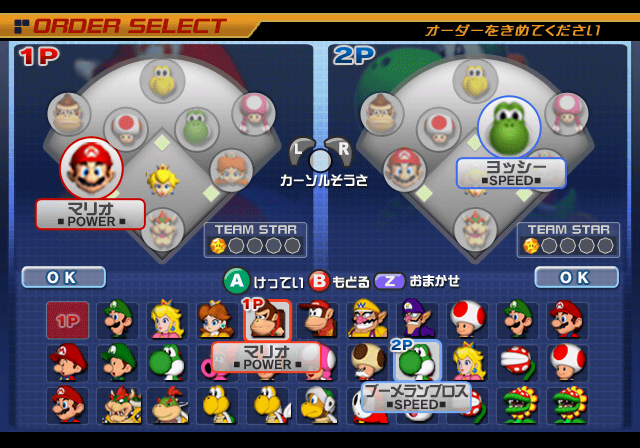
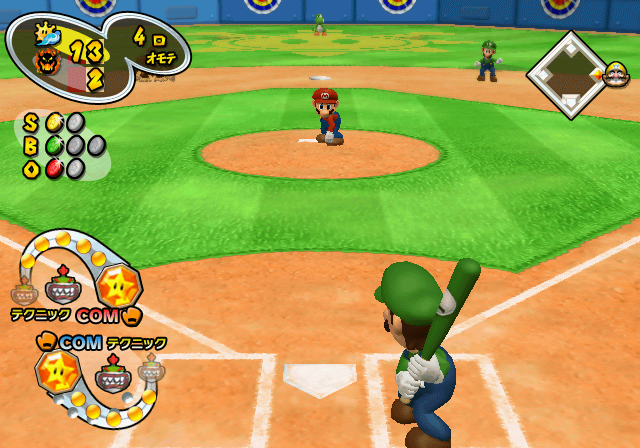
Seven screenshots of an earlier build of the game. These screenshots can be found in both all released versions of the game and the demo. There are plenty of differences in these screenshots which were changed in the final game:

Screenshot

General Notes

Screenshot Notes

  • The main menu uses a completely different design making the grid background appear bright blue, which was changed to be dark blue.
  • The captain backgrounds on the captain and teammate select screens use different artwork, with Mario's using in-game artwork of him diving for a catch from Training mode, while Yoshi uses artwork from Mario Golf: Toadstool Tour.
  • The character icons are remnant of the early designs used in pre-release screenshots, while the mugshots are different.
  • Mario's team logo is erroneously labeled as the Donkey Wilds (DK Wild Wones in the US and European version), while Yoshi's team logo is labeled as the Mario All Stars. The Mario All Stars logo uses an early design, with a blue flag instead of a red one in the final.
  • The buttons showing how to select, cancel, and randomize are located on the bottom half of the first two screens, before being moved to the top left corner in the final game.
  • The top right text in all the menu screenshots translates to "Please decide the order", presumably meant for the batting order screen.
  • Likewise, the last two screenshots has text meant for the Batting Order / Field Positions screen reading "Change your batting order and fielding positions" in Japanese.
  • Many of the characters have different types compared to the final game:
  • Many of the characters have different types in the screenshots compared to the final game:
    • Mario is a power character, but was changed to a balanced character.
    • Daisy is a speed character, but was changed to a balanced character.
    • Yoshi is a technique character, but was changed to a speed character.
    • Donkey Kong is a speed character, but was changed to a power character.
    • Toad is a speed character, but was changed to a balanced character.
    • Koopa Troopa is a speed character, but was changed to a balanced character.
  • On the captain select screen, Mario and Yoshi use their artwork from Mario Golf: Toadstool Tour instead of using their 3D models. Both of their artworks have been edited to remove the golf clubs, except for the grips on their hands.
  • It appears that Koopa Troopa and Toad were intended to be team captains, as showcased in place of Bowser and Bowser Jr. who do not appear on this screenshot. However, in the final release, they were relegated to being non-captains.
  • The stats for Mario and Yoshi are not present, only showing which type of character they are.
  • A Piranha Plant is present as one of the playable team players. In the final game, Piranha Plant is not playable.
  • Duplicates mugshot icons for Mario, Luigi, Yoshi, Toad, Piranha Plant, and Petey Piranha exist in the teammate select screen. These are most likely placeholders for the characters that were added later in development.
  • On the topic of characters, Monty Mole, Pianta, Noki, Magikoopa, King Boo, Dixie Kong, Goomba, Paragoomba, and Dry Bones are not present in this screenshot.
  • On the bottom of the teammate select screen, Yoshi's icon is selected with his name being "Boomerang Bro".

Curiously, the early icon of Shy Guy ended up being repurposed for Mario Kart DS, while Hammer Bro's icon was re-used as a rankings icon for Yoshi Touch & Go. Petey Piranha and Hammer Bro's icons can be found unused in Mario Kart Wii.

  • The batting order select screen shows a heart icon for Mario, something not used in the final game in the order select screen.
  • Switching batting and fielding hands for each teammate was done originally with the L trigger, which instead is done with the X button in the final.
  • Likewise, changing characters to be star players was done originally with the R trigger, which was changed to be the Y button in the final.
  • Player 2's team logo uses a early design for the Yoshi Islanders, with smaller spots on the Yoshi Egg.
  • On the bottom, the icons for a a few game settings are different:
    • The first bat option uses a bat for an icon, which was changed to two curved arrows in the final.
    • The star skills option lacks eyes for the star icon, which was added in the final
    • The innings count uses two curved arrows, which ended up being reused for the first bat option. The innings selection in the final game uses an icon for a grid.
  • The game options button which is accessible by pressing the L trigger is not present in this screenshot.
  • The last three screenshots seem to be different designs for the star meter, with the team members showing who's batting / pitching, and who's up next to bat being Bowser and Bowser Jr.
  • Mario, Luigi, Yoshi, and Donkey Kong use their early models, reminiscent of their appearance in Super Smash Bros. Melee.
  • Mario Stadium had more detail for the grass and dirt, and a different texture for the outfield walls. A shine sprite is present in the outfield, which was removed in the final game.
  • In the first screenshot, both players are COM players. But in the last two screenshots, both are replaced by Player 1 and Player 2.
  • Early icons are present for the Mario Sunshines team (depicting a Shine Sprite behind a wave), and the Bowser Flames team (depicting a darker silhouette of Bowser's face behind a flame).
  • The text for the score, inning number, and SBO counter used the Super Mario font, but was changed to be a different font in the final game.
  • On the infield bases graphic, an icon of Wario is seen on first base. This icon appears to have been borrowed from one of Wario's renders from Wario World.
  • Bowser Jr. is shown to be a technique character, but was changed to be a power character in the final.
  • The star meter graphics are tilted, and have five star skills filling up the meter.
  • On both teams, Bowser Jr's icons are used to show who is up, and who is next up to bat.
  • The COM text, character type text, glove icons are place differently, being outside of the star meter graphics.
  • For the star meter on the bottom, five empty slots appear underneath the ones that are filled with five star skills.
  • The star meter graphics are at a different angle unlike the last screenshot.
  • The bat and glove icons for each player is outside of the star meter graphic, where it is inside in the final.
  • On Player 1's team, Bowser's icon is used to show who is up at bat and who is next to bat, while for Player 2, Bowser Jr's icon is used only to show who is up at bat.
  • The tail of the star meter graphics have been slightly tilted compared to the last screenshot.
  • The character type text is next to each character icon for both teams, where the final places this above or below them.

(Source: Geno Penguin, Roeming)

Hammer Bro Challenge Mode Dialogue Mugshot#

MSSBHammerBroChallengeModeDialogueIcon.png

A dialogue mugshot graphic of Hammer Bro found with the rest of the Challenge Mode map graphics, suggesting that Hammer Bro may have been planned to appear on the map as an interactable character.

Miracle Difficulty Text#

Japanese

English

SMSMBChallengeModeMiracleLevelText.png
MSSBChallengeModeMiracleLevelText.png

The text graphics for Challenge Mode include English and Japanese text graphics for a Miracle level, possibly meant as a planned additional fifth difficulty level after completing Special level.

Early Dictionary Book Graphic#

Early

Final

In the International versions, remnant files from the Japanese-exclusive Dictionary mode shows a photo-realistic graphic of a book seen before opening the dictionary. This was most likely a placeholder for the final version of the dictionary book seen in the Japanese version.

Early Mario Sunshines Icon#
Early

Final

MSSBEarlyMarioSunshinesTeamIcon1.png
MSSBEarlyMarioSunshinesTeamIcon2.png

MSSBFinalMarioSunshinesIcon.png

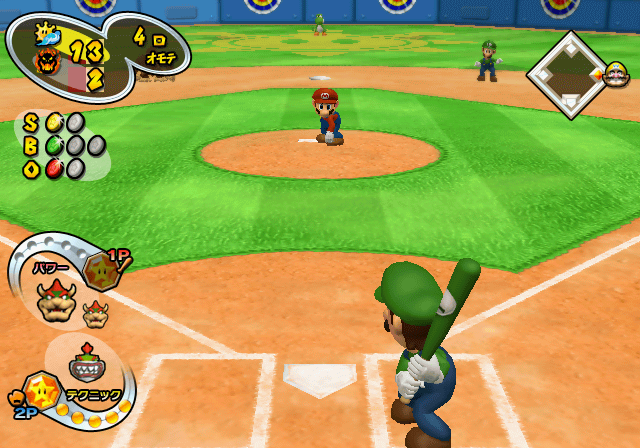
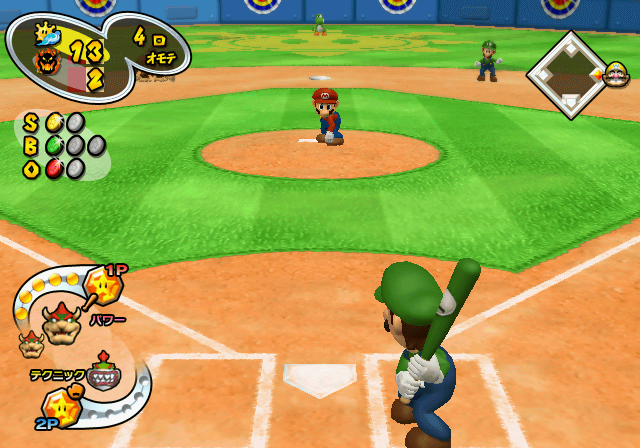
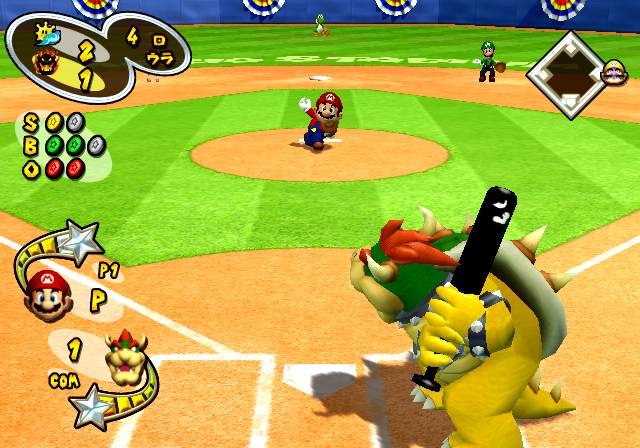
An early version of the Mario Sunshines team icon found along the text and HUD graphics during an Exhibition game. The early version's icon depicts a Shine Sprite behind a wave whereas the final has the "M" from Mario's hat in front of a shine sprite. A smaller and blurrier version of this can be found with the Records menu graphics, though it has two periods in front of it.

This early team icon of the Mario Sunshines team can be seen in a pre-release screenshot from the 2004 reveal.

Early

Final

MSSBEarlyMarioSunshinesLogo.png MSSBFinalMarioSunshinesLogo.png

Like the team icon, a team logo for the Mario Sunshines can be found as well within the Exhibition results screen graphics. The early version's logo had a different yellow and blue color scheme before being changed in the final game to resemble the logo from Super Mario Sunshine.

Transparency Tests#

MSSBDKTestTextures1.png MSSBDKTestTextures2.png

Two graphics testing transparency with the first using a render of Donkey Kong's face with various transparency effects, the render itself being based off of Mario Kart: Double Dash!!. The second texture is a test for different reflection textures with each light having different levels of opacity.

(Source: morimementos)

Campfire Tent (Family Stadium 2003)#

MSSBFamilyStadiumTentGraphic.png

The tent location icon leftover from Family Stadium 2003's Pennant Race mode.

Early Gameplay HUD#

A set of graphics for an early version of the batting and pitching HUD with a more Mario-themed appearance than the one used in the final game.

Graphic

Notes

MSSBEarlyGameplayHUDMockup1.png
  • The player and computer player indicators shows that they were meant to be placed at the bottom corners of the screen.
  • Mario uses artwork from Mario Party 4 while Bowser uses artwork from Super Smash Bros. Melee.
  • Both of their names are shown in Japanese, and the star skills were shown above them as tiny stars. The "8" likely represents which number teammate they are on their respective teams.
MSSBEarlyGameplayHUDMockup2.png
  • The score, inning, and SBO counter uses a unique design with Lakitu on a cloud holding a sign similar to the one he carries in the Mario Kart series.
  • Emblems of Mario and Wario are used as team logos, and a bat is shown to represent the current team batting.
MSSBEarlyGameplayHUDMockup3.png

The baseball diamond graphic has a wind direction indicator inside of it, a feature from Family Stadium 2003 that was likely planned to have been brought over.

(Source: LittleCoaks)

Debug Graphics#

A few of these graphics found in various texture archives, with two of them being a smiley face and frowning face, a turning orange arrow, a red rectangle and circle, and a blue arrow. The blue arrow is taken from Family Stadium 2003, where it was used to indicate the direction of wind on the HUD.

Red HUD Graphic#

MSSBUnusedRedCommaGraphic.png

A red graphic that could either be a comma for some text or part of a meter on some HUD.

0 Number#

A 0 graphic, using a different font compared to the ones used throughout the game for the UI.

Baseball Text Graphics#

SMSFBUnusedBaseballText1.pngSMSFBUnusedBaseballText2.pngSMSFBUnusedBaseballText3.pngSMSFBUnusedBaseballText4.pngSMSFBUnusedBaseballText5.png
SMSFBUnusedBaseballText6.pngSMSFBUnusedBaseballText7.pngSMSFBUnusedBaseballText8.pngSMSFBUnusedBaseballText9.pngSMSFBUnusedBaseballText10.png

SMSFBUnusedBaseballNumber0.pngSMSFBUnusedBaseballNumber1.pngSMSFBUnusedBaseballNumber2.pngSMSFBUnusedBaseballNumber3.pngSMSFBUnusedBaseballNumber4.pngSMSFBUnusedBaseballNumber5.pngSMSFBUnusedBaseballNumber6.pngSMSFBUnusedBaseballNumber7.pngSMSFBUnusedBaseballNumber8.pngSMSFBUnusedBaseballNumber9.png

MSSBMeleeDKDebugTexture.pngMSSBMeleeDKDebugTextureTransparent.png

A set of baseball pitching related text graphics which translate to Straight, Curve, Slider, Changeup, Forkball, Sinker, Knuckleball, Shoot, Magic Pitch No. 1, and Magic Pitch No. 666, and some numbers from 1 to 9. Also included with these are strangely two graphics of Donkey Kong performing his taunt from Super Smash Bros. Melee, both with and without anti-aliasing.

Effect Debug Graphics#

A set of graphics which look like to be for particle effects. These include a light, musical notes, and a square with a blue gradient.

STAGE 1 Text#

MSSBStage1TextGraphic1.pngMSSBStage1TextGraphic2.pngMSSBStage1TextGraphic3.pngMSSBStage1TextGraphic4.pngMSSBStage1TextGraphic5.pngMSSBStage1TextGraphic6.png

A set of graphics when arranged, spell out STAGE 1.

Early

Final (JP)

MSSBEarlyKoopaFlamesTeamLogo.png SMSMBFinalKoopaFlamesTeamLogo.png

An early team logo for the Japanese version of the Bowser Flames team can be found in the graphics for the character select screen in Exhibition mode. The early logo had a fiery-black color scheme with a different design for the emblem of Bowser in the middle. The text was also written in the Super Mario font before getting changed to a different one in the final.

Just like the early team icon of the Mario Sunshines team, this logo matches the original team icon for the Bowser Flames in a pre-release screenshot from the 2004 reveal.