 This article has a talk page!
This page details one or more prototype versions of Nintendo 3DS Camera.

|
This article has just been started and needs the article basics added. |

|
This page or section needs more images.
|

|
This page or section needs more audio. |
Differences#
- Pressing B in some areas doesn't go back.
Camera Shoot#
Main Menu#
|
Proto |
Final |
|---|---|
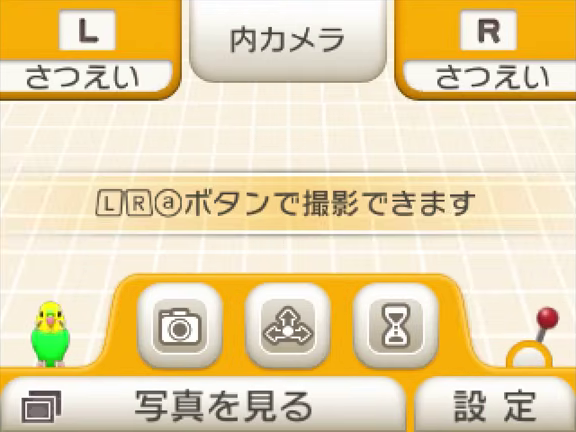
|

|
- The lever is smaller.
- The text showing the buttons to shoot is smaller and use the Wii pro controller "a" button font.
- The stabilizer is shown by pressing Y, while Y opens the album on the final version.
Camera Filter#
|
Proto (no filter) |
Final (no filter) |
|---|---|

|

|
|
Proto (filter selected) |
Final (filter selected) |
|---|---|
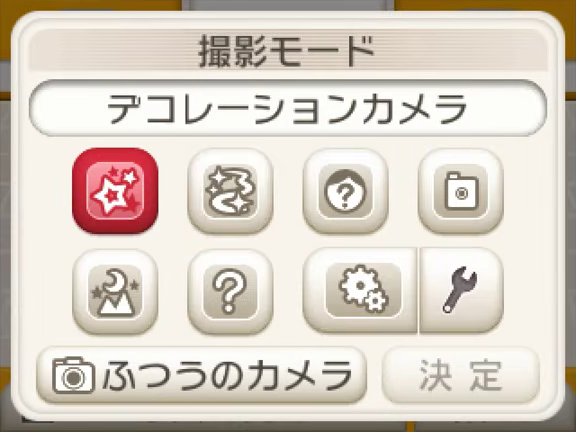
|

|
- The camera filter menu looks different, you have to tap the bottom left button to reset.
Gallery#
- The BGM Playing is different.
- The color of the date folders is darker.
Graffiti#
- The star stamp is smaller in the stamp menu.
- The eraser menu don't have the 3D erasers, they are in the 3D paint menu.
- The 3D paint menu has a option to clear all 3D painting, which is missing in the final version for some reason?
Album#
- The recording selection works fine using the touch screen (it's broken in the final version).
- There's text showing how many photos you can use for your album.
- The button to set the album's title does nothing.
- The album's author shows the username of the console, copying the same text on the final version doesn't work and shows the last part of the date.
Data management#
- The blue button to confirm critical actions appears faster.
Boot Menu#
Main Menu#
Upon booting the application, the boot menu is displayed with 9 different options.
--- BOOT MENU [8 hexadecimal digits that increases every frame] ---
1   Play
2   Camera Config
3   Layout Stress Check
4   Effect
5   Make Dummy Photo
6   Cleanup Nand / Sd
7   Guide
8   GuideBackup
9 MakeImagePlay#
This will launch the main interface of Nintendo 3DS Camera.
Camera Config#
This will enable the camera on the Top Screen. The Touch Screen will show various parameters that can be tweaked for the camera effects.
Pressing X while a parameter is highlighted will only reset the selected parameter, pressing X while “All Reset” is highlighted will reset all parameters.
--- CAMERA CONFIG ---
Effect          [26 effects]
Contrast        [11 patterns]
LensCorrection      [DARK,NORMAL,BRIGHT]
Exposure        [-5 to 5]
FrameRate       [13 frame rate options]
WhiteBalance        [6 effects]
Sharpness       [-4 to 5]
Flip            [NONE, HORIZONTAL, VERTICAL, REVERSE]
NoiseFilter     [OFF, ON]
PhotoMode       [5 effects]
All Reset
X: Reset Parameter
B: Return to Debug Menu
Layout Stress Check#
After selecting this option, the debug menu will display every layout file in the application.
It can be selected and displayed on either the Top Screen or Touch Screen, pressing left and right while a layout is highlighted will show sub-layouts. Only the raw layout is displayed with no animations and sounds. The application must be unpaused at first to take effect.
Effect#
This will enable the camera on top screen and display the camera particle effects. Select an effect with D-Pad up or down then press A to create the effect. The Touch Screen will display a slider and debug controls. The slider can be moved with the touch screen or the Circle Pad. Moving the slider left and right takes no effect, moving the slider up and down will zoom the camera.
--- Effect Test ---
[Slider UI]
[Effect Name]
Select: ⇅
Create: A
Return: B
Make Dummy Photo#
This will allow you to generate dummy photos and save them to SD Card or NAND or both. Press the A button while highlighting MAKE UP to save the dummy photos. Holding L while changing a value increases it by 100.
Changing the date span will increment each photo date by 1, starting from 1st January 2000.
(Dummy photo(s) are images of a pixelated number starting from 0 on a white background.)
--- MAKE DUMMY PHOTO ---
NAND PHOTO      [Amount of dummy photos]
SD PHOTO        [Amount of dummy photos]
DATE SPAN       [The date of each dummy photos]
L: Boost Change
B: Return to Debug Menu
Cleanup Nand / Sd#
This option will show a menu to remove all images stored on the SD Card or NAND or both.
--- CLEANUP NAND/SD ---
Press A To Cleanup NAND
Press Y To Cleanup SD
Press X to Cleanup NAND/SD
B: Return to Debug Menu
After removal, this message is displayed:
Done Cleanup
Please Reset SystemsGuide#
This will allow you to select and display a Parakeet guide. Pressing the X button will display a random guide. Up to 79 guides are available.
--- Guide Test ---
[Guide Number]
Select: ⇅
Start: A
Parakeet: X
Return: BGuideBackup#
This option will display 2 other sub-menus, “Read” & “Requirement”. Read menu will display all 79 Parakeet guides, each guide can be locked (OFF) or unlocked (ON).
Requirement menu will display all 13 mandatory / alerted Parakeet guides, each guide can be toggled ON or OFF.
--- Guide Test ---[Read/Req] Flag
[No. of Guide]:     [OFF/ON]
Select: ⇅
Switch: A
All ON: X
All OFF: Y
Return: BMakeImage#
This will display various image properties that can be edited by highlighting it then pressing the A button. Pressing the X button will save a dummy image to the SD Card with all the displayed properties applied to it.
SIZE:       [WIDTH]x[HEIGHT]
SAVE:       0x0000000[X]
        0=Unknown, 1=PNOTE, 2=menu, 3=Applet, 4=Library, 5=Screenshot, 6=Other
HAND:       PermitUpload, PermitEditUpload, PermitFirstDistribute, PermitSecondDistribute, AdjustablePicture
DIST:       Male, Female, Child, Mii, Funny, Manual, SS
SHOT:       0x0000000[X]
        0=PhotoNormal, 1=PhotoFace, 2=PhotoEffect, 3=PhotoDayDream, 4=PhotoToy, 5=PhotoAfterimage, 6=PhotoFramelate,
        7=PhotoQuestion, 8=PhotoManual, 9=MovieNormal, A=MovieMonochrome, B= MovieScratch, C=MovieStrange,
        D=MovieToy, E=MovieQuestion, F=MovieManual
BODY:       ShotId, SendId, RecvId, EditId [Each have adjustable 8 hexadecimal digits.]
QUAL:       [1 to 100 value]
YUV:        0x0000000[X]
        1=YUV444 (24bit), 2=YUV240 (12bit), 3=YUV422 (16bit)
< PRESS X: MAKE IMAGE >
< PRESS A: INTO ITEM >
Upon pressing the X button, a message is displayed then goes back to boot menu:
< WAIT MAKING IMAGE >Debug Menu#
Pause Menu#
Press Start or Select to pause the application. Upon pausing, the Top Screen will show the following:
Game Paused

Start(T)    - Return to Game
B Button (B)    - Debug Mode
Pressing the B Button will enable debug mode with various pages of settings to view or edit. The Top Screen will show the following while debug mode is enabled:
Debug Mode

Start(T)    - Return to Game
B Button (B)    - End Mode
LR Button (LR)  - Switch Pages
Main Menu#
Game Speed          [Default: 1.000]
Game Rendering      [Default: Enabled]
Meter Rendering     [Default: Disabled]
Language (ReadOnly) [Default: JP_Japanese]
SD              [Default: Enable (Insert: 0, Removal: 0)]
WriteProtect        [Default: No]
Game Tree Dump
FATAL               [Default: --]
Exit Game

            FPS     [Frame rate of the application]
Sound Settings#
BGM     [Default: Yes]
SE      [Default: Yes]
REVERB  [Default: No]
Debug Input#
RandomPush          [Default: 0]
Draw Touch Positions        [Default: Disabled]
Build Information (ReadOnly)#
NN-0.12.0.200(none).24364.2.1
NW-1.0.1.0.21358
Internal Resource - 2010/08/26 14:55:00
-- BUILD INFO!! --
DATE        :2010/08/26 14:55:00
BUILD       : Release
GF_DEBUG    :true
USER        :naoko@NAΟΚΟ-ΧΡ080919
SVN     :rev:11648(2010/08/26
User Color#
User Color R    [Default: 255]
User Color G    [Default: 161]
User Color B    [Default: 000]
User Color A    [Default: 255]
Heap Information#
(NOTE: Quantity, available, and total amounts may differ.)
Normal heap information output  Quantity: 923 (352)
Available 0x00957284   Total 0x01400000
Output device heap information  Quantity: 159 (125)
Available 0x007c5f00   Total 0x02000000
VRAM A information output   Quantity 5 (5)
Available 0x00189000   Total 0x00300000
VRAM B information output   Quantity 4 (4)
Available 0x001f1c00   Total 0x00300000
Output heap information     Quantity: 1091 (486)
Available: 0x01497d84  Total 0x03a00000
Output layout resource information
Output of GFX resource information
Output of GL lock information
Time Check (ReadOnly)#
Year            [Default: Device Time]
Month           [Default: Device Time]
Day         [Default: Device Time]
Hour            [Default: Device Time]
Minute      [Default: Device Time]
Second      [Default: Device Time]
Millisecond [Default: Device Time]Birthday#
Year            [Default: 2000]
Month           [Default: 01]
Day         [Default: 01]
Hour            [Default: 00]
Minute      [Default: 00]
Second      [Default: 00]
Millisecond [Default: 000]
Debug Message#
[Can choose from 001 to 006]
ClearAll

001 -> CFL: Cached Resource Version = 0x0506
002 -> initialize finished.
003 -> remain     : tmp= 241000Byte
004 -> tmpHeap     : 0x15a5e800 - 0x15a99578 (2410
005 -> manager     : 0x15a4d4c0 - 0x15a4d5a0 (   224
006 -> ------------- CFL_InitResAsync --------------
DayDream Camera#
Const RGB1      [Default: 008]
Const A1        [Default: 064]
Const RGB2      [Default: 032]
Const A2        [Default: 048]
Const RGB3      [Default: 064]
Const A3        [Default: 032]
Deco Camera#
Art Style       (Default: Random)
Microphone Sensitivity  (Default: 100)
Particle Amount     (Default: 1.00)
Face Compositing Camera#
Feature Points [Default: None]Mysterious Camera#
Blindfold           [Default: Enabled]
Type selection          [Default: Random]
  - Mode Selection (SDK and Others) [Default: Random]
     = Sharpness        [Default: Random]
     = Contrast         [Default: Random]
     = Special effects      [Default: Random]
  - Pattern (ventricular)           [Default: Random]
     = Color            [Default: Random]
     = Arrangement      [Default: Random]

To activate the changes, please switch to a different shooting mode than the "Mysterious Camera" once, and then select the "Mysterious Camera" again.Browse#
NOTE: This debug menu is only seen at 3DS Camera album interface.
Show Image Info [Default: false]
Show Face Info  [Default: false]
Layout Change - Top Screen/Bottom Screen#
NOTE: These debug menus are only seen when choosing “Layout Stress Check” in Boot Menu.
Layout Change - Top Screen
-- : --Not Selected--
[Number of Layout] : [Name of Layout]
Layout Change - Bottom Screen
-- : --Not Selected--
[Number of Layout] : [Name of Layout]|
First-Party | |
|---|---|
|
Default Apps |
Home Menu (Prototype) • Nintendo 3DS Camera (Prototype) • Nintendo 3DS Sound • Mii Maker (Prototypes) • StreetPass Mii Plaza (Prototype) • Face Raiders • AR Games • Activity Log (Prototypes) • Download Play • Health and Safety Information • System Settings (Prototype) • Nintendo Zone • Instruction Manual (Prototype) |
|
Included with System Update |
Nintendo eShop (Prototype) • Miiverse • Nintendo Network Settings • Internet Browser |
|
Downloadable Apps |
Virtual Console • Swapnote • Save Data Transfer Tool • Nintendo Badge Arcade |
|
Third-Party | |
|
Downloadable Apps |
|
|
Related | |
|
DSiWare |
|