 Featured article
 Room Design ChangesEarly design elements left in, covered up.
 Unused Foreign Dialogue in DX US v1.2Link ist ein Mann mit vielen Sprachen.
 Version DifferencesHippos have boobs?
Debug Utilities#
The original Game Boy games had two debug options. If bytes 00:0003 or 00:0004 were set to non-zero values, debugging options would be enabled. The DX versions also enable debugging options when 00:0005 is set to a non-zero value.
Setting 00:0003 to a non-zero value will have the following effect:
- <span style="
background-color: #808080;
-moz-border-radius: 5px; border-radius: 5px;
text-shadow: #000000 1px 1px; font-weight: bold; color: #FFFFFF; padding-left: 2px; padding-right: 2px;" >Mono/DX When the game is booting, a precomposed savegame will be written to slot 1 and overwrite any previously saved game. See the Notes page for details.
- <span style="
background-color: #808080;
-moz-border-radius: 5px; border-radius: 5px;
text-shadow: #000000 1px 1px; font-weight: bold; color: #FFFFFF; padding-left: 2px; padding-right: 2px;" >Mono/DX Free-Movement Mode.
- <span style="
background-color: #808080;
-moz-border-radius: 5px; border-radius: 5px;
text-shadow: #000000 1px 1px; font-weight: bold; color: #FFFFFF; padding-left: 2px; padding-right: 2px;" >Mono/DX Pausing the engine.
- <span style="
background-color: #808080;
-moz-border-radius: 5px; border-radius: 5px;
text-shadow: #000000 1px 1px; font-weight: bold; color: #FFFFFF; padding-left: 2px; padding-right: 2px;" >Mono/DX Warping to any map.
- <span style="
background-color: #808080;
-moz-border-radius: 5px; border-radius: 5px;
text-shadow: #000000 1px 1px; font-weight: bold; color: #FFFFFF; padding-left: 2px; padding-right: 2px;" >Mono/DX Enable text debugger.
- <span style="
background-color: #808080;
-moz-border-radius: 5px; border-radius: 5px;
text-shadow: #000000 1px 1px; font-weight: bold; color: #FFFFFF; padding-left: 2px; padding-right: 2px;" >Mono/DX Enable directly starting the Wind Fish Awakening.
No sub-screen redraw |
Weapons |
Rupees, hearts |
Reset Picture Gallery |
|
|---|---|---|---|---|
Mono Japanese |
✓ |
✓ |
✓ |
– |
Mono Canadian, French, German, US |
✓ |
– |
||
DX Japanese Rev 0 |
✓ |
✓ |
✓ |
✓ |
DX Japanese Rev 1, Rev 2 |
✓ |
✓ |
✓ |
|
DX French Rev 0, Rev 1, US Rev 0 |
✓ |
✓ |
||
DX US Rev 1, Rev 2 |
✓ |
|||
DX German Rev 0, Rev 1 |
✓ |
00:0004 seems to disable redrawing of the sub-screen and other screen elements, and additionally enables skipping to the end scene. Setting 00:0004 to a non-zero value will have the following effect:
- <span style="
background-color: #808080;
-moz-border-radius: 5px; border-radius: 5px;
text-shadow: #000000 1px 1px; font-weight: bold; color: #FFFFFF; padding-left: 2px; padding-right: 2px;" >Mono/DX Partially black-out the sub-screen.
- <span style="
background-color: #808080;
-moz-border-radius: 5px; border-radius: 5px;
text-shadow: #000000 1px 1px; font-weight: bold; color: #FFFFFF; padding-left: 2px; padding-right: 2px;" >Mono Disable redrawing of the weapons. You will not be able to see your selected weapons anymore nor any others on the sub-screen. DX Japanese only.
- <span style="
background-color: #808080;
-moz-border-radius: 5px; border-radius: 5px;
text-shadow: #000000 1px 1px; font-weight: bold; color: #FFFFFF; padding-left: 2px; padding-right: 2px;" >Mono Disable redrawing of rupees and hearts. They will only be redrawn once you collect a rupee or get hit by an enemy respectively. DX Japanese only.
- <span style="
background-color: #808080;
-moz-border-radius: 5px; border-radius: 5px;
text-shadow: #000000 1px 1px; font-weight: bold; color: #FFFFFF; padding-left: 2px; padding-right: 2px;" >Mono/DX Disable drawing arrows to exits for dungeons.
- <span style="
background-color: #808080;
-moz-border-radius: 5px; border-radius: 5px;
text-shadow: #000000 1px 1px; font-weight: bold; color: #FFFFFF; padding-left: 2px; padding-right: 2px;" >Mono/DX Enable scene skipping functions in the ending sequence.
In the DX versions, an additional flag, 00:0005 was introduced. Setting 00:0005 to a non-zero value will have the following effect:
- <span style="
background-color: #FF0000; background: -webkit-gradient(
linear,
left top,
right top,
color-stop(0, #FF0000),
color-stop(0.2, #D7E600),
color-stop(0.4, #00FF09),
color-stop(0.6, #1B08F5),
color-stop(0.8, #FF00F7),
color-stop(1, #FF1C1C)
); background: -moz-linear-gradient(
left center,
#FF0000 0%,
#D7E600 20%,
#00FF09 40%,
#1B08F5 60%,
#FF00F7 80%,
#FF1C1C 100%
);
-moz-border-radius: 5px; border-radius: 5px;
text-shadow: #000000 1px 1px; font-weight: bold; color: #FFFFFF; padding-left: 2px; padding-right: 2px;" >DX Pressing Select on the sub-screen will toggle Free-Movement Mode on and off.
- <span style="
background-color: #FF0000; background: -webkit-gradient(
linear,
left top,
right top,
color-stop(0, #FF0000),
color-stop(0.2, #D7E600),
color-stop(0.4, #00FF09),
color-stop(0.6, #1B08F5),
color-stop(0.8, #FF00F7),
color-stop(1, #FF1C1C)
); background: -moz-linear-gradient(
left center,
#FF0000 0%,
#D7E600 20%,
#00FF09 40%,
#1B08F5 60%,
#FF00F7 80%,
#FF1C1C 100%
);
-moz-border-radius: 5px; border-radius: 5px;
text-shadow: #000000 1px 1px; font-weight: bold; color: #FFFFFF; padding-left: 2px; padding-right: 2px;" >DX Pressing Select on the sub-screen will reset the photo gallery to only contain the first photograph.
- <span style="
background-color: #FF0000; background: -webkit-gradient(
linear,
left top,
right top,
color-stop(0, #FF0000),
color-stop(0.2, #D7E600),
color-stop(0.4, #00FF09),
color-stop(0.6, #1B08F5),
color-stop(0.8, #FF00F7),
color-stop(1, #FF1C1C)
); background: -moz-linear-gradient(
left center,
#FF0000 0%,
#D7E600 20%,
#00FF09 40%,
#1B08F5 60%,
#FF00F7 80%,
#FF1C1C 100%
);
-moz-border-radius: 5px; border-radius: 5px;
text-shadow: #000000 1px 1px; font-weight: bold; color: #FFFFFF; padding-left: 2px; padding-right: 2px;" >DX Pressing Start on the world map will activate the final scene waking the Wind Fish and playing the credits.
- <span style="
background-color: #FF0000; background: -webkit-gradient(
linear,
left top,
right top,
color-stop(0, #FF0000),
color-stop(0.2, #D7E600),
color-stop(0.4, #00FF09),
color-stop(0.6, #1B08F5),
color-stop(0.8, #FF00F7),
color-stop(1, #FF1C1C)
); background: -moz-linear-gradient(
left center,
#FF0000 0%,
#D7E600 20%,
#00FF09 40%,
#1B08F5 60%,
#FF00F7 80%,
#FF1C1C 100%
);
-moz-border-radius: 5px; border-radius: 5px;
text-shadow: #000000 1px 1px; font-weight: bold; color: #FFFFFF; padding-left: 2px; padding-right: 2px;" >DX Viewing the photo gallery will automatically set all pictures to captured.
Precomposed Savegame#

The precomposed savegame starts you out with all weapons and items, 10 hearts, and 509 rupees in the town square of Mabe Village. You also have every item in every dungeon. For some reason, the dungeon inside the Egg has these flags set as well, though they are reset by a routine specifically for this dungeon.
The heart and rupee counts match those seen in some early screenshots.
Mono Pausing the Engine and Mono/DX Free-Movement Mode#

Mono/DX Set C17B to any non-zero value (GameShark code 01017BC1).
Mono/DX This is done by holding any D-Pad key and then pressing Select. This will pause the engine (possibly intended for clearer screenshots). Pressing just Select again will unpause the engine, also toggle between regular playing mode and Free-Movement Mode.
DX Pressing Select while on the sub-screen will toggle Free-Movement Mode on and off. The two methods above cannot be mixed, i.e. activating Free-Movement on the sub-screen, then outside of the sub-screen will actually result in pausing the engine, but deactivating Free-Movement Mode again.
Known effects:
- Can walk over anything, including walls, pits, quick sand, and water.
- Ignores doors, but not staircases. Free-Movement Mode will exit when using staircases!
- Increased movement speed.
- Owl dialog won't pop.
- Can still open chests, but can't interact with keyholes.
- No shadow while jumping.
- Will not trigger random dialog for jars etc.
- The Map screen will allow you to move the cursor anywhere, even areas you haven't yet visited.
Warping#
Open the regular in-game map. Press B + Select to warp to the center of the currently selected map. Remember to activate Free-Movement Mode if you're stuck in a wall. You will also notice that pressing B alone will not exit the map screen anymore.
Text Debugger#

The Marin object will replace itself with a text debugger object 0x6B when the player's name begins with exactly one space. You can enter the text debugger on any map Marin is on. You couldn't enter zero letters at the beginning of the name, so this clearly must be done with some precomposed save state.
The text debugger will draw digits to the middle of the screen. Left/Right increase/decrease the ones (note that this will wrap and not increase the tens), while Up/Down increase/decrease the tens. Once you're done assigning this dialogue number, press A to display text 00XX, press B to display text 01XX, and Select to display text 02XX. XX is of course the digit you just entered on the screen. There are $27F messages in total.
Wind Fish Awakening#
Mono/DX Marin will start the awakening scene when the player's name begins with exactly two spaces. You can go to the scene on any map Marin is on. You couldn't enter zero letters at the beginning of the name, so this clearly must be done with some precomposed save state.
- <span style="
background-color: #FF0000; background: -webkit-gradient(
linear,
left top,
right top,
color-stop(0, #FF0000),
color-stop(0.2, #D7E600),
color-stop(0.4, #00FF09),
color-stop(0.6, #1B08F5),
color-stop(0.8, #FF00F7),
color-stop(1, #FF1C1C)
); background: -moz-linear-gradient(
left center,
#FF0000 0%,
#D7E600 20%,
#00FF09 40%,
#1B08F5 60%,
#FF00F7 80%,
#FF1C1C 100%
);
-moz-border-radius: 5px; border-radius: 5px;
text-shadow: #000000 1px 1px; font-weight: bold; color: #FFFFFF; padding-left: 2px; padding-right: 2px;" >DX Pressing Start on the world map screen will activate this scene.
- <span style="
background-color: #808080;
-moz-border-radius: 5px; border-radius: 5px;
text-shadow: #000000 1px 1px; font-weight: bold; color: #FFFFFF; padding-left: 2px; padding-right: 2px;" >Mono/DX If 00:0004 is set to a non-zero value, you will have full control over this scene, see below.
Ending Scene Skipping#
Scenes in the ending can be skipped forwards and the whole sequence can be reset. Left/Right skip one scene forward, while Up/Down reset the ending scene to the beginning.
DX Photo Gallery#
While viewing the photo gallery, all pictures will be marked as taken. In certain language versions this can be remedied by pressing Select on the sub-screen to mark all photos but the first as not taken. Therefore, a savegame can be created that does not contain all pictures as taken even when 00:0005 is set and the gallery has been visited once. This makes it all the more likely that the three flags were originally dip-switches on the PCB of the test cartridge.
Disabled Redraw#

|
This needs some investigation. |

This demonstrates how redrawing on the sub-screen is disabled by 00:0004 in the game. The amount of stuff that's not redrawn is worse in the original games, compared to DX.
Pre-set Warps#
An additional debug feature, unaffected by the above flags, exists in all versions. The code checks for holding B and Select at the same time when not in the map or inventory screens. Game Genie code 282-B5A-80A will enable it in any version, or look for E6 40 18 36 3E 01 EA; change the 18 to 28. The code was disabled by changing a conditional branch to a branch-always that ignores the checks.
Using the above button combination will play the 'secret found' jingle and immediately warp you to one of 11 rooms, proceeding in order and looping around after reaching the last one:


The last three entries in the list are particularly odd and suggest that this code was disabled and forgotten about quite early on:
- Most of the warp points are generally not useful; the first and third spawn you between two traps and on top of an enemy, respectively.
- The ninth warp places you in a row of blocks from which you can only move downwards.
- The tenth warp attempts to warp you to room E6 on submap 06 (Eagle's Tower), but Eagle's Tower only occupies rooms 01 to 2E, as well as E8 and F8 (the boss tower). The warp logic can't find the room on the submap, and the player is unceremoniously dropped in the room immediately following its submap, room 60, a side-scrolling room and the top-left room of Turtle Rock's submap. It's possible that this warp was set before Eagle's Tower was moved to the second map group, as in the final game the first group contains the first six dungeons (rooms 01-DD), as well as various caves (DE-EE and F0-FE). While it is possible it was intended to point to the boss tower (two rooms away at E6), this warp code always uses the top-down warp type, and would not work properly for that room.
- The eleventh warp has a similar problem. It attempts to warp to room 0A of submap 07 (Turtle Rock)... but Turtle Rock's rooms occupy 30-6B — room 0A belongs to Eagle's Tower. The game fails to find this room on the submap and dumps the player off the bottom of the map, in the otherwise-unused room 00.
Unused Text#
|
|
To do: |
Shovel Chest#
- Mono: 059C12
- DX: 053C5B
EN |
JP |
Translation |
DE |
Translation |
|---|---|---|---|---|
|
|
|
|
|
This message appears when you get the Shovel out of a chest. As you normally purchase it from the shop, it is never used in-game.
There's a room that's coded to give you the Shovel in a chest, but the actual chest is gone. There also exists chest data for the Bow, but there is no associated dialogue. See "Removed Chests" for details.
Unused Area Names#
EN |
JP |
Translation |
|---|---|---|
Waterfall at the Shrine |
しんでんのたき |
Shrine Waterfall |
South of the Shrine |
しんでんのみなみ |
South of the Shrine |
Entrance to the Animal Village |
どうぶつむらいりぐち |
Animal Village Entrance |
- Mono: 02697F
- DX: 05BA83
None of these areas exist on the map. The most likely spot for the first one (at the northeast end of the Face Shrine area) is labeled "Rapids Ride"; the Southern Face Shrine is just labeled as "Face Shrine", and the Animal Village sign just says "→ Welcome to the Animal Village!".

EN |
JP |
Translation |
|---|---|---|
Mountain Bridge |
つりばし |
Suspension Bridge |
- Mono: 05374F
- DX: 0534AA
This text appears right after the various dungeon auto-popups (like "Level 8-- Turtle Rock"). Interestingly, if you hack a warp to use an invalid submap, you'll be warped to the mountain cave by Eagle's Tower and this text will appear.
EN |
JP |
Translation |
|---|---|---|
Warp Hole |
ワープのあな |
Warp Hole |
- Mono: 0597B0
- DX: 0537E9
Although four Warp Holes do exist in the game, they're not specifically labeled with this text anywhere.
Unused Shop Items#

The Ocarina, a Guardian Acorn, and the Secret Medicine can be sold to you by the shopkeeper by use of a GameShark or other cheating device. Buying the Ocarina and the Secret Medicine gives you those respective items, but buying the Guardian Acorn has no effect. None of these items have shopkeeper text or prices coded for them, so you can buy them for free.
GameShark codes for those items:
- Ocarina: 010705C5 (Slot 07)
- Guardian Acorn: 010806C5 (Slot 08)
- Secret Medicine: 010907C5 (Slot 09)
According to an early list of shop items, the item in slot 08 was originally the (possibly tentatively named) "Rod Base" (ロッドの素), an ammo source for the Magic Rod. An ammo counter for the rod can be seen in early game screenshots.
Passwords#
Interestingly, the passwords used in the name entry screen and their results differ between versions of the game.
Password |
Password BGM |
JP |
US |
CA/FR |
DE |
Notes |
|---|---|---|---|---|---|---|
|
✔ |
✘ |
✘ |
✘ |
||
|
✘ |
✔ |
✔ |
✔ |
||
|
✔ |
✘ |
✘ |
✘ |
||
|
✘ |
✘ |
✘ |
✔ |
Named after the German translator, Claude Moyse; plays Totaka's Song in the DX version. |
|
|
✘ |
✘ |
✔ |
✘ |
Plays the Title Screen Remix in the DX version. |
Hidden/Unused Songs#
Link's Awakening has a handful of unused songs, mostly of the "short jingle" variety. Use the following Game Genie codes to play any song at the file select screen (replace "??" with the song ID):
- <span style="
background-color: #808080;
-moz-border-radius: 5px; border-radius: 5px;
text-shadow: #000000 1px 1px; font-weight: bold; color: #FFFFFF; padding-left: 2px; padding-right: 2px;" >Mono - ??8-07B-A2E (US Rev 1 and 2), ??8-01B-A2E (US Rev 2), ??8-0BB-A2E (Canada, French), ??8-14B-A2E (German), ??8-1BB-A2E (Japan Rev 1), ??8-23B-A2E (Japan Rev 2).
- <span style="
background-color: #FF0000; background: -webkit-gradient(
linear,
left top,
right top,
color-stop(0, #FF0000),
color-stop(0.2, #D7E600),
color-stop(0.4, #00FF09),
color-stop(0.6, #1B08F5),
color-stop(0.8, #FF00F7),
color-stop(1, #FF1C1C)
); background: -moz-linear-gradient(
left center,
#FF0000 0%,
#D7E600 20%,
#00FF09 40%,
#1B08F5 60%,
#FF00F7 80%,
#FF1C1C 100%
);
-moz-border-radius: 5px; border-radius: 5px;
text-shadow: #000000 1px 1px; font-weight: bold; color: #FFFFFF; padding-left: 2px; padding-right: 2px;" >DX - ??8-BEB-A2E (US, Europe), ??8-C1B-A2E (US, Europe Rev 1), ??8-C2B-A2E (French Rev 1 and 2), ??8-BFB-A2E (German), ??8-D0B-A2E (Japan), ??8-D3B-A2E (Japan Rev 1), ??8-D3B-A2E (Japan Rev 1 and 2).
Hidden Songs#
Title Screen Remix#
This song is played in all versions by entering "ぜるだ" as your name in the Japanese versions, "LOLO" in the French DX version, and "ZELDA" in all other versions.
Totaka's Song#
A short signature tune of composer Kazumi Totaka, hidden in nearly every game he has worked as composer for. This song can be heard by entering "とたけけ" (Totakeke, Totaka's nickname) as your name in the Japanese original and DX versions or by entering "MOYSE" (the name of the German translator) in the German DX version.
This particular track is not accessible in any North American release, though a rendition of Totaka's Song can be heard by waiting in Richard's Villa for 2 minutes and 30 seconds. See the above "Passwords" section for more info.
Moyse's Song#
This song is played only in the original German version, by entering "MOYSE" as your name.
"LOLO" Song#
This song is played only in the original French and Canadian versions, by entering "LOLO" as your name.
Unused Songs#
ID 38 Another variant of Totaka's signature song, seemingly for Ocarina use.
ID 3B An alternate "get minor item" jingle.
ID 4F A short jingle. Possibly intended for receiving an item, although it could have been used for just about anything.
(Source: nensondubois (access method))
Unused Graphics#
Unused Sprites#
Graphic |
Name |
Description |
|---|---|---|
|
Old Man |
This man looks like any old cloaked man from previous Zelda games. It's not known what he was originally meant to be, but his sprites are very similar to those of the Shrouded Stalfos. He later appeared in Oracle of Ages and Oracle of Seasons. |
 |
Skull Bat |
An unused flying enemy. Possibly an early version of Vire's split form or Big Keese. It was replaced with the Photographer Mouse in Link's Awakening DX. |
 |
Kneeling Star |
This is an unused frame of animation for the Star enemy, showing it kneeling down with eyes closed. |
 |
Dog Food |
This seems to be an early version of the Dog Food item sprite. |
 |
Broom |
This seems to be either an early version of the Broom item sprite, or a sprite of said broom that was supposed to be in Mr. Write's house. It is stored alongside Mr. Write's graphics, and still exists in Link's Awakening DX. |
 |
Turning Piranha |
A sprite of the Piranha swimming either up or down. Unfortunately, there aren't any associated jumping sprites in the ROM. |
 |
Text Foot |
A foot included among the other text pictures (faces, trade items, etc.). It was never used in-game, but it was probably meant to either imply walking or distance on foot. Perhaps it used to be on some of the signs around Richard's Villa until they converted feet to minutes? |
 |
Text Magnifying Glass |
While the rest of the trade sequence items have miniature pictures for textbox use, the Magnifying Lens never had its icon shown. |
 |
Lion Head Statue |
This lion statue head is among the sprites of Kanalet Castle and the Southern Face Shrine. According to internal materials, this was used as decoration outside of a dungeon in an early version of the overworld. |
 |
Turning Frog |
Another sprite that looks like it should be in-game, but isn't. The frogs alongside Mamu never turn their heads this direction. (Source: Artemis251) |
 |
Question Mark Block |
Appears near the rest of the Trendy Game objects. It may have been used instead of the Yoshi Doll. |
 |
Open Chest |
An open chest graphic for the Subscreen map, probably dumped in favor of just showing the room without a chest. |
 |
Kirby Map Marker |
This odd-looking Kirby icon appears with the map graphics in the Japanese version, but is never actually used. In later releases, this is replaced in the data with the owl map marker, although owls are still displayed on the map the same way in the Japanese version as they are in later releases. |
 |
Alternate Bikini Top |
An alternate version of the mermaid's bikini top from the Japanese version. This is stored with the boat and fisherman, meaning it was supposed to be used when he first pulled it up out of the water, but the normal icon for it is used instead at that point. Interestingly, this graphic still exists in the English and DX versions. |
|
Goriya's Back |
The Goriya itself is not unused, but this particular sprite of it is. Normally, the Goriya turns to face you as you walk around the room, and this sprite is used when you walk around behind him. However, due to the way the room is set up, it's not actually possible to get behind him without cheating, as he's standing right up against a wall. |


Also of interest is that if the Goriya's room is entered via glitches before the Magnifying Lens is obtained, from any area that does not use the standard cave tileset, a strange creature will be present there, treated as an enemy. It looks like the Goriya, but it doesn't seem to do anything except move around slowly. Its movements are the same as Mask-Mimics and you can kill him by hitting it in its back. It's possible Goriyas were at one point intended to be enemies, as they were in earlier Zelda games.
Unused Photo Graphics#
Seagulls#

This was originally used in a prototype to adorn the sky in the photograph on the beach with Marin.
Rooster#

This was originally used for the rooster photography scene in a prototype.
Link#

This might have been what Link looked like while getting frustrated with Tarin in the Rooster Statue photograph. It's likely to have been mirrored, as this half is the only one found.

A prototype for Link during some photograph events, perhaps? He does look kinda odd; it's probably for the best that they scrapped this one.
Group Shot#

The only differences between this and the event in-game is Link's expression (in the final cut, his eyes are looking at Tarin) and that Tarin seems to have shrunk a few pixels.
Sparkle#

This was found around the bomb photograph pieces and can be seen used in a prototype. It was probably meant to be around either the shopkeeper's or Link's eyes, akin to the shines seen in anime when someone's keeping a sharp lookout on something.
(Source: Artemis251)
Unused Rooms#
Underwater Room#

This room empties out into the Kanalet Castle moat along a narrow passage north that seems to hold nothing special. It's logical to assume this room was meant to be found by diving, but either they had troubles programming it in or replaced the treasure with a Heart Piece. The chest contains 200 Rupees.
The enemies here are knights of the same variety as the ones found in Kanalet Castle, but their sprites are usually a scrambled mess. Bringing up the map or sub-screen usually (although not always) causes the sprites to correct themselves, but doing so in this room reveals the enemies to be...Trendy Game operators? Since they behave as Kanalet knights in every aspect, it's likely that their sprites were once written in the same spot, and later moved, with the Trendy Game operator sprites taking their place. The Trendy Game operator is the Terrain System Programmer Takamitsu Kuzuhara.
(Source: Takamitsu Kuzuhara)
Kanalet Castle#

This short passageway may have been the original means to get into the castle. The north exit leads to the stairway under the bush (right on top of it, which is never used for hidden staircases - the exit is usually placed next to it), and the southern exit leads to the castle room with the gate-lowering switch, inside of a wall.
Interestingly, entering these rooms will usually make the room flash between "fully lit" and "dark" states. In DX, the palette upon entry is woefully broken, suggesting that the room was overlooked.
Eagle's Tower#

Before destroying the four pillars and causing the fourth floor to collapse onto the third, the four rooms in the center of Eagle's Tower's third floor are entirely different, consisting primarily of an extremely large pit. Of these rooms, the upper two are inaccessible and never normally seen in-game. It appears the one on the left was meant to be used, but due to the way the crystal switches work the blocks controlled by them will always deny you entry. And even if they did, the pit is too open and can easily lead to getting trapped on the second floor. Interestingly, while the room is inaccessible, it was still updated after the first version.
To the right of that room is one that was definitely never intended to be used at all, consisting only of a downward staircase leading up to 4F, presumably for testing purposes. It's also the only way to get up there. (Leaving the 4F area in any direction will take you to blank "default" rooms.)
These rooms are also present in DX.


Interestingly, a German guide for the game includes an artist's rendering of 3F that replaces the inaccessible staircase room with a continuation of the large pit.
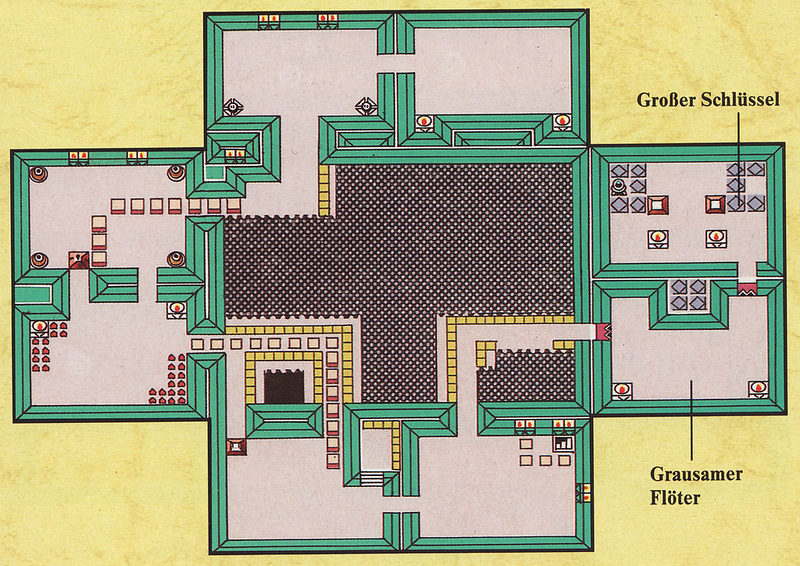
(Source: Artemis251)
Removed Chests#
The following rooms have chest data, but no actual chests. It's worth noting that two of the chests would have contained the bow and shovel items, which can only be purchased from the shopkeeper in the final game.
|
|
|
|
|
|
|
|


(Source: Xkeeper)
There's also unused code that causes Tarin to pop out of a chest. It may have been meant for a quest.
(Source: Yoshinori Tsuchiyama)
Unused Dungeon Minimap Layouts#
The variable at DBB0 determines which minimap layout is used:
- Value 00 is a one-floor minimap, which is used for most dungeons.
- Value 11 splits the minimap into two vertically-split floors, 1F and B1F. This minimap is used in non-English versions of the game for Key Cavern.
- Value 30 is a four-floor split minimap that's used only in Eagle's Tower.
The following values are not used in any version:
10 |
20 |
21 |
|---|---|---|
 |
 |
 |
31 |
32 |
33 |
 |
 |
 |
These layouts are in both the original and DX releases; the only difference is that the floor labels in DX are covered up by the minimap's background since the PUSH SELECT notice takes up too much space, as explained on the version differences page.
Unused Throwable Item Fairy Spawn Routine#
Watch on YouTubeWhen a throwable item shatters, such as bushes, pots, and rocks, if an object-specific flag is set, there is a 25% chance for a Fairy to be spawned where the object shatters. However, this flag is never set, leaving this feature unused.
To enable this for all throwable items, replace the bytes at the following locations with the byte 00:
- Mono v1.0 US: D3AD-D3AE
- DX v1.0 US: D33E-D33F
References#
- Producer was Shigeru Miyamoto.↩︎
- GDRI↩︎
- Nintendo: The Legend of Zelda: Link's Awakening DX↩︎
- Game Boy™ - Nintendo Switch Online - Nintendo Official Site↩︎
- [GB] Link's Awakening for GameBoy should be out soon!↩︎
- GameBoy's "Legend of Zelda: Link's Awakening. "Played it for 2 days now [from August 5 to post date of August 7]...and I'm still impressed! Well worth $30."↩︎
- Guide 64: Game Boy Release Schedule. "12/15/98 - The Legend of Zelda: Link's Awakening DX (Nintendo)"↩︎
- Nintendo's Glorious 20-Year-Long Struggle in China↩︎
- ゼルダの伝説 夢をみる島↩︎
- ZELDAの伝説↩︎
- www.NINTENDO.se. "Zelda-Link's Awakening Adventure Nintendo 1993-11-18"↩︎
- www.NINTENDO.se. "The Legend of Zelda: Link's Awakening DX Strategy Nintendo 399:- 1999-02-11"↩︎
- Nintendo Magazine System (AU) 10 January 1994, p. 14-15↩︎
- LEGEND OF ZELDA, THE - LINKS AWAKENING DX | Australian Classification. "Classification date: 16 December 1998"↩︎
- VideoGame News - Ano 4 Numero 40 (1994-07)(Sigla Editora)(BR)(pt), p. 7↩︎
- SuperGamePower - Ano 05 No. 058 (1999-01)(Nova Cultural)(BR)(pt), p. 11. "No Brasil, os primeiros a chegar foram The Legend of Zelda: Link's Awakening DX, Tetris DX, Pocket Bomberman, Quest for Camelot e Turok 2."↩︎