 This article has a talk page!
This is a sub-page of The Legend of Zelda: Four Swords Anniversary Edition.

|
'This page or section details content from theSeptember 2020 Nintendo Leak.''' |

|
This page is rather stubbly and could use some expansion. |
A debug build of The Legend of Zelda: Four Swords Anniversary Edition can be found in the "generic.7z" file released on September 9, 2020, as part of the 2020 Nintendo leaks. The path to the ROM is DSiWareROM.rar/DSi_Ware RO/20110922/SPD-05577_KQ9J_DEBUG_2011_0915_1547.tad.
Documents#
Besides the debug ROM itself, there's a handful of documentation within the folders.
DSiWareROM.rar/DSi_Ware RO/20110922/documents/documents:
- Knife_Debug_Command.xls - All the available debug commands listed in detail.
DSiWareROM.rar/DSi_Ware RO/20110922/documents/documents/MessageFiles/export_JP_805:
- Knife_Glossary.xls - A list of all names, items, enemies, NPCs, objects, and more.
- Knife_GraphicText.xls - A spreadsheet of the main menu's localized text.
- Within these same folders are build tools for compiling the dialog. All of the text is stored in .mstxt files.
Test Maps#
Check 00#

xxxx
Check 01#
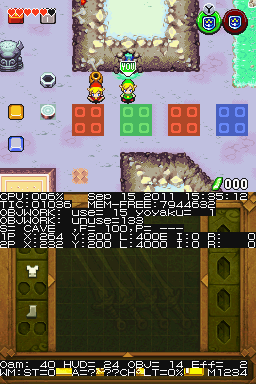
xxxx
Check 02#

xxxx
Check 03#

xxxx
(Dark Linkaël: discovering the test maps)
Debug Display#
|
In menu |
In level |
|---|---|
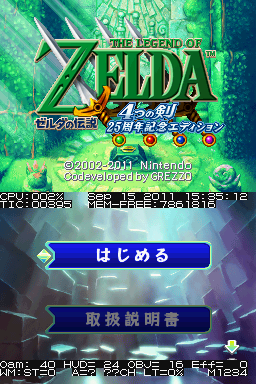
|
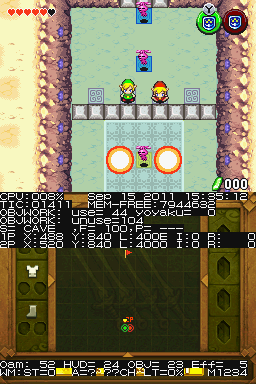
|
Text |
Explanation |
|---|---|
Sep 15 2011 15:35:12 |
Build Date |
CPU |
Amount of used CPU power |
TIC |
|
MEMFREE |
Amount of free RAM memory |
OBJWORK |
|
USE |
|
yoyaku |
|
OBJWORK |
|
unuse |
|
S |
|
,F |
|
P |
|
1P |
|
X |
|
L |
|
I |
|
R |
|
2P |
|
X |
|
L |
|
I |
|
R |
|
Oam |
|
HUD |
|
OBJ |
|
Eff |
|
WM |
|
ST |
|
??CH |
|
LT |
|
M1234 |
Debug Menus#
Map Select#

To load this, hold L while loading a stage. It'll have a glitched background unless you use RETRY from the Pop-Up Debug Menu.
Pop-Up Debug Menu#

Press B + Y + Select to activate.
Text |
Explanation |
|---|---|
RETURN |
|
NEXT |
|
RETRY |
|
DIP SWITCH |
|
INFORMATION |
|
SETTING |
|
MESSAGE |
|
SOUND |
|
FRAME |
|
TUTORIAL A-0 |
|
PARTS |
|
WK |
|
VG |
|
X |
|
Y |
DIP SWITCH#

xxxx
SETTING#

xxxx
MESSAGE#

xxxx
SOUND#

xxxx
Test Mode#

Press A + X + Select to activate. Brings you to the DIP SWITCH sub-menu by default. Once you are on the menu, you can cycle between different colour schemes with the same button combo. For ease-of-reading, screenshots on this page will use the white background colour scheme (which for some reason isn't the default).
Text |
Explanation |
|---|---|
DIP SWITCH |
|
VRAM VIEW |
|
OBJ TEST |
|
SOUND TEST |
|
ROM INFO |
Doesn't go anywhere |
GAME INFO |
|
SAVE INFO |
|
EXIT |
Exits the menu |
DIP SWITCH#

The D-Pad is used to choose a flag to switch. A switches a flag and B resets it to the default setting. Start exits the menu.
Number |
Text |
Explanation |
|---|---|---|
00 |
AB THROUGH |
|
01 |
PLAYER NO DAMAGE |
|
02 |
ITEM CHANGE |
|
03 |
ITEM ALWAYS |
|
04 |
ENCOUNT OFF |
|
05 |
ENCOUNT FORCE |
|
06 |
- - - - |
|
07 |
BIG BLOCK MOVE |
|
08 |
- - - - |
|
09 |
MAP SELECT |
|
0A |
- - - - |
|
0B |
BOSS WEAK |
|
0C |
ENEMY WEAK |
|
0D |
GC KAITEGIRI |
|
0E |
SWORD BEAM |
|
10 |
FEVER TEST |
|
11 |
- - - - |
|
12 |
FORMATION_CHANGE |
|
13 |
- - - - |
|
14 |
ID THOROUGH 1P |
|
15 |
ID THOROUGH 2P |
|
16 |
ID THOROUGH 3P |
|
17 |
ID THOROUGH 4P |
|
18 |
SELECT - ON/OFF |
|
19 |
SELECT - SLOW/STOP |
|
1A |
SELECT - SLOW X 2 |
|
1B |
- - - - |
|
1C |
BGM OFF |
|
1D |
- - - - |
|
1E |
PROC BAR OFF |
|
1F |
COM ERROR OFF |
VRAM VIEW#

xxxx
OBJ TEST#

xxxx
SOUND TEST#

xxxx
GAME INFO#

xxxx
SAVE INFO#

xxxx