 This article has a talk page!
In Wario: Master of Disguise, Wario decides to hit it big after watching a TV show about a master thief. He makes a device called the Telmet, which he then uses to enter his TV and take the show for himself. With gameplay and an art style that departed from the normal look and feel of Wario games, it was met with mediocre reviews.

|
To do:
|
Debug Menu#

A debug menu exists in all versions of the game, and can be accessed by using the below Action Replay codes.
Version |
Code |
|---|---|
JP |
94000130 FDFF0000 120D14D4 00000000 D2000000 00000000
|
US |
94000130 FDFF0000 120D2BF4 00000000 D2000000 00000000
|
EU |
94000130 FDFF0000 120CD198 00000000 D2000000 00000000
|
Hold L when the screens fades to black, and you’ll be taken to the Debug Menu. Pressing Select will also instantly bring it up, though it may lock up the game depending on where you are. Do NOT pause and unpause the game, as doing so will freeze the game if attempting to bring up the menu. It's advised to enter the Debug Menu from the title screen when first booting up the game. If the top screen fails to display when going back to the Debug Menu, press L+Down, then pick a screen in SUB to fix it.
When you’re in the Debug Menu, L and R buttons switches between pages (MAIN, SUB, DS), Up and Down on the D-Pad selects the screen. Left and Right reveals the next or previous set of screens/levels, and A will take you to the desired screen/level. A few parameters can also be set, like SCRIPT MAIN, SUB, and ENTRANCE. B toggles SCRIPT MAIN. Y toggles SUB. X sets the entrance, though it's unknown what exactly this option does.
Alternatively, use this less complicated version:
Version |
Code |
|---|---|
JP |
94000130 FFFB0000
|
US |
94000130 FFFB0000
|
EU |
94000130 FFFB0000
|
Just hold Select whenever the screens fade out to reach the Debug Menu. These codes only work well in the menus and screens, they have no effect in-game.
There’s the following strings of text in the Debug Menu; "WARIO THE PHANTOM THIEF" which is possibly the game's working title, and a build date.
Misc. Debug Screens#

Rank Shop: Sets whether any of the disguises is in possession. A button sets the highlighted disguise to "on", pressing A one more time upgrades it. B takes away the disguise.

Item Shop: Sets what items the player has obtained. The A button adds the selected item to the status screen at top, B removes it.
Unused Tiles#

|
Please elaborate. |
Tilesets belonging to an early level (MAP256, specifically) exist in the game.


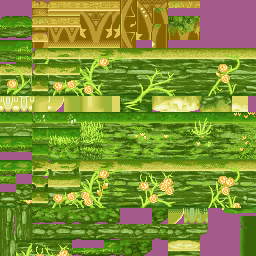
MAP256 also loads a unique unused top screen that possibly hints at the game being intended to be a metroidvania at first.


Unused Graphics#
|
|
Please elaborate. |
Various graphics also exist inside the ROM, completely unused.
Picture Frames#
Selecting EKAKI in the Debug Menu, and using any of the below codes will display a set of graphics that never appear anywhere else in the game. Interestingly, they seem to be early designs for the treasure pictures in Wario's coffee table book. The first picture doesn't have any description, and instead shows garbled tiles. Touch the garbled icons that blink at the bottom of the touch screen to shift between the images.
Version |
Code |
|---|---|
JP |
0206D0E8 32200852
|
US |
0206D5A0 32200852
|
EU |
0206D62C 32200852
|

Wario Block: Unused block frame.

Wario Bucket: Unused bucket frame.

Bomb: Unused bomb frame.

Axe: Unused axe frame.

Home-run Bat: Unused home-run bat frame.

Meat: Unused meat frame.

Vehicle: Unused Vehicle frame.
Nose Picking Wario#


A image of Wario picking his nose. Note that this was not extracted from the games internal files, but found by extensive sprite hacking. The right image shows what it looks like when all parts are joined. They can be viewed on the title screen with the below Action Replay codes.
Version |
Code |
|---|---|
JP |
0206D0E8 32XX0112
|
US |
0206D5A0 32XX0112
|
EU |
0206D62C 32XX0112
|
Replace XX with the below values:
-
04 - Sprite Chunk 1
-
24 - Sprite Chunk 2
- 44 - Sprite Chunk 3
Ribbons#

Graphics for ribbons can be found as well. They all go unused in the final game, but can be seen by using the below codes and selecting EKAKI in the Debug Menu. The ribbon parts in the above image have been cleaned and grouped together in one set for better viewing, as every part were originally separated along with some garbage tiles around them.
Version |
Code |
|---|---|
JP |
0206D0E8 32XX0092
|
US |
0206D5A0 32XX0092
|
EU |
0206D62C 32XX0092
|
Replace XX with the below values:
-
A0 - Sprite Chunk 1
-
B0 - Sprite Chunk 2
- C0 - Sprite Chunk 3
Like the above unused image, the ribbons all come in chunks. By piecing them together, they form the ribbons as seen in the below images.


They correspond to the unused frames above that also are accessible from EKAKI. They read as follows:
Original |
Translated |
|---|---|
ブロック |
block |
ジャンプボックス |
jump box |
ばくだん |
bomb |
おの |
axe |
バット |
bat |
ほねつきにく |
bone with meat (such as a rib) |
バギー |
buggy |
(Translation: Zettabyte)
Wario#
|
|
To do: |
There's quite a bunch of them in here. Use the Action Replay codes below to see them for Wario's respective forms ingame.
Cosmic Form#
Version |
Code |
|---|---|
JP |
220A6C63 000000XX |
US |
220A82CB 000000XX |
EU |
220A762B 000000XX |

15
Cosmic Wario standing in triumph as the reflection on his helmet shines.
Genius Form#
Version |
Code |
|---|---|
JP |
220A6D4E 000000XX |
US |
220A83B6 000000XX |
EU |
220A7716 000000XX |

12
Genius Wario looking down at something while his lab coat blows by the wind.

11
Wario talking while in his genius form. He never does this in any other forms besides his Thief one, as he just changes back to Thief Wario whenever a cutscene starts.
Thief Form#
Version |
Code |
|---|---|
JP |
220A6C34 000000XX |
US |
220A829C 000000XX |
EU |
220A75FC 000000XX |

16
Thief Wario either kneeling down in defeat, or bowing to someone.
Wicked Form#
Version |
Code |
|---|---|
JP |
220A6D7D 000000XX |
US |
220A83E5 000000XX |
EU |
220A7745 000000XX |

13
Wicked Wario in a strange pose. It looks a lot like the first frame of Thief Wario's laughing sprite.

14
Wicked Wario ducking with his wings out.
Others#


More graphics belonging to the EKAKI screen.
Version |
Code |
|---|---|
JP |
0206D0E8 32FF0852
|
US |
0206D5A0 32FF0852
|
EU |
0206D62C 32FF0852
|
Replace XX with the below values:
-
81 - Return arrow
-
59 - Numbers
- 69 - Arrow


These unused arrow graphics are loaded during the opening and ending cutscenes. Possibly some sort of fast forward option were being planned? They are easiest to see in the ENDINGDEMO3 screen.
Version |
Code |
|---|---|
JP |
0206D0E8 3AXX0852
|
US |
0206D5A0 3AXX0852
|
EU |
0206D62C 3AXX0852
|
Replace XX with the below values:
-
0D - FFWD arrow
-
19 - FFWD arrow 2

The nose-like creature from the unused minigame W59_09_01 has unused animations for dancing on stage and winning. The only way to see them is to modify the unused minigame's setup pointer address and replace it with the setup from Roach Smash.
Version |
Code |
|---|---|
JP |
2208EC20 0000000A
|
US |
22090298 0000000A
|
EU |
2208F580 0000000A
|
The codes don't make the unused minigame fully playable, it just makes some of the animations of the nose creature possible to see.
Unused Music/Sounds#
SSEQs#
A number of tracks are unused in the game. For the SSEQ music, use these codes to listen to them in the game.
Version |
Code |
|---|---|
JP |
D5000000 000000C0
|
US |
D5000000 000000C0
|
EU |
D5000000 000000C0 C0000000 0000001D
|
Replace the XXs with the values that correspond to the below tracks:
Unused Episode 2 Song
Track ID: 0E
A piece of music intended to be used in the second episode. Internal filename is BGM_WORLD02B.
Early Wishstone Theme
Track ID: 1B
An early version of the final Wishstone music. Internal filename is BGM_CHARA_ETC01.
Streams#
These streams remain inside the ROM, but are unused. They can be heard ingame by using the codes below.
Version |
Code |
|---|---|
JP |
120687BA 000021XX |
US |
12068C5E 000021XX |
EU |
12068CEA 000021XX |
Replace XX with the values that correspond to the below tracks:
Unused Music
Track ID: 01
An unused short jingle. Internal filename is STR_SCOOP.
Unused Music 2
Track ID: 03
Sounds like a jingle that would have played in the scene where Wario demonstrates his Telmet, but is never used. Internal filename is STR_OP_03B.
Unused Music 3
Track ID: 0C
Perhaps an game over jingle. For whatever reason, it ended up being unused. Internal filename is STR_GAMEOVER.
Sounds#
|
|
To do: |
A whole load of unused sound effects has been left in the game as well. The sounds are categorized by the folder they are located at in the ROM. They can be listened to ingame by using the below Action Replay code to replace all the sound effects with the value specified by 120683AC at the end of the code (EU only atm.):
Version |
Code |
|---|---|
EU |
D5000000 00000314
|
- XX - The current sound effect being set to play
- XX+XX+XX+XX - Sound bank
List of Sound bank folders:
1F+77+21+CF - SFX_OPED
20+78+22+D0 - SFX_SYSTEM
21+79+23+D1 - SFX_TITLE
22+7A+24+D2 - SFX_MENU
23+7B+25+D3 - SFX_BINDER
24+7C+26+D4 - SFX_ENEMY
25+7D+27+D5 - SFX_TREASURE
26+7E+28+D6 - SFX_ACT_WARI
27+7F+29+D7 - SFX_GNRL
28+80+2A+D8 - SFX_WLD01
29+81+2A+D8 - SFX_WLD02
2A+82+2B+D9 - SFX_WLD03
2B+83+2C+DA - SFX_WLD04
2C+84+2B+D9 - SFX_WLD05
2D+85+2C+DA - SFX_WLD06
2E+86+2D+DB - SFX_WLD07
2F+87+2D+DB - SFX_WLD08
30+88+2E+DC - SFX_WLD09
31+89+2E+DC - SFX_WLD10
32+8A+2F+DD - SFX_BOSS_AG
33+8B+30+DE - SFX_BOSS_01
34+8C+31+DF - SFX_BOSS_02
35+8D+32+E0 - SFX_BOSS_04
36+8E+33+E1 - SFX_BOSS_05
37+8F+34+E2 - SFX_BOSS_06
38+90+35+E3 - SFX_BOSS_07
39+91+36+E4 - SFX_BOSS_08
3A+92+37+E5 - SFX_BOSS_9A
3B+93+38+E6 - SFX_BOSS_9C
3C+94+39+E7 - SFX_BOSS_10
3D+95+3A+E8 - SFX_BOSS_10B
3E+96+3B+E9 - SFX_BOSS_10W
3F+97+3C+EA - SFX_BOSS_10R
40+98+3D+EB - SFX_BOSS_10F
41+99+3E+EC - SFX_CHARA00
42+9A+3F+ED - SFX_CHARA01
43+9B+40+EE - SFX_CHARA02
44+9C+41+EF - SFX_CHARA03A
45+9D+42+F0 - SFX_CHARA03B
46+9E+43+F1 - SFX_CHARA04A
47+9F+44+F2 - SFX_CHARA04B
48+A0+45+F3 - SFX_CHARA05
49+A1+46+F4 - SFX_CHARA06
4A+A2+47+F5 - SFX_CHARA07
4B+A3+48+F6 - SFX_CHARA08
4C+A4+49+F7 - SFX_CHARA09A
4D+A5+4A+F8 - SFX_CHARA09B
4E+A6+4B+F9 - SFX_CHARA09C
4F+A7+4C+FA - SFX_CHARA09D
50+A8+4D+FB - SFX_CHARA10A
51+A9+4E+FC - SFX_CHARA10B
52+AA+4F+FD - SFX_CHARA10D
53+AB+50+FE - SFX_CHARA10E
54+AC+51+FF - SFX_CHARA10F
55+AD+52+100 - SFX_STAFFROLLSFX_SYSTEM#
The SFX_SYSTEM folder has a few unused sound effects, the four last ones supposedly being for some kind of scrapped mission mode:
Sound ID: 07
The same piece of sound as the one at 06, but in reverse.
Mission Completed
Sound ID: 0E
Mission Failed
Sound ID: 0F
"Mission Complete"
Sound ID: 10
"Time Up"
Sound ID: 11
SFX_MENU#
SFX_MENU contains a couple sounds also, completely unused.
Bottle
Sound digit: 06
Chicken
Sound digit: 0C
Ding!
Sound digit: 0D
Treasure Peek 1
Sound digit: 0E
Treasure Peek 2
Sound digit: 0F
Early Option Confirm
Sound digit: 15
Ka-Ching!
Sound digit: 17
SFX_ACT_WARI#
In the SFX_ACT_WARI folder, a number of unused voice samples for Wario can be found:
"D'ohhh!"
Sound digit: 31
"Oh yeah!"
Sound digit: 32
"Hahaha! Wario!"
Sound digit: 35
"Ha!"
Sound digit: 36
"Punch!"
Sound digit: 37
"Yah!"
Sound digit: 38
"Yahoo!"
Sound digit: 39
Unused Levels/Screens#
|
|
To do: |
By using the Debug Menu codes, various unused levels, minigames, and screens can be found. The names for the levels here are derived from the Debug Menu.
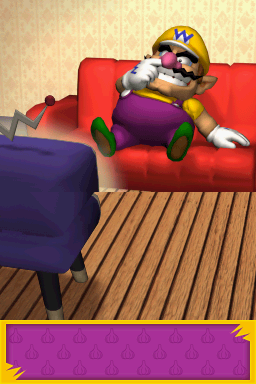
STAFFROLL01: An unfinished staff roll screen with Wario sitting on his sofa watching TV. This screen never appears in the final game.

W59_09_01: A minigame with a nose wearing glasses standing on a platform. The goal of this minigame could have been that the player would touch the arrows with the stylus (the arrow graphics are not visible for some reason), changing the color of the lights. The player would then tap the "OK" icon and the creature would start performing.
There's unused animations of the creature dancing and hopping in place. It's unknown what the win and lose conditions would be due to the unfinished nature of the minigame.

W50_01_02: Unused Paint Picture minigame. Unlike the above unused minigame, this one is actually playable.
W50_01_03: Same as W50_01_02.
W50_01_04: Same as W50_01_03.

FLAG SHOP: Blanked out, with a single “!” in the top left corner. While it is unknown what this screen was used for due to the code having been removed, it's possible this screen would have let developers set flags that change things in the game, like progress, treasures obtained, and maybe even more debugging functions.
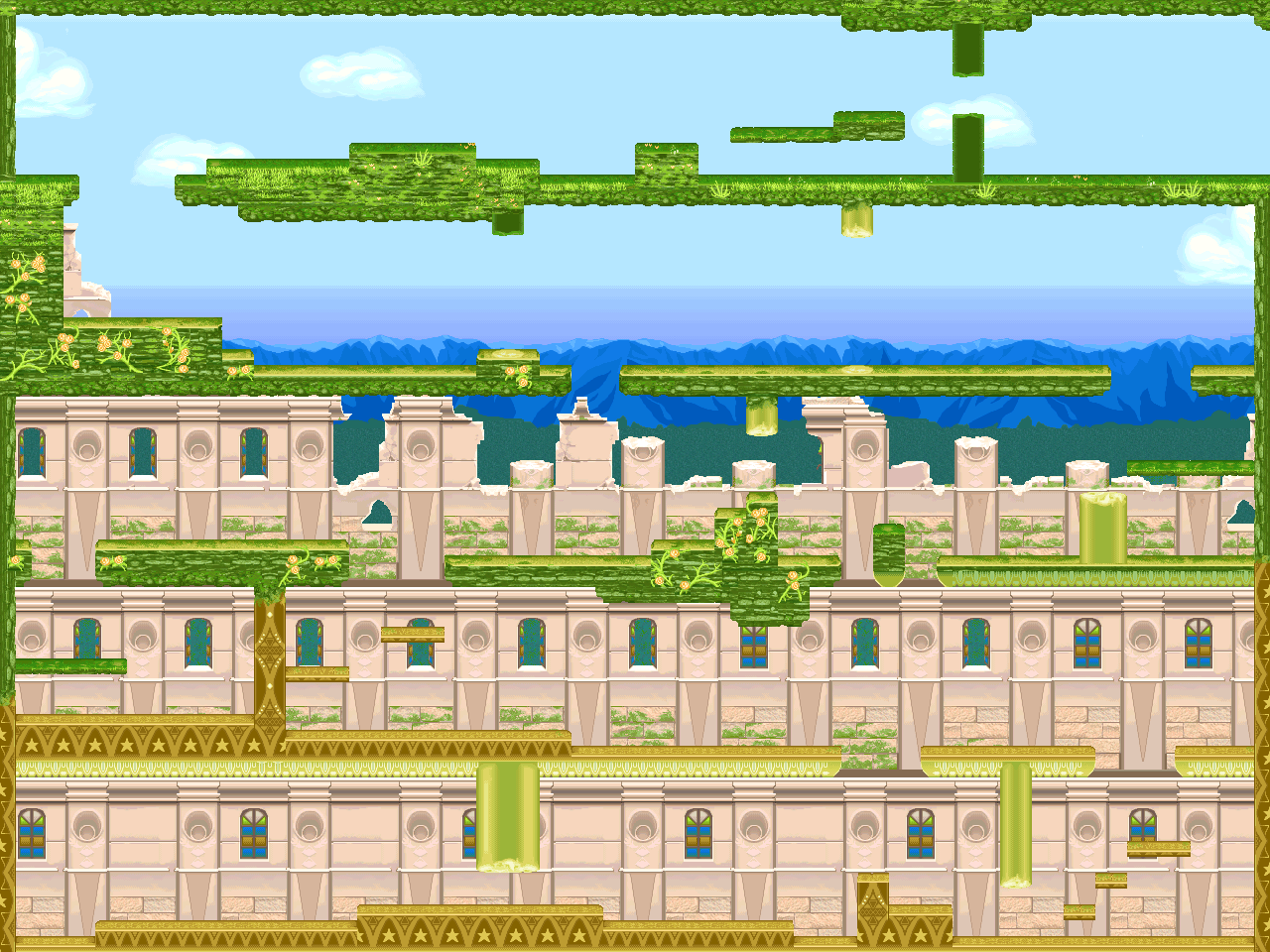
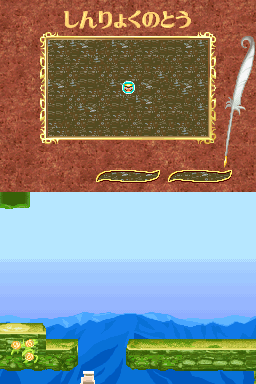
MAP256: An unused level with graphics not used anywhere else. Only the view can be moved around. This level is unplayable in its current state. Trying to make it playable via hacking only makes the level layout become a garbled mess. Interestingly, it features its own unique top screen.
The area normally crashes when trying to select it in the Debug Menu. Using any of the below codes fixes it.
Version |
Code |
|---|---|
JP |
220911F4 00000005 |
US |
2209286C 00000005 |
EU |
22091B54 00000005 |
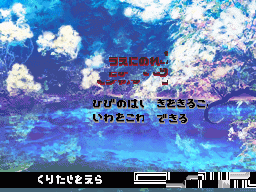
EKAKI: Some sort of early Inventory screen. Some Japanese symbol graphics which scroll at the bottom are glitched for some reason. EKAKI sometimes refers to paintings or pictures in Japanese.
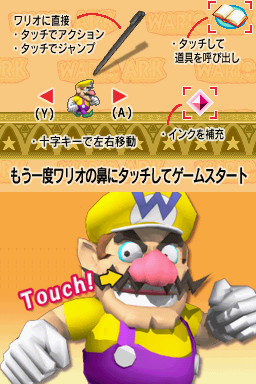
TITLE: Early title screen featuring an earlier model of Wario. Touching the blinking nose makes the top screen switch to a screen explaining how to control Wario.
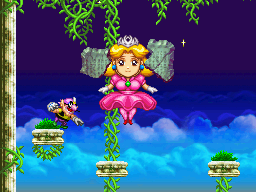
W10_03_08: The room used for the cutscenes and the final (and easy) phase of the Terrormisu boss, with a few differences; located in the upper left part of the room is Terrormisu along with two Wishstone pieces. At the bottom left part of the room is the door that looks like it can be entered. Even if the player has the Crimson Gem the door still won't open. The door always appears in front of Wario.

W10_01_02: Unused room that would connect between W10_01_01 and W10_01_03. Could be possible that it was to contain some enemies or treasure. The entrances on both sides of the room don't work. Strangely the entrances DO work in the likewise unused W30_01_02 room.
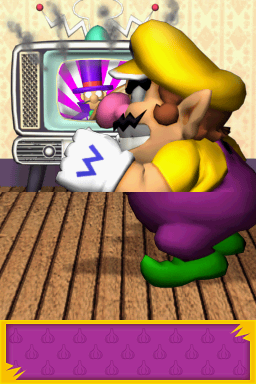
W00_01_45: Unused scene of Wario in front of his TV, with smoke coming out of the screen. This screen comes after W00_01_44, so this would likely have followed the previous scene. In the final version the screens simply fade to black with a "The End" graphic followed next by the Staff Credits, so this screen is never used.
The upper screen for this scene does exist but selecting it from the Debug Menu in retail versions will freeze the game. It doesn't freeze in the US Kiosk demo though. For retail versions, the below codes fixes the X00_01_45 entry in SUB.
Version |
Code |
|---|---|
JP |
0208779C 00000000
|
US |
02088E14 00000000
|
EU |
020880FC 00000000
|
Using another code will replace the BINDER_DUMMY entry in the DS section with the above unused scene.
Version |
Code |
|---|---|
JP |
02087470 0014000B
|
US |
02088AE8 0014000B
|
EU |
02087DD0 0014000B
|
file:WMOD_savefile_difficulty.png
SAVE FILE DIFFICULTY: An unused screen for setting the chosen file's difficulty level. The purple icon represents the harder difficulty. Although the icon bounces when touched, it has no apparent effect on neither difficulty nor gameplay.
Unused Sub screens#
At the very end of the sub screen list on the debug menu there are three sub screens leftover from a very early prototype of the game.

T0001: An unused sub screen that is exclusively used in the above MAP256, it appears to be some sort of map screen. The Japanese text at the top most likely translates to "Spire of Deep Green".

T9001: An early title sub screen featuring some Japanese text that reads out "Wario Ark (working title)".

T9002: A simple movement tutorial screen. Interestingly, the Japanese text on here sheds some light on how early builds of the game played, including early controls, some sort of tool system (likely related to the EKAKI screen) and some kind of ink replenishment mechanic.
Build Date#
|
|
To do: |
The debug menu features a build date that differs between versions.
Version |
Text |
|---|---|
Japan |
|
USA |
|
Europe |
|
Regional Differences#
Nintendo Logo#
|
Japan |
International |
|---|---|

|

|
- The Japanese version has a blue Nintendo logo, and has text on the bottom screen instead of Suzak's logo.
Title Screen#
|
Japan |
International |
|---|---|
|
|
|
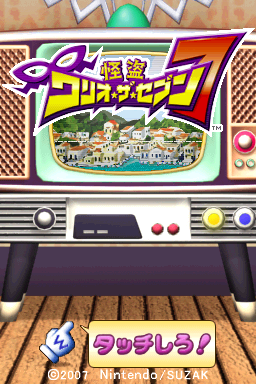
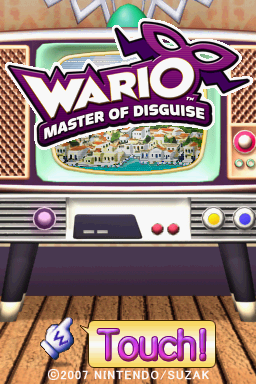
- The Japanese logo is more fancy, though the International one retains the mask + mustache combo.
- The title screen music has lyrics in the Japanese version.
Japanese |
Romaji |
Translation |
|---|---|---|
おしゃれ怪盗ワリオ・ザ・セブン おしゃれ怪盗ワリオ・ザ・セブン 七つの姿に変身だ お宝ざくざくざくざくワリオセブン |
Oshare Kaitō Wario za Sebun Oshare Kaitō Wario za Sebun Nanatsu no sugata ni henshin da Otakara zakuzaku zakuzaku Wario Sebun |
Fashionable Thief Wario the Seven Fashionable Thief Wario the Seven Transform into seven different disguises Lots, lots, lots of treasures Wario Seven |
Museum Quiz Typing System#
In The US version, The Typing system lets you draw a letter with the Stylus. But in the European version it is replaced with a keyboard. (Possibly to suit the extra languages in this version)
|
The Wario series | |
|---|---|
|
Wario Land | |
|
Game Boy (Color) |
Wario Land: Super Mario Land 3 • Wario Land II • Wario Land 3 |
|
Game Boy Advance |
|
|
GameCube |
|
|
Nintendo DS |
|
|
Wii |
|
|
WarioWare Inc. | |
|
Game Boy Advance |
|
|
GameCube |
|
|
Adobe Shockwave |
|
|
Nintendo DS |
|
|
Wii |
|
|
Nintendo DSi |
|
|
Wii U |
|
|
Nintendo 3DS |
|
|
Nintendo Switch |
|
|
Misc. | |
|
NES |
|
|
SNES |
|
|
Game Boy (Color) |
|
|
See Also | |