 This article has a talk page!
This is a sub-page of The Legend of Zelda: Ocarina of Time.
jpn_font_static#
This file contains textures for the game's fonts.
Greek Font#
Start |
End |
Type |
Size |
Filename |
Translation |
|---|---|---|---|---|---|
0x0000C300 |
0x0000D500 |
i8 |
8x16 |
[Unavailable] |
- |

A font containing a complete set of Greek characters can be found within the Japanese font file used for dialog boxes. It is possible to hack the game in order to display these symbols.
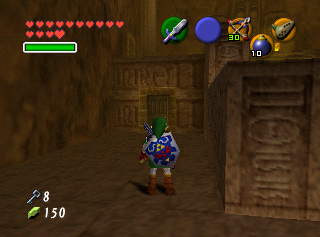
No characters in Ocarina of Time speak in Greek. However, Greek symbols can be found in certain areas, such as the walls of the first room in the Fire Temple.
Hylian Font#
Start |
End |
Type |
Size |
Filename |
Translation |
|---|---|---|---|---|---|
0x0000D580 |
0x0000EC80 |
i8 |
8x16 |
[Unavailable] |
- |

A font containing a complete set of Time Hylian characters can be found within the Japanese font file that is used for dialog boxes. It is possible to hack the game in order to display these symbols.
Unlike The Wind Waker, in which the Deku Tree, Jabun, and Valoo speak in Sky Hylian script on the first playthrough, no characters in Ocarina of Time use Hylian. However, Hylian script appears on various signs and items in the game. Translations are available at Zelda Wiki.
icon_item_static#
This file contains textures for the pause menu.
Button Background#
Icon |
Start |
End |
Type |
Size |
Filename |
Translation |
|---|---|---|---|---|---|---|
 |
0x0005BF80 |
0x0005C1C0 |
i8 |
24x24 |
[Unavailable] |
- |
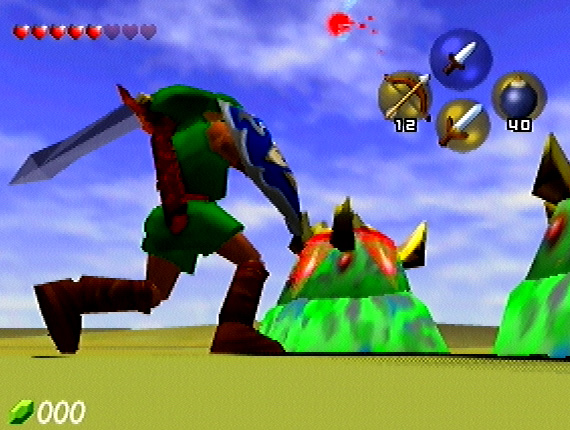
This unused button background was seen in pre-release screenshots.
Note Display Text#
Icon |
Start |
End |
Type |
Size |
Filename |
Translation |
|---|---|---|---|---|---|---|
 |
0x00087B40 |
0x00088040 |
ia16 |
40x16 |
[Unavailable] |
- |
This unused label reads "Display notes with" in Japanese. It would have been used to indicate that you could press a button to display the notes for a song in the Quest Status screen.
icon_item_24_static#
This file contains textures for the item icons used in message boxes.
Magic Jars#
Icon |
Start |
End |
Type |
Size |
Filename |
Translation |
|---|---|---|---|---|---|---|
 |
0x0000A200 |
0x0000AB00 |
rgba32 |
24×24 |
[Unavailable] |
- |
Icon |
Start |
End |
Type |
Size |
Filename |
Translation |
|---|---|---|---|---|---|---|
 |
0x0000AB00 |
0x0000B400 |
i8 |
24×24 |
[Unavailable] |
- |
Generally, when Link obtains an item for the first time, a message box pops up with a description and picture of the item. No such pop-up is displayed for either type of Magic Jar (Small or Large), however, resulting in these icons going unused.
icon_item_dungeon_static#
This file contains textures for the item icons for the dungeon maps in the Map section of the pause screen.
Floor Labels#
Start |
End |
Type |
Size |
Filename |
Translation |
|---|---|---|---|---|---|
0x00000180 |
0x00001980 |
i8 |
24×24 |
[Unavailable] |
- |
Dungeons in Ocarina of Time never extend above the 5th floor (5F), but icons exist for 6F, 7F, and 8F:


Similarly, dungeons never extend below the 4th basement floor (B4), but icons exist for B5, B6, B7, and B8:


do_action_static#
This file contains textures for the action button labels.
Navi Action#
Icon |
Start |
End |
Type |
Size |
Filename |
Translation |
|---|---|---|---|---|---|---|

|
0x00000F00 |
0x00001080 |
i4 |
48x16 |
[Unavailable] |
- |

|
0x00003A80 |
0x00003C00 |
i4 |
48x16 |
[Unavailable] |
- |
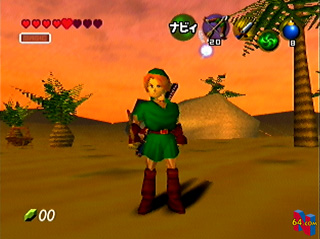
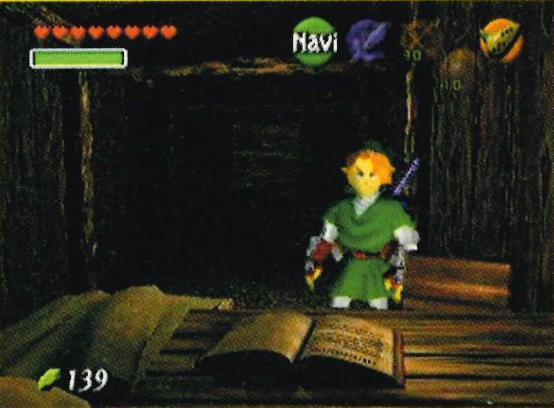
In the final game, when the A button is blank, it can be pressed to summon Navi or return her to her hiding place. During development, the button said "Navi" instead of being blank, to indicate that this action was possible. As such, this unused texture for the "Navi" action shares its value (0A) with the value used by the blank A button.
|
Pre-release (Japanese) |
Pre-release (English) |
|---|---|
|
|
item_name_static#
This file contains textures for the item names that appear on the inventory and equipment screens.
Wind Medallion Name#
Icon |
Start |
End |
Type |
Size |
Filename |
Translation |
|---|---|---|---|---|---|---|
 |
0x0000E000 |
0x0000E400 |
ia4 |
128x16 |
[Unavailable] |
- |
This unused Wind Medallion name texture appears in the spot that corresponds to the icon for the Fire Arrows equipped to the Fairy Bow. The icon is only displayed on the C buttons when the Fairy Bow is combined with fire magic, and thus does not have a name in the inventory screen.
|
Unused (Wind) |
Used (Forest) |
|---|---|
|
|

|
The texture reflects the fact that the Forest Medallion was once a Wind Medallion. It has a thicker shadow than the name texture used by the Forest Medallion.
Fire Medallion Name#
Icon |
Start |
End |
Type |
Size |
Filename |
Translation |
|---|---|---|---|---|---|---|
 |
0x0000E400 |
0x0000E800 |
ia4 |
128x16 |
[Unavailable] |
- |
This unused Fire Medallion name texture appears in the spot that corresponds to the icon for the Ice Arrows equipped to the Fairy Bow. The icon is only displayed on the C buttons when the Fairy Bow is combined with ice magic, and thus does not have a name in the inventory screen.
|
Unused (Fire) |
Used (Fire) |
|---|---|
|
|

|
This texture has a thicker shadow than the name texture used by the Fire Medallion.
Ice Medallion Name#
Icon |
Start |
End |
Type |
Size |
Filename |
Translation |
|---|---|---|---|---|---|---|
 |
0x0000E800 |
0x0000EC00 |
ia4 |
128x16 |
[Unavailable] |
- |
This unused Ice Medallion name texture appears in the spot that corresponds to the icon for the Light Arrows equipped to the Fairy Bow. The icon is only displayed on the C buttons when the Fairy Bow is combined with light magic, and thus does not have a name in the inventory screen.
|
Unused (Ice) |
Used (Water) |
|---|---|
|
|

|
The texture reflects the fact that the Water Medallion was once an Ice Medallion. It has a thicker shadow than the name texture used by the Water Medallion.
Piece of Heart Name#
Icon |
Start |
End |
Type |
Size |
Filename |
Translation |
|---|---|---|---|---|---|---|
 |
0x0001CC00 |
0x0001D000 |
ia4 |
128x16 |
[Unavailable] |
- |
This unused Piece of Heart name texture is found directly below the used name texture.
|
Early |
Final |
|---|---|
|
|

|
This texture has a thicker shadow than the name texture used by the Piece of Heart.
Boss Key Name#
Icon |
Start |
End |
Type |
Size |
Filename |
Translation |
|---|---|---|---|---|---|---|
 |
0x0001DC00 |
0x0001E000 |
ia4 |
128x16 |
[Unavailable] |
- |
|
0x0001E000 |
0x0001E400 |
ia4 |
128x16 |
[Unavailable] |
- |
|
0x0001E400 |
0x0001E800 |
ia4 |
128x16 |
[Unavailable] |
- |
These three unused Boss Key name textures are found in the Dungeon Map name texture.
|
Early |
Final |
|---|---|
|
|

|
The textures have a thicker shadow than the name texture used by the Boss Key.
map_i_static#
This file contains textures for the game's minimaps.
Missing Spirit Temple Room#
Start |
End |
Type |
Size |
Filename |
Translation |
|---|---|---|---|---|---|
0x000A8570 |
0x000A9560 |
i4 |
96x85 |
[Unavailable] |
- |
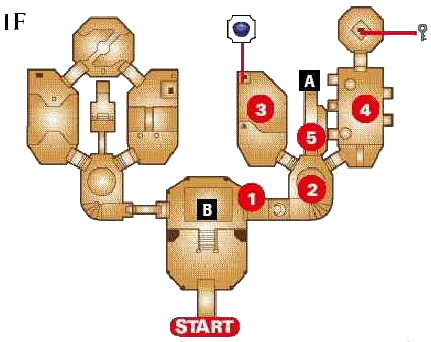
The first floor of the Spirit Temple used to be symmetrical, with a loop on either side. However, the developers ended up deleting the topmost room on the righthand side, breaking the loop. A blank space exists where the texture for this room's minimap would once have been found.
The guidebook map at right shows how 1F looks in the final game.
Overlay Files#
ovl_Effect_Ss_Bomb#
Icon |
Start |
End |
Type |
Size |
Filename |
Translation |
|---|---|---|---|---|---|---|
 |
0x |
0x |
xxx |
xxx |
[Unavailable] |
- |
This effect uses the same textures as the bomb explosion in gameplay_keep. The difference is the number of frames in comparison with the file ovl_Effect_Ss_Bomb2, which is normally used. ovl_Effect_Ss_Bomb uses only 4 frames instead of 8.
ovl_Effect_Ss_Sibuki2#
Icon |
Start |
End |
Type |
Size |
Filename |
Translation |
|---|---|---|---|---|---|---|
 |
0x |
0x |
ia8 |
32x32 |
soft_splash.ctxb |
- |
This object's filename means "splash". Although ovl_Effect_Ss_Sibuki is used when Gohma receives damage, ovl_Effect_Ss_Sibuki2 isn't used anywhere.
gameplay_keep#
This file contains textures that are always loaded into memory during gameplay.
Slime Body#
Icon |
Start |
End |
Type |
Size |
Filename |
Translation |
|---|---|---|---|---|---|---|
 |
0x00000000 |
0x00000200 |
rgb5a1 |
16x16 |
silver2_env_txt |
- |
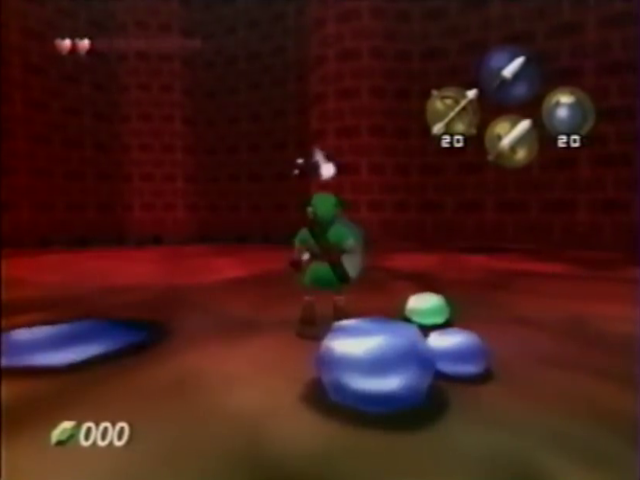
The first texture in gameplay_keep. This environment map is used for most reflections in Ocarina of Time as well as Super Mario 64. This also has a striking resemblance to the body of a removed enemy that appeared in pre-release footage from May 1997, during the "A + C" period of the game's development. The enemy resembles the Gels from earlier Zelda games. An older, higher-resolution version resides in the unused Great Fairy model.
Navi Wing#

Icon |
Start |
End |
Type |
Size |
Filename |
Translation |
|---|---|---|---|---|---|---|
 |
0x00015E08 |
0x00016E08 |
rgb5a1 |
32x64 |
elf_feather_txt |
- |
This texture is an earlier version of Navi's wing texture, which can be seen in pre-release footage.
|
Unused |
Used |
|---|---|
|
|

|
Bombchu Pickup#
Icon |
Start |
End |
Type |
Size |
Filename |
Translation |
|---|---|---|---|---|---|---|
 |
0x0003FD80 |
0x00040580 |
rgb5a1 |
32x32 |
n_bomb2_texture |
- |
This Bombchu icon would have been used if Bombchus were available as pickups that could be obtained via enemy drops, or by destroying objects such as jars, rocks, crates, and grass clumps. However, Bombchus can only be purchased from vendors or obtained from chests in the final game.
|
Unused |
Used |
|---|---|
|
|

|
The icon differs slightly from the 2D Bombchu icon in the icon_item_static file, which contains textures for the item icons that appear on the inventory and equipment screens.
Bomb Bag Pickup#
Icon |
Start |
End |
Type |
Size |
Filename |
Translation |
|---|---|---|---|---|---|---|
 |
0x00040580 |
0x00040D80 |
rgb5a1 |
32x32 |
n_bombpouch_texture |
- |
This Bomb Bag icon may have been used if the Bomb Bag was available as a pickup that could be obtained via enemy drops, or by destroying objects such as jars, rocks, crates, and grass clumps. However, the Bomb Bag cannot be obtained this way in the final game. The unused icon also appears in the gameplay_dangeon_keep file, which contains textures that are always loaded into memory when Link is in a dungeon.
Unused |
Used (20) |
Used (30) |
Used (40) |
|---|---|---|---|
|
 |
 |
 |
In addition, the icon itself is an earlier version of the final Bomb Bag icons found in the icon_item_static file, which contains textures for the item icons that appear on the inventory and equipment screens. In the comparison above, the used icons have flipped horizontally, in order to more easily compare the design changes between them and their unused counterpart.
Piece of Heart Pickup#
Icon |
Start |
End |
Type |
Size |
Filename |
Translation |
|---|---|---|---|---|---|---|
 |
0x00041580 |
0x00041D80 |
rgb5a1 |
32x32 |
n_heart2_texture |
- |
This Piece of Heart icon is not used. While Pieces of Heart can be obtained by destroying crates (such as the one in the Graveyard) or simply found out in the open, they use a 3D model that spins around rather than a 2D texture that other collectibles use.
|
Unused |
Used |
|---|---|
|
|

|
The icon differs slightly from the 2D Piece of Heart icon in the icon_item_24_static file, which contains textures for the item icons used in message boxes. In the comparison above, the used icon has been sized up from 24×24 to 32×32 and flipped horizontally, in order to more easily compare the design changes between it and its unused counterpart.
Recovery Heart Pickup#
Icon |
Start |
End |
Type |
Size |
Filename |
Translation |
|---|---|---|---|---|---|---|
 |
0x00045220 |
0x00045A20 |
rgb5a1 |
32x32 |
h_heart_txt |
- |
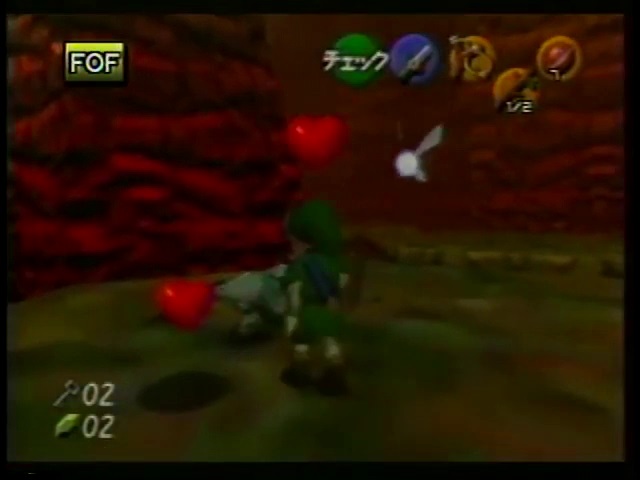
This is an unused, early version of the Recovery Heart pickup icon.
|
Unused |
Used |
|---|---|
|
|

|
The icon differs slightly from the used Recovery Heart icon that's found in the same file. For some reason, the used icons are stored upside-down, while the unused icons are stored right-side-up. In the comparison above, the used icon has been flipped vertically in order to more easily compare the design changes between it and its unused counterpart.
Pre-release Screenshot (Apr. '98) |
|---|
 |
Bomb Pickup#

Icon |
Start |
End |
Type |
Size |
Filename |
Translation |
|---|---|---|---|---|---|---|
 |
0x00045A20 |
0x00046220 |
rgb5a1 |
32x32 |
h_bomb_txt |
- |
This unused icon is the early version of the icon used by the Bomb pickup. A Bomb icon with a similar design can be seen in pre-release screenshots from the "Early Sword on A" period of the game's development, which spanned the months of August and September 1997.
|
Unused |
Used |
|---|---|
|
|

|
The icon differs slightly from the used Bomb icon that's found in the same file. For some reason, the used icons are stored upside-down, while the unused icons are stored right-side-up. In the comparison above, the used icon has been flipped vertically in order to more easily compare the design changes between it and its unused counterpart.
Arrow Pickup#
Icon |
Start |
End |
Type |
Size |
Filename |
Translation |
|---|---|---|---|---|---|---|
 |
0x00046220 |
0x00046A20 |
rgb5a1 |
32x32 |
h_arrow_txt |
- |
This unused icon is the early version of the icon used by the Arrow pickup.
|
Unused |
Used |
|---|---|
|
|

|
The icon differs slightly from the used Arrow icon that's found in the same file. For some reason, the used icons are stored upside-down, while the unused icons are stored right-side-up. In the comparison above, the used icon has been flipped vertically in order to more easily compare the design changes between it and its unused counterpart.
Heart Container Pickup#
Icon |
Start |
End |
Type |
Size |
Filename |
Translation |
|---|---|---|---|---|---|---|
 |
0x00046A60 |
0x00047260 |
rgb5a1 |
32x32 |
life32_txt |
- |
This Heart Container icon would have been used if Heart Containers were available as pickups that could be obtained via enemy drops, or by destroying objects such as jars, rocks, crates, and grass clumps. However, Heart Containers can only be obtained by collecting four Pieces of Heart or defeating bosses.
|
Unused |
Used |
|---|---|
|
|

|
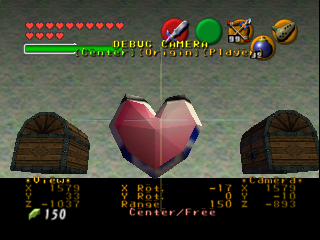
The icon differs greatly from the 2D Heart Container icon in the icon_item_24_static file, which contains textures for the item icons used in message boxes. In the comparison above, the used icon has been sized up from 24×24 to 32×32 and flipped horizontally, in order to more easily compare the design changes between it and its unused counterpart.
|
Early Heart Container (gameplay_field_keep) |
Early Heart Container (object_b_heart) |
|---|---|
|

|
In addition, the design of the unused icon is similar to the early versions of the Heart Container that can still be found in the game's files.
ADLEZ#
Icon |
Start |
End |
Type |
Size |
Filename |
Translation |
|---|---|---|---|---|---|---|
 |
0x00056AE0 |
0x000572E0 |
i8 |
64x32 |
g_bow_test_texture |
- |
The leaked iQue files revealed the filename of this texture, with the individual file being located in data\shape2\zelda_keep\blure_txt\DELETE, suggesting a possible relation to g_bow_blure_texture.
gameplay_dangeon_keep#
This file contains textures that are always loaded into memory when Link is in a dungeon.
Kokiri Sword Icon#
Icon |
Start |
End |
Type |
Size |
Filename |
Translation |
|---|---|---|---|---|---|---|
 |
0x000154B0 |
0x00015CB0 |
rgb5a1 |
32x32 |
n_sword_txt |
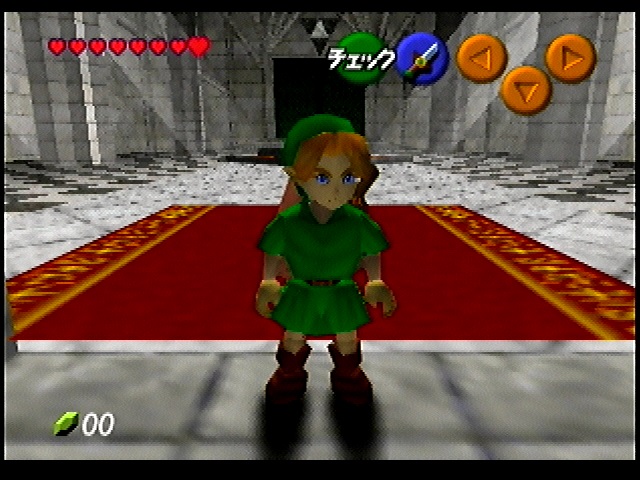
N - Sword - Texture This early icon for the Kokiri Sword features a green gem, rather than red and also appears more stubby than the final version. It can be seen in pre-release footage. In fact, the sword's color wasn't finalized until Fall 1998, shortly before the game's November 1998 release. |
Unused |
Overdump |
Final |
|---|---|---|
|
 |
 |
The icon differs from the 2D Kokiri Sword icon in the icon_item_static file, which contains textures for the item icons that appear on the inventory and equipment screens.
Small Magic Jar Icon#
Icon |
Start |
End |
Type |
Size |
Filename |
Translation |
|---|---|---|---|---|---|---|
 |
0x00015CB0 |
0x000164B0 |
rgb5a1 |
32x32 |
n_kusuritubo_txt |
N - Potion Jar - Texture |
For some reason, gameplay_dangeon_keep contains an early icon for the Small Magic Jar, but not for the large one.
|
Unused |
Used |
|---|---|
|
|

|
Even though, visually, it's nearly identical, with only slight differences in specular lighting, this icon nonetheless differs from the 2D Small Magic Jar icon in the gameplay_keep file, which contains textures that are always loaded into memory during gameplay. For some reason, the used icons are stored upside-down, while the unused icons are stored right-side-up. In the comparison above, the used icon has been flipped vertically in order to more easily compare the design changes between it and its unused counterpart.
Bomb Bag Icon#
Icon |
Start |
End |
Type |
Size |
Filename |
Translation |
|---|---|---|---|---|---|---|
|
0x000164B0 |
0x00016CB0 |
rgb5a1 |
32x32 |
n_bombpouch_txt |
N - Bomb Pouch - Texture |
This unused Bomb Bag icon is an earlier version of the final Bomb Bag icons found in the icon_item_static file, which contains textures for the item icons that appear on the inventory and equipment screens. The unused icon also appears in the gameplay_keep file, which contains textures that are always loaded into memory during gameplay. See this section of the article for a comparison.
Fairy Slingshot Icon#
Icon |
Start |
End |
Type |
Size |
Filename |
Translation |
|---|---|---|---|---|---|---|
 |
0x00016CB0 |
0x000174B0 |
rgb5a1 |
32x32 |
n_pachinko_txt |
N - Pachinko - Texture |
This unused Fairy Slingshot icon is skinnier and has white bands, rather than red. It can be seen in pre-release footage. Like the Kokiri Sword, the Slingshot's design wasn't finalized until Fall 1998, shortly before the game's November 1998 release.
|
Unused |
Used |
|---|---|
|
|

|
The icon differs from the 2D Fairy Slingshot icon in the icon_item_static file, which contains textures for the item icons that appear on the inventory and equipment screens.
Object Files#
object_fire#
Icon |
Start |
End |
Type |
Size |
Filename |
Translation |
|---|---|---|---|---|---|---|
 |
0x00000080 |
0x00004080 |
i8 |
32x64 |
[Unavailable] |
- |
This fire uses a detailed fire render with eight animation frames. The fire effect used in the game is made by overlapping two textures (a flame shape and a noise image) and scrolling the noise to create a flickering appearance, which uses less resources and has a longer animation loop.
object_yukabyun#
Icon |
Start |
End |
Type |
Size |
Filename |
Translation |
|---|---|---|---|---|---|---|
 |
0x00000000 |
0x00000800 |
rgb5a1 |
32x32 |
[Unavailable] |
- |
The Flying Floor Tile object contains an alternate texture for the surface of the tile. While there is a lighter version of a texture that's most commonly seen on the walls of the Spirit Temple, it also appears on the floor in the room with the Torch Slugs, as well as around the platform that lowers down in front of the statue. Both of these are potential spots where Flying Floor Tiles may once have been intended to appear, as the Torch Slug room is the only chamber in the temple with a tiled floor, and the room with the platform features flying pots.
|
Unused |
Used |
|---|---|
|
|

|
object_ma1#
Icon |
Start |
End |
Type |
Size |
Filename |
Translation |
|---|---|---|---|---|---|---|
 |
0x00002B18 |
0x00003318 |
rgba16 |
32x16 |
[Unavailable] |
- |
The Child Malon object contains alternate mouth expressions. These are supposed to be mapped using Segment 9, but the default one is just applied directly, and so they're never seen. The Child Malon actor does have code that sets up Segment 9, but doesn't ever change the assigned mouth texture from the default, either.
Used mouth |
Unused mouth 1 |
Unused mouth 2 |
|---|---|---|
 |
 |
 |
title_static#
This file contains textures for the file select and options screens.
Save x#
Icon |
Start |
End |
Type |
Size |
Filename |
Translation |
|---|---|---|---|---|---|---|

|
0x00029000 |
0x00029100 |
i4 |
32x16 |
[Unavailable] |
- |

|
0x00038F80 |
0x00039080 |
i4 |
32x16 |
[Unavailable] |
- |
These textures read "Save x" in Japanese and English. It's unclear what they might have been used for.
parameter_static#
This file contains textures for the game's HUD, including the rupee, key, and carrot counters.
1/2#
Icon |
Start |
End |
Type |
Size |
Filename |
Translation |
|---|---|---|---|---|---|---|

|
0x00003840 |
0x000038C0 |
ia8 |
16x8 |
[Unavailable] |
- |
This texture was once used to indicate a broken Deku Stick, back when a single Deku Stick could be used infinitely instead of being consumed upon breakage.
Room Files#
Dodongo's Cavern#
Icon |
Start |
End |
Type |
Size |
Filename |
Translation |
|---|---|---|---|---|---|---|
 |
0x0003FD80 |
0x00040580 |
rgb5a1 |
32x32 |
[Unavailable] |
- |
The Compass room in Dodongo's Cavern still features a texture left over from an earlier design for the area. It was likely overlooked when the rooms were being retextured, as it is only used on the narrow square above the door. It is stretched beyond recognition, and the only way to tell it apart is the narrow band of red pixels facing the player.
bump_texture_static#

|
To do: |
Head#
Icon |
Start |
End |
Type |
Size |
Filename |
Translation |
|---|---|---|---|---|---|---|
 |
0x |
0x |
xxx |
xxx |
[Unavailable] |
- |
An unused icon depicting a pre-rendered character. It's never used in-game, but appears to be wearing some kind of beret or poofy hat, and has rounded ears. It's one of the last graphics in the ROM, located just after the data for the Inside Ganon's Castle (Collapsing) map, in the bump_text_static file.
    +--------------------------------+
    |________________________________|
    |________________________________|
    |___________,+++~~+++,___________|
    |_________,+,___,,___,+,_________|
    |________+,_,,,,,,,,,,_,+________|
    |_______+_,,,,,,,,,,,,,,_+_______|
    |______+_,,,,,,,,,,,,,,,,_+______|
    |_____,,,,,,,,~~~~~~~,,,,,_,_____|
    |_____+_,,,,~~~,,,~~~~,,,,_+_____|
    |_____+_,,,~~~~,,,,,~~~,,,,~_____|
    |_____~,,,,~~~~,,,~~~~~,,,,~_____|
    |_____+_,,,~~~~,,,,~~~~,,,,~_____|
    |_____+_,,,,~~~~,~,~~~,,,,_+_____|
    |_____,,,,,,,,,,,,,,,,,,,,,~_____|
    |______+_,,,,,,,~~,,,,,,,,~______|
    |_______~,,,~~+oooo+~~,,,,,______|
    |______,,,~~+oooooooo+~~,+~~_____|
    |_____++o~~+~+oooooo+~+~~+o+,____|
    |____*+oo~~+++~+oo+~+++~~+o+*____|
    |____*ooo~~++oo++++oo++~~+o+*____|
    |____~+oo~~++ooo++ooo++~~oo+,____|
    |_____++o+~++oo++o+o+++~~o++_____|
    |______+++~+++o+oo+oo++~+~,______|
    |________~~++oooooooo+~~~________|
    |_________~~++o+++++++~+_________|
    |_________+~+++oooo+++~+_________|
    |__________~~~+ooooo+~~__________|
    |__________~~~++++++~~,__________|
    |___________~~~~++~~~,___________|
    |____________,+~~~~+,____________|
    |_______________++_______________|
    |________________________________|
+--------------------------------+Sort#
Damage Effects#
Actor files reference a numeric value that decides which combination of blood particle and hit spark plays when the actor is damaged. There are 14 entries in total. Nine of them (numbered 0 through 8) define blood/spark combinations and are listed in the table below. The other five are reserved for solid objects — metal, wood, hard surfaces, and tree-like objects — which don't produce blood at all and use a separate piece of code to pick their sound and spark based on how the hit landed, rather than what was hit.
Three of the nine blood/hit combinations below are never assigned to any actor in the shipped game, and can normally only be seen by editing an actor's data to force one of these values.
The ID numbers below come from names used by the decompilation community, and may not reflect Nintendo's original internal terms.
ID |
Blood Color |
Hit Spark |
Used In-Game? |
|---|---|---|---|
0 |
Blue |
White |
Yes |
1 |
None |
Dust |
Yes |
2 |
Green |
Dust |
No |
3 |
None |
White |
Yes |
4 |
(Water burst instead of blood) |
None |
No |
5 |
None |
Red |
Yes |
6 |
Green |
White |
Yes |
7 |
Red |
White |
No |
8 |
Blue |
Red |
Yes |
ID 02#
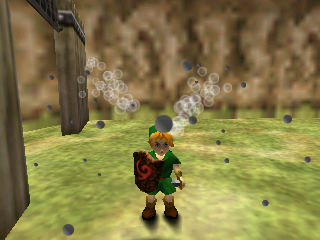
Green blood with a dust-type hit spark — the same combination used when Link deflects a Deku Nut off his shield. This specific combination is not assigned to any enemy in the final game.
ID 04#
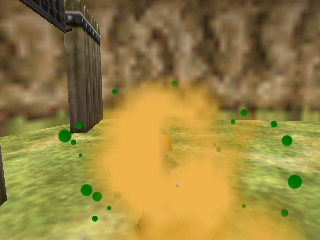
Not blood at all: this is a burst of water droplets, with no hit spark accompanying it. No enemy in the final game is assigned this ID.
ID 07#
Red blood with a white hit spark. The particle isn't a pure red — half of its droplets are a dark wine tone, and the other half are pure orange, which tends to dominate the effect visually. Like ID 02 and ID 04, this combination is unused by every actor in the final game.
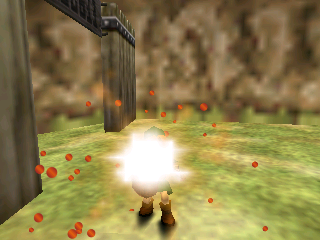
Duplicate Red Blood Effect#
Beyond the 14 IDs above, there's a second, entirely separate copy of the red blood particle function sitting in the game's code, byte-for-byte identical to the one used by ID 7. Unlike the IDs above, this copy isn't wired up to any ID at all — none of the 14 entries point to it, so it can't be reached even by editing an actor's data to a different value. The only way to see it play would be to alter the game's code directly to call it. It was likely left over from some internal refactor, duplicated by a developer and never reconnected to anything.