 This article has a talk page!

|
This page contains no introduction. |
Debug Information#
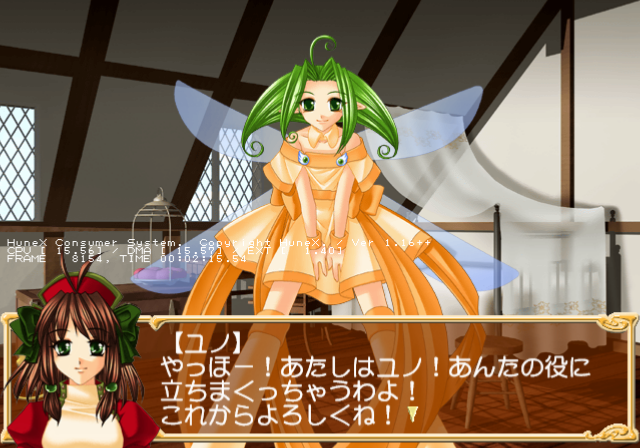
A simple debug display can be enabled with the below code. It will show total CPU usage, the current number of frames passed since boot, and the total time passed since boot. This also appears in a few of HuneX's other PlayStation 2 games.
Master Code (only needed for cheat devices)
901BC998 0C06F20E

Enable Debug Information
0017D3E6 00000096
(Source: Original TCRF research)
Debug Logging#
Within the game is a stubbed printf function which would have logged various background information to a debug unit. This logs information such as files loaded and memory information. It would also report errors if any occurred. To re-enable this mode, apply the below code:
201D98D8 08073C94
201D98DC 00000000
If you are playing the game on a regular PlayStation 2, you will need to use a TOOL, RDB, or a debug version of OPL to view the logs. If you are playing on an emulator, you can see this information by enabling the option "Show Console". Below is an example of what type of information gets logged.
HCS> ------------------------------------------------------------------
HCS> HuneX Consumer System Start. Hello!
HCS> Kernel Replace Module [cdrom0:¥¥MODULES¥SCE¥IOPRP253.IMG;1]
HCS> Micro Direction Code        0x - 0x
HCS> Micro Direction Code Size = 4832
HCS> Micro Shadow Code           0x - 0x
HCS> Micro Shadow Code Size    = 736
HCS> Cdvd Initialize.  Please wait a moment.
CMovie> Drive status = 10
HCS> SPU trans mode
(Source: Original TCRF research)