A puzzler which involves cute animals, musical instruments, launching spheres, and ungodly RNG-based luck.
Unused Graphics#

|
This needs some investigation. |
Note: All files have their extension changed to .TIP in the Simple 1500 revision. While the new files seem to be compressed, it is presumed what they contain did not change.
Unused Portrait#
CHARA/FACE02.TIM contains an early portrait picture set for the character Puchamaru. Notable differences include a nearly completely different set for the lose portraits.

Demo Leftovers#
Assets BAK10.TIM to BAK13.TIM in folder HAIKEI are leftovers from a demo of some sort.
BAK010.TIM

Japanese |
Translation |
|---|---|
購入者にステキなプレゼントが当っちゃう。 |
We've got a wonderful gift for buyers. For more details, please see the campaign |
BAK011.TIM
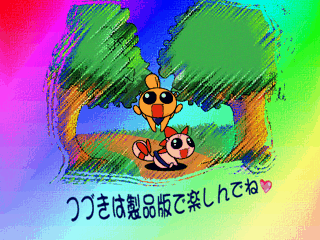
Japanese |
Translation |
|---|---|
つづきは製品版で楽しんでね❤ |
Enjoy the rest in the retail version❤ |
BAK012.TIM

Japanese |
Translation |
|---|---|
この体験版は現在開発中の為、 |
Because this demo version is currently under development, |
BAK013.TIM

Placeholder Graphic?#
The file LBAK.TIM in folder FILE/HAIKEI is a placeholder graphic featuring a stick figure in a book page.

Placeholder Icons?#
The file SSEL.TIM in folder FILE is an assorted set of crudely-drawn icons.

Placeholder Character Sprites#
Several placeholder sprites for the game's characters can be found in the folders TEKIH and TEKIL.
TEKIH#
EN10C.TIM |
EN11C.TIM |
EN12C.TIM |
EN13C.TIM |
|---|---|---|---|
 |
 |
 |
 |
TEKIL#
EN001C.TIM |
EN002B.TIM |
EN002C.TIM |
EN003B.TIM |
|---|---|---|---|
 |
 |
 |
 |
EN003C.TIM |
EN004C.TIM |
EN006C.TIM |
EN007C.TIM |
 |
 |
 |
 |
EN008C.TIM |
EN009C.TIM |
||
 |
 |
(Source: tikal.)
Debug Features#
Note: None of these codes work in the Simple 1500 revision, though whether the features can still be loaded is unknown.
Level Select#
Press Up, Down, Left, Right, X on the title screen, then enter the "Hitori de Muses" mode.
Left and Right change the ID, which varies from 01 to 14, and Circle selects it.

(Source: PSX Datacenter)
Animation Viewer#
In the main menu, highlight "Hitori de Muses" mode, hold Select, press Circle, and don't let go of the buttons. The player will then be redirected to an animation viewer.
Press Up and Down to navigate through the options, and Left and Right to switch through them. Pressing Circle applies the changes.

The options are as follows:
STAGE |
Unselectable. Displays the ID of the character determined by the LOAD option (see below). |
|---|---|
TYPE |
Changes the animation displayed in the bottom right. Available options are as follows:
|
LOAD |
Changes the character. IDs range from 01 to 14 in decimal. |
BACK |
Changes the background. IDs ranges from 01 to 09 in decimal. |
MINPLAY |
Once applies, the animation only plays if Circle is being held. |
STEPPLAY |
Plays the animation, but stops when reaching a new frame. |
EXIT |
Goes back to the intro sequence. |
The parameters on the right are as follows:
FILE |
Unknown. |
|---|---|
FRAME |
The ID of the graphic/graphics displayed. |
CNT |
A tick counter. Resets when a new NO is reached. |
LOOP |
Unknown. |
NO |
The number of the animation frame for each graphic. |
(Source: tikal.)
Revisional Differences#
The game's rerelease as part of D3 Publisher's Simple series made a few changes.
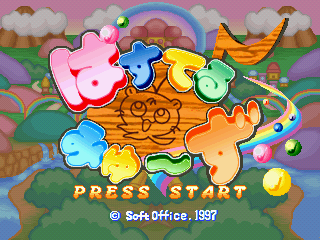
Title Screen#
- The title screen was completely redesigned in order to fit the Simple series' aesthetic:
Original |
Simple series |
|---|---|
 |
 |
- No music plays in the Simple revision.
Loading Screen#
- In the original release, the loading screen was animated, featuring many falling stars which unite then burst when it is finished. In the Simple revision, the stars do not move.
Original |
Simple series |
|---|---|
 |
 |
Options Menu#
- There are far less options displayed in the Simple release. Removed functions include those of saving/loading and of the default guide line behavior.
Original |
Simple series |
|---|---|
 |
 |
Character Select#
- In the original release, in the Hitori de Muses mode, each of the game's two characters were associated with a difficulty: Puchamaru to Normal and Panako to Easy. In the Simple release, both characters and difficulties were made separate and a third harder difficulty was also added.
Original |
Simple series |
|---|---|
 |
 |
Gameplay#
- In the original release, in normal circumstances, the guide line, which displays the trajectory of the launching orbs, only appears in the Hitori de Muses mode in the first round or after getting a Game Over. While this can be changed in the options menu so that it always displays, in the Simple release it cannot be disabled by any form.
Continue?#
- In the Simple release, it is now possible to switch characters after getting a Game Over in the Hitori de Muses mode.
Original |
Simple series |
|---|---|
 |
 |
You Win!#
- When completing the Hitori de Muses mode in the original release, a video plays, along with the game's staff roll. In the Simple revision, however, only a congratulatory screen appears.