 This article has a talk page!

|
To do:
|
Train your brain! Get a degree in Wii!
Development Leftovers#
BMC Files#
The game has color table files for each localization but are entirely unused in the game, it contains the following colors than 0xFFFFFFFF for the rest:
#000000ff
#ff0000ff
#00ff00ff
#0000ffff
#ffff00ff
#ff00ffff
#ffffffff
#6883e6ff
#e668acff
User directory#
The entire user folder is chock-full of tests, early versions of minigames, and of course, unused graphics, most likely from an internal developer wiki.
user\kiuchi\cuttingPuzzle\layout.arc has graphics of various pixelated things leftover from the DS game.

There's also some silhouettes of various objects.


In user\kiuchi\shooting, there's what seems to be an early version of Speed Spotting, with many pictures. A few remain in the final, but many are only found here.
In user\masuda\NandTest, there seems to be graphics left-over from a NAND memory test. The text corresponds to the filenames of the images.


Read (読み込み)

Write (書き込み)

Test Start (テスト開始)


In user\masuda\NigaoeTest, there's something involving using books from all angles, possibly a portrait test judging by the filename (Nigaoe (似顔絵)).

In user\masuda\SaveBanner, there's a early version of the save banner, along with a little drawing of Dr. Lobe.


In user\ogawa\layout_test, there's a bunch of numbers and... space.


The Japanese text translates to "Total" (合計), suggesting that this is from some sort of calculator.
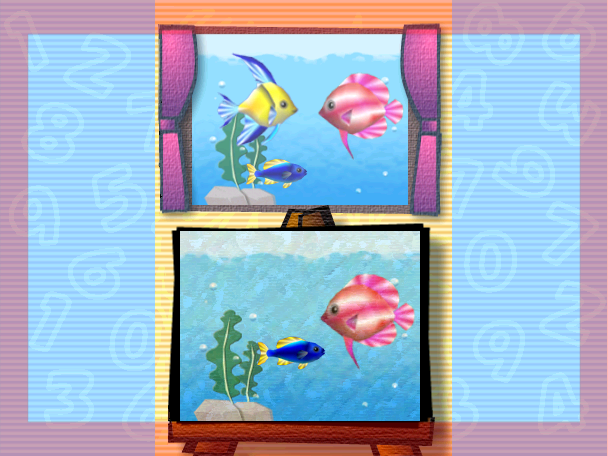
In user\ogawa\ogawaTest, there are buttons and a very strange picture of an aquarium that looks like it's from the DS "prequel". user\waken\buttonTest also has these exact same files.

In user\ogawa\test\designer.arc along with some other places, there's some early graphics.


The first graphic is present in losehakari.bti and shows Dr. Lobe with a tear in his eye and a white flag in his hand.
The second graphic is present in winhakari.bti and shows Dr. Lobe with a trophy in his hand.
The third graphic is present in winlosehakari.bti and is similar to the second graphic, but the trophy Dr. Lobe is holding in this graphic is shinier.
user\ogawa\sample has two TXT files. test.txt
hogehogeThe other one is in director.arc. aaa.txt
sample dataPresent in user/kando/dbController/layout.arc/layout.brlyt is a debug controller.

Excel Spreadsheets#
5 spreadsheets are left on the disc. They're all identical to the final game, except for one.
FaceThrough_Difficulty061214.xls#
|
|
To do: |
Early parameters for the Face Case minigame. Note it uses a parameter called SameFaceNumOnTrain which isn't in the final game.
    Pattern0    Pattern1    Pattern2    all
easy
QuestionRate    6   2   2
DifferentPartsNum   3   4   4
FaceBase    same    different   different
Eye different   different   different
Nose    different   different   different
Mouth   different   different   different
Speed               600
SameFaceNumOnTrain              0

normal
QuestionRate    4   1   5
DifferentPartsNum   2   2   4
FaceBase    same    different   different
Eye undefined   undefined   different
Nose    undefined   undefined   different
Mouth   undefined   undefined   different
Speed               600
SameFaceNumOnTrain              1

hard
QuestionRate    3   1   6
DifferentPartsNum   1   1   3
FaceBase    same    different   same
Eye undefined   same    different
Nose    undefined   same    different
Mouth   undefined   same    different
Speed               600
SameFaceNumOnTrain              1

expert
QuestionRate    1   1   8
DifferentPartsNum   1   1   2
FaceBase    same    different   same
Eye undefined   same    undefined
Nose    undefined   same    undefined
Mouth   undefined   same    undefined
Speed               600
SameFaceNumOnTrain              2
Alternative Game Configurations#
|
|
To do: |
Four alternative configurations for the game are left on the disc.
#--------------------------------------------------------------------------------------------------------#
#
#   gameConfig.ini
#
#   コメントの前はスペースを空ける必要がある
#
#--------------------------------------------------------------------------------------------------------#
{
    #-----------------------------------------------------------------------------------------------#
    #-----------------------------------------------------------------------------------------------#
    firstSection        nawabari    #起動時のセクション指定:title/morimura/kando/ito
    hostIO          1       #HostI/Oを使うかどうか:使わない場合は 0 にしないと動きません
    #-----------------------------------------------------------------------------------------------#
    #   Console Print スイッチ
    #-----------------------------------------------------------------------------------------------#
    sysPrint        0
    masudaPrint     0
    kandoPrint      0
    kiuchiPrint     0
    wakenPrint      0
    ogawaPrint      0
    itoPrint        0
    #-----------------------------------------------------------------------------------------------#
    #   カンファレンス用
    #-----------------------------------------------------------------------------------------------#
    controllerIdleMin   1.0

    disableSectionMenu  1       # 1:"-"ボタンメニュー封印
    publicity       1       # 1:余計な表示をOFF

    courseFlag      0x20        # コース封印用フラグ
                        #   cCOURSE_SHODAN      = 0x0001,
                        #   cCOURSE_STRETCH     = 0x0002,
                        #   cCOURSE_RACE        = 0x0004,
                        #   cCOURSE_SURVIVAL    = 0x0008,
                        #   cCOURSE_PANEL       = 0x0010,
                        #   cCOURSE_OFFICE      = 0x0020,
                        #   cCOURSE_GRAPH       = 0x0040

    MarikuraMonitor     0       # マリクラモニター
    GDC         1       # GDC用
    RYUTU           1       # 流通説明用
    RENTAL          0       # 部外貸出用
    FILM            0       # 撮影版
    showVersion0914     0
    showMode        0

    end         # タグの終わり
}
#--------------------------------------------------------------------------------------------------------#
#
# gameConfig.ini(MC)
#
# コメントの前はスペースを空ける必要がある
#
#--------------------------------------------------------------------------------------------------------#
{
#-----------------------------------------------------------------------------------------------#
#-----------------------------------------------------------------------------------------------#
bootSection eGameOpeningSection #起動時のセクション指定:eTitleSection/eGameOpeningSection/...
hostIO 1 #HostI/Oを使うかどうか:使わない場合は 0 にしないと動きません
#-----------------------------------------------------------------------------------------------#
# Console Print スイッチ
#-----------------------------------------------------------------------------------------------#
sysPrint 0
masudaPrint 0
kandoPrint 0
kiuchiPrint 0
wakenPrint 0
ogawaPrint 0
itoPrint 0
#-----------------------------------------------------------------------------------------------#
# カンファレンス用
#-----------------------------------------------------------------------------------------------#
controllerIdleMin 1.0
disableSectionMenu 1 # 1:"-"ボタンメニュー封印
publicity 1 # 1:余計な表示をOFF
EraseData 0 # 1:必ずデータ消去
courseFlag 0x7F # コース封印用フラグ
# cCOURSE_SHODAN = 0x0001,
# cCOURSE_STRETCH = 0x0002,
# cCOURSE_RACE = 0x0004,
# cCOURSE_SURVIVAL = 0x0008,
# cCOURSE_PANEL = 0x0010,
# cCOURSE_OFFICE = 0x0020,
# cCOURSE_GRAPH = 0x0040
DebugCommand 1 # デバッグコマンド
MarikuraMonitor 1 # マリクラモニター用
DebugKey 1 # デバッグ用リモコン表示 (0:off 1:on)
GDC 0 # GDC用
RYUTU 0 # 流通説明用
RENTAL 0 # 部外貸出用
FILM 0 # 撮影版
showVersion0914 0
showMode 0
panelPrint 0
panelPrintDeep 0
nigaoePrint 0
nigaoePrintDeep 0
messageWindowPrint 0
messageWindowPrintDeep 0
textSpeachPrint 0
textSpeachPrintDeep 0
end # タグの終わり
}#--------------------------------------------------------------------------------------------------------#
#
# gameConfig.ini(MC_D)
#
# コメントの前はスペースを空ける必要がある
#
#--------------------------------------------------------------------------------------------------------#
{
#-----------------------------------------------------------------------------------------------#
#-----------------------------------------------------------------------------------------------#
bootSection eGameOpeningSection #起動時のセクション指定:eTitleSection/eGameOpeningSection/...
hostIO 1 #HostI/Oを使うかどうか:使わない場合は 0 にしないと動きません
#-----------------------------------------------------------------------------------------------#
# Console Print スイッチ
#-----------------------------------------------------------------------------------------------#
sysPrint 0
masudaPrint 0
kandoPrint 0
kiuchiPrint 0
wakenPrint 0
ogawaPrint 0
itoPrint 0
#-----------------------------------------------------------------------------------------------#
# カンファレンス用
#-----------------------------------------------------------------------------------------------#
controllerIdleMin 1.0
disableSectionMenu 0 # 1:"-"ボタンメニュー封印
publicity 1 # 1:余計な表示をOFF
EraseData 0 # 1:必ずデータ消去
courseFlag 0x7F # コース封印用フラグ
# cCOURSE_SHODAN = 0x0001,
# cCOURSE_STRETCH = 0x0002,
# cCOURSE_RACE = 0x0004,
# cCOURSE_SURVIVAL = 0x0008,
# cCOURSE_PANEL = 0x0010,
# cCOURSE_OFFICE = 0x0020,
# cCOURSE_GRAPH = 0x0040
DebugCommand 1 # デバッグコマンド
MarikuraMonitor 1 # マリクラモニター用
DebugKey 1 # デバッグ用リモコン表示 (0:off 1:on)
GDC 0 # GDC用
RYUTU 0 # 流通説明用
RENTAL 0 # 部外貸出用
FILM 0 # 撮影版
showVersion0914 0
showMode 0
panelPrint 0
panelPrintDeep 0
nigaoePrint 0
nigaoePrintDeep 0
messageWindowPrint 0
messageWindowPrintDeep 0
textSpeachPrint 0
textSpeachPrintDeep 0
end # タグの終わり
}#--------------------------------------------------------------------------------------------------------#
#
# gameConfig.ini
#
# コメントの前はスペースを空ける必要がある
#
#--------------------------------------------------------------------------------------------------------#
{
#-----------------------------------------------------------------------------------------------#
#-----------------------------------------------------------------------------------------------#
bootSection eGameOpeningSection #起動時のセクション指定:eTitleSection/eGameOpeningSection/...
hostIO 1 #HostI/Oを使うかどうか:使わない場合は 0 にしないと動きません
#-----------------------------------------------------------------------------------------------#
# Console Print スイッチ
#-----------------------------------------------------------------------------------------------#
sysPrint 0
masudaPrint 0
kandoPrint 0
kiuchiPrint 0
wakenPrint 0
ogawaPrint 0
itoPrint 0
#-----------------------------------------------------------------------------------------------#
# カンファレンス用
#-----------------------------------------------------------------------------------------------#
controllerIdleMin 1.0
disableSectionMenu 1 # 1:"-"ボタンメニュー封印
publicity 1 # 1:余計な表示をOFF
EraseData 0 # 1:必ずデータ消去
courseFlag 0x7F # コース封印用フラグ
# cCOURSE_SHODAN = 0x0001,
# cCOURSE_STRETCH = 0x0002,
# cCOURSE_RACE = 0x0004,
# cCOURSE_SURVIVAL = 0x0008,
# cCOURSE_PANEL = 0x0010,
# cCOURSE_OFFICE = 0x0020,
# cCOURSE_GRAPH = 0x0040
DebugCommand 1 # デバッグコマンド
MarikuraMonitor 1 # マリクラモニター用
DebugKey 1 # デバッグ用リモコン表示 (0:off 1:on)
GDC 0 # GDC用
RYUTU 0 # 流通説明用
RENTAL 0 # 部外貸出用
FILM 0 # 撮影版
showVersion0914 0
showMode 0
panelPrint 0
panelPrintDeep 0
nigaoePrint 0
nigaoePrintDeep 0
messageWindowPrint 0
messageWindowPrintDeep 0
textSpeachPrint 0
textSpeachPrintDeep 0
end # タグの終わり
}Symbol Maps#
The folder map has symbol maps for almost all development builds of the game from all regions excluding Japan. Some symbol maps are different across regions. Over 167MB of the disc is consumed off them!
 |
Download Big Brain Academy Wii symbol maps (Japan) File: BBAcademySymbolMaps_JP.zip (? KB) (info) |
|
Download Big Brain Academy Wii symbol maps (Europe) File: BBAcademySymbolMaps_EU.zip (? KB) (info) |
|
Download Big Brain Academy Wii symbol maps (North America) File: BBAcademySymbolMaps_US.zip (? KB) (info) |
|
Download Big Brain Academy Wii symbol maps (All regions) File: BBAcademySymbolMaps_AllRegions.zip (6,826 KB) (info) |
Build Date#
|
|
To do: |
USA
TimeStampD_EU.txt (Debug EU) |
TimeStampD_JP.txt (Debug JP) |
TimeStampD_US.txt (Debug US) |
TimeStampD.txt (Debug, no region) |
|---|---|---|---|
|
|
|
|
TimeStampP_EU.txt (Product, EU) |
TimeStampP_JP.txt (Product, JP) |
TimeStampP_US.txt (Product, US) |
TimeStampP.txt (Product, no region) |
|
|
|
|
TimeStampR_EU.txt (Release, EU) |
TimeStampR_JP.txt (Release, JP) |
TimeStampR_US.txt (Release, US) |
TimeStampR.txt (Release, no region) |
|
|
|
|
TimeStampV_EU.txt (Develop, EU) |
TimeStampV_JP.txt (Develop, JP) |
TimeStampV_US.txt (Develop, US) |
TimeStampV.txt (Develop, no region) |
|
|
|
|
All of the build dates that are presented above can be found at the root of the game's files.
It's notable that
TimeStampP.txtsays
TimeStampon it instead of an actual build date.
Internal Project Name#
The internal name of the game is Yawaraka, given by many mentions of Yawa and the full term in the game's files and executable. Yawaraka is present in the Japanese name of the game.
Regional Differences#
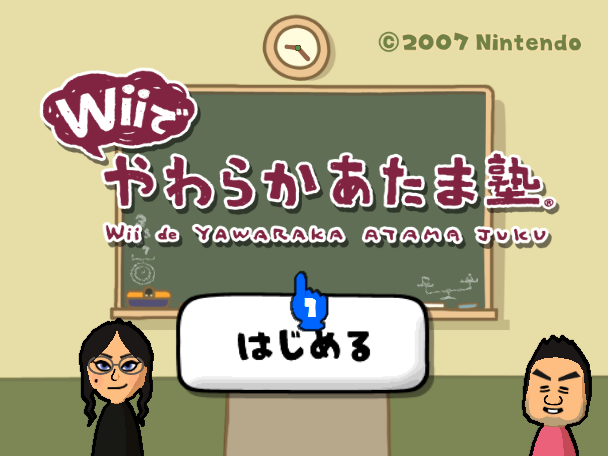
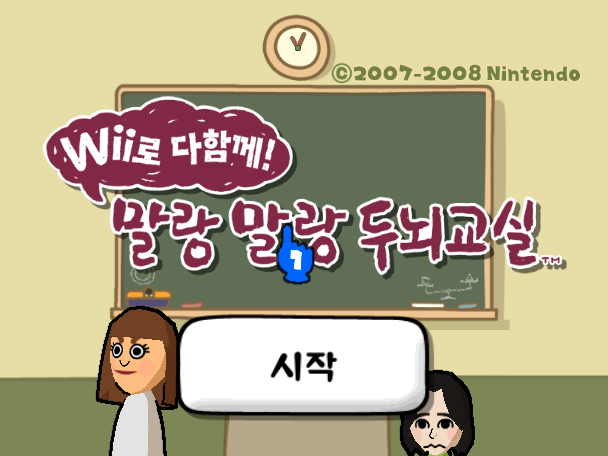
Title Screen#
Japanese |
South Korea |
North America |
Europe |
|---|---|---|---|
 |
 |
 |
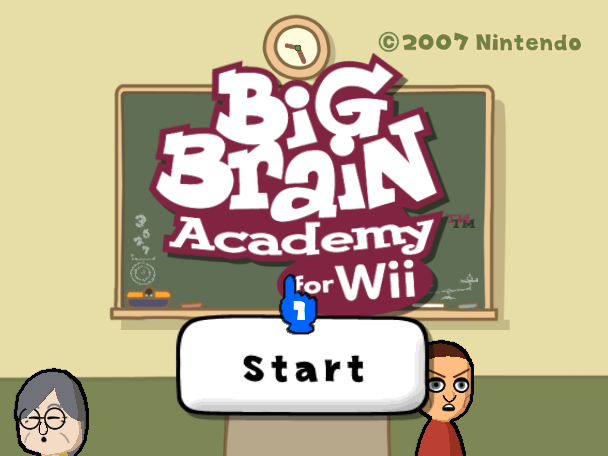 |
Save Banner#
Japanese |
South Korea |
North America |
Europe |
|---|---|---|---|
 |
 |
 |
 |
Correct/Incorrect#
In the Japanese and Korean versions, a red maru (circle) is used to indicate correct, and a blue batsu (cross) for incorrect. These have been changed to a green check mark (or tick) and a red cross respectively in international versions.
Exception Handler#

The NintendoWare exception handler is present in the code. Unlike most titles that feature this handler, it automatically displays on the television screen when the game crashes and does not require a button combination to activate. The D-Pad can be used to scroll through the output.
(Source: Tanline666)
References#
|
The Big Brain Academy series | |
|---|---|
|
Nintendo DS |
|
|
Wii |
|