Angry Birds Transformers is a robotic shooter built off Exient's XGS engine. The game was good at launch, but was and continues to be very hefty with premium content and ways to try to hook you into said material and also premium currency.
Debugging Utilities#
In the game's XML holding PAK and library file, there are mentions of a debug menu similar to the one in Angry Birds Go!, as well as other debugging features. Some functions, mostly in modern versions, are either stripped or dummied out from public releases, so not every single thing works as intended on them.
UI#
Battle Pass#
- Choose Side: Stripped.
- Exit Screen: Stripped.
- Prime Pass: Stripped.
- Team name test: Stripped.
- Unclaim All Rewards: Stripped.
- Claim All Rewards: Stripped.
- Add Level: Stripped.
- Remove Level: Stripped.
Character Missions#
- Chance To Win: Stripped.
Daily Reward/+Crate/Mission Results#
- Advert Boost Debug: Allows you to fake watching an AD and get double the daily rewards, empty square.
Endless Leaderboard#
- Do FTUE: Stripped.
- Clear Profile: Stripped.
- Clear Leagues: Stripped.
- Refresh Data: Stripped.
- End Day: Stripped.
- Fake Score: Stripped.
- Fake Friends: Stripped.
- Skip Next Day: Stripped.
- Skip Next Day Promoted: Stripped.
- Skip Next Day Remain: Stripped.
Enter Player Name#

|
To do: |
- Debug Wipe Profile: Clears the player's profile.
Facebook Login#
- Debug Text: Unknown.
Feature Test#
The screen provides a number in the middle that is your energy count.
- Add Energy: Adds 1 energy.
- Spend Energy: Spends 1 energy.
- Fill Energy: Seems to crash the game. Dummied?
Gacha#
- Toggle Award Items: Stripped.
- Toggle Skip Countdown: Stripped.
- Toggle Daily Gacha Limit: Stripped.
- Show Maxed Out Text: Stripped.
- Force Rarity: Stripped.
- Force Item Type: Stripped.
In-Game#
- Debug Washing Machine Button: Stripped.
- Debug Stats Window: A window for showing debug stats in the below format. The string can be coins or score, depending on the game mode.
%s: %dPause
- Debug Enable Panel: Stripped.
- Debug Menu: Stripped.
- Restart: Restarts the level and heals the TF.
- AutoComplete: Dummied, mutes all in-game music and returns to the game.
- Exit: Exits the level without keeping damage on the used character.
- Metrics: ?
- Screens: Loads the Debug Menu.
Map#
- Debug: Loads the Debug Menu.
- SHOW: Stripped.
- HIDE: Hides the debug panel and all debugging content for the session.
- Dev: Loads the Developer Menu, see above, a button.
- Live Event Timer: Stripped.
When choosing an event:
- Emulate Play Button: Emulates the event, empty square.
- Terraform: Unknown.
- Toggle Tier: Unknown.
- World++: Increases the World marker by 1.
- World--: Decreases the World marker by 1.
- Event++: Increases the Event marker by 1.
- Event--: Decreases the Event marker by 1.
- Seed++: Increases the Seed marker by 1.
- Seed--: Decreases the Seed marker by 1.
- Index++: Increases the Index marker by 1.
- Index--: Decreases the Index marker by 1.
- Rarity: Unknown.
- Emulate Boss Play Button: Unknown.
Dr. Pig's Lab#
Three debug monitors with associated textures, it seems this was stripped.
Quests#
- New: Generates new quests.
- Complete: Completes all quests.
Popup Gacha Upsell#
|
|
To do: |
- Debug Text: Unknown.
Silo#
- Material Add: Adds 1 material, empty rectangle, this is near icons of any resource, you cannot go beyond limits.
- Upgrade: Located on the bottom of the popup is a button that upgrades the Silo. Going beyond level 25 will reset it to level 1. This also maxes the Silo's resources a bit after the upgrade trigger. oddly, this function spends coins and resources when used so you cannot use this when you don't have enough or none at all.
- Fill: Maxes the Silo's resources, located on the bottom of the popup.
- Clear: Empties the Silo's resources, located on the bottom of the popup.
Revisions
???-2.14.2: Material Add adds coins equal to the amount when used when the max of the resource is reached.
Shockwave's Spire#
- Toggle Award Items: Stripped.
- Skip 5 Floors: Stripped.
- Show Reward Backgrounds: Stripped.
- Get stuff now: Stripped.
- Exit screen: Stripped.
- Pause Flow: Stripped.
- Show Vignette: Stripped.
- Show Tool Tips: Stripped.
- Pause: Stripped.
- Wait at end: Stripped.
- Proceed: Stripped.
- -: Stripped.
- Speed=100%: Stripped.
- +: Stripped.
- 1: Stripped.
- 0%: Stripped.
- -: Stripped.
- 0: Stripped.
- Card: Stripped.
- -: Stripped.
- OffsetX=0: Stripped.
- OffsetY=0: Stripped.
- Ignore Factors: Stripped.
Shop#
- Debug Offer: Stripped.
- Debug Time Advance: Stripped
- Debug Live Event Timelapse Start/Stop: Stripped.
Splash#
|
|
To do: |
- Debug Facebook Button: ?
- Debug Cloud Saves: ?
Telepods#
- Debug Scan: A cogwheel button that simulates a successful scan of any Telepod chosen, choosing none will crash the game.
Token Shop#
- Add/Remove Tokens: Stripped.
Debug Menu#
This menu allowing you to select any screen in the game if the file is/are present and has a call in the library and XML files.
- Metrics Seems to crash the game.
- Cycle Loc: Changes the language locale for a session, you cannot change back to the default one for the session due to that changes into the same language but with a different text format (unicode?), the Current value displays the current.
- Back: Returns to Map.

After choosing a screen, an overlay exists with the following options.
- Reload: No effect, the function is dummied out.
- Back to Debug: Goes back to the Debug Menu.
Developer Cheat Menu#
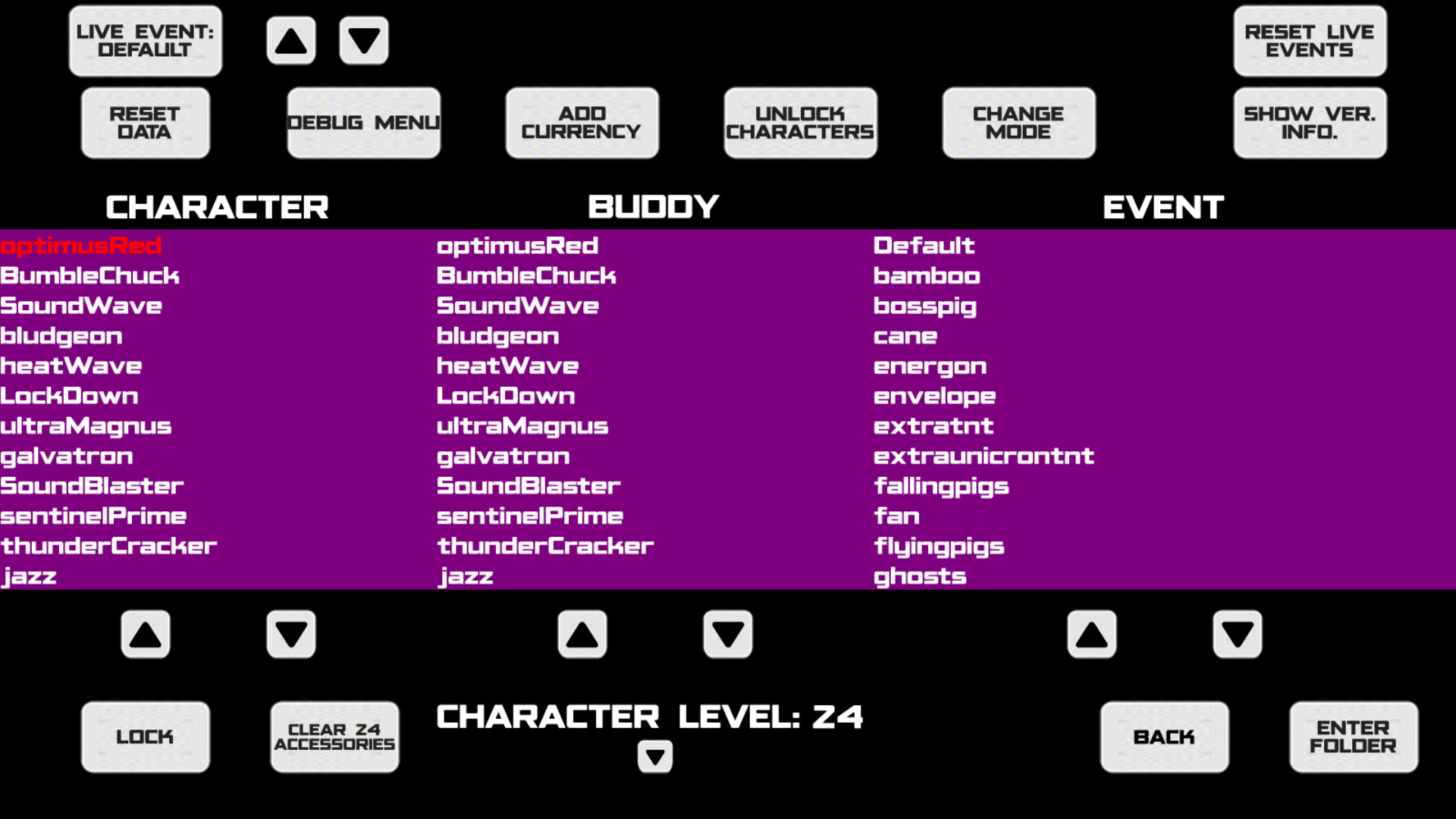
A developer cheat menu is also present in the game's files and library and it can do many things. In the game's files, it's referred to as "CheatScreen".
- Add Currency: Adds 10,000 of each currency to your save. This excludes Bat Pigs, Plasma, and Tokens. The use of this is capped with Coins/Sparks at 1,000,000 and Gems/Pigs at 100,000.
- Reset Data: Wipes most of your save data, you may modify the beginning values for the new save before the next boot after.
|
|
To do: |
- Live Event: %s: Changes the local live event.
- Change Mode: Changes the very right column to load game data. Defaulted to Event.
- Event: Event definition files (events).
- Procedural: Automatic generation of level data.
- Cutscene: Cutscene files.
- Layout: Level layout files, the Buddy table is changed to Tiles (%s) to load tile definitions.
- Debug Menu: No known effect.
- Unlock Characters: Unlocks all locked characters at level 1 for a save, unreleased characters are also unlocked this way.
|
|
To do: |
- Reset Live Events: Resets the local live event.
- Show Ver. Info.: Shows various info on the hardware, the extra string in the Data Version entry is the ABGroupID value.

- Lock/Unlock: Locks/unlocks a TF for a save with its accessories and level, does not add/remove a containment unit for them on the map, changes to Unlock if a TF is locked, unlocking TFs early can mess up the achievement status for them, you may also manage unreleased characters this way.
- Clear X Accessory/ies: Removes all accessories from a character.
- Character Level: X: Shows character's level and has up and down arrows below to alter, often capped at level 25, unreleased characters are normally capped at level 15.
- Enter Folder: Views the events directory in the PAK filesystem, Default is from xml.pak, and other directories are in events/liveevents from xml_additional.pak. This changes to Play when a file is selected, only select XML files and not XML.META files to avoid crashes.
Changes in Revisions#
|
|
To do: |
- 1.??.?: added up and down arrows for toggling Live Events separately in clockwise and counterclockwise ordering, due to this, the Live Event button no longer has any effect when tapped but is still clickable however, it is now used as a display for the event.
- 1.??.? - 2.0.5.0: A difficulty scaling setting was added in the Procedural tab. Unlock Characters now can be toggled rather than a one-click.
Feature Config#
Accessible from the settings screen is a menu allowing you to toggle the use of these in-game features for the next bootup.
- Elite Enemies = Makes the game use Elite Enemies, defaulted to off.
|
|
To do: |
- Alternate Event Flow = Allow you to choose characters for events.
- Auto Fire AI Uses Buttons = The autofire AI can use buttons.
- Character Promotion/Prestige = Characters can promote.
- Sign Posting = Allows you to sign post?
- Force Release Live Events = Forces release live events.
- Enable Spark Run = Allows Spark Run to be done.
These options below cannot be toggled in the above menu, manually hacking them by adding a onScreen flag set to true and a displayName node in entries to show their name in xml.pak/global/featureconfig.xml won't work as toggling them there doesn't trigger their effects.
- GameDamageModifier: ?
- GameSpeedModifier: ?
- CharacterBuyForGems: Allows you to buy characters in the Barracks for Gems, enabled in the Chinese version but still works fine in the worldwide version.
- CharacterUpgradeOnFail: ?
- InstantCharacterRepair: Immediately repairs Transformers after payment, enabled in the Chinese version but still works fine in the worldwide version.
- MaxUpgrade: Allows you to upgrade Transformers in the barracks to the maximum level from a singular payment of 1500 gems, enabled in the Chinese version but still works fine in the worldwide version.
- InstantEventSpawnBeforeSoundwave: ?
- JengaForGemsAndMoney: ?
- JengaWithCode: Allows you to use codes to unlock Jenga.
- SiloUpgrade: Allows you to upgrade the Silo.
- ToonsTV: Removed.
- RefreshLabel: ?
- PostEventPopup: ?
- DailyReward: Use of daily rewards.
- DoubleRewardsForGems: ?
- BuddyBoostForGems: Allows you to boost buddies for 2 gems, granting them 5+ seconds of active time, enabled in the Chinese version but still works fine in the worldwide version.
- RegionalAds: ?
- SoundtrackAdvert: Use of the soundtrack advert, disabled in the Chinese version.
- SiloAdvert: Use of the video offering in the Silo, disabled in the Chinese version.
- ExpandedShop: ?, enabled in the Chinese version but still works fine in the worldwide version, this seems to make the game use different text strings for gem offers.
- BuyRegions: Makes you pay coins to explore regions, enabled in the Chinese/legacy versions but doesn't work in the worldwide version.
- StarterBundle: Shows a starter pack on bootup, enabled in the Chinese version but still works fine in the worldwide version.
- UseChinaTextures: Crashes on the worldwide version.
- RestorePurchases: Toggles visibility of the Restore Purchases button, disabled in the Chinese version.
- UseReducedSettingsMenu: Uses a smaller slide-up settings menu, enabled in the Chinese version.
- Telepods: Toggles the use of Telepods, disabled in the Chinese version.
- MapAccessoryButton: Shows a button on the map to open the Accessory shop, enabled in the Chinese version but still works fine in the worldwide version.
- AccessoryCharacterArrows: Shows arrows in the Accessory shop to change character targets.
- FacebookEnabled: Shows the Facebook button.
- PlatformEnabled: Shows the platform-specific buttons.
- SnapshotEnabled: ?
- RateGamePopup: ?
- AllowSeasonalContent: ?
- ChinaMiscSettings: Crashes on the worldwide version.
- MiniconLevelBasedOnRarity: ?
- ShockwavesSpire: ?
- BuyItemAfterGemIAP: ?
- CombinerRun: ?
- WarForCybertronSpire: ?
Debug Tweakables XML#
A debugging feature tweak list is present in xml.pak/global and is named: DebugTweakables.xml. It has a LOT of tweaks that are enabled (aside from true debugging tweaks) on every game bootup, even for a retail build, some code isn't present in the library and/or the XML logically, anything in XMLs ONLY from the Library can be used as settings are called from it and not the XMLs alone.
(Pastebin: http://pastebin.com/raw/tgcxr7n1)
Internal Character Names#
The game simply doesn't always name the character like it's seen in-game internally. They follow these unique names below:
|
|
To do: |
Internal Name/String ID |
In-Game Name (English) |
||
|---|---|---|---|
optimusRed |
Red as Optimus Prime |
||
BumbleChuck |
Chuck as Bumblebee |
||
SoundWave |
Chef Pig as Soundwave |
||
bludgeon |
King Pig as Bludgeon |
||
heatWave |
Terrence as Heatwave |
||
LockDown |
Mustache Pig as Lockdown |
||
ultraMagnus |
Red as Ultra Magnus |
||
galvatron |
Corporal Pig as Galvatron |
||
SoundBlaster |
Chef Pig as Soundblaster |
||
sentinelPrime |
Terrence as Sentinel Prime |
||
thunderCracker |
Minion Pig as Thundercracker |
||
Jazz |
Bubbles as Jazz |
||
SoundWave |
Chef Pig as Soundwave |
||
brawl |
King Pig as Brawl |
||
grimLock |
Hal as Grimlock |
||
starScream |
Minion Pig as Energon Starscream |
||
SoundWaveEnergon |
Chef Pig as Energon Soundwave |
||
grimLockEnergon |
Hal as Energon Grimlock |
||
LockDownEnergon |
Mustache Pig as Energon Lockdown |
||
galvatronEnergon |
Corporal Pig as Energon Galvatron |
||
optimusRedEnergon |
Red as Energon Optimus Prime |
||
megaPorkUltimate |
King Pig as Ultimate Megatron |
||
optimusRedUltimate |
Red as Ultimate Optimus Prime |
||
BumbleChuckHighOctane |
Chuck as High Octane Bumblebee |
||
grimLockGoldBite |
Hal as Goldbite Grimlock |
||
megaPork |
King Pig as Dark Megatron |
||
arcee |
Stella as Arcee |
||
airachnid |
Stella as Airachnid |
||
ratchet |
Terrence as Ratchet |
||
BlueStreak |
The Blues as Bluestreak |
||
NemesisPrime |
Red as Nemesis Prime |
||
AcidStorm |
Minion Pig as Acidstorm |
||
EpicOptimus |
Red as Epic Optimus |
||
BumbleChuckFire |
Chuck as Rodimus
|
||
Shockwave |
King Pig as Shockwave |
||
Prowl |
The Blues as Prowl |
||
hotRod |
Chuck as Rodimus |
||
Richochet |
Bomb as Richochet |
||
Deadend |
Mustache Pig as Dead End |
||
Drift |
Bomb as Drift |
||
WindBlade |
Silver as Windblade |
||
skywarp |
Minion Pig as Skywarp |
||
g1starscream |
Minion Pig as Starscream |
||
sunstorm |
Minion Pig as Sunstorm |
||
wheelJack |
Bomb as Wheeljack |
||
Smokescreen |
The Blues as Smokescreen |
||
chromia |
Stella as Chromia |
||
blaster |
Bubbles as Blaster |
||
trypticon |
Hal as Trypticon |
||
scorponok |
Corporal Pig as Scorponok |
||
Barricade |
Mustache Pig as Barricade |
||
Sideswipe |
Bubbles as Sideswipe |
||
EnergonWindBlade |
Silver as Energon Windblade |
||
Nautica |
Matilda as Nautica |
||
RedAlert |
Bubbles as Red Alert |
||
EnergonShockwave |
King Pig as Energon Shockwave |
||
EnergonNautica |
Matilda as Energon Nautica |
||
Hound |
Terrence as Hound |
||
Elita |
Silver as Elita One |
||
Sunstreaker |
Bubbles as Sunstreaker |
||
Strongarm |
Silver as Strongarm |
||
EnergonWindBlade |
Minion Pig as Energon Windblade |
||
MotorMaster |
Mustache Pig as Motormaster |
||
Beachcomber |
The Blues as Beachcomber |
||
EnergonMegatron |
King Pig as Energon Megatron |
||
CliffJumper |
Chuck as Cliffjumper |
||
Moonracer |
Stella as Moonracer |
||
EnergonBumblebee |
Chuck as Energon Bumblebee |
||
NemesisHotRod |
Chuck as Nemesis Hot Rod |
||
Novastar |
Stella as Novastar |
||
ClassicBumblebee |
Chuck as Classic Bumblebee |
||
Ironhide |
Terrence as Ironhide |
||
Mirage |
Bubbles as Mirage |
||
Alphatrion |
Mighty Eagle as Alpha Trion |
||
Breakdown |
Chef Pig as Breakdown |
||
Grapple |
Bomb as Grapple |
||
superion |
Terrence as Superion |
||
Dragstrip |
Bubbles as Dragstrip |
||
Devastator |
Minion Pig as Devastator |
||
Greenlight |
Stella as Greenlight |
Internal Project Name#
The game is internally called Blue Steel, with or without Angry Birds. 123
Development Leftovers#
Note#
In xml_additional.pak, a file at the root directory called changethispak.xml is present with no references in the game, it only says the below text.
</ChangeThisPakThough>Leftover Console Log#
In ui_additional.pak on iOS/the Chinese distribution or in the OBB file on Android, a file called xgsconsole_log.html similar to the one in Angry Birds Go! is present in seasonal/thanksgiving/ui/textures, it shows an error message log regarding XGSCore. The line number was changed from 1051 to 635 in the latest.
XGSConsole::Open() - debug console opened
*********************************
******* ASSERTION FAILED *******
*********************************
FILE : XGSCore\Common\XGSFileSystem\XGSFileSystem.cpp
LINE : 1051
CONDITION : (eErr == EXGSError::OK) || (eErr == EXGSError::FileNotFound)
DETAILS : Error 14 (00000020) received by filesystem code
Uncompiled Localization File#
The game's localization.pak file has a file named locdb_global.xml. It is serialized by (possibly automatically) by Exient's XML serializer but it being here suggests it is uncompiled from Exient's localization tool(s) as the game doesn't call a file with this name but instead, an .xlc file with related strings.
XAL Compilation Metadata#
Similar to GO!, partial compilation metadata exists in asset list files.
v1.0.23 (iOS):
S_Staging\ABBS\Scratch\Temp\iPhone_EU_OPTS\publisher\
pY19jb3JlLnBhay4w/36df66a5d25c215eeec12d7
6086f5
Probably ABBS_Staging.
v1.9.39 (Android, EGame SKU):
dlc_core
XGS-HttpClient/1.0
Host: abtf-assets.ta
dlc_additional
634025317_data-characters-bumblechuck.pak.1
v2.13.0 (Android):
s_staging\abbs\built\android_eu\data\characters\shared.
Probably abbs_staging with shared.pak.
Source File Directories#
map.tmx in iOS v1.0.23 mentions two source files of map assets with directories.
F:/Work/ABBS/ABBS/Data/XML/Global/MapBackground.png
F:/Work/ABBS/ABBS/Data/XML/Global/MapRegionTiles.png
Missing Texture Handlers#
Character Icon#
If an expected character icon sprite is missing in the game's files, a ball with purple and pink squares will replace it, this could happen when using unreleased characters with the same partner from using the Developer Menu.

Misc. Textures#
If an expected texture is missing, it will show the game logo instead.
Executable Launch Commands#
|
|
To do: |
The game's library on Android mentions these commands:
- --ignoreRovioLogo = Jumps to splash screen at bootup.
- --ignoreDownloads = Skips downloading/updating of assets.
- --ignoreSplashScreen = Ignores splash screen, directly boots game.
- --level= Forces the game to boot a specific level, sets all above parameters except the first one.
- --enable-profile-test Loads EventDef_World00_EventProfile.xml to test the deviceconfig being used, such a file does not exist.
- --nopak = Makes the game not use PAKs but use direct data folders.
- --testnews = Simulates a news broadcast? Also uses ignoreDownloads.
- --difficulty-bot = Chooses the difficulty bot character?
- --sparkrun-bot = Unknown.
Unused PC DRM#
The unused code from Angry Birds Go! made it here, but with slight additions. The game was likely planned for some time to be on computers (or Steam) but it was cancelled likely for the favor of mobile devices, the game library mentions PC DRM, including the DRM server URL, links and protocols.
(Source: LolHacksRule)
|
The Angry Birds series | |
|---|---|
|
iOS |
Angry Birds (Prototypes) • Seasons • Rio • Friends (Fusion, Unity) • Island • Space (Prototypes) • Bad Piggies (Prototypes) • Star Wars (Prototypes) • Star Wars II • Go! • Epic (Prototype) • Stella • Transformers • POP! • Fight! • Angry Birds 2 • Reloaded • Rovio Classics: Angry Birds • Bad Piggies 2 |
|
Android |
Angry Birds • Epic • Seasons • Space • Rio • Star Wars • Star Wars II • Stella • Transformers • Fight! • Angry Birds 2 • Go! • Friends (Fusion, Unity) • Football! • Bad Piggies • Rovio Classics: Angry Birds • POP! • Racing • Block Quest |
|
Windows |
Angry Birds • Seasons • Space • Rio • Star Wars • Star Wars II • Angry Birds 2 • Bad Piggies • Friends |
|
HTML5 |
Chrome • Pistachios • Friends |
|
Mac OS X |
Angry Birds • Seasons • Space • Rio • Star Wars • Bad Piggies • Reloaded |
|
Adobe Flash |
Breakfast • Ultrabook Adventure • Friends • Vuela Tazos • Heikki • Lotus F1 Team • McDonald's • Social (Earlier Prototype) |
|
Xbox 360, PlayStation 3 |
|
|
Arcade |
|
|
tvOS, visionOS |
|
|
The Transformers series | |
|---|---|
|
NES |
|
|
Nintendo 64 |
|
|
Game Boy (Color) |
|
|
PlayStation 2 |
|
|
Nintendo DS |
|
|
Windows |
The Game • Revenge of The Fallen • War For Cybertron • Fall of Cybertron • Rise of the Dark Spark • Devastation |
|
Xbox 360, PlayStation 3 |
The Game • Revenge of The Fallen • War For Cybertron • Dark of the Moon • Fall of Cybertron • Rise of the Dark Spark • Devastation |
|
Wii |
|
|
Wii U |
|
|
PlayStation 4, Xbox One |
|
|
iOS, Android |
|
|
Arcade |
|