'This page or section details content from theApril 2020 Nintendo Leak.'''
To do:
Investigate and document the debug menus.
Investigate the leaked incomplete source code archive which leaked October 17 2020 (on a Development page).
Determine what the client is attempting to connect to.
Four builds of Pokémon Ultra Sun were leaked on April 27-28, 2020. Upon booting these, a gray screen appears showing a client waiting to receive data. After decrypting the .cia files, the code.bin file can be patched to allow for more functionality:
After patching the file, it can be loaded as an exefs mod. The builds will now boot to the Pokédex, press B which will exit to the main debug menu.
Additionally, you can usually bring up a secondary debug menu on the bottom screen by pressing the X button which shows different options depending on the context, and pressing Select in some cases brings you back to the main debug menu.
Many different options are available, some opening a submenu with even more options. Some options don't function in one build, but do in another, and some options do nothing or crash the emulator.
Selecting this option spawns the character on Route 1. Opening the debug menu with X shows various options for warping to maps, camera manipulation, executing scripts, and managing Pokémon and items. Pressing X again to close the debug menu will bring up the normal menu. Unfortunately, after getting into a battle, the game will reboot when the battle ends.
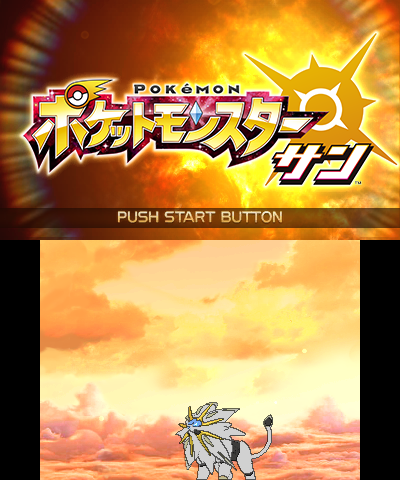
Can be seen by selecting Uchida > タイトル in the main debug menu. Has a 3D Solgaleo model at the bottom who just idles. The title has the non-Ultra Pokémon Sun logo.
After decrypting 000400000001A8A00.3120.cia to .3ds, the Pokémon Model Viewer can be loaded by replacing the original value 30402DE9 in the file at 0x31AC84 with A04501EA in a hex editor. When booting, a menu to view each Pokémon in the PokéDex appears.
The translation for the controls, as well as their purpose are as follows:
Japanese
Translation
Description
しゅるい
Type
Allows the user to search a Pokémon. The red buttons on the sides allow you to go to the next Pokémon by number.
ナンバー
Number
Displays the Pokémon's number in the PokéDex.
フォルム
Form
Switches the model to a certain form of the Pokémon (ex: Mega Evolved form) when tapping the side buttons.
せいべつ
Sex
Displays the Pokémon's gender. Tapping the button will swap the gender. The model will correspond to the gender displayed if there are gender variants of the Pokémon.
たまご
Egg
Puts the Pokémon in an egg when tapped.
おおきさ
Size
Zooms the camera in or out when pressing the side buttons.
Yオフセット
Y offset
Changes the Y offset of the camera when pressing the side buttons.
回転
Rotation
Rotates the model when pressing the side buttons.
(Source: Unknown who discovered the offsets and values to insert in order to access this menu)
 This article has a talk page!