Debugging Material#

|
To do: |
Similar to Perry?, debug buttons and widgets cannot be displayed by editing the screen files but still for the most part can be easily restored by a single byte edit to simply make them true instead of false.
Buy All#
Version |
Address |
|---|---|
1.1.3 (iOS, ARMV9) |
1AFB00 |
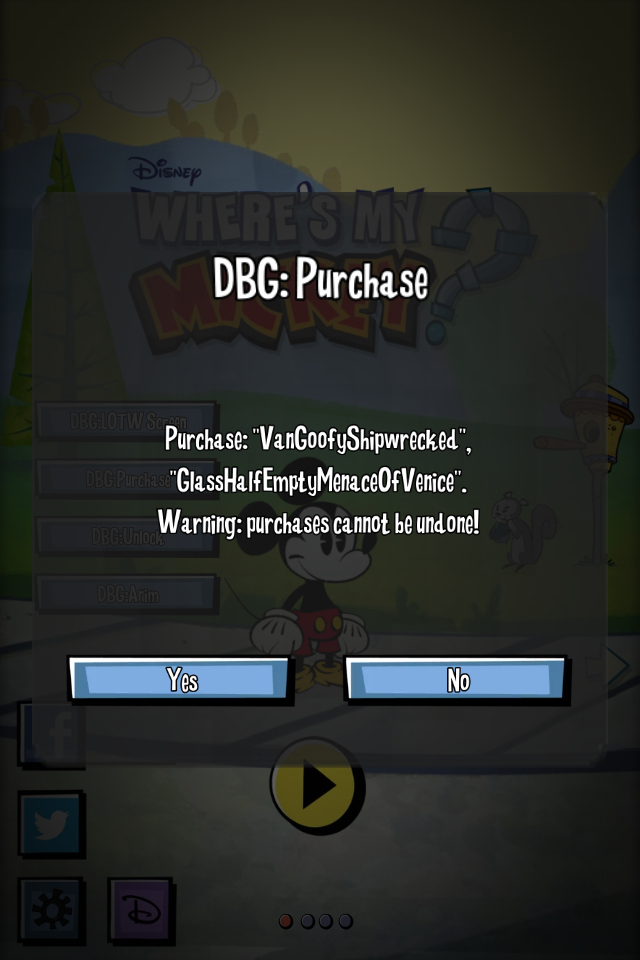
The main menu's debug purchase button allowing simulating of all level pack purchases.
Unlock Menu#
Version |
Address |
|---|---|
1.1.3 (iOS, ARMV9) |
1AFB12 |

The unlock menu offers a checkbox list with a variety of options. Note that it mentions Tri-Ducking instead of Tri-Gnoming, which suggests the code was mostly ported from WMW with little changes.
Animation Test#
|
|
To do: |
Version |
Address |
|---|---|
1.1.3 (iOS, ARMV9) |
1AFB2A |
LOTW Fake Download#
|
|
To do: |
Version |
Address |
|---|---|
1.1.3 (iOS, ARMV9) |
1AFB4A |
Development Leftovers#
Source Code#
//
//  GameMovieView.h
//  Where's My... ?
//
//  Created by Russ Klinkerman on 4/19/13.
//  Copyright 2013 Disney Mobile. All rights reserved.
//

#import <UIKit/UIKit.h>
#import <AVFoundation/AVFoundation.h>

@interface GameMovieView : UIView

@property (nonatomic, retain) AVPlayer *player;

- (void)setVideoFillMode:(NSString *)fillMode;

@end
The iOS versions left a small source file called GameMovieView.h at the root of the application with a developer copyright, the said developer was a lead designer of the game.
Texture Export Configs#
A small number of texture directories have a configuration file named atlast.cfg, most likely the text inside them are arguments for a texture exporting tool.
-e waltex -fmt rgba4444
Almost Empty Java Source Directory#
Do not move files from com.disney.common
    (or do so cautiously and update native code in lockstep accordingly)

- Native code is hardwired to class and methods defined in com.disney.common
- We are migrating these step by step but they need to remain here for Mickey

    BaseActivity
    DoofAssetAMPSManager.java
    PlatformGameServcesManager.java
    TABHDAssetAMPSManager.java
    VOAssetAMPSManager.java
    WMWActivity.java
    WMWGLUtils.java
    WMWRenderer.java
    WMWView.java
A directory named com is present in the root of version 1.2 for Android. Most of these directories commonly contain source files but they are nowhere to be found; just a note named _IMPORTANT_Readme_Do_Not_Rename_These_Files.txt.
Developer Notes#
Levels can override any animation defined by the LevelPack on a per level basis.

Skeleton Actor:
    Requires attributes for skeleton, animation, and scene

Expected Animations:
    idle:           (group) played while idle in the portal
    intro:          played while entering the level from the results screen
    success:        played when the level is won and continues all the way into the results screen
    fail:           played when the level has failed
    tapped:         (group) played when the player tapps on the portal
    resultsIdle:    played when the gag has completed
    resultsTapped:  (group) played when the results animation is tapped on
    resultsGag:     played when the success animation has completed
    resultsPostGag: played after the gag, but before idle

Transitions:
    screen_pos:     The position in screen space of the portal, as seen in game
    uv_pos:         The uv position of the texture applied to the portal (where the portal is looking)
    widet_pos:      The position in screen space of the Widget_Animation on SN_ResultsPortal. This has a range of 0-1. 1 being the entire screen.
    screen_scale:   The scale of the geometry in screen space, this equates to the radius
    uv_scale:       The uv scale of the texture applied to the protal (how big the texture is)
    widet_scale:    The scale of the animaiton contained in the widget on SN_ResultsPortal
    to_delay:       The time to delay before performing the transition
    to_pos:         The position of the gemometry in screen space, as see in the game.
    to_scale:       The scale of the gemometry for the portal, as see in the game.
    to_uv_scale:    The time it takes to transition from the last uv scale to the new one
    to_uv_pos:      The time it takes to transition from the last uv position to the new one
    to_widget_scale:The time it takes to transition from the last widget scale to the new one
    to_widget_pos:  The time it takes to transition from the last widget position to the new one
    minimum_to_wait:Minimum amount of time to wait before performing the transition, currently
                        only used for payoff transition and has to deal with how long to
                        wait before starting to scale up to payoff.
A note on configuring levels.
|
The Where's My Water? series | |
|---|---|
|
iOS, Android |
Where's My Water? • Where's My Perry? (Prototype) • Where's My Summer? • Where's My Water? 2 • Where's My Mickey? • Where's My XiYangYang? |
|
Adobe Flash |
|
|
Windows |
Where's My Water? • Where's My Water? 2 • Where's My Mickey? |