
Unused Text#
In the second version of the News Channel, there were some error messages that were never used.
You must perform a Wii system update to
use WiiConnect24. Refer to your Wii
Operations Manual for details.
You must perform a Wii system update to
use the News Channel. See the Wii
Operations Manual for details.An error has occured. WiiConnect24
features cannot be used.Regional Differences#
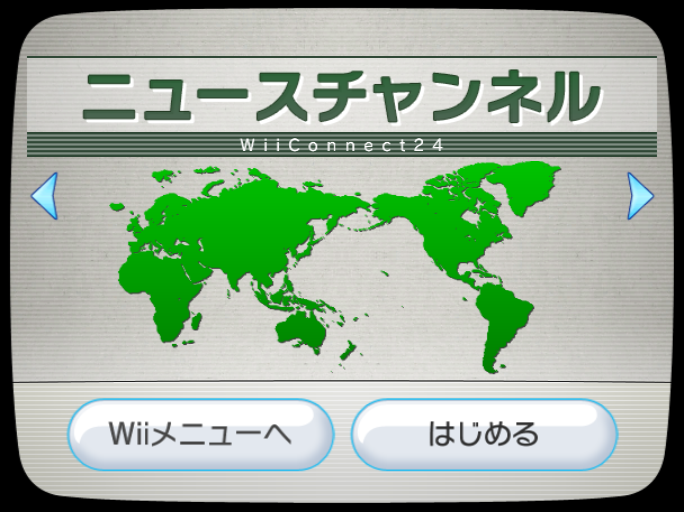
Title Screen#
|
Japan |
International |
|---|---|
|

|
The continents swapped places on the Wii Menu to change the map for Japan (since it's in Asia).
Updated Time#
The updated time text is slightly different.
|
USA |
Europe |
|---|---|
|
Updated |
Last Updated |
Globe#
In the Japan version, when using the Globe, "Powered by Goo" is displayed.

When multiple news articles are grouped together on the Globe, the text after the location name is slightly different.
|
USA |
Europe |
|---|---|
|
Area |
etc. |
And when you click that...
|
USA |
Europe |
|---|---|
|
Regional News |
The News |
Clock#
In the Japan and European versions of the channel, there's a clock in the top left corner of the screen while using the channel, however they look different.
Japan |
|---|
|
Europe |
|


News Sources#
In different regions, the news source(s) were different.
US English/French/Spanish |
|---|
Associated Press |
EU English/French/Spanish |
Associated Press AFP |
German |
Associated Press AFP and SID |
Italian |
Associated Press ANSA |
Dutch |
Associated Press ANP |
Japanese |
News24 and Mainichi |
News Topics#
Along with the sources being different, the topics list was different as well.
Untranslated Text |
|---|
Japanese |
News24 and Mainichi |
政治 経済 国際 社会 スポーツ 芸能文化 |
Translated Text |
Japanese |
News24 and Mainichi |
Politics Economy International News Society Sports Entertainment/Culture |
* - Not seen in all countries.
Revisional Differences#
Wii Menu Icon#


On the first version of the News Channel, the icon would be white, then fade to green.
When the second version of this Channel was released, Nintendo only used the green icon and the headlines would show on the Wii Menu.
Errors#
The error messages were changed when the Channel was updated.
|
First Version |
Second Version |
|---|---|
|
|
|
First Version |
Second Version |
|---|---|
|
|
|
First Version |
Second Version |
|---|---|
|
|
|
First Version |
Second Version |
|---|---|
|
|
Also, some more error codes (starting with NEWS) were added.
Unused Music#
This is a song that would be layered over the main background music, supposedly when reading news. It plays asynchronously to the main background music. The volume of this track is set to 0 inside the channel's BRSAR file, therefore it cannot be heard.
Unused Featured News Section#
The News Channel has a field in the data file that allows room for a featured news section. The button to send you to the main sections, however, scrolls all the way to the bottom of the list.
|
First-Party | |
|---|---|
|
Default Channels |
Wii Menu • Mii Channel • Photo Channel (1.0 Restore Program) • Wii Shop Channel • Forecast Channel • News Channel • Wii Menu Electronic Manual • Wii + Internet: Get Connected Video |
|
Installable Channels |
Everybody Votes Channel • Internet Channel (Demo) • Check Mii Out Channel • Nintendo Channel • Wii Fit Channel • Mario Kart Channel • TV no Tomo Channel G Guide for Wii • Wii Speak Channel • Wii no Ma • Demae Channel • Digicam Print Channel • Wii Fit Plus Channel • Kirby TV Channel • The Legend of Zelda: Skyward Sword Save Data Update Channel • Wii U Transfer Tool • USB Memory Repair Program |
|
Third-Party | |
|
Installable Channels |
|