

Environments#
 CanyonTrackMania² Canyon
 StadiumTrackMania² Stadium
 ValleyTrackMania² Valley
 LagoonTrackMania² Lagoon
 StormShootMania Storm
Analyser#
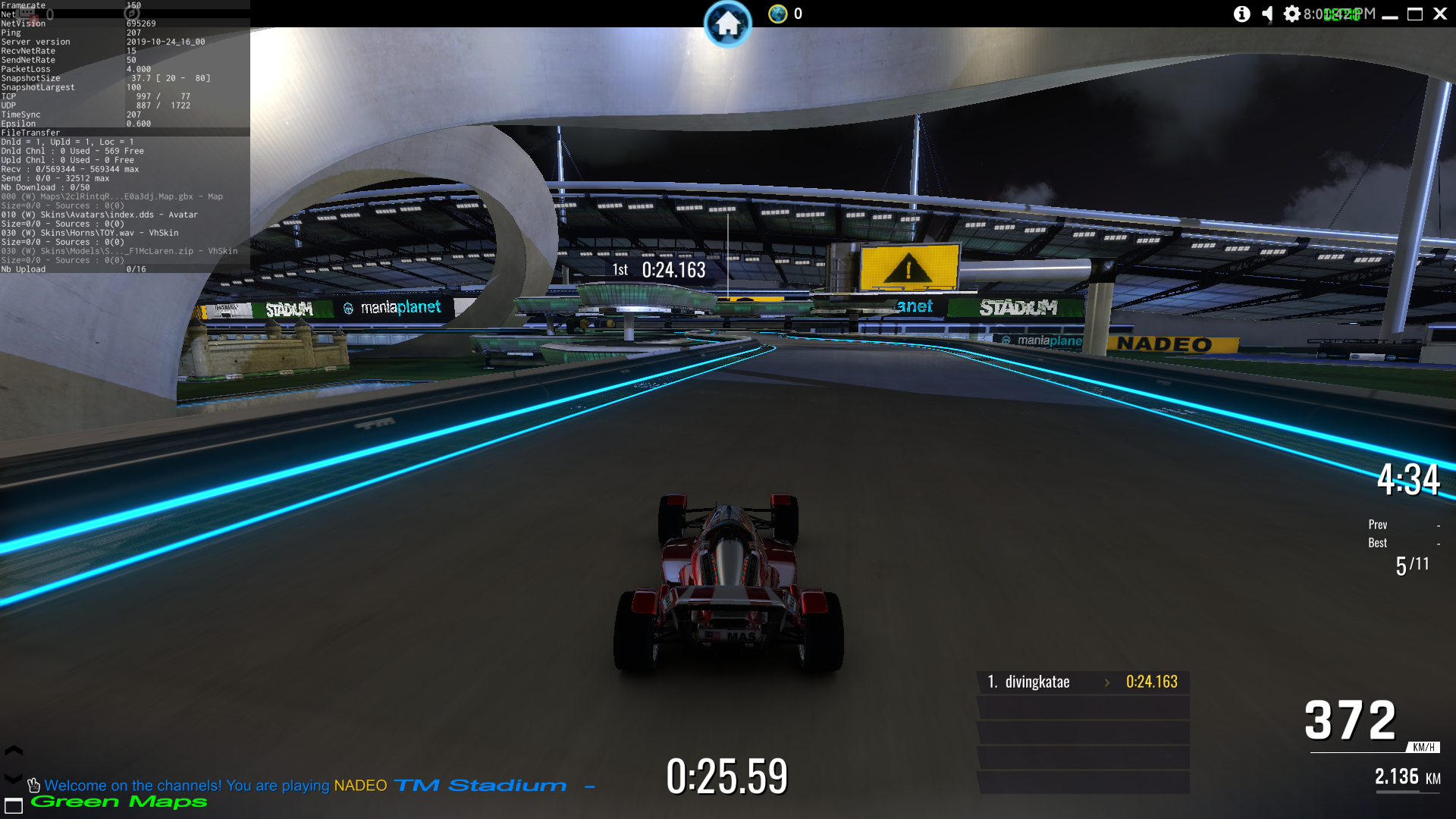
Pressing the -/_ (Minus/Underscore) key during gameplay will bring up the Analyser which displays some stats about the game. Pressing it the first time will bring up some simplified stats, while pressing it a second time gives full debugging details, as shown above. The Analyser has been present in TrackMania Sunrise DemoBeta1, and every TrackMania game since TrackMania Sunrise Extreme.
Additional Debug Text#
Further debug texts can be drawn in the game by pressing CTRL + F11 or CTRL + F12.
Old settings menus#
While the settings menu was completely replaced in ManiaPlanet 4.1, the old settings menus are still accessible.
VR mode#
In the old 3D anaglyph settings menu, there is an option to set the mode to VR. However, this mode only is non-functional since ManiaPlanet 4 and only supported Oculus Rift headsets.
TrafficCar#
The TrafficCar is an unused car that was left in the game. It does not have a separate 3D model, so it uses the model and hitbox of the ValleyCar instead.
Its handling is also somewhat similar to the ValleyCar but is still a lot different. Notably, it accelerates faster, steers less sharp, and is much lighter. The car can also bounce on water.
While no official titlepacks allow for making a map with the TrafficCar, a TM2 map can be externally edited with tools like GBX.NET Explorer, and changes must be made to the PlayerModel:
- Ident must be set to TrafficCar
- Collection must be set to Vehicles
- Author must be set to Nadeo
The map must then be loaded in a compatible titlepack in-game, such as TMAll.
An item can also be edited to reference the TrafficCar ObjectInfo file, for easier use within custom titlepacks.
|
The TrackMania series | |
|---|---|
|
Windows |
TrackMania (2003) (Prototypes) • TrackMania Sunrise (Prototypes) • TrackMania Original (Prototypes) • TrackMania Nations ESWC (Prototype) • ManiaPlanet • Trackmania Turbo (2016) • Trackmania (2020) |
|
Adobe Flash |
|
|
Nintendo DS |
|
|
Wii |
|
|
PlayStation 4, Xbox One |
|
|
PlayStation 5, Xbox Series X |
|