 This article has a talk page!
Debug Menu#

|
To do: |
Like all of Gust's PlayStation 2 Atelier games before Atelier Iris: Eternal Mana, a fairly elaborate debug menu remains in this game as well. You can apply the following code for a cheat device that supports raw codes, such as a CodeBreaker or a GameShark to enable it.
Lilie no Atelier: Salburg no Renkinjutsushi 3 Plus Codes (SLPM_65116):

Master Code (For an actual PS2 only)
9026BFD8 0C09AF9E

Enable Debug Menu
D08BEF90 0000FFF7
201E20EC 08097A2C
D08BEF90 0000FFFF
201E20EC 080789FA
With the code above active, hold Start while the opening movie is playing to appear in this menu. The regular version of the game does not have the BTLTEST debug option.

Upon first boot, we will come across this screen. It's likely some of the names in this menu represent various developer names that worked on the game. The option, TAKANASI has no function.
HIGDON#

This menu contains quite a bit of variety on what you can do here.
- Selecting Buc will allow you to view all the character portraits in the game.
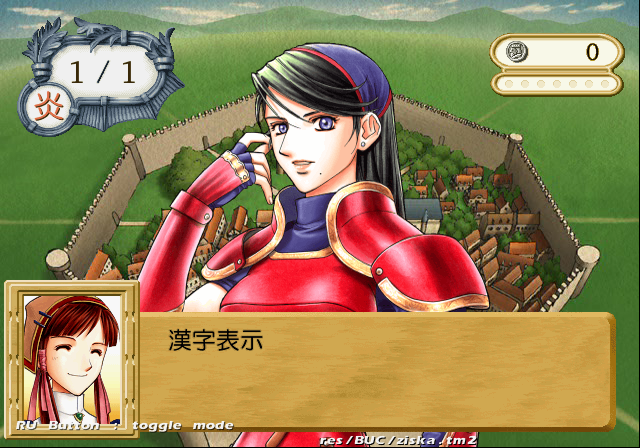
- Selecting Ipu will allow you to view all of the background images, such as town scenery.
- Selecting Tex2D Group will allow you to view and change all of the images in the game.


- Selecting Sound will allow you to listen to all the music in that game, as well as voices and SFX.

- Selecting Movie will allow you to watch all the movies in the game.
Y.TAKEZAWA#


Inside this menu are an assortment of options. It contains memory card options, HDD install options, view HDD contents, text settings and so forth. There is quite a bit of options to choose from in this menu.
KONISHI#


Inside this menu you will find shop and item-related debug options.
NARIMATSU#


This menu allows you to view endings, quick start the game without any opening cinematics, an animation viewer and various others.
BTLTEST#


The battle debug option. This will allow you to fight against enemies of your choice and set the stats for each party member individually.
(Source: Original TCRF research)
Unused Images#
Two unused demo images representing the release date of the game can be seen below.
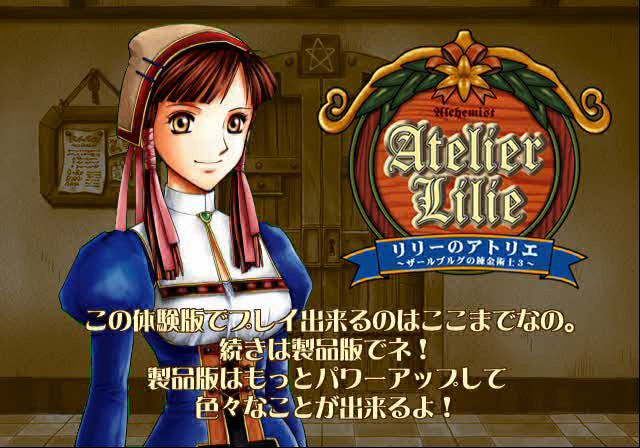
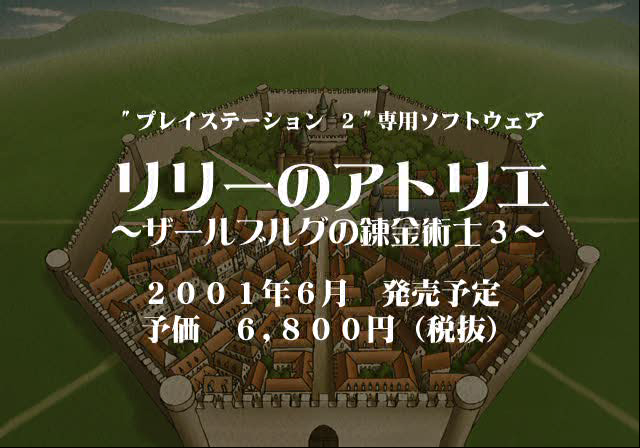
(Source: Original TCRF research)
Unused Menu Options#

An unused menu option with PCM and AC3 audio options can be seen here. This doesn't work anymore.
Debug Logging#
Within the game is a printf function that doesn't print anything anymore. This would have logged various background information to a debug unit. This logs information such as files loaded and memory information. It would also report errors if any occurred. To re-enable this mode, apply the below code:
SLPM-65116 code:

Re-enable printf Messages
2028A808 0809AE98
If you are playing the game on a regular PlayStation 2, you will need to use a TOOL, RDB, or a debug version of OPL to view the logs. If you are playing on an emulator, you can see this information by enabling the option "Show Console". Below is an example of what type of information gets logged.
StartUp
sif initialized
Cdvd initialized
HddGetFullPass=yomikaki
HddGetReadPass=yomikomi
hdd berore irx initialized
cd initialized
EzADPCM driver version 0.11
 Exit EzADPCM loader thread
goto adpcm cmd loop
loadmodule: id 37, ret 0
result=37 result2=0
iop initialized
Hdd.status= 3
HDD PowerOff Thred Start
Mount pfs
Unknown device 'hdd'
Known devices are  pfs:(PFS)  mc:(Memory Card)  cdrom:(CD-ROM )  rom:(ROM/Flash)
tty:(CONSOLE)
cannot mount partition -19
hdd after irx initialized
sound initialized
memory card initialized
controller initialized
AdpcmInit
EzADPCM: create thread ID= 27194173
rest:0
 alloc memory 0x000cfc00 - 0x000d0c00 (1000)
AdpcmSetSpu2Addr
ADPCM set spu2addr:1fe000
EzMIDI: create thread ID= 27191359, SoundInit() initialized
¥VPACK¥V0001.VP;1
¥VPACK¥V0739.VP;1
¥VPACK¥V1645.VP;1
¥VPACK¥V2146.VP;1
¥VPACK¥V2506.VP;1
¥VPACK¥V3101.VP;1
¥VPACK¥V3785.VP;1
¥VPACK¥V4461.VP;1
¥VPACK¥V4877.VP;1
¥VPACK¥V5442.VP;1
¥VPACK¥V5785.VP;1
¥VPACK¥V6315.VP;1
¥VPACK¥V6708.VP;1
¥VPACK¥V7173.VP;1
¥VPACK¥V8001.VP;1
¥VPACK¥V8200.VP;1
¥VPACK¥V2146.VP;1
¥VPACK¥V9100.VP;1
¥STREAM¥ENDING48.PCM;1
¥STREAM¥BADEND.PCM;1
¥STREAM¥TITLE48.PCM;1
¥STREAM¥E_T.PCM;1
¥STREAM¥I_T.PCM;1
¥STREAM¥J_T.PCM;1
¥STREAM¥L_T.PCM;1
¥STREAM¥M_T.PCM;1
¥STREAM¥P_T.PCM;1
¥STREAM¥Q_T.PCM;1
¥STREAM¥S_T.PCM;1
¥STREAM¥T_T.PCM;1
¥STREAM¥U_T.PCM;1
¥STREAM¥V_T.PCM;1
¥STREAM¥W_T.PCM;1
¥STREAM¥X_T.PCM;1
¥STREAM¥Y_T.PCM;1
¥STREAM¥OP.PCM;1
¥STREAM¥MIRAI.PCM;1
VoiceInit() initialized
loadmodule: fname cdrom0:¥RES¥EPSPRINT.IRX args 0 arg
IOP PRINTER DRIVER: Seiko Epson Corporation. Version 1.0.0
loadmodule: id 38, ret 0
PrinterDriver initialized
sel=0
name=fpack/resTIM.fp
¥RPK.BIN;1
pmode:0,clut_flg:1
w:16,h:1
idx:res/TIM/FONT01.TIM
CLUT size:44
idx:res/TIM/FONT01.TIM
w:256,h:256,wbit:8,hbit:8,wbyte:128
sel=0
name=fpack/resTIM.fp
pmode:0,clut_flg:1
w:16,h:8
idx:res/TIM/JYOHO.TIM
CLUT size:268
idx:res/TIM/JYOHO.TIM
w:256,h:128,wbit:8,hbit:7,wbyte:128
sel=0
name=fpack/resTIM.fp
pmode:0,clut_flg:1
w:16,h:16
idx:res/TIM/STATUS.TIM
CLUT size:524
idx:res/TIM/STATUS.TIM
w:256,h:256,wbit:8,hbit:8,wbyte:128
sel=0
name=fpack/resTIM.fp
pmode:0,clut_flg:1
w:16,h:6
idx:res/TIM/CHA_NAME.TIM
CLUT size:204
idx:res/TIM/CHA_NAME.TIM
w:256,h:256,wbit:8,hbit:8,wbyte:128
sel=0
name=fpack/resTIM.fp
pmode:0,clut_flg:1
w:16,h:8
idx:res/TIM/CHA_NAM2.TIM
CLUT size:268
idx:res/TIM/CHA_NAM2.TIM
w:256,h:128,wbit:8,hbit:7,wbyte:128
sel=0
name=fpack/resTIM.fp
sel=0
name=sound/se/stereo/system.bd.lzr
sel=0
name=sound/se/stereo/system.bd
WARNING: WaitEventFlag KE_CAN_NOT_WAIT
sel=0
name=sound/se/stereo/system.hd.lzr
sel=0
name=sound/se/stereo/system.hd
SeBody OK
*T0_COUNT=9446
system init end.
ExhiGetNextExSpDate = 362
OptionInit
sel=0
name=fpack/Q01.fp
pmode:1,clut_flg:1
w:256,h:1
idx:res/QvMap/Q01_1.tim
CLUT size:524
idx:res/QvMap/Q01_1.tim
w:512,h:512,wbit:9,hbit:9,wbyte:512
sel=0
name=fpack/Q01.fp
pmode:1,clut_flg:1
w:256,h:1
idx:res/QvMap/Q01_2.tim
CLUT size:524
idx:res/QvMap/Q01_2.tim
w:512,h:512,wbit:9,hbit:9,wbyte:512
seqStep 0 <- 13 check:0
sel=0
name=res/IPU/town1.ipu128.lzr
sel=0
name=res/IPU/town1.ipu128
IPU D 256 256
sel=0
name=fpack/resTIM.fp
pmode:0,clut_flg:1
w:16,h:1
idx:res/TIM/MESSAGE1.TIM
CLUT size:44
idx:res/TIM/MESSAGE1.TIM
w:256,h:256,wbit:8,hbit:8,wbyte:128
sel=0
name=fpack/resTIM.fp
pmode:0,clut_flg:1
w:16,h:1
idx:res/TIM/MESSAGE2.TIM
CLUT size:44
idx:res/TIM/MESSAGE2.TIM
w:128,h:128,wbit:7,hbit:7,wbyte:64
seqStep 1 <- 0 check:0
MMS_LOAD_INDEX:Error -105
seqStep 4 <- 1 check:-105
(Source: Original TCRF research)