 This article has a talk page!
Unused Music IDs#
Below are unused music IDs that were once other songs during development. Forcing them to play will result in playing used music in the final game with little to no difference. You will find categories of which these songs belonged to below.
Master Code (for console users only)
902BD1D0 0C0AF41C
Force Sequenced Song to Play
20FA4BC0 2410????
20137064 0C3E92F0
20137068 0080802D
20FA4BC4 001010C0
20FA4BC8 03E00008
With the above code on, simply take a Music ID from below and put it where the "????" is in the above code to hear the song play. It is best to enter Sound Mode from the Bonus screen with this code on.
Music ID |
Music That Plays |
Music Internal Name |
Music Category |
Notes |
|---|---|---|---|---|
000C |
Lost Technology |
qv_gate |
Map music |
|
001A |
Lost Technology |
qv_markis01 |
Map music |
|
001C |
The Forest of Meeting |
qv_puni01 |
Map music |
This song is slightly louder than its used version. |
0023 |
Town Where the Bells Chime |
qv_core |
Map music |
|
0025 |
Town Where the Bells Chime |
qv_youseishop |
Map music |
Internal name translation: Fairy Shop. |
0027 |
Lost Technology |
qv_erfolk |
Map music |
|
002D |
Town Where the Bells Chime |
qv_extra02 |
Map music |
|
002F |
Town Where the Bells Chime |
qv_extra03 |
Map music |
|
0030 |
Town Where the Bells Chime |
qv_extra04 |
Map music |
|
0031 |
The Forest of Meeting |
qv_sougen01 |
Map music |
Internal name translation: Meadows, grassland. |
0032 |
Town Where the Bells Chime |
qv_room01 |
Map music |
|
0036 |
Town Where the Bells Chime |
qv_pr04 |
Map music |
|
003B |
The Forest of Meeting |
wm_05 |
World Map Music |
|
003C |
The Forest of Meeting |
wm_06 |
World Map Music |
|
0046 |
Town Where the Bells Chime |
bt_pr01 |
Battle Music |
|
0047 |
Town Where the Bells Chime |
bt_pr02 |
Battle Music |
|
004F |
Lost Technology |
es_renkin |
Event Music |
|
0052 |
Town Where the Bells Chime |
es_03 |
Event Music |
|
0053 |
Town Where the Bells Chime |
es_04 |
Event Music |
|
0054 |
Town Where the Bells Chime |
ec_krein |
Event Music |
|
0055 |
Town Where the Bells Chime |
ec_ryta |
Event Music |
|
0056 |
Town Where the Bells Chime |
ec_popo |
Event Music |
|
0057 |
Town Where the Bells Chime |
ec_arlin |
Event Music |
|
0058 |
Town Where the Bells Chime |
ec_norun |
Event Music |
|
0059 |
Town Where the Bells Chime |
ec_delsus |
Event Music |
|
005A |
Town Where the Bells Chime |
ec_maretta |
Event Music |
|
005C |
Town Where the Bells Chime |
ec_iris |
Event Music |
|
(Source: Original TCRF research)
Debug Menu#

|
To do: |
A debug menu containing a few neat tools can be found left in the game. It has options such as an animation viewer and map editor.
Main Debug Menu#

The main debug menu. Currently, only QvAnmTest and QvTexObjEdit work.
QvTest#

Inside QvTest option. It's unclear what this is.
QvSeMapTest#

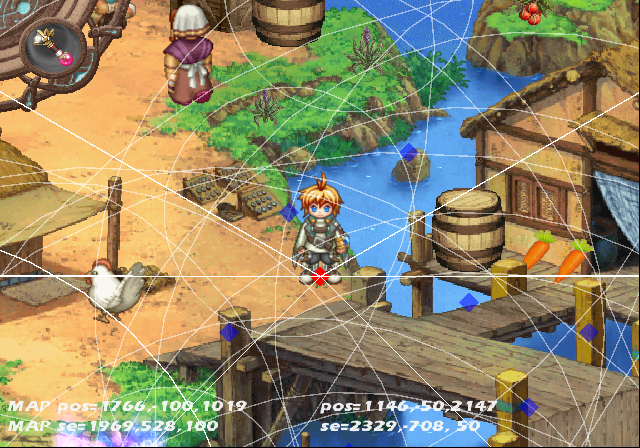
This is a level select option. You can enable it with the code below for the US version of the game.
Enable Level Select (press Triangle in-game to enter)
201ABCF4 0C0922D8
D0E2E9E0 00004200
20248C0C 00000000
D0E2E9E0 00000000
20248C0C 54620005
Once inside this menu, press R2+X to enter a map of your choice. Using this menu will also enable some extra debug options such as being able to view the coordinates of the player, and SFX locations. Press Start to bring this info up. Markers in blue represent a map SFX location.
Animation Viewer#


Inside QvAnmTest option. This allows you to view all the sprites in the game and view their various animated states.
Map Editor#
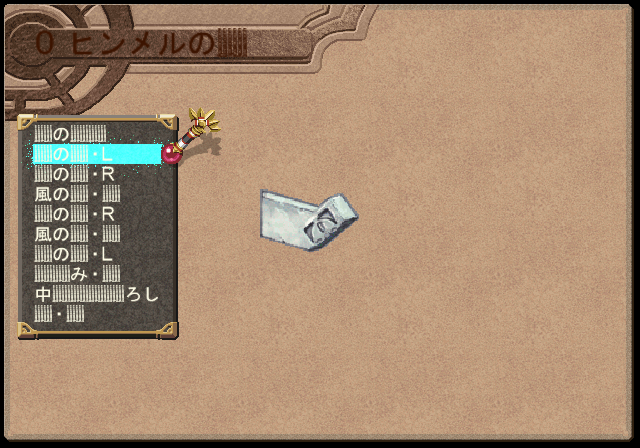


Inside QvTexObjEdit option. This appears to be a map/object editor. You can select various objects and place them in the map. It is unclear how the saving option works while in this mode. It might save the changes to an HDD if it were plugged in.
Extra Debug Functions#
Debug functions not present in the master debug menu. These are likely leftovers from previous Gust games.
Animation Viewer 2#


Another animation viewer, tucked away in the game's code can be seen here. You can activate it with the following code for the US version of the game.
Enable Animation Debug (press Triangle in-game to enter)
201ABCF4 0C04B029
Additionally, you will need to go to the following memory locations while inside the debug option and set values at their locations to change the sprite and animation the sprite is doing.
Animation Debug Memory Offsets.

01FE22B4 0000xxxx Current Player / Monster. Higher values are enemies and event animations.
01FE22B8 000000xx Current Animation.

Animation Debug Buttons

X = Play Current Animation
O = Exit / Back
L1 = Flip Sprite Upside Down
R1 = Flip Sprite Left / Right
L2 (Hold) = Loop Animation.
Start = Enter Frame-by-frame Debug Option.
Select = Change BG to Black or White.
Battle Debug#
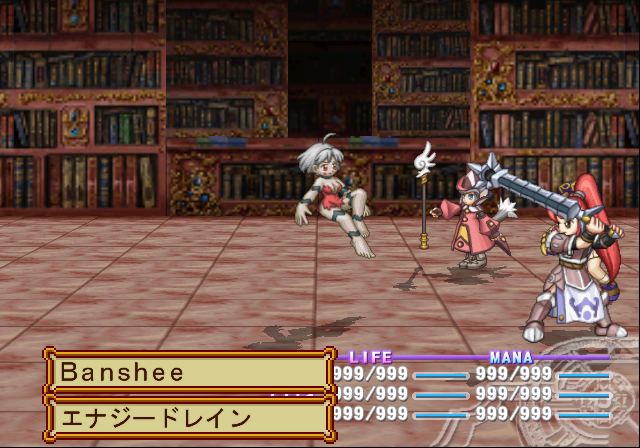
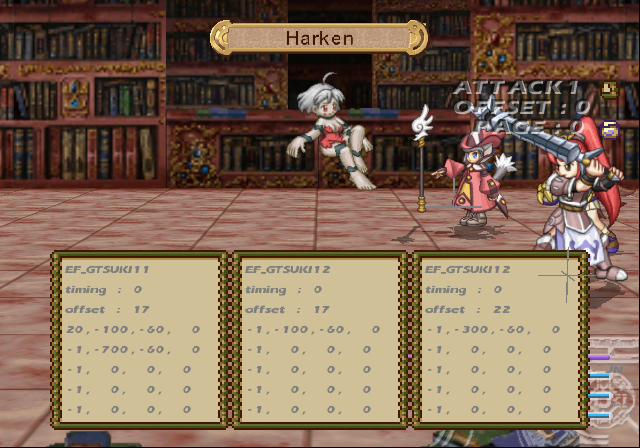
You can do quite a lot of things in this debug option. You can attack enemies, attack your own party while controlling a monster, view attacks and skill animations, change attack patterns and skills, adjust and see skill effects in real time, and even add them to existing animations!
Enable Battle Debug (press Triangle in-game to enter)
201ABCF4 0C08A446
Additionally, you may want to activate these codes while inside the menu to change the current player / enemy:
10B6E5AA 0000xxxx

xxxx = Player select. 0000 is Klein, 0001 is Lita and so forth.

20B6E5B0 xxxxyyyy

xxxx = Monster Position. A value of 000C is close to the party.
yyyy = Monster displayed on field.
Controls:
Controls (Main Screen)
L1 / R1 = Change Attack / Skill of current player or enemy.
X = Enter Attack Mode. This attacks with the current skill selected.
Triangle = Change between controllable target.
D-Pad (After entering Attack Mode) = Select target to attack.
Select = Enter attack configuration menu.

Controls (Attack Configuration Screen)
D-Pad = Change current selected option.
L1 / R1 = Change highlighted option.
Start = Clear highlighted option.
BGM Test#

In this menu, you can select all of the music in the game, including the streamed songs, such as the opening and ending songs.
Enable BGM Test (press Triangle in-game to enter)
201ABCF4 0C04EA2C
D0E2EA60 0000BDFF
2013AC58 00000000
D0E2EA60 0000FFFF
2013AC58 1462004B
Controls:
Left / Right = Move through options of current selection.
R1 / R2 = Move through options by a lot.
With the code on, press R2+X to hear your current selection. Additionally, you may want to activate this code to move through the options in this menu.
D1FE2064 0000000D
01FE206C 000000xx
xx =
00 Bgm
01 BgmReplay
02 BgmFadeOut
03 BgmStop
04 Se
05 SeStop
06 Voice
07 VoiceStop
08 BgmVolume
09 SeVolume
0A BgmChVolume (doesn't appear to work)
0B StreamPlay
0C StreamStop
Map Effect Editor#


It's unclear what this option is. You can select effects and make them display at a set position in this option. It appears you would be able to save these edits to a dev kit or memory card or upload the result to a PC.
(Source: Original TCRF research)
Unused Sound#
An unused sound effect from Viorate no Atelier: Gramnad no Renkinjutsushi 2 can be found left in this game.
(Source: Original TCRF research)