 This article has a talk page!


64DD Error Messages#
Japanese cartridge
Encoding SHIFT-JIS Windows Japanese CP-932
800CD580 0
800CD584 1
800CD588 2
800CD58C 3
800CD590 4
800CD594 5
800CD598 6
800CD59C 7
800CD5A0 8
800CD5A4 9
800CD5A8 エラー番号              Error Number
800CD5B4 取り扱い説明書をお読みください。       Please read the instruction manual.
800CD5D8 【注意】アクセスランプ点滅中に        【Caution】 While the access lamp is blinking
800CD5F8 ディスクを抜かないでください。        Do not remove the disc.
800CD618 もう一度ディスクを挿入して      Insert the disc again
800CD634 ください。              please.
800CD640 イジェクトボタンが押されてい     Is the eject button
800CD660 ませんか。              pressed?
800CD66C 一度ディスクを抜いてきちんと     Please remove the disc once and
800CD68C 差し込んでください。         insert it properly.
800CD6A4 間違ったディスクが挿入されている       The wrong disk may
800CD6C8 可能性があります。確認して      be inserted. Have you
800CD6E4 ディスクが差し込まれていますか。       checked and inserted the disc?
800CD708 起動時のディスクを挿入して      Insert the disk at startup
Expansion Kit Content#

|
To do: |
Most of the content added by the F-Zero X Expansion Kit, released on the ill-fated Nintendo 64DD in Japan, is actually present in the main game and merely enabled by the Expansion Kit. This is even true for the overseas versions, which didn't get the Expansion Kit. Such content includes all the new machines, several graphics, and an unfinished placeholder for the track editor.
Super Falcon#
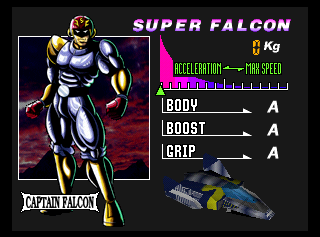

There are two versions of Super Falcon accessible. One is a unique character slot that uses mostly default data, but shows his portrait. The other is similar to what the Expansion Kit uses, by changing Captain Falcon's data.
To access Super Falcon's portrait (in emulation), follow the instructions below. For Super Falcon's vehicle and stats, use the Create Machine application to generate codes for any region.
Instructions: This cheat needs to be used once the track is loaded since the game will crash while loading the course, thus only being accessible in emulation. Enter the desired track in any mode with any character. Once the track loads, activate the cheat code, then enter the menu in-game (by pressing Start) and select Settings. You will now be presented with the pilot profile of Super Falcon and a buggy Blue Falcon with maxed-out stats. The vehicle will be playable until it crosses the finish line, where the game will instantly freeze.
Something interesting to note is that in the Expansion Kit, Super Falcon actually has a B in Boost and weighs 790 KG, instead of an A in Boost and 0 KG. The even more interesting thing is that Super Falcon's actual machine is in the game's files, completely separate from the bugged-out Super Falcon.
Version |
GameShark code |
|---|---|
US |
800E5EE1 001E |
Europe |
800D8731 001E |
Japan |
800E5AB1 001E |
China |
800D8F69 001E |
Super Stingray and Super Cat Leftovers#
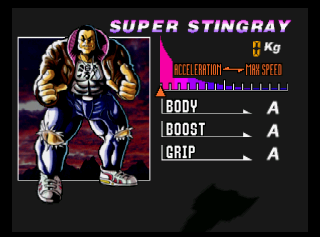
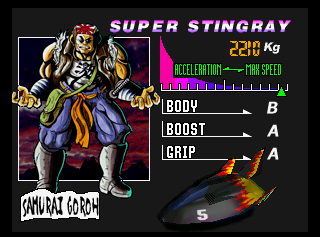


Using a character modifier code and setting the value to 21 or 22 (on emulation) will reveal that Samurai Goroh and Jody Summer's profile images are actually included in the original game rather than the Expansion Kit version. Upon accessing the machine settings screen, the game will slow down because they don't have a machine model defined, even though their Super Machines are in the game files. Like with the Super Falcon, the Super Machines can be accessed with the Create Machine application.
GameShark Code |
Effect |
|---|---|
800E5EE1 0021 |
Perfect Samurai Goroh |
800E5EE1 0022 |
Perfect Jody Summer |
Edit Cup Graphic Leftover#

The building texture for the Edit Cup Ending from the Expansion Kit is present in the US version, and can be accessed using the F-Zero Execution Project (a track editor) and adding it to a custom track.
Custom Machines#
Data for creating custom machines exists in the game. In fact, through the use of third-party programs it's entirely possible to create your own machine, including unique stats, weight, emblem, parts, and name. Playing your created machine requires a cheat device, such as a GameShark.
Longer Races#
Graphics and functionality for 4- and 5-lap races, seen in early magazine screenshots, are still present in the ROM. Use the code 800CD00F 0004 for 4-lap races or 800CD00F 0005 for 5-lap races.
Unfortunately, increasing the number of laps will also cause the CPU racers to speed up tremendously, meaning you'll end up in last place almost all the time. The authentic F-Zero experience!
(Source: fzeroman)
Regional Differences#
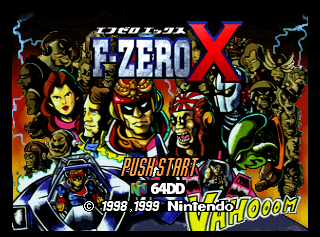
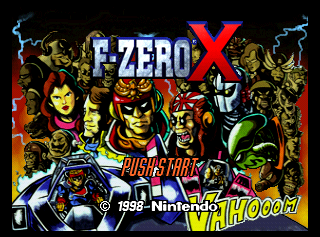
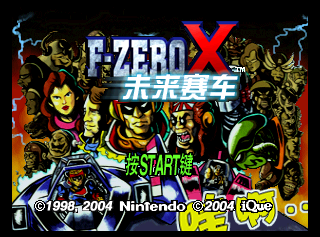
- Pardon the 64DD logo. Other than that, here's the differences between Japan, International, and China.
Japan |
US/Europe |
China |
|---|---|---|
 |
 |
 |
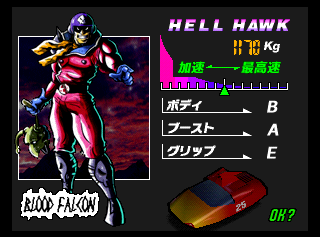
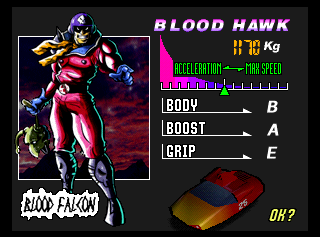
- Blood Falcon's vehicle, the Blood Hawk, is named the Hell Hawk in Japan. Later Japanese games adopted the international name.
|
Japan |
International |
|---|---|
|
|
- Three pilots have different names in the Japanese version.
|
Japan |
International |
|---|---|
|
|
|
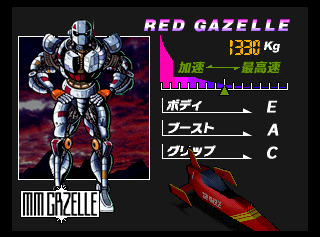

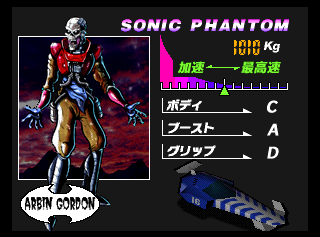
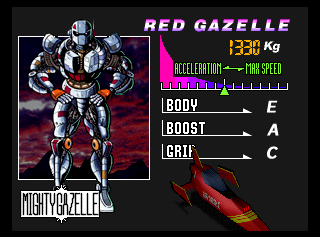

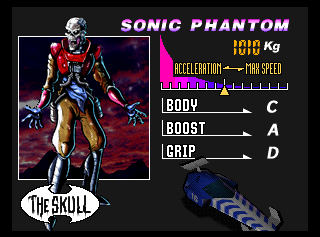
- The iQue version replaced many graphics and sounds. All graphics and text were changed to be written in Chinese and Mr. Zero, the announcer, was dubbed into Chinese. Some in-game billboards were also changed to show the iQue logo.
Revisional Differences#
The Virtual Console release for the Wii differs slightly from the N64 and iQue versions.
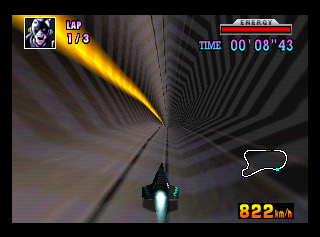
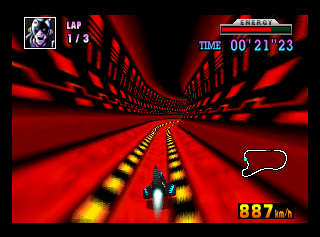
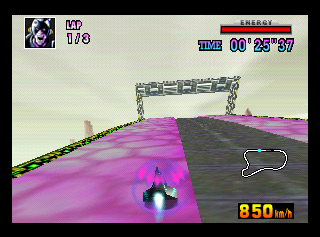
- There's a fault in emulation that causes textures to appear differently. This is most notable in Sand Ocean 1, where there is a very bright section of the pipes that is not seen on the N64 or iQue versions.
|
N64 |
Wii Virtual Console |
|---|---|
|
|
|


Crash Debugger#

Crash the game, then hold Z + L and press A, C-Up (×2), B, C-Right (×2), B, C-Right, B, C-Right, Start.
A similar crash debugger can be found in Paper Mario.
(Source: fkualol)
Debugging Text#

|
Please elaborate. |
Found at 0x0006A680.
----------------------Double-Error CH: %x %f
----------------------Double-Error NT: %x
CAUTION:SUB IS SEPARATED FROM GROUP
CAUTION:PAUSE EMERGENCY
Error:Wait Track disappear
ptr2 %x
--4 %x
NoteOff Comes during wait release %x (note %x)
Slow Release Batting
Alloc Error:Dim voice-Alloc %d
Error:Same List Add
Already Cut
Intterupt UseStop %d (Kill %d)
Intterupt RelWait %d (Kill %d)
Drop Voice (Prio %x)
Audio:Envp: overflow  %f
Audio:Track:Warning: No Free Notetrack
Stop Release
Error:Same List Add
Wait Time out!
WARNING: NPRG: cannot change %d
Audio:Track:NOTE:UNDEFINED NOTE COM. %x
Error: Subtrack no prg.
ERR %x
Note OverFlow %d
trs %d , %d, %d
SUB:ERR:BANK %d NOT CACHED.
SUB:ERR:BANK %d NOT CACHED.
[%2x]
Err :Sub %x ,address %x:Undefined SubTrack Function %x
VoiceLoad Error Bank:%d,Prog:%d
Disappear Sequence or Bank %d
Group:Undefine upper C0h command (%x)
Group:Undefined Command

CAUTION:WAVE CACHE FULL %d SUPERDMA BankCount %d
BANK LOAD MISS! FOR %d
BankCount %d
Flush Start
%d ->%d
useflag %d
BankCount %d
%2x LoadCtrl, Ptr %x and Media is %d
Load Bank, Type %d , ID %d
get auto
get s-auto %x
Seq %d Write ID OK %d!
Banknumber %d
Bank Offset %x %d %d
PEP Touch %x
FastCopy
FastCopy
Not Supported
Error: DMA Prohibited Media [%d]
Warning: size not align 16 %x  (%s)
Load Bank BG, Type %d , ID %d
get auto
get s-auto %x
Clear Workarea %x -%x size %x
AudioHeap is %x
Heap reset.Synth Change %x
Heap %x %x %x
Main Heap Initialize.
%d :WaveA %d WaveB %d Inst %d,Perc %d
---------- Init Completed. ------------
 Syndrv    :[%6d]
 Seqdrv    :[%6d]
 audiodata :[%6d]
----
Entry--- %d %d
---Block LPS here
===Block LPS end
SLOWCOPY����Not Supported
Req: Src %x Dest %x Len %x,media %d,retcode %d
Remain Size %d
---Block BG here
===Block BG end
Retcode %x
Other Type: Not Write ID.
BGLOAD:Error: dma length 0
BGCOPY  Not Supported
InstTop is %x
Error: Already wavetable is touched %x.
Touch Warning: Length zero %x
Media Convert %d -> %d
It's busy now!!!!! %d
BG LOAD BUFFER is OVER.
Warning: Length zero %x
Wave Load %d
Total Bg Wave Load %d
Receive %d
============Error: Magic is Broken after loading.
Remain DMA: %d
N start %d
============Error: Magic is Broken: %x
Error: No Handle.
Success: %x
It's busy now!!!!! %d
BG LOAD BUFFER is OVER.
Base %x,Len %x Media %d
Wave Load %d
Total Bg Wave Load %d
Warning:Kill Note  %x
Kill Voice %d (ID %d) %d
Warning: Running Sequence's data disappear!
%x %x %x
Audio:Memory:Heap OverFlow : Not Allocate %d!
%x %x %x
Audio:Memory:Heap OverFlow : Not Allocate %d!
Audio:Memory:DataHeap Not Allocate
StayHeap Not Allocate %d
AutoHeap Not Allocate %d
Status ID0 : %d  ID1 : %d
id 0 is Stopping
id 0 is Stop
id 1 is Stopping
id 1 is Stop
WARNING: NO FREE AUTOSEQ AREA.
WARNING: NO STOP AUTO AREA.
         AND TRY FORCE TO STOP SIDE
Check ID0  (seq ID %d) Useing ...
Check ID1  (seq ID %d) Useing ...
No Free Seq area.
CH %d: ID %d
TWO SIDES ARE LOADING... ALLOC CANCELED.
WARNING: Before Area Overlaid After.
WARNING: After Area Overlaid Before.
MEMORY:SzHeapAlloc ERROR: sza->side %d
Audio:MEMORY:SzHeap Overflow error. (%d bytes)
Auto Heap Unhit for ID %d
Heap Reconstruct Start %x
---------------------------------------TEMPO %d %f
%f
%f
AHPBASE %x
AHPCUR  %x
HeapTop %x
SynoutRate %d / %d
FXSIZE %d
FXCOMP %d
FXDOWN %d
WaveCacheLen: %d
SpecChange Finished
Warning:Emem Over,not alloc %d
Single AutoSize %d
Single Ptr %x
Request--------Single-Auto, %d
Retry %x, %x, len %x
DMAing list %d is killed.
Try Kill %d
Try Kill %x %x
Try Kill %x %x %x
Rom back %x %x
Error sw NULL
Request--------Single-Stay, %d
Try Kill %d
Try Kill %x %x
Try Kill %x %x %x
Terminate-Canceled Channel %d,Phase %d
DAC:Lost 1 Frame.
Address Error %x
DMA: Request queue over.( %d )
Audio:now-max tasklen is %d / %d
Audio:Warning:ABI Tasklist length over (%d)
BGLOAD Start %d
Error: OverFlow Your Request
---AudioSending (%d->%d)
AudioSend: %d -> %d (%d)
Warning: MesgQ is Full, Retry Next Send.
Next Start %d
Continue Port
%d -> %d
Sync-Frame  Break. (Remain %d [%d,%d])
specchg conjunction error (Msg:%d Cur:%d)
Warning : Queue is not empty,drop this (number %d )
Warning: SpecChange is processing now[number %d]
Same SpecChange...  Cancel.
Overwrite SpecNumber.[->%d]
Coherency safety wait..
Normal SpecChange [num %d]
Undefined Port Command %d
Found at 0x005286DF:
== MML PASS CHECK ===Found at 0x00070050:
LEVEL SE INTERNAL CALL! player=%02x SE Number= %02x
LEVEL SE FINAL CALL! player=%02x SE Number= %02x
LEVEL SE FINAL CALL! player=%02x SE Number= %02x
LEVEL SE FINAL CALL! player=%02x SE Number= %02x
LEVEL SE FINAL CALL! player=%02x SE Number= %02x
LEVEL SE FINAL CALL! player=%02x SE Number= %02x
LEVEL SE FINAL CALL! player=%02x SE Number= %02x
LEVEL SE FINAL CALL! player=%02x SE Number= %02x
LEVEL SE FINAL CALL! player=%02x SE Number= %02x
LEVEL SE FINAL CALL! player=%02x SE Number= %02x
LEVEL SE FINAL CALL! player=%02x SE Number= %02x
Ouch!! UN-SUPORTED TRG SE NUM WAS CALLED !!!!!!! num = %02x
LEVEL SE FADEOUT COMPLETE ROUTINE
BGM FADEOUT1 COMPLETE ROUTINE
BGM FADEOUT2 COMPLETE ROUTINE
BGM FADEOUT3 COMPLETE ROUTINE
BGM FADEOUT COMPLETE ROUTINE (in the PAUSE ROUTINE)
ENEMY ENGINE START MACHINE No.= %02x
ENEMY ENGINE STOP!
len = %d
Player Level SE Start !! player =  %02x SE number = %02x
PLAYER LEVEL SE STACK OVER!!
Na_PlyLevelSE_Stop Called player = %02x num = %02x
NON ENTRIED LEVEL SE STOPED! SE NUMBER = %02x
VOICE SE STACK OVER!!
System SE = %02x
hanabi se called. pan = %02x volume = %02x
ENGINE SOUND ECHO START MACHINE NO = %02x
ENGINE SOUND ECHO STOPED! MACHINE No.= %02x
ENGINE SOUND STOPED! MACHINE No.= %02x
ENGINE SOUND START! MACHINE No.= %02x
WINING RUN ENGINE SOUND START! MACHINE No.= %02x
64DD STREEM BGM Ready %02x
64DD STREEM BGM Start%02x
Na_DDBgm_Stop Called
Na_BetaBgm_Start num = %02x
Na_BetaBgm_Stop Called
Na_ROMBgm_Start Called num = %02x
Na_ROMBgm_Stop Called
RETIRE FUNCTION CALLED!!
Level SE Fadeout !!
Na_BetaBgm_Stop2 Called
Na_BetaBgm_Stop3 Called
Pause Called!! Status =  %02x
Spec Change No = %02x
Player Mode = %02x
All Sound Off
Na_SeSeq_Start for ROM Called
Change Sound Mode No = %02x
Na_chakuchi Called player = %02x volume = %f
Na_chakuchi Edited volume = %f
Na_Guitor_Start Called
Na_Guitor_Start for ROM CalledReferences#
- Producer was Shigeru Miyamoto.↩︎
- F-Zero X Speeds to Stores - IGN↩︎
- Nintendo Switch Online: Nintendo 64 - F-Zero X Trailer - IGN. "F-Zero X will be available for Nintendo Switch Online + Expansion Pack members from March 11, 2022."↩︎
- F-Zero X out in Canada! Order now!↩︎
- F-Zero X - iQueBrew↩︎
- F-ZERO X INTRODUCTION↩︎
- Nintendo Official Magazine (UK) 75 December 1998, p. 20. "Release: 6 November"↩︎
- Swedish Super Play November 1998, p. 44. "SLÄPPS 5 November"↩︎
- F-Zero X. "On Tue, 20 Oct 1998, coolguy wrote: > Hello... F-Zero X came out last Thursday."↩︎
- SuperGamePower - Ano 04 No. 055 (1998-10)(Nova Cultural)(BR)(pt), p. 21. "LaNçaMeNto"↩︎
|
The F-Zero series | |
|---|---|
|
SNES |
|
|
Satellaview |
|
|
Nintendo 64(DD) |
|
|
Game Boy Advance |
F-Zero Maximum Velocity (iQue Prototypes) • F-Zero GP Legend • F-Zero Climax |
|
GameCube |
|
|
Arcade |
|
|
Nintendo Switch |
|
|
Virtual Boy |
|