
|
This page is rather stubbly and could use some expansion. |
It's Marbles... But replace the marbles with bombs and you'll get this game... (probably.)
Debug Mode#
Pro Action Replay code 80807701 will enable a debug flag that allows you to do several things:
- Press Select at any time to pause/resume the game, or hold L + R + Select and press Start to reset.
- At the Hudson logo, hold Select and press Start to enter the debug menu.
Debug Menu#

The initial screen looks like a stage select, but "stage" in this context refers to individual screens/modes rather than stages. The A / B / X / Y buttons increase/decrease the screen number and Start enters the selected screen.
Valid screen numbers:
- $FB: bomb entry edit
- $FC: move type edit
- $FD: debug mode data
- $FE: sound test
- $FF: explosioin (sic) param
Other options correspond to various normal in-game screens. Pressing either L or R will go to screen $FB.
After exiting the debug menu, Select + Start can be pressed at any time during the game to enter the menu again.
A nearly identical debug mode can also be found in Bakukyuu Renpatsu! Super B-Daman.
Bomb Entry Edit#
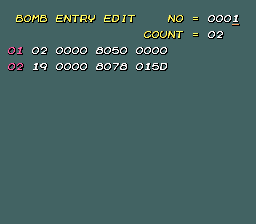
This screen allows you to edit the placement of bombs on each single-player stage.
Pressing A / B / X / Y increases/decreases the current stage number. Pressing Down switches to editing; from here, use the D-Pad and A / B / X / Y to edit the parameters of each bomb (though what each one does is currently unknown.) Press L / R to increase/decrease the number of bombs in the stage.
Press Select to select a new stage to edit; pressing Select again from here returns to the debug menu.
Move Type Edit#
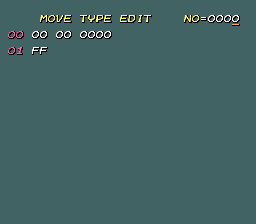
This screen seems to be for editing the movement types of each bomb on a particular single-player stage.
Debug Mode Data#
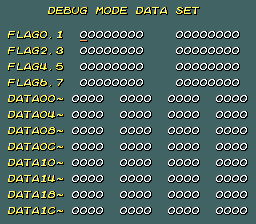
This screen is used to set/clear various flags and change the values at various RAM addresses (most effects currently unknown). Pressing Start returns to the debug menu.
The flags are located in RAM from 0x7E1F4E to 0x7E1F55, with the remaining data fields located immediately after.
Flag effects:
- 0.0: displays "move type" value on the main Edit Mode screen, though there is no apparent way to actually change the value.
Sound Test#
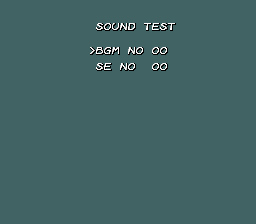
The sound test screen allows you to test sound. (Wow!)
Pressing Y / B increase/decrease the sound or music number, and B plays the selected music track or sound effect. Start returns to the debug menu.
Explosion Param Set#
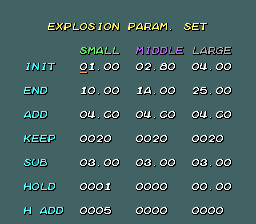
The last debug screen allows you to change the size and animation properties of the three types of explosions seen in the game.
"INIT", "END", and "ADD" are probably the initial and final explosion sizes and the speed of size increase; the other options are unknown.
(Source: Original TCRF research)
|
The Bomberman series | |
|---|---|
|
NES |
|
|
Game Boy (Color) |
Atomic Punk • Blaster Master Boy • Wario Blast: Featuring Bomberman! • Bomberman GB (US) |
|
TurboGrafx-16 |
|
|
Genesis |
|
|
SNES |
Super Bomberman • Super Bomberman 2 • Super Bomberman 3 • Super Bomberman 4 • Super Bomberman 5 |
|
Virtual Boy |
|
|
Sega Saturn |
|
|
Arcade |
|
|
Windows |
|
|
Nintendo 64 |
Bomberman 64 (US/Europe) • Bomberman 64 (Japan) • Bomberman Hero • Bomberman 64: The Second Attack |
|
Game Boy Advance |
Bomberman Tournament • Bomberman Max 2 • Bomberman Jetters • Hudson Best Collection Vol. 1: Bomberman Collection |
|
Nintendo DS |
|
|
PlayStation |
|
|
PlayStation 2 |
Bomberman Kart • Bomberman Jetters • Bomberman Land 2: Game Shijou Saidai no Theme Park |
|
GameCube |
|
|
PlayStation Portable |
|
|
Xbox 360 |
|
|
See Also | |
|
The B-Daman series | |
|---|---|
|
SNES |
|
|
Game Boy (Color) |
Super B-Daman: Fighting Phoenix • Bakukyuu Renpatsu!! Super B-Daman: Gekitan! Rising Valkyrie!! |
|
Nintendo 64 |
|
|
Game Boy Advance |
|