
|
This page is rather stubbly and could use some expansion. |
|
|
To do:
|
Angry Birds Trilogy bundles the three classic Angry Birds games we know and love into one giant package ready to play on your console, in full HD for the very first time²!
²Not if you already played them on an iPad.
Unused Graphics#



Placeholder images for the second DLC pack, the Fowl Tempered Pack, are present in the first DLC pack, the Anger Management Pack.
(Source: AB Modding Hub: serif#8152)
Odd Level File#
scripts/game_data/original/levels/pack12/level242.lua is almost empty, it only has a Red bird and small Pig beside each other. A rough decompilation of the level is below.
themeSprites = {}
castleCameraData = {
  version = "0.02",
  ipad = {
    sy = 0.8,
    sx = 0.8,
    px = 69.218,
    py = -180.479,
    screenHeight = 768,
    screenWidth = 1024
  }
}
levelParticles = {}
joints = {}
world = {
  SmallPiglette_1 = {
    y = -0.95,
    x = -4.45,
    name = "SmallPiglette_1",
    angle = 0,
    definition = "SmallPiglette"
  },
  ground = {
    y = 5,
    x = 0,
    name = "ground",
    angle = 0,
    definition = "Ground"
  },
  RedBird_1 = {
    y = -0.95,
    x = -7.75,
    name = "RedBird_1",
    startNumber = 1,
    angle = 0,
    definition = "RedBird"
  }
}
physicsToWorld = 20
counts = {RedBird = 1, SmallPiglette = 1}
theme = "theme1"
birdCameraData = {
  version = "0.02",
  ipad = {
    sy = 0.8,
    sx = 0.8,
    px = -57.7937,
    py = -180.479,
    screenHeight = 768,
    screenWidth = 1024
  }
}
Debug Mode#
|
|
To do: |
On the PlayStation 3, the game checks if a debug.edat file is present in the root of the content directory of the disc for the game's region (PSN also checks for discs) on boot. If it is, the game checks if the console can decrypt it. If the check succeeds, debug mode will be enabled.
Title#
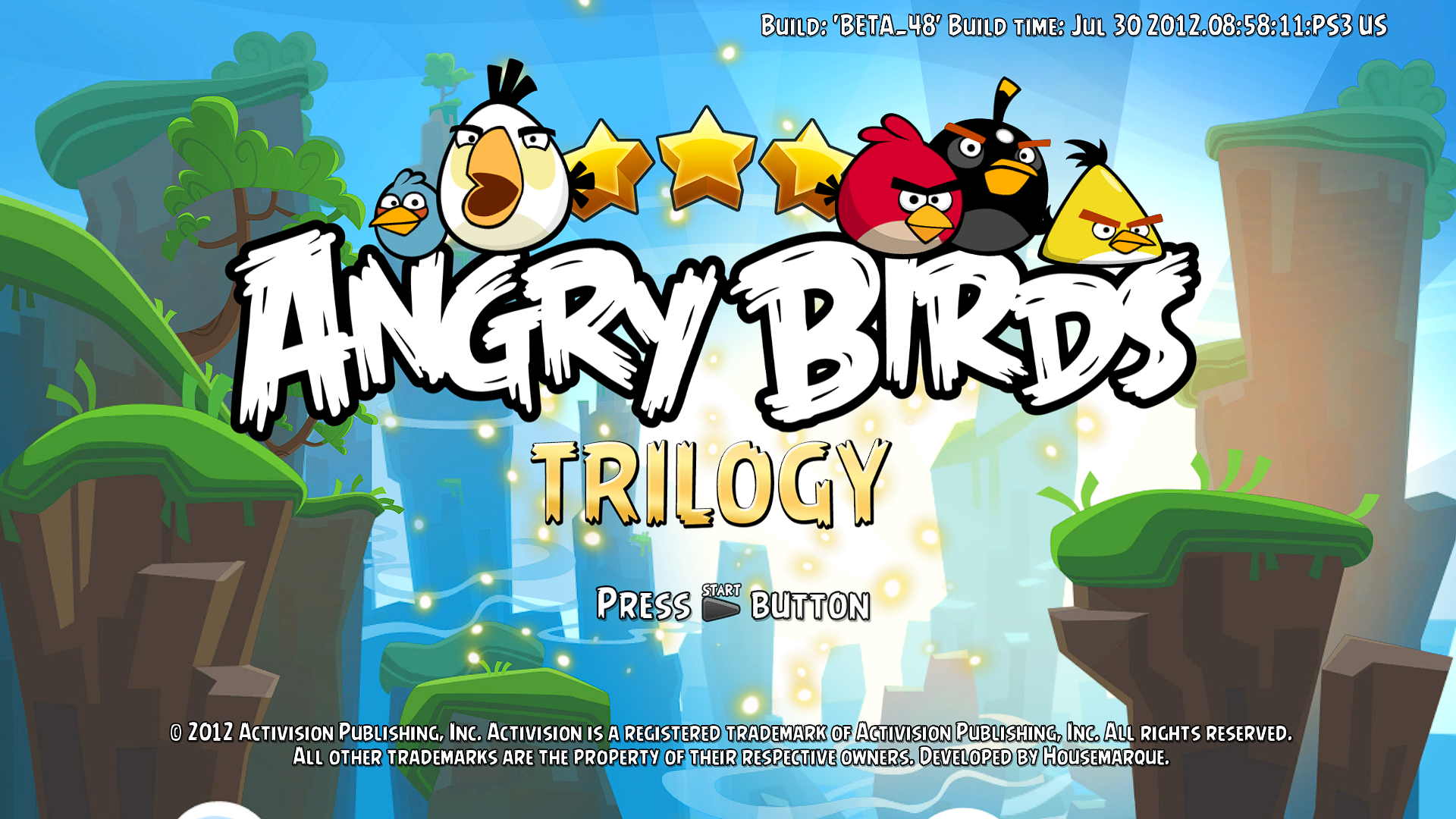
Information about the build is displayed. Up can be pressed to resume the game from the current level; if the level is not present, it loads 1-1 of Angry Birds Classic.
Main Menu#
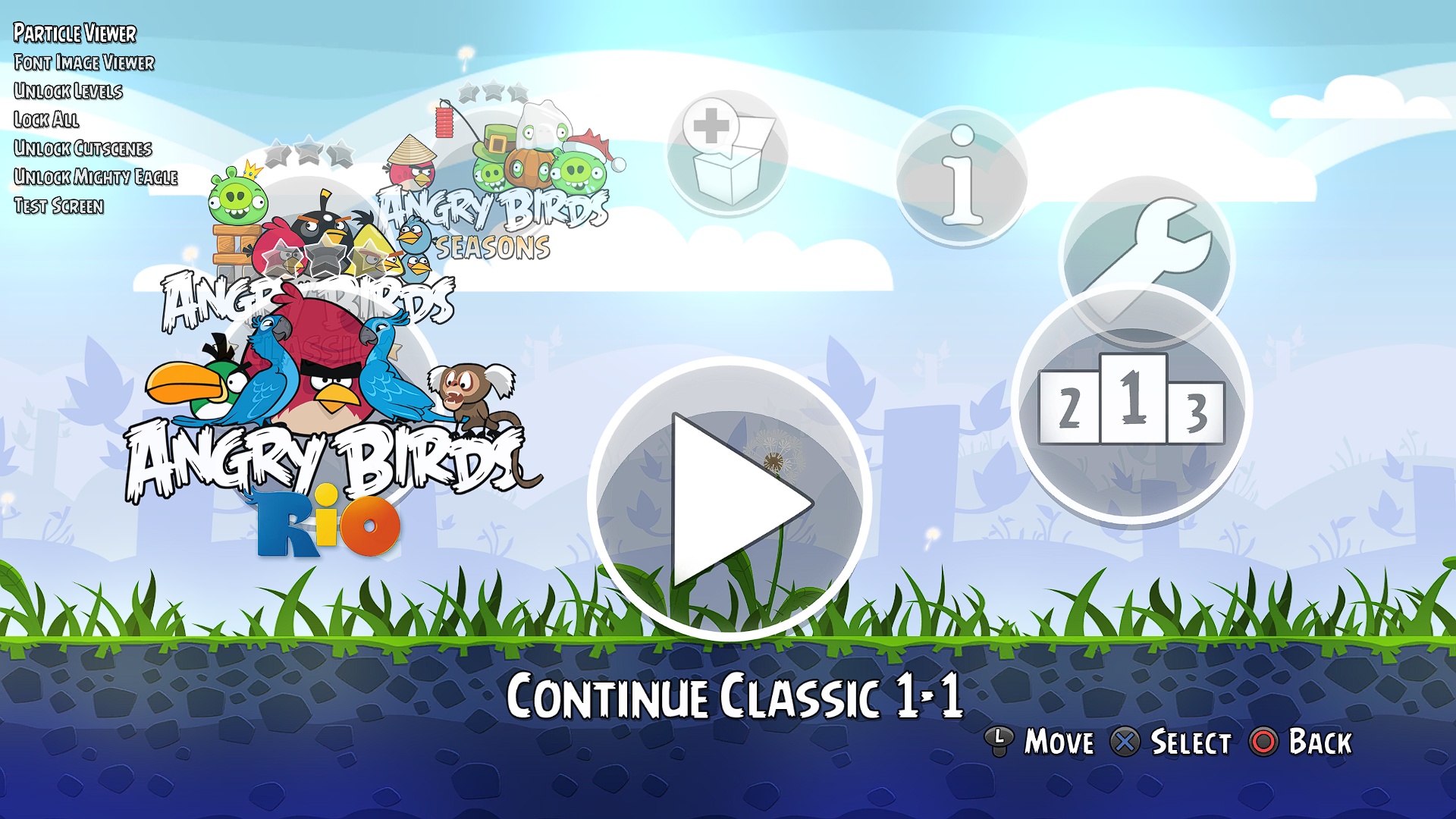
A debug menu on the side is displayed. You can use START to navigate the debug menu with the D-Pad and X.
Option |
Function |
|---|---|
Particle Viewer |
See Particle Viewer. |
Font Image Viewer |
See Font Image Viewer. |
Unlock Levels |
Unlocks all levels. |
Lock All |
Locks all cutscenes and levels. |
Unlock Cutscenes |
Unlocks all cutscenes. |
Unlock Mighty Eagle |
Unlocks the Mighty Eagle for the save. |
Test Screen |
? |
Particle Viewer#
A simple particle viewer; you cannot play more than one at once. There's also no way to scroll quickly, so navigation here will be slow.

Font Image Viewer#
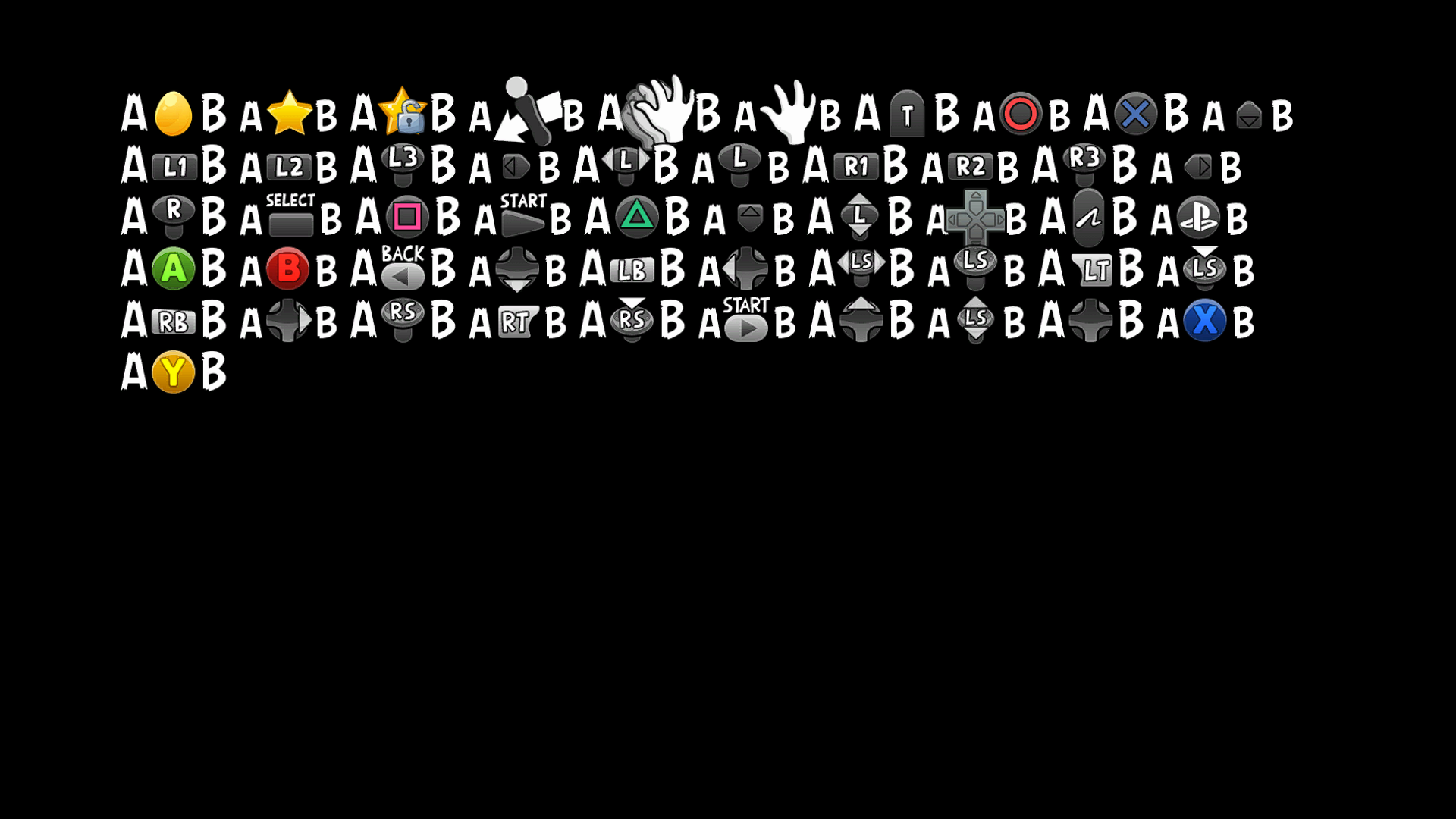
A simple display of the font texture. Pressing Left or Right on both does ?
Test Screen#
|
|
To do: |
A simple display.


In the EU version, this was changed to a list of options that have no purpose.
Level Select#
- idx (Index of levels) are displayed.
- lb (Leaderboard items) of levels are displayed.
- The first two letters of the names of birds in the level, from the level statistics, are displayed in left-to-right order in this format:
birds:%s
The below birds for that string are:
RE: Red
BL: Black/Bomb
YE: Yellow/Chuck
SM: Small/Blue
WH/BA: White/Matilda
Interestingly, the last bird has two aliases.
In-Game#
The below keys can be used on the D-Pad.
Down: Fails level. If Pigs are dead, this terminates the level
Up: Three-Star Level with score of 100000
Left: Kill all Pigs
Right: Next Level
Elsewhere#
- Licensor movies and the save display can be skipped with X or START.
- Locations of the level files are displayed, separated with dots.
- Vertical inputs are faster for scrolling the lines on the credits screen.
Unused Cutscene Audio#
In Angry Birds Classic, pre-rendered movies are used for all of the cutscenes. However, related sound files for them are present in the audio package and left unused, suggesting that the game was planned to display the cutscenes in the style of still images from the original and/or maybe it was a case of Rovio forgetting to remove them after the change.
Developer Save File#
A compiled settings file for Angry Birds Rio, most likely from the developers, is present in scripts/game_data/rio as settings.lua. Since a highscores.lua file isn't present, it's not possible to see the user's scores. Unlike saves in the original game, this one doesn't use encryption. A rough decompilation is below.
    platform = {
  device = "ipad",
  hardwareID = "00-22-15-89-EE-3F"
}
viewedCutscenes = {theme1Start = true}
flurryFirstTimeLevelCollected = true
screenWidth = 1242
screenHeight = 692
achievements = {}
tutorials = {
  YellowBird = "TUTORIAL_YELLOW",
  WhiteBird = "TUTORIAL_WHITE",
  SmallBlueBird = "TUTORIAL_BLUE",
  RedBird = "TUTORIAL_RED"
}
fullScreen = false
currentLevelSelectionPages = {
  episode2 = 2,
  episode3 = 1,
  episode1 = 2
}
lastOpenLevels = {
  warehouse = 16,
  jungle1 = 16,
  carnival1 = 1,
  jungle2 = 16,
  beach1 = 16,
  warehouse2 = 16,
  beach2 = 16
}
playtime = "1040"
episodesCompleted = {
  episode2 = {completed = true},
  episode3 = {completed = true},
  episode1 = {completed = true}
}
audioEnabled = true
Command-Line Parameters#
The game executable mentions a number of working command-line parameters that can be passed to it; you can separate inputs with a space.
-noaudio = Turn off all audio
-nosounds = Turn off sound effects
-nomusic = Turn off music
-nosplash = Turn off splash screen
-game:<original | seasons |rio> = Start a specific game
-level:- = Start the game in a specific level (use with -game)
-screenshotmode = Use screenshot mode
-screenshotfolder: = User defined screenshot folder (Shire otherwise)
-testmode = Use test mode
-birdscamera = Start level with birds
-zoomin = Start level zoomed in
-zoomout = Start level zoomed out
-testmode
Some parameters that do not have descriptions are:
-noperfbars
-nohud
-norumble
-screenshotlevelname
-nosplash, -game along with -level, -nohud and -screenshotmode have no known effect. Most likely, debug mode has to be enabled for those to work.
Script Compilation Paths#
While the original games removed most compilation information, this game left it in all the game scripts. This provides some insight into the source file locations on the developer's end. * can be data_patch for updates or data_dlc_0* for DLC.
C:\Work\Projects\AngryBirds\data_*\resources\nonscene
Build Dates#
The game executable has build dates.
Release |
Header text |
|---|---|
PlayStation 3 (US disc) |
Build: 'BETA_48' Build time: Jul 30 2012.08:58:11:PS3 US |
PlayStation 3 (US disc [Update]) |
Build: 'DLC2_12' Build time: Jan 25 2013.11:42:33:PS3 US |
PlayStation 3 (EU disc) |
Build: 'MASTER_59' Build time: Aug 24 2012.18:57:51:PS3 EU |
PlayStation 3 (EU disc [Update]) |
Build: 'DLC2_12' Build time: Jan 25 2013.11:42:01:PS3 EU |
PlayStation 3 (US PSN) |
|
PlayStation 3 (US PSN [Update]) |
|
PlayStation 3 (EU PSN) |
Build: 'PATCH_22_2' Build time: Nov 19 2012.19:29:04:PS3 EU |
PlayStation 3 (EU PSN [Update]) |
Build: 'DLC2_12' Build time: Jan 25 2013.11:43:04:PS3 EU |
Xbox 360 |
Build: 'MASTER_57' Build time: Aug 11 2012.11:39:03:Xbox360 XX |
Xbox 360 TU1 |
Build: 'PATCH_22' Build time: Nov 9 2012.11:06:20:Xbox360 XX |
Xbox 360 TU2 |
Build: 'DLC2_13' Build time: Jan 30 2013.16:49:14:Xbox360 XX |
|
The Angry Birds series | |
|---|---|
|
iOS |
Angry Birds (Prototypes) • Seasons • Rio • Friends (Fusion, Unity) • Island • Space (Prototypes) • Bad Piggies (Prototypes) • Star Wars (Prototypes) • Star Wars II • Go! • Epic (Prototype) • Stella • Transformers • POP! • Fight! • Angry Birds 2 • Reloaded • Rovio Classics: Angry Birds • Bad Piggies 2 |
|
Android |
Angry Birds • Epic • Seasons • Space • Rio • Star Wars • Star Wars II • Stella • Transformers • Fight! • Angry Birds 2 • Go! • Friends (Fusion, Unity) • Football! • Bad Piggies • Rovio Classics: Angry Birds • POP! • Racing • Block Quest |
|
Windows |
Angry Birds • Seasons • Space • Rio • Star Wars • Star Wars II • Angry Birds 2 • Bad Piggies • Friends |
|
HTML5 |
Chrome • Pistachios • Friends |
|
Mac OS X |
Angry Birds • Seasons • Space • Rio • Star Wars • Bad Piggies • Reloaded |
|
Adobe Flash |
Breakfast • Ultrabook Adventure • Friends • Vuela Tazos • Heikki • Lotus F1 Team • McDonald's • Social (Earlier Prototype) |
|
Xbox 360, PlayStation 3 |
|
|
Arcade |
|
|
tvOS, visionOS |
|