 This article has a talk page!
Monkey Ball is basically Marble Madness, except in 3D with improved graphics and lots of monkeys. And a banana-shaped joystick.
Unused Graphics#
Master Difficulty Graphics#


Graphics for a Master difficulty exist, but are never implemented aside from one Master floor. While Super Monkey Ball added nine more Master floors, you still couldn't start at the Master stages from the difficulty select until Super Monkey Ball Jr. and Super Monkey Ball 2.
Whether they planned to make Master an actual difficulty setting in the original game, or something to expand on much more than they did while porting to the GameCube, is hard to tell.
Unused Select Screen Background#
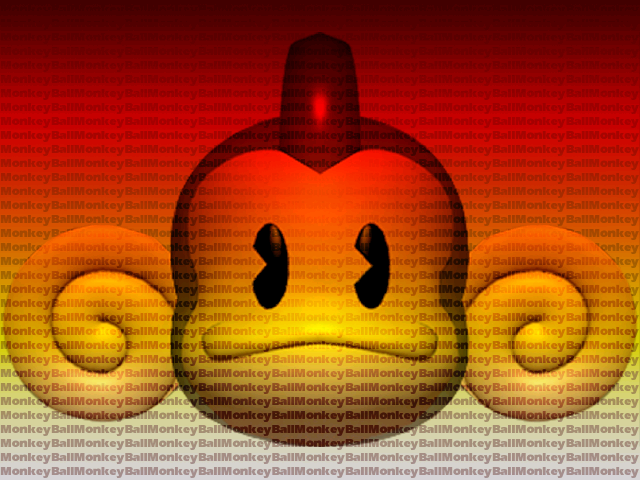
This background was found in the select game graphics. The final game uses a 3-D blue sky.
Debug Font#

A debug font.
Unused Models#
Debug Axis#

A debug axis.
Coins#


Coins for gold and sliver.
Tex Test Model#

A model for testing textures.
Unused Sounds#
There are unused sound takes for the announcer.
Stage Clear |
|
Floor Clear! |
|
Game Clear! |
|
Go! |
|
Press Start |
|
Get Ready |
|
Ring Out |
|
Thank You! |
|
Monkey Ball |
Unused Levels#

|
To do: |


Unused Strings#
These are the strings used during gameplay, including indicators if a level is a Bonus level or the final level, and the number of the floor. Among them is a string that describes "MASTER EXTRA", and "EXTRA 2". The string "SELECT A STAGE" is used in the Debug Mode's Stage Select. Extra 2 and Extra are used in the Debug Mode's Stage Select, with Extra 2 being appended to Expert to refer to the Master floor.
SELECT A STAGE
STAGE
SELECT LEVEL
SELECT YOUR LEVEL
SELECT BY LEVER
EXTRA 2 FLOOR LIB.
EXTRA FLOOR LIB.
SELECT A MONKEY
MASTER EXTRA
FLOOR
BONUS FLOOR
FINAL FLOOR
Debug Mode#
A debug mode does exist in Monkey Ball, and can be turned on by setting address 2C228084 to 1. This must be on in order to access the stage select and the in-game debug menu.
Debug Pause#
While address 2C228084 is set to 1, setting address 2C228080 will put the game in a pause-like state. Pressing P1 START advances the game by a single frame.
In-Game Commands#
While debug mode is on , pressing P2 PUSH1 + P2 PUSH2 + P2 PUSH4 will instantly complete the current level.
Test Mode#
A debug menu, called Test Mode, can be accessed by setting address 2C223609 to 3 and address 2C223611 to 67.

- STAGE NUM - Adjusts what level is currently selected in the debug level select.
- BACKGROUND - Adjusts what BG is used when selecting a level from the debug stage select.
- OBJECT TEST - A model viewer.
- LOD OBJ TEST - Tests switching out models for low-poly counterparts based on the model's distance from the camera.
- SPRITE TEST - A sprite viewer.
- MOTION TEST - An animation viewer.
- FONT TEST - Displays "HELLO, WORLD" in all fonts, or in the case of the fonts consisting only of number, all numbers from 0 to 9.
- SOUND TEST - Plays all types of audio in the game, from music to voice clips to sound effects.
- TEXTURE TEST - A texture viewer.
- INPUT TEST - Shows what inputs are being pressed.
- REPLAY TEST - Plays the replays that are normally reserved for the game's attract mode.
- BG TEST - A background viewer.
- CALIBRATION - Analog stick calibration.
- BOOKKEEPING - A menu where various statistics can be viewed, such as floor clear rates and average play duration.
- BACKUP CLEAR - Deletes all saved data.
- DIP SWITCH - Allows various DIP switches to be toggled on and off.
:* DIP_DEBUG - Debug mode.
:* DIP_DISP - Shows the Lib No. of the stage currently being played, as well as the route being taken.
:* DIP_STCOLI - Shows stage collision.
:* DIP_TRIANGLE - Turns the stage and its collision into a triangle.
:* DIP_BALL_TGT - Indicates what object the character is looking at.
:* DIP_JOINT_OFF - Detaches the clothing of each character from their waists.
:* DIP_APE_IK - Causes the character to start warping in and out of the ball.
:* DIP_TIME_STOP - Freezes the timer.
:* DIP_KARAKUCHI - Seemingly does nothing.
:* DIP_NAMEENTRY - Forces the name entry screen to appear after a game over, regardless of score.
:* DIP_SHADOW_TEST - Makes the stage's floor and walls the same darkness as the shadows.
:* DIP_FALL_DISP - Shows the boundary that triggers a Fall Out, but strangely only on certain stages.
:* DIP_SWITCH12 - Nothing.
:* DIP_SWITCH13 - Nothing.
:* DIP_SWITCH14 - Nothing.
:* DIP_SWITCH15 - Nothing.
In-Game Debug Menu#
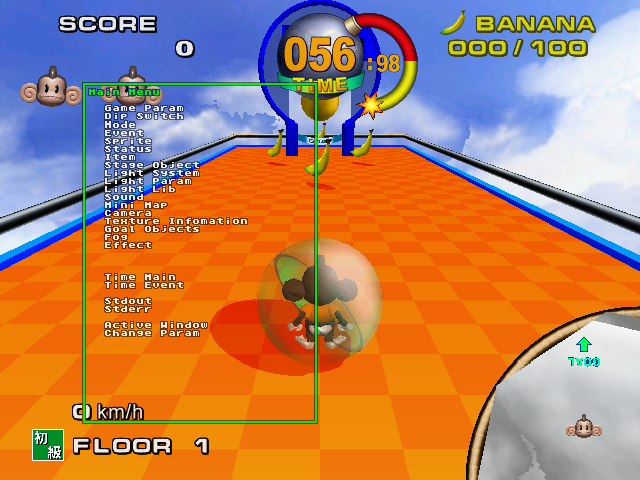
There is another debug menu, this one seemingly intended for monitoring various stats. The only real notable things that can be done here are adjusting the ball size (which has no effect on its collision) and the slant angle (which not only adjusts the visual tilt, but also the angle of the gravity), as well as tweaking lighting. To access this, have address 2C228080 set to 3, and then press P2 PUSH2 + P2 PUSH4. Once the menu appears, address 2C228080 can be set back to 0 to unpause the game.
Stage Select#
While Debug Mode is active, pressing P2 Start during the attract mode will access the Stage Select.

Pressing P1 Start starts the selected stage with Aiai, pressing P1 Button 1 starts the selected stage with Meemee, and pressing P1 Button 2 starts the selected stage with Baby. P2 Start can be used to switch between difficulties.
Early Expert Level Order#
|
|
To do: |
By forcing the game to load the scrapped Master mode, you can play what appears to be an early version of Expert, featuring a different level order than the final. This includes stages from the two other difficulties.
This being an early version of Expert is mostly evident as the bonus stages from Expert appear here, and some of its stages are even in the same place as the final. The last stage is "Polar Large" from Advanced Extra 5, which is a more difficult version of the final Advanced stage.
Interestingly, the unused Stage 26 appears here at Floor 37. Also, of the many final Expert stages that are absent in this early version, Expert 7 is not here. Considering the close release window of this version and the GameCube version, this could relate to the GameCube game's Expert 7 originally being shown as Master 3 in that version's pre-release trailer (0:24).
|
The Super Monkey Ball series | |
|---|---|
|
Arcade |
|
|
GameCube |
Super Monkey Ball • Super Monkey Ball 2 (Demo) • Super Monkey Ball Adventure |
|
Game Boy Advance |
|
|
N-Gage |
|
|
PlayStation 2 |
Super Monkey Ball Deluxe (Prototype) • Super Monkey Ball Adventure |
|
Xbox |
|
|
Nintendo DS |
|
|
PlayStation Portable |
|
|
Wii |
|
|
Nintendo 3DS |
|
|
Nintendo Switch |
Super Monkey Ball: Banana Blitz HD • Super Monkey Ball Banana Mania • Super Monkey Ball Banana Rumble |
|
Xbox One, PlayStation 4, Windows |
Super Monkey Ball: Banana Blitz HD • Super Monkey Ball Banana Mania |
|
PlayStation 5, Xbox Series X, Amazon Luna |
|