 This article has a talk page!
Super Monkey Ball is a port of Monkey Ball to the GameCube with improved graphics, more levels, better control, and a new character (GonGon). There are also several multiplayer and party game modes, with the ability to play with up to four players.
Sub-Pages#
 Prerelease Info
 Notes
Notes
 Bugs
Bugs
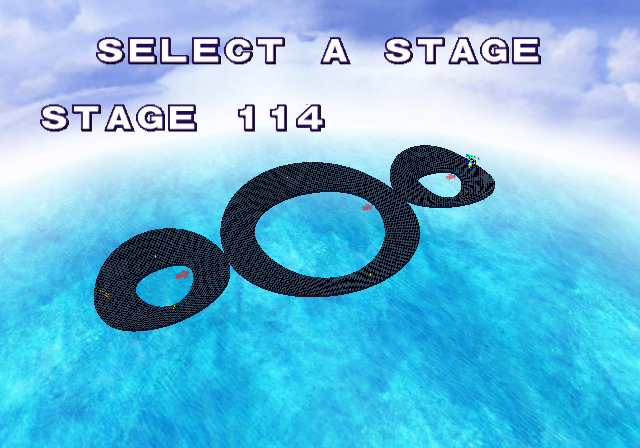 Unused Levels24, to be exact: some leftovers from the arcade version, some completely unused, and some oddities.
Debug Mode#
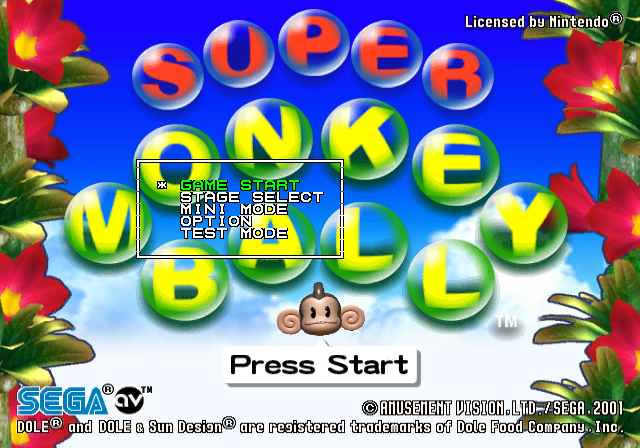
The Debug mode can be enabled by using one of the following Action Replay codes:
NTSC-U |
NTSC-J |
PAL |
|---|---|---|
|
|
|
Pressing Start on the title screen then enables a simple Debug Menu.
- GAME START - Goes to the main menu.
- STAGE SELECT - Goes to an unused level select screen.
- MINI MODE - Allows you to go to any of the mini games.
- OPTION - Goes to the option menu.
- TEST MODE - Lots of debugging material and settings.
:* MODEL TEST - Fully fledged model viewer, but some entries crash the game.
:* nIObjPut TEST - Actually is a model viewer, that can only display the old NAOMI Monkey Ball resources left in the game (that can't be seen in MODEL TEST). Scrolling up past the Monkey Ball stage select resources returns to the main Test Mode screen; attempting to scroll past the cave background (bg_i) crashes the game unless you replace its files, then you can see the rest of the backgrounds, that happen to be all from the original Monkey Ball levels.
:* EFC MDL TEST - Shows a customizable AiAi head distortion; could have been used for stretching animations.
:* PATTERN TEST - Shows the explosion animation as a rotatable model; also allows to control speed and filtering type.
:* PREREND TEST - Generates level previews used in Practice Mode and Competition Mode stage selection screens.
:* MOTION TEST - Views animations with options controlling the monkey and skeleton used.
:* BITMAP TEST - If the models can get a viewer, then textures can too. Shows basic overlay textures, nothing special.
:* FONT TEST - Shows various fonts used in the game; most of which have "HELLO, WORLD" as a test message.
:* ROMFONT TEST - Seems to show letters from the GameCube BIOS and bleaches out most letters in the main Test Mode menu when exited.
:* PREVIEW TEST - Shows level icons. Since the generation methods aren't level-specific, levels that wouldn't normally be shown in a certain mode can be viewed as such (e.g., race tracks in Practice Mode).
:* INPUT TEST - Test that indicates controller input; could be used to make sure controllers aren't broken.
:* REPLAY TEST - Use D-Pad Left/Right to select a replay and press A to view it. Note that Level 0 crashes the game.
:* BLUR TEST - Tests (de)fogging in replays. D-Pad Left/Right controls the fog level.
:* SHADOW TEST - Spins a sun-like model above solid cubes with a light shining on it (most likely to test shadows).
:* FOCUS TEST - Tests blur in replays. As in the Blur Test, D-Pad Left/Right controls the blur level.
:* INDIRECT TEST - Seems to test overlays, but the only one available is the water.
:* DIP SWITCH - Contains a number of extra debugging features.
In-Game Commands#
A few cheat commands are also enabled in-game:
- Pressing X + Y will instantly complete the current level.
- The game can be debug paused with R + Start, which will display "DEBUG MODE" in the top right corner of the screen. Unpause with just Start.
- Pressing Z while debug paused will advance the game by one frame.
- Pressing X + B while debug paused will display a cursor that allows you click on UI elements with X or A and move them around the screen with the Left Stick.
- Pressing Y + B while debug paused will unlock the camera. Pressing again will reset it but it won't take affect until the game is unpaused. Unlocking the camera also disables the above cursor.
Dip Switches#

|
This needs some investigation. |

By selecting DIP SWITCH on the debug menu, you can access another menu containing a number of extra debugging features.
- DIP_DEBUG - Enables the debug mode.
- DIP_DISP - Displays the library number of the current level.
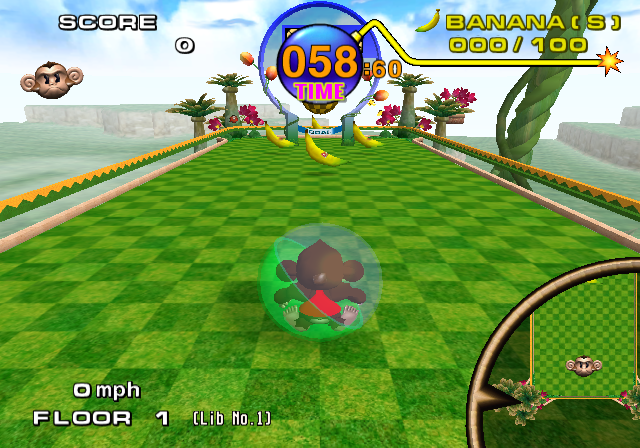
- DIP_STCOLI - Displays the level's collision.
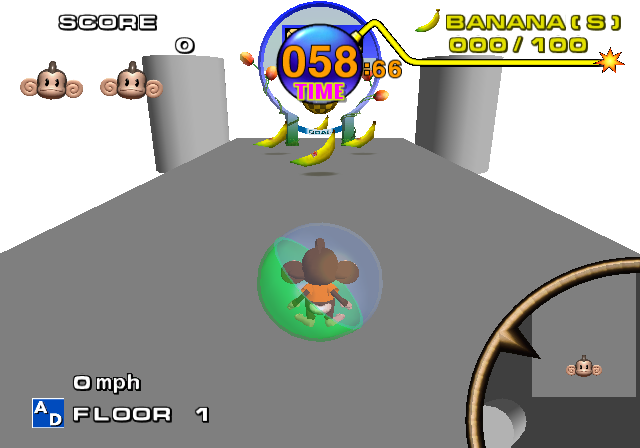
- DIP_TRIANGLE - Replaces the level model with a grey triangle.
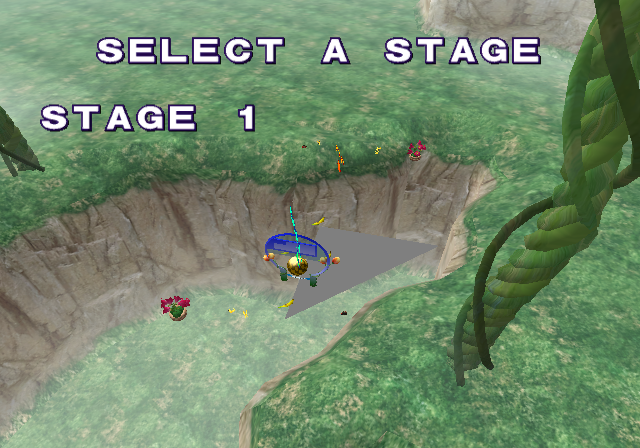
- DIP_BALLTGT - Unknown.
- DIP_JOINT_OFF - Unknown.
- DIP_APE_COLOR - Unknown.
- DIP_TIME_STOP - Freezes the countdown timer at 60 seconds.
- DIP_KARAKUCHI - Unknown.
- DIP_NAMEENTRY - Makes the Name Entry screen appear after a Game Over regardless of score.
- DIP_SHADOW_TEST - Unknown.
- DIP_FALL_DISP - Displays the out of bounds areas in some levels.
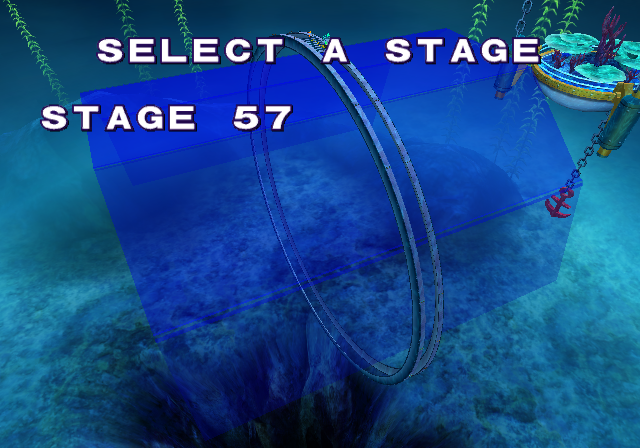
- DIP_TEST_CAM - Allows you to control the camera during gameplay.
- DIP_NO_INTR - Unknown.
- DIP_CAPTURE - Unknown.
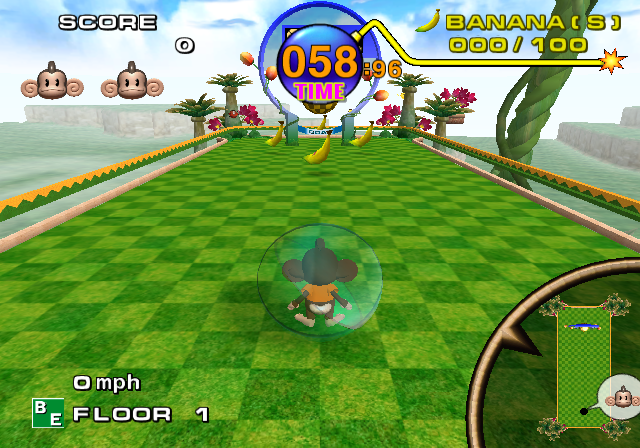
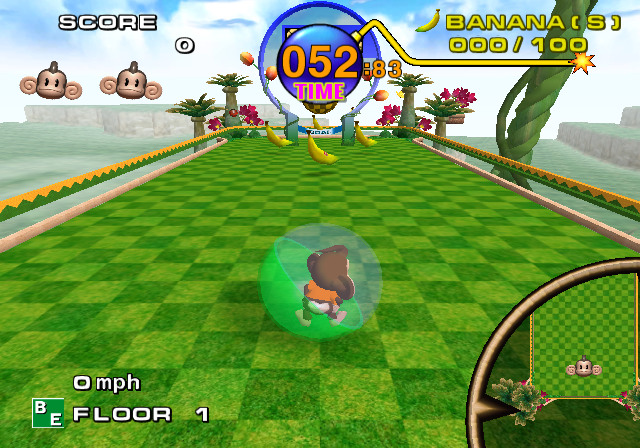
- DIP_OLD_BALL - Toggles the ball model from Monkey Ball (see below).
- DIP_NO_KARI - Unknown.
- DIP_PLAY_STG_ALL - Unlocks everything.
- DIP_PLAY_PNT_x10 - Multiplies the play points you earn by 10.
- DIP_SARU_0 - Sets your life counter to 0 at all times (SARU_0 = 0 monkeys).
The rest of them do nothing.
(Source: Parasyte, Kola, BSFree (JPN Code), TheArcadeStriker)
Unused Graphics#
Leftover Monkey Ball Graphics#
Level Difficulty#


These models are leftovers from the original arcade game. This version uses sprites for selecting the difficulty.

While this is also from the arcade game, that version never had a selectable Master difficulty. In fact, it only had one single master floor altogether. Super Monkey Ball added nine other Master floors, but you still can't start straight at the Master stages from the difficulty select; Super Monkey Ball Jr. and Super Monkey Ball 2 added the ability to do that.
Whether they were planning on making Master an actual difficulty setting in the original arcade game, or if this is something they were planning on expanding on much more than they actually did in the process of bringing the game to the GameCube, is hard to tell.
(Source: Inuyasha)

Only half of the difficulty icons shown here are ever used. The English two-letter and Japanese icons from Beginner, Advanced, and Expert see the light of day, but none of the others do. The Master icon, oddly enough, would go on to be scaled down for Super Monkey Ball Jr., as its Master mode was completely spliced off from Expert.
Old Ball#
|
Old |
New |
|---|---|
|
|
By enabling DIP_OLD_BALL on the DIP_SWITCH Debug Menu, you can enable the old ball from Monkey Ball.
Old Party Ball Goal#

The old Monkey Ball party ball goal.
Arcade Button#


The old Monkey Ball arcade button.
Banana Joystick#


The old Monkey Ball arcade banana joystick.
Old Time Bomb Fuse#

The old Monkey Ball time bomb fuse.
Goal Mini Map#

The old Monkey Ball goal icon, removed from the minimap but still used in debug stage select.
How to Play#
A Button#
|
Early |
Final |
|---|---|
|
|
|


The early design for the A button closely matches the prototype GameCube controller though uses the current green color instead of blue.
Analog Stick#
|
Early |
Final |
|---|---|
|
|
|


The analog stick which is also based off of the prototype design is slightly bigger.
Monkey Race#
Unused Items#


Four unused item icons. No models exist for these items.
Recovery Plate#

An unused recovery plate similar to the boost panels. Presumably, it would've removed any negative effects such as the polygon ball or ice cube.
Jump#


An unused ramp along with a switch to activate it. This can be found in the unused stage 132.
Stick#


Unused sticks along with switches that raise and lower them. This can be found in the unused stage 132.
Mine#

An unused mine which looks like a capsule.
Monkey Fight#
Bananas#


A couple of unused banana items.
Panels#


Six unused square poles.
Shield#

An unused shield.
Monkey Bowling#
Old Bowling Ball#

An earlier version of the bowling ball.
Unused Music#
Found inside gcboot/snd/test. Interestingly, the first 11 seconds appear to be a guitar solo version of "Over the Rainbow". The purpose of this song is currently unknown, but because it was found in /test/ it most likely could have been a song for testing, or it could have been a demo by T's Music. Also, the original Japanese intro song "Ei Ei Poo" is still in the game's files for the US and EU versions of the game (where it went unused).
Unused Animations#
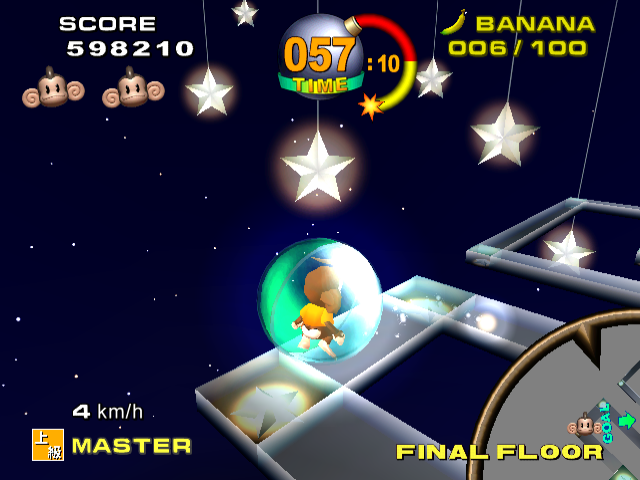
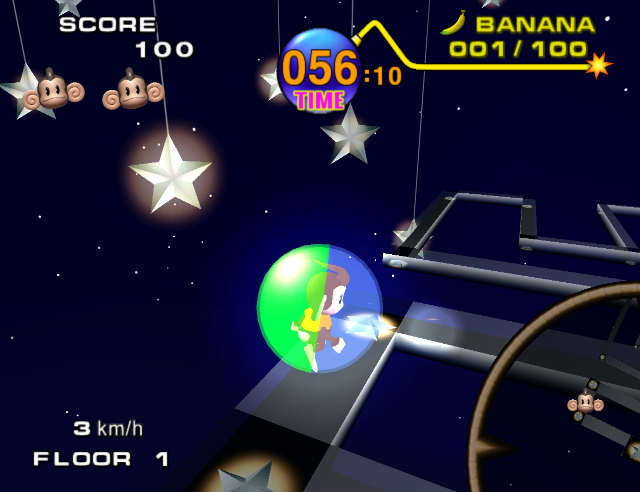
The animations for Master from the Arcade version are still left in the game.
|
Arcade |
GameCube |
|---|---|
|
|
Unused Sounds#

|
This page or section needs more audio. |
Monkey Fight#
The sound file for the Monkey Fight round announcer has four unused announcements, for Rounds 17-20. The highest possible announcement that can be heard is Round 16, if all four players alternate in winning.
Main Game#
There are multiple unused takes on the announcer saying "Go" and "Goal". These takes were later re-used in the sequel Super Monkey Ball Adventure, although the last "Goal" take was also used in Super Monkey Ball Jr.
Go! |
|
Goo! |
|
Gooo! |
|
Goal. |
|
Goaaal! |
|
Goaal! |
Main Menu#
Two unused difficulty selections, said by the announcer, corresponding to the Master and Extra difficulties.
There are several takes by the announcer which were never used at all in this game. The "Master" clip was later re-used in Super Monkey Ball 2, as well as "Select Stage", the "Select your Monkey" clip as well as the "Select Stage" clip were used for the N-Gage port of Super Monkey Ball.
Extra |
|
Master |
|
Select Level |
|
Select your Monkey |
|
Select Stage |
Regional Differences#
Title Screen#
|
Japan |
International |
|---|---|
|
|
|
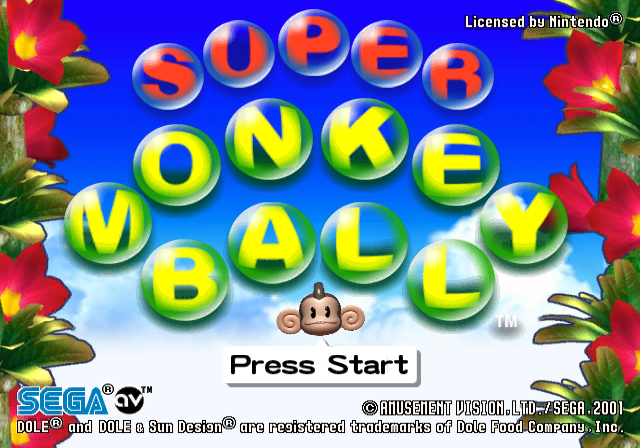
Licensed by Nintendo (apparently).
Alterations#
- The JP version's attract mode clocks in at about 60 seconds long; it features the monkeys singing "Ei Ei Poo!" along to a jaunty tune. The US and PAL attract mode is truncated down to about 42 seconds long and uses a completely different piece of (instrumental) music.
|
Japan |
International |
|---|---|
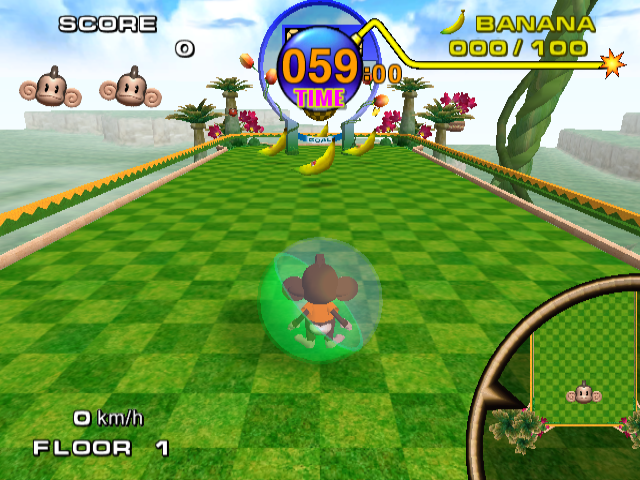
- "BANANA" was changed to "BANANA(S)" in the US version. The respective plural indicators are used in parentheses in the international language versions (for example: PLÁTANO(S)).
- The current speed the Monkey is doing is displayed in km/h in the Japanese version, while this was changed to mph in the US version. In the Europe version, mph is used if English is selected, while km/h is used if German, French, Spanish, or Italian is selected.
|
Japan |
International |
|---|---|
|
|
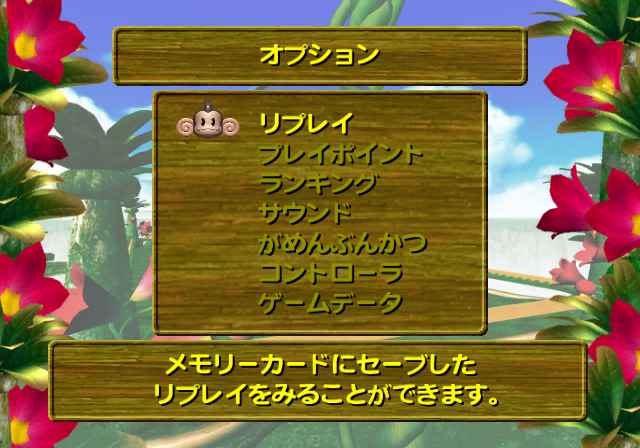
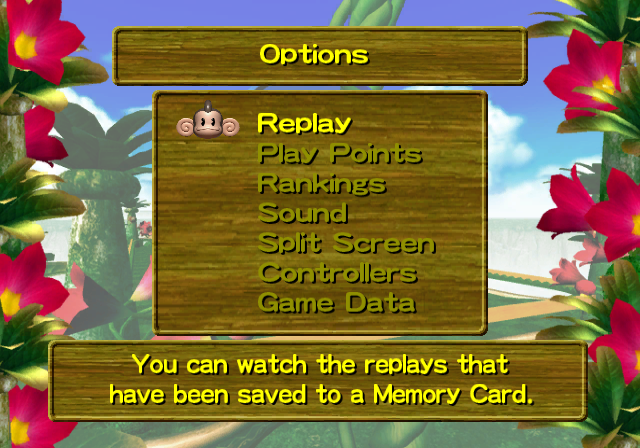
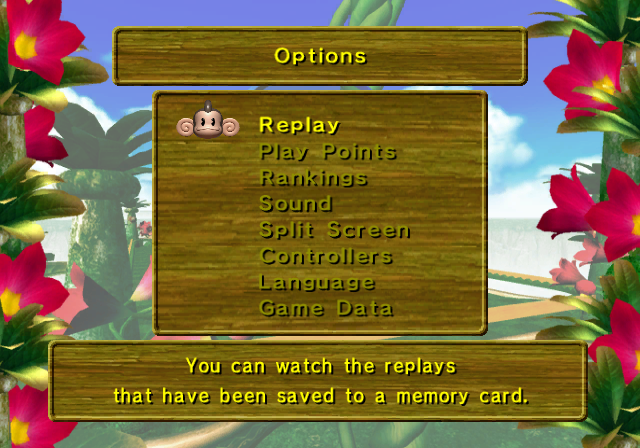
- The Options Mode config text fades out after an auto-save much slower in the Japanese version. The UI font for both the options screen, and the rest of the system, is thinner and smaller than the one in the US and Japanese version.
Japan |
USA |
Europe |
|---|---|---|
 |
 |
 |
- In the Japanese version's Monkey Target, there is a different speech sample used when the "spiky balls" option is selected from the item wheel, though it is still spoken by the same English narrator. Because the actual Japanese text ("togetoge ball") wasn't already in English like the rest of the clips, it was edited to "spike ball" for western releases. Similarly, various instances of Engrish voice clips in the mode were corrected to be more palatable to western ears.
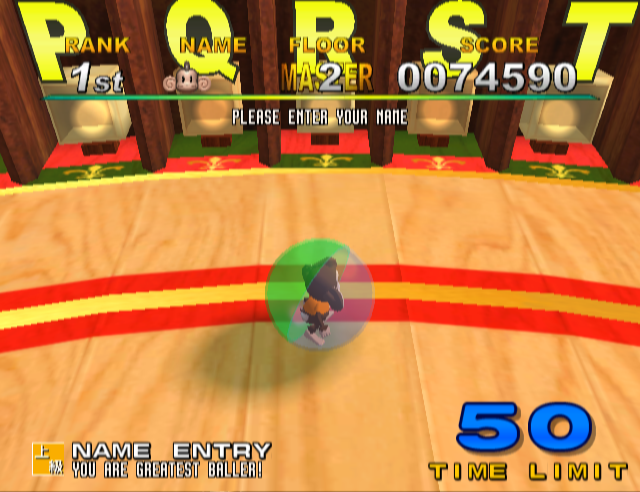
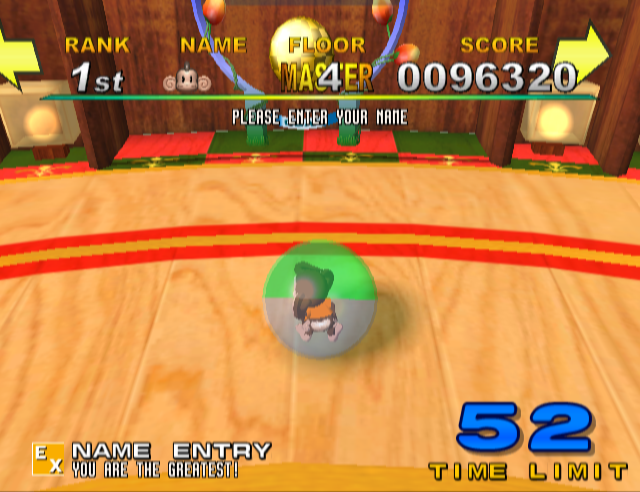
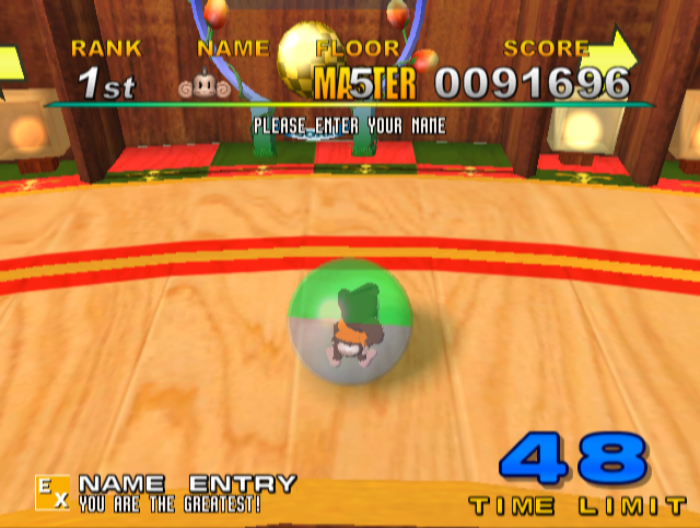
- The text used on the hi-score tables to indicate a single-credit run to Master stages is different between NTSC and PAL versions, and also scrolls horizontally every few seconds in the PAL version. Also, when entering your initials in the circular roulette-style stage, the text at the bottom of the screen says "You are the greatest baller!" or "You are the 2nd baller!" etc. for the Japanese version, like in the arcade version. The western releases changed this to simply say "You are the greatest" or "You are second best", etc.
Japan |
USA |
Europe |
|---|---|---|
 |
 |
 |
Optimization Bugs#
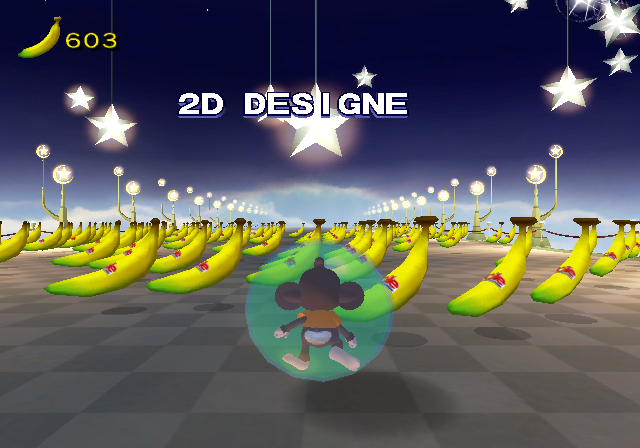
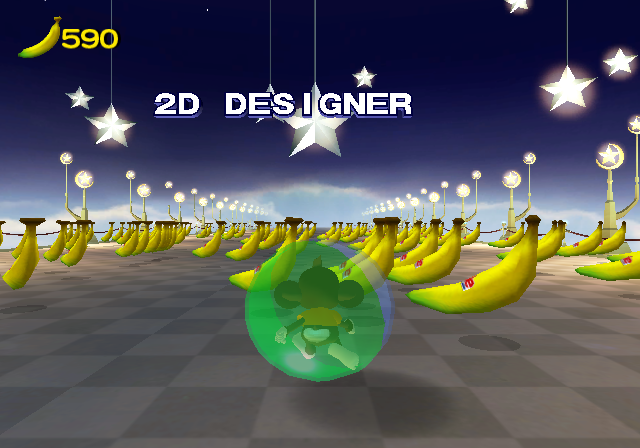
- After beating each game, there is a credits sequence shown. One of the lines of text in the credits should be displayed as "2D DESIGNER". For some reason, the 3D-modelled "R" at the end of "DESIGNER" is missing in the PAL version, resulting in the text being displayed as "2D DESIGNE". As it is correctly displayed with the "R" intact in the Japanese version, this error likely occurred due to a mistake made during the localization process.
|
Europe |
USA/Japan |
|---|---|
|
|
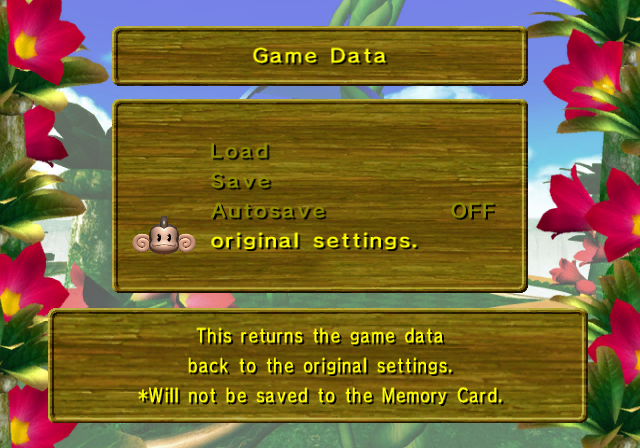
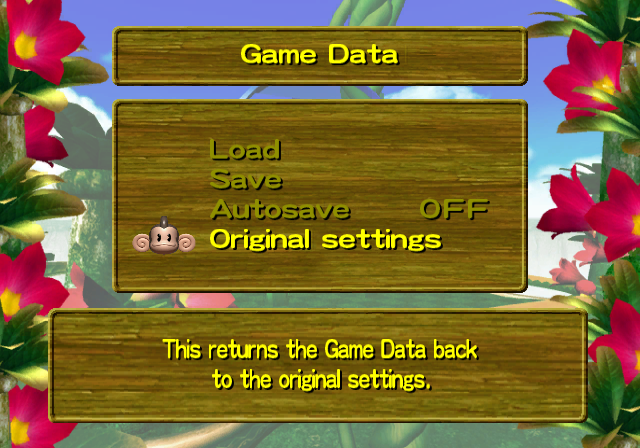
- There are several punctuation and capitalization mistakes in the PAL version menus. See the Options Mode and the Sound Settings, for a quick example.
|
Europe |
USA |
|---|---|
|
|
- The PAL version has bits of slowdown on several stages, most notably Expert Floor 17 as well as some particularly disastrous slowdown on a portion of the Ice Stage of Monkey Race that reduces the game's framerate drastically. The Japanese version does not have any slowdown.
- There is heavy slowdown on Expert Extra Floor 10 in the PAL and Japanese versions.
|
The Super Monkey Ball series | |
|---|---|
|
Arcade |
|
|
GameCube |
Super Monkey Ball • Super Monkey Ball 2 (Demo) • Super Monkey Ball Adventure |
|
Game Boy Advance |
|
|
N-Gage |
|
|
PlayStation 2 |
Super Monkey Ball Deluxe (Prototype) • Super Monkey Ball Adventure |
|
Xbox |
|
|
Nintendo DS |
|
|
PlayStation Portable |
|
|
Wii |
|
|
Nintendo 3DS |
|
|
Nintendo Switch |
Super Monkey Ball: Banana Blitz HD • Super Monkey Ball Banana Mania • Super Monkey Ball Banana Rumble |
|
Xbox One, PlayStation 4, Windows |
Super Monkey Ball: Banana Blitz HD • Super Monkey Ball Banana Mania |
|
PlayStation 5, Xbox Series X, Amazon Luna |
|