 Prerelease Info
 Notes
Notes
 Unused AudioDJ Cadence's Lost Tracks.
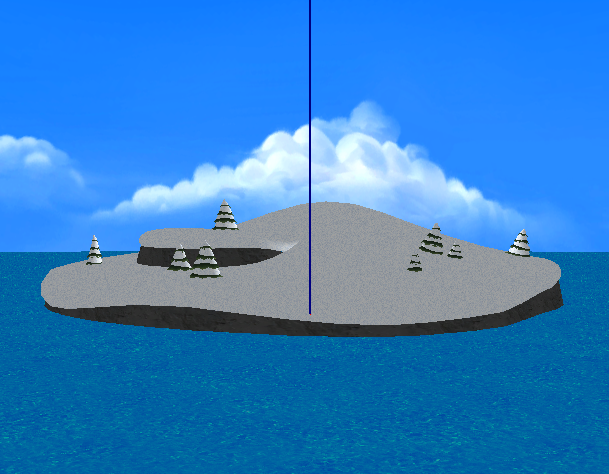 Unused ModelsLone islands, but no icebergs to tip, unfortunately.
 Unused Textdeclare war on the us
Unused Cinematics#
Found in the directory /hub/demo, several unused demo resource files can be found alongside the used files. "Demo" is used for assets relating to cutscenes in Game Day.
Examples being the following:
- demo_blue_##.cmpres and demo_red_##.cmpres, which are unused mid-story cutscenes.
- demo_green_##.cmpres and demo_yellow_##.cmpres are duplicates of the Red files.
- demo_green_##.cmpres and demo_yellow_##.cmpres are duplicates of the Red files.
- demo_red_op.cmpres, which is an unused introductory cutscene to the team you picked.
- demo_blue_op.cmpres, demo_green_op.cmpres and demo_yellow_op.cmpres are duplicates of the Red files.
- demo_blue_op.cmpres, demo_green_op.cmpres and demo_yellow_op.cmpres are duplicates of the Red files.
Due to the script files that would've been used to play them not being present, and no scripts actively loading the files, they simply go unused.
Below this is a table with video mockups of the Red & Blue teams cutscenes, using custom script files along with the original set files.
Elements that may have been intended, such as particle effects and sound effects, are not present, along with the penguins used likely not being the intended ones.
Filename |
Video |
Note(s) |
|---|---|---|
Last Commit Revision: 4062 - January 26, 2010 11:26:09 |
||
demo_blue_01.cmpres |
Likely intended for when you unlock the Snow Forts as a claimable area. |
|
Last Commit Revision: 4051 - January 26, 2010 08:00:51 |
||
demo_blue_02.cmpres |
Likely intended for when Green Team takes over your starting area (The Docks) |
|
Last Commit Revision: 5079 - April 2, 2010 12:25:36 |
||
demo_blue_03.cmpres |
Intended for when you unlock the Ski Hill as a claimable area. |
|
Last Commit Revision: 3969 - January 22, 2010 06:32:17 |
||
demo_red_01.cmpres |
||
Last Commit Revision: 4039 - January 26, 2010 03:02:35 |
||
demo_red_02.cmpres |
Likely intended for when you unlock the Ski Village as a claimable area. |
|
Last Commit Revision: 3969 - January 22, 2010 06:32:17 |
||
demo_red_03.cmpres |
Likely intended for when Blue Team takes over your starting area (Snow Forts) |
|
Unused Sprites#

|
To do: |
Sprites from Ice Fishing#

Left in \test\gm_dancing_lay_test.cmparc, there are sprites that were used for testing or for very early on the game's development.
There are sprites for Fluffy the fish, a jellyfish and others related to it from the "Ice Fishing" minigame.
Stamp Tickets Sprites#
Found in hub\hub_ui_common.cmparc, UI textures for a ticket book, a ticket and a "Clear!" stamp exist, which were used in the unused stamp ticket layout section.


Pause/Menu Early Sprites#

There are multiple unused sprites found in pause.cmparc that relate to the pause menu that are leftover from FlingSmash, another Artoon title.
They were never used, or they were placeholders for early versions of the game.
Dancing Sprites#

The following content may induce seizures and has been hidden by default. Click to reveal: |
|---|
Dancing Penguin Sprite#
There's a sprite of a penguin dancing with its colors changing every frame. Interestingly, there's a puffle version of this sprite as well. Dancing Puffle Sprite#
A version of the dancing penguin sprite, only now with a (not) dancing puffle. |


Unused Objects#
General NPCs#
Found in \hub\script\Common.arc, there are three general NPC classes present which aren't called anywhere else in the game.
hub01_town_Com_ESNPC_SS.nut#
This class looks to be an earlier version of the NPC used for "Bean Balance", as it calls that minigame in the event parameter.
The class uses the special penguin register for Sensei when setting up, which implies that Sensei was originally going to be the NPC for Bean Balance, but was replaced by the Coffee Shop Barista late into development, with his dialogue removed from the final files. 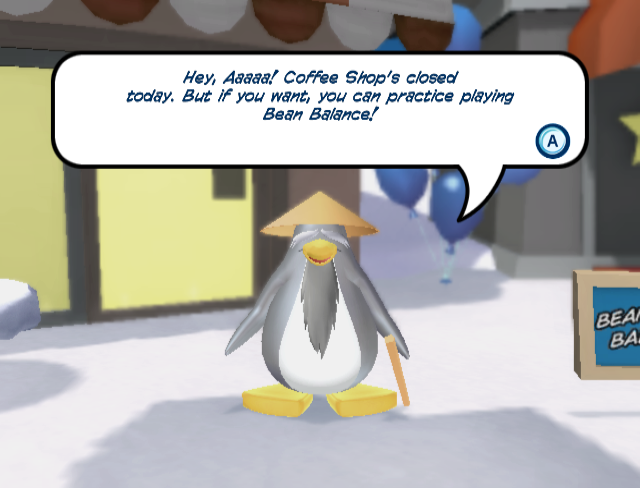
hub01_town_Com_SSNPC_01.nut#
This class is the Gift Shop Penguin, they would reside at the door of the Gift Shop, and would allow you to view the Penguin Style catalogue when interacted with.
In the final game, you interact with the door to access the catalogue, rendering this NPC obsolete. A separate NPC class that uses the same appearance and locator, hub01_town_CH09_GiftShop.nut, is used in-game, during the "Hunt for Funny Items!" challenge to prevent access to the Gift Shop. 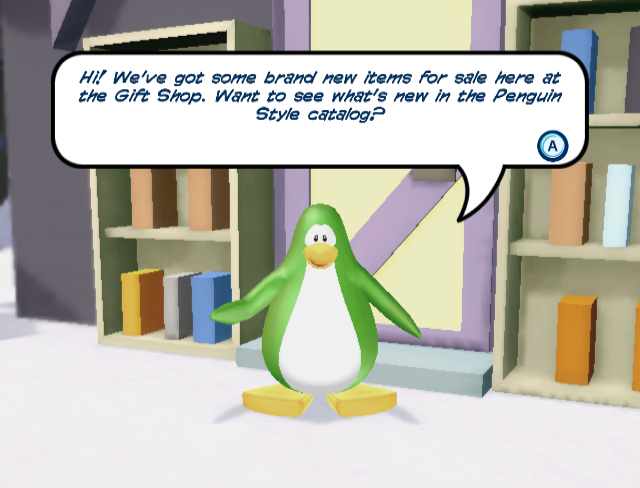
hub02_village_Com_SSNPC_01.nut#
This class is the Sport Shop's Salesman, they seemingly would have resided at the door of the Sports Shop, and would allow you to view the Snow and Sports catalogue when interacted with.
In the final game, the Sports Shop was replaced by the Everyday Phoning Facility, rendering this NPC obsolete, and thus they go unused. Interacting with them will bring up the Penguin Style catalogue. 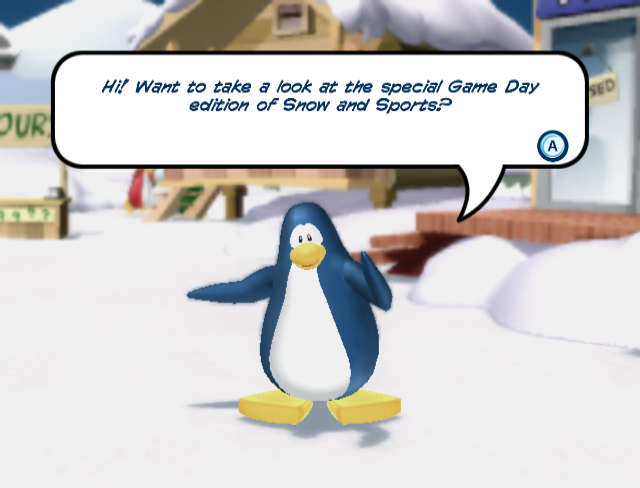
Challenge NPCs#
Found in \hub\script\CH09.arc file, several unused NPC files are present for the various referees in the other hub areas during "Hunt for Funny Items!".
In the final game, only the one at the Ski Village is present.
Debug Elements#
In several of the game files, there are leftover debug elements present that do different things, from printing specific data to actual testing features.
Title Select Debug Menu#
Left over in penguin_maker.rso is an entire debug menu that appears to be from an earlier point in development. It consists of several menus and a lot of options.
By default, the game doesn't print anything being called to the function Debug::Printf, instead it needs to be swapped to use Romfont::Printf to view the printed strings.
The basic controls are: Up and Down to scroll the options. Left and Right to adjust the selected option. A is used for confirmation.
SELECT#
The main screen for the menu, it consists of the Wii's region, the current language for the game and four options to use.
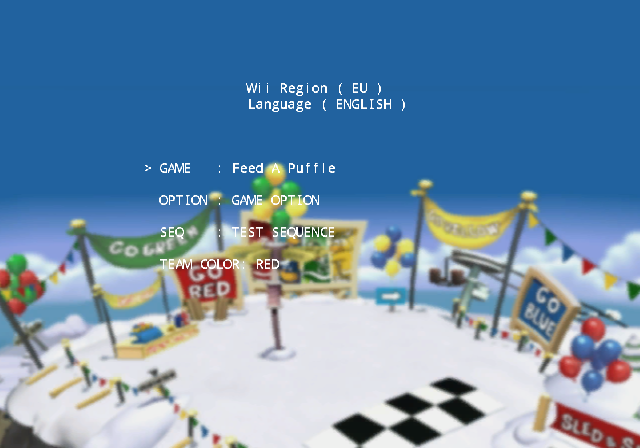
Option Name |
Options |
Notes |
|---|---|---|
GAME |
Despite the name implying just the minigames, this is used for loading a specified sequence file. The options are: |
Java Sack Race and Go Go It will crash the game due to not being loaded properly. |
OPTION |
This allows for selecting the various other option menus in this. The options are: |
N/A |
SEQ |
No idea exactly what this is meant to do, outside of quickly loading a .rso file. The options are: |
Selecting either TEST SEQUENCE or SCENE BUILDER will crash the game due to no .rso files existing for either. |
TEAM COLOR |
This just allows you to quickly pick your team color. The options are: RED, BLUE, GREEN, YELLOW |
N/A |
GAME OPTION#
The Game Option menu, this provides several options for the various minigames you can pick.
Pressing A will save the changes you made. Pressing B will discard any changes that have not been saved.
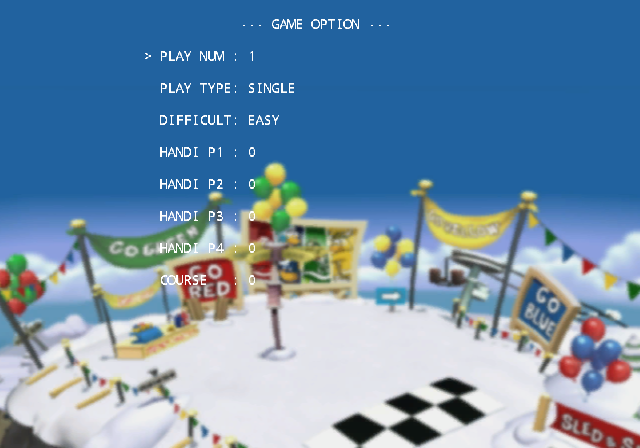
Option Name |
Options |
Notes |
|---|---|---|
PLAY NUM |
This is for selecting your player number. Goes from 1 to 4. |
N/A |
PLAY TYPE |
Determines if the game will load as a singles (Free For All) or a pair (2 VS 2). Options are: SINGLE, PAIR |
N/A |
DIFFICULT |
Difficulty of the minigame. Options are: EASY, NORMAL, HARD. |
N/A |
HANDI P1 |
Character Type for P1, Goes from 0 to 3. |
(0) = PLY, (1) = CPU, (2) = COM, (3) = --- |
HANDI P2 |
Character Type for P2, Goes from 0 to 3. |
|
HANDI P3 |
Character Type for P3, Goes from 0 to 3. |
|
HANDI P4 |
Character Type for P4, Goes from 0 to 3. |
|
COURSE |
Unsure as to what this is used for. Goes from 1 to 9. |
This may potentially be from an earlier system. Minigames in the final game change their map depending on the difficulty. |
HUB OPTION#
The Hub Option menu, this provides options for the hub flags, team color and allows for jumping into any challenge or sequence.
Pressing A on "START SCENE" or "START CHALLENGE or DEMO" will load into the specified option.
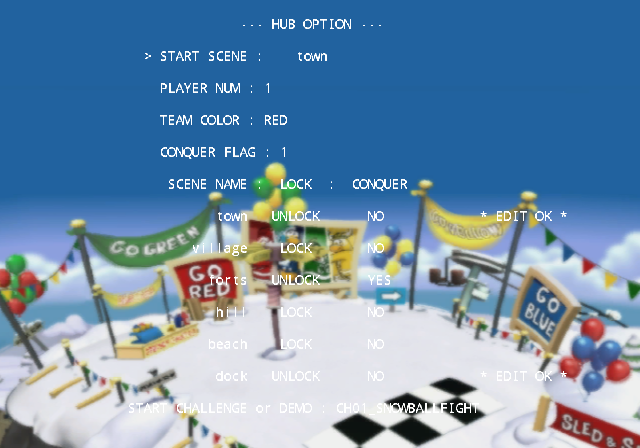
Option Name |
Options |
Notes |
|---|---|---|
START SCENE |
The desired hub scene to load in. Options are: town, village, forts, hill, beach, dock. |
Before using this, GAME OPTION must have been entered at least once, otherwise the player penguin won't spawn. |
PLAYER NUM |
The desired player slot. Goes from 1 to 4. |
N/A |
TEAM COLOR |
The current player's team color. Options are: RED, BLUE, GREEN, YELLOW |
N/A |
CONQUER FLAG |
Controls the the currently conquerable scenes in the game. Goes from 1 to 4. |
1 has only two unlocked for edits, 4 has every area unlocked for edits. |
SCENE NAME |
List of scenes present in-game and their current conquer status. |
LOCK is controlled by CONQUER FLAG. |
START CHALLENGE or DEMO |
The desired challenge or cutscene (demo) to load in. Options are: |
The only options that work are COMMON_OPENING and COMMON_ENDING. All others default you to the standard Town. |
SOUND CHECK#
The Sound Check menu is what it says, it allows you to test any registered sound entry.
Pressing Plus will play the selected option. Pressing Minus will stop whatever audio is currently playing.
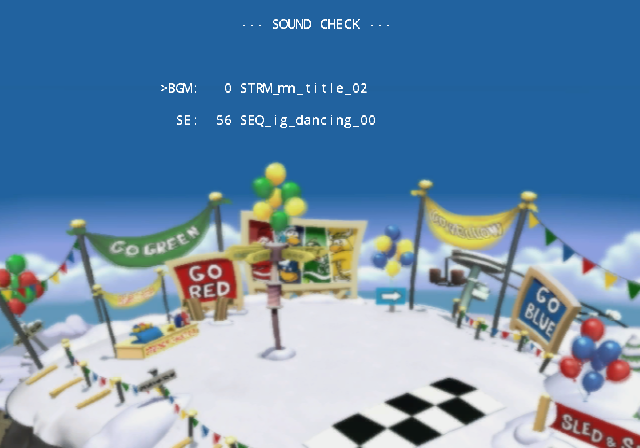
Option Name |
Options |
Notes |
|---|---|---|
BGM |
This option is for testing music. |
The only entries in here are STRM files. |
SE |
This option is for testing sound effects. |
The only entries in here are SEQ files. |
FONT CHECK#
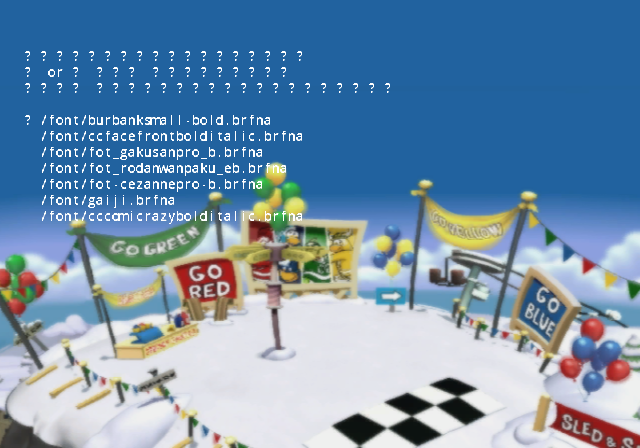
The Font Check is another self explanatory option, it displays a list of font files used in the game. Preceeding that is some Japanese text that doesn't display properly.
Pressing A will print information regarding the selected font file to any connected debugger.
Japanese |
Translation |
|---|---|
|
|
UI COMMON#
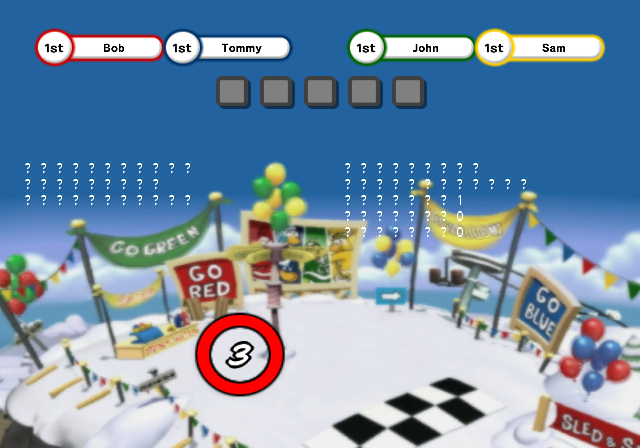
The UI Common Tester option is a test for the layout files, both for handling loading of them and modifying nodes/animations. More Japanese text is found here, but not displayed properly.
Pressing Left or Right will alter the radial's bar. Pressing Plus does something with loading a UI file.
Left Base Options |
|
|---|---|
Japanese |
Translation |
|
|
GetSaveWork Debug Print#
Found in the common hub script files for the Town, Snow Forts, Beach and Dock, there's a check for if ScriptDebugMode is set to true in common.nut.
If the check returns true, it will print the result of the GetSaveWork data for FLAG_YELLOW_ED, FLAG_RED_ED, FLAG_GREEN_ED and FLAG_BLUE_ED to a console.
GetLocalWork Debug Print#
Similar to the GetSaveWork debug functions, the challenge mode "Hunt for Funny Items!" has print functions for every hub area except the Ski Village for the collectable items.
Challenge Debug Skip Command#
Found in the script file challenge_common.nut, a debug skip function named IsChallengeDebugSkip() is present which is called by all challenges in the game while in active play.
If IsDebugMode() returns true, any valid player who is holding Minus on their Wiimote will instantly clear the challenge. Holding B in combination will instead instantly fail the challenge.
By default, IsDebugMode() will always return false. This can be forced to true with the following Gecko code:
USA |
EUR |
DE |
|
|---|---|---|---|
Gecko Code |
013F27A3 00000001 |
013F2823 00000001 |
013ED4C3 00000001 |
These codes were made with immediately going to the story mode and risks problems if you go into any mini-game with these codes active due to how the RSO files are loaded.
Minigame Debug Parameters#

|
This needs some investigation. |
Found in \param\gm_javasack\js_param.param, mentions to various debug aspects can be found for "Java Jump", including turning off the time limit and a path editor.
Japanese |
Translation |
|---|---|
|
|
Similarly, found in \param\gm_snowfight\sf_param.param, more mentions to various debug elements can be found for "Snowball Battle", including having infinite snowballs.
Japanese |
Translation |
|---|---|
|
|
Unused Layouts#
Early Title Menu#

In the game's files, within \title\title.cmparc there is a placeholder title of the game along with some early "Press A + B" text.
This can be viewed by replacing penguin_maker.rso with main_menu.rso.
The same file is also found in the files of Fortune Street, due to being accidentally copied by the developers when attempting to reuse the "Put on and tighten the wrist strap" splash screen. 
Event Test Menu#
Also found within \title\title.cmparc, there are two additional .brlyt files that look to be a very basic menu, comprising of a player amount select and an event select.
Title UI |
Notes |
|---|---|
 |
ui_tit_menu01a.brlyt is a total number of players selection menu, up to four players can be chosen. |
 |
ui_tit_menu02a.brlyt is an event select menu, only two events can be selected. |
Early Event Instructions#
Found within \game_sub\gm_inst_lay.cmparc are two .brlyt files that make up an unused instructions UI.
Instruction UI |
Notes |
|---|---|
 |
ui_eve_inst_balloon01a.brlyt is a dialogue box with up to 9 pages of messages, with scroll buttons to go between each page. |
 |
ui_eve_inst_screen01a.brlyt is a projector screen that was likely connected to the balloon UI. |
Unused Stamp Tickets#
Alongside the main UI for the hub (ui_hub_layout01a.brlyt) in \hub\hub_ui_common.cmparc, an unused section with stamped tickets can be found.

Unused Textures#
Sensei Color Texture#
Alongside the other body colors in /chara/cp01.cmpres, one for Sensei can also be found. Because Sensei was never used, this also goes unused. 
Wii SDK Leftovers#
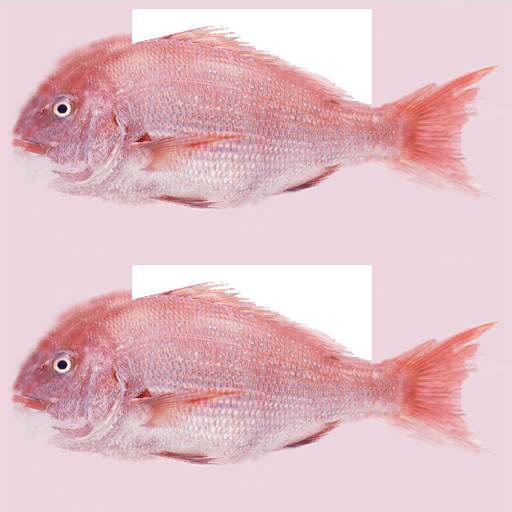
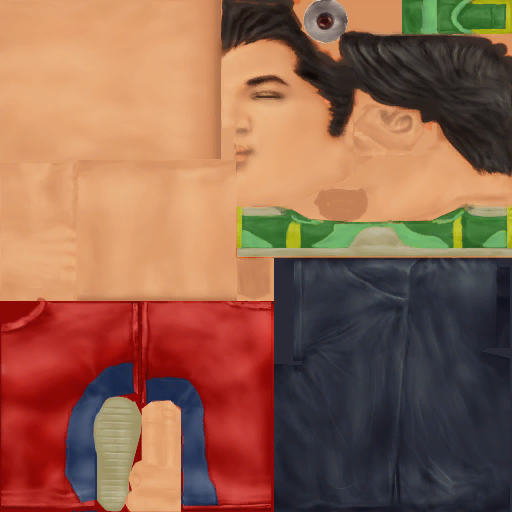
Several textures from the Wii's SDK were left in /test/test01.brres, examples include a fish and a human man respectively. The models that they belong to were not kept in the file.
Development Leftovers#
Subversion Entries#
In the file directories for Club Penguin: Game Day!, there are leftover .svn folders from their Subversion repository for the game.
These contain details about the files present, such as their last changed date, author of the change and the URL it was on in the repository, as well as duplicate files of the ones present.
The example .svn/entries file presented is from the root files directory.
9

dir
6057
http://cp-wii-server:28828/svn/CP_Wii/trunk/dvdroot
http://cp-wii-server:28828/svn/CP_Wii


2010-06-11T11:22:12.405125Z
6057
morishita_g


svn:special svn:externals svn:needs-lock


9b02b4b4-0fe6-1946-ac4d-27194fa4eda4
�
opening.bnr
file


2010-06-11T11:24:10.747534Z
ed844940328058d4dde0d0a692478164
2010-06-11T03:12:38.858250Z
6047
uchidam
has-props


357400
�
test
dir
�
title
dir
�
sample
dir
�
game_sub
dir
�
penguin_maker
dir
�
company_logo
dir
�
sound
dir
�
common
dir
�
wifi_room
dir
�
effect
dir
�
scene
dir
�
keyboard
dir
�
param
dir
�
localize
dir
�
hbm
dir
�
font
dir
�
option
dir
�
game
dir
�
hub
dir
�
chara
dir
�
Path: .
URL: http://cp-wii-server:28828/svn/CP_Wii/trunk/dvdroot
Relative URL: ^/trunk/dvdroot
Repository Root: http://cp-wii-server:28828/svn/CP_Wii
Repository UUID: 9b02b4b4-0fe6-1946-ac4d-27194fa4eda4
Revision: 6057
Node Kind: directory
Schedule: normal
Last Changed Author: morishita_g
Last Changed Rev: 6057
Last Changed Date: 2010-06-11 12:22:12Several usernames can be found in these files, which all correlate to developers for the game. These include morishita_g, uchidam, ogawa, terasaki and nishimura.
Several .svn files can also be found in the .cmparc files for "Fast Freeze" (gm_gogostop), "Feed A Puffle" (gm_feedapuffle) and "Java Jump" (gm_javasack), which are dated to before the current files they were found in.
Internal Names#
Unsurprisingly, the game's internal name is Club Penguin Wii, sometimes abbreviated to cp-wii, as seen in the SVN files.
===Internal Minigame Names===
Minigame |
Internal Name(s) |
|---|---|
Puffle Paddle |
gm_pufflepaddle |
Feed A Puffle |
gm_feedapuffle |
Goal! |
gm_icehockey |
Snowball Battle |
gm_snowfight |
Jackhammer! |
gm_jackhammer |
Rollin' Riot |
gm_snowrolling |
Bean Balance |
gm_coffeebags |
Java Jump |
gm_javasack |
Sled & Slide |
gm_bobsled |
Sumo Smash |
gm_sumo |
Dance Off! |
gm_dancing |
Fast Freeze |
gm_gogostop |
Regional Differences#
From the German release of the game, there are a few changes that were done.
- The copyright date was changed from "© 2010 Disney" to "© 2010, 2011 Disney".
- gc_pad.rso was removed and several of the U8 Archive files were recompiled to remove the leftover SVN files inside.
- Several people from Disney Interactive Studios were added to the credits for the game, the new entries are:
- Alison L Maruca - Senior Producer
- Monica Costoya - Localization Producer
- Dav Jalaf - Sr Mgr-New Release Planning & 1st Parties (EMEA)
- Carly L Bezilla - SPECIAL THANKS
- Lawrence Crenshaw - SPECIAL THANKS
- CK Kindregan - SPECIAL THANKS
- Alejandra H Thompson - SPECIAL THANKS
- Coralie Aholoukpe - SPECIAL THANKS
- A new message was added to warn players when uploading coins to the online game.
"196,"Caution: If your online connection ","is interrupted while uploading ","coins, the coins you are uploading ","will be lost."
References
|
The Club Penguin series | |
|---|---|
|
Adobe Flash |
|
|
iOS |
|
|
Android |
|
|
Nintendo DS |
Elite Penguin Force (Prototype) • Elite Penguin Force - Herbert's Revenge (Prototypes) |
|
Wii |
|
|
Unity Web Player |
|
|
Windows, Mac OS X |
|