 This article has a talk page!
Worms Forts: Under Siege follows up the franchise's mixed-received jump into 3D by doing away with more core elements of the series in favor of ambitious new base-building mechanics over its already shaky foundation.
Sub-Pages#


Buildings#
Unused Building Strings#

|
This needs some investigation. |
A few game files, such as Building.xom and Bundle160.xom, contain strings for all buildings. Among the strings are building names not found in the normal game:
- Wall
- Pub
- Super Pipe
Strings for Refinery can also be found; however, this is simply the internal name for the Weapon Factory.
Cut Building Icons#
Bundle06, Bundle07, Bundle09, and Bundle10 each contain the icons for the Building section of the weapon panel for their respective Epoch. They include a handful of cut buildings:


Before outlining the cut buildings, a visual bug present in the retail game on all platforms needs to be addressed. Due to an unknown error, the Wonder building uses the icon of the Stronghold (Row 3, Column 1), while the Stronghold uses the unknown building icon placed last on the grid (Row 4, Column 3). Consequently, the Wonder icons (Row 3, Column 2) go unused.
HUDTweak.xom contains an ordered list of name strings for the weapon panel, allowing us to know the names attached to the unknown icons:
Icon |
Name |
Comment |
|---|---|---|
Wall |
(See Unused Buildings) The wall structure that automatically links buildings when they are constructed. The icon has a different design for each Epoch, except for Medieval where the icon is missing. |
|
Farm |
Icon of a Mad Cow, usually a recurring weapon in the franchise. |
|
Siege Workshop |
Icon of an anvil. |
|
Storehouse |
Icon changes drastically between Epochs. Egyptian shows some sort of plant, Greek shows a round wooden shield or target pierced by arrows, Oriental shows an orange building, and Medieval shows a beige hut with a straw roofing not dissimilar to the unused Pub building (See Unused Buildings). |
|
Masons Build |
Icon of a wooden crest, a compass can be seen on the design. |
|
Market |
Icon of a pot and a plant. Erroneously used for the Stronghold in the retail game. |
Unused Buildings#
|
|
This needs some investigation.
|

|
This page or section needs more images. |
Wall#
In the retail version of the game, walls are accessory structures created automatically to link buildings whenever one is built. However, they were once placeable as standalone buildings, occupying a building slot. This functionality still exists in the game's data.
The only way to access the Wall as a building in-game is through the help of external tools. A standalone Wall simply connects to adjacent buildings without any additional function. This can be done in any Epoch, with each using its respective wall model.
(Source: SeriousNorbo on Worms Wiki)
Pub#
This building is exclusive to the Medieval Epoch. Its model is located in Bundle77.xom for use on the level The Magic of Merlin (M1.xom) as part of the scenery, which could explain why it remained within the game's files.
It is unavailable without modding the game. Once placed, the Pub behaves like any other building, linking to surrounding buildings with walls, but without any extra functionality. Trying to insert the Pub in a non-Medieval landscape causes the game to crash.

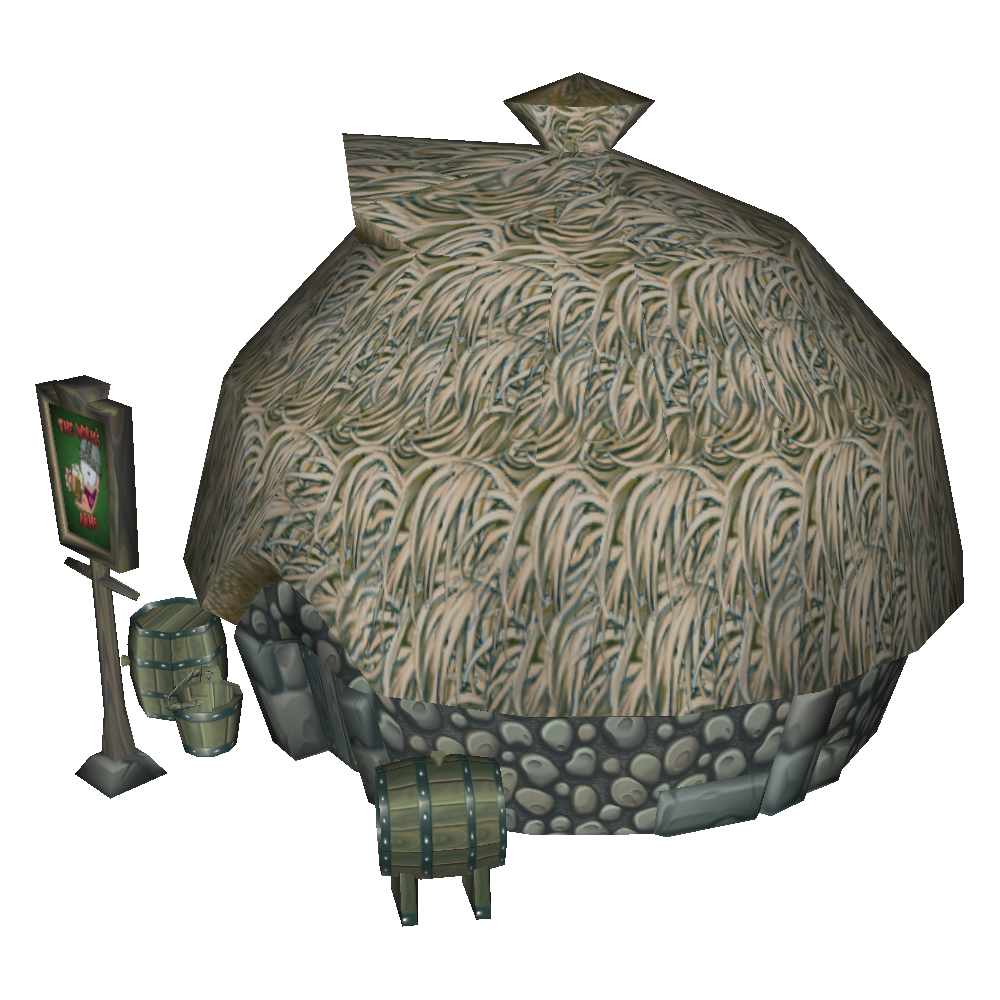
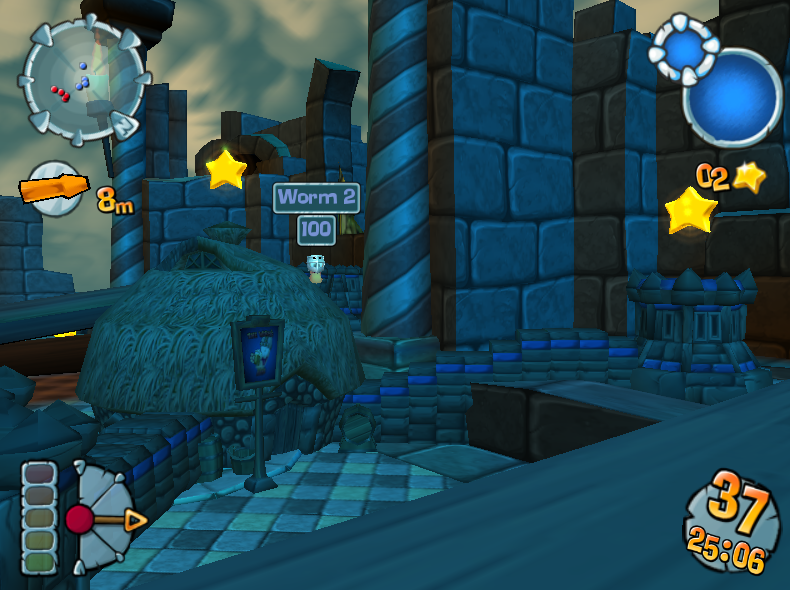
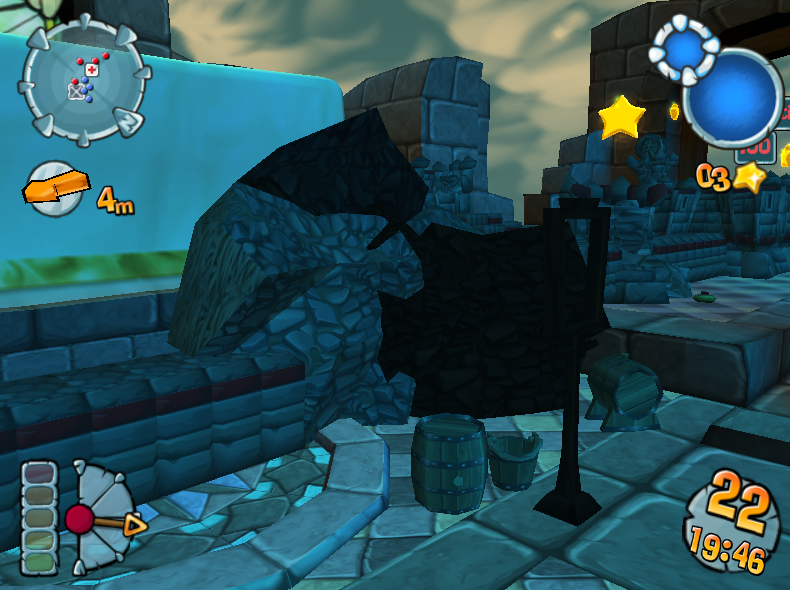
The Pub is the only cut building found in the list of buildings in Building.xom. In the file, buildings are classified with the prefixes "Building" for offensive buildings or "Special" for support buildings (e.g. "BuildingTower", "SpecialHospital"). Pub, however, uses the unique prefix "DestructiblePub". This could suggest that it wasn't intended to have a role in normal gameplay.
Weapons#
Small Catapult#

Within the game's data is an unused Fortapedia entry for an early version of the Chili Con Carnage named "Small Catapult". The entry is complete with text and artwork.
The artwork can be found in Bundle174.xom as "SmallCatapult.tga".
The weapon looks identical to the Chili Con Carnage, but has a sling holding what looks to be a rock rather than the "Mexican" projectile. While the catapult was kept, no trace of the scrapped projectile remains in the game's data.
Unused text for the Fortapedia entry can be found within the language files located in /data/Language/PC/FrontEnd. Despite the weapon being scrapped, the text has been translated into all available languages. The strings read as follows:

|
To do:
|
File |
Key |
Text |
|---|---|---|
English.xom |
4E5 |
|
French.xom |
4E4 |
|
German.xom |
4E4 |
|
Italian.xom |
4E2 |
|
Spanish.xom |
4E3 |
|
Fire Grenade Launcher#
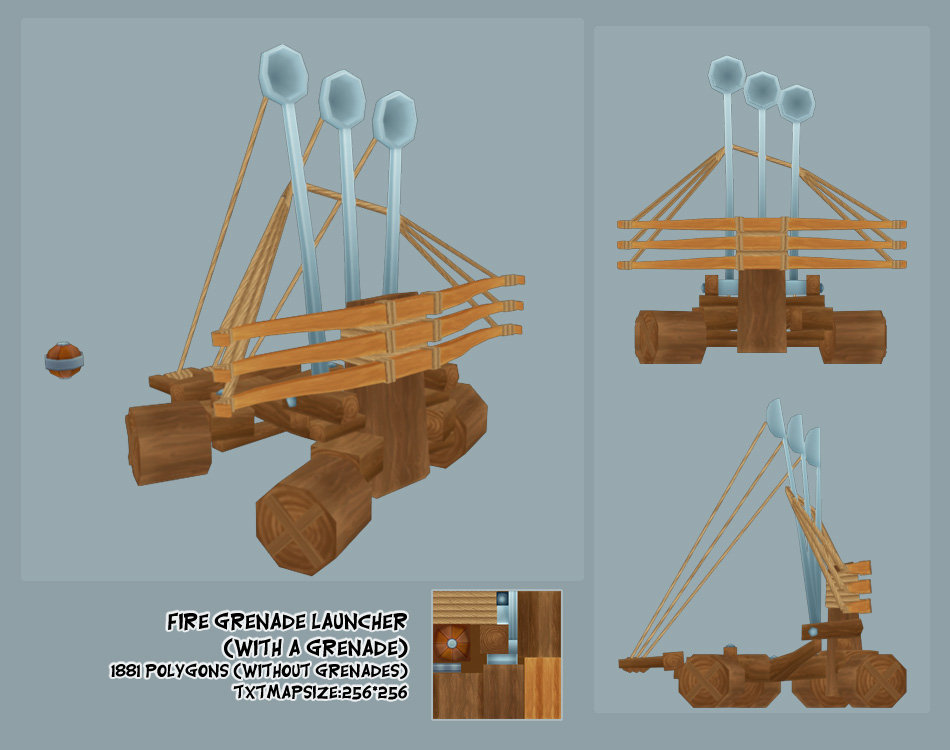
Many elements within the game's files and official website hint that the Siege Onager was initially intended to be part of the Grenade Family of weapons.
According to some internal strings and concept art that could be found on the official website, the weapon used to be named "Fire Grenade Launcher". It initially occupied the spot of the Chili Con Carnage as the Tier 3 Grenade weapon, while the Tier 3 Bazooka weapon was held by the previously mentioned Small Catapult. This was before the Small Catapult evolved into the Chili Con Carnage, then the Fire Grenade Launcher was tweaked into the Siege Onager to swap as the Tier 3 Bazooka weapon. This initial role would also contextualize why the projectiles look identical to the Grenade without its grip.
More extensive evidence outlined in Notes:Worms Forts: Under Siege.
Banana Bomb Launcher#
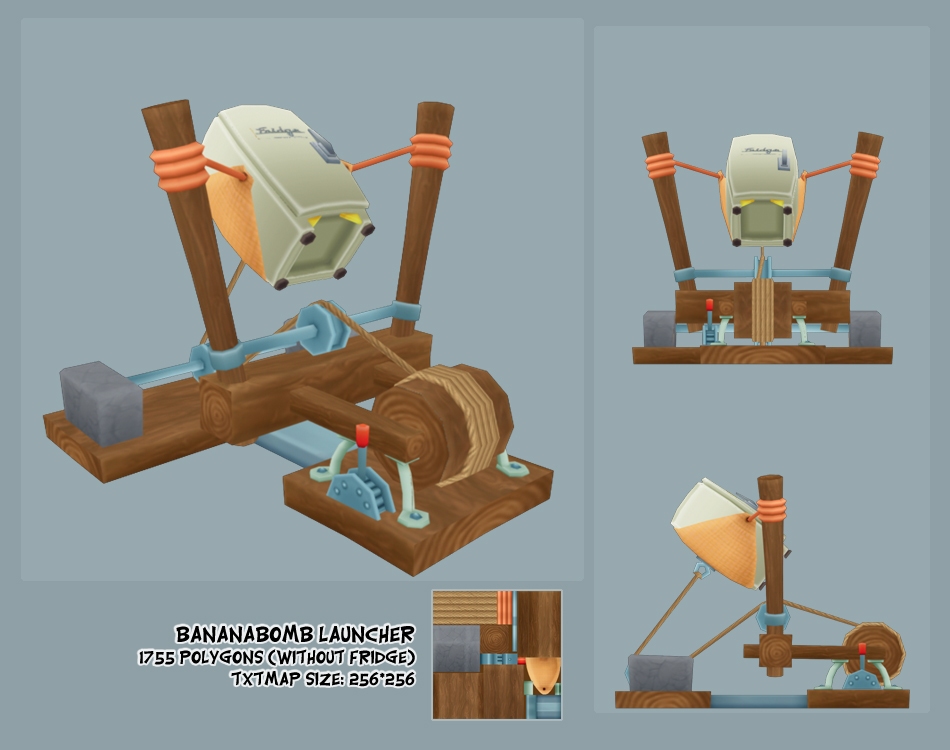
The Fridge Launcher is referred as "Banana Bomb Launcher" everywhere in the data, most easily found within the weapon's model data, Bundle127.xom.
Concept art for the weapon could also be found on the game's official website, where the Fridge catapult is labeled as the "BananaBomb Launcher", with the ferret clusters it produces in the retail game nowhere to be seen.
This suggests that the iconic Banana Bomb was intended to be featured in this game, and that the Fridge Launcher may have produced Banana Bomb clusters upon exploding instead of frozen ferrets, only to be changed at some point in development.
Minor Name Differences#
Within the game's files, such as Weapons.xom, it is possible to find text strings with early names for some weapons:
Retail Name |
Alt Name |
Source |
|---|---|---|
Grenade |
Hand Grenade |
Across the game's data and in concept art. |
Rhino |
Battering Ram and Rhino Battering Ram |
Battering Ram in the game's files, Rhino Battering Ram in concept art. Despite the former lacking to mention a Rhino, no evidence supports a design change. |
Nuclear Strike |
Plague |
Within Weapons.xom, each of the God Power weapons have a duplicate entry labeled with the prefix "Natural Disaster - " (likely intended for their Sudden Death versions). In the case of the Nuclear Strike, that duplicate is named "Natural Disaster - Plague". |
Monkey Troop |
Monkey Herd |
Across the game's data |
Early Screenshot Placeholder Texture#
|
|
This page or section needs more images.
|
|
|
To do:
|
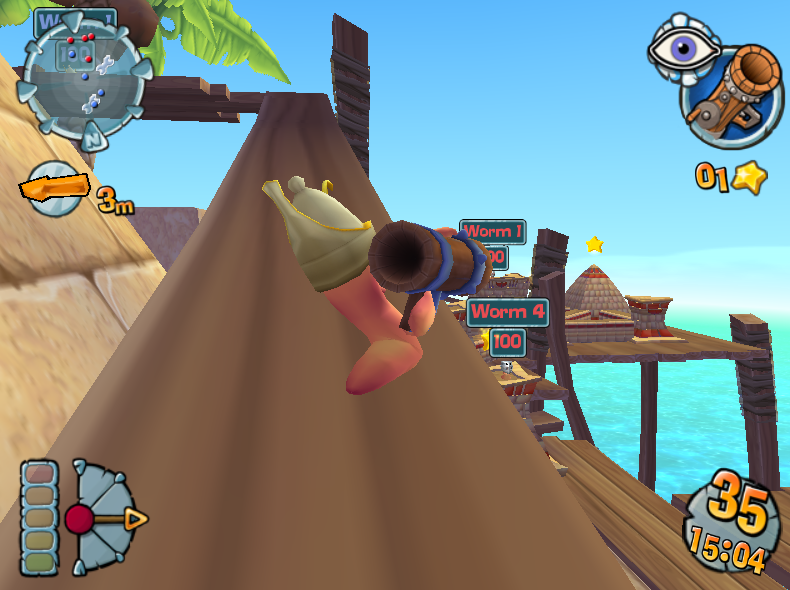
A placeholder texture found in Bundle173.xom features a compressed early development screenshot of the game. The "R1" icon in the top right implies the PlayStation 2 version specifically.
|
Early Screenshot |
Retail (PC) |
|---|---|

|
|
HUD#
The screenshot gives us a clear view of an early version of the game's HUD.
Its design is very reminiscent of the HUD from Worms 3D, unlike the retail version which resembles the one that would later appear in Worms 4: Mayhem. Upon closer inspection, we can see what seems to be the Victory Point counter on the left, but it is represented by a red gem rather than a star, despite yellow star Victory Points being visible in the background like in the retail game.
The image also has red debug text at the top of the screen, but the small resolution makes it hard to read. Uncertain guesses are noted in square brackets.
Landscape Polys : 13[26]3
Tower [?] = 20 Polys = 1074 x 2
[??] 2[6] Polys = 1[6]72 x 3
[??] Bricks = 3[6] Polys = 2117 x 2
[?] collision polys = 34[565]
[FPS(?)]: [46.?]
[?] 21[8]9 draw:  7[[66]1 wait:   1[9]1  Tri#: 143[838]
Even with the incomplete text, we can at least deduce that the purpose of the debug text is to indicate the game's performance, denoting the number of rendered polygons and their types.
Level Differences#
The screenshot was taken on what can be recognized as the "Under Construction" landscape from the retail version. However, some differences can be noted:
- The wood texture for the platforms is different and darker.
- The wood pillars holding the platforms are different. Retail has some of them sticking out higher to provide cover.
- The palm tree seen on the top left is less detailed, with smaller leaves.
Wall#
The player building walls have a more complex design than the flat-surfaced, simple ones seen in the retail version. They may have been simplified at some point for performance reasons and/or easier navigation.
Additionally, the wall the active Worm is standing on seems to reach way too far without a building attached, even making a turn by itself at the end of the slope. This may be a showcase of the cut Wall building mentioned earlier.
Worms 3D Leftovers#
Freeze Hat#
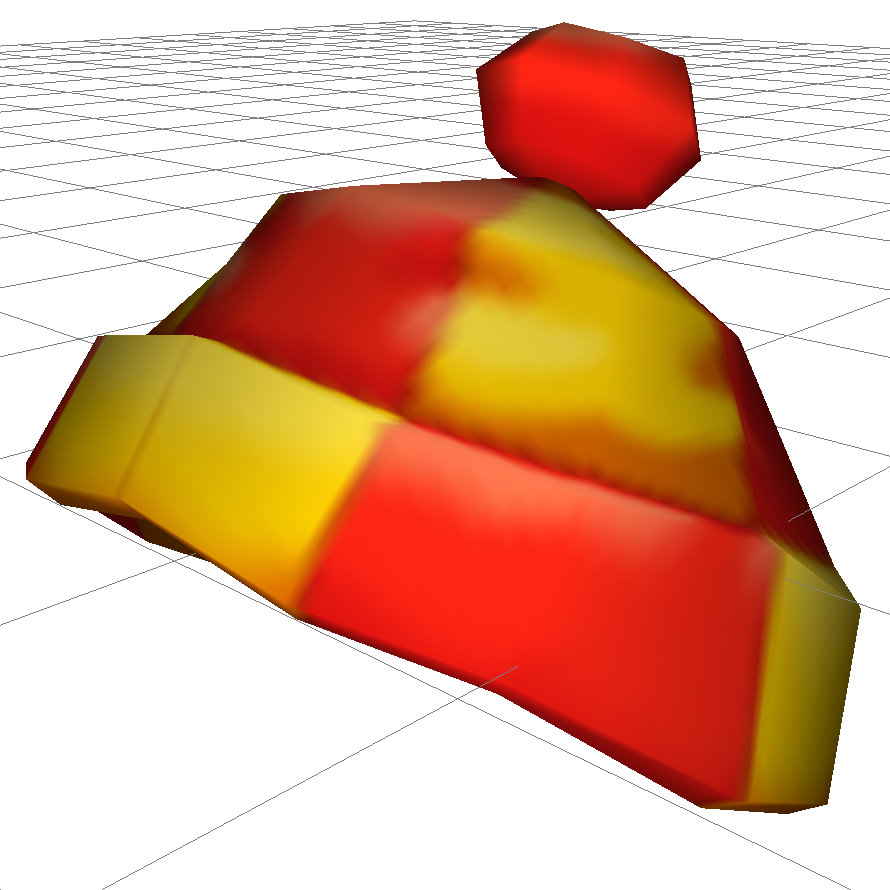
The 3D model of the bobble hat worn by Worms when using the Freeze utility in Worms 3D can be found in Bundle01.xom under "Hat.Vital". It comes with a "Walk" animation where the pom-pom bobs back and forth.
Level Name Strings#
LevelList.xom contains leftover strings for all Worms 3D levels.
|
The Worms series | |
|---|---|
|
DOS |
Worms (Demo) |
|
Windows |
Worms 2 (Demos) • Armageddon • Pinball • World Party • Blast • 3D • Forts • Mayhem • Ultimate Mayhem • Revolution |
|
Genesis |
|
|
SNES |
|
|
Nintendo 64 |
|
|
PlayStation |
Worms • Armageddon • Pinball |
|
Dreamcast |
|
|
Game Boy Color |
|
|
GameCube, PlayStation 2, Xbox |
|
|
Xbox 360, PlayStation 3 |
|
|
Wii |
|
|
PlayStation Portable |
|
|
J2ME |
|