Shifters is the direct sequel ofto Warriors of Might and Magic. This time you can change into various creatures, though.
Debug Mode#
A set of development features can be restored if a USB keyboard is plugged into the console while in-game. If you're using PSCX2, you'll need the Nuvee plugin in order to emulate one.
Keyboard Inputs#
Key |
Effect |
|---|---|
Esc |
Brings up the Pause menu. |
F3 |
Toggles God Mode. |
F/Alt |
Runs an attacked animation. |
N |
Triggers another attacked animation. |
M |
Runs a slightly different attacked animation of the above. |
Pause Break |
Increases the game's speed. |
Scroll Lock |
Decreases the game's speed. |
Enter |
Brings up a console. Working commands are unknown so far. |
Camera Controls#
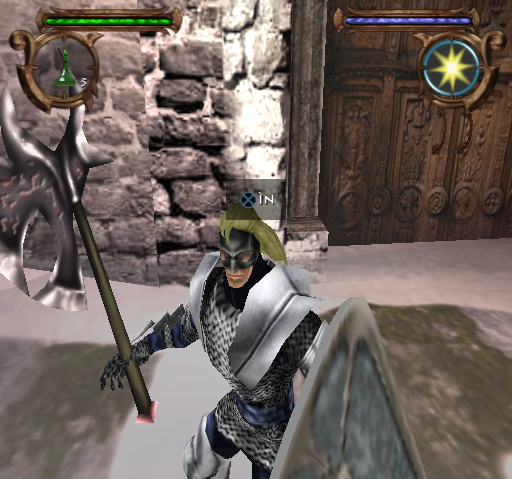
Insert and Delete zoom in and out the camera, while Start and End pan the camera upwards and downwards (albeit at a snails' pace). Any time these keys are pressed a cryptic X IN will appear onscreen; pressing the X button doesn't seem to have any effect here other than attacking.
Debug Displays#
- C brings up technical statistics about the player.
- F12 shows information about the level, the player's coordinates, frames per second, and so on.
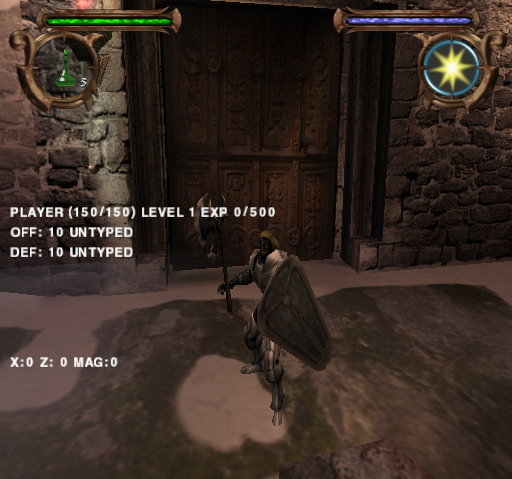
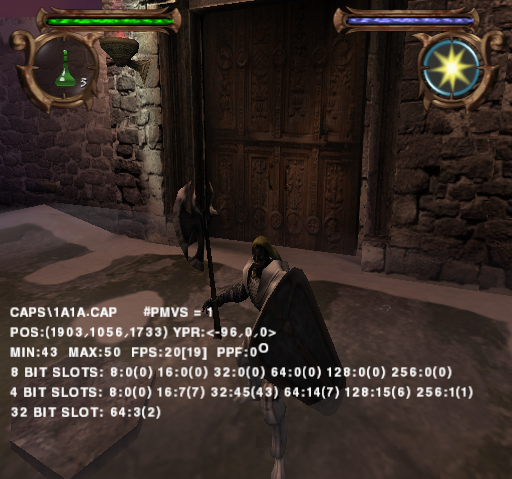
- T lets the player view up to four pages composed by many of the game's settings. It's possible to scroll through them with the G and B keys.
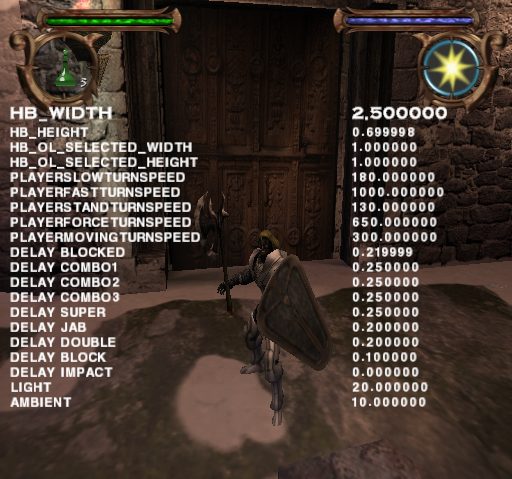
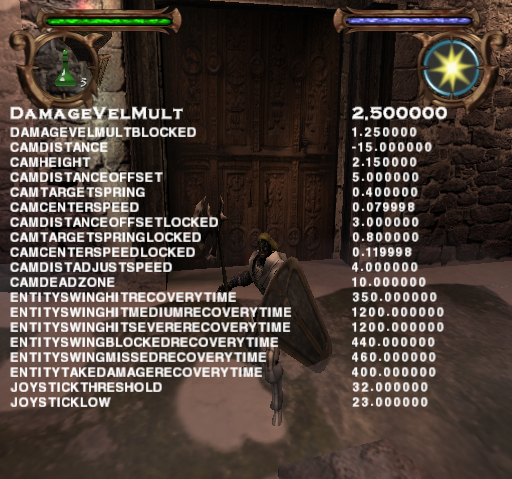
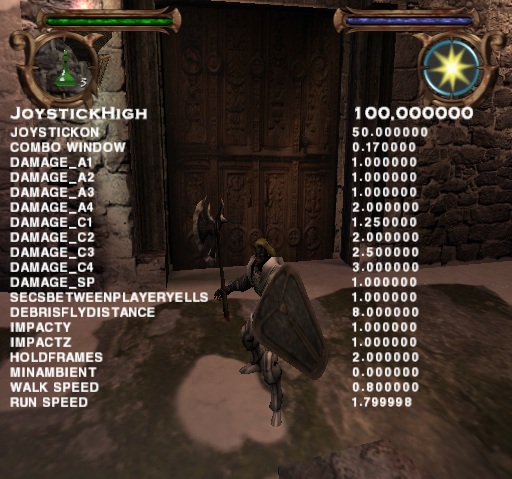
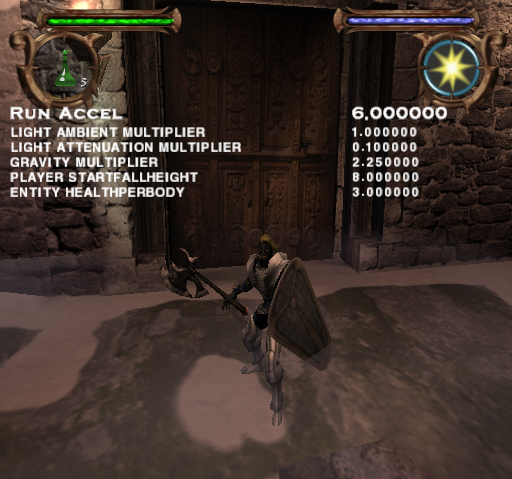
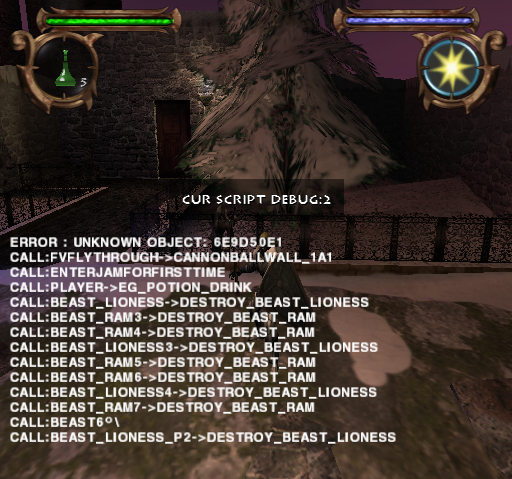
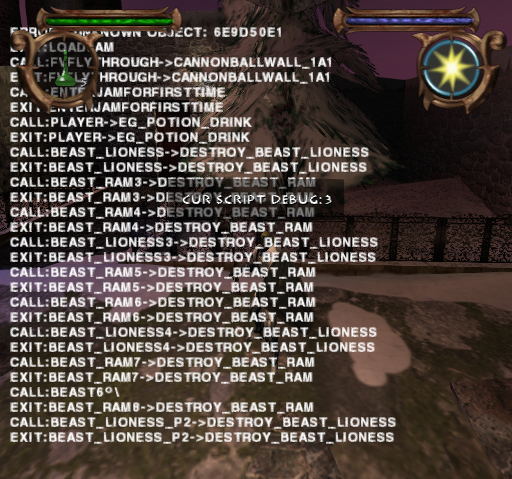
- Page Up reveals the commands performed by the console.
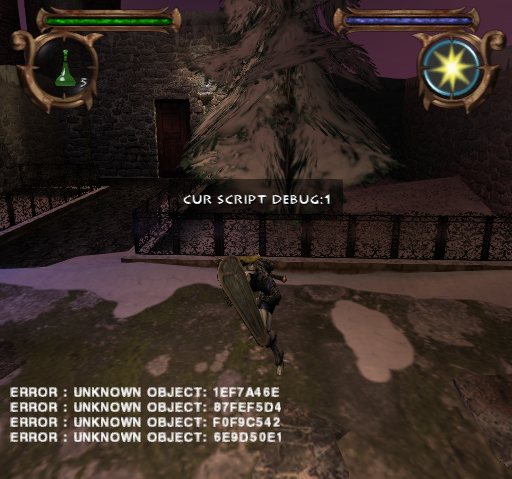
Transformations#
Every single transformation can be accessed with the following set of keys.
- W sets the creature group you want to shift into.
- S chooses the class of the creature above.
- Q transforms Alleron based on the settings above.
- A shifts the player into a Beast Warlord, but prints Automotron Grunt on screen instead. Its purpose is unknown.
(Source: UnknownArchive on YouTube)
Unused Graphics#
Title Screen#

An unseen title screen can be viewed by joining title1.tga, title2.tga, title3.tga and title4.tga together. The game jumps straight to the main menu following the 3DO logo and the introductory video.
Language Select#
Four screens for a language select can be found under the following. Neither the US nor the European version use this, potentially because no translations were ever done.


The third picture is made up by ui_language1.tga and ui_language2.tga.
Fonts#
There are at least three fonts sets that go unseen. One of the yellow tinted fonts is actually used but only within the console environment.


Unused Textures#
Placeholders#
A handful of labeled 128x128 images on a flat color background.


Grids#
A small set of grids likely meant as a base for making actual textures. The last one appears to be a placeholder judging by the filename.


Miscellaneous#
Graphic |
Filename |
Description |
|---|---|---|
 |
alpha_box_a.tga |
A small square with "ALPHA" written on it; serves no obvious purpose. |
 |
ent_selector.tga |
A striped black and white square, related to selecting entities. |
 |
Flagvolume_LQ_0.tga |
A blue and olive green checkerboard. |
 |
milt_test.tga |
A set of blue, red and purple gradients for something related to a "milt test". |
Development Files#
 |
File: SHIFT_TEMP.7z (24,8 KB) (info) |
The American release has a TEMP folder that is not present in the European version, despite being released earlier. It contains several header (.h) files ranging from January 2001 to February 2002 according to the commented-out text printed on top of each one of them. Inside are also a few Python scripts and some .tab files which seem to bind audio files together. All of these can be found in the SOUND\PS2 directory.
All of these header files are related to the audio components of the game, and have commented out development folder from at least 4 different sources. A sample (JACKAL.H) is displayed below.
//======================================================================
// Created By ASB Creator - 10-24-2001
//======================================================================

// Wavesample Defines:

#define AUDIO_JACKAL_BASEWAVEINDEX  0

#define AUDIO_JACKAL_CRIT_JACKALMAN_AMBIENT 0   // C:\WINDOWS\Desktop\ShifterSFXwav\Beastmen\vag\10.24.01\Crit_JackalMan_Ambient.VAG
#define AUDIO_JACKAL_CRIT_JACKALMAN_ALERT   1   // C:\WINDOWS\Desktop\ShifterSFXwav\Beastmen\vag\10.24.01\Crit_JackalMan_Alert.VAG
#define AUDIO_JACKAL_CRIT_JACKALMAN_ATTACK  2   // C:\WINDOWS\Desktop\ShifterSFXwav\Beastmen\vag\10.24.01\Crit_JackalMan_Attack.VAG
#define AUDIO_JACKAL_CRIT_JACKALMAN_DEATH   3   // C:\WINDOWS\Desktop\ShifterSFXwav\Beastmen\vag\10.24.01\Crit_JackalMan_Death.VAG
#define AUDIO_JACKAL_CRIT_JACKALMAN_FALL    4   // C:\WINDOWS\Desktop\ShifterSFXwav\Beastmen\vag\10.24.01\crit_jackalman_fall.VAG
#define AUDIO_JACKAL_CRIT_JACKALMAN_IMPACTHVY   5   // C:\WINDOWS\Desktop\ShifterSFXwav\Beastmen\vag\10.24.01\Crit_JackalMan_ImpactHvy.VAG
#define AUDIO_JACKAL_CRIT_JACKALMAN_IMPACTLT    6   // C:\WINDOWS\Desktop\ShifterSFXwav\Beastmen\vag\10.24.01\Crit_JackalMan_ImpactLt.VAG
#define AUDIO_JACKAL_CRIT_JACKALMAN_IMPACTMED   7   // C:\WINDOWS\Desktop\ShifterSFXwav\Beastmen\vag\10.24.01\crit_jackalman_impactmed.VAG
#define AUDIO_JACKAL_CRIT_JACKALMAN_JUMP    8   // C:\WINDOWS\Desktop\ShifterSFXwav\Beastmen\vag\10.24.01\crit_jackalman_jump.VAG
#define AUDIO_JACKAL_CRIT_JACKALMAN_LAND    9   // C:\WINDOWS\Desktop\ShifterSFXwav\Beastmen\vag\10.24.01\crit_jackalman_land.VAG

#define AUDIO_JACKAL_NUMSAMPLES 10

// Patch Defines:

#define AUDIO_JACKAL_BASEPATCHINDEX 0


#define AUDIO_JACKAL_PATCH_SIZE 4
Hidden Text#
The folder above contains two plain text files with instructions for the developers.
README#
The first one describes the functions of some of the .py scripts.
GenerateSoundList.py
    Before running, checkout "GenerateSoundList.tab".
    Creates list of sounds used by each level.
    This list is used by Sound Designer to
    build lists of sounds that go into ASBs.
    Should be run biweekly and given to Sound Designer.
    This script also runs "_EPParse.py" and "_ROLParse.py".

_GenerateAsbList.py
    Before running, checkout "runtime data\script\asblist.tab".
    Creates "asblist.tab", which lists which
    ASB files need to be loaded for each cap.
    Should be run when entity types are added to a cap.
    You need to run "GenerateSoundList.py"
    before running this script.

GenerateATX.py
    Generates ATX files and reports on SPU budget.
    Should be run whenever ASB files are created.
    You need to run "_GenerateAsbList.py"
before running this script.WHERE#
The second one details where the game's sound files are referenced within the code.
Sound Resources are referenced in the following places:

    C/C++ files
    textures.nfo
    EP files
    ROL files
    Entity Database
    Form Database

GLOBAL SOUNDS
  C/C++ files:  aud_constants.cpp ( by hand )
  TEXTURES.NFO
  EP files: ( EPParse.py )
        global ep files
        ai.ep
        ai_*.ep
        entities.ep
        globals.ep
        obstacles.ep
        spell_*.ep
        weapons.ep
        igc.ep ?

LEVEL SOUNDS
    EP files for level ( EPParse.py )
    ROL files: (ROLparse.py)
        "SND:" references
        SoundFlag references
        Entity references
    What about NPC's ?

ENTITY SOUNDS
    Entity Database ( by hand )
    ( list entities by level )

FORM SOUNDS
Form Database ( by hand )TEXTURES#
Located in TEXTURES.ZIP is the lengthy .nfo file named in the previous text.
// Textures.nfo
//
//   - Enumerates and describes categories of texture material properties
//
/////////////////
//


// Wood

Category Wood
Ricochet wpn_blunt_wood
FootstepL crit_Alleron_walk_wood_L1
FootstepR crit_Alleron_walk_wood_L1
FootstepD footprint
BreakApart wpn_hitbarrel01
SparxDust ent_footDust
Decal hole
KFriction 1.0
//HasDetail
Symbol WD


// Earth

Category Earth
FootstepL crit_Alleron_walk_dirt_L1
FootstepR crit_Alleron_walk_dirt_L1
FootstepD footprint
SparxDust ent_footDust
Decal scorch
KFriction 1.0
//HasDetail
Symbol ER


// Stone

Category Stone
Ricochet amb_thud
FootstepL crit_Alleron_walk_stone_L1
FootstepR crit_Alleron_walk_stone_L1
SparxDust ent_footDust
Decal slash
KFriction 1.0
//HasDetail
Symbol ST


// Metal

Category Metal
Ricochet wpn_hitmetal01
FootstepL crit_Alleron_walk_metal_L1
FootstepR crit_Alleron_walk_metal_L1
SparxDust none
Decal scorch
KFriction 1.0
//HasDetail
Symbol ML

// Sand

Category Sand
Ricochet crit_Alleron_walk_sand_L1
FootstepL crit_Alleron_walk_sand_L1
FootstepR crit_Alleron_walk_sand_L1
SparxDust ent_footDust
Decal scorch
KFriction 1.0
//HasDetail
Symbol SD


// Cloth

Category Cloth
Ricochet wpn_hitleather01
FootstepL crit_Alleron_walk_dirt_L1
FootstepR crit_Alleron_walk_dirt_L1
SparxDust none
Decal scorch
KFriction 1.0
//HasDetail
Symbol CL


// Organic

Category Organic
FootstepL crit_Alleron_walk_grass_L1
FootstepR crit_Alleron_walk_grass_L1
SparxDust none
Decal scorch
KFriction 1.0
//HasDetail
Symbol OG


// Liquid

Category Liquid
FootstepL crit_Alleron_walk_water_L1
FootstepR crit_Alleron_walk_water_L1
Decal scorch
KFriction 1.0
//HasDetail
Symbol LQ


// Sky

Category Sky
SparxDust none
Decal scorch
KFriction 1.0
Symbol SY

// Glass

Category Glass
BreakApart amb_jarbreak
SparxDust none
Decal scorch
KFriction 1.0
Symbol GL

// Snow

Category Snow
Ricochet crit_Alleron_walk_snow_L1
FootstepL crit_Alleron_walk_snow_L1
FootstepR crit_Alleron_walk_snow_L1
SparxDust none
Decal scorch
KFriction 1.0
//HasDetail
Symbol SN

// Grass

Category Grass
Ricochet crit_Alleron_walk_grass_L1
FootstepL crit_Alleron_walk_grass_L1
FootstepR crit_Alleron_walk_grass_L1
SparxDust none
Decal scorch
KFriction 1.0
//HasDetail
Symbol GR

// Special

Category Special
SparxDust ent_footDust
Decal scorch
KFriction 1.0
Symbol SP

// Materials database proxy

Category DatabaseMaterial
SparxDust none
Decal scorch
KFriction 1.0
Symbol DB

// Sliding
Category Sliding
Decal scorch
KFriction 0.0
Symbol SL|
The Might and Magic series | |
|---|---|
|
NES |
|
|
Mac OS Classic |
|
|
DOS |
III: Isles of Terra • IV: Clouds of Xeen (Demo) • V: Darkside of Xeen (Demo) • IV + V: World of Xeen • Swords of Xeen |
|
SNES |
II: Gates to Another World • Book II • III: Isles of Terra (Prototype) |
|
Windows |
VI: The Mandate of Heaven • VII: For Blood and Honor (Prototypes) • VIII: Day of the Destroyer • IX: Writ of Fate (Prototype) |
|
PlayStation 2 |
|
|
Heroes of Might and Magic | |
|
Windows |
A Strategic Quest (Demo) • II: The Succession Wars • III: The Restoration of Erathia • IV • V • VI • VII • Olden Era |
|
Dreamcast |
|
|
Other | |
|
Windows |
|
|
Game Boy Color |
|
|
PlayStation 2 |
|
|
Xbox 360 |
|