 This article has a talk page!
This is a sub-page of Minecraft: Java Edition.
The Java Edition of Minecraft contains a lot of debugging features, and we mean a lot.
Debug Text#
In the language files for the game, lines 221 and 3296 to 3320 contain some debug-related strings. They are indeed used by the debugging options shown below.
generator.debug_all_block_states=Debug Modedebug.prefix=[Debug]:
debug.reload_chunks.help=F3 + A = Reload chunks
debug.show_hitboxes.help=F3 + B = Show hitboxes
debug.clear_chat.help=F3 + D = Clear chat
debug.cycle_renderdistance.help=F3 + F = Cycle render distance (Shift to invert)
debug.chunk_boundaries.help=F3 + G = Show chunk boundaries
debug.advanced_tooltips.help=F3 + H = Advanced tooltips
debug.creative_spectator.help=F3 + N = Cycle creative <-> spectator
debug.pause_focus.help=F3 + P = Pause on lost focus
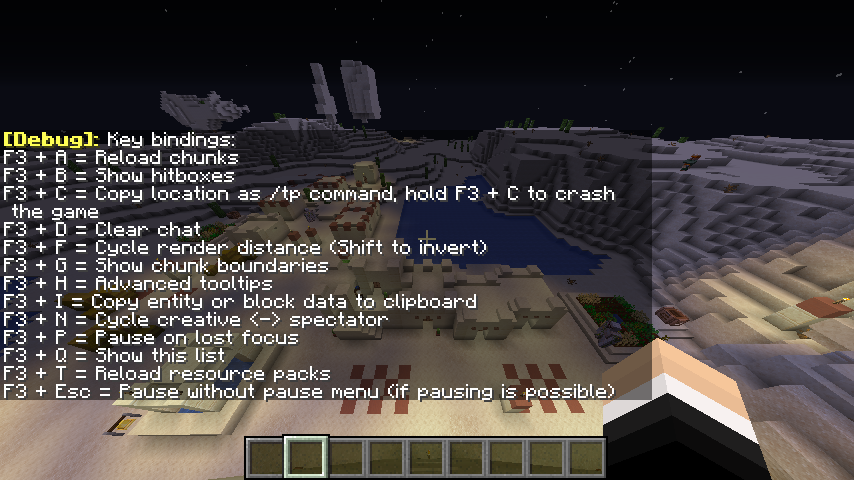
debug.help.help=F3 + Q = Show this list
debug.reload_resourcepacks.help=F3 + T = Reload resource packs
debug.reload_chunks.message=Reloading all chunks
debug.show_hitboxes.on=Hitboxes: shown
debug.show_hitboxes.off=Hitboxes: hidden
debug.cycle_renderdistance.message=Render Distance: %s
debug.chunk_boundaries.on=Chunk borders: shown
debug.chunk_boundaries.off=Chunk borders: hidden
debug.advanced_tooltips.on=Advanced tooltips: shown
debug.advanced_tooltips.off=Advanced tooltips: hidden
debug.creative_spectator.error=Unable to switch gamemode, no permission
debug.pause_focus.on=Pause on lost focus: enabled
debug.pause_focus.off=Pause on lost focus: disabled
debug.help.message=Key bindings:
debug.reload_resourcepacks.message=Reloaded resource packsWorld Type#

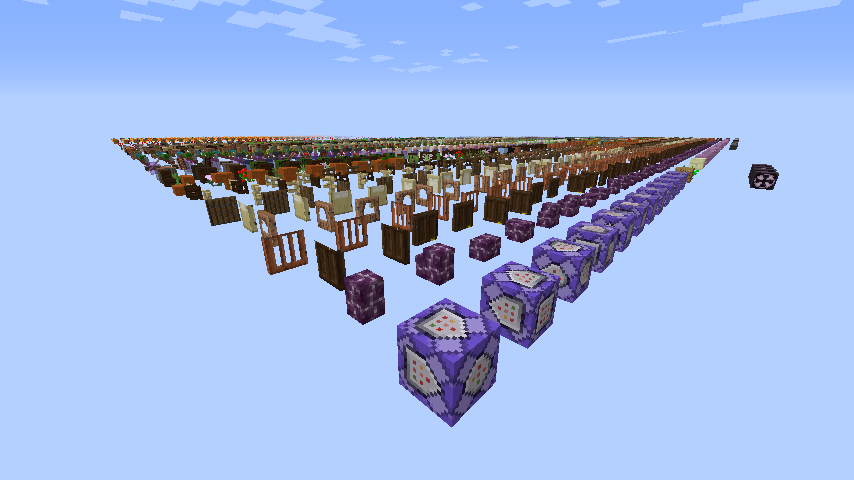
Introduced in snapshot 14w26a, holding Alt (Shift in versions prior to 20w46a) while selecting a world type will grant access to a hidden world type called "Debug Mode" after scrolling through the standard world types. Doing this will hide the other world options.
This world type only consists of all blocks in the game separated by 1-block gaps. Upon starting the world, you will be forced into Spectator Mode where you cannot interact with the world in any way. If you get into Creative Mode and try to break anything, it will instantly respawn. If you do anything that causes a floating block to update (such as stepping on a pressure plate), many copies of that item will be dropped due to the item being recreated rapidly, and as a result the game may freeze.
Key Combinations#

|
To do:
|
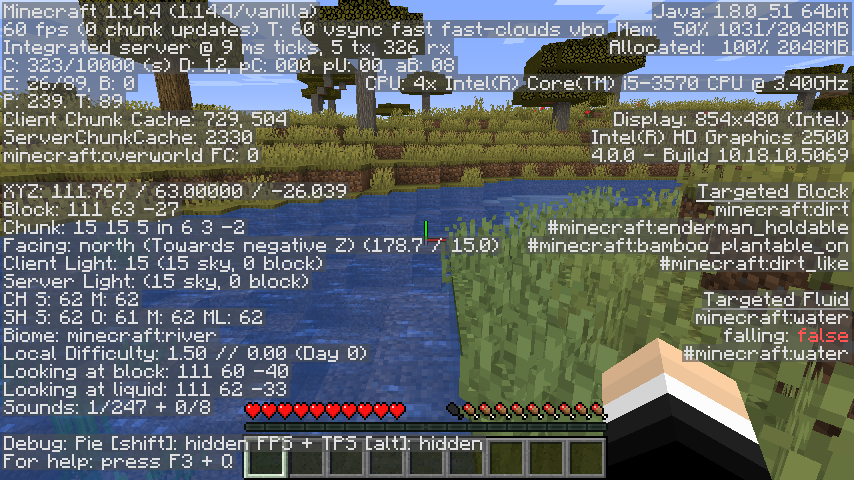
Pressing F3 in-game brings up a debugging overlay that displays various debugging text, including:
- The version of Minecraft you are playing (as well as the client type, which defaults to vanilla if you're playing an unmodded version of the game).
- Framerate.
- The number of chunk updates.
- Your max framerate.
- Whether you're using Fancy graphics or Fast graphics.
- Your render distance.
- Your current coordinates.
- The coordinates of the block you are currently looking at.
- The coordinates of the chunk you are currently in.
- The direction you are facing (north, east, etc.)
- The biome you are currently in.
- Current light level.
- Current difficulty level (easy being 0.76, medium being 1.54, hard being 2.33).
- Number of days gone by.
Performance Key Combinations#
Holding Shift and pressing F3 in-game to open the debugging overlay shows a pie chart of what is using the most resources, and each of the things listed are all color coded separate colors. Doing the same thing but except holding Alt instead of Shift brings up an alternate way of seeing framerates.
Command Key Combinations#
Hotkey |
Function |
Screenshot |
|---|---|---|
F3 + A |
Reloads the currently visible chunks in-game. |
|
F3 + B |
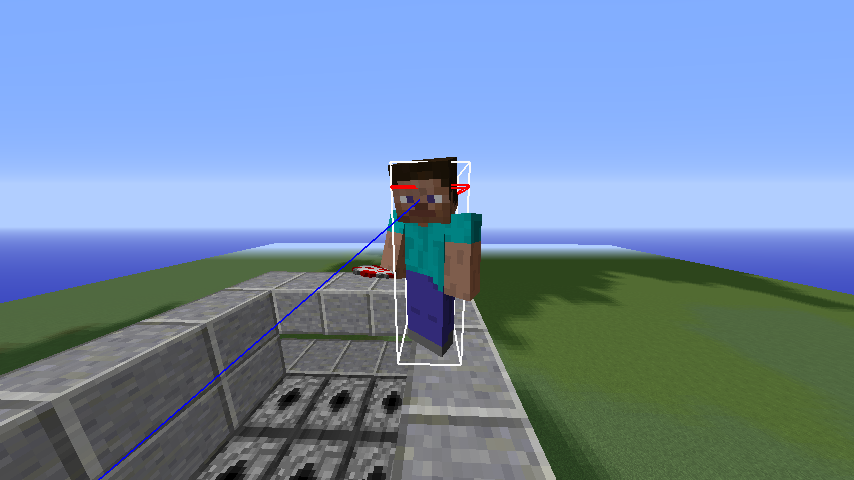
Toggles the ability to see entity hitboxes (including players). |
 |
F3 + C |
Manually crashes the game with the reason of "Manually triggered debug crash". You may need to hold it for a few seconds and then release to trigger it. |
|
F3 + D |
Clears the chat. |
|
F3 + F |
Cycles between the render distances. |
|
F3 + G |
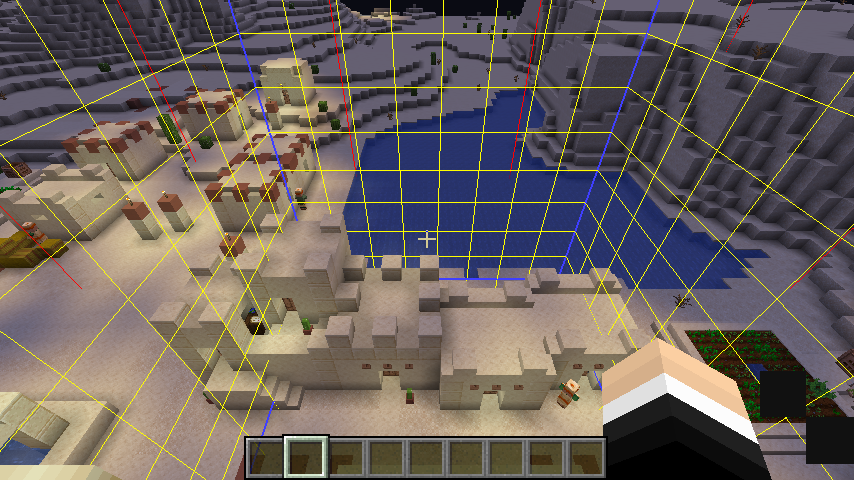
Shows the chunk borders. |
 |
F3 + H |
Toggles the ability to see more specific tool tips (displays their item ID and the damage value to obtain the item). |
 |
F3 + N |
Switches between Creative Mode and Spectator Mode. |
|
F3 + P |
Toggles the function to pause the game when the game loses focus. |
|
F3 + Q |
Displays a list of most of the key combinations that can be used. |
 |
F3 + T |
Reloads the currently used resource packs. |
Unregistered Key Combinations#
There are a number of key combinations which are not registered by default. These key combinations are only available on development builds, but can be activated in public versions of the game using mods.
Hotkey |
Function |
|---|---|
F3 + E |
Toggles SectionPath, a debug mode that shows the borders between subchunks (16 x 16 x 16 areas of blocks). |
F3 + L |
Toggles SmartCull, also known as chunk culling. |
F3 + U |
Captures frustum culling data. |
Shift + F3 + U |
Deletes captured frustum data. |
F3 + V |
Toggles SectionVisiblity, a debug mode that shows chunk culling data. |
F3 + W |
Toggles WireFrame. Note that the code to make wireframe mode work is not present as of Minecraft release 1.21. |
F3 + O |
Toggles Frustum culling Octree. |
F3 + F |
Toggles the fog graphics. |
Debug Renderers#
|
|
To do: |
There are a number of debug renderers hidden in the code. They can be activated on public builds through the use of mods.
Test Worlds#
|
|
To do: |
There is code for a "Create Test World" button on the title screen. It is only visible on development builds by default, but can be made visible through the use of mods. This button can be used to generate a superflat world that is designed to be used for testing. The world is set to allow commands and uses Creative as the default gamemode. It also disables the generation of structures.
- Superflat Preset:
minecraft:bedrock,3*minecraft:stone,116*minecraft:sandstone;minecraft:desert
Game Rules#
When creating test worlds, some game rules uses different values as the default setting.
- doDaylightCycle:
false - doMobSpawning:
false - doWeatherCycle:
false
Debug Stick#


The debug stick is a debugging tool that was added in snapshot "17w47a" for Minecraft 1.13. It uses the texture of the stick and can only be accessed either by using /give @s minecraft:debug_stick or through the Operator Utilities tab in Creative mode. Right clicking will change the state of the block you are hovering on, and left clicking will choose the state you want to edit. Holding Shift while doing either of the actions will do the same action, but reversed.
This is intended for custom maps to allow the map maker to customize how the specified block will act and or look like.