 This article has a talk page!
Lode Runner 2 is an isometric incarnation of Lode Runner, with a host of neat powerups and puzzles, and online multiplayer capability.
Scrapped Worlds#
By editing the byte of a custom level that tells LR2 which world the level uses and then trying to open it, you can determine this:
00 Mona
01 Wacky (although it may crash LR2 under some conditions)
02 Industry
03 Alien
04 Jungle
05 Builder
06 Gear
07 Mall
08 World Hub
09 Credit Level
There is no Alien World, nor a Mall World, and as such the editor will tell you that it couldn't find their graphics .PRX files. Presage must have intended to include them until some point in development...
(Source: Stephen Appleby)
Unused Graphics#
None of the graphics appear to be stored with names, so in some cases there is really no clue as to what they are.
Colorful Keys#

These appear in 4 of the .PRX files: Gbg, Glrs, Gog, and UI. Some of them within the same file appear to be duplicates, and they appear all in sequence as shown here (each row is from a different file, in alphabetical order). Some or all of them have way larger palettes than they actually use. As it turns out, that's because these placeholder images are where the alternative palettes for monks, lode runners, bombs, and some UI elements related to runner colours, are stored! Why these 'key' images themselves look like they do (or indeed why they have image data instead of only having palettes, since we know they don't have to), is still unclear.
Transforming Monk#

A monk turning into a pillar. Can be seen in game by activating cheats, and using the "morph" cheat, while the player is affected by the monk disguise powerup. However, this almost always crashes the game before the animation happens. Appears in Gbg.PRX, which is where the Monk stuff all seems to be.
Detail Settings#

These are in UI.PRX, but there is no menu that shows them. At least, if there is, it's disabled.
Hidden Gubbins#
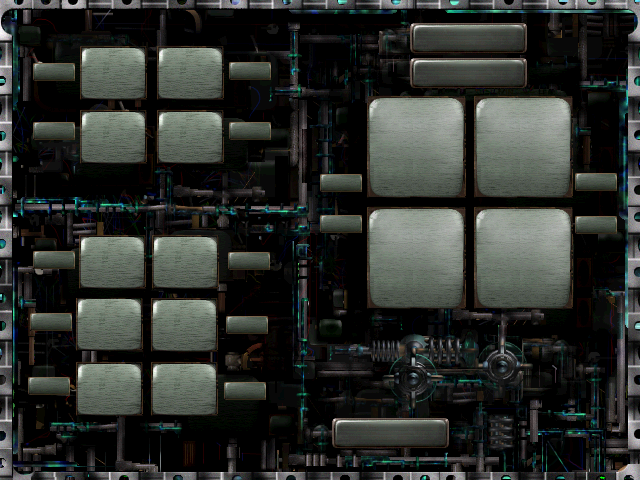
The configure controls menu normally has some buttons placed in the bottom right area, obscuring these intricate machine bits. Only this menu has such bits; the other menus have a relatively simple textured appearance, aside from the borders.
Team LR2#

Appears in UI.PRX. The image was first discovered, and then all (probably) of the cheat strings were located. It turns out that typing "teamlr2" (sans quotes) at the very first menu, and then starting a new game, will cause this image to take the place of the usual rotation of instructive images.
Smileyface Monk Portrait#

Appears in UI.PRX. The main menu has portraits for Jake Peril and Jane, the titular Lode Runners (the Lode Runner 2, if you will). However, there are not two sets of sprites, but three! First 3 small ones, then 3 normal, 3 bright, 3 monochrone, and 3 partially desaturated. The first of each is Jake, the second is Jane, and the third... is a Mad Monk with a big yellow smiley face. There is nowhere on the menu to select this option. Perhaps it's another undiscovered secret... Much later in the file there are tiny portraits for the in-game HUD. He's in there too.
World Icon Placeholders#

In Editor.PRX, there are sprites which are used in the level editor to represent each world. They appear in the same order as in the world bytes in a level file (first Mona, then Wacky, etc.), except that there is an extra one between Builder and Gear. For that extra one, Alien, Mall, World Hub, and Credit (none of which are options in the editor), the icon is this thing.
0x0 sprites#
In Editor.PRX, there are sprites which are used by the level editor to represent any prefabricated arrangements of multiple tiles which are available for the currently chosen world. For Wacky world, the file lists 30. 3 of them are defined as taking up 0 bytes. They are shown here in order of appearance.
(Source: Toastline)
Unused Debug Text#
In LR2.exe#
Some strings are repeated, but this list will not feature the duplicates. Some of the particular instances of strings in the file may not be used, but the text appears in-game in other places, and so those will also not feature on this list because it's not known whether those particular instances are used or not.
AI Turned On
AI Turned Off
Mem = %ld%% Phys = %ld %ld %ld Page = %ld %ld Virt = %ld %ld x = %ld
Downloaded Levels\
Resource\
Movies\
In LR2Ed.exe#
Many of the strings that ARE used in LR2.exe appear here as well, but are not used due to reasons like being related to online multiplayer modes, which the editor does not have.
Unique Demo Graphics#

Where the Team LR2 image normally resides in the full game, the demo has this. Why is there all that empty space around it? The set of instructive menu graphics to which this belongs are all like that, for some reason, in the demo and in the full game. The game runs in 640x480 fullscreen mode, and storing these images this way means that they don't need an offset for the visible part to appear where it's supposed to. That doesn't seem like it saves any time or space, since they have to store the blank space in each image instead of one pair of values that applies to all of them, but that's how it is.
|
The Lode Runner series | |
|---|---|
|
Apple II |
|
|
NES |
|
|
SNES |
|
|
Nintendo 64 |
|
|
Game Boy Advance |
|
|
PlayStation 2 |
|
|
Windows, Mac OS Classic |
|
|
See Also | |