 This article has a talk page!
 Prerelease Info
 Unused Text--DUMY LINE--
 Version DifferencesLet's kick around a sack instead of a skull, why shall we?
Unused Graphics#
Truck Health#

This icon is used for the Truck whenever a health display is forced on-screen (for example, if a player hacks the Truck into Old King Coal's fight). It's a grey silhouette of an unknown object with a question mark in it. Since the truck cannot get hurt, it has no regular health display. According to the game's designer Gregg Mayles, this icon was likely a placeholder for characters that didn't have a dialogue icon.
Honey B's Chest#

The texture used for Honey B's chest. She wears a yellow top which covers up most of her breasts, so half of this texture is never actually seen in-game.
Skull#
An unused icon for a yellow skull. Red and green skulls were added in the XBLA version but are still unused.
N64 |
XBLA |
|---|---|
 |
|


Game Box#

The texture for the right side of the Banjo-Tooie box in the menu can't be seen in-game due to the camera angle.
Unused Models#
Muscular Jinjo#

A huge, musclebound Jinjo with fangs. Possibly an early Minjo design, scrapped for looking too different from Jinjos, making it too obvious at a glance that it's a Minjo.
Unused Objects#
Using the GameShark code 81093486 ???? in the US version, the player can spawn these objects in-game.
(Source: retroben)
Falling Leaves#
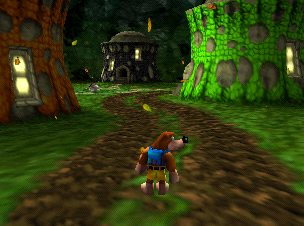
Value: 0204
Falling leaves that were used in the autumn section of Click Clock Wood in Banjo-Kazooie.
Torch Enemy#

Value: 02AE
An angry torch that doesn't do anything. Some concept art reveals that it was intended to appear in the flooded caves in Glitter Gulch Mine. It would've lit up dark areas and chase the player whenever they're nearby.

Rare Crate#

Value: 03BC
A metal version of the wooden Rare crates seen in Grunty Industries. Unlike the wooden crates, this can only be destroyed with Grenade Eggs or a Clockwork Kazooie.
Unused Animations#
The dance Banjo does when he collects all jiggies in a level in Banjo-Kazooie exists as a leftover. However, the player maintains control of Banjo when collecting jiggies, so the animation is never seen.
Bottles' Revenge#
Watch on YouTubeA dummied-out game mode which allows Player 2 to antagonize Player 1, which can be re-enabled with a GameShark code.
Version |
Code |
Version |
Code |
|---|---|---|---|
UK |
|
Aus |
|
Japan |
|
US |
|
When the player starts a new file, they will get an additional cutscene where Bottles' spirit turns evil. Player 2 can now use Devil Bottles to take control of the baddies and try to hinder Banjo's progress. However, Devil Bottles is not available in boss battles, and will disappear when Banjo enters a boss room. The rest of the game's story remains unchanged when in this mode.
In this mode, the first player plays the game as normal. When Banjo is near an enemy, Devil Bottles will hover over it and player 2 can control it and make it attack by pressing B. If multiple enemies are nearby, player 2 can press R to switch between them. Additionally, a radar will appear at the bottom right corner of the screen.
During the Tower of Tragedy Quiz, player 2 will be able to control Mingella or Blobbelda at will, similar to the multiplayer version available from the replay menu.
The mode is quite functional, but there are still unimplemented features that caused the mode's dummying out. The two players were to switch positions upon the baddies landing a kill, so successfully thwarting player 1 would allow player 2 to take a turn as Banjo. Boss battles were also intended to be playable, with Old King Coal being the only known attempt, but it was found that putting a human in control of a boss was too difficult to win against, ruining the patterns that boss fights are predicated upon. Also, using it in replay mode makes the game think it's in story mode.
(Source: Ice Mario, SubDrag (Rare Witch Project), Rare(ware) (YT))
Unused Audio#
Banjo-Kazooie Leftovers#
Various songs and sounds from Banjo-Kazooie are still present, but are never heard in the sequel.
Game Over#
The last four seconds of the Game Over theme cannot be heard in-game, as the game fades out to the title screen (complete with Grunty's laughter being imposed over the music) before the final segment can play. It's not too substantial a loss, as the full version is audible in the Banjo-Kazooie "Game Over" screen.
Note Door#
The fanfare played for opening a Note Door and collecting the final Jiggy of a world. Banjo-Tooie not only has no Note Doors, but nothing special happens upon getting the last of a world's Jiggys.
Jinjo Fanfare#
The fanfare used in Banjo-Kazooie when the player collected all five Jinjos in a world. In Banjo-Tooie nothing special happens when a player collects all five Jinjos in a world, and no special fanfare plays when a complete Jinjo family is collected.
Extra Life#
Rare did away with extra lives for this game, leaving this sound unused.
Termites#
Two voice clips that were spoken by the termites in Mumbo's Mountain in Banjo-Kazooie. Mr. Fit uses the "hut" and "two" voice clips, but the voice clips for "three" and "four" go unused.
Unused Areas#

|
This needs some investigation. |
Unused Jinjo House#
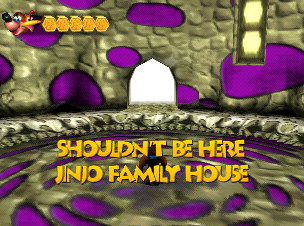
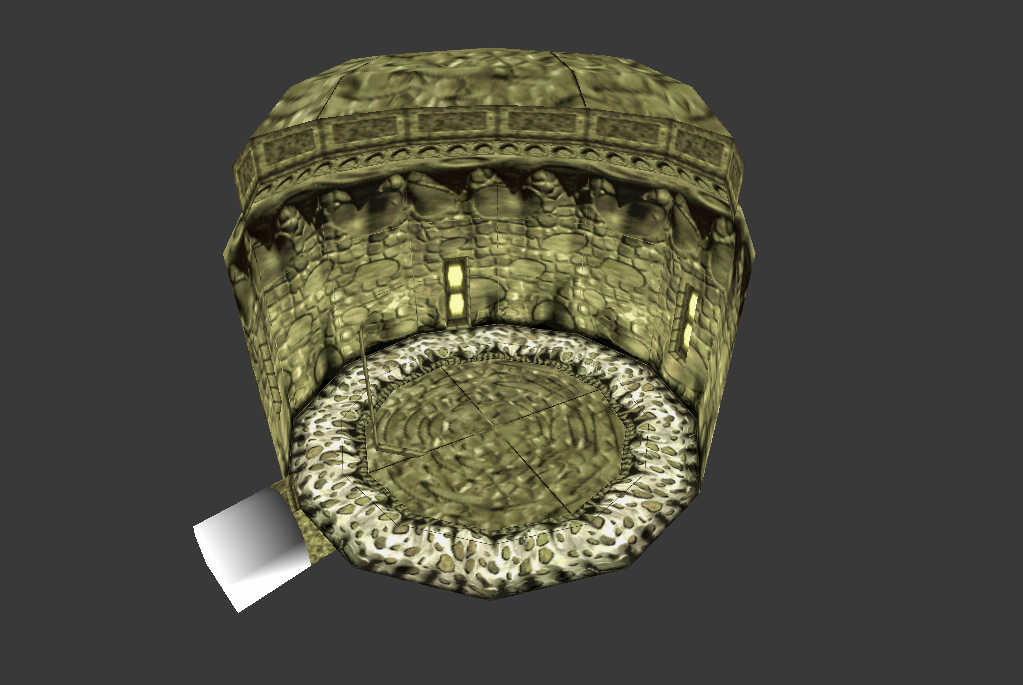
Code:
81127640 0149Present among the nine Jinjo houses in Jinjo Village is an unused tenth Jinjo house which has the tag "SHOULDN'T BE HERE". The spots on the wall randomly alternate between purple and brown. The entrance also lacks a loading zone, so you can't exit the house. The exact purpose of this map is unknown.
To access the next three maps in the US version, use the following GameShark code and replace "????" with the respective map's value.
8101E006 ????
8101E012 0000
8101BBB8 0800
8101BBBA 7800
8101E000 A08E
8101E002 FFFF
8101E004 201B
8101E008 3C01
8101E00A 8013
8101E00C AC3B
8101E00E 8608
8101E010 201B
8101E014 AC3B
8101E016 860E
8101E018 1CC0
8101E01A F6E3
8101E01C 0000
8101E01E 0000
8101E020 03E0
8101E022 0008
Cave Of Horrors Doors#

Value: 1D49
A small area that contains a copy of the Cave of Horrors doors in Witchyworld.
Empty Square Room#

Value: 1D56
A large, empty square room with a very glitchy ceiling texture. It may have been intended for Jolly Roger's Lagoon since it's grouped with the rest of the maps for that level.
Empty Map#
Value: 1D97
A completely empty map. Trying to access it just displays a black screen.
(Source: Runehero123 & Coolboyman)
Unused Pipe#

Code:
81127640 0184
80127643 0000
An unused pipe that appears to be an early, unfinished version of the toxic waste pipe that leads to Jolly Roger's Bay. It lacks textures on some parts and uses the opening cutscene song.
(Source: Coolboyman)
Hidden Level Geometry#
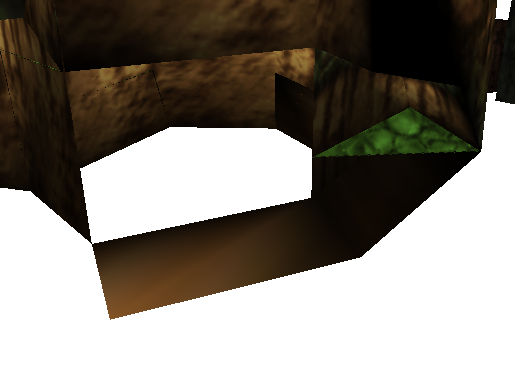
Near the power hut in Glitter Gulch Mine is some out of bounds level geometry.
(Source: Ferrox)
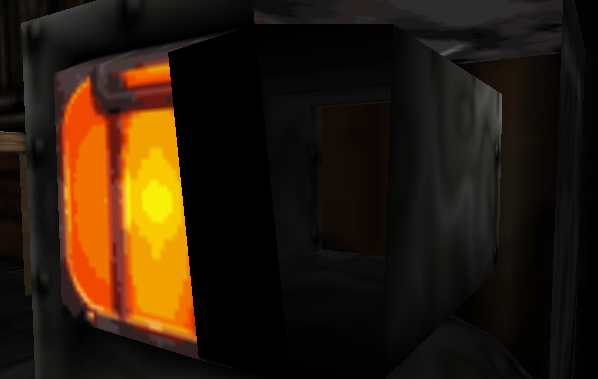
The oven in the prospector's hut in Glitter Gulch Mine has the insides modeled but since it can't be opened, the insides can't be seen.
(Source: Shesez)
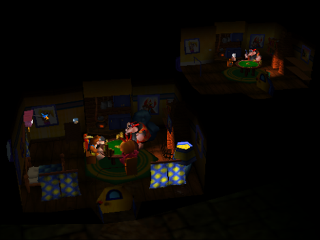
The model for Banjo's House contains two versions of the house. One is used extensively during the intro cutscene, while the other is a largely unseen copy of the house more-or-less as it looked during Banjo-Kazooie. There are subtle differences in the Banjo-Tooie version of the house, including a new diamond-pattern and blue-and-pink-stripe wallpaper instead of the original game's yellow flower pattern, a dark wood ceiling, dark skirting board, and a bookshelf removed to make space for an extra couch and floor lamp. Although the Banjo-Kazooie version of the house is mostly unused, it does appear very briefly during the first-person view of Banjo looking at his cards, so the wallpaper behind the photo of Banjo & Kazooie appears to lose its blue-and-pink stripe and switch to its original flower pattern for this one shot. The Banjo-Kazooie copy of the house has three low-poly spheres floating in it, as described in the Cutscene Oddities section - these are part of the map model rather than objects/actors.
(Source: Banjeoin)
Oddities#
Cutscenes#
The opening cutscene has a few odd things which are never visible on-screen at any point.
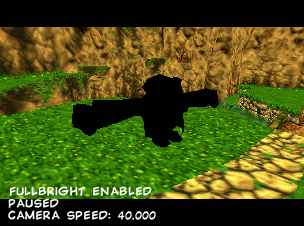
At the very beginning, there's a second, completely untextured model of Klungo. After the camera starts panning down, it moves towards the boulder briefly before disappearing. It's likely that at one point, the opening cutscene was going to show Klungo walking up to the boulder.
(Source: Shesez)

In the scene where Banjo looks at his cards, three white low-poly spheres can be found offscreen. It's unknown what these were for.
(Source: Shesez)

Inside Banjo's house during the opening cutscene is an unseen opaque window texture on the ground.
(Source: Ferrox)
Internal Filename Oddities#
- The animations of Banjo and Kazooie firing eggs forwards and backwards is internally named egg head and egg ass respectively. The same goes for the animations of Kazooie firing eggs alone.
- The internal filename for the Hoop Hurry mini-game is hoop swoop which was likely an earlier name.
- The Clockwork Kazooie is internally known as babykaz (Baby Kazooie).
(Source: Ferrox)
Unused Warp#
The metal pipe in the icy side of Hailfire Peaks contains a second warp zone at the end of the pipe which can't be accessed normally since there's no way around the first warp zone.
Crash Debugger#
Banjo-Tooie has a very detailed and complete crash debugger. Everything is drawn by the CPU directly to the framebuffer as the device is assumed to be in an unstable state.
How to Enable#
To enable the crash screen, enter the combination C-Left, D-Pad Up, B, C-Right, A, B, Z on your controller during the intro screen, then hit Start as usual when the camera has panned down far enough.
If it worked, a "ding" sound effect will play when you reach file select, and the handler will now show up when the game crashes. The game will automatically cycle through all screens until the console is reset.
Crash Info#
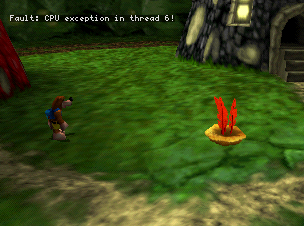
After the game crashes, it'll print a single line at the top of the screen indicating the type of crash. It'll also display the last two frames leading up to the crash.
Call Stack#

This screen lists the hierarchy of function calls that occurred leading up to a crash. Functions in static memory are labeled as 'core' in the leftmost column, but this screen can also show the names of DLLs if the crash occurred during a DLL function call.
- Some form of queue/thread information. e.g. 80079010 is pointed to by the JOY threads queue.
- Entry point into the module.
- Location in memory. (Can be replaced with func*)
- End of module in memory.
Current CPU State#

The CPU Status portion of the Crash Debugger provides very basic information on the state of the CPU during the time when an error was detected.
- It provides all GPR and FPR, as well as the current thread, cause, status, and FPU status.
- The Status register (sr) shows the player the current interrupt masks as well.
Thread Status#

The thread status portion of the debugger gives a lot of useful information about the currently running threads, what is able to be run, what has stopped, and what is waiting to be run. It also details the threads current PC, where their stack frames are located, if they have a queue, and their priorities.
Here we can see the 10 threads that run Banjo Tooie:
- VI, (Video Interface) Controls the main video output of the system.
- IDLE, The idle thread that the system waits in when no higher priority thread is runnable.
- TIDY, Assumed to be the game's memory management system. Killing it causes the game to no longer function.
- CIC-6105, Security features to prevent duplication.
- AUDIO, Controls producing all ALists (Audio lists) and preparing samples for the RSP.
- SCHEDULER, Manages Audio/Graphics command list generation and processing.
- MAIN, Control's the game's main logic, such as interpreting controller inputs, detecting collision, and AI.
- JOY, Reads joystick data from PIF.
- MOTOR, Controls the Rumble Pak if any are plugged in.
- CRASH, The crash handler thread, which must be started in order to display this screen upon crashing.
Build Info#
The crash handler displays a build time and date in the upper right corner.
Version |
Text |
|---|---|
USA |
Build: 13:19 23/09/00 |
Australia |
Build: 14:42 25/10/00 |
Japan |
Build: 13:36 27/10/00 |
Europe |
Build: 15:24 01/12/00 |
(Source: Jombo23, Authentic, and Wedarobi)
Anti-Piracy#
Present in the Nintendo 64 version of the game are two anti-piracy checks:
- When the game is powered on, it'll check for the correct save type. Banjo-Tooie uses a 2 kilobyte EEPROM, but if the save type is incorrect or there's no save chip at all in the cartridge, the game will act as if no controller is plugged in. The game will display the "NO CONTROLLER" message and won't respond to any button inputs.
- Additionally, the game also checks for the correct CIC lockout chip, much like Jet Force Gemini. North American and Japanese copies check for a CIC-NUS-6105 and European copies check for a CIC-NUS-7105. This check is done by using the challenge-response feature of the 6105/7105. Unlike Jet Force Gemini, Banjo-Tooie has 268 checks that happen throughout the game. The responses from the CIC are used to decrypt various game assets and if any of the checks fail, the game won't be able to decrypt the data and will simply freeze.
(Source: Original TCRF research)
|
The Banjo-Kazooie series | |
|---|---|
|
Nintendo 64 |
|
|
Game Boy Advance |
|
|
Xbox 360 |
|
|
Related | |
|
SNES |
|