 This article has a talk page!
This is a sub-page of Proto:Sonic the Hedgehog CD (Sega CD).

Time-Attack#

- The graphics are extremely basic.
- Times are saved by this point, with ATTACK.BIN having basic functions for Backup RAM handling.
- Only Palmtree Panic Zones 1/2 are normally selectable, and is referred to as "Salad Plain." Although by hex editing values on the Time Attack menu, it is possible to bypass the restrictions of being stuck with R1-1 and R1-2 and you can select other levels. These entries don't have proper level loading command IDs defined, resulting in either a crash or loading an R1 level with the selected level's ID and time zone (which causes certain Round-dependent things to switch on or off, and also affects which song plays during the level).
- There are no additional Round previews on the left window for anything other than Salad Plain, and upon initialization, those graphics are hard-coded to always load.
- This is the only prototype that explicitly references Dubious Depths/Round 2, the scrapped second round, which is listed as a level entry in the Time Attack menu. All other known versions of the game jump from R1 (Palmtree Panic) directly to R3 (Collision Chaos).
- The table of IDs that the game pulls from for Rounds also has R2 present as level ID 0x100, with R3 (Collision Chaos) being ID 0x200, as every Round ID gets shifted forward by 1 compared to later builds.
- Collision Chaos' Present theme is used here instead of the actual Time Attack music.
Graphical#
- Some of Sonic's animation frames are buggy. His "Peel-Out" animation isn't implemented.
|
v0.02 |
510 - Final |
|---|---|

|

|
- The sprites for the "I'm outer here!" animation are quite different, with dimmer shading in certain frames as well as different posing for Sonic as he leaps off.
Sonic 1 |
v0.02 |
510 - Final |
|---|---|---|
 |
 |
 |
- Sonic still has his spring frame from the original Sonic the Hedgehog, but it's not exactly the same - his shoes were redrawn to add the white stripe. The spinning animation also exists in this prototype, and is used during the time travel sequence.
- The lives counter is placed slightly higher than normal, and there are no zeroes in the "SCORE" and "RINGS" counters. The RINGS counter does not flash red when the player has zero rings.
- Active time warps are not yet indicated on the HUD.
v0.02 |
510 - v0.51 |
v0.70 Demo |
v0.70 - Final |
|---|---|---|---|
 |
 |
 |
 |
- The goal post reads "You Say!", an apparent pun on "Yuusei," the name of the event where this build was featured1, and does not spin when the player passes it. This also appears in the earliest screenshots available of the game.
- The graphics for Palmtree Panic are more uniform, with less distinctions among the time zones.
- The Time Attack mode looks nothing like the final, and features the early name for Palmtree Panic.
- The time travel graphic is extremely basic, featuring only blue lines on a white background.
Sound#
|
v0.02 |
Final |
|---|---|
- "Sonic - You Can Do Anything" had Utoku's vocals re-recorded for the final. Interestingly, it's the demo version that is featured in Sonic Jam's movie gallery and the 1998 Japanese CD album SONICTEAM "PowerPlay" ~Best Songs from SonicTeam~. It is also the version that made it into Sonic Origins.
|
v0.02 |
v0.70 - Final |
|---|---|
- Palmtree Panic's Past theme is stored as CD audio, while in the final it was remade into sequenced PCM audio. It also uses a different mix. The exact reason for this change is disputed:
- Masato Nishimura said that the CDDA versions "just wouldn't fit". When accounting for four CD audio variations instead of three (for reference, an average Sonic CD track is 1-2 minutes, or 10-20 megabytes), the data and music stored on the Sonic CD disc amounts to 600 - 700 megabytes which is dangerously close to an audio CD's storage capacity limit (around 650 - 700MB).
- Yukifumi Makino stated in the October 1993 issue of Beep! MegaDrive that it was done to give the songs an intentional cheap and prehistoric feel, compared to the future tracks' more techno feel.
(Source: Mazin's Twitter, shmuplations)
|
v0.02 - v0.28A |
Final |
|---|---|
- The time warp sound is different, and very grating on the ears. This would be changed in v0.51, and again for v1.05.
Gameplay Differences#
2 Player#
Pressing the A, B, or C buttons on player 2's controler activates a rudimentary 2 player mode. A 2nd "virtual Sonic" is spawned in at the first player location. This 2nd sonic can interact with most objects but despawns if left off screen.
If the first player dies then the 2nd player can take over as the main player, with the first becoming a "virtual Sonic". Watch on YouTube
"I'm outer here!"#

The "I'm outer here!" easter egg, where Sonic jumps off the level after three minutes of no controller input and an unpaused game, doesn't function the same as it does in the final version of the game: the camera tracks Sonic as he falls, but he dies when he reaches the bottom of the level, instead of just disappearing and triggering a Game Over. When he respawns, Sonic retains any rings previously collected.
Time Traveling#
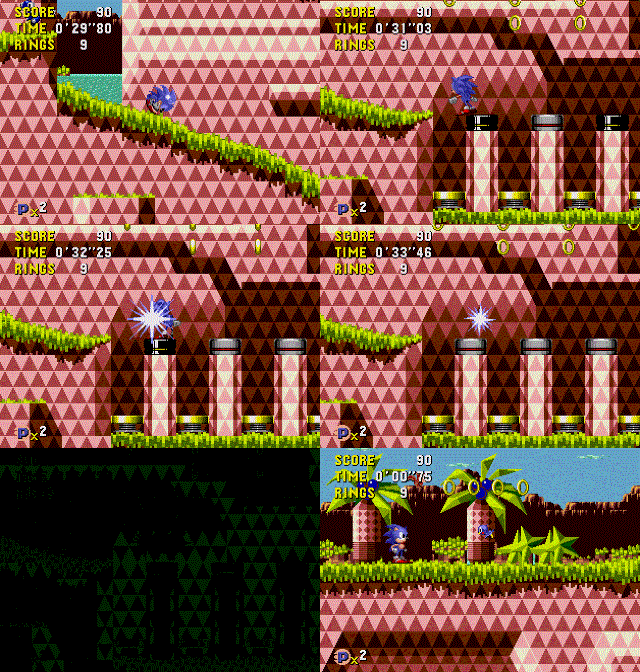
Time traveling doesn't seem to work correctly, staying on the spinners will instead cause the current level to restart rather than letting Sonic warp through time (the time warp appears short here because the black screens were trimmed out of the GIF).
- You aren't invincible when sparkling. As a result of this, dying when activating the fade to white will subtract a life, but still activate the time travel sequence.
Physics Oddities#

Sonic the Hedgehog's programming was used as the basis for Sonic CD, but at this point the physics weren't fully optimized for this game, resulting in several oddities:
- In Salad Plain Bad Future, colliding with solid collision tiles whilst standing on the collapsing diamond platforms can cause glitches like the infamous "slope zip" glitch.
- Charging a Peel-Out for about 21 seconds warps Sonic near the end of the Zone. Charging it several seconds longer will crash the game.
- Running fast or charging a Spin Dash or Peel-Out does not cause the camera to move.
- Sonic takes a lot longer to charge a Super Peel-Out. The maximum speed it gives is also limited by Sonic the Hedgehog's speed cap.
Miscellaneous#
- The game cannot be paused, and no code to pause the game exists yet.
- Two additional item monitors are present in this build.
- Blue Ring: When broken, Sonic will run faster and be granted temporary invincibility. In later builds it acts like a triple-layered shield (as-in, it gives three additional hits), but was later removed from levels.
- Clock: Meant to freeze time for a few seconds, but is incomplete, as it only freezes the animation of objects other than Sonic.
- Pressing Start on the second controller spawns a second Sonic. That player will then able to control that Sonic.
- Collecting 50 rings does not spawn a Special Stage ring at the end of a level, as it is unimplemented.
- The player can not change the direction while roll-jumping, like in the other Mega Drive / Sega Genesis Sonic games.
- If the player loses all their lives or beats Salad Plain Zone 2, a "COMIN' SOON" screen will appear, after which the game resets. This screen actually made it into the final game, and can be viewed using the level select.
- The Palmtree Panic Good Future theme plays on this screen instead of the invincibility theme used in later builds.
- The system program extension file, SPX___.BIN, does not yet exist at this point, and all functions for level loading and music playback are handled in the system program in the disc's boot sector.
- The Round/Zone loading routines are not handled by one function, but all have discrete functions. Level loads are not calculated by their zone ID, but rather, are laid out as offsets into the SP's command table.
- The function to fade out CDDA audio tracks simply stops playback.
- For some odd reason, Salad Plain Zone 2's commands come before Zone 1's, but are called in order.
Unused Level Select#
v0.02 |
510 - v0.70 |
|---|---|
 |
 |
The level select screen is present in the files, and does have the routines that load it, unused. The layout of the IPX file itself suggests that in a build before this one, it would have been ran by default. It is unable to be accessed without modifying the IPX file to skip over the title screen.
- Only up to "COMMING" is accounted for. It is also instead marked as "COMMING SOON".
- Its filename on the disc is SSEL__.MMD, unlike the final game and in later prototypes, where it is named STSEL_.MMD. This was likely changed to avoid confusion between it and the sound test file present in later builds. (that is, SOSEL_.MMD)
Debug Mode#
Debug mode is present in this build, unused, as nothing sets its respective flag in memory. Setting 0xFF13FA in MegaDrive RAM will partially enable it.
- You cannot enter object placement mode, but it is present in the code, unused, as Sonic's object never calls it.
- Unlike the final game, the ring counter is unaffected, not showing what metatile ID you are currently on.
- Even without entering placement mode, some object collision is ignored, like the sides of monitors, springs, and the gray boulders.
Unused Objects#
Object 04#
This object does exist in later prototypes and in the final game. This object moves downwards and then disappears after a bit. As it moves down, it continuously places a row of blocks. According to the leftover symbol data found in the Sonic Gems Collection version, this object is called "taki", which translates to "waterfall".
(Source: Nat the Porcupine)
Object 05 & 08#
Easily the most interesting unused object in this prototype. Interacting with object 05 spawns an object of ID 08 that causes the level layout above it to shift down by 8 blocks, as if it is collapsing. According to the leftover symbol data found in the Sonic Gems Collection version, the object that performs the collapsing is called "jisin", which translates to "earthquake", and the object that spawns that is called "jisin_set". This suggests that an earthquake might have been a level effect in the game at one point, which would cause the level layout to shift down when activated (and creating a hazard for Sonic). These objects were dummied out by the time the 510 prototype was compiled.
(Source: Nat the Porcupine)
Object 1E#
This is the ID for the pinball flipper from Collision Chaos. The object code itself doesn't exist, with the ID just pointing to a blank object. However, the code for handling Sonic's physics on a flipper and launching him off of one do exist, and they specifically reference this object ID.
Object 23#

This object is meant to represent various kinds of projectiles. Tamabbohs spawn this object, but the subtype IDs used point to null code. The only subtype that doesn't point to null code is subtype 09, which just slowly moves left or right and displays a corrupted sprite.
Object 25#

In the object list, this ID just points to a blank object. However, there is leftover code for a bridge object that was assigned to this ID (R11A__.MMD has it at location 0xBCA4). By re-adding the pointer back to the object list, it can seen that bridges were actually already placed in the stage. If debug mode is also re-enabled via hacking, bridges can be placed with it. Spawning a bridge with its subtype to a non-zero value will make it appear to break.
Object 27#
This appears to be an unfinished tilting platform object. Its graphics get loaded at certain points in the stage, usually around the small logs. It was scrapped by the time of the 510 prototype.
(Source: Nat the Porcupine)
Object 29#
This is a swinging platform. While not placed in the stage, its graphics are loaded in Zone 2 around the area in which a swing is placed in the final.
The number of chain links it spawns is determined by the lower 4 bits of its subtype value (0 = underflow, 1 = 0 links, 2 = 1 link, etc.). The upper 4 bits determine how it moves. There are 8 unique movement types:
- 0x - Moves in a circular motion clockwise.
- 1x - Moves in a circular motion counter-clockwise.
- 2x - Moves 180 degrees downwards.
- 3x - Moves 180 degrees upwards.
- 4x - Moves 540 degrees, starts facing west.
- 5x - Moves 540 degrees, starts facing north.
- 6x - Moves 90 degrees downwards.
- 7x - Moves in a circular motion counter-clockwise, and also spawns object 0x13, which is a Mosqui in Salad Plain. It is unknown what the object was intended to be (maybe a switch?).
The final version also features 8 different movement modes, but they are different due to the reworking of the physics.
(Source: Nat the Porcupine, Devon)
Unused Sprites#

|
To do: |
Artwork |
Description |
|---|---|
 |
A black-and-white death sprite, whose purpose is unknown. This is also present (and unused) in the original Sonic the Hedgehog and the 1996 Windows version, as well as in the final game, leftover and unused in Tidal Tempest. |
 |
Two different angles of Sonic rolling, intended for the 3D loop in Palmtree Panic 1. Only leftover mappings data can be found in the final version. These sprites are also present (unused) in the 1996 Windows version. |
 |
More angled sprites of Sonic rolling. These are used in the Final version on the 3D loop. |
 |
A sprite of Sonic looking over his shoulder. This is also in the final game, unused. A black pixel was removed between his legs in the final version. |
 |
An animation of Sonic sneezing. It's also unused in the final version. |
 |
An animation of Sonic waving his arms around while walking. This is also unused in the final. |
 |
An animation of Sonic hanging onto something. These sprites are also unused in the final, but a different animation is used where his feet hang down instead. His shoes were made less pointy in the final version. |
 |
A secondary hurt sprite, grabbed from Sonic 1. Used in the final version. |
 |
A sprite of Sonic grabbing an air bubble, grabbed from Sonic 1. Used in the final version. |
 |
A sprite of Sonic spinning around, grabbed from Sonic 1. Used in the final version. |
 |
A sprite of Sonic drowning, grabbed from Sonic 1. Used in the final version. |
 |
A sprite of Sonic hanging onto a pole, grabbed from Sonic 1. Used in the final version. |
 |
An entire sprite set for Sonic's mini form. Appears incomplete. There is unused code that calls these sprites. |
 |
Sprites for a log bridge. The code for the bridge object is unreferenced, but its graphics still get loaded into VRAM, and its mappings are also referenced in the debug mode object list. |
Unused Sounds#
Opening FMV Audio#
In the data of the opening FMV, there's some unused PCM music data containing "Sonic - You Can Do Anything". Its playback rate is about half of the final game's, but appears that it would have been implemented as stereo sound as opposed to the final game's mono, as there are two PCM channels specified in the FMV SubCPU program, with their appropriate register data. Strangely, unlike the title screen, Keiko Utoku's vocals are finalized here.
|
Ver0.02 |
Final |
|---|---|
Early Time Travel Sound#
There are earlier versions of the entire FM sound effect driver in every MMD, and the preceeding code to load it into Z80 memory. It appears to only have an earlier version of the time warp sound effect.
Mini Sonic#
Watch on YouTubeSetting RAM value 0xFFF75E to 01 will activate Sonic's mini form, used in the final's Metallic Madness.
Leftovers from Other Rounds#
The IPX by this point is very simple, and only contains some code for the level select and running Zones 1 and 2 of Salad Plain. However, the zone MMD files themselves have some remnant code and data that account for Rounds that were either removed or not yet compiled into the game.
Round Event Tables#
The level events table has 8 entries, with R1 (Salad Plain) and R3 (Collision Chaos) being given fleshed out routines with per Zone routines, while the rest point to a very barebones routine.
- R1 sets the bottom screen boundary to 0x310 for all 3 Zones.
- R3 sets the bottom screen boundary to 0x510 for all 3 Zones.
- R4 onwards set the bottom screen boundary to 0x710.
- Interestingly, R2 is accounted for in this list, but simply points to Salad Plain's routines.
Time Travel Oddity#
Bizarrely, there is a check for Zone 0x01 in the time traveling code, where if you are in that zone, it would restore water related variables. In this prototype's internal level list, that would be R2's level slot. This is, however, actually an erroneous copy-paste job from Sonic 1's lamppost code where you respawn from a checkpoint, which performs an identical check for Labyrinth Zone, which is also Zone 0x01.
CDDA Playback Commands#
The System Program CDDA playback commands for every Round are implemented by this point, having an identical amount to the final game's. This accounts for the switch to using PCM audio for the past time zones, and also accounts for R2's removal, implying that it may have never been implemented, or was removed by this point.
Collision Chaos Bumpers#
Watch on YouTubeThere is leftover code that handles the non-standard bumpers and glass bumpers in Collision Chaos (R3). It specifically checks for that Round ID, so setting the Round ID to 02 it will activate the function. The function itself is nearly identical to the final's, and even uses the same block IDs for checking collision with. Also, as mentioned here, code that handles Sonic on a pinball flipper also exists.