 This article has a talk page!
A game based on the 1990 sequel to the blockbuster film about the titular mind-conflicted robotic law enforcer. Unlike Data East's previous RoboCop arcade game, this one has convenient instant direction-changing shooting controls and co-op gameplay (where the second character is weirdly another RoboCop instead of Anne Lewis).
Debug Functions#
Version Info#

Hold 1P Start + 2P Start before the game boots to see this version info screen.
Crash Handler#

A standard handler for all exception vectors is built into the game. To trigger it, just crash the game somehow. Be creative. Think outside the robobox.
Stage Select#
After starting a new game, the game checks Dip Switch 3-8 ("Game Over Message") and is supposed to send the player to a stage select if that dip switch is set, but there's a branch opcode at the start of the subroutine that effectively dummies this out. Put the following code in robocop2.xml to reactivate this feature:
  <cheat desc="Enable Stage Select">
    <script state="run">
      <action>maincpu.mw@003188=0002</action>
    </script>
    <script state="off">
      <action>maincpu.mw@003188=0074</action>
    </script>
  </cheat>
Press 1P Up/Down to select a scene, and press 1P Button 1 to warp to that scene.
Display Debug#
The game actually tries to run a display debug subroutine every frame during normal gameplay, but the developers put an rts opcode at the start of the subroutine to disable it. Put this code in robocop2.xml to reactivate it:
  <cheat desc="Display Debug (Main)">
    <script state="run">
      <action>maincpu.mw@00DE98=4E71</action>
    </script>
    <script state="off">
      <action>maincpu.mw@00DE98=4E75</action>
    </script>
  </cheat>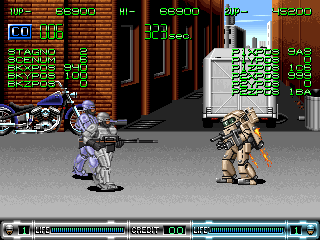
STAGNO and SCENUM should be self-explanatory. BKXPOS is the current camera X position for the stage; BKYPOS and BKZPOS would be the Y and Z positions, but they're always 0x100 and 0x000 in this game. The X/Y/Z coordinates for both players are displayed on the right.
There's a second display debug for the game's bonus stages, but the code is completely unreferenced in the final game. Put this code in MAME's robocop2.xml cheat file to add it back in:
  <cheat desc="Display Debug (Bike)">
    <script state="run">
      <action>maincpu.mq@0160D6=4EB9000FFE004279</action>
      <action>maincpu.mq@0FFE00=4EB90001629E4E71</action>
      <action>maincpu.mq@0FFE08=4EB9000150E84E71</action>
      <action>maincpu.mw@0FFE10=4E75</action>
    </script>
    <script state="off">
      <action>maincpu.mq@0160D6=4EBA01C64E714279</action>
      <action>maincpu.mq@0FFE00=FFFFFFFFFFFFFFFF</action>
      <action>maincpu.mq@0FFE08=FFFFFFFFFFFFFFFF</action>
      <action>maincpu.mw@0FFE10=FFFF</action>
    </script>
  </cheat>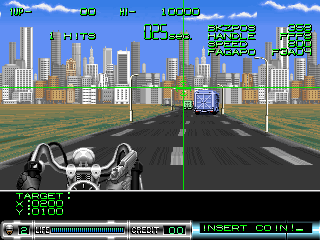
In this case, BKZPOS is the player's current position on the stage, HANDLE controls how the car or bike turns, SPEED is the current scrolling speed (Actual value in pixels is SPEED / 100), and the unfortunately named FAGAPO is an offset that the game uses to control how the road turns and bends.
Camera Debug#
Like the display debug, this is technically called every frame, but is dummied out by an rts opcode at the start of the subroutine. Place the following code in robocop2.xml to reactivate it:
  <cheat desc="Debug Functions">
    <parameter>
      <item value="0x21EC">Camera Debug</item>
      <item value="0x2244">Weapon Debug</item>
    </parameter>
    <script state="run">
      <action>maincpu.mw@00EEA2=param</action>
    </script>
    <script state="off">
      <action>maincpu.mw@00EEA2=21EA</action>
    </script>
  </cheat>
Use 1P Left/Right to move the camera, and hold 1P Up/Down to stop the camera from scrolling. This works a lot better if 2P is the only one playing. Be aware that screen locks override this debug function.
Weapon Debug#
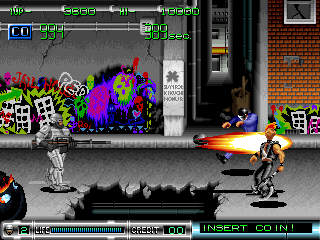
Press 1P/2P Button 3 to cycle between the Cobra Assault Cannon, Bazooka, Gatling gun, and the default Auto 9. This will also give the player(s) 999 ammo where applicable. No code references the weapon debug subroutine, but the code above will replace the camera debug with the weapon debug.
There's one additional tool: Press 1P/2P Button 1 to decrease the player's health bar by 1 unit.
(Source: Original TCRF research)
Copy Protection#

RAM addresses 0x18C000 to 0x18C7FF are reserved for the game's copy protection chip. Shortly after booting, the game checks if address 0x18C504 is equal to 0x0084. If it isn't, it displays the above screen and prevents the game from booting further.
To trigger this bit of copy protection, place the following code in MAME's robocop2.xml cheat file and reset:
  <cheat desc="Trigger Copy Protection">
    <script state="run">
      <action>maincpu.mb@0006BA=0x66</action>
    </script>
    <script state="off">
      <action>maincpu.mb@0006BA=0x67</action>
    </script>
  </cheat>
(Source: Original TCRF research)
Location Test Screen#
Put this code in MAME's robocop2.xml cheat file and beat any stage to see a screen from a location test version of the game:
  <cheat desc="Enable Location Test Screen">
    <script state="run">
      <action>maincpu.mw@00095A=0x0002</action>
    </script>
    <script state="off">
      <action>maincpu.mw@00095A=0xFDFC</action>
    </script>
  </cheat>
Once the text finishes being typed out on-screen, RoboCop will thank you for your cooperation (You're welcome) and the game will reset.
(Source: Original TCRF research)
Unused Areas#
Scene 00 (Intro Stage 1)#
All of the US and Euro / Asia sets start you off in the street, attempting to stop the crime in progress at Nick's Guns. However, the Japan set (0.11) includes two extra scenes that give a rundown on the events of the first film and lets the player go through the movie's climax.


However, the scene data is still in the other sets and the story text has even been fully translated! Use the above stage select code and select Scene 00 or 01 to play them.

The first scene is very short and mainly exists to let the player(s) get a handle on how the game works...


...and to show how powerful RoboCop really is. Guy's just flipping guards and exploding doors like it's nothing.
Scene 01 (Intro Stage 2)#

This scene takes place in the OCP boardroom and features a boss fight against an ED-209.


At the start of the fight, RoboCop will use his visual systems to pinpoint the boss's weak point. The fight itself is a neutered version of Stage 4's ED-209 fight; this version can't shoot rockets.
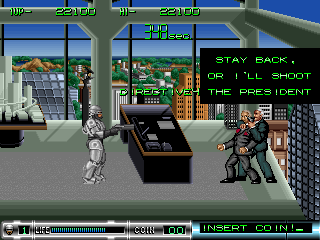

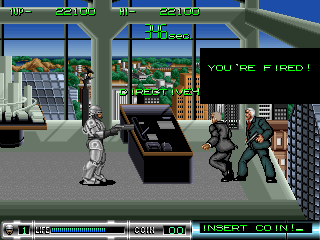


After defeating ED-209, the first movie's ending scene will play out.
Scene 0A#

A very short scene that takes place in a sewer system. This would be placed in-between the parking garage and factory sections of Stage 3.
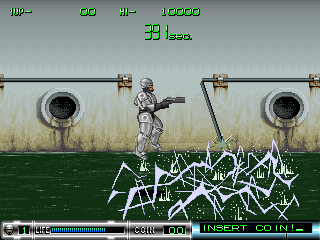
This stage seems to have been abandoned very early in development. The only object is a pipe that breaks off and swings back and forth, electrifying the nasty sewer water when it gets too low, but the electricity doesn't actually do anything at this point.
(Source: Original TCRF research)
Unused Items#

There are two pickups that were coded but were never placed in any stage proper. Put the following code in robocop2.xml to change the life pickup in Stage 1-1 to one of the unused items.
  <cheat desc="Change Pickup in Stage 1">
    <parameter>
      <item value="0x8005">Max Life</item>
      <item value="0x8006">Stopwatch</item>
    </parameter>
    <script state="run">
      <action>maincpu.mw@022956=param</action>
    </script>
    <script state="off">
      <action>maincpu.mw@022956=8004</action>
    </script>
  </cheat>
While the normal life pickup only heals 10 HP, the max life pickup brings the player back to full health.

This stopwatch pickup should give the player more time, but there's no code to handle that so instead it does nothing. Oh well.
(Source: Original TCRF research)
Unused Graphics#


Small front and sides-looking graphics of RoboCop's head are found amongst the game's font. Note that the front-looking RoboCop head seen on the player's HUD is not the same one seen here.
|
Early |
Final |
|---|---|

|

|
Early, less chromatic versions of the 1P/2P player markers.

The weapon icons are supposed to have a 10-frame flashing animation, but only the first frame is used in the actual game.
|
Early |
Final |
|---|---|

|

|
An early version of the "HIT BUTTON" prompt in a more comic book-like impact style.
|
Early |
Later |
|---|---|

|

|
Unused "SHOT!" prompts, available in both old and new style graphics.

A wagglin' indicator for one of those top fire button joysticks. You know the ones. The game instead uses a different, traditional joystick graphic in non-Japanese sets.

A pristine version of RoboCop's police car. In the final game, this car only shows up once, smashed up, and on fire at the beginning of Stage 1.

A strange version of the nuke vat at the end of Stage 3 with outlines around the main vat and cracks. These graphics appear about 2/3 of the way through the object graphics ROM, while the final vat graphics are at the very end.
(Source: Original TCRF research)
Unused Audio#
Music#
Put this code in robocop2.xml and change the music in Stage 1 (Scene 03) to an unused track:
  <cheat desc="Change Stage 1 Music">
    <parameter>
      <item value="0x09">Unused Track 1</item>
      <item value="0x15">Unused Track 2</item>
    </parameter>
    <script state="run">
      <action>maincpu.mb@003323=param</action>
    </script>
    <script state="off">
      <action>maincpu.mb@003323=0x05</action>
    </script>
  </cheat>
ID |
Track |
|---|---|
09 |
|
15 |
09 seems to be rejected stage music; it's worth noting that Stage 1 and Stage 2 share the same track. 15 is a more sedate piece that might have been used for a continue or name entry screen.
Sound Effects#
Put this code in robocop2.xml to replace the "RoboCop" clip on the title screen with a different sound effect or PCM sample:
  <cheat desc="Change Title Screen Sound Effect">
    <parameter min="0x1B" max="0x76" step="0x01"/>
    <script state="run">
      <action>maincpu.mb@00B541=param</action>
    </script>
    <script state="off">
      <action>maincpu.mb@00B541=0x6E</action>
    </script>
  </cheat>
ID |
Track |
|---|---|
1B |
|
1C |
|
20 |
|
28 |
|
29 |
|
2A |
|
31 |
|
32 |
|
37 |
|
38 |
|
39 |
|
3B |
|
3E |
Not much to comment on here. Sound 2A would fit in well for collecting a life pickup, which normally produces no sound at all.
PCM Samples#
ID |
Track |
Notes |
|---|---|---|
52 |
RoboCop: You are under arrest. |
|
54 |
RoboCop: Your move, creep. |
|
55 |
RoboCop: Drop it! |
|
5B |
Unused enemy grunt 1 |
|
5C |
Unused enemy grunt 2 |
|
5E |
Unused enemy grunt 3 |
|
60 |
Unused enemy grunt 4 |
|
6C |
Unused enemy grunt 5 |
|
6F |
???: Murphy. |
|
74 |
Digitized beep |
|
76 |
Digitized creek |
The first three lines were used in the first RoboCop arcade game, though the clips here are of higher quality. There is a "Murphy" clip in the first game too, though the one in RoboCop 2 is new and sounds like it was recorded with a different actor.
(Source: Original TCRF research)
Unused Text#
Attract Mode Text#
ID |
Text |
ID |
Text |
ID |
Text |
ID |
Text |
ID |
Text |
|---|---|---|---|---|---|---|---|---|---|
29 |
|
2A |
|
2B |
|
2C |
|
2D |
|
2E |
|
2F |
|
30 |
|
31 |
|
32 |
|
These labels for attract mode screens were most likely used on placeholder screens before everything was properly implemented.
Placeholder Intro Text#

Strings 3C to 41 are simple placeholder strings -- "MESSAGE 0", "MESSAGE 1", etc. -- that were used in the intro cutscene before the proper text was written. Put this code in the usual place to see 'em:
  <cheat desc="Placeholder Intro Messages">
    <script state="run">
      <action>maincpu.mw@001388=0x003C</action>
    </script>
    <script state="off">
      <action>maincpu.mw@001388=0x007F</action>
    </script>
  </cheat>
Sector Clear Text#
ID |
Text |
ID |
Text |
ID |
Text |
|---|---|---|---|---|---|
67 |
|
68 |
|
69 |
|
6A |
|
6B |
|
6C |
|
Yet more placeholder strings; these were used in lieu of actual end-of-stage cutscenes.
Intro Stage Outro#
ID |
Text |
|---|---|
84 |
|
Text for a screen that was cut from non-Japanese sets. Read on for more information.
(Source: Original TCRF research)
Developer Text#
Labels for some of the game's music and all of the game's instrument samples can be found in the audio CPU.
Music#
0x2102 |
bgm1.bgm |
|---|---|
0x21F6 |
bgm2.bgm |
0x412E |
bgm6.bgm |
0x5870 |
boss1.bgm |
0x5E5D |
boss2.bgm |
0x638E |
boss3.bgm |
0x698B |
boss4.bgm |
0x7157 |
cont.bgm |
0x75A0 |
demo.bgm |
0x7A98 |
elev.bgm |
0x7F63 |
clear.bgm |
0x81DF |
over.bgm |
0x84CC |
end.bgm |
0x9A98 |
bgm0.bgm |
Instruments#
Text starts at 0xCA36.
e_piano |
e_piano2 |
pia_5th |
pia_at |
pia_hi1 |
pia_hi2 |
pia_seq |
pia_syn |
piano_1 |
piano_2 |
piano_3 |
piano_4 |
piano_5 |
piano_6 |
piano_7 |
piano_8 |
pia_casio |
pia_gt |
hiseqx |
seque |
badbell |
belflute |
bellsyn |
belviola |
chaimer |
kinkon |
toybell |
abc |
cheap |
kira1 |
kira2 |
metalsyn |
analogue |
flution |
flution2 |
gira |
hamowire |
soundtrack |
soundtrac2 |
synclavi |
clav_1 |
delayer |
masked |
melody |
percle |
readcal |
spaces |
synther |
tremolo |
tubasyn |
wavewire |
wire |
analogue2 |
tomita |
voice1 |
voice2 |
voice3 |
voice4 |
voice5 |
voice6 |
voice7 |
voice8 |
voice9 |
accordion 3 |
celest_1 |
celest_2 |
e_organ1 |
e_organ2 |
e_organ3 |
e_organ4 |
hammond_1 |
hammond_2 |
impact_org |
organ_1 |
organ_2 |
organ_3 |
organ_4 |
soften |
organ_v1 |
organ_v2 |
esn_org |
ob_organ1 |
ob_organ2 |
sx_organ |
waveorgan |
porgan_1 |
porgan_2 |
porgan_at |
harpsi |
ginginlead |
lead |
maskedlead |
syorgan1 |
syorgan2 |
marimba_1 |
marimba_2 |
marimba_st |
melody_at |
mokkin_at |
s_xylo |
vibra_1 |
vibra_2 |
vibra_3 |
xylo_1 |
xylo_2 |
koto |
shami_1 |
shami_2 |
e_guitar1 |
e_guitar2 |
grassharp |
guitar_1 |
guitar_cx |
bright_dis |
clavsitar |
hard_g |
hardy_1 |
hardy_2 |
hardy_3 |
hardy_4 |
hardy_5 |
low_dist |
a_bass |
a_bassx |
afr_bass |
bright_wb |
w_bass |
analog_b1 |
analog_b2 |
analog_b3 |
analog_b4 |
syn_b1 |
syn_b2 |
syn_b3 |
syn_b4 |
syn_b5 |
syn_b6 |
syn_b7 |
syn_b8 |
syn_b9 |
syn_b10 |
thick_b |
bassclavi |
bright_b1 |
bright_b2 |
dx7_b |
e_bass1 |
e_bass2 |
e_bass3 |
e_bassx |
pick_b1 |
pick_b2 |
pick_b3 |
ricken_b |
rr_bass |
log_bass |
mokugyo_b |
casio_cym |
ride_symba |
hr_snare |
meka_dr1 |
meka_dr2 |
meka_drm3 |
metalhit1 |
metalhit2 |
noise_sd |
noise_sd2 |
snare |
waterclap |
bd_tom |
bowlhit |
smallbowl |
b_drum |
afr_drm1 |
afr_drm2 |
baribari |
gamran |
steeldrum1 |
steeldrum2 |
steeldrum3 |
steeler |
at_clari |
fagot |
fue |
piccolo1 |
sht_brs |
syn_oboe |
trp_1 |
trp_2 |
trp_3 |
trp_4 |
brs_1 |
brs_2 |
crystal |
hard_brs |
5th_brs1 |
metal_brs |
opl_brs1 |
opl_brs2 |
opl_brs3 |
rise_brs |
slow_brs |
wave_brs |
wave_brs2 |
5th_brs1 |
5th_brs1 |
bell_brs |
delay_brs |
vivi_brs |
bassoon |
brk_sax |
cheap_horn |
hard_horn |
hi_sax |
hornsect |
sax_1 |
sax_2 |
sax_3 |
soft_sax |
softuba |
syn_brs1 |
syn_brs2 |
syn_sax |
cembalo_1 |
cembalo_2 |
solovln_1 |
solovln_2 |
solovln_3 |
violin_1 |
violin_2 |
violin_3 |
violin_4 |
5th_str |
lane |
distrings |
hi_str |
orchstra |
strings |
syn_str1 |
syn_str2 |
syn_str3 |
pizz_1 |
pizz_2 |
vioboe |
bass50 |
bass60 |
bass70 |
bass80 |
bassd80 |
harpsi5 |
harpsi |
brass1 |
brass2 |
brass3 |
brass3 |
brbass |
||||
(Source: Original TCRF research)
Regional Differences#
Attract Mode#
Exclusive to the Japanese version is a fourth gameplay demo taking place on the intro stage's ED-209 boss fight.
Intro Stage#


As mentioned previously, only the Japanese set lets the player play through the intro stage without cheats or hacks.
 |
 |
And, one year later... |
There's one difference even if the intro stage is re-enabled in other sets: After the stage ends, a screen of text is displayed followed by an animated title screen.
Button Prompts#
|
International |
Japan |
|---|---|

|

|
At the end of the first section of Stage 1, the player has to stop a pick-up from running them over. In the US and Euro/Asia versions, the game tells the player to use the joystick and the buttons, but the Japanese version displays "Hit Button" instead of a moving joystick. Despite this difference, the game behaves the same across all versions - moving the joystick and pressing the buttons will work.
A similar section in Stage 3 where the player is trying to pry themselves off a giant magnet uses the "Hit Button" prompt in every version of the game, but the joystick is exclusive to non-Japanese sets.
Secret Credits#
|
Credits |
Background Only |
|---|---|
|
|
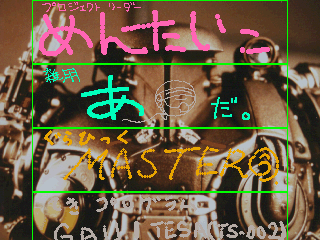
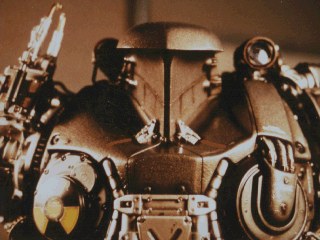
Version 0.11 (Japan) of the game has an additional set of scribble-like credits if you manage to beat the game with just one credit. These credits are scrolled on top of a still image of RoboCop 2 from the film that is otherwise unused.
While the images are semi-transparent in the game, the transparency has been removed in these images and replaced with black for ease of reading. Some of the names refer to parts of the staff that worked on the game; these have been filled in when possible based on the endgame credits and other sources.


|
The RoboCop series | |
|---|---|
|
Arcade |
|
|
Commodore 64 |
|
|
NES |
|
|
Game Boy |
|
|
Genesis |
|
|
Game Boy Color |
|
|
Game Boy Advance |
|
|
PlayStation 2 |
|
|
RoboCop vs. The Terminator | |
|
SNES |
|
|
Game Boy |
|
|
NES |
|
|
Genesis |
|
|
Game Gear, Sega Master System |
|