 Development Info
 Prototype Info
 Prerelease Info
 Notes
Notes
 Limbo PageAn entire page of unused minigames!
 Unused GraphicsThere's unused graphics on your lawn!
 Unused TextDo not be alarmed. Plants are not real.
Unused Animations#
Plants#
|
Unused |
Final |
|---|---|

|

|
An extended version of the Gravebuster's planting animation that has an extra bounce.


Animations of Squash transitioning from its looking poses to its idle pose, these were used in the 0.1.1.1014 prototype.

An unused non-active version of Magnet-shroom's active idle animation, named anim_nonactive_idle.
|
Unused |
Final |
|---|---|

|

|
An extended version of Magnet-shroom stealing an object from a zombie, with there being a transition going in and out of the idle animation. This version of the animation has it going back to its default pose, suggesting this and the previous animation are related. This animation is used in the mobile phone version.
Zombies#
|
Pre-GOTY |
GOTY |
|---|---|
|

|
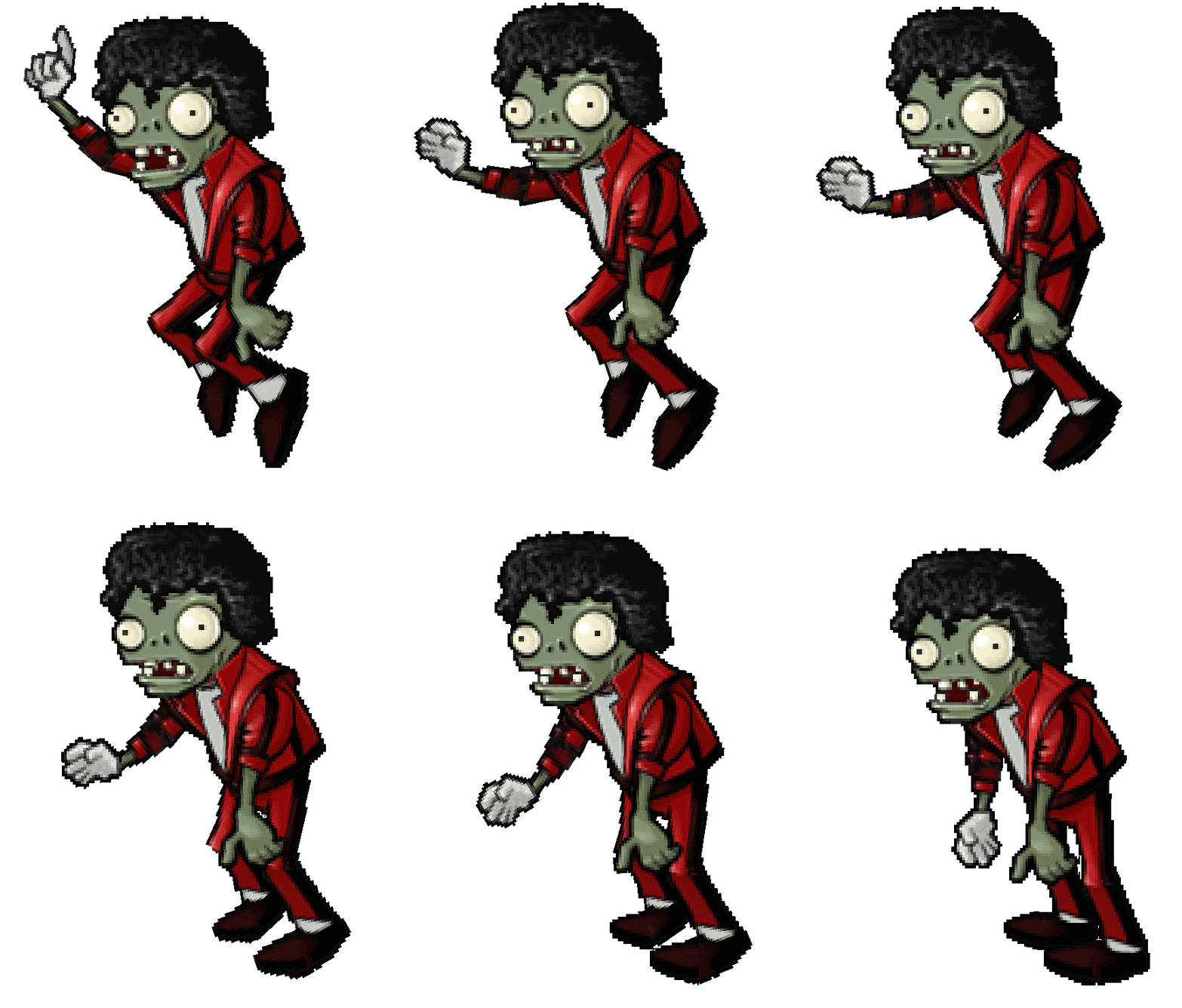
An animation of the Dancing Zombie exiting its pointing pose.
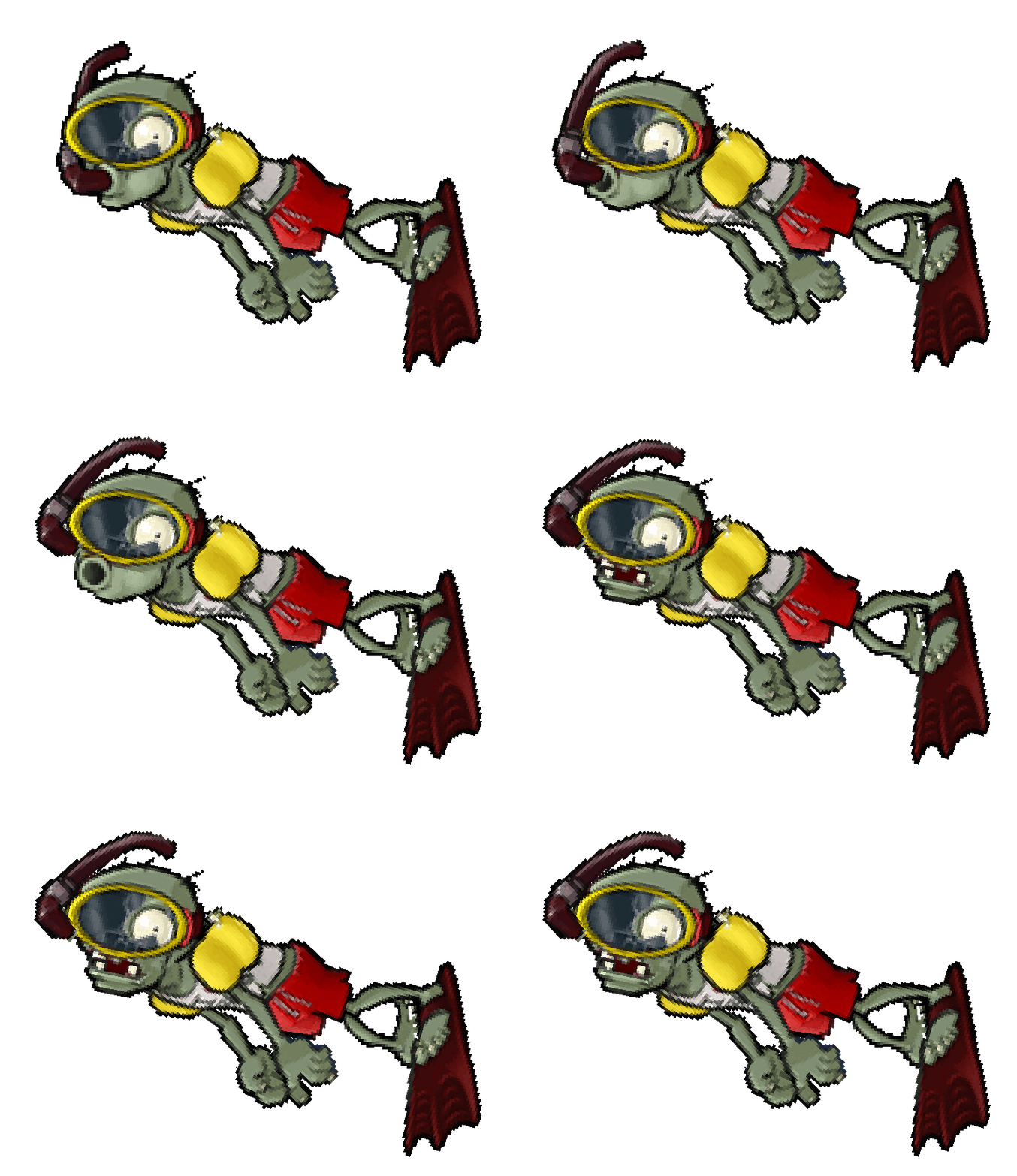
An animation of the Snorkel Zombie opening its mouth in the Zombiquarium mini-game.
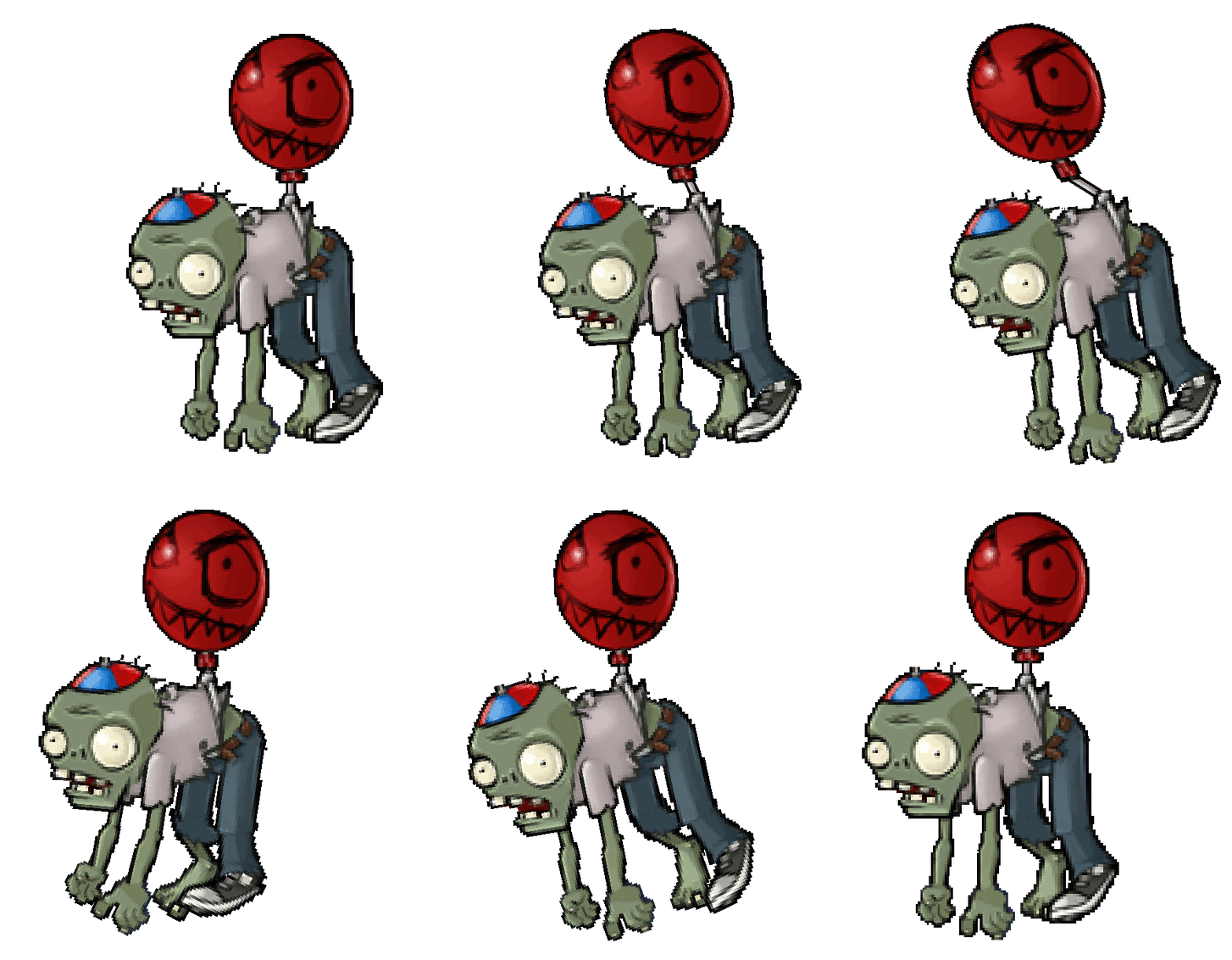
Unused swinging animation for the Balloon Zombie.

Unused brain swelling animation for Dr. Zomboss
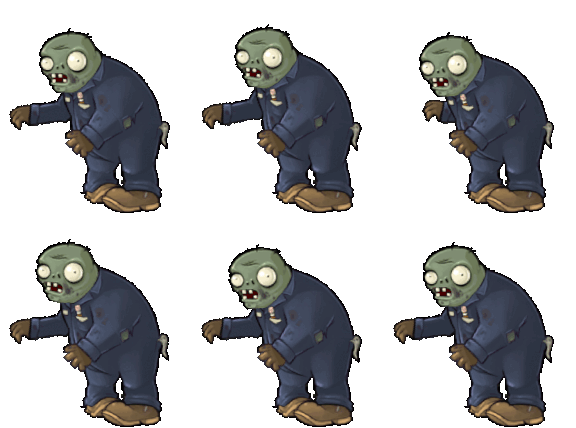
The Lower half of the Catapult Zombie has some small animations that are unseen because of the catapult machine.
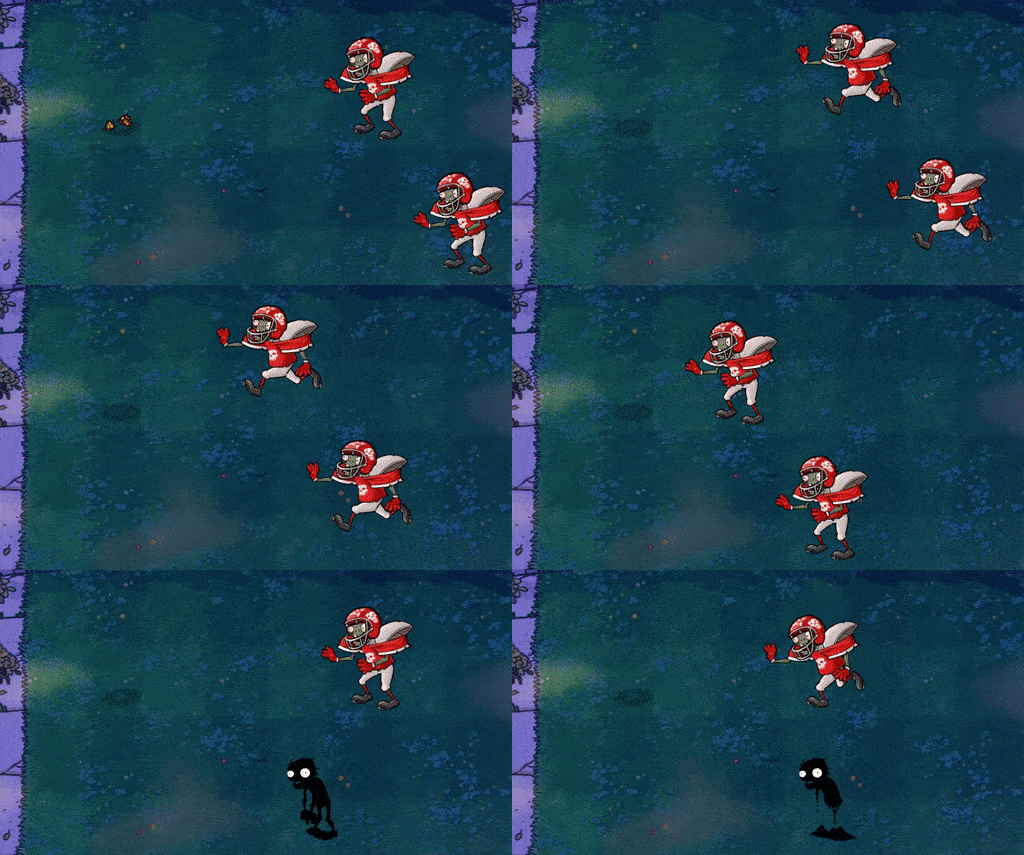
A leftover animation of the Football Zombie from the 0.1.1.1014 prototype.

Another leftover animation of the Jack-in-the-Box Zombie from the credits in the 0.1.1.1014 prototype--notably, the Lex from Bookworm Adventures cameo is absent due to the Lex graphic being removed from the final game.
Debug Displays#
Present in the game executable are a couple of hidden debugging displays. Unfortunately, the game loses a LOT of frames when activating any of these, especially with 3D Acceleration enabled. It is wise to turn that off before attempting any of these, and even then the game could see framedrops to as low as 10FPS. To enable these, follow the steps listed here.
Zombie Spawning#
Decimals are displayed in SS:MS (seconds to miliseconds).
It displays the following in this format:
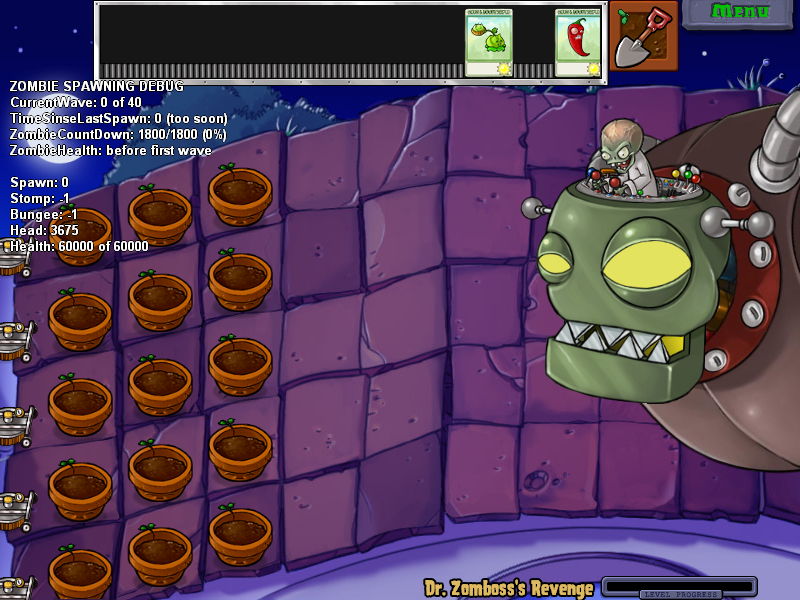
ZOMBIE SPAWNING DEBUG
CurrentWave: %d of %d
TimeSinseLastSpawn: %d %s
TimeSinseLastSpawn: %d %s (too soon)
ZombieCountDown: %d/%d (%.0f%%)
ZombieHealth: before first wave
HugeWaveCountdown: %d
ZombieHealth: CurZombieHealth %d trigger %d (%.0f%%)

Spawn: %d
Stomp: %d
Bungee: %d
Head: %d'
Health: %d of %d
CurrentWave is the current internal wave the player is on; 10 is considered a game wave, and this maxes out at 40. TimeSinseLastSpawn is the time (frames) it has been since the last zombie spawn. ZombieCountDown is the time it takes before a zombie wave begins; it increases over time. ZombieHealth is the internal health of the zombies before the next wave. CurZombieHealth is the amount of internal health a wave has. HugeWaveCountdown is the amount of seconds before the huge wave starts.
The latter set only occurs on Dr. Zomboss's Revenge or the final level. Spawn is the amount of time in seconds (SS:MS) the spawn zombie action is triggered; it can be set from 221 to 0. Stomp is the time before stomping on a nearby plant if possible, defaulting to 60:00 at the beginning. Bungee is the time it takes before using Bungee Zombies to steal plants, defaulting to around 40:00; oddly enough, this also affects throwing an RV. Head is the time it takes before Dr. Zomboss is open to attacks. Health is the health of the boss; the max is 60000, and it is defeated at 1.
Music#

|
This needs some investigation. |

- CurrentWave: Displays what wave the level is on.
- Music Burst: Displays what kind of burst the music is on. More Zombies will enable this and make the music more dramatic.
- Music order: Displays where the audio is playing based on the .mo3's audio location. If it is playing streamed audio it will say Music order 65535 row 16383.
- bpm1: Displays the BPM
Memory#
|
|
To do: |
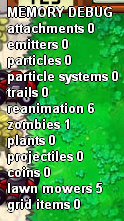
Shows how many objects are stored in memory. Most are pretty self-explanatory.
Collision#
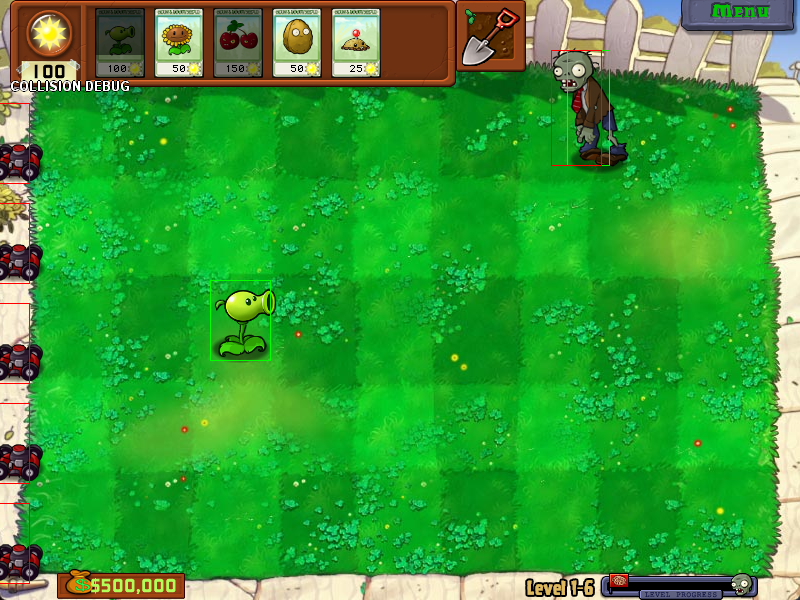
This does not draw any text aside from what's above, but displays the hitboxes and hurtboxes of all Plants and Zombies. Green is the hurtbox while red is the hitbox. Projectiles do not have hitboxes displayed. On plants that attack both in front of and behind them, the hitbox of the rear-facing attacks will be in pink.
Unused Plant Types#
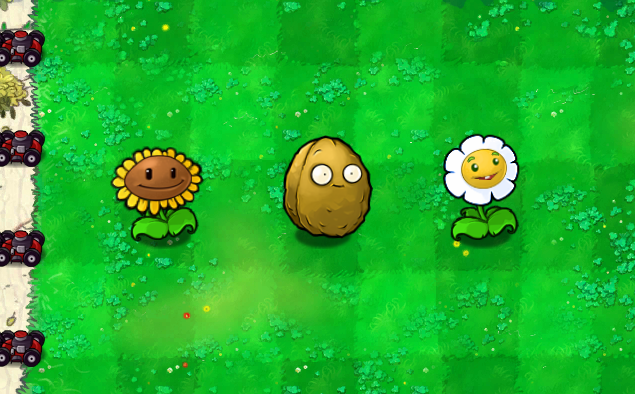
Large Sunflower, Large Marigold, and Large Wall-nut, used in the unused mini-game "Big Time". Note that Large Wall-nuts ARE normally seen in Wall-Nut Bowling 2, but never as regular plants.
Unused Zombies#
The decompilation of the game contains two commented out Zombies in the Zombies code, those being for a Ghost Zombie and a Dog Walker Zombie. The Dog Walker Zombie has more data and graphics in the leaked prototype builds of the game.
Unused Music#
Unused Watery Graves Section#
Offsets 117 to 120 of mainmusic.mo3 contain an extra part of Watery Graves which goes unused, due to the song looping at Offset 116. These offsets contain the patterns (in this order) 99, 100, 101, and 102, as compared to the used final part of the song (offsets 113 to 116) which contain 99, 100, 101 and 103. 102 is the unused pattern here, which sounds similar to 103 except for a few different notes and the lack of "closing drums".
Offsets 117 to 120. Normal version.
Offsets 117 to 120. Horde version.
Here is a restoration of how the song should sound with these unused parts of the sequence:
Watch on YouTube
Unused Rigor Mormist Volume Commands#
|
|
To do:
|
In Pattern 79 (Sequence 125), which is used for the intro for Rigor Mormist, there is unused data to reduce note volume in channels 14 and 15. These match up with the same data on the same channels found on Pattern 110 (Sequence 126). These volume commands are used to decrease the volume of the Sine Wave used in the ending of the song after it loops. The reason this is unusual is because the Sine Wave only plays when the song loops and the song loops at Pattern 110 (Sequence 126), making this behavior go unseen.
|
Pattern 79 |
Pattern 110 |
|---|---|

|

|
Earlier Zombies on Your Lawn Segment#
Within the animation files for all the segments relating to the Zombies on Your Lawn credits sequence, there exists an earlier animation during the lyrics "You're Dead so it doesn't matter".

This is a screenshot of the scene. It is unknown what would have happened during this scene due to there being no actual animation to go along with the segment. This is because the original animation file was overwritten by the current animation of the zombies being hit by a melon.
Script File#
#!/bin/sh
verbose=1

convert_if_candidate()
{
    if [ $verbose -eq 1 ]; then
        echo "checking $1 ..."
    fi

    [ -d "$1" ] && return;
    [ ! -f "$1" ] && return;

    echo "$1" | egrep -q ".*\.jpg$"

# change gamma for jpg files
    if [ $? -eq 0 ]; then
        convert "$1"
        continue;
    fi

    echo "$1" | egrep -q ".*\.png$"

    if [ $? -eq 0 ]; then
        convert "$1"
        continue;
    fi

    echo "$1" | egrep -q ".*\.gif$"

    if [ $? -eq 0 ]; then
        convert "$1"
        continue;
    fi

    if [ $verbose -eq 1 ]; then
        echo "skipping $1"
    fi
}

convert()
{
#   chmod u+w $1

    [ ! -f "$1" ] && return

    if [ $verbose -eq 1 ]; then
        echo "converting gamma of $1"
    fi
    /opt/local/bin/convert -gamma .8 "$1" "$1"
    [ $? -ne 0 ] && echo "error converting $1"
}

# will fail if file or path has a space in it. Probably need to do the while read thing...
for f in `find .`; do
    convert_if_candidate $f
done

# this will handle those paths with a space in them but skip everything else
find . -name '* *' | while read f; do # only reads those containing a space
    convert_if_candidate "$f"
done
Present in images on older or Mac releases is this shell script called gamma_correct_image_files.sh.
Unused Code#
SexyCache#
The game executable on Windows mentions working code for loading SexyCache.exe before bootup if the debugging flag is set. In the retail version, this function has no references, but in special versions, the launch command -tod can load it; otherwise, forcing the game to load it by changing a function to one that does nothing on the following address based off the build displays this message. Yes attempts to load SexyCache.exe and the game while No just loads the game. It is unknown what exactly SexyCache.exe does, as it doesn't exist in the installation root in all builds of the game. PopCap's original name was "Sexy Action Cool" when it was founded, so SexyCache.exe was likely an internal program that was used for games since.
Build |
Address |
|---|---|
v1.20.1073 (PopCap.com, Windows) |
00454CC5 |
v1.20.1073 RELEASE (JA, Windows) |
00454CB7 |
v1.20.1096 (Steam GOTY, Windows) |
004569AD |

MP3 music support#
Plants vs. Zombies has unused MP3 support, due to the final game using sequenced tracker music. However, the game also has functions to play MP3 music during menus and levels, and even to loop/pause streamed audio. In the 0.1.1.1014 prototype, these functions are used, as the switch from streamed audio to tracker music was only just starting to be made.
Command-line Parameters#
The game's executable mentions developer command lines for starting the game. Most are related to the framework and it's not friendly with commands using spaces, so use = instead. None of these work on Mac OS. These are:
- -tod: Loads the game in "cheat mode", allowing MANY cheat keys to be pressed, most cutscenes to become skippable, and more. Only works on specific builds.
- -play: Plays popcap.dmo if its present; if not present, an error is shown. -demofile can also be used to choose the name and location of the file.
- -recnum: Records demos with Popcap.dmo and Popcap#.dmo if that's taken on every boot.
- -playnum: Plays demos with Popcap.dmo and Popcap#.dmo from -recnum if that's taken on every boot.
- -record: Records a demo named Popcap.dmo and saves after shutdown of the game.
- -demofile: Specifies filename for recorded demos.
- -crash: Crashes the game immediately with an Access Violation error.
- -screensaver: Makes the game act like it's a screensaver; any movement or key presses will immediately force close the game. This is a leftover from Insaniquarium Deluxe, which came with a "virtual aquarium" screensaver that showed the player's progress in that game.
- -changedir: Changes game installation directory, for the current boot.
- -version: Shows the product name, version, build number, and build date with a popup instead of starting the game.
Unused I, Zombie Zombies#


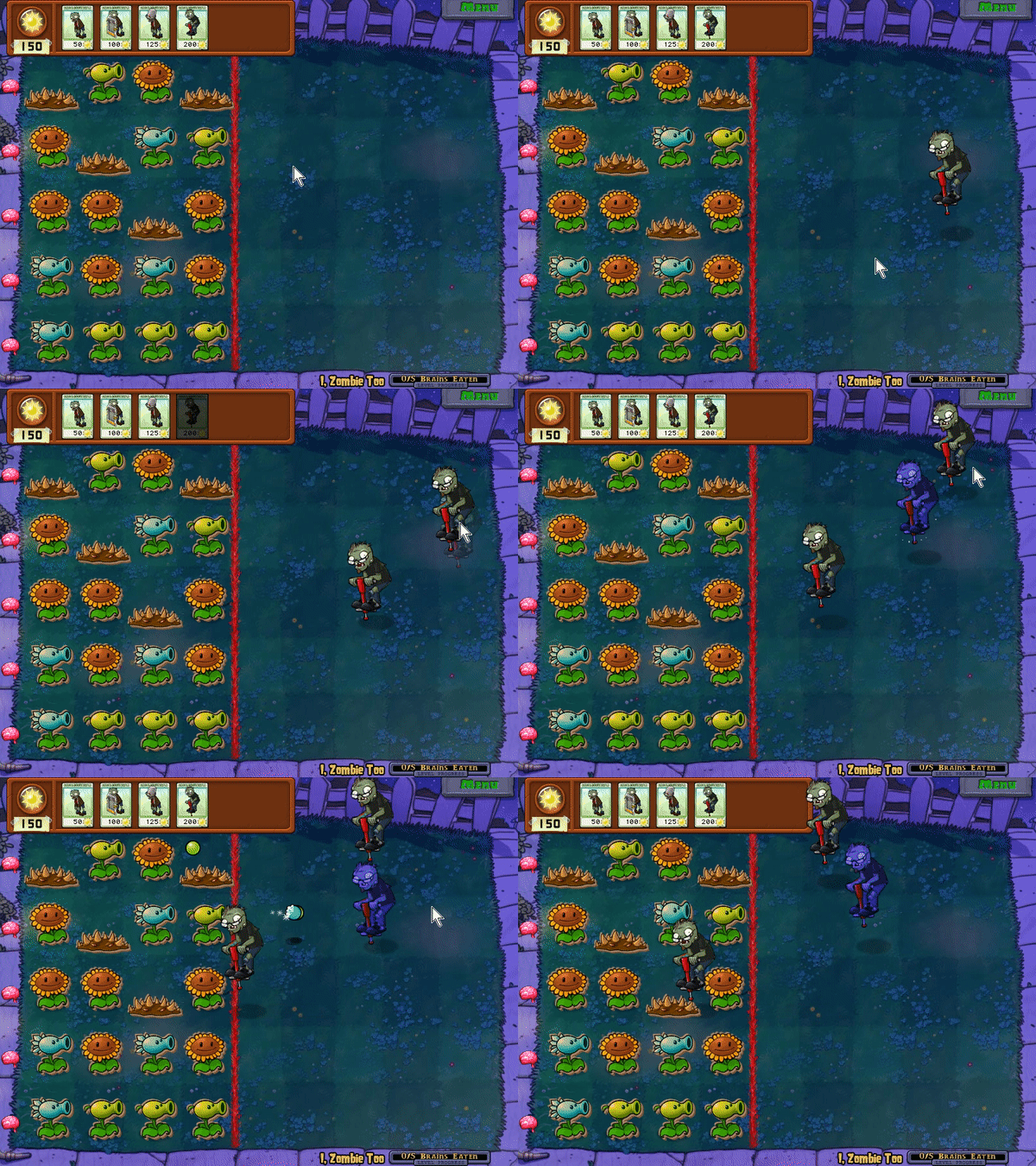
In the I, Zombie game mode, two unused Zombies exist which cannot be used in-game: the Zomboni and Pogo Zombie. Despite this, they have their own seed packet graphics, and via hacking, can be re-implemented in the game and are fully functional. Strangely, the Pogo Zombie will completely ignore the brain at the end of a lane, jumping right over it. Additionally, when 'planting' a Zomboni, its front end will appear cut-off.
Level 6#

An unused 6th level is present in the game, although not much of it is left. The only actual sublevel present is 6-1, which is simply a duplicate of level 5-9 but with the Day theme (as the theme this level tries to use is not present in the final game). All other sublevels in level 6 are simply duplicates of 6-1 read from garbage data. In the December, 2nd, 2008 prototype, this level is present with more content left; however, it uses an "elevated backyard" theme from even earlier in development (as indicated by the crude background graphics). This background is actually a leftover of what was going to be level 4 according to George Fan's Twitter.
Of interest: the night roof background graphic used exclusively for level 5-10 is named background6boss.jpg. The rest of level 5 uses background5.jpg, the day roof. It thus is possible that a night roof background6.png once existed which did not feature the Zomboss. Alternatively, the crude background6.gif graphic that is accessed when level 6 is loaded in-game could indicate a completely different layout would have been featured in this level.
Alternate Level 5-10#
In the code for which plants are chosen in conveyor belt levels, data exists for an unused alternate version of 5-10 where it seemingly would have been just another tenth level conveyor belt level like every previous world instead of a boss.
Plant |
Weight |
|---|---|
Cabbage-pult |
15% |
Flower Pot |
55% |
Kernel-pult |
12% |
Garlic |
3% |
Umbrella Leaf |
3% |
Cherry Bomb |
12% |
Melon-pult |
10% |
Image Metadata#
Some jpg images found in the images folder contain metadata for when they were created and modified.
Image |
Created |
Modified |
|---|---|---|
background3.jpg (0.1.1.1014 Prototype) |
2007-02-27T00:07:25+01:00 |
2008-04-25T10:39:07-07:00 |
background5.jpg |
2007-10-15T12:12:51-07:00 |
2008-04-25T13:32:51-07:00 |
pool.jpg |
2007-12-24T08:43:49-08:00 |
2008-04-25T10:54:45-07:00 |
background6boss.jpg |
2008-03-26T17:22-07:00 |
2008-06-27T11:49:54-07:00 |
pool_night.jpg |
2008-04-25T10:59:03-07:00 |
2008-04-25T10:59:03-07:00 |
fog.jpg |
2008-04-25T13:45:35-07:00 |
2008-06-25T16:11:05-07:00 |
fog_.jpg |
2008-04-25T13:46:15-07:00 |
2008-06-25T16:11-07:00 |
pool_base.jpg |
2008-04-25T14:13:41-07:00 |
2008-04-25T14:13:41-07:00 |
pool_base_night.jpg |
2008-04-25T14:25:05-07:00 |
2008-04-25T14:25:05-07:00 |
AwardScreen_Back.jpg |
2008-07-03T10:20:57-07:00 |
2008-11-17T15:55:37-08:00 |
Challenge_Background.jpg |
2008-08-26T12:06:48-07:00 |
2008-10-16T15:35:09-07:00 |
Store_Background.jpg |
2008-10-29T13:07:59-07:00 |
2009-02-26T14:52:02-08:00 |
reloaded/zombatar_bg.jpg |
2010-05-27T13:52:06-07:00 |
2010-05-28T16:32:41-07:00 |
reloaded/zombatar_layout_800x600.jpg |
2010-05-27T13:52:06-07:00 |
2010-06-17T11:57:12-07:00 |
reloaded/zombatar_layout.jpg |
2010-05-28T15:13:25-07:00 |
2010-05-28T15:13:25-07:00 |
reloaded/acheese/acheesements_more-top.jpg |
2010-06-03T10:32:27-07:00 |
2010-06-03T16:36:56-07:00 |
reloaded/main_menu_mockup_v2.jpg |
2010-06-25T15:05:01-07:00 |
2010-06-28T14:24:16-07:00 |
Revisional Differences#
Game of the Year Edition#
On July 11th, 2010, a "Game of the Year" edition of the game was released (according to the readme, this edition is version 1.2.0.1073). Aside from adding new content, a few changes were made.
Michael Jackson Zombie#
When the game was originally released, the Dancing Zombie and Backup Dancer Zombie looked different from how they do today. The Dancing Zombie originally resembled Michael Jackson dressed in his classic "Thriller" outfit, and the Backup Dancer Zombie resembled the backup dancers from the music video of the aforementioned song. The description of the Dancing Zombie even mentions "any resemblance between Dancing Zombie and persons living or dead is purely coincidental."
Coincidentally, Michael Jackson actually did die a little over a month after this game's release. About a year afterwards, Michael Jackson's estate objected to its inclusion. PopCap subsequently changed the designs of the Dancing Zombie and Backup Dancer Zombie out of respect to Jackson. The new Dancing Zombie was based off of Disco Stu from The Simpsons and the Backup Dancers have pink shirts with mustaches. The redesign has been included in all other versions since. Despite being removed, the textures of the original Dancing Zombie and Backup Dancer Zombie can still be found in the game's files.
|
Pre-GOTY |
GOTY |
|---|---|

|

|
|
Pre-GOTY |
GOTY |
|---|---|

|

|
Zomboni Description#
In the original version of the game, the Zomboni enemy had a different description in the Suburban Almanac than it does in the GOTY edition. Judging from the current description, it was most likely changed for trademark reasons.
|
Original description |
GOTY description |
|---|---|
|
Often mistaken for a zombie driving an ice machine, the Zomboni is a totally different life-form more closely related to a space ogre than a zombie. |
Not to be mistaken for a Zamboni® brand ice resurfacing machine. Zamboni® and the image of the ice-resurfacing machine are registered trademarks of Frank J. Zamboni & Co., Inc., and "Zomboni" is used with permission. For all your non-zombie related ice resurfacing needs, visit www.zamboni.com! |
Adventure button#
Adventure button was changed in GOTY to better match the Start Adventure button shape.
|
Pre-GOTY |
GOTY |
|---|---|

|

|
Zombie head#
The normal Zombie head sprite was changed to have its neck cut off in GOTY. This was mostly seen on Zomboni, Pole Vaulting Zombie, and Newspaper Zombie.
|
Pre-GOTY |
GOTY |
|---|---|

|

|
Path References#
|
|
To do: |
In 1.0.0.1051, at 0x27F850 in the game's executable, there is a reference to a Program Database file.
c:\Popcap\Lawn\releasefinal\PlantsVsZombies.pdbIn the same executable still, in the GOTY version, there's a reference to a single directory with another Program Database file.
c:\Users\dfranzi\Desktop\Files\Perforce\dfranzi_SEA-10786\games\Lawn\goty\cpp\Lawn\ReleaseFinal\PlantsVsZombies.pdbUnused .wav#
Located at 0x270F88 is a reference for an audio file. It was most likely used for the game's engine debug mode.
c:\windows\media\Windows XP Menu Command.wavOther Additions#
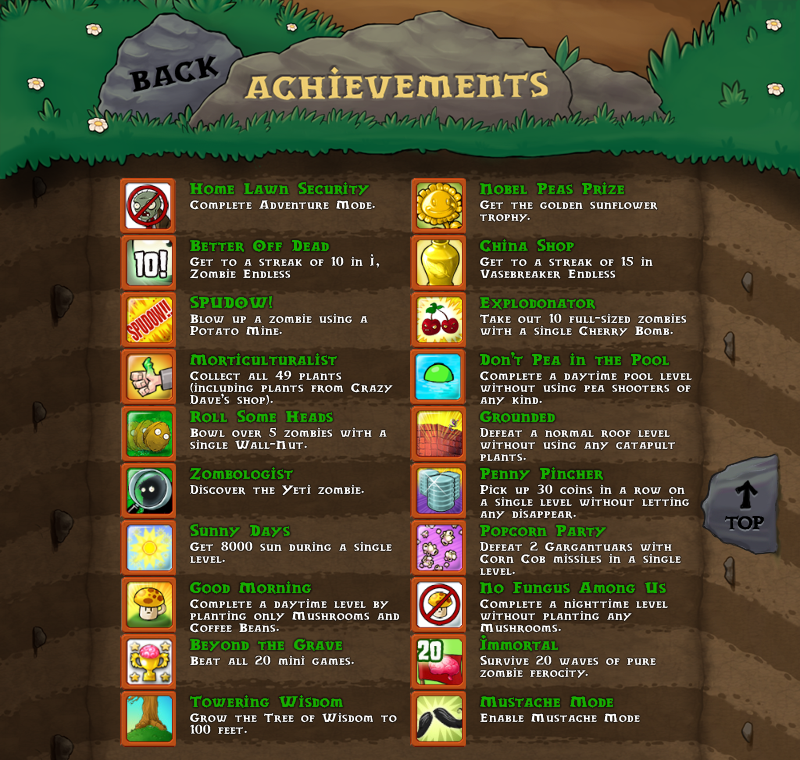
- The Game of the Year version adds an achievement system, in which various awards are given for completing certain requirements. However, because of this, one of the game's messages is unable to be seen.
- The Zombatar, an avatar creator, was introduced in the GOTY edition. This allows you to create your own zombie. Additionally, the accessories chosen for your Zombatar will appear on the Flag Zombie.
Internal Project Name#
The internal name of the game is Lawn.4 This project name was probably given during when the game's name was changed to Lawn of the Dead, and its name remained that way for some time until version 0.96, where it was changed to Zom-Botany. Earlier instances of the game may have used Insaniquarium's codename WinFish5, as seen in the present version of that game.
References#
|
The Plants vs. Zombies series | |
|---|---|
|
Windows |
Plants vs. Zombies (Prototypes) • Plants vs. Zombies: Replanted |
|
Mac OS X |
|
|
Android |
Plants vs. Zombies • Plants vs. Zombies 2 • Heroes • Plants vs. Zombies 3 (Demos) |
|
iOS |
Plants vs. Zombies • Plants vs. Zombies 2 (Use Your Brainz EDU) • Heroes • Plants vs. Zombies 3 (Demos) |
|
Adobe Flash |
|
|
Nintendo DS, DSiWare |
|
|
Xbox 360, PlayStation 3, PlayStation Vita |
|
|
Xbox One, Xbox Series X and S, PlayStation 4, |
|
|
China-Exclusive | |
|
iOS |
|
|
Android |
Great Wall Edition (Dev Build) • Endless Edition • Plants vs. Zombies 2 (Dev Build) • All Stars |
|
Adobe Flash |
|
|
Android TV |
|
|
Garden Warfare | |
|
Windows |
Garden Warfare • Garden Warfare 2 • Battle For Neighborville (Picnic) |
|
Xbox 360, PlayStation 3 |
|
|
Xbox One, PlayStation 4 |
Garden Warfare • Garden Warfare 2 • Battle For Neighborville (Picnic) |
|
Nintendo Switch |
|