 This article has a talk page!

|
To do: Namely, everything from Flying Bear's website has to be documented.
|
Insaniquarium looks at first glance to be a virtual aquarium. Being a PopCap game, it's much more than that (and considerably more interesting). By the end, one will understand why the exit popup leaves anyone who survives the chaos with one final, unhinged plea: Stop the insanity?
Unused Music#
Within the Alien.mo3 file, there lies early and unused versions alien approaching theme.
Offset 0, with tempo 125. Unlisted.
Offset 2, with tempo 125. Unlisted.
Within offset 3 there is an edited version of offset 2 only missing the beginning and with higher notes.
Offset 6, with tempo 125. Unlisted.
Offset 13, with tempo 125. Unlisted.
The file "Lullaby.mo3" contains the ending credits theme of the game. Patterns 15-30 contain the music itself. However, although not used by the sequence data, patterns 0 to 14 do exist, and they contain an earlier version of the credits theme, which is faster than the final and is arranged much differently, even incorporating drums. Sadly, it does not seem to reference any samples, however, the audio file above is a restoration, using samples from the final, and generic drum samples.
Unused Graphics#
Meryllipps.gif#


Sprites for Meryl's lips, almost definitely planned for use in her appearance in the main menu and Fish Emporium. Likely scrapped once the developers realized programming dynamic lip sync would be a nightmare, let alone by 2004's standards.
Unused Text#
The purple guys eat coins!
Early explanation dialog for the Starcatchers. It seems that at one point in development they would eat coins instead of stars.
c:\windows\media\Windows XP Menu Command.wav
A file path to a Windows sound. Apparently the sound for enabling debug keys.
    %s line %d +0x%X
+0x%X
//
Connection: close
 HTTP/1.0..User-Agent: Mozilla/4.0 (compatible; popcap)
Host:
GET
Connection: close
Beta Validation failed! Check your internet connection and try again.
Error!
The password you supplied did not match this account.
Invalid Password!
Invalid Password
This PopCap Beta account has been disabled!
Account Disabled!
Account Disabled
Unable to locate a PopCap Beta account for the supplied user name.
Invalid User Name!
Invalid Username
This product has been removed from the PopCap Beta program.
Thanks for helping us test during the beta period!
Beta Discontinued
Internal Server Error! Try again later.
Server Error
A new version of this product is now available. Click OK to open a page to download it from.
Update Required!
Update Needed
Unable to parse Beta Validation results! Check your internet connection and try again.
Validation Failed!
URL:
HOST:
result.txt
FAILED
SUCCEEDED
:COMMENTURL
:UPDATEURL
:ERROR
&pass=
&username=
&version=
http://www.popcap.com/beta_validate.php?prod=
Abort
Validating Beta
ValidateWindow
www.popcap.com
--
Content-Type: application/octet-stream
Content-Disposition: form-data; name="demofile"; filename="popcap.dmo"
Content-Disposition: form-data; name="builddate"
Content-Disposition: form-data; name="buildnum"
Content-Disposition: form-data; name="version"
Content-Disposition: form-data; name="prod"
Content-Disposition: form-data; name="username"
--
Text leftover from the beta testing period of the game's development.
Development Material#

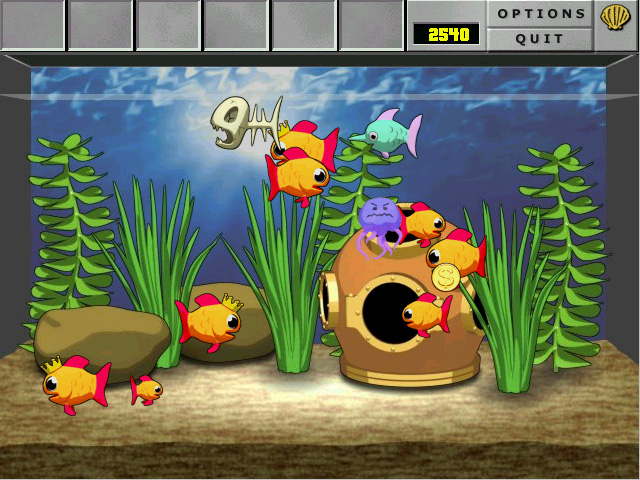
The first two screenshots shown of the deluxe version. Originally posted on October 3rd, 2002. It features graphics more faithful to the original java version, early versions of the cell shaded Guppies and Carnivore, and a completely different Tank 1 background using the same cell shaded style as the fish.
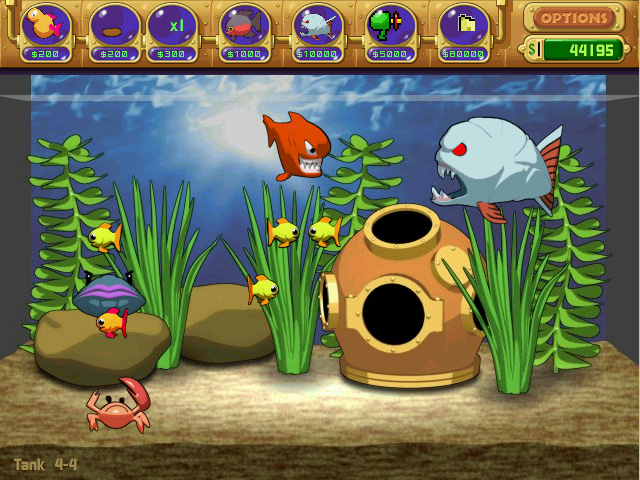
Posted on February 6th, 2003. It showcases an updated UI with unfinished elements within the HUD, also the first time the Ultravore was showcased as well as the hungry Guppies.
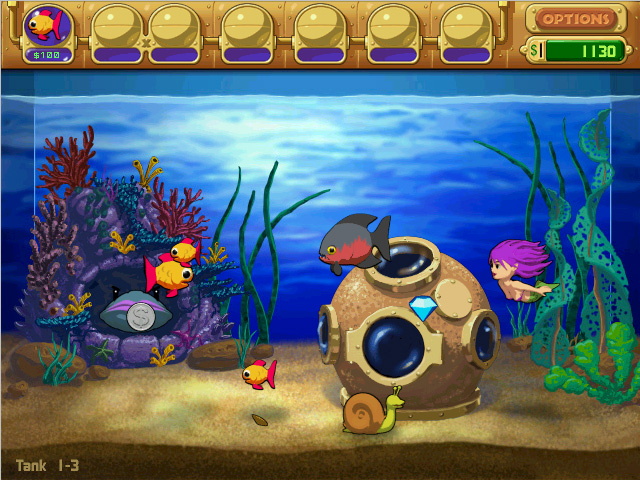
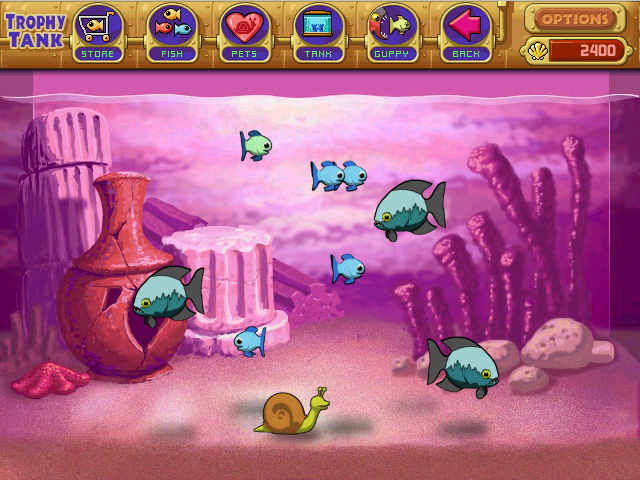
Posted on March 29th, 2003. Screenshots feature more finished graphics with some slightly different versions of the tank backgrounds. Tank 1 has the helmet lower than the final and Tank 2 has more detailed coral and a missing clam. The second screenshot features the first instance of the Virtual Tank originally known as the "Trophy Tank", including early versions of the colored Guppies and Carnivores
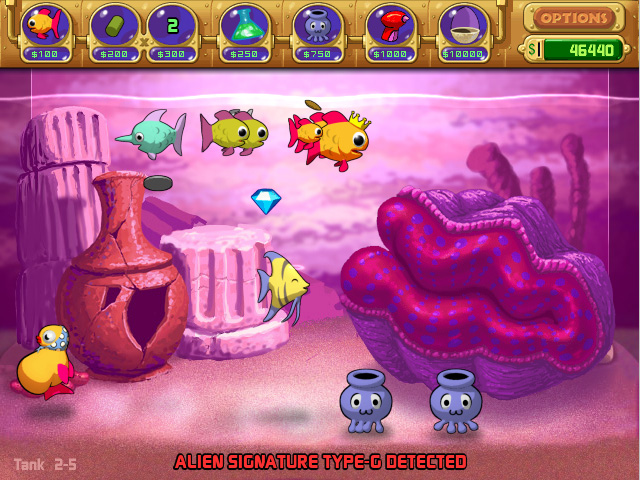
Posted on May 26th 2003. Tank 2 added the clam but is giant compared to the final version. Alien approaching text has a thicker black outline instead of red. King Guppies also aren't blue yet.
Posted on September 13th, 2003. An early version of the Tank 1 theme. Composed by George Fan.
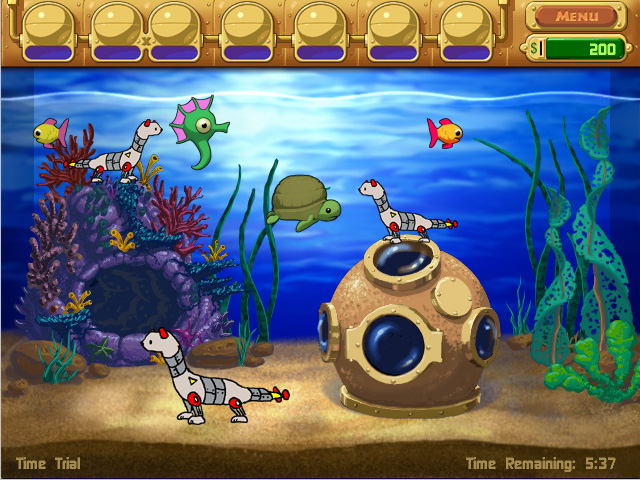
Posted on December 4th 2003. Ignoring the mecha-weasels, this was a teaser for the Time-Trial mode, still using the old Tank 1 background.
Internal Naming Scheme#
Several pets, and even the final boss, are referred to as different names internally.
Internal Name |
In-Game Name |
|---|---|
Grubgrubber |
Guppycruncher |
Gekko |
Beetlemuncher |
Ultra |
Ultravore |
Sylv |
Sylvester |
Smallsylv |
Minisylvester |
Boss |
Cyrax |
Brink |
Brinkley |
Note that the Ultravore is only internally referred to as "Ultra" in its scl prefixed sprites.
It seems like the developers had fun with the letter Z; the lasers used to kill the aliens are internally referred to as LazerGunz.
Internal Project Name#
Insaniquarium's internal name is WinFish, as referenced in executable file WinFish_Scr.exe.
Sandbox Mode#
The Sandbox Mode can be accessed by typing the Konami Code (↑, ↑, ↓, ↓, ←, →, ←, →, B, A) when you have the silver trophy. Typing the following keys will spawn the corresponding fish, pet or alien:
1 - Guppy
2 - Carnivore
3 - Star Guppy
4 - Starcatcher
5 - Guppycruncher
6 - Beetlemuncher
7 - Breeder
8 - Ultravore
q - Stinky
w - Niko
e - Itchy
r - Prego
t - Zorf
y - Clyde
u - Vert
i - Rufus
o - Meryl
p - Wadsworth
a - Seymour
s - Shrapnel
d - Gumbo
f - Blip
g - Rhubarb
h - Nimbus
j - Amp
k - Gash
l - Angie
; - Presto
A - Brinkley
S - Nostradamus
D - Walter
F - Stanley
z - Sylvester
x - Balrog
c - Gus
v - Destructor
b - Ulysses
n - PsychoSquid
m - Bilaterus
+ and - - Change the background.
(Source: InsaniquariumGuide.com)
Cheat Codes#
Typing the following codes during gameplay will cause various aspects of the game to change. Typing these codes will toggle between on and off.
TIME - Displays the time elapsed in the bottom-right corner of the tank. 
ZOMBIE - Changes living fish to appear dead.
SPACE - Changes the background to outer space. 
VOID - Changes the background to solid white.
SUPERMEGAULTRA - Changes Prego's birth sound to a longer & louder one. Typing the code again or typing "PREGO" will turn the code off.
WELOVEBETATESTERS - Changes Prego's birth sound to the Breeder's birth sound. Typing the code again or typing "PREGO" will turn the code off.
WAVY - Background will become wavy.
GIVE - Allows you to give shells to another user. This can only be typed on the main menu. 
B - Spawns bubbles in your tank while held.
(Source: InsaniquariumGuide.com)
Command-line Parameters#

-crash - Simulates a game crash, complete with the crash dialog asking to send crash data to Popcap.
-screensaver - Launches WinFish_Scr.exe.
-version - Displays the game program version, build information, and build date. Clicking OK exits.
-changedir - Specify the directory on your computer where the game's assets are stored. The correct syntax for this parameter is "-changedir=C:\folder" (minus the quotes), substituting "C:\folder" for the absolute path of the game data directory.
Demos#
Several command-line parameters enable an otherwise unused feature. Guess what it is.
-demofile - Specifies the filename for the played or recorded demo and only works when used with the "-play" or "-record" command line parameters (see below). The correct syntax for this parameter is "-demofile=MyDemo.dmo" (minus the quotes), substituting "MyDemo.dmo" with your demo filename of choice (either a previously recorded demo to play, or a filename to save a new demo that you wish to record).
-play - Starts Insaniquarium in windowed mode and then plays a previously recorded demo file. If no demo filename is specified using the "-demofile" command line parameter (see above), the game attempts to load "Popcap.dmo" and will display an error if it can't.
-playnum - Starts Insaniquarium in windowed mode and plays the last sequentially named demo that was previously recorded using the "-recnum" parameter (see below).
-recnum - Records sequentially named demos each time you run the game. The filenames of the saved demos are "Popcap1.dmo", "Popcap2.dmo", "Popcap3.dmo", etc., with "Popcap" being replaced with the specified file name (see above).
-record - Records and saves a demo file with the filename of "Popcap.dmo". Again, the filename can be changed with "-demofile".
(Source: InsaniquariumGuide.com)
Trial Mode#
The game includes a file in its "properties" folder called "partner.xml," which determines certain information about the game depending on how it was distributed, such as whether the game requires registration. On startup, the game checks if this file has been modified by comparing its signature to the contents of the "partner.xml.sig" file. Some versions of the game (including the Steam release) refuse to launch at all if the file has been modified; others, however, will show a warning and then launch in a "trial" mode.
The only notable differences between "normal" mode and "trial" mode are:
- The game has a 60-minute time limit, continuous across launches.
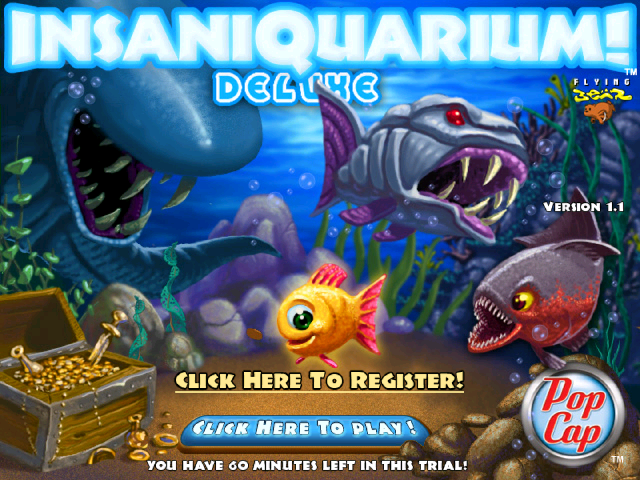
- The title screen prominently features a large "Click Here to Register!" button. This button is useless as it now redirects to PopCap's homepage.
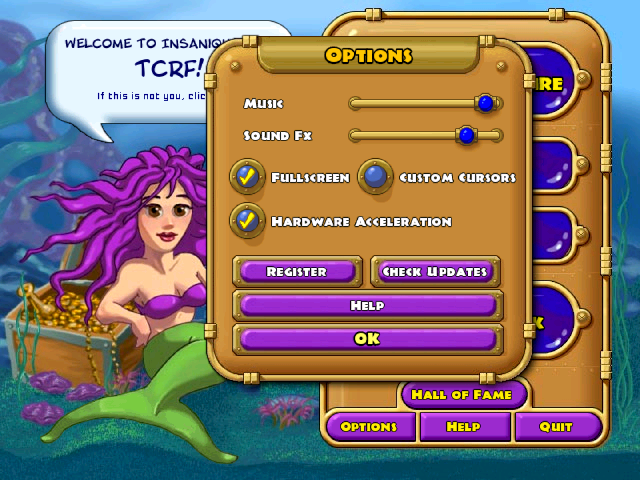
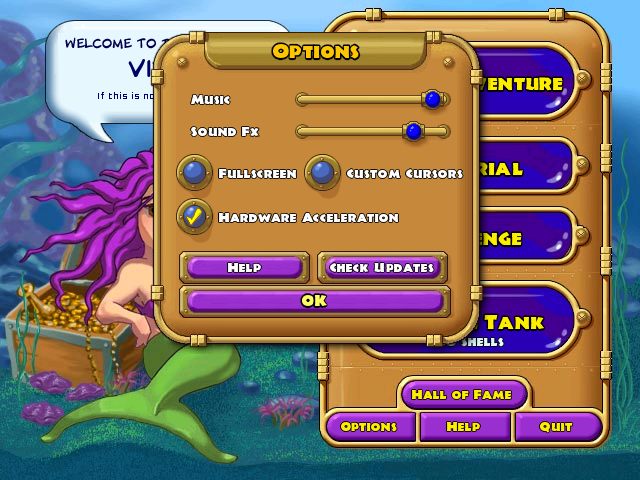
- A "Register" button has been added to the options menu, serving the same (non-)function as the one on the title screen.
- The "Check Updates" button is enabled regardless of whether the particular distribution of the game usually has it. This even includes 1.0 releases, which normally doesn't have this button at all.
|
The title screen with the "Click Here to Register!" button and the time limit displayed. |
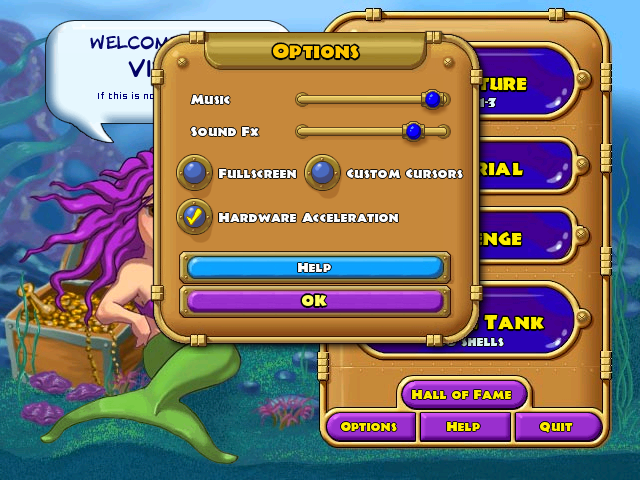
The options menu with the "Register" and "Check Updates" button present. |
|---|---|
|
|
Version Differences#

|
This needs some investigation.
|
While there are two official revisions of this game (1.0 and 1.1), each of these revisions have been published in several ways, with extremely minor changes, mostly in the title screen.
1.0 Digital Release |
1.0 GameHouse Disc |
1.0 MumboJumbo Disc |
|---|---|---|
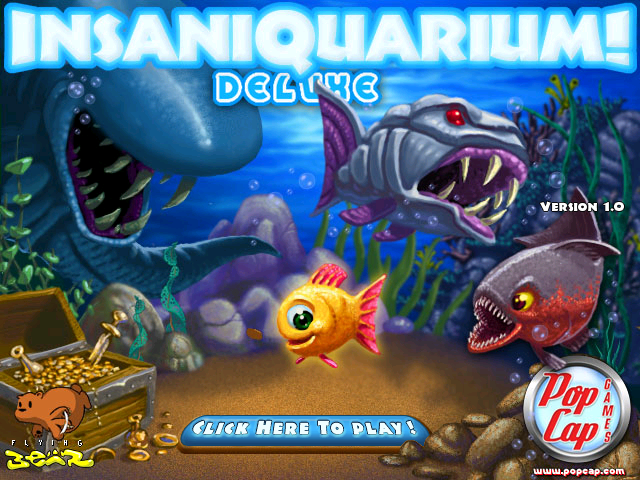 |
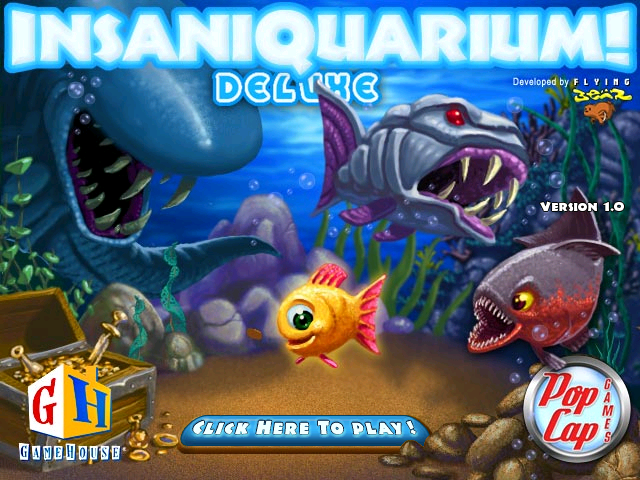 |
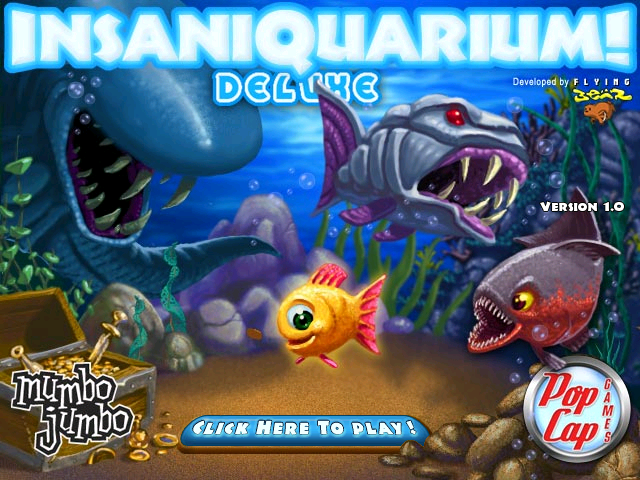 |
The three documented versions of 1.0 mostly only differ in the title screen, depending on which publisher it originated from. 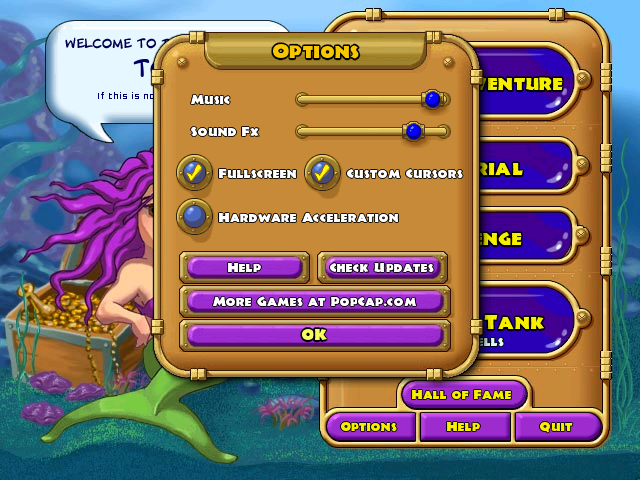 The Digital Version was available for direct download from the popcap.com website and will run in a demo mode if the game hasn't been registered, along with displaying an upsell popup when the game boots. This mode is separate from the Trial Mode mentioned above. This version has a unique settings menu when run in this mode, which replaces the "Register" button with the "Help" button and puts a button that says "More games at popcap.com" where "Help" used to be. These buttons are removed when the game is registered and are replaced with the standard v1.0 button layout. This version's title screen features a prominent Flying Bear logo on the bottom-left, and lists the PopCap website under its old logo.
The GameHouse and MumboJumbo versions came in physical discs, and move the Flying Bear logo up to the top-right to make room for their own logos. They also remove the website from the PopCap logo. The disc versions also remove a few assets related to advertisements and promotions of other PopCap games.
1.1 Digital Release/Steam Version |
1.1 Disc Release |
1.1 RealArcade Demo |
|---|---|---|
 |
 |
 |
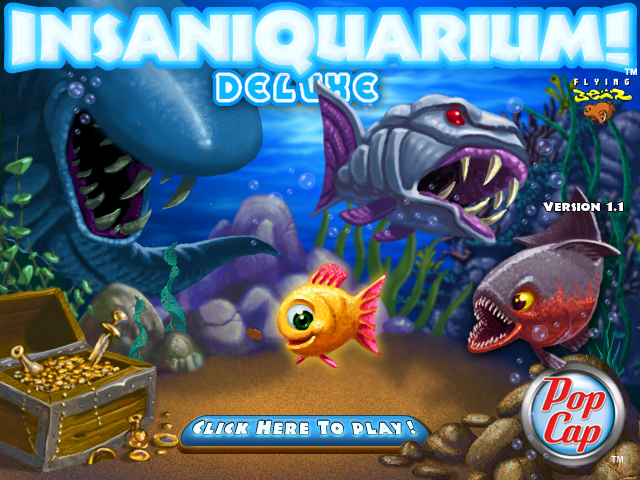
There are four documented releases of 1.1, with a few other minor changes besides the title screen. The digital release was directly available on the PopCap website, and if not purchased, will provide a pop-up telling the player that they have limited time to play, and urging them to buy it. This is separate from the Trial Mode mentioned above. the title screen features a new Popcap logo with the "Games" part omitted.
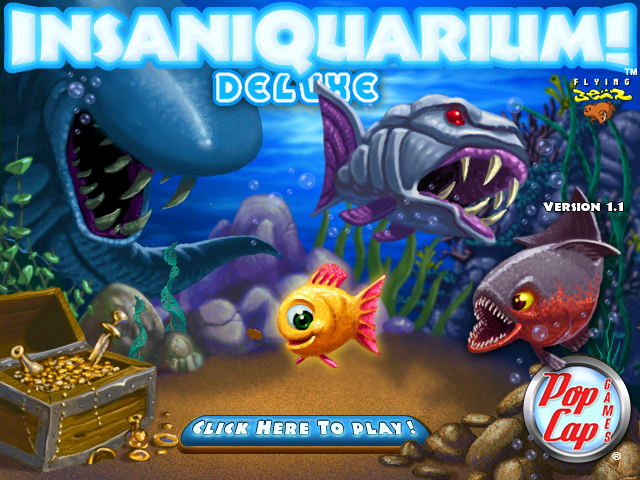
The disc release was published by PopCap themselves, and reuses the original logo, despite the new logo being printed on the disc and its case. This version removes the drm folder, which is where the assets for the upsell popup originally resided.
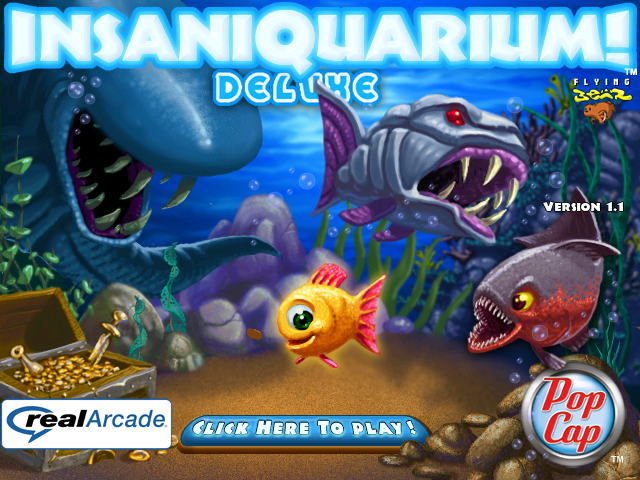
The RealArcade demo was digitally available through the now-defunct RealArcade service, where you could play a demo of the game, and optionally pay for the full release. Its title screen features the new logo, as well as a RealArcade logo, similar to the logos present on 1.0 releases. Interestingly, the readme of this version states that it is v1.0, presumably by accident. The drm folder has been removed, with the demo restrictions being handled through RealArcade itself.
The Steam version looks identical to the digital 1.1 release, with the new logo. The drm folder is present, as well as an exact duplicate of the main executable... for some reason. Both .exes are checked during Steam Verification.
None of the 1.0 releases are specifically equipped to handle a widescreen resolution, which results in the game stretching its picture to fill the entire display when played on computers with wide screens and more primitive graphics card drivers. Most graphics cards of the modern era are capable of detecting this and will automatically display it in the correct 4:3 ratio, and 1.1 releases know to maintain its aspect ratio on widescreen displays via the addition of resolution settings in their partner.xml file.
The game contains an option to check for updates, which is determined by the value of "DontUpdate" in properties/partner.xml, and it is disabled by default in most releases. Because this file is signed, patching is required to enable/disable this functionality, although it can always be seen when enabling Trial Mode. The only version that has it enabled by default is the v1.1 Digital release, despite the option being present in every version, 1.0 or 1.1. No versions were ever released after v1.1, so this option is mostly useless anyway.
|
Everything Else |
1.1 Digital Release |
|---|---|
|
|
The icon used for the main executable was also changed between versions. 1.0 uses what appears to be a (slightly unsettling) modified version of the guppy's in-game render, while 1.1 uses a more stylized illustration of the guppy, similar to the one on the title screen and boxart. Oddly, Steam still uses the old icon in its Game List.
|
1.0 |
1.1 |
|---|---|

|

|