 This article has a talk page!
The Krion Conquest is to Mega Man as a frozen dollar pizza is to a New York deep dish. More or less.
Despite the later release date, there are a number of clues that point to the US version actually being an earlier build than the Japanese version.
 Prerelease Info
 Bugs
Bugs
 Japanese CutscenesFan-translated versions of cutscenes found only in the Japanese version.
Regional Differences#
Title Screen#
|
JP |
US |
|---|---|

|

|
Compared to the Japanese release, the US title screen looks rather bland. The Japanese version also identifies the witch protagonist as Doropie, as opposed to Francesca in the US release.
Opening Cutscene#
|
JP |
US |
|---|---|

|

|
Francesca appears to be more chibi-styled in the US release while Doropie appears to be older. In the Japanese version, Doropie's appearance is kept consistent throughout all of the cutscenes.
Level Intro#

The Japanese version has a screen to introduce each stage. The US release does not have this.
Level Transition#

The circled hexagram at the end of each stage in the Japanese version does not exist in the US version. Given Nintendo of America's policy on religious imagery at the time, it may have been removed due to its resemblance to the Star of David.
Round 4-1#
|
JP |
US |
|---|---|

|

|
Round 4-3#
|
JP |
US |
|---|---|

|

|
Stage 5#
For some reason, if the Astro Guard (the first boss of Stage 5) stands on the same level as you and shoots fireballs, they cannot be ducked under in Magical Doropie, but can in The Krion Conquest.
Music#
|
JP |
US |
|---|---|
The title screen music in the Japanese version is entirely different and much more cutesy sounding compared to the US release.
Difficulty#

In the Japanese version, you have an unlimited amount of continues, and the "CONTINUE" option is presented on the title screen. The US release doesn't contain this feature, so when you get a game over you start from the very beginning. The Game Genie code GAEEGASA will restore this functionality.
Dying in a boss fight takes you right back in the boss room in the Japanese version, instead of the beginning of the third stage of the round.
In the US release, it is possible to skip the boss fights in round 2 and 3 and simply proceed to the next stage.
Ending#

The US version's ending has been reduced to a congratulations message and credits roll that plays while still in the final boss room.
Codes#
Aside from the level select listed below, three other codes are included only in the Japanese version and must be entered at the title screen. Two of these codes access hidden playable characters. No matter which character you pick, you will change back to Doropie for the final boss fight against Empress Elysia.
Play as Kagemaru#

Press Up, Up, Down, Down, Left, Right, Left, Right, A, B, A, B on controller 2 and then hold Select and press A on controller 1. Upon further look at the box art, Kagemaru indeed has a gun! Besides wielding a gun while playing him, nowhere in the game does it suggest he has one.
Play as an Unknown Character#

Press Up, Up, Down, Down, Left, Right, Left, Right, A, B, A, B on controller 2 and then hold Select and press Start on controller 1. Unlike Kagemaru, this character is never in the plot. It could just be an alternate outfit for Doropie.
When playing as this character, the appearance of the 1UP also changes. It somewhat resembles Doropie's face in the beginning of the Round 2 cutscene.
|
Doropie/Kagemaru |
Unknown Character |
|---|---|

|

|
Invincibility#
Press Up, Down, Up, Down, Left, Right on controller 2 and then hold Select and press Start on controller 1. By entering this code, you won't even flinch by touching an enemy.
Tech Notes#
The playable character codes set memory at address $00FF to 01 for Kagemaru and 02 for the "Unknown Character." Changing this value at the title screen is equivalent to entering the code. Technically any value besides 00 or 02 will simply result in Kagemaru. The only real effect is that memory at $0303 and $0304 are set to different MMC3 CHR bank values when the level is initialized -- $40/$41 for Doropie/Francesca, $68/$69 for Kagemaru, and $4A/$4B for "Unknown Character." In Krion Conquest, this value appears to not be checked at all. The override subroutine that would change which player sprite CHR banks get written in appears to be completely absent, and thus $0303 and $0304 are always initialized to $40 and $41, respectively.
The invincibility code sets memory at address $004E to 01, and interestingly this value is still checked and works in Krion Conquest even though the code can no longer be entered.
(Source: GameFAQS, Southbird)
Unused Graphics#
Japanese Version#
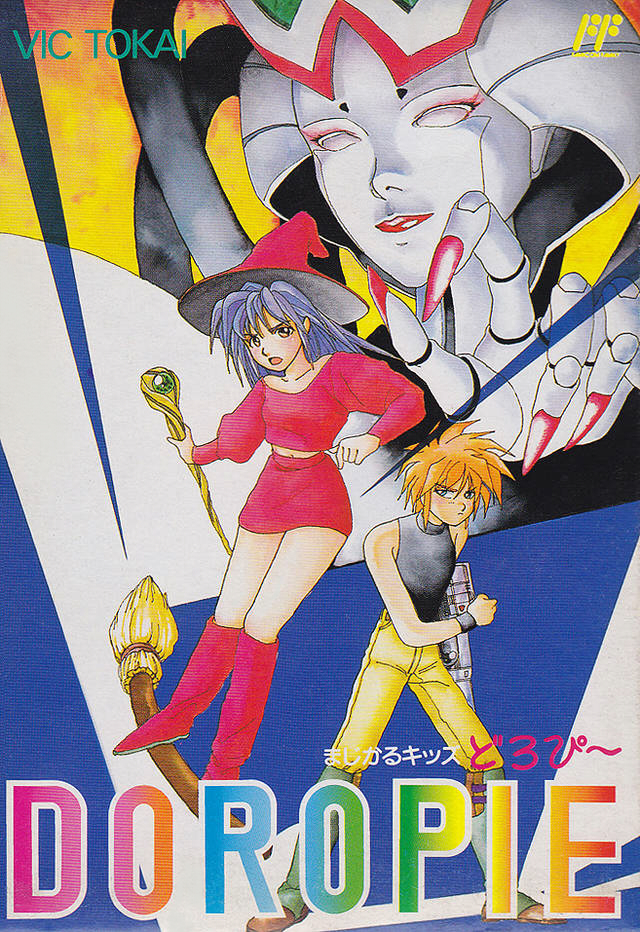

This graphic is found with the other stage intro graphics; however, the only part that is used is "magical", leaving the "kid's" part unused. Oddly enough, this text matches the game's title on the Japanese box.
|
Original |
Mockup |
|---|---|
|
|

|

This graphic of Doropie used in Round 1's cutscenes is normally static; however, a few unused tiles suggest it was supposed to be animated and synced with Doropie's dialogue.

Sprites of asteroids are loaded with the ending scene where Doropie gets a call from Kagemaru.

Another unused graphic is loaded into the same scene; it is unclear what it's supposed to be.
US Version#
A shot of Francesca looking angry.
Both#

A shot of Doropie with her hair waving in the wind.


This realistic portrait with animated blinking eyes, loaded with the rest of the title screen graphics, is all that remains of a much earlier title screen (right). The portrait was likely an 8×8 block of sprites, which would explain why the top and bottom are cut off in the screenshot (the NES can only show 64 sprites at once).

The letters "NE" can be found below the early Francesca's Wand graphics. These mark the end of the CHR data in the US version.

According to an interview, a lot of stage five, the final stage, was cut due to space issues. You never see a level completion screen where this digit would've been used because there's only one level with the bosses. After the bosses are defeated, you see the ending and credits.
(Source: Wikipedia)

A shot of Kagemaru looking down.
Level Select#

In the Japanese version, press Up, Down, Up, Down, Left, Right on controller 2 and then hold Select and press A on controller 1. Press Left or Right to select a digit and Up or Down to change it. Pressing B will cause the currently selected digit to blink. The program code for this feature is completely absent from the US version.
(Source: GameFAQS)