T00P0X#

|
This needs some investigation.
|
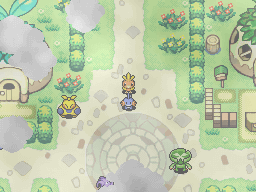
This is the main Debug Room present in these games, called "T00P01", "T00P02", and "T00P03" internally. It seems to be quite old, even using the Town Square map from Rescue Team! The easiest way to access it is through the Debug Menu, under Ground Debug Play; however, loading it this way will load a fully blank save file which does not load on real hardware and breaks most of the room's functionality. To access the room properly, use these codes:
Time |
|---|
JP |
|
Darkness |
JP |
|
To use it, hold SELECT while accessing your save file. The code spawns you in the second room (trying to spawn you in the main room crashes the game), so go through the right exit to access the main room. The leaked debug ROMs confirm that, if a real save file is used, this menu retains all of its functionality in the final product!
Northern Sign#

Opens a menu and asks "Which function will you access?".
Job Bulletin Board#
Loads the Job Bulletin Board. This works identically to the final's board.
Outlaw Notice Board#
Just like the above, just with the Outlaw Notice Board.
Exploration Results#
|
|
This needs some investigation. |
Displays the results screen of the last dungeon you entered. If no dungeons have been entered, this button does nothing. For some reason, the dungeon name always seems to display as Mt. Bristle.
Team Controls#
Opens a menu with the options Initialize Team, Team Returns from Map, Team Defeated in Map, Inspect Team, Default Team Setup 1 and Default Team Setup 2. The first two seem to do nothing, and Team Defeated in Map locks the game. Inspect Team brings up a window which will describe your current team setup. The possible messages are: Other Teams, Hero & Partner Only, Partner & Hero Only, Hero & Partner Present, Solo Player Character. Default Team Setup 1 changes your setup to "Hero & Partner Only", which will remove all recruits from your team. This is only evident if you Inspect Team again or enter a dungeon. Default Team Setup 2 does the same thing, but instead changes the setup to "Solo Player Character".
Status Update#
The top screen briefly flashes if it is set to "Team stats". If the team has been changed using the Team Controls submenu, those changes will be updated on the top screen.
Western Sign#
Displays:
Welcome!
This is the fun Treasure Town!
Whiscash Pond ↑
Pelipper Post Office →
And fun it is. For comparison, this what the sign said in Rescue Team:
Welcome!
The fun and bustling Pokémon Square!
Whiscash Pond ↑
Pelipper Post Office →
Green Kecleon#
After waking up this sleeping bozo, he will open up a menu and say:
Kecleon:...Fnarff... Yes? I'll open up the shop-r
lated
menus for you. Which one would you like?"
Assembly#
Opens up Chimecho Assembly, which works as intended.
Reward#
Does nothing.
Link Shop#
Opens up Electivire Link Shop.
Mini Game#
Starts Sentry Duty Mini Game.
Appraisal#

Meant to open Xatu Appraisal, but it's bugged, so it goes back to Kecleon after Xatu speaks. Xatu's textbox and portrait will remain visible even after exiting the conversation.
Add Team Members#
Adds Uxie, Manaphy and Mesprit (will ask for Uxie/Mesprit to join, will force Manaphy to join instead). Then Mesprit (or Manaphy) will say:
Mesprit(Manaphy):Good morning! I am Mesprit(Manaphy).
Not like anyone wanted Azelf anyway. Right?
Add Items#
Gives you a Blue Gummi!
Purple Kecleon#
Opens a menu and tells you:
Kecleon:The shop-related menus will be opened. Which one would you like?
Duskull Bank#
Opens Duskull Bank.
Kangaskhan Storage#
Opens Kangaskhan Storage.
Kecleon Shop#
This confused Kecleon will open the menu for the (green) Kecleon Shop. There are randomly generated items in the shop.
Kecleon Wares#
Like the above, but this purple Kecleon will open up the Kecleon Wares.
Name#
Will open a menu asking you what your name is, breaking the graphics on the top screen in the process. Once the name has been entered, it will rename your Hero to whatever you set it as. This persists after a save and reset.
Evolution#
Sends you to Luminous Spring. Using this method of accessing the room, exiting will bring you back to Treasure Town.
Egg (Day Care)#
Opens Chansey Day Care.
Makuhita#
Where the main party happens. Opens a menu with the following message:
Makuhita:An event will be activated. Which one would you like to see?
ACTING_TEST#

Makuhita:An Acting Test will be activated. Which one would you like?
This pulls up a submenu with two pages that contain entries titled "M01A01A" to "M01A09A".
M01A01A
The screen flashes for a bit, fades out, and then back in. Your position is reset and a dialogue box appears reading:
It sounds like the natural disasters were interfering with our ability to evolve.
I think the timing's right. I should think about evolving...
This is Lombre's postgame dialogue from the first two games. The screen fades out and in again, resetting the debug area like when you first entered it.
M01A02A
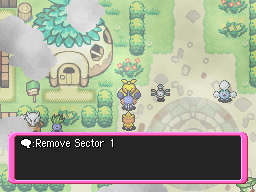 A dialogue box appears stating:
An Event Test is under way.
A Placement Test will be conducted.
After a pause, it reads:
Place Sector 1
A Magnemite appears a couple tiles to the right of Makuhita.
Place Sector 2
A Jumpluff appears farther down the line.
Remove Sector 1
Remove Sector 2
Deletes the Magnemite and Jumpluff.
The Event Test is finished.
M01A03A
Watch on YouTubeA dialogue box shows up:
An Acting Test will be conducted.
The camera will pan towards the center of the square, and Jumpluff and Magnemite will once again appear. Magnemite will "walk" in a square for a short amount of time, Jumpluff will teleport and then turn in place, and the Lombre present in the square will float in place while using its idle animation, then run using its walking animation, and finally run in its idle animation.
The Event Test is finished.
The camera will re-center and you will re-gain control.
M01A04A
Guess what! A dialogue box!
An Acting Test will be conducted.
(Lombre walks faster for a few seconds)
The Event Test is finished.
M01A05A
The screen fades to black and dialogue from the beginning of Rescue Team plays.
Where am I?
Am I dreaming this?
I feel a pleasant breeze.
The text then becomes aligned to the right instead of the center and the fade effect goes away. The dialogue changes to Lombre's postgame dialogue as seen earlier:
It sounds like the natural disasters were interfering with our ability to evolve.
I think the timing's right. I should think about evolving...
The screen fades back in and Makuhita says,
Makuhita:But when I evolve... I become a Ludicolo...
M01A06A
Magnemite and Jumpluff will appear in the center of the square, walk towards each other, and then disappear.
M01A07A/M01A08A
The screen fades to black, and you are placed back in the center of the room. Your partner will say:
Acting Test under way...
You regain control, and Makuhita will then disappear. Forever...
M01A09A
The Color Effect Test will be conducted. Both screens will fade gray, then red, then green. Then, the bottom screen will fade from red to gray to red, then green to gray to green. Then the bottom screen is tinted gray, then yellow, and then...
The Test has completed.
STATION_TEST#
STATION_01
Magnemite will be placed in the top-left of the square. When talked to, it will say:
Magnemite:Gritty hard
STATION_02
Jumpluff is placed in the top-right of the square. When talked to, it will say:
Jumpluff:Soft & Fluffy
REMOVE_01
Magnemite disappears, if present. Nothing happens otherwise.
REMOVE_01
Jumpluff disappears, if present. Nothing happens otherwise.
STATION_M01A02_0
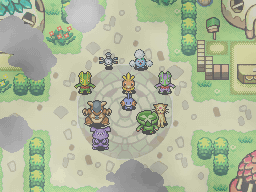 The screen fades out, then back in. You are in (almost) the middle of the square, and every NPC in the room, plus Magnemite and Jumpluff and except Makuhita, are surrounding you, facing south. All of them stay stationary except Lombre, who will immediately begin moving around as usual. None of them can be interacted with anymore, and Makuhita and your recruits have gone missing.
STATION_M01A02_1
Magnemite and Jumpluff are placed in their usual spots. They do not have any text this time, and you also lose the ability to interact with Makuhita.
STATION_M01A02_2
Same as before, but now Makuhita disappears.
SOUND_TEST#
There are four pages in total here:
Option |
Result |
|---|---|
BGM_PLAY |
The Boss Battle theme will begin playing. |
BGM_FADEIN |
This abruptly cuts the music if it is playing, and starts playing a quiet tone. |
BGM_STOP |
Stops the music or the quiet tone if it was playing. |
BGM_FADEOUT |
If the music or tone is playing, it will fade out as expected. |
BGM_WAIT |
If the music or tone is playing, it will abruptly stop and the "Mission Failed" jingle will play. If there is no music, it'll just play the jingle. |
BGM_CHANGE |
If there is music playing, it will fade out, remain silent for a second or so, and then fade back in. If the tone is playing, it will become louder. |
The options for each respective page do not affect any other options. For example, if you select "BGM_PLAY" and then select "BGM2_STOP", it will not actually stop the music. The sounds from the pages will overlap one another if played at the same time.
Option |
Result |
|---|---|
BGM2_PLAY |
Also plays the Boss Battle theme. |
BGM2_FADEIN |
Works the same as the previous page, but instead of a quiet tone, a pulsing 8-bit noise will play indefinitely. |
BGM2_STOP |
Works the same as the previous page. |
BGM2_FADEOUT |
Works the same as the previous page. |
BGM2_WAIT |
Works the same, but instead of the "Mission Failed" jingle, this will play the "Mission Complete" jingle. |
BGM2_CHANGE |
If there is music playing, it will fade out, remain silent for a second or so, and then fade back in. If the tone is playing, it will become louder. |
Option |
Result |
|---|---|
BGM_SIGNAL |
The intro music will play in its entirety. After a while of silence, a bass instrument will play a few times. The following text will display. The text has no effect on what's currently playing:
This can be skipped through after a few seconds of the intro.
This can be skipped after the bass-instrument stops playing.
|
ME_PLAY |
Plays a "success" jingle. |
ERROR_TEST |
will display in red text, and the drumroll theme will play. When the box is closed, the music will fade.
Nothing happens. |
Option |
Result |
|---|---|
SOUND_STOP |
Abruptly stops any sound if there is sound playing. |
SOUND_FADEOUT |
Despite the name, also abruptly stops any sound if there is sound playing. |
SE_PLAY |
The sound of stone crumbling will begin to play. |
SE_STOP |
Plays a second of a different "stone crumbling" sound, then abruptly stops. |
SE_FADEOUT |
Despite the name, does absolutely nothing. |
SE_WAIT |
The "healing" sound effect will play.
The sound of a door opening will play.
A whooshing sound will play. |
DUNGEON_OPEN#
These options will edit your current dungeon list. Use the Northern Exit to check your progress.
ALL_CLOSE
This removes the main storyline dungeons from your list. It does not touch optional dungeons.
ALL_SCENARIO
Unlocks 7 pages of all of the mandatory dungeons, including post-game dungeons, warps to the ends of dungeons, the optional/missable "Path" dungeons, future dungeons, and even the Test Dungeon. This also prefixes each dungeon with the "Scenario" emblem, indicating that the dungeon pertains to the current story beat. This doesn't unlock other optional dungeons, and also does not touch your currently unlocked dungeons (ie. if you have an non-"Path" optional dungeon in the list, it'll stay there).
ALL_RANDOM
This appears to just unlock all the main dungeons, with no emblems attached. Not sure what "RANDOM" has to do with it.
TYPE1
This unlocks Test Dungeon, Beach Cave, and Drenched Bluff, and adds the Scenario emblem to the latter. Again, this does not touch your currently unlocked dungeons, so if you've progressed through the game at all, this one's effects may not be so apparent.
D006B_CLOSE
Removes the Scenario emblem from Waterfall Cave if one has been applied.
D006B_SCENARIO
Adds a Scenario emblem to Waterfall Cave.
VISUAL_TEST
V00P01_M01A01A
The screen fades out, then fades into the stormy waves scene which appears at the beginning of the game. The screen scrolls right, and the following text will appear in red.
Memo: WI.
No BG prepared.
Memo: Raging sea
Side scroll.
You will then be returned to the Debug Room.
V00P01_M01A02A
The screen fades out, then fades into yellow-ish clouds seen towards the end of the game. The clouds are scrolling diagonally to the bottom-right.
Loop Scroll Test
The screen fades, and then we see a close-up of Lapras' front-side, also seen towards the end of the game.
Loop Scroll Test 2
The screen fades yet again, and the pathway that you see after beating the final boss is shown, scrolling diagonally to the bottom-right.
Loop Scroll Test 3A
The pathway starts scrolling to the upper-left.
Loop Scroll Test 3B
You will then be returned to the Debug Room. Side note, if your top screen is set to "Map & Team", it will repeatedly fade in and out over the course of these tests.
V00P02_M01A01A
 The screen fades, and the far-away Sharpedo Bluff at night is shown, complete with rain and a scrolling cloud overlay. The screen immediately begins shaking, and both screens will flash white, then the bottom screen will darken while the top screen remains white, then the top screen goes to black and back to white. Lightning flashes from Sharpedo's nose (?!), the screen stops shaking, and the following text appears in red:
Memo: Raging storm at night.
The screen stops shaking.
Memo: Two lightning flashes. They reveal the
silhouette of Sharpedo Bluff.
You will then be returned to the Debug Room.
V00P02_M01A02A
The screen fades, and the screen that displays when you enter a new chapter is shown. It reads:
Final Chapter
Final
Banner
Test
It fades, and then this text appears, in a similar fashion to the flavor text that is shown in the game's intro:
A Tale of an
Exploration Team
Fade out, and then this appears in the same fashion:
Mt. Horn
You will then be returned to the Debug Room.
V00P02_M01A03A
Screen fade, then the top-down Sharpedo Bluff map is shown during nighttime. It gets brighter, similar to a cutscene in the regular game. You will then be returned to the Debug Room.
V00P02_M01A04A
The screen fades into the rainbow graphics used for the background of the Personality Test. The bottom screen will change into the mint screen used when you're meant to touch the bottom screen feel your aura, then the graphic for when you place your finger on the screen is shown. The graphic freezes, then there's a fade to black, and the top screen fades to red. Then you go back to the Personality Test background, and finally fade back into the Debug Room.
V00P02_M01A05A
The far-away shot of Sharpedo Bluff is shown. First without rain, then with, and then the screen freezes and fades to black. The picture of the Rainbow Stoneship mural shown at the beginning of the game fades in, and the logo for Explorers of Time fades in, regardless of the version you're actually on. The screen fades to the Time Gear location in Treeshroud Forest, focused on its upper-leftmost side, with a single misaligned Time Gear. Two more time gears fade in below it, the lower-right one brightens, and the two additional ones fade back out. The original Gear is abruptly removed, and you are taken back to the Debug Room. The "Map & Team" bug that was mentioned earlier also happens here.
V00P02_M01A06A
You fade into the upper-leftmost corner of the Beach, and a submenu appears, with three options: Overall Presentation Check, Clear clouds, and Presentation Test. These options deal with the map on the top screen: the first does a basic overview which tests several animations, like the points flashing, being walked to, and an arrow pointing to it. It also momentarily shows the special Hidden Land map. Clear clouds presents even more options, labeled "Level 2" through "Level 8", where the clouds on the map are cleared and the land below them is revealed. Presentation Test runs a small animation where clouds are cleared around Fogbound Lake, an arrow points towards its spot, and it finally flashes. Once any of these tests are complete, you return to the Debug Room.
V00P03_M01A01A
The background that shows when you eject from Waterfall Cave fades in, and the following text is shown:
Pierce Map Test Start
The screen scrolls down and the clouds that overlay the graphic have a tear of transparency on them. The screen scrolls up.
Pierce Map Test End
Back to the Debug Room? Usually, yes, but the "Map & Team" bug actually softlocks the game here.
PARTY_TEST
PLAYER_HERO
Doesn't seem to do anything.
PLAYER_APPOINT
Also doesn't seem to do anything.
ATTENDANT1_NONE
Your partner no longer follows you. This is only apparent if you leave the room. They're still present on your team, however.
ATTENDANT1_PARTNER
If you previously removed your partner before, they're back now.
ATTENDANT2_NONE
If Manaphy is following you (See: next option), they're gone now.
ATTENDANT2_MANAFI
Manaphy now follows behind you and your Partner.
CHECK_LIVES_EXIST
If Manaphy is present in either your Assembly or your Team, it will say:
Manaphy is in the team.
If they are not,
Manaphy isn't in the team.
CHECK_LIVES_LEVEL
If Manaphy is in your assembly or team, and is at least level 2, it will (shockingly) say:
Manaphy is at least Level 2.
If they are level 1, it will say:
Manaphy is Level 1.
Man, TCRF research is so hard...
In the event that you don't have Manaphy on your team, it says:
Manaphy is not here.
JOIN_LIVES
Adds Manaphy to your assembly for you. How handy!
CHECK_HERO
 The game will check your Hero. If you are a Torchic, it will say:
It's Torchic.
If you are a Charmander, it will say:
It's Charmander.
If you happen to be neither, it will say:
It's something else.
And yes, these are the only possible checks. There aren't even any strings for the other Pokémon present in the ROM, so if you aren't one of the two, you're out of luck.
CHECK_PARTNER
Exact same thing as above, except it checks your Partner instead of your Hero. Yes, including the weird arbitrary choices.
WORLD_MAP

Remember the V00P02_M01A06A part of VISUAL_TEST? This is completely identical to that.
Persian#
The following messages will play, with no portrait:
Who are you?
Everyone:We are...
Everyone:[Hero's Name] and [Partner's Name]!
Persian's portrait will appear, and they will say: ![The [c_stammer:PLAYER] command in action.](data:image/webp;base64,UklGRi5LAABXRUJQVlA4TCFLAAAv/8AvADULg7aNJDnlz3r3HggRMQGq1glNudWx3rMVBQnH86Er1YXydo/s6+HVNvuHbQ3wPtv+3I2cf8fpH3HpMv4hOXtzzjmo2BxZbFDBhgULFSxYsGCxebdwzrXe9/n9vqNNapcDyDirwSGxzoKzMAGQQ7UE5GxvOOU3tJYL5OUeJwHcvCsMTsNCHTUUBGhKVfwAOifu2gfgQuAIg89Jp5HglsByDFAVx/Fbmt0AJCiDDtJsGByABAgBmooFHTSFHNnxrEwHaQEeYaDBQOPsg9VnDDbIYQhoQGdBZ8bZpo+NAYgxSGdBwHHQEJyvEAQPxogaFiotgI6EuanSwazkOKCkyNULaqUyL/RK7WwdTmi4iK/jQznkI1AFhmqpykxt+DgVLAWSFMCNJMnH3ruP84Q5znG+Mm+bR6wP2NygQzTI4Jo1EyxIgwWuRZCCqcWH/ksMwDZsGwCEKEq2ZS9JnTTdAZqX/5/vNpb+obvs6R/pP2Ce7zx64Y0WWmihhRZeaOGFF17UcBZaaKGFNlpooYUWZ3EWWmihhRc13PnetT6fz/cn3/8gR42csggBh8TqwaXyPRQSJ1g4C1ncadVDxWAi0jdH4EVMTUktZFJRz46xbFo9yAf3WBO4BgdxJyGDr7SpqAcZgu6UIqHtljZlCQylnk8gEFlJFcYBu09RkrVIF+XWwqFwjEHiqK8RxBWtwgkEdBzrYhSnSXBKLSzOHQ9GwkqKYFE5qA22ChcEox7MFS17kSDbqUE5FdlRTVeWC+28yCnqXITAdwqnZ4ENdwi2Cpu28v9t8+5z8BX8Agoo4EAM3e0F7HUJPezN7r331AsyKCCDAzG8bv/Dgs4DWqptR66k+5mZ5d+aQ02lhlMTye7TnkF2HsJrslGBDDIcQTy4Al0IgQJCYIEE74LvR/8hBkAbtgGEZdlJvCxr02x7wGr8/44kSWvMwHPnnDoTDi48raHWWmt9Z8LBQ/t/v//v/7L3qtKCTAPGgomBZUFFtA91qkCyad4R1axNGGlFRnSjZYOWZqxmFeNB82QPPFYRp7VAw8aK82HEK1JDVxigdx04C1ai04XGhmOj2pnExY8wiiRJUS488UDjWl4BR9+TwCayrVa3fDKwRvss4QAjsXwSCD/nWPZfomS7ddvcewGBECWB8DNplQ9IUtymknqLSkckv5B+i1fSmcmVkj4IyR8c0nFwDHEFGkJJjyRmgz6pk55JeJ3Yfr7Gdsv95+0/+dj0PbFdKjkmrxEMDh1pC3HwbTAdcNpDpzqxOlPM99V0Hrfe+qRXnvfKWz+72Dy7jLMa4xizeTilB8d3P7OzndNDdo/MVq+8wbxO2+cXhSIhgf/OARN+XaFQqA2G7pmzgXdmi8U3+Pn5+fhY7GuaOM2Fghxzq41k4kRTmYm9xsdnxSPjhG9SpHh4kWJmdnE2M8blBqVe4uV4njYsvUAbtg5jO+UKD0485RpsC+ZdJMK8qzx4TKk38RrrwoyzEhCYPULYus0rES/A440RYntqF+oyc7OukFxe1ouizbVaXS1tM9fNQv2RM5MUI0M9whK0ahVXJBoKDZ/jKrbAyHQYz8+Mff7zn5+eDvXYzOdvzCKiwZkMLP6vW03mccG4caQHyAaoZQbLYTUkKByeOYDDzDj1OX4JPgMNcnUCrArg5+NHemqKLpCMR5o4Ub1fHU+ZqKBMKKACNyh1wdIFV2E75T9OQY7UgphSYe4uaSFZQZlllhP2yuWyMm1ubi9Mm6uFepTiCItaAIoAMvsfdRXbMMXYjc+3yP35sU71LKjnVLtP/p3Fz3/+RmrWKk8i7d59qhsmnqPnK28yj3EwxhsjpmPS7rzzTvtnTiwfaBDD5ZaQkCB45wzWY8Q9wSLM6zSkycV/HpaVJsb8BpCf2AfwmExpKsNGw0CH7WUWyA5cxfwCbRDie8lP+adh5rsCAUUzLfby8mOW9QhdJttbhnMTc7UumDYHjQhgse2q5/KZIMpVq4h4nTx/o/WtxL/1UNoI7pC84NZDbJdKsRqALWJmo6tT/26h9XMThv6XyTysnvlXvWrcBWDjbhUjZbI0n5nmdRqyEwDNM2cqEpAG9UzDQLmMLCwNOwCFnxihVCpJY6fMQBVNAPECbThFynnyubuEFq38AjwkEs8WlwktuYm5ubladDZVBAeIGQejwCuQWJb1QSxtpP7Ode8vBmh2d1lQv1/gC/Y+uzE6BeMc96pxr8LiGHF5Wlq5T5oszc+QZl5nAsDxmVPbjHGguuc2Jbikh4QE9UCD30BZmg+uTCz28aNM89E+BqbcD81+y9ARFg9nixQb7oi24CIRArtoeznjhblKLB97zLKWqVOnanNzErVabfMjjzxyhGiWaAS209VmuuLpNi2DyZ/7dxh1y72xlMPXbdRofiFjt6Ng5zP+nH3TOodOPfVVds/cq8bdOmaMDzmf+MJyA0759V9XD5w5U60e+Os4ZaZBoRb7kfmk+ByyRrAxtLEw5ehaadJKgOtV8xacIhmpCiiy1+SWccwhhNpcYLMM+AjF5yAk5sRRwNEVvHsp5BPPC4nt+UhMynAYHMIi744c7X7UVas0iOL3R72fdhoPICzC3k8ADzt1Gnu1kf3ZdojU+enhByAsM48j15I4ze8GH4WPeZ2wP7XBMHOmRZ3XqtVqg8JwgwKXhCwH/fns7Ow/7yd+7LHHfABxrohWipx3DluLqMpb6M6jPXKVttwlOVo21KOmDcjR3vCIHCHjmUeYILTJkx1/7q6w7qPVvRQS8rwQqz7GQv31rpH54IMnknJUcRSvk3UQwCj1gXWxGv9Jw6Yh3Zg25ZlDTGIyj39y6xiYRVofgB9cZHKxQWGYaTCoTSH1tQpYgcIADaE4TSy+LiE72y8NOvEAUxkMyNQ0Z8rHsgOQImmbXdhR3IMULkhO7g2P3CAjUKO3qHSbSp8ThY6AvU5Mh5+7gKNlaSEhId1yi+X1ERFiUkamRd5PPPGNbyTtAVUjS9UBXidRrv1Jk6ZxkOt6swV+waWC9AC4E1r6qqK4zrxOudqgUMycabB75g1qufq6RxV+CrrvOwHZBsNAsVhMyi1K2NhmuQ0dqtSQ+QyzF642zJNxFzi1gmWD92IblcKFZuuke+hWiJABy1Ip2FCTXTEvpL9F3nl9tJ6uGX4ZBSGZD646saCgPyrqwIFGFRRUgAMHYjVWki+EJjkK09yg28FSjzljY8YJ0kM2hgxhSBOr0xR+0J+pUHTfFfW1Aw0KKMpQ2dl+4hx8acDXxhymWQaQtQRCANICwtPKliGW1LLT4B8rClNUAWZm9sp6vam9MsANdcmUyZPNyzQro3jevP6rVp34o5kWefd78MG/8mBBSEj/v/kJsKgDMNioimqMijqwrkslVU+S0VcAc2e9MYO5Q85Y5RhBeqi0/+TSxGk+YgO8o14nhiUo8FxDfaB6oPo6hcLPR+wDq7kzO0GcmANZIkbOY9r4ZUpl99CGDpXJWohUy7SieLmVq+IKpJatWix2wSZMKN2vFzGAMGFfgtlur78AnCfgeM1zV/V/YwbgrzgyQf3N8+0TCHixiToA81Xr1h2IylQf32VBX2pmHnbbpfCge7nkZqyIIW6FncCo1gCX1p1pYh8fcbmfwo+EwQA7T1AMNOT6iKGoGJiYSO4MkJWPxTtPiF9rZmYq0wACiUdNlq3cpbAnpVDLx1oIZ7ILvJ+x/SPAEhV83ynalu6l2R2GLXtc4fBzFzBBFnn/Ub+JDz73wVUVFZ/Y8+xn8wen6lIpCvYLXHdgHa+TqAN7esAZ3qNHA+7trfIKOGB0CHDBmDFin5ycnGwx/mRl5+SIxT5//s7nwDuQODEnQa3IThAn5CTmGMRqsSEnUasWq+1nxm6l9rGpb58aP3SZpyywJZAvoglvInqFy4uH2SWkEoOWRsWwwMZSM5WJ9HrN+v1bnWml2ipt1SpdEzD8dP759bdJfuEd73jHrxa76hpoXs/rY8aDDxZUPO+Nrw8BFG9cF5UZFRtbXHwgamOU1UHsHrN3tZUKD/Hu2YR7772XQ5xVJA0EMocwzccvDb8BPuTd9TnQJiYmGgYqDAMTuThTLZfLZZDATt+OnLpMRmZETYHRaLQ3MErsjUahalk6mnUBHscc44lolIh4pP1xokagRrFK0zUJ1vfo223fz+tE/Qu/cM01e54NeH1sSAhGfwhNZnFxZqw60wi9TGNFxRf+JMRZp3FhGjvmwzGbKh/TIkiTVp6TU5lT6TOmnHy6yEkEXpdmXmc2QQ5slTNTjCGTiW+ALlSmTkWUBZoy3eGVyBXKOFGyBH54QkYOApApI1zDwWfM4pQyeyFxFeODFkU/OAbm/Oqvznt2SP/+/Z9XEfvG18cW/+qvajTrNmZmRq2L3bNujrHYWGEyDNvPF1Mb1aed5n2a7VJ6Qz5QKk3nYTczGpPkVFJeMEYMG5GVMHNz6J6aIZeh3wDKmTCVBeQKFI4hGduF4gXwqxNAGCRehMfYYzw9seMMQ1UnUu5XKsG5SPMiL8fhh3PE4XD09xcVfUvM4VxaeoPD2ZiZYp98SlumcaNGA7YxNpbXSVRmxZwUY0Wm8U213fYHE40eajG0XRuzvuFsvU3xCZARzIPAW6eSRoaljZwsZdmLjg7E7XqRhHJCmcwKEY7YWsqCHKR39LgbBoQwyXCfgl+CjsPIhtP25DOd6d/tzKbTxUWLNJpuoXV1+qWQMoBbcTpIIwSuSFYR4Vva2mpTjG1tJDQbwTa2tRVXtLVVGGE1V9b9j7Xh9euVbMVEYplSKTGV8UiwLXE3gkuA0lJasEbMzVAyudzMVK/XSxgEytl9u5V88pOcBky4yp23UNTD8qKmivkheXkkQvmZzqP77u/W6QRCXDSPtHs3KNRf+Fy9MknmcsUUiWRl/XLpL2fOcSzOPnkYop/FoVLRlimoZ34916akVLR13c222iuhWbt+Pkg2ke6bA5VKiG6mI5Sc2/ZWylQI5J49NEkqMzN1UNbqTe21dAKq17+wC1VGoLVBGhpEXIWFxMs6HSNoRtsKhKVFcfs/y1PVvDxzw4aftXXtZHvVk+1UnWGdTmRuc/duWyQ93VoSvvC54PU+eQWziEt7WhHpEmbFvE7aNrbZJ++QvIpAvbFtpuOtB349I+2Sd7j10D3lz/1JRofiUH8sjK1X6sI0RXx/L3GmlSob3cDhaFNZdFx0HPY00Ydpyw7GwKCnmakcTatdr5rQC5n60EMtPUNHc1S+xdz0Fs8mS1N1k1uX4EK63cKyehnRQIcAVEL5yeXl5SJQuonu6Yix7yeFx6UZRUVZv/zLGx2SjyJBFdWH0rH+sPl8SQkzy7fM0BM7QGyQKmHOuH5rKcznkczM2FEnmsflVaYyjVokEHTOMKVAEKk1Gs1WTGlZ2PA0+rFjHxKZmaqFWq1WcgwxtWkvwAaxMGvKdRGcjJ2F+bleQi5jM4CbQWYJyjvEsn6WUF5urbbPRjLRCXaG3S830b2qqqtT4WDgK03rNyJ0g6GKUtXWhrKq6COoZ8wI8wtDP1GLqTAN9jTBR4f0pUArZH1ctI7uVyD0q9o9jC+4N7pBne4wjyQZ4STgIM7wMjO1Ro4BtXAArbnZsW/5loceatq7V1imFdogF43Nzc0VCYzne3mVuU2ETcaFBMEhlkoElANcg+HA+6NS0zXDMEYogDTIB8/BcwZD9BnQMSAsvy30xBM7OJm/HjKb4gvg5kEWLJMp90/UkXaYie5V6XzBw8Oj0aPRzYJeInH0ubQUIcJpt2AyXd3gWYotgWfT00hj9RddNF9rg8wfKxT1dvbmr/Tl4gCIJkQtN9NSM0j70ESc8JSu6T6GRqPS1GoYRlXM2ZNCjXcQY8PyF58IPIOm45YyGWMXWC+jH3EOl2Aj6uo0fZi7hwfKbeoO69V4kfYiqabLY3BSjHYWFFVoTU17m1zhNRZi7Nix87UiVbFn2TdB0olw9xU13W7VEhrERB1NgwbTqVfqB/GO2Rfk0ISqNMShrSV9TDrCYoscigMOzs/J8ecEbYenXiIZQbBfh3E4Dqr/l2Ejs6kzk2Gpk6APxtRVaDFqT6FQ2+SlUvVic6F/Z0/NfSOvsGTmChFg88c2qBpguIWcVTejR9zO7DGjsIHk/kPNlCwbSvh2Z3KEZWjNzdbLTTDB/azgFSImGPB8C9WoHhWQl4OsD+LgwX06OmAMNg0LWwwV8PmkzhylhiEYnnA0EEmw1cXtdvfgAM7y4ERjo5MgDHaBS4+VkPsutacN0lDs6TVfpfrOYy6je5LmSIBIPv0ifS5IKxqrKlaXUXIMMYGO5T+bOJHFboFknowi1ja/+tVWfmueUg08MB+2x1Cpli/XVMwZXNRaNKC2aEDRnLD8GztA4J05Eky120Xog60QoV6vt3WyVaLTwXh0+mFueAA8OFEqEHboR5DG3Eykz83NLS6+JVc1S+Wguq9038iR3TWjiuWequmwnLF6mzaqpgvV9MZaa4U0NNg6IQ2XYYEj2jNxIu/aEn4EL1OupVi7duirgQMx7wkTZKJQVewJyy8KGxAW1pGfH1ZkGXMsE4M5OTlBBZEpj/Qi6SV6vVa/NViI7eE4kXsjJ0jrwWG4M1IqKWnwEmnhDFuYaWfNmpVrp/3qkeUjR0ZFwe1o03QVYa5QSHaqD14fPMLTS+3JLYn/2ZtDolFOBedhTxBLTkxtTABDopY/qgmtfVNRUVEYMD8sP7YoLJb0RQWlWikdfqSkxNaJRCJZv94KwXFd9ESB4O5B8R3f0VsGXZ2tkxEuMJH6WguzBnMzPYReNHLk1SPBRhYLiz09RbZtnD5We5WnNeKlhtYKkYzQOwnTS+brvSTcw+IE883/5oGB1bQCqpimanITaCqTMKKWRROkWueaqVS1FW35RQFFixe3toYVFRYVBcDc2PIChc4gSxlPHT4szxAXmCHo8H641WLNiU1AXeBBD+sEL1hw8f91Zv5fAp1A0O3fAVGiAs4i1OsxA+t0Na2oYUWDJ0xt0DYA9BIrxEmYrtfryX1Ibw33JJ/R6vqenh4WFLh5g1LJKd1cahNghjzunXZvyrqUlFBja2vA4thuMUtjLVMOWBzQ2nqjQ3EYYJ05QVIQOhpPCf6mcoEZB+iiTWUCQecBxsQCd76QNSzL3Ql2X4CiaNTpNNHOcAkrFdT0IsTVUVd0FrtCL9JO12u12obpDZKWlhEjSg7bOnESoLVCSnaQ+5CF5D1cr4+aXFi1atUtzrCqvl4UGz/5CKVSw2AohS0xE3AvkUPyobUphQEBRfmLY60/X4oCWqWm+dZlN/Pti1viqqPhUDkATBD7Tz311N/dBos0dKYy6DMQUBfkbpnnet9bAxRWff8WSCD1IJiocYZRJEifdqJ2dVqaWpjB/hyVp4sAYBJbJy3BOw5PFAiHd+xwEvRbXeCGEWUMo1ivr2cN3eGK6ntA3LIiAlFrGWkYvyy2wHyqCA0NDShcvDgWxoo2S1sXS//AT1qzBLhmCUlCcQ5JEBGmMs3QocuWLdu77KEJ3+Lp6bl3qjMZWeME8wUnGCCgeQx3D+IL3v67rVXSJw2bNCn98t3e3rC5h0cj6TrDyoiICRMmPLS3qanpf/7PO+1DLdtbtnfvXgszc7POTt50iNrnqLrPoQlTrp7ioGrfhJPtVS2kPafDEL3k8A5X6HROgm6HNeICw33IZMJeo5s8fPhw2BPl00aHHE5WMhm7lqXrNNg8FrVaqQZ72JSASUJD28AKCwtbTfMN6lLptm1QIUNLULW+XRb0pi6VLHIHZWVlpfKTV66l2vstTU1wgLVwn+NEnoUQ0IYPDwoKGv4LJrr7pk/iC+6OAhIK/arSnWhwGwivSe46d2UEaGrTsr2QfAuO7d1b1iTv3OWyc0+aDv/9in1XODYoHVlaaq965smArcrDuokikGjijhIrRN0ymREz9Wmc6jCIGLSQTfREhRZ7/iIW8e2VRPScJMeyFqywtXDxgAEdmze3btu2bc0SFE3zv9Dsc6HqlHXGjRt5nQBSsyKGKtcuI02TJ+xp6NC1s2bNcprQ1WlWkAAGYGQcP2yYo8DBScN2Z6A8AHwha//bAZ4QoCeFvncvWpO8DF44Hn88qnxf6UhA+ZlnDukxHobwSLJoZ/iwSCQ6vNVqHUt2SNYzRrPJdXXOfxvFV44OjYj9HEbSxjaXc6LeZnCszD6GQ3vaCnvek7ABAwY4zD8WrbG/+fCe90khWP9csz8AtT/pnc+vHZySEnvNRkhTUyPWEsGpW0bQ/OOzXt1sorsGgPyFLlLfSZMchaBf8M2Qy6v9fwGLvsJ0J5oHRdXaoc7kt3viqpFkd6ZQU2cnVdQVI4EnW0irVqzgJw+f1qMP6whFEomkZbLz6CZfQw3zg09jHvxKTkxbWEjUyTyH0XSVEi9NCK5WWSJTPSGH4qYVDRhAYtHmzZu83kP7WB/kmjXl53cMTtnD60RdHAuAkqlM4olGAvDqrObtDPjsfFjuj9GTJP9CKCAAe8ej/IUC2Ik2nOLVa+OHskD7SXMzIWZlk6muuOJMEk6jc4U6OnqidRsP7xDVRauD15ddA2TngHr93ArrMG8sLDxYyBj7EJKlauqfElYrFvmC6k8AWllgYRvbB/R855vymxCgzI1YSo14g0wG547Fq5ubt786AxE0/Pyz2o+HmGQ0BlAacRW75ZcPd6IJYIqha9cu4zAYlT+ALQAFhC2GRCBEE9VW66iOhqlqkRWyvgWDkr/3gr0HFPbcTiZf+JXowjoUeQ4nSEOqL1l+Wx6yCCsKI7Fm0SYAI4SnJ1jYHNfYk9mlEn9wmlRUhFIpgQp7h7N9+/aMX3DF+cDqLtKTTnJFBgGmxgxsujrNENCGQ+KeDgBywNzMBDKFOkkNfq46AzsfH/L4kCGBERERtxFM1O/YqtfrrZAdQkkLjV6cDvYa3XD7ezxleI88He5lu7yuPIqTPKz7XriQdvHmQzIBoK4xilqLYvNp+6SI7rls2vweOrqEYDNY2JwUV8S6gnZBMkmP0LnhTxHZnnGSg+CKLlIuyINAVXIBTOHNglThI+guEmXM60pgZ2DgNbch41wh4pEY6IWSrYiDB53+Nlc4ZkyZMmXuSn5G4tGVgoxPPW10Vn23z2thId2EeRAhproI9XXTIyCHEHaEtg7uYDo4+f7+S6g4rIP3zlf/xE/8RAA5QmpWFnl/Z25wiDK28w/xKB9eHvkP2sMdBUCGMYDt+gYB/btIH12+fPmjj76aw5aRaTEPdJa54S3IiPj4+BXmUp6avepL7Jpg34TyuY3/8WQ71U8PGULwJ5/G/JMHeX0H1Cd+KvFJ27nyUys/mHi7h4fTGN6FII9irKhZU5OZmXkeGuXN5c1B+cWgDi25yDqJQ3EdRWFhAzo6BixaA9i0Cdo13NbU3l4dEFBdHRBKPqtmZWUx7+8c1m/7P/gHfDgSMNpBAARFnjQ6HDj6pMigSIAvi+ZXM0Gq9u98Zyd9ftACPvVbJgSW0YuGoLv6S75rbp/yxj6N3/USCylgMtHBOl7f66fU337Kuz51+6cc7+WViYVfy8ljysr6AoKF3KgpCakw4/MSDFaOx9+NEsdDJ+1I50+0zgnD5w4dRYv699+0+X1ruMuD2kc7wrPhnAYEBIQSQRqfGhGxFhPW+kHg2nrAcKbxZHtHAnEe4ngjYvmPN5vozgCzpk4a+PmZHmDChLKW+AjiK6B5SWP5vj599n3Xd61ATAbUWRZtO1pfX19X6FGQePvtrlmvn1vhypVTKBilJKbyL6zMzPEiQHgZeig5mOGfiKXPHTatgR317xbz/UysWTLILOyDZhMiUkJDVaFEuMtUfH+vqmpGGDMIeH4DhFdXV58WyYI0N3eRbkc8WlUDWAbP3PDthu6TorPloQmdgRMmRDAREQH69Jnl5fvKX2IhhX4guelwyKGtrUeec+vhrqvwdmhuh72A6o+SDqOU8TIQmb90wkCBg3Poc4fNmzbf33/T/aRPjETP0EYDq6GtDa3VaDQqclhCm9f/u6qmqrnKmKFZvpwPL3fFaAch4KTzTwrnAEl9jQRZsMS1pjKZRAL7JkH1LQ/hFUN+f0Aq8VC/DWUh/a4zv+u7Pv3pFRDETqkvOMV2W+rxrgt2XXD7XFfVFX7w6PDTp0xhQWYDvGXavSn0uYPXpv7b+veXMn1ge/vo0T/0Q9ZtsWmLmuc3XwBELYYKxbC5pqbGmIH6B74B4ZHteFB7gbMTGelr9IWuBr5FSqXMM7CTMzofeKisszOwjPz+III1ABFwCOQAu7v8kY8MHz63oKBg7tG6g3V18B045ZTCwikfPPquU6awqCf7l/ESZJX+3sXB7jFnxlrGHBD7Hul7pF5e7+P63PEHoPYfUhP+UDsAU1YaVu90nV6T0S+jXz9fnt/aq2eb2OgOnxZ+6eyQ2QSU/u3bfX37ZTRX1ZjKbN9fRgUGckfZA8gy8vuDN7whPp7RbaCIIUNIBWMy4CO8vg+vP/30uXPr6k6fgjh9ysoPHi04pR6CQY8px+7unO6SR4CDHciBOfmLY/OLXDOp17bNXB+7R7eP/iH16Oo/AEml7dWIUFUolphjsoWaftuBPL8dap8x22YpPVVCQs4BAENmU4R3kR46BMt6dXNNREQgQRmHL3zgAdwssGXUG5hR8ndChHSM3nN/ZMqU+vqjt88lrMdF1M89ejr8IB6dOxfAKOVfiCI4UaL+HmKIzTFWFOVbxty6OODGNUuIHIrDpB0IlfbrnGF+DntODgCboM8H9yG+3+qbtd22LXGu+FwofDZliJ1AgAQEHDr074oJzbpuWaplSkKkcL8kcaSlW0jTNGNKfdnL7G+ydVde9rKXOUbUPvzww98M/JvhXpPPqGfVwbP+5uB6CXctjPH0tDQFmkDyEZ6fRvxBcKmoI2I0GUZFK3z+hicQ28g4NAzz29Xt8+fncEjEO0BnbKCI2+5qDFZawiuBFLNnh7cfOoTL2tDM3xMSP0ESBL9EwrA0S0mSjNcHFZDzO8+PePhlCFhCzyr6h1CIXTE9Q8fwlMs9vT5NgbbJA/x6Jn93UFhY2OFQHHnquAa0BL2DYr5ETB+VfELht77pJitK8bnQOSQo4lcSnCNtRyueRSBJHm9KJs61JGFxQUA9kJhdzjbb8rIe/XzZN7/sbzrrexYc3FMv7E2wW5BgXl53gL45VAHCED9Qp5RHQTI480bLmCGoL6HcDBgchIegNHySMPy/dQ+Cz4XaQ87BWGkadsQi66WsxAgZJCWgEV21SFZU8mslocFQNbfULOgi6gU6Rhy16Qo/YtdffXjLy1529GW7DqZiD8uUpDG3eKFiYgDMWyDIExVmSgBSUga3LiaVaVgnWLN5kFVb2nkpOeLnkGIyQgF9v8+/gZvt/QKqB7Vf2nUxkX/AdNCg+8kCLm0f1C71xfKGDZpmqZZlRi1TkIJpXqKiQV+mXQ8frU1I+E8PvwzHOimi9T31MqJR3HLLWe/zPtSDzWFTvTHnGAeRPz7ok9KGb68dXLEEgIapJET5fUHjm2Dj6oDqkJAQS3jRGfE9VOLPOCM+Pv6MRfGwkHZpNc9vh154j9/aoCW/EEsaUJaY20vHg11awiii3pS8sOxK2JXgGJFw+sNHj/Z0UtXs6RFkUrMwI4yBA5x11vtw4J7eR1naGcE0kH3yfQYjQmtDa+E8L2Hsd0A9Qhs0OL+zMwdok/z/+E1fCAEDwr1DFI4sDiyEDuxnM1SEhMwIQG74R0OHiVFToHLZ6+V1yTcTTQhAwo9AIWEXYT2HfDNuCITkbrLgc3hAhxv7zHlSJ4NTMomwZXTpoDzIsRNkiUMGvgT7Vf369UsJ5amE9IVtFyz47RASpuLuQv7atBSLsPvu7/cbPp1lKfctwSxN1SxBFlAGEPUf+RFEfb04JjegGRRDmAzbI4Fix5BFVO3gPXOqq8PDw2e0t6/h5KDATqZfiYYfWFvbs/pW639/4rafe3TrerI8yb+Ehh55M5lqNf1sbSWL5eVpGt55sRNVUUz8SStSl0e9JCHksJ6osF20R1wRrikBVxbX7Yv/8qyz3hoKcbe7SSda5nOaPoMHZzoWFx4JnD17xpruPwM64dpZ27YNbuN653UCnZ03CHQu8T93yRL/EqEeEwkOcPfdiK4ni9nZxaIJrhV7LR0doZe8+Y8c8T3vPFzw3Xc/t3PJkphIN4nU3a11D48UUGMjVVdHq6OBKM83hxeJcUkjauLzzMJ1JCmgwh7rchOvvb0JV7l3F4HdHNAJe4R6VLIG+zlsSbgJ6ltucphDwr++aUt8tz+xgGI9h6BdFMCD01PZDyKDU95kn3x45Gw+HAno6MC55zF+LF3VbURunvvcJc8d/jcuWRL791n03bjdW+9uXe1IOM9VoW+214J8c+gRXwfCeaOgaV1990JeXdyf2B3/J5InfMeRSUt1oLoaLNoW43Kb+DA7SZEg8Ma4aGhJClyHO8YFZJnRqsPvEF/WRLu6Lu9EIxXB9JP1avJTh07F7ZymnzcdvGnbv952Ezr0nvjEgreHEigUba4w9RRgTveY94Rj1rfvDIjzWmGuA4HxY7exbxsc3LZt4XMXPvdrFiaBv0bufMJbIUb5+kLe7dLhc2/8/TCkvr6jYLmrV6/2eesOXmMyuL2p/RbgxpKWFlLid6xm64o9nG9x+HXN7FvEh9mL1OTDrzdwyWdLEPxX2WymWhbjovKoO+5gonWtocTl1sPll5eV7WIqTyNwuSGu4CsJB7dsA3eefm7Z9rVctxXeVPjERGp/+dZQorTlAz8x2DNn8J7q6hnA9nY4wa9efd7q8zj0qEdBsI5duHDhDiW9te/q1aNGne175BJ7LasAl0B7Nui8vj6rP7NwB63sa04WRYUAf3v+NvGBMqbXu9zjomYRL4OQIHCXtaWR1gjseuDvz/3kws7OefNSgcxcrkgcKjh3C/Ft2x426S+P5hEI0hywwsOYrUjEqm3OHMuYZzgIfR3Z+0IHTy+eylFnM84JGa5nx45ETDuSMJ0s88jP+Pj09fX1veSIA3QE+rDdJb6+UIDV+ETu+ExaGfWSMTXtVbK55DZgkGrdoFSeIdDr0a0IBIkLbZaVMnuNxB+YW9ZpN4d5B1NTH+9FeLwX6XF/uj/9zTHveirVBf9KwqwtX0mqjNjytaTKiMrAysrCgreGvTUUDKo23HZ4cRoDY0XFjTNmA7CDP2c+cN7YIM161LZBYT2K+kwkLBGWBvK9xF7LJb4Qowhh4XSF1GtileTm0iChrcy1HJCoWLTc69B1z3JYB3VmlyUItlpW28zemWDRd//9B/55Wee81HmpQ4bAXBpyhwCHCvg3cq2sPPqdoUdznHWWkM+9wT6CqSqMFV13M39G34uRxABn+zAGzaxZa9dum3Us4e78aJLrMz59YeQIDnTgyBEcOHsUsfuDQbp5c0kJWJrHdZMiXsxdxcu9+S5PGq0D2rTsspE7SKvqjXXpgnzNJ+/4+w9cTvpuhyZsF1FJKtng30iqzH5nKOloaBTfe9pgL1RQRabxRrvk29tpmUFftzE461HuY2k5O5gnC9xx8g7SqyK4ORmp/QdzINufjShbYFNTCZVaSsjayhIVixYlx4dFJ1BvUYJiY7HLs1yDJyJOzu6tKktWzMYyrCNNrW5Jb6G5uenEXbt2cX3XqafyvMe3ACu3VGYT/0YSGmJPEoxNlgFsaZjYWGE0dt3NwhmzCWesoT9fo852o0M2axvH3fliigVYAnf3d/OcZ++m4EzAflLAnMbubs21fPkiTVt0gnbCCSds3JivC+uYrRJmzoxxMdNmzlyTrKACr6OsLMbFohuWltzjc/3pAiBYYsYRnRJbPIJaEqy1VfrRgy2SzirGf73oupt2yc+Y7SD0hSln4JariXzEKULnUfsJhgWs7kC5yXLi6XcO33WIVGyaKEoaA1qba7nL41qk9SfHh/7+jQ2vF8HwwDpmq2mze9Nmds1LVlSlzeyt6l0TTZudllbWtVTVAo25LAGYizNIcJgQlYsrk2B7Jk0aQe0rbwMlKoRNhZ+PLUYZHYsLxwymkAsMCWcZdgTBN+GCCeRcjrl437m/JJOiSWKa5ile7nUtp/lGQ8PG/qKYIrCOstllZcmKBEHXzN6UWJeqwEx370xah+p2L3dlFmtadyPF8fJWnE8qnIbdRGoFlZOI71yuqu6gr+5oFHz6xzz915biWFx1dThTJrebq30Yx/tP7hwrMWHWyTJJIDNbuo2gN26Dy+VavnzjxoaNDU/r3/g0g9aRVkbsmtkV6J0ZSFbM6+3tnTmzrCxBUOYudi0vVrtbShqVDROyz96xgsWVk/ZMqloTL2+vIe/uaPzLnzt+/k34OfC5gw/T+46OV+NNM4dvowrYNrYdn4mATBb7nUMzwXdLRqRoIuzVhGWPw+uKuCKRy5jVbuzP6u8vqqV1ZKbFuBzeNsx8Zu/BvQlXOeVlC7rSUtJUtaptucvhckW0btvtF3rb1s+unMRBuCMmn8MJwdx3oBMOCnV+K0Ygo7CJjJHbUz44ODdH0tjQbQKLeDyR/OKioqdFiiJFtbWfW0TrULMzUwKHpxyeMsy8ah7VUw7PzszMVjPzaY0v0LptLEPSewYDe/a8c7mi2HRHo/Wrf1/wTwGRzH2HGx+2B6XcxvGZNmUi5sqwH4YUe5G473VEIi5v5GkN/d9SW1Sb1dBA60hLEKiBrt6Ul43EwV1dC1Iye91qttsV8UQ8Dq9GE3kzuYlpdu/a+sWVe76YIm7/6Y7Gb+zegHGUyf1HeHV1KHniOJ+Jn0jabPsh5vI0qs+VdKRqQrU3tZM58vOLXUW1/Q1FtZGizzWKsmgd8cKZbb1dKcPMD0+Zl6xIWXC4mp2W6XElCCKe/MgLeKa8LBn+BQo3HePo9WdVLr5jg3bofccM+puj8FBCqAzOBzx3IZuNsf/c3QJ2XyZlkKSVDO/FionUrTkckYijtjarNiurtqgoKyuL19HWtnWY+YIFVSkpC4iZmVvbPFs9DoeHVuSA8ubc45X6sIWblk2B3T2LKwW8CoeX6z4RK2yCuKbftqI0DkTy4b4UfDiSAbTCd5E7KVi24gbLf+buT++6BgfpiOfsRzVZDmgisTXGRCJzODxFkX6aWEuZVsTriKjxwmrbMPMqqpBt3doWyXflt3mo4LDNJONuOfncwTde3CBoLBSqoMTGuN8s3IDPSiOopc8dImeEQwYJBfzaFb2zE82mcLv3Jw6OoN/UO4cpTBNCwQyt2OHw1NIchsdR5CvOcngEkFLMbIq2iOrK93jaPI6IDlLYDLe2IVjDt14Ae0UfMESJTYEE0TL73JEcwL+6mjty0E5eaGvsh7jO8p/9J8ghhEgs79Z8T3N4HPxY81Dd0aD7imEdPLi1bWuCwLKyaU+8rjZel1fnaJGYWJCLXcHXktjWc1lAhb0vhM+tUMheYUNUPA+Y1vysLihCAzs6H3/e8ABBDkKkmxYM0meMX3OyskHO3J/2/TPn/MyEnxFDUlGy3Yb+NIeULgZwKzBemEGx1bEV10UItOSKJp8i1RY3y+sRHM5QKOTkAhUVoqKCl4TznkXgj4iMJIgMCvLXuCk/BcsWoAbnTjhnws/8kZjhHmTRJJjh0w2PBMU6UfNIlG0RNYV1aRQtHAqytbxe7Itw2kNIJydAJ7OP9wQL4kLQ+cjw8EgBDemvoQoKv3EO+ln3J5eMSTIhPWe/c14T4RzFTKImNM3Qfbqm5Xu2emJcvJqmM2EdDk9+gkDjz1113dLU/DZHWz6uS1MDHHfAjJJAmlZWks8gnZViVQJsQzjH6bSHbtMVZlwuhSHanR3WI8Nr0fES3X7PcGB7dYY/MAN+qZSRgduRA1TV1KQeAYMwyuUZ1dXtwEHtg4B5SGle3v24CPIHC1LyKyd5u5whrLurU3kNa7/VfB4axGZi8AI8+ADB4CX4SAwG4QDdTCUaGbsuegBZxE5qMjPT9fDvWepr1ddi79o4MwhpDp1wQnBwXDAwDpbAkzDe530A0PZJdgB4e9bTTuvoKHTanbggZ8geYiR9UM09ieHhcn9HIYgvgJvbzLBtC2FGht1mRcZVpR45Qszof7OdzzefdBbwnJ4qinMU733vey96r+Kc9ypgEWedRdZzEvZuPguWhz2YZy2ZdLN3DVPWNsTnBRi8AI/K8XCAS/AxiTKwuJj/5EKnC9aQ9YhwXeiaiDvAVONVJpCXnfJ0cJFIP1YPPa1W62ys1bp4dtQ6QDsgawD2BmizJhX85Xo5+LGGgJdYUkzPKEBOe8jZV1hIVmFPA3u9zvGe+4P7IwRwkKMQ5F1VWAgorKIoBNy3lNjx+FeWhMwfXABnU0ZyMoghXyDzdtcsZe47zkNDQLCSLy/gNphugQnhDOuchJI4iYhIw64vEMtDVONNICtkfsl8ShcB2Es491ysnwtHOncLw4KC2bML9siQxg3MoI15U2pOQ9kLC0FOp307wHi9zjFlA/yIyOX+AjiIL7g7we7eVcz5Zq6TqlSU+392N+7OA2LGxGwOco1FMmPkGkbuRiuhsgx4fTOLN2/mbYv5ACXOsAscLLn6ag6DniQwkFiJzApxDQ6QhAQhHAD83EmkxfSeY4+ICmpSU1NDzlAqs9Dp7MAGd+mkHv80gs7rdY73eH9vb/9+wqoqb2BVFQOO73/EzvuW3gdWczxfQG3YwCRnX0zIIT58PlBAG84IyCAJoqmx2wYLXoAHliWHu5rLRCKRhJoLPB7AofmAWR/60IfuuusuMhXnfSXprrsKCugjh8rKxUmw1kkIaBicxeXSgeQAFjpD1KaJeH+gEP5rCv5fwN1bY7dZ7Tfr1YXk6xdJpYgjaEsFsNCfLzgKvweyOBKsV1/v4a3PGwwGxMUUIewMAY3yeDKfhUCI2+8MJ+lK2rsZ4xkX4EFWOZ6N/nqRO3wAF1ggQIerzIDed6wPRpSQDPWhDxHZIhCk8LX0u97GHUJlEmwEtRNahfcd/K4jNQRthzILKzhkKGbgDHs4we467yqu60PqpPdSKTGUvGoSXwjKu8dR782PhKFDf3aDgcH5kaPdQpAvgIuHNfuT8Lmjko0fXzk+mM3gjnAAN65LxlDrJTs4Gi6c23Quw7vAkmHA1tbKVsRtKqfNqLDzzriVwVlRAQeooOC1MZIrnS0wTteIjGOvf4lIJF2wABK8AYYXj5qqdDiRIOSTmrNhNj6tD2+v7gGzL7b+9G37eGa/UMf/JdPIwOBjN3g8VY6nMpMgnKfsfEUUrAVSk0n0TgKS1S3Ihob0c5mXYPgPnlvMt0NJcxvB668O3WvoXkTGjDTy7Xwohdb+yntvTjsNFMJIA2g6+v7oOOR+ZTQsIDhYJhsxIsBZ7y8mSZIiSbe0xoRh7ut9S5OtV1/5ev8xRuxBNlDkuXkQ9ySgwsJXUw1lkm58S25LtwbnU1zcTOeTTSw/+6F4nnS+wXFxwftlzLrYr5uabrzSTKObrwXjgZCU0EH2YBcRhwNQ9qvPS5wbVYYEAO3OvlQoy3A/RKp9BhBgaXo8an9cMIGMnJYRgOAACCjYrr5Kk3RJOmkysNuRcCWVg94/3xDJwMq/bAgC5lkvX7hfbXA+iSeuUsKlk9sSCKhwPsUPLRfOq/nsYoR4ACWJaKWSxAjAHRg62VX1T6DY4kVUZBQFHMErb/+8nWQKCMFO7HZ7n4CK+93P2dHRZ0+1p8qAXwAJbFkfPAI8eL0smFCGBwiwC18uRgYUjNclKaXSK21WXwV6/9PUnn+C2ZFgmP3XIiNP27Ahsi3P7My6KM92EYOSk9Pd3dMR8E+U0FModtY/AYZBUuXnk12cXf7z2YXZhYDCuGhEHMLcppIeIFgZsVMxXpEEX++KJ+qfuKOgwBX6kvlaTHIvuij3IiDHAe7F3BnP604J3n5M7HZonamn9Ulkt3M4O+whWBmawPXrJdjjBIokAXDudMoV0mTp9YCPnTB0Ax/6sR8zfKkZckPbhu4bLLJefb3H/Mx6XPKx5CqkhuWKFU8Ar5JRU5XRfPbZQegJByDw9o7jQCC+3qGtgG9f/VVXSYDmZsgGtym8F3L7TgEPANk5+pz089YpqoOjw0kDsDKGpgtQe3p5BQePcAO06KL3ASipVGp5JFyfTDs/u+GEEzb8B+QGRy3QHnfcouRjAi3JVuvIW8d/GxMTo4mh7N5sV9XDCTOzXUYs8TtWJyuUUNyM5UIqwwEQ3sAaijgu+7Pk+9cksW5jXZ1NG4HCFSts24hsuIqy4aoVjKTxlpUwP9xrNQAogG437ue0F0p3FqKBBxAVrGy9VzC6WiaUCCUSiUwmITRe/NKLL353wPiACy+87MrLiH3sS69vltfaCTCBD1PwtSTm5SVDREgxi9FpdDF1MXV1JQCghSoxozoQ5fMQzycYzGw+D/9XLldpqoBKpYYQcAcxQD1BCapOJVTZthH1NFLDLAJVgwogSxUQYmOcJqZOQIcyysrK1F6EahNICGQhFBrtw5eXvvRtkHY/Ei678LILr4TyPd1O8D2f/ewJn/3sBh6yoc2ywb/f0JbI1zJLoGVWRMSxY8k9N7AzTJDqJion6mJi6kq2Etwn47CalBQBIBum1JCoqqnhgCKJGDb1VzXJtpYAVCK5SAXp00h6U0iPmoXroBlYXL0zjlcJuOykch8gVUDI2cdmG4DXgsspZYRymTHAGNDjSHjbGYgLr78SWpDFkfCxj3W/1vJ6wMbqDRvyFmEgnbRMsDizSqVSnVLDI8kkJSUlMiGDO8DSKaLlNeUim5lnK7Gr0xpKZY2Skp88KSfpdjKwQmQSVYlKZm5mjciFqqeRZsVYmNkg8oZZs1RyXAeOQUEJVCx09nXQUZxCP7XPGeJdzJBBtVRTNbu6hC/HR8GlX5mvNgKMZ5xxxrsvu/Cnr/9paGCoIC8P/vLOrKldFy0Rg0t59Frb3d19hbRt/4Zv+NPAsKQXIeeAe6eW9JZqPhFLtSxLhS9eyj1BoRtJL6SRG+C6z6druq6L1tjd3M4IBOh8DrvCslZXVw9L28tQO+ywYVzpO2lXSdvGw2AdnzVu571WA+81BJgREtnHGzM7FBgKwf0Y4wjLrVocXVGT6vVmPU5VwU3LVKsD/MOfRuhceNmCnwZe/9Z7PnZPHq96QtgntjQOyJs2La870N0dYFZX/91hQrCqq6NWlAOkC/uDA8DXuQ2fITkArshndLOhPoGApxOoZp5afeqpsCdmoHrn9nFDmIyDKRXwKgvvOOU33tIdOuHjNzCv262qUXfXlGhXV6/4PWFL8ghkG1IwviTg3ZdRXXllcrJVvVo0ddFfgF7eorzjEgkOoLhGztOukHTa2O6xYwN/93eBvwv85E/WXIYaB8ugXUXhL06wABI+evMBoeLz+cCEx+HuuD8RraQx0HwJauV8MnQ21T8JvWskrX7GT55KS8B1TFo9bty4IcAY+NzFibTb+/oUbjztdjtEX6qko/2XmzSlq4vig6JdCVcZvxxuimFF1Sg8eAIWXHbh9QvAkpNrkEZkXmLyccc4Im9ac3N5M75egbdg+DlUIVQOCys+3WcTExUoQ9tNhmosL5edjiLLa8on7aQKJ0PxWMeI5RnO1D6igirsdpjEc0JiWfuv/3L/1xT3lCmcTumC78eLYYK1jEe7DHX9lcl2//xkafvvryvuyzt2XF6PDRoa9uQdd9xx047Lm9bIbCHS9wXT2XPJ0VSWhaGPQuCgDlN3Nza1UxBzG+nM6WS4ZygQF3KvodUFBQVD42IXvDVx3AtEFELJyakkKeT9pdofMMPJidCx3G1ud9uUKcPMp1R9UNeUHv7mv2g9XIgG2JJ00gXSZGly8tKl93H4FUvzGpKTk48dkEdbTDtuWmNJI16iXIM8vSW9JTcXy4GAJNfluY0C141uUjImEJ9Pbm4LnhF6uui8ip07C5irRypx3MFmQNnptHOX33zbaWqfnZmaGgqF6JYzlZJUNFVt+y/1v4aZd1VFq6bQzgRKytwvwC9fmpS0NOm+pW55suW55UnnXi5N5loeBztcnnQjnXrI43khBJkE+HyjIIntVQIktYhKt8F3rgaMSRz3oZFiFBbC62pqH3zOag+lVvDcUF9fqII/eacheGKi6Xg54CFmckhTmKfi+78kjKXQo1OBqOS3XPoW6XEHsJVA5ObmwsXJFTL+6BD7lnJllOQjM7opmjaXCBRSIhTSc9P5ALl8gjvvVYAa09oKm1U8wJnawZmzoq+P1FfhhMHUCrrhiMvF2dEhm7JK13VLFe69orRtDz7eBGGnIClJp0vS4WlY6g4ng1kBePJbkrufW6QHcL65hP9xNuMTzZ/rTz8e3Z+b29ISkJju9fLPWhH4N10G1OGvOyWiTnt7U8lem0uknns8OvxChk+O/fhx21djUBHLTsxCqYWF8JuHUCrQDvdbMxSm6Jqlccgu9pv/zRMnQqEeLdByR0HS+CSM5GSck+SehCIFqeW5hXcuSSGHBi8MXhUOP3i6+L1bvsHRKLyGr6HBgLkAIwgXO2j8bTJKEgpJmMqd3e38OLdZuRCw3fbt22HyGCKD7zJDTn5lIRTC716QfTMeAITxkGiarkEatfhS9+D/DyApq2wKCCkwWUoScopJKpXuIWN5fxiZJrXjhWvCaW4Lmtvt1jTN651uNDT0+wxAEAV/z/TjzzL8T32WUDYIuxvb2ylGTbj5uO3bea9kCMldZlwuKIH2vrcfk8gZhc6QcN9BoYJUuMw9JuA2kKjkvoOlKFBIAUyG19h9SxXgUqn0guJiigMi06bBZi3C66P44yG3xYBQrf9ye73aR3gbKKjQD3Pht5skP+lvn+o3nvVUvxgGqrGJvERw4WCSU0uHl3i2ccTVonV0yFSIBDxAggc8QFKGG2Dxj+Tk/z8AuUni2KnYiSApmZDMnA6pG4SJCleGgkdxR//1Ed6P+Ajv9OkN0/0NpScGBfqD/mDQh3rWjwdhlz609t3t3e38D9wuLcBpKZ0cG8gGcEmS2GfYBl2DrkUSLnXXIWZUFc0i27lzZ8HOOxiRDe47ojii2KnY6Ya6G8lbGgMt6NXCtkYgEOhWNUv3erzey5hNn147/RJm0xtK/UGpyII+f8Pf+uivusSDsXWT+Ax343mCB1qUvXonhaBWgLyRJLZDKun/D4BlMPWOiJ07d2KdaueR1COkvpOsh6mIa+sO0EKV61q3pmua5vkIY3ptw3HGcaUnysABdmLDiSc2BH1BsczerVDn81JtObGCIQGxC75pCCBvkKME4U0QyCTyKyT/E1iWaloWD0QERnAylTCi96lqqjI1pq5reFQ/PtcAOdwTFmEEG07k3QWFzTRDwzOU9gzbzi1asHpoHE8eohvPJHn9FQ//iqo7Gh/c2D6AF8LPrITzRrPRHaOZ0M1jF1jMsC7lheELnwNKEUi7Lqz3Dl0/rWscxo8+qjNB/xlnBNnjFZJdZ/ozg5nBMEaG8Xghfly7C4SFeLWuxWLG+1NAWs27MmPmNnTggQ+/o37t9vQB/JmVsG1wpnomif/PRuDhArDEejHDukautnocxEMPwKu6iUaL0Yx7qXum6xqH8fnzj2rfyX7GGWd00pBfUNBvUKCvxQdRcBGRWz7Jz0YLOR0H3ni2bhrzkU868I4aQfVjUQtn+HSeoa8XtVocXKAe1YsauCDivq5JXTU1Xtc4hHDe6Qyay9vJPOiHBQGD57Wg0wFO58ZjGMM6dDegLwThxtsc98IEhFfC+zsiD+DaLUUtsXb8iKv4hj6qpZEFkvPWI6wr1NCKul4wT+r+jj6O6hrmjsBmtUoEx/e4tr4gL8//yw+XurNTKmEM1mUEsBrqBQUl1ZeR6wR9AFa3Do1BvBA4hg4Qi5Aw7gLjZutBPM9MxvFQCce8J3dl0XRd13SpDjUuMoSmiHUBZRW1QdVUUtcXzAW8C2aoqyjo2UhdoalSqIbCT5i2OkXGKbg3CP8I/omP+RP/Y3hdD3iMBHxpi4B1Z+hLa6tZAH9nyi77axMBPK/1oFvgKI0Yy6rpnK9iQFZVQx8YYUQUhb5AQ9gVVeVf18T5nWJnZw+iUbFTO4ai6hwdPiOfSkAnxsI6BwepNwL9UN6us/PQx+RNFPmflTAGc91Z+jJqjV3wF74QtkUq6CDAQa0yUMRUOgejqqpSgq6orjadXlyMBbkAJdSr6unsutTpJpMd2bVH6u7QAMgE9KOOGg5belQClqccxQc4lFYilWNVZVg360sFF3jhC0cN5pnmma0yjKlEgLPY6HxGQr30AbDmOofEKlShNAY8BTkCy1NEgvJkaDKs3mfNLwQqbzrhhZSYBw0nP+hM0zQBeCkqQZVqtcKQTm1wniEPh/CJuCakUAYjYopSRAeYQH5ioChwIQ10x4RCkepnbtq0qbW1lSB5HEDEBGWrjPPGZUhLzRWXZelea+Th8aFkvN2Q5IRMpIIkiX4gzbW7pX/gFNUvWHonGBW2bmrlvHWTzN4F1THiUnWiqIrC89lWSSYWMTEjj4DtGrA96REswZoE56awSZJGC5+/5HQFNO3t+rai1mXDCzeZY4irx90GR+EUcO0ptQ01XC2qat+0zedKU7jANkZ4x8du01dpZ6RcHvxejHEvuqobhiHgOxUppnLTaBgjPmdS27YoHE0YNYxhFAylQ0XStAXf8qB93ZjPiTh052KqAMRYomnoLrY+KRJWAMtT5oml16Htp37qUqm0I29gE/WOCRBick1cawFHwep0eCmA9Ve6lwOfRNV1hxzOeWTkuBRTURSwsyLiLwBtkJ8Idoq9Ego3xj6IR3/yUuKnHiUpkQECO8YiCBLRhFETZwIOfbT8uQQZZyZAhWXKSRBLeO77fmTrgD2/WXqYSTeBPfmnjzoKMFEQQAUNKkZPeQ2Ufg5zLtijFeQFNwBEltFqqrJtE770W8TQPhSFTlSWTePjfPDkpUcRyWzpkgmFighSq7HKuJlboAnA0HQJNiX2q/FpbBuToCLvWQRVBTIvB1twlsztTzNgx8oliSEV93QcCRQHA6WBn3MimBjtIGIP+FAP8eliS56Xbt1t5RG1bfuRU7qGOtNM+GwT0N89Lw+lwDLsLAm8Mg51P71fYj5XsJPu82sLugFQbEHRmR8T0GEIj5qK3POhbQvmtJH6EXqHsX0BY+m75wk0nD5sopS0VRwqMdje/OlP734w/7i5cVpiBkKJHtw8k4cUrXthE6P81NDEtrONjY2XMbnHTdDLf0vc24Bs0Q5A7vG0k0oNxQ+mGPz0QbQc5N0bG2fObK+nCj/7JJqKH9x9ZiMv8VP4V4PnXlXmdks7p0z4HgjzCIcOJXRTUDbcAsLbBa+c+iged0XxaL9xh97jcl/9NKY2vjIVg2qY0b41KIVheRToHoCjfcXtu3/IQHgMnsWRBeyf6l3mUjhgHj4AupT+4NKWwNsdfVbw7FEN+9V09SiOspTii+Wyn0AMYU7Relbs+woyYjX1BwwVhZivAJnx7FGyG2A07SiOMpfCoZqtKukTGCV79qgMiKztmpZCsaTWJxCHlbuPecxjbMRROObo7QmryzzrrD/Ab/gf8xi/338Tchs7Xpkr5PvDGpZy5Qo1VYdYn4AhfE/j9GefrmBZeFRzLUtRZyJlQdQvEDSCfvbTT3927NzZRr/vO/yZftDpp48Y9wc85gHzJ4x+AREM+s+lYB/9wggiz31XiAeMfhH0IQ46F+JdR7+4Ts3XqDn8/xfgtvb1On7ku0L33GePfnGZXC6Ryz//87Au//ORRz7m3IPe9Uza4egXN2h4773/ee0///Pax7wr3XlQYTSMk/75pH++TpfDR55LM8581zPfdTTcOemk6zS898P++eNOP/ddOc4cDYO6D9v7yJuMhSujZxu+Effm4YtwC6LlcprxrZ/rO3gjr13sxjPjjWkN+g4edHYjp91J3+oL3rgBdjl/EdOkl1IbG7PPh/+//vLJHAa0Pt9lh8snb+Sxu0GXL4CDz6f7ZP5JsTxGzDB92TW6rPu44yyPEf6yuHbSdd2np5iA+QsKQExlK4mYv4DQNV+MsZQJbf5CR2oOZRmr/IWFoTtzt2bltNPYisYxv10DzGlnkWs5Dmz0SU/j6tWr3wXHq1ev9uJAtdgknc0HnR7oMdyKxL6DXnpJ9KOeAv6nASplRLYJYrMnJebUY8aYq5ElKiyprePmwZ/2GH8Egx/9tJe4BtqPHGksXWJFub4tmx7km5Ac8auNHuOBBz5pLoVFgQYW4/oD29u9qV/1YIQ5DYs2gRviyvX153qRv3qu16gRLRhVJVZEQFOkmCy2ncX9dn+L3mus+OjZR88/KnzmFdd/Z1F/vCD/aV7XdYp4Ih5Hg8/wNugaefNFdu++8Qab2/i8DF/R89CoBOIdXcjVHIrwIP8bAKdmmdscJoD5wi9UHZ8FX1949Kzwrhr8XfVNeABZt3klk+rES5DdpG6GDxMxppfCNeFhWabWMcNz6sJXYJ1TVze8SXPCxFJi3dQtlmVhTo57PuICFinFFD3A7qEbdsaNhiQYdlvnRePfH/lf5Gn9RR6XN+LJj7xxGzTNp/kMvj7NfL2POQ+NmM1tQirH/PXWsXs02M8gUruyAE6wuy3SzzdLBR7E1wo3CS/DbUt5TXlNTc3kupi6KV1WuiWjru4mw4S4DNnUjJv00tTYYYI1ZADWZdSUM7dMhgXjrWkfcSGbVJpbiMBsdWBDXU46H27TEXFZlzGrzfI4HJ5IxOHQNeEhch4azc95TvA5wRf+4Chz19ilgvh4793D3G2Rm71v5g8uFWYEfCjvGt01YtqSsW7duhXLMsIZpaWlU+eEb9KklVMTE8WP4sq6LwuH59AjcOXAvh+2cmV4zlRCxpaMZVNpkZO3CCB/TyCmpkutxntccH8ebhsS8QClSqrOPxrGdx45MjKKIv2RWg8VHJruI2c10wU8D40L7IwfJK5tQHaquzrd7W6LpHt7ZxEG/J2B4TK2EOpKl2WUh8Mr6tbNqckgrlxZN+cHMjK+bCC2SRnDqGZk1Mypo2nhmgyaULduncTcsMCJcBcksWU7VEf4GasDiwphHP4ihqit9Tgi8MEWU/gzTuV2178Mj13eGvdhtoi1pIrgrrMKd928SwXmitIty6bSVuFwGF5mVoQnTx3Yd999R4xiBi1kJS1gYGpGeGpd3Rxax5bwMtpFaXjZCpk1DupuzBZtadpwyKWOHVb7bYXlLUVn/3IbsrKyeJBmeXWB+Ce8Cpc449grKUQIiTHT0eQtW2hkGT+l1q1cV0c+NWNgX+DAD4QzkhL2Zf+dDMK6unUr6XCTS5fVlNNiJwtl9fcE8PVVoZb78PRiWWKdrsdZWu6DKjEHkY4sR78QtlR3Nee7a5Cg2M8XoMuNm+44EGWly/jVZFk4g19r6vjpJmRzeAFzVu4LnFO3klcVN4r7Tg7TMcK0UEr4/fTsNmhiahf2m3llnVhatoixuLPhMmYSPU2SsSldXPGQ8VCGT2AdNEJaM9yKLVvmrJu6jBneMpCQaN+4URyg7VdOBWSEM3juSeGTACtWuvcd4GUN8CD5inVXyWXLxFCjtf+eU74gm3fVE48AbjlL+7AFJzIilzHLqo00GAZeIukfcUthMisIdbphEzk6LHGxfPKKdXV8O1G3YrL4ZNu3LqNuYGBOODw1XEcIZ9BxBgZoMcKyBjL4OVhaumzduhUA "The [c_stammer:PLAYER] command in action.")
[Hero's Name]
In the Japanese and Korean versions, the previous line serves a clear purpose; Persian will repeat the name's first character twice to represent stuttering. This uses the [c_stammer:PLAYER] command that is commonly used in the Japanese script, but did not get utilized in any localized version of the game. Notably, the Korean version does not use the stammer command anywhere other than this normally unseen line.
For the next line, our hero's portrait will appear and they will say one or the other, depending on their gender:
Male
Female
Persian re-appears, and depending on the talk type of your partner, says one of the following for type 1, 2, and 3 respectively:
Persian:Male
Persian:Yo!
Persian:Hey!
These next two strings will always be the same, regardless of gender or talk type.
Persian:Good-bye.
Persian:Good-bye.
The dialogue ends, with no obvious changes. It's worth noting that this dialogue also has the ability to display "Mystery" instead of Male or Female, which cannot be seen normally. However, setting your Hero's gender identifier as something other than 04 (Male) or 05 (Female) through hacking will allow this message to be seen. This can be done with this Action Replay code:
For Time: |
For Darkness: |
|
|
The partner text does not have this luxury, and hacking them to have an invalid talk type will just default to the "Hey!" choice. This is one of the only, if not the only, text in the game that accounts for invalid genders; other instances of gendered text generally use the female dialogue as the default.
Eastern Sign#
Save the game, no strings attached. Saving here and then resetting will automatically place you here when you next access your save file.
Granbull#
Will say the following postgame dialogue from Rescue Team, with the picture on the facing right on the left side for the first line and facing left on the right side for the second:
Granbull:I've given up on trying to turn back int
o
Snubbull.
Granbull:From now on, I'm living as Granbull.
Pleased to meet you.
Lombre#
Will say his own postgame dialogue from Rescue Team. His portrait is facing right on the left side for the first 2 lines, facing left on the left side, and then in the middle of the screen for the last two with an angry expression (note that this picture only appears here, and is otherwise unused in the game):
Lombre:It sounds like the natural disasters wer
e
interfering with our ability to evolve.
Lombre:I think the timing's right. I should think
about
evolving...
Lombre:But when I evolve... I become a Ludicol
o...
Lombre:You know? Ludicolo is a carefree Poké
mon.
Lombre:I don't know about having my personalit
y
become carefree... What do you think? Huh?
Kangaskhan#
Will say the following, with "yes" being selected for the first 2 lines. The 4th line will display if "no" was ever selected instead (no Kangaskhan picture is displayed):
Do you need something?
Do you really need something from me?
I can't help you with anything right now.
I see...
Northern Path#
Will let you go to a dungeon (and not Whiscash Pond). Will also display the following message (A is default, but the letter is dependent on which dungeons you have unlocked):
Which dungeon will you enter? A/B/C
The dungeon loads identically to how it would normally. If you exit it (completion, failure, etc), the "End of Day" sequence will begin, likely a side-effect of how the debug room is loaded.
Eastern and Western Paths#
Heading East leads you to the West side of Treasure Town (not Pelipper Post Office), and West to get to the East side, with the bridge in the middle connecting the two sides. When compared to the normal Treasure Town, these are the differences:
- You can walk through the walls, no cheats required!
- The totem poles on the West side are shifted up and has a 4th one that normally only appears in front of Wigglytuff's Guild, and the East side is missing them completely, leaving a circle which is the shadow of where the totem poles should be.
- Above the bridge over the river on both sides has the apple that Wigglytuff bounces on his head.
- On the west side by the bush left of Xatu Appraisal, an oddly placed object animation can be found. In the international versions, this is a water drop that drops from the leaf in the intro and a few cutscenes. In the Japanese versions, this is a rotating leaf object instead. The leaf (
v26p09a3.wan) is not used anywhere else, and has been removed entirely from the international versions.
Also there is no-one in here except for the following 2 on the eastern side:
Kangaskhan#
Will say the following, with "yes" being selected for the first 2 lines. The 4th line will display if "no" was ever selected instead (Kangaskhan picture is displayed):
Kangaskhan:What can I help you with today?
Kangaskhan:Do you really need help with anythin
g?
Kangaskhan:I can't help you with anything right
now.
Kangaskhan:I see...
Makuhita#
Greets you with another menu and this message:
Makuhita:An event will be activated.
Which one would you like?
ACTING_TEST
M01A01A

An Acting Test will be conducted.
The camera centers on the plaza. Jumpluff appears towards the bottom, then walks around while using various emote effects. Then,
The Event Test is finished.
M01A02A
An Acting Test will be conducted. Spawns the lightning graphic in the center of the plaza, then:
The Event Test is finished.
M01A03A
A Special Movement Test will be conducted. Jumpluff once again spawns towards the bottom-center of the plaza, then zips upwards off-screen. The game hangs for about 10 seconds, then:
The Test is finished.
Jumpluff never returns...
ITEM_TEST
CHECK_ITEM_CARRY
If you have 2 or more Blue Gummis in your Treasure Bag, the game says:
You have 2 or more Blue Gummis.
If you have 1, the game says:
You have 1 Blue Gummi.
If you have none:
You have no Blue Gummis.
CHECK_ITEM_WAREHOUSE
The same as above, but it looks at your Kangaskhan Storage instead of your Treasure Bag.
ADD_ITEM
Places a Blue Gummi in your Treasure Bag.
DEL_ITEM
Deletes a Blue Gummi from your Treasure Bag. If you do not have a Blue Gummi, it says:
You never had a Blue Gummi to start with.
MAP_TEST
the screen immediately fades into the lower-left corner of Luminous Spring. a window pops which says:
The Map will be switched.
The beam of light disappears, then it says:
The Map was switched.
You are placed back into the Debug Room, near the left exit of the map.
Southern Path#
Opens another menu (with options that work like loading a dungeon in the Northern Path) and will display:
Which one will you enter?
Dojo 1#
Will let you choose to go to the "Normal/Fly Maze", "Dark/Fire Maze", "Rock/Water Maze" or the "Grass Maze" as a destination to go to.
Dojo 2#
Will let you choose 4 of the Dojo dungeons. Specifically, these are 0x90 through 0x93, although it doesn't particularly matter anyways.
Boss Stage#
Will load the area that Zubat and Koffing was fought in Beach Cave with only the Pokémon that you bring with you.
Other#

There are several spots in the room where there is undefined text: if you click a small area near the bottom-right of Makuhita's sprite, or if you press R to talk to your partner if you selected "ATTENDANT1_NONE", a message will appear saying
Did you need something?
ADEBUG#
Watch on YouTubeThe Beach has a very well-kept secret hidden in its files: a small debug room, stored as a cutscene with the name "ADEBUG". Unlike the game's main debug room, this one has much more humor behind it and is more unstable overall. It also has subtle references to what may be some unused/unimplemented features. This may point to this being a very early room which was abandoned in favor of the main one. Accessing this room requires an Action Replay code: to use it, hold SELECT while entering the Beach below Treasure Town (US Versions):

|
|
This needs some investigation. |
For Time: |
For Darkness: |
|
|
You are placed near the center of the beach, and a Mankey, Zubat, Dugtrio, and Teddiursa are surrounding you. The Teddiursa cannot be interacted with, and does not seem to have any dialogue strings in the ROM.
Mankey#
When spoken to, the Mankey will say:
What's it take for you to give me a Chestnut?!
A dialogue pops up, with the options "Wait & Movement Test", and "You can't have one!"
Wait & Movement Test 
What's the holdup? Hurry up and choose!
A submenu pops up with the options "Hang on...", "What should I do...", "Do the Mankey Dance.", and once again "You can't have one!"
Hang on...
Mankey will say:
What, you're holding out?!
What, you're holding out on me?!
the previous menu will then return.
What should I do...
What's the deal with making me wait randomly?!
Come on, gimme a Chestnut!
Do the Mankey Dance.
Darn tootin'! You watch me until I finish my dance!
But let me ask you this first:
will it be alright if i bumped into things?
Another set of options appears: "No problem." and "I don't like pain..."
No problem.
All right! Now I can dance with wild abandon!
I don't like pain...
It could be lights-out if you bump into me! Be prepared for that!
These options seem to have no effect on future options. Regardless of which one you choose, Mankey will then say
Which Dance should I do?
No. 1 Direction Variable No. 2 Constant
No 3. Time
Four more options are presented: "MovePosition-Related", "Move2Position-Related", "Move2Position-Related", "************", and "Cancel".
MovePosition-Related 
Hey! Let's Dance!
The Direction Changing Dance!
They will run around the map while singing a song, and when the song is over, the very first dialogue will re-appear.
Move2Position-Related
Hey! Let's Dance!
The Direction Constant Dance!
This time, they will only run in completely straight lines around the map, while singing a different song. Once again, the first dialogue re-appears when it's over.
Move2Position-Related
Hey! Let's Dance!
The Direction Time Dance!
Mankey does the Direction Constant Dance, but this time, they run at full speed for most of it. The song lyrics are the same. As usual, the first dialogue re-appears when its over.
The third option simply returns to the first dialogue, and the fourth will reset the menu the first time it's selected, then return to the first dialogue the second time.
If you cancel out of the menu at any point, Mankey says:
Hah?! You won't give me one?!
I'm out of here!
Mankey doesn't move, and control is returned to you.
Zubat#

I'm Zubat. What do you want me to do?
A set of options appears: "Message Wait Test", "Emoticon Test", "Message Test", "Message Color", "Debug Display", and "Cancel".
Message Wait Test
fades the screen black, and the following text appears in red:
Narration
The words "Exploration Team Federation has sent a message..." will briefly flash on-screen, and more red text will appear:
EXPLANATION
The text that appears when you're given a larger treasure Bag will appear. You'll be returned to Zubat's dialogue box.
Emoticon Test
|
|
This needs some investigation. |
Emoticon Test, huh? Which one?
B Button Cancel: Go back one menu step
The options "Charmander" and "Ursaring" will appear. The first will cycle your Hero (regardless of their status as a Charmander) through all of the emoticons, repeating four times for each cardinal direction they can face. Ursaring will do the same thing, but no Ursaring appears onscreen and no one else plays any emotions. When either one is done, you are sent back to the original menu.
Message Test  Makes another dialogue appear, and Zubat will say:
Message Test, huh? Which one?
B Button Cancel: Go back one menu step
4 more options appear: "Message Control", "Message Output", "Choice Message", and "Multiple-Choice Tag".
Message Control
opens up yet another set of options: "Close", "Close Enforce", "Set Actor", SetFace", "ResetActor", "SetFacePosition", "FacePositionOffset", and "Cancel".
Close
makes Zubat say:
It's goodbye if you press a button.
By default, Zubat's Portrait will appear here. Advancing closes the textbox (and subsequently crashes the game).
Close Enforce
will make Zubat say:
There's nothing set yet.
like before, Zubat's portrait appears here by default.
SetActor
makes Zubat say:
First, you set the portrait window.
There's no portrait window.
Is this OK?
SetFace
brings up a list of all of the portrait emotions, with Zubat saying
This is your partner Totodile's
Portrait. what expression do you want?
B Button Cancel: Go back one menu step
This always says Totodile, regardless of your partner's status as a Totodile. Selecting an emotion will show your partner's portrait for that emotion. This also sets this portrait as the "default" for the rest of the menu, meaning that any textbox in the entire menu that originally showed Zubat's portrait/name will now show the portrait you selected, along with your partner's name.
ResetActor
Set just the Portrait Window.
Delete!
Set the Portrait Window and
speaking character.
Delete!
There's no character portrait.
Delete!
makes Zubat "delete" various variables. This removes the current "default" portrait and name, meaning that no portrait or name will appear for any textbox, even Zubat's.
SetFacePosition
allows you to view various areas where the portrait can be on the screen. This will always use your partner's portrait and name, even if ResetActor was accessed. The options here are "Standard", "Bottom", and "Top".
Standard shows the following: 
Standard
The portrait is placed towards the left side of the screen, near the textbox, facing right. This is the most common position for portraits to be in during gameplay.
Absolute Coordinates Standard
It moves to the very top left of the screen, cutting off the border. Still faces right.
Absolute Coordinates Left
Nothing changes.
Absolute Coordinates Right
The portrait is flipped in its place, using the flipped versions of portraits where applicable.
Bottom shows the following:
Bottom Center Right-Facing
The portrait is placed a little above the center of the screen, facing right.
Bottom Left Inner-Facing
This is the same as the "Standard" position from the previous set, still facing right.
Bottom Right Inner-Facing
Placed towards the right side of the screen, near the textbox, facing left. Similar to the Standard Position, but flipped.
Bottom Left Center
Similar to the standard position, but moved more towards the center.
Bottom Right Center
Similar to the flipped Standard Position, more towards the center.
These next few are the exact same as the previous 5, except each of the portraits are flipped.
Bottom Center Left-Facing
Bottom Left Inner-Facing
Bottom Right Outer-Facing
Bottom Left-Center Outer Facing
Bottom Left-Center Outer Facing
Top shows the following: 
Top Center (Right-Facing)
the portrait is on the top of the screen, in the center, facing right. Makes sense.
Top Left Inner-Facing
Now its on the left side, a bit lower than the previous one, but higher than the Standard Position, still facing right.
Top Right Inner-Facing
Like above, but on the right side and flipped.
Top Left Center
Kind-of like the Top Left one, but is a bit higher and more to the right. Also faces right.
Top Left Center
like above, but on the right side and flipped.
These next few are the exact same as the previous 5, except each of the portraits are flipped.
Top Center (Left-Facing)
Top Left-Center Right-Facing
Top Right-Center Right-Facing
Top Left-Center Outer-Facing
Top Right-Center Outer-Facing
FacePositionOffset
explains and gives examples of various portrait offsets. Zubat's portrait and name will always appear here.
Set the Portrait Window.
the portrait is set in the Standard Position.
The Portrait was moved (X: 10). Moving it on the Y-axis will make it cover the Message Window.
The portrait is moved near the center (assumedly 10 units right).
The Portrait was moved back.
The portrait returns to the Standard Position.
Right-Facing and on the corner is the default position.
Is placed in the same place as "Absolute Coordinates Standard". Assumedly, this is where X and Y equal 0.
Moved the Portrait.
(X:20, Y:10)
It moves towards the right-center of the screen, above the textbox.
The Portrait was returned to the corner.
Goes back to the Absolute Coordinates Standard.
Going back to the "Message Test" Menu:
Message Output
brings up a submenu which allows you to view the different ways that text can appear.
Notice:
Text is displayed all at once.
There is no Portrait Window.
Monologue:
It's like this.
The current default portrait appears.
[Current Default Name]: You don't get the talking sound effect.
Talk:
[Current Default Name]: It's like this.
The current default portrait appears.
Mail:
It's like this. You don't get a
Portrait Window.
ImitationSound: 
Kabooooooom!
The text here is bugged, so a solid block appears over some of the "o"s.
You can use that for indicating sounds.
Incidentally, it shouldn't be set to wait for the A Button, but it is.
This message in particular doesn't wait for the A button, meaning that it only appears for a handful of frames before being overwritten.
The Portrait Window should be
displayed, but it doesn't appear to be set.
Even if it's set, this message will appear.
Choice Message
The speech will change depending
on the hero and partner characters.
Your Hero's portrait appears, and depending on their gender, they will say one of the following.
(I'm disappointed but I'm a boy.)
(I'm a girl...)
Your Partner will then say:
I'm a Type X [partner].
Nice to meet you!
The X is replaced by either 1, 2, or 3, depending on your Partner's talk type.
Unlike Persian in T00P01, this Zubat doesn't have any interesting placeholder choice text; having an invalid gender indicator for your Hero or talk type for your Partner will just default to the last choice respectively.
Multiple-Choice Tag
simply brings up a message that says, "To be added".
On the first menu:
Message Color  will go through a list of examples of the colored text. While many of them are still accurate, several of these colors are unused, and some of the examples point to unused features, as explained here. Note that the "CS:" is the games internal control character, where different capital letters create different colors. Unless noted otherwise, the color is used in-game for its listed purpose.
[CS:T]Transparent[CR]
As promised, this shows up as transparent in-game. Is only used here.
[CS:D]Standard Color[CR]
This is true, although this specific control character is only used a few times in the code (a few random variables, and the "E" difficulty in jobs). Since this color is the default when there's no control character, it isn't really needed.
[CS:E]Bold Text[CR]
[CS:C]Caution[CR]
[CS:W]Warning[CR]
[CS:F]Team Pokémon Name[CR]
[CS:N]Pokémon Name[CR]
[CS:K]Poké Species Name[CR]
[CS:M]Move Name[CR]
[CS:P]Place Name[CR]
[CS:I]Item Name[CR]
[CS:V]Number[CR]
[CS:B]Forbidden Choice[CR]
Likely not correct anymore, this control character only exists in three parts of the ROM (The "S" difficulty in jobs, some random variable, and here)
[CS:S]Multiple Items Selected[CR]
Only used here.
[CS:A]Identified Item[CR]
[CS:U]Unidentified Item[CR]
The two above are only used here.
[CS:G]Money[CR]
[CS:R]Selling Price[CR]
When finished, the dialogue will close, softlocking the game.
Debug Display
finally, this pops another message saying, "This is to be added." Then, the dialogue is closed.
If the dialogue with Zubat is closed at any point, Zubat will say "See you." and the game will lock up.
Canceling out of the first menu will make the Zubat say
Oh, you canceled? Leaving me lonesome again.
and lock the game up as well.
Dugtrio#

Two options appear, "Ground Map" and "Cancel". Ground Map makes Dugtrio say
No, there's something there.
I can't do any digging over there.
There doesn't seem to be strings in the ROM for any valid digging spots.
Exiting will make Dugtrio say:
What, you don't like getting into the holes I dig?
...All right. I'm going back to earth again.
The game will lock up after the dialogue is over.
Interestingly, if Manaphy is living in your Sharpedo Bluff, they will appear next to the Mankey, and will be unable to be interacted with.
A very strange emulator-only bug occurs in this room, where the game's logo and parts of the title screen are placed towards the left side of the map. The right exit does not work, and the left exit simply hangs the game.